How to Build an E-commerce Brands Directory in Flutter (Full Code + Preview)
Every multi-brand store eventually needs a browse-all-brands page, and a flat wall of names is where shoppers stop scrolling. This tutorial builds StyleCart's brands directory in Flutter: a Featured carousel of cover-photo cards, an A-Z sectioned list produced by grouping the brand data at build time, painter-drawn monogram logos so no logo images ship, live Follow/Following pills backed by a single Set, and an alphabet index rail down the right edge. It is one self-contained file that talks to the outside world through three plain callbacks.
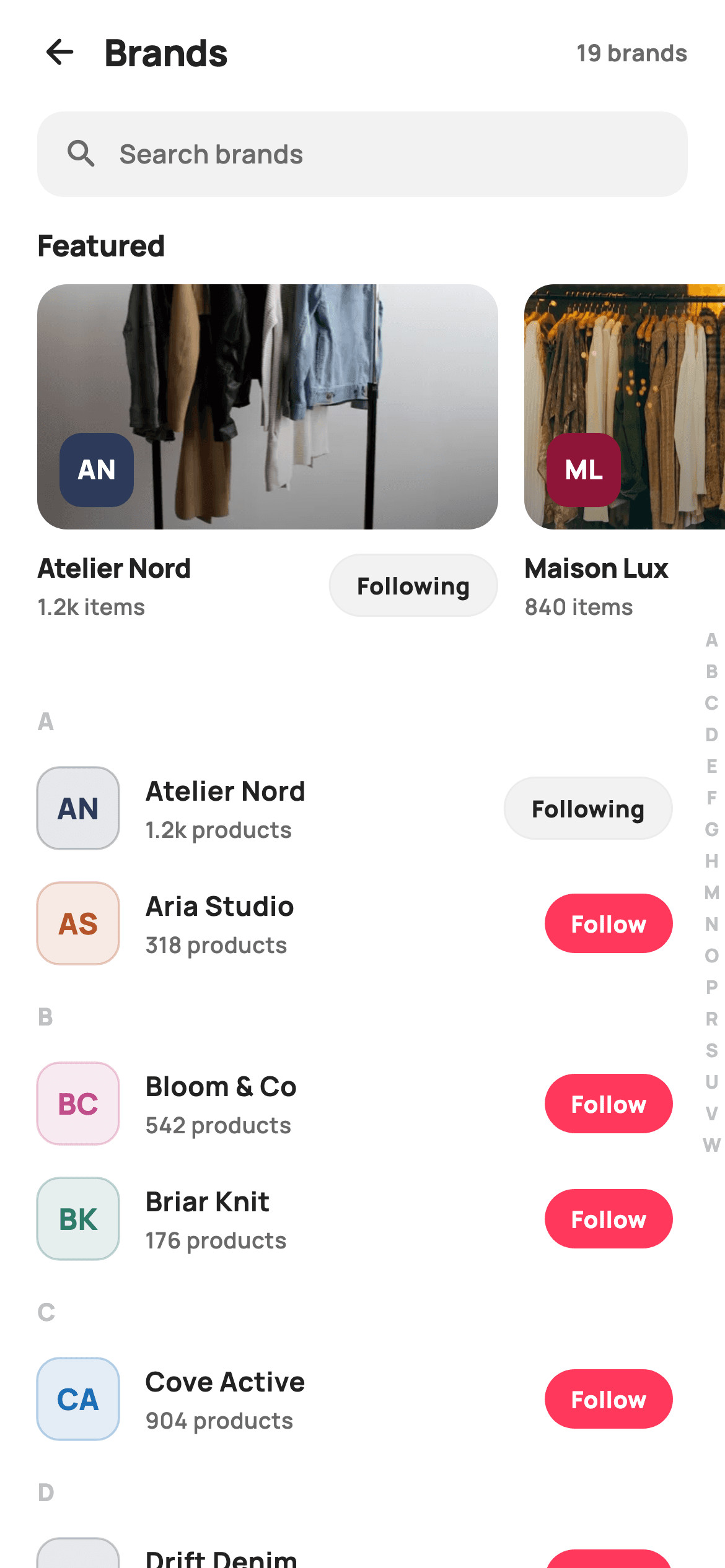
What you'll build
- ✓A horizontal Featured carousel of 248px cover cards with a bottom gradient scrim and a painted monogram badge
- ✓An A-Z sectioned brand list grouped on the fly with putIfAbsent, so new data re-sections itself
- ✓A CustomPainter monogram logo with two modes: tinted outline on white, solid tint with white initials on photos
- ✓An AnimatedContainer follow pill that flips between a coral Follow fill and a hairline Following outline from one Set<String>
- ✓An alphabet rail pinned over the scrolling list with Positioned, plus a 1.2k-style product-count formatter
Step-by-step build
Create the file
Add a new file at lib/ecom_brands_directory/ecom_brands_directory_screen.dart in your Flutter project.
Register the bundled fonts
No external packages — this is pure Flutter. It does bundle its design font (Manrope), so drop the font file into fonts/ and declare it in pubspec.yaml:
flutter:
  fonts:
    - family: Manrope
      fonts:
- asset: fonts/Manrope-Regular.ttfBuild it, piece by piece
Here's how the screen goes together. Each block below is a real slice of the code with a plain-English explanation — paste them in order, or grab the whole file from the next section.
A callback-only contract and the token palette
import 'package:flutter/material.dart';

/// StyleCart — Brands directory.
///
/// A searchable brand catalog: a featured-brand carousel (cover webp +
/// painted monogram badge + follow toggle), then an A–Z sectioned list of
/// every brand with a painted monogram logo, product count and follow chip.
/// An alphabet rail on the right jumps between sections.
///
/// Self-contained per CONVENTIONS.md: pure Flutter, bundled Manrope, inline
/// Airbnb-style tokens, own light theme + SafeArea. Painter-only graphics
/// (brand monograms). Reused bundled webp covers. Exposes callbacks only.
class EcomBrandsDirectoryScreen extends StatefulWidget {
  const EcomBrandsDirectoryScreen({
    super.key,
    this.onBack,
    this.onBrand,
    this.onSearch,
  });

  final VoidCallback? onBack;
  final ValueChanged<String>? onBrand;
  final VoidCallback? onSearch;

  @override
  State<EcomBrandsDirectoryScreen> createState() =>
      _EcomBrandsDirectoryScreenState();
}

class _EcomBrandsDirectoryScreenState extends State<EcomBrandsDirectoryScreen> {
  static const String _font = 'Manrope';
  static const Color _canvas = Color(0xFFFFFFFF);
  static const Color _ink = Color(0xFF222222);
  static const Color _muted = Color(0xFF6A6A6A);
  static const Color _faint = Color(0xFFC1C1C1);
  static const Color _brand = Color(0xFFFF385C);
  static const Color _surface = Color(0xFFF2F2F2);
  static const Color _hairline = Color(0xFFEBEBEB);

  static const String _dir = 'lib/screens/ecommerce/ecom_brands_directory/images';
The screen imports nothing but `material.dart` and exposes exactly three optional callbacks — `onBack`, `onSearch`, and `onBrand`, the last a `ValueChanged<String>` that hands the tapped brand's name to whoever owns navigation. All styling lives in static consts on the state class: `_brand` is the Airbnb-style coral `0xFFFF385C`, `_ink`/`_muted`/`_faint` are three grey steps for title, meta and index text, and `_surface`/`_hairline` cover fills and borders. `_dir` holds the image folder once so the three cover paths below never repeat it.
Brand data, the follow set, and a one-line toggle
  static const List<_Featured> _featured = <_Featured>[
    _Featured('Atelier Nord', 'AN', Color(0xFF2E3A59), '$_dir/p21.webp',
        '1.2k items'),
    _Featured('Maison Lux', 'ML', Color(0xFF8E1537), '$_dir/p03.webp',
        '840 items'),
    _Featured('Urban Form', 'UF', Color(0xFF1A6DB5), '$_dir/p02.webp',
        '2.1k items'),
  ];

  static const List<_Brand> _brands = <_Brand>[
    _Brand('Atelier Nord', 'AN', Color(0xFF2E3A59), 1243),
    _Brand('Aria Studio', 'AS', Color(0xFFB5532A), 318),
    _Brand('Bloom & Co', 'BC', Color(0xFFC04D8A), 542),
    _Brand('Briar Knit', 'BK', Color(0xFF2E7D6B), 176),
    _Brand('Cove Active', 'CA', Color(0xFF1A6DB5), 904),
    _Brand('Drift Denim', 'DD', Color(0xFF3A4A63), 410),
    _Brand('Ember Lane', 'EL', Color(0xFFE07A00), 233),
    _Brand('Form Studio', 'FS', Color(0xFF555B6E), 689),
    _Brand('Gilt Edit', 'GE', Color(0xFF8E6B1F), 152),
    _Brand('Halcyon', 'HA', Color(0xFF2E7D6B), 778),
    _Brand('Maison Lux', 'ML', Color(0xFF8E1537), 836),
    _Brand('Norden', 'NO', Color(0xFF2E3A59), 1021),
    _Brand('Olive & Oak', 'OO', Color(0xFF5B7A2E), 364),
    _Brand('Pace Athletic', 'PA', Color(0xFF1F6F8B), 1187),
    _Brand('Rue Belle', 'RB', Color(0xFFC04D8A), 295),
    _Brand('Sienna', 'SI', Color(0xFFB5532A), 612),
    _Brand('Urban Form', 'UF', Color(0xFF1A6DB5), 2108),
    _Brand('Vela', 'VE', Color(0xFF6A4C93), 187),
    _Brand('Wovenly', 'WO', Color(0xFF2E7D6B), 449),
  ];

  final Set<String> _following = <String>{'Atelier Nord', 'Pace Athletic'};

  void _toggle(String name) {
    setState(() {
      if (!_following.add(name)) _following.remove(name);
    });
  }
`_featured` and `_brands` are const lists of tiny value classes; every entry carries its own `initials` and a distinct `tint` color, which is all the monogram painter needs to fake nineteen brand logos. Follow state is just `Set<String> _following`, pre-seeded with two names so the screen demos both pill states. The toggle is one line inside `setState`: `if (!_following.add(name)) _following.remove(name)` — `Set.add` returns `false` when the name was already present, so the same expression follows and unfollows without an explicit contains-check.
Grouping in build and floating the rail over the list
  @override
  Widget build(BuildContext context) {
    // Group brands by first letter for the sectioned list.
    final Map<String, List<_Brand>> sections = <String, List<_Brand>>{};
    for (final _Brand b in _brands) {
      sections.putIfAbsent(b.name[0].toUpperCase(), () => <_Brand>[]).add(b);
    }
    final List<String> letters = sections.keys.toList()..sort();

    return Theme(
      data: ThemeData.light(useMaterial3: true),
      child: Scaffold(
        backgroundColor: _canvas,
        body: SafeArea(
          child: Column(
            children: <Widget>[
              _header(),
              _searchBar(),
              Expanded(
                child: Stack(
                  children: <Widget>[
                    ListView(
                      padding: const EdgeInsets.only(bottom: 28),
                      children: <Widget>[
                        _featuredRail(),
                        for (final String l in letters) ...<Widget>[
                          _sectionLabel(l),
                          for (final _Brand b in sections[l]!) _brandRow(b),
                        ],
                      ],
                    ),
                    Positioned(
                      right: 2,
                      top: 0,
                      bottom: 0,
                      child: _alphabetRail(letters),
                    ),
                  ],
                ),
              ),
            ],
          ),
        ),
      ),
    );
  }
Sections are not stored — `build` folds `_brands` into a `Map<String, List<_Brand>>` keyed by `b.name[0].toUpperCase()` using `putIfAbsent`, then sorts the keys. Because grouping happens per build, swapping the data source re-sections the list for free. The screen wraps itself in `Theme(data: ThemeData.light(useMaterial3: true))` so it looks identical inside any host app, and the body is a `Stack`: a single `ListView` emits the featured rail then, via a nested collection-for, each letter label followed by its rows; a `Positioned` pinned `right: 2, top: 0, bottom: 0` floats the alphabet rail over the scrolling content instead of stealing a column of layout width.
A header that counts itself and a tap-through search bar
  Widget _header() {
    return Padding(
      padding: const EdgeInsets.fromLTRB(8, 4, 20, 4),
      child: Row(
        children: <Widget>[
          IconButton(
            onPressed: widget.onBack,
            icon: const Icon(Icons.arrow_back_rounded, size: 22, color: _ink),
          ),
          const Text(
            'Brands',
            style: TextStyle(
              fontFamily: _font,
              fontSize: 20,
              fontWeight: FontWeight.w800,
              letterSpacing: -0.3,
              color: _ink,
            ),
          ),
          const Spacer(),
          Text(
            '${_brands.length} brands',
            style: const TextStyle(
              fontFamily: _font,
              fontSize: 12.5,
              fontWeight: FontWeight.w700,
              color: _muted,
            ),
          ),
        ],
      ),
    );
  }

  Widget _searchBar() {
    return Padding(
      padding: const EdgeInsets.fromLTRB(20, 4, 20, 10),
      child: GestureDetector(
        onTap: widget.onSearch,
        behavior: HitTestBehavior.opaque,
        child: Container(
          height: 46,
          padding: const EdgeInsets.symmetric(horizontal: 14),
          decoration: BoxDecoration(
            color: _surface,
            borderRadius: BorderRadius.circular(14),
          ),
          child: Row(
            children: const <Widget>[
              Icon(Icons.search_rounded, size: 20, color: _muted),
              SizedBox(width: 10),
              Text(
                'Search brands',
                style: TextStyle(
                  fontFamily: _font,
                  fontSize: 14,
                  fontWeight: FontWeight.w600,
                  color: _muted,
                ),
              ),
            ],
          ),
        ),
      ),
    );
  }
The header row is a back `IconButton`, a 20px `w800` title with `-0.3` letter spacing, a `Spacer`, and `'${_brands.length} brands'` — deriving the count from the list means the label can never drift from the data. The search bar is deliberately not a `TextField`: it is a 46px `_surface` container inside a `GestureDetector` whose tap fires `onSearch`, so a dedicated search screen can own the keyboard and results. `HitTestBehavior.opaque` is the important detail — without it, taps on the empty space right of the placeholder text would fall through and do nothing.
The Featured carousel and its scrimmed cover cards
  Widget _featuredRail() {
    return Padding(
      padding: const EdgeInsets.only(bottom: 6),
      child: Column(
        crossAxisAlignment: CrossAxisAlignment.start,
        children: <Widget>[
          const Padding(
            padding: EdgeInsets.fromLTRB(20, 4, 20, 10),
            child: Text(
              'Featured',
              style: TextStyle(
                fontFamily: _font,
                fontSize: 16,
                fontWeight: FontWeight.w800,
                letterSpacing: -0.2,
                color: _ink,
              ),
            ),
          ),
          SizedBox(
            height: 196,
            child: ListView.separated(
              scrollDirection: Axis.horizontal,
              padding: const EdgeInsets.symmetric(horizontal: 20),
              itemCount: _featured.length,
              separatorBuilder: (BuildContext _, int i) =>
                  const SizedBox(width: 14),
              itemBuilder: (BuildContext _, int i) => _featuredCard(_featured[i]),
            ),
          ),
          const SizedBox(height: 14),
        ],
      ),
    );
  }

  Widget _featuredCard(_Featured f) {
    final bool following = _following.contains(f.name);
    return GestureDetector(
      onTap: () => widget.onBrand?.call(f.name),
      child: SizedBox(
        width: 248,
        child: Column(
          crossAxisAlignment: CrossAxisAlignment.start,
          children: <Widget>[
            ClipRRect(
              borderRadius: BorderRadius.circular(16),
              child: Stack(
                children: <Widget>[
                  Image.asset(
                    f.cover,
                    width: 248,
                    height: 132,
                    fit: BoxFit.cover,
                  ),
                  Positioned.fill(
                    child: DecoratedBox(
                      decoration: BoxDecoration(
                        gradient: LinearGradient(
                          begin: Alignment.topCenter,
                          end: Alignment.bottomCenter,
                          colors: <Color>[
                            Colors.transparent,
                            Colors.black.withValues(alpha: 0.34),
                          ],
                        ),
                      ),
                    ),
                  ),
                  Positioned(
                    left: 12,
                    bottom: 12,
                    child: CustomPaint(
                      size: const Size(40, 40),
                      painter: _MonogramPainter(f.initials, f.tint,
                          onPhoto: true),
                    ),
                  ),
                ],
              ),
            ),
            const SizedBox(height: 10),
            Row(
              children: <Widget>[
                Expanded(
                  child: Column(
                    crossAxisAlignment: CrossAxisAlignment.start,
                    children: <Widget>[
                      Text(
                        f.name,
                        maxLines: 1,
                        overflow: TextOverflow.ellipsis,
                        style: const TextStyle(
                          fontFamily: _font,
                          fontSize: 14.5,
                          fontWeight: FontWeight.w800,
                          letterSpacing: -0.2,
                          color: _ink,
                        ),
                      ),
                      const SizedBox(height: 2),
                      Text(
                        f.count,
                        style: const TextStyle(
                          fontFamily: _font,
                          fontSize: 12,
                          fontWeight: FontWeight.w600,
                          color: _muted,
                        ),
                      ),
                    ],
                  ),
                ),
                _followPill(f.name, following),
              ],
            ),
          ],
        ),
      ),
    );
  }
The rail is a 196px-tall horizontal `ListView.separated` with 20px edge padding and 14px gaps. Each `_featuredCard` is 248 wide: a `ClipRRect(16)` stacks a 132px webp cover, a `Positioned.fill` gradient from transparent to `Colors.black.withValues(alpha: 0.34)` anchored at the bottom, and a 40px `CustomPaint` monogram constructed with `onPhoto: true` in the lower-left. The scrim exists purely so that badge and the photo's darker edge stay legible on bright covers. Under the image, the brand name is ellipsized inside an `Expanded` so a long name compresses instead of pushing the shared `_followPill` off the card.
Section labels, brand rows, and the animated follow pill
  Widget _sectionLabel(String letter) {
    return Padding(
      padding: const EdgeInsets.fromLTRB(20, 10, 20, 6),
      child: Text(
        letter,
        style: const TextStyle(
          fontFamily: _font,
          fontSize: 13,
          fontWeight: FontWeight.w800,
          letterSpacing: 0.4,
          color: _faint,
        ),
      ),
    );
  }

  Widget _brandRow(_Brand b) {
    final bool following = _following.contains(b.name);
    return InkWell(
      onTap: () => widget.onBrand?.call(b.name),
      child: Padding(
        padding: const EdgeInsets.fromLTRB(20, 9, 28, 9),
        child: Row(
          children: <Widget>[
            CustomPaint(
              size: const Size(44, 44),
              painter: _MonogramPainter(b.initials, b.tint),
            ),
            const SizedBox(width: 14),
            Expanded(
              child: Column(
                crossAxisAlignment: CrossAxisAlignment.start,
                children: <Widget>[
                  Text(
                    b.name,
                    style: const TextStyle(
                      fontFamily: _font,
                      fontSize: 14.5,
                      fontWeight: FontWeight.w700,
                      color: _ink,
                    ),
                  ),
                  const SizedBox(height: 2),
                  Text(
                    '${_formatCount(b.count)} products',
                    style: const TextStyle(
                      fontFamily: _font,
                      fontSize: 12,
                      fontWeight: FontWeight.w600,
                      color: _muted,
                    ),
                  ),
                ],
              ),
            ),
            _followPill(b.name, following),
          ],
        ),
      ),
    );
  }

  Widget _followPill(String name, bool following) {
    return GestureDetector(
      onTap: () => _toggle(name),
      child: AnimatedContainer(
        duration: const Duration(milliseconds: 150),
        padding: const EdgeInsets.symmetric(horizontal: 14, vertical: 7),
        decoration: BoxDecoration(
          color: following ? _surface : _brand,
          borderRadius: BorderRadius.circular(9999),
          border: following ? Border.all(color: _hairline) : null,
        ),
        child: Text(
          following ? 'Following' : 'Follow',
          style: TextStyle(
            fontFamily: _font,
            fontSize: 12.5,
            fontWeight: FontWeight.w800,
            color: following ? _ink : _canvas,
          ),
        ),
      ),
    );
  }
`_sectionLabel` renders each letter at 13px `w800` in `_faint` — loud weight, quiet color, like a contacts-app header. `_brandRow` is an `InkWell` calling `widget.onBrand?.call(b.name)`, with a 44px painted monogram, the name, and `'${_formatCount(b.count)} products'`; note the asymmetric padding `fromLTRB(20, 9, 28, 9)` — the extra 8px on the right keeps row content clear of the floating alphabet rail. `_followPill` is an `AnimatedContainer` with a 150ms duration and radius 9999: unfollowed it is solid coral with white text, following it flips to a `_surface` fill, `_hairline` border and `_ink` text, so the two states animate between each other on every toggle and both the carousel cards and the rows reuse the same widget.
The index rail, the count formatter, and the monogram painter
  Widget _alphabetRail(List<String> letters) {
    return Center(
      child: Column(
        mainAxisSize: MainAxisSize.min,
        children: <Widget>[
          for (final String l in letters)
            Padding(
              padding: const EdgeInsets.symmetric(vertical: 1.5),
              child: Text(
                l,
                style: const TextStyle(
                  fontFamily: _font,
                  fontSize: 10,
                  fontWeight: FontWeight.w800,
                  color: _faint,
                ),
              ),
            ),
        ],
      ),
    );
  }

  static String _formatCount(int n) =>
      n >= 1000 ? '${(n / 1000).toStringAsFixed(1)}k' : '$n';
}

class _Featured {
  const _Featured(this.name, this.initials, this.tint, this.cover, this.count);
  final String name;
  final String initials;
  final Color tint;
  final String cover;
  final String count;
}

class _Brand {
  const _Brand(this.name, this.initials, this.tint, this.count);
  final String name;
  final String initials;
  final Color tint;
  final int count;
}

/// A painted rounded-square brand monogram (tinted fill + initials).
/// On a photo it flips to a solid tint fill with white initials for contrast.
class _MonogramPainter extends CustomPainter {
  _MonogramPainter(this.initials, this.tint, {this.onPhoto = false});
  final String initials;
  final Color tint;
  final bool onPhoto;

  @override
  void paint(Canvas canvas, Size size) {
    final RRect box = RRect.fromRectAndRadius(
      Offset.zero & size,
      const Radius.circular(12),
    );
    canvas.drawRRect(
      box,
      Paint()..color = onPhoto ? tint : tint.withValues(alpha: 0.12),
    );
    if (!onPhoto) {
      canvas.drawRRect(
        box,
        Paint()
          ..style = PaintingStyle.stroke
          ..strokeWidth = 1.2
          ..color = tint.withValues(alpha: 0.30),
      );
    }

    final TextPainter tp = TextPainter(
      text: TextSpan(
        text: initials,
        style: TextStyle(
          fontFamily: 'Manrope',
          fontSize: size.width * 0.36,
          fontWeight: FontWeight.w800,
          letterSpacing: 0.3,
          color: onPhoto ? Colors.white : tint,
        ),
      ),
      textDirection: TextDirection.ltr,
    )..layout();
    tp.paint(
      canvas,
      Offset((size.width - tp.width) / 2, (size.height - tp.height) / 2),
    );
  }

  @override
  bool shouldRepaint(_MonogramPainter old) =>
      old.initials != initials || old.tint != tint || old.onPhoto != onPhoto;
}
`_alphabetRail` is a `Center`-ed min-height `Column` of 10px letters — the `Positioned` gives it the full screen height and `Center` holds the stack of letters mid-screen; in this file it is a visual index (see the FAQ for wiring real jumps). `_formatCount` turns 1243 into `1.2k` with `toStringAsFixed(1)`. `_MonogramPainter` draws a 12px-radius `RRect` in two modes: normally a `tint.withValues(alpha: 0.12)` fill plus a 1.2px stroke at alpha 0.30 with the initials in full tint, but with `onPhoto: true` it switches to a solid tint fill and white initials, because a translucent chip would vanish against a photograph. The initials are a `TextPainter` sized at `size.width * 0.36` and centred by subtracting its measured width and height, and `shouldRepaint` only fires when initials, tint or mode change.
Full code
The complete, ready-to-paste source. Free to use in your projects — one click copies it all.
import 'package:flutter/material.dart';

/// StyleCart — Brands directory.
///
/// A searchable brand catalog: a featured-brand carousel (cover webp +
/// painted monogram badge + follow toggle), then an A–Z sectioned list of
/// every brand with a painted monogram logo, product count and follow chip.
/// An alphabet rail on the right jumps between sections.
///
/// Self-contained per CONVENTIONS.md: pure Flutter, bundled Manrope, inline
/// Airbnb-style tokens, own light theme + SafeArea. Painter-only graphics
/// (brand monograms). Reused bundled webp covers. Exposes callbacks only.
class EcomBrandsDirectoryScreen extends StatefulWidget {
  const EcomBrandsDirectoryScreen({
    super.key,
    this.onBack,
    this.onBrand,
    this.onSearch,
  });

  final VoidCallback? onBack;
  final ValueChanged<String>? onBrand;
  final VoidCallback? onSearch;

  @override
  State<EcomBrandsDirectoryScreen> createState() =>
      _EcomBrandsDirectoryScreenState();
}

class _EcomBrandsDirectoryScreenState extends State<EcomBrandsDirectoryScreen> {
  static const String _font = 'Manrope';
  static const Color _canvas = Color(0xFFFFFFFF);
  static const Color _ink = Color(0xFF222222);
  static const Color _muted = Color(0xFF6A6A6A);
  static const Color _faint = Color(0xFFC1C1C1);
  static const Color _brand = Color(0xFFFF385C);
  static const Color _surface = Color(0xFFF2F2F2);
  static const Color _hairline = Color(0xFFEBEBEB);

  static const String _dir = 'lib/screens/ecommerce/ecom_brands_directory/images';

  static const List<_Featured> _featured = <_Featured>[
    _Featured('Atelier Nord', 'AN', Color(0xFF2E3A59), '$_dir/p21.webp',
        '1.2k items'),
    _Featured('Maison Lux', 'ML', Color(0xFF8E1537), '$_dir/p03.webp',
        '840 items'),
    _Featured('Urban Form', 'UF', Color(0xFF1A6DB5), '$_dir/p02.webp',
        '2.1k items'),
  ];

  static const List<_Brand> _brands = <_Brand>[
    _Brand('Atelier Nord', 'AN', Color(0xFF2E3A59), 1243),
    _Brand('Aria Studio', 'AS', Color(0xFFB5532A), 318),
    _Brand('Bloom & Co', 'BC', Color(0xFFC04D8A), 542),
    _Brand('Briar Knit', 'BK', Color(0xFF2E7D6B), 176),
    _Brand('Cove Active', 'CA', Color(0xFF1A6DB5), 904),
    _Brand('Drift Denim', 'DD', Color(0xFF3A4A63), 410),
    _Brand('Ember Lane', 'EL', Color(0xFFE07A00), 233),
    _Brand('Form Studio', 'FS', Color(0xFF555B6E), 689),
    _Brand('Gilt Edit', 'GE', Color(0xFF8E6B1F), 152),
    _Brand('Halcyon', 'HA', Color(0xFF2E7D6B), 778),
    _Brand('Maison Lux', 'ML', Color(0xFF8E1537), 836),
    _Brand('Norden', 'NO', Color(0xFF2E3A59), 1021),
    _Brand('Olive & Oak', 'OO', Color(0xFF5B7A2E), 364),
    _Brand('Pace Athletic', 'PA', Color(0xFF1F6F8B), 1187),
    _Brand('Rue Belle', 'RB', Color(0xFFC04D8A), 295),
    _Brand('Sienna', 'SI', Color(0xFFB5532A), 612),
    _Brand('Urban Form', 'UF', Color(0xFF1A6DB5), 2108),
    _Brand('Vela', 'VE', Color(0xFF6A4C93), 187),
    _Brand('Wovenly', 'WO', Color(0xFF2E7D6B), 449),
  ];

  final Set<String> _following = <String>{'Atelier Nord', 'Pace Athletic'};

  void _toggle(String name) {
    setState(() {
      if (!_following.add(name)) _following.remove(name);
    });
  }

  @override
  Widget build(BuildContext context) {
    // Group brands by first letter for the sectioned list.
    final Map<String, List<_Brand>> sections = <String, List<_Brand>>{};
    for (final _Brand b in _brands) {
      sections.putIfAbsent(b.name[0].toUpperCase(), () => <_Brand>[]).add(b);
    }
    final List<String> letters = sections.keys.toList()..sort();

    return Theme(
      data: ThemeData.light(useMaterial3: true),
      child: Scaffold(
        backgroundColor: _canvas,
        body: SafeArea(
          child: Column(
            children: <Widget>[
              _header(),
              _searchBar(),
              Expanded(
                child: Stack(
                  children: <Widget>[
                    ListView(
                      padding: const EdgeInsets.only(bottom: 28),
                      children: <Widget>[
                        _featuredRail(),
                        for (final String l in letters) ...<Widget>[
                          _sectionLabel(l),
                          for (final _Brand b in sections[l]!) _brandRow(b),
                        ],
                      ],
                    ),
                    Positioned(
                      right: 2,
                      top: 0,
                      bottom: 0,
                      child: _alphabetRail(letters),
                    ),
                  ],
                ),
              ),
            ],
          ),
        ),
      ),
    );
  }

  Widget _header() {
    return Padding(
      padding: const EdgeInsets.fromLTRB(8, 4, 20, 4),
      child: Row(
        children: <Widget>[
          IconButton(
            onPressed: widget.onBack,
            icon: const Icon(Icons.arrow_back_rounded, size: 22, color: _ink),
          ),
          const Text(
            'Brands',
            style: TextStyle(
              fontFamily: _font,
              fontSize: 20,
              fontWeight: FontWeight.w800,
              letterSpacing: -0.3,
              color: _ink,
            ),
          ),
          const Spacer(),
          Text(
            '${_brands.length} brands',
            style: const TextStyle(
              fontFamily: _font,
              fontSize: 12.5,
              fontWeight: FontWeight.w700,
              color: _muted,
            ),
          ),
        ],
      ),
    );
  }

  Widget _searchBar() {
    return Padding(
      padding: const EdgeInsets.fromLTRB(20, 4, 20, 10),
      child: GestureDetector(
        onTap: widget.onSearch,
        behavior: HitTestBehavior.opaque,
        child: Container(
          height: 46,
          padding: const EdgeInsets.symmetric(horizontal: 14),
          decoration: BoxDecoration(
            color: _surface,
            borderRadius: BorderRadius.circular(14),
          ),
          child: Row(
            children: const <Widget>[
              Icon(Icons.search_rounded, size: 20, color: _muted),
              SizedBox(width: 10),
              Text(
                'Search brands',
                style: TextStyle(
                  fontFamily: _font,
                  fontSize: 14,
                  fontWeight: FontWeight.w600,
                  color: _muted,
                ),
              ),
            ],
          ),
        ),
      ),
    );
  }

  Widget _featuredRail() {
    return Padding(
      padding: const EdgeInsets.only(bottom: 6),
      child: Column(
        crossAxisAlignment: CrossAxisAlignment.start,
        children: <Widget>[
          const Padding(
            padding: EdgeInsets.fromLTRB(20, 4, 20, 10),
            child: Text(
              'Featured',
              style: TextStyle(
                fontFamily: _font,
                fontSize: 16,
                fontWeight: FontWeight.w800,
                letterSpacing: -0.2,
                color: _ink,
              ),
            ),
          ),
          SizedBox(
            height: 196,
            child: ListView.separated(
              scrollDirection: Axis.horizontal,
              padding: const EdgeInsets.symmetric(horizontal: 20),
              itemCount: _featured.length,
              separatorBuilder: (BuildContext _, int i) =>
                  const SizedBox(width: 14),
              itemBuilder: (BuildContext _, int i) => _featuredCard(_featured[i]),
            ),
          ),
          const SizedBox(height: 14),
        ],
      ),
    );
  }

  Widget _featuredCard(_Featured f) {
    final bool following = _following.contains(f.name);
    return GestureDetector(
      onTap: () => widget.onBrand?.call(f.name),
      child: SizedBox(
        width: 248,
        child: Column(
          crossAxisAlignment: CrossAxisAlignment.start,
          children: <Widget>[
            ClipRRect(
              borderRadius: BorderRadius.circular(16),
              child: Stack(
                children: <Widget>[
                  Image.asset(
                    f.cover,
                    width: 248,
                    height: 132,
                    fit: BoxFit.cover,
                  ),
                  Positioned.fill(
                    child: DecoratedBox(
                      decoration: BoxDecoration(
                        gradient: LinearGradient(
                          begin: Alignment.topCenter,
                          end: Alignment.bottomCenter,
                          colors: <Color>[
                            Colors.transparent,
                            Colors.black.withValues(alpha: 0.34),
                          ],
                        ),
                      ),
                    ),
                  ),
                  Positioned(
                    left: 12,
                    bottom: 12,
                    child: CustomPaint(
                      size: const Size(40, 40),
                      painter: _MonogramPainter(f.initials, f.tint,
                          onPhoto: true),
                    ),
                  ),
                ],
              ),
            ),
            const SizedBox(height: 10),
            Row(
              children: <Widget>[
                Expanded(
                  child: Column(
                    crossAxisAlignment: CrossAxisAlignment.start,
                    children: <Widget>[
                      Text(
                        f.name,
                        maxLines: 1,
                        overflow: TextOverflow.ellipsis,
                        style: const TextStyle(
                          fontFamily: _font,
                          fontSize: 14.5,
                          fontWeight: FontWeight.w800,
                          letterSpacing: -0.2,
                          color: _ink,
                        ),
                      ),
                      const SizedBox(height: 2),
                      Text(
                        f.count,
                        style: const TextStyle(
                          fontFamily: _font,
                          fontSize: 12,
                          fontWeight: FontWeight.w600,
                          color: _muted,
                        ),
                      ),
                    ],
                  ),
                ),
                _followPill(f.name, following),
              ],
            ),
          ],
        ),
      ),
    );
  }

  Widget _sectionLabel(String letter) {
    return Padding(
      padding: const EdgeInsets.fromLTRB(20, 10, 20, 6),
      child: Text(
        letter,
        style: const TextStyle(
          fontFamily: _font,
          fontSize: 13,
          fontWeight: FontWeight.w800,
          letterSpacing: 0.4,
          color: _faint,
        ),
      ),
    );
  }

  Widget _brandRow(_Brand b) {
    final bool following = _following.contains(b.name);
    return InkWell(
      onTap: () => widget.onBrand?.call(b.name),
      child: Padding(
        padding: const EdgeInsets.fromLTRB(20, 9, 28, 9),
        child: Row(
          children: <Widget>[
            CustomPaint(
              size: const Size(44, 44),
              painter: _MonogramPainter(b.initials, b.tint),
            ),
            const SizedBox(width: 14),
            Expanded(
              child: Column(
                crossAxisAlignment: CrossAxisAlignment.start,
                children: <Widget>[
                  Text(
                    b.name,
                    style: const TextStyle(
                      fontFamily: _font,
                      fontSize: 14.5,
                      fontWeight: FontWeight.w700,
                      color: _ink,
                    ),
                  ),
                  const SizedBox(height: 2),
                  Text(
                    '${_formatCount(b.count)} products',
                    style: const TextStyle(
                      fontFamily: _font,
                      fontSize: 12,
                      fontWeight: FontWeight.w600,
                      color: _muted,
                    ),
                  ),
                ],
              ),
            ),
            _followPill(b.name, following),
          ],
        ),
      ),
    );
  }

  Widget _followPill(String name, bool following) {
    return GestureDetector(
      onTap: () => _toggle(name),
      child: AnimatedContainer(
        duration: const Duration(milliseconds: 150),
        padding: const EdgeInsets.symmetric(horizontal: 14, vertical: 7),
        decoration: BoxDecoration(
          color: following ? _surface : _brand,
          borderRadius: BorderRadius.circular(9999),
          border: following ? Border.all(color: _hairline) : null,
        ),
        child: Text(
          following ? 'Following' : 'Follow',
          style: TextStyle(
            fontFamily: _font,
            fontSize: 12.5,
            fontWeight: FontWeight.w800,
            color: following ? _ink : _canvas,
          ),
        ),
      ),
    );
  }

  Widget _alphabetRail(List<String> letters) {
    return Center(
      child: Column(
        mainAxisSize: MainAxisSize.min,
        children: <Widget>[
          for (final String l in letters)
            Padding(
              padding: const EdgeInsets.symmetric(vertical: 1.5),
              child: Text(
                l,
                style: const TextStyle(
                  fontFamily: _font,
                  fontSize: 10,
                  fontWeight: FontWeight.w800,
                  color: _faint,
                ),
              ),
            ),
        ],
      ),
    );
  }

  static String _formatCount(int n) =>
      n >= 1000 ? '${(n / 1000).toStringAsFixed(1)}k' : '$n';
}

class _Featured {
  const _Featured(this.name, this.initials, this.tint, this.cover, this.count);
  final String name;
  final String initials;
  final Color tint;
  final String cover;
  final String count;
}

class _Brand {
  const _Brand(this.name, this.initials, this.tint, this.count);
  final String name;
  final String initials;
  final Color tint;
  final int count;
}

/// A painted rounded-square brand monogram (tinted fill + initials).
/// On a photo it flips to a solid tint fill with white initials for contrast.
class _MonogramPainter extends CustomPainter {
  _MonogramPainter(this.initials, this.tint, {this.onPhoto = false});
  final String initials;
  final Color tint;
  final bool onPhoto;

  @override
  void paint(Canvas canvas, Size size) {
    final RRect box = RRect.fromRectAndRadius(
      Offset.zero & size,
      const Radius.circular(12),
    );
    canvas.drawRRect(
      box,
      Paint()..color = onPhoto ? tint : tint.withValues(alpha: 0.12),
    );
    if (!onPhoto) {
      canvas.drawRRect(
        box,
        Paint()
          ..style = PaintingStyle.stroke
          ..strokeWidth = 1.2
          ..color = tint.withValues(alpha: 0.30),
      );
    }

    final TextPainter tp = TextPainter(
      text: TextSpan(
        text: initials,
        style: TextStyle(
          fontFamily: 'Manrope',
          fontSize: size.width * 0.36,
          fontWeight: FontWeight.w800,
          letterSpacing: 0.3,
          color: onPhoto ? Colors.white : tint,
        ),
      ),
      textDirection: TextDirection.ltr,
    )..layout();
    tp.paint(
      canvas,
      Offset((size.width - tp.width) / 2, (size.height - tp.height) / 2),
    );
  }

  @override
  bool shouldRepaint(_MonogramPainter old) =>
      old.initials != initials || old.tint != tint || old.onPhoto != onPhoto;
}
Plus bundled 8 binary assets (fonts/images). The CLI and MCP install those for you automatically.
Two faster ways to add it
Copy-paste works, but you can skip it entirely.
1. FlutterKit CLI
One command drops this screen — and its fonts — straight into your project.
$ flutterkit add ecom-brands-directory2. AI agent (MCP)
Connect FlutterKit's MCP server in Claude or Cursor and just ask your agent to install ecom-brands-directory — it fetches and writes the files for you.
FAQ
Can I use this brands directory screen in a commercial app?
Yes. FlutterKit screens are free to use, including commercially — you can ship this directory in a client project or your own store app, restyle the coral accent to your brand color, and swap the demo brand list for your catalog without any attribution requirement.
What packages and fonts does this screen need?
No pub packages at all — the only import is package:flutter/material.dart, and the brand logos are drawn with a CustomPainter instead of image assets. You do need two asset declarations in pubspec.yaml: the bundled Manrope font family (the code sets fontFamily: 'Manrope' everywhere) and the three webp cover photos referenced through the _dir constant for the Featured cards.
Which Flutter version does this code require?
Flutter 3.27 or newer, because the scrim gradient and the monogram painter use Color.withValues(alpha: ...). On an older SDK, replace each withValues(alpha: x) with withOpacity(x) — for example Colors.black.withOpacity(0.34) — and it compiles down to Flutter 3.0, since the constructor uses super parameters (Dart 2.17+).
The alphabet rail renders but doesn't scroll the list — how do I wire the jumps?
As shipped, _alphabetRail is a visual index with no tap handling. To make it jump, give the ListView a ScrollController and build a GlobalKey per section label, then wrap each rail letter in a GestureDetector that calls Scrollable.ensureVisible on that letter's key context. For long catalogs, the scrollable_positioned_list package is the sturdier route: replace the ListView with ItemScrollController.scrollTo using each section's item index, and add a vertical-drag handler on the rail for the classic finger-slide behavior.
How do I replace the hardcoded brand list with data from my API?
Turn _brands from a static const into a List<_Brand> field you fill from your fetch, and call setState when it arrives — the A-Z grouping, sorted letters, and the '19 brands' header count are all computed inside build from that one list, so they update automatically. Map your API's brand name, a two-letter initial, a tint Color, and a product count into _Brand; if your backend supplies real logo URLs, swap the CustomPaint in _brandRow for a network image and keep _MonogramPainter as the fallback for brands without artwork.


