How to Build an E-commerce Help Center Screen in Flutter (Full Code + Preview)
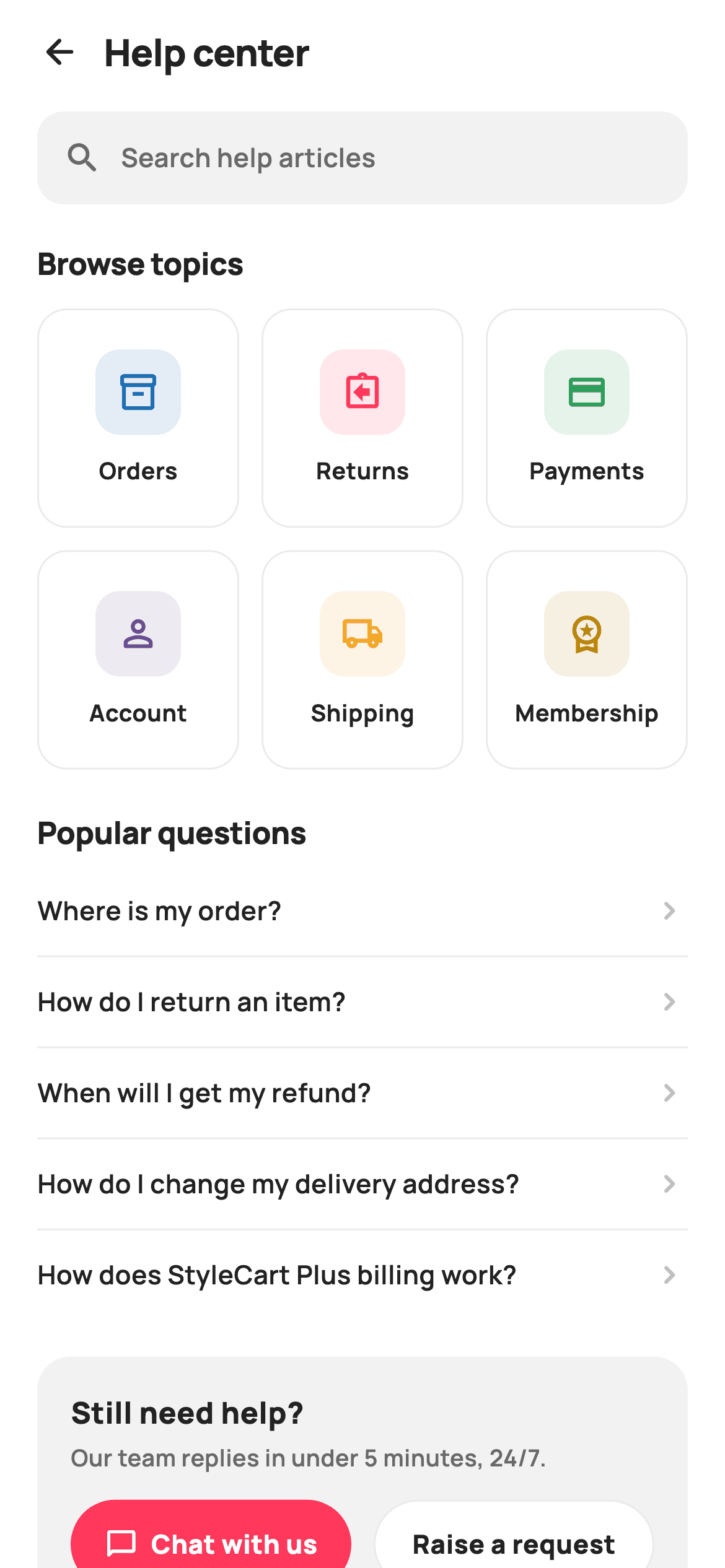
Every shopping app eventually needs a help center, and a bad one funnels every question into live chat. This tutorial builds StyleCart's support landing in Flutter: a tappable search field, a three-column grid of six topic tiles — Orders, Returns, Payments, Account, Shipping, Membership — each with its own tinted icon disc, a divider-separated list of the five questions shoppers actually ask, and a contact card that ranks live chat above raising a ticket. It is pure Flutter, painter-free, and hands every tap to a callback.
What you'll build
- ✓A three-column topic grid where every tile carries a 46px icon disc tinted at 12% of that topic's own accent colour
- ✓A tap-through search bar styled as a field, ready to push a real search screen
- ✓A popular-questions list with hairline dividers between rows — never after the last — and chevron deep-links into FAQs
- ✓A 'Still need help?' contact card that ranks a coral pill Chat button above an outlined Raise-a-request action
- ✓A callback-only API (onBack, onTopic, onQuestion, onChat, onTicket) with zero internal state
Step-by-step build
Create the file
Add a new file at lib/ecom_help_center/ecom_help_center_screen.dart in your Flutter project.
Register the bundled fonts
No external packages — this is pure Flutter. It does bundle its design font (Manrope), so drop the font file into fonts/ and declare it in pubspec.yaml:
flutter:
  fonts:
    - family: Manrope
      fonts:
- asset: fonts/Manrope-Regular.ttfBuild it, piece by piece
Here's how the screen goes together. Each block below is a real slice of the code with a plain-English explanation — paste them in order, or grab the whole file from the next section.
Topics and questions as data, not widgets
import 'package:flutter/material.dart';

/// StyleCart — Help center.
///
/// The support landing: a search field, a 2×3 grid of topic tiles (Orders /
/// Returns / Payments / Account / Shipping / Membership) with tinted icon
/// badges, a "popular questions" list that deep-links into FAQ topics, and a
/// contact card with Chat / Raise a request actions.
///
/// Self-contained per CONVENTIONS.md: pure Flutter, bundled Manrope, inline
/// Airbnb-style tokens, own light theme + SafeArea. Painter-free (Material
/// icons in tinted discs). Exposes callbacks only.
class EcomHelpCenterScreen extends StatelessWidget {
  const EcomHelpCenterScreen({
    super.key,
    this.onBack,
    this.onTopic,
    this.onQuestion,
    this.onChat,
    this.onTicket,
  });

  final VoidCallback? onBack;
  final ValueChanged<String>? onTopic;
  final ValueChanged<String>? onQuestion;
  final VoidCallback? onChat;
  final VoidCallback? onTicket;

  static const String _font = 'Manrope';
  static const Color _canvas = Color(0xFFFFFFFF);
  static const Color _ink = Color(0xFF222222);
  static const Color _muted = Color(0xFF6A6A6A);
  static const Color _faint = Color(0xFFC1C1C1);
  static const Color _brand = Color(0xFFFF385C);
  static const Color _surface = Color(0xFFF2F2F2);
  static const Color _hairline = Color(0xFFEBEBEB);

  static const List<_Topic> _topics = <_Topic>[
    _Topic('Orders', Icons.inventory_2_outlined, Color(0xFF1A6DB5)),
    _Topic('Returns', Icons.assignment_return_outlined, Color(0xFFFF385C)),
    _Topic('Payments', Icons.credit_card_outlined, Color(0xFF2E9E5B)),
    _Topic('Account', Icons.person_outline_rounded, Color(0xFF6A4C93)),
    _Topic('Shipping', Icons.local_shipping_outlined, Color(0xFFF5A623)),
    _Topic('Membership', Icons.workspace_premium_outlined, Color(0xFFB8860B)),
  ];

  static const List<String> _popular = <String>[
    'Where is my order?',
    'How do I return an item?',
    'When will I get my refund?',
    'How do I change my delivery address?',
    'How does StyleCart Plus billing work?',
  ];
The whole screen is a `StatelessWidget` exposing five nullable callbacks — `onBack`, `onTopic`, `onQuestion`, `onChat`, `onTicket` — because a help landing routes taps elsewhere and owns no state of its own. The token block keeps a near-black `_ink` (#222222) for text, a `_surface` grey (#F2F2F2) for panels, and reserves the coral `_brand` (#FF385C) for exactly one element later: the chat button. The interesting move is `_topics`: a `static const` list of six `_Topic` records, each pairing a label and outlined Material icon with its own tint — blue for Orders, coral for Returns, green for Payments, and so on — so the grid renders from data and adding a seventh topic is a one-line edit. `_popular` does the same for the five FAQ strings.
One Column, one scrolling ListView
  @override
  Widget build(BuildContext context) {
    return Theme(
      data: ThemeData.light(useMaterial3: true),
      child: Scaffold(
        backgroundColor: _canvas,
        body: SafeArea(
          child: Column(
            children: <Widget>[
              _header(),
              Expanded(
                child: ListView(
                  padding: const EdgeInsets.fromLTRB(20, 4, 20, 24),
                  children: <Widget>[
                    _searchBar(),
                    const SizedBox(height: 20),
                    _sectionTitle('Browse topics'),
                    const SizedBox(height: 12),
                    _topicGrid(),
                    const SizedBox(height: 22),
                    _sectionTitle('Popular questions'),
                    const SizedBox(height: 6),
                    _popularList(),
                    const SizedBox(height: 20),
                    _contactCard(),
                  ],
                ),
              ),
            ],
          ),
        ),
      ),
    );
  }
`build` wraps everything in `Theme(data: ThemeData.light(useMaterial3: true))` so the screen carries its own light theme regardless of the host app, then splits the body into a pinned `_header()` and an `Expanded` `ListView`. Putting search, grid, list and contact card inside the ListView — with `EdgeInsets.fromLTRB(20, 4, 20, 24)` — means the header stays put while the rest scrolls on a short phone. The spacing rhythm is deliberate: 20–22px between sections, but only 6px between the 'Popular questions' title and its list, because each question row already brings 14px of its own vertical padding.
A minimal back-titled header
  Widget _header() {
    return Padding(
      padding: const EdgeInsets.fromLTRB(8, 4, 20, 4),
      child: Row(
        children: <Widget>[
          IconButton(
            onPressed: onBack,
            icon: const Icon(Icons.arrow_back_rounded, size: 22, color: _ink),
          ),
          const Text(
            'Help center',
            style: TextStyle(
              fontFamily: _font,
              fontSize: 20,
              fontWeight: FontWeight.w800,
              letterSpacing: -0.3,
              color: _ink,
            ),
          ),
        ],
      ),
    );
  }

  Widget _searchBar() {
    return Container(
      height: 50,
      padding: const EdgeInsets.symmetric(horizontal: 14),
      decoration: BoxDecoration(
        color: _surface,
        borderRadius: BorderRadius.circular(14),
      ),
      child: Row(
        children: const <Widget>[
          Icon(Icons.search_rounded, size: 21, color: _muted),
          SizedBox(width: 10),
          Text(
            'Search help articles',
            style: TextStyle(
              fontFamily: _font,
              fontSize: 14,
              fontWeight: FontWeight.w600,
              color: _muted,
            ),
          ),
        ],
      ),
    );
  }
The header is just an `IconButton` firing `onBack` next to a 20px `w800` 'Help center' title with `letterSpacing: -0.3` — no AppBar, no actions, and left padding of 8 rather than 20 so the icon's built-in touch target optically aligns with the content edge. `_searchBar` looks like a text field but is a 50px grey `Container` holding a search icon and the muted placeholder 'Search help articles'. It stays deliberately non-editable: tapping it should push a dedicated search screen with keyboard focus, which avoids managing a `TextEditingController` on a landing page that never consumes the query itself.
The tinted topic grid
  Widget _sectionTitle(String t) {
    return Text(
      t,
      style: const TextStyle(
        fontFamily: _font,
        fontSize: 16.5,
        fontWeight: FontWeight.w800,
        letterSpacing: -0.2,
        color: _ink,
      ),
    );
  }

  Widget _topicGrid() {
    return GridView.count(
      crossAxisCount: 3,
      shrinkWrap: true,
      physics: const NeverScrollableScrollPhysics(),
      mainAxisSpacing: 12,
      crossAxisSpacing: 12,
      childAspectRatio: 0.92,
      children: <Widget>[
        for (final _Topic t in _topics)
          GestureDetector(
            onTap: () => onTopic?.call(t.label),
            child: Container(
              decoration: BoxDecoration(
                color: _canvas,
                borderRadius: BorderRadius.circular(16),
                border: Border.all(color: _hairline),
              ),
              child: Column(
                mainAxisAlignment: MainAxisAlignment.center,
                children: <Widget>[
                  Container(
                    width: 46,
                    height: 46,
                    decoration: BoxDecoration(
                      color: t.tint.withValues(alpha: 0.12),
                      borderRadius: BorderRadius.circular(13),
                    ),
                    child: Icon(t.icon, size: 23, color: t.tint),
                  ),
                  const SizedBox(height: 10),
                  Text(
                    t.label,
                    style: const TextStyle(
                      fontFamily: _font,
                      fontSize: 12.5,
                      fontWeight: FontWeight.w700,
                      color: _ink,
                    ),
                  ),
                ],
              ),
            ),
          ),
      ],
    );
  }
`_topicGrid` is a `GridView.count` with `crossAxisCount: 3`, so the six topics land as two rows of three. `shrinkWrap: true` plus `NeverScrollableScrollPhysics` lets it sit inside the outer ListView without fighting it for scroll gestures, and `childAspectRatio: 0.92` makes each tile slightly taller than wide to fit the disc-plus-label stack. A collection-for builds every tile from a `_Topic`: a hairline-bordered white card containing a 46px rounded square filled with `t.tint.withValues(alpha: 0.12)` and the icon drawn in the full-strength tint. That two-layer trick — 12% tint behind, 100% tint on top — is what gives six differently-coloured badges a matched intensity. Each tile's `GestureDetector` reports `t.label` through `onTopic`, so the host routes by string.
Popular questions with dividers that know when to stop
  Widget _popularList() {
    return Column(
      children: <Widget>[
        for (int i = 0; i < _popular.length; i++)
          Column(
            children: <Widget>[
              InkWell(
                onTap: () => onQuestion?.call(_popular[i]),
                child: Padding(
                  padding: const EdgeInsets.symmetric(vertical: 14),
                  child: Row(
                    children: <Widget>[
                      Expanded(
                        child: Text(
                          _popular[i],
                          style: const TextStyle(
                            fontFamily: _font,
                            fontSize: 14,
                            fontWeight: FontWeight.w600,
                            color: _ink,
                          ),
                        ),
                      ),
                      const Icon(Icons.chevron_right_rounded,
                          size: 20, color: _faint),
                    ],
                  ),
                ),
              ),
              if (i < _popular.length - 1)
                const Divider(height: 1, color: _hairline),
            ],
          ),
      ],
    );
  }
`_popularList` iterates `_popular` by index specifically so it can write `if (i < _popular.length - 1)` and place a 1px `_hairline` `Divider` between rows but never after the fifth — a trailing divider would visually merge into the contact card that follows. Each row is an `InkWell` (ripple feedback, unlike the silent `GestureDetector` used on the grid) whose `Expanded` question text keeps long questions like 'How do I change my delivery address?' wrapping cleanly beside the `chevron_right_rounded` icon, drawn in `_faint` (#C1C1C1) so the affordance is present without competing with the copy. The tap forwards the exact question string to `onQuestion` for deep-linking into an FAQ topic.
The contact card: two exits, unequal on purpose
  Widget _contactCard() {
    return Container(
      padding: const EdgeInsets.all(18),
      decoration: BoxDecoration(
        color: _surface,
        borderRadius: BorderRadius.circular(18),
      ),
      child: Column(
        crossAxisAlignment: CrossAxisAlignment.start,
        children: <Widget>[
          const Text(
            'Still need help?',
            style: TextStyle(
              fontFamily: _font,
              fontSize: 16,
              fontWeight: FontWeight.w800,
              color: _ink,
            ),
          ),
          const SizedBox(height: 4),
          const Text(
            'Our team replies in under 5 minutes, 24/7.',
            style: TextStyle(
              fontFamily: _font,
              fontSize: 12.5,
              fontWeight: FontWeight.w600,
              color: _muted,
            ),
          ),
          const SizedBox(height: 14),
          Row(
            children: <Widget>[
              Expanded(
                child: GestureDetector(
                  onTap: onChat,
                  child: Container(
                    height: 48,
                    alignment: Alignment.center,
                    decoration: BoxDecoration(
                      color: _brand,
                      borderRadius: BorderRadius.circular(9999),
                    ),
                    child: Row(
                      mainAxisAlignment: MainAxisAlignment.center,
                      children: const <Widget>[
                        Icon(Icons.chat_bubble_outline_rounded,
                            size: 18, color: Colors.white),
                        SizedBox(width: 7),
                        Text(
                          'Chat with us',
                          style: TextStyle(
                            fontFamily: _font,
                            fontSize: 14,
                            fontWeight: FontWeight.w800,
                            color: Colors.white,
                          ),
                        ),
                      ],
                    ),
                  ),
                ),
              ),
              const SizedBox(width: 12),
              Expanded(
                child: GestureDetector(
                  onTap: onTicket,
                  child: Container(
                    height: 48,
                    alignment: Alignment.center,
                    decoration: BoxDecoration(
                      color: _canvas,
                      borderRadius: BorderRadius.circular(9999),
                      border: Border.all(color: _hairline),
                    ),
                    child: const Text(
                      'Raise a request',
                      style: TextStyle(
                        fontFamily: _font,
                        fontSize: 14,
                        fontWeight: FontWeight.w800,
                        color: _ink,
                      ),
                    ),
                  ),
                ),
              ),
            ],
          ),
        ],
      ),
    );
  }
`_contactCard` is an 18px-padded `_surface` panel led by 'Still need help?' and the expectation-setting subline 'Our team replies in under 5 minutes, 24/7.' at 12.5px muted — a concrete promise converts better than 'contact support'. Below, a `Row` of two `Expanded` 48px buttons: 'Chat with us' gets the coral `_brand` fill, a chat-bubble icon and a `BorderRadius.circular(9999)` pill shape, while 'Raise a request' is white with only a hairline border. The ranking is the point — chat is the fast path the subline just advertised, so the ticket flow takes the visually quieter treatment. Both buttons are equal-width via `Expanded`, so the hierarchy is carried entirely by fill versus outline, not size.
The _Topic value class
class _Topic {
  const _Topic(this.label, this.icon, this.tint);
  final String label;
  final IconData icon;
  final Color tint;
}
`_Topic` is a three-field const class — `label`, `icon`, `tint` — private to the file. Because its constructor is `const`, the entire `_topics` list compiles into canonical constants with zero allocation at build time, and every property the grid needs travels as one object instead of three parallel lists that could drift out of sync.
Full code
The complete, ready-to-paste source. Free to use in your projects — one click copies it all.
import 'package:flutter/material.dart';

/// StyleCart — Help center.
///
/// The support landing: a search field, a 2×3 grid of topic tiles (Orders /
/// Returns / Payments / Account / Shipping / Membership) with tinted icon
/// badges, a "popular questions" list that deep-links into FAQ topics, and a
/// contact card with Chat / Raise a request actions.
///
/// Self-contained per CONVENTIONS.md: pure Flutter, bundled Manrope, inline
/// Airbnb-style tokens, own light theme + SafeArea. Painter-free (Material
/// icons in tinted discs). Exposes callbacks only.
class EcomHelpCenterScreen extends StatelessWidget {
  const EcomHelpCenterScreen({
    super.key,
    this.onBack,
    this.onTopic,
    this.onQuestion,
    this.onChat,
    this.onTicket,
  });

  final VoidCallback? onBack;
  final ValueChanged<String>? onTopic;
  final ValueChanged<String>? onQuestion;
  final VoidCallback? onChat;
  final VoidCallback? onTicket;

  static const String _font = 'Manrope';
  static const Color _canvas = Color(0xFFFFFFFF);
  static const Color _ink = Color(0xFF222222);
  static const Color _muted = Color(0xFF6A6A6A);
  static const Color _faint = Color(0xFFC1C1C1);
  static const Color _brand = Color(0xFFFF385C);
  static const Color _surface = Color(0xFFF2F2F2);
  static const Color _hairline = Color(0xFFEBEBEB);

  static const List<_Topic> _topics = <_Topic>[
    _Topic('Orders', Icons.inventory_2_outlined, Color(0xFF1A6DB5)),
    _Topic('Returns', Icons.assignment_return_outlined, Color(0xFFFF385C)),
    _Topic('Payments', Icons.credit_card_outlined, Color(0xFF2E9E5B)),
    _Topic('Account', Icons.person_outline_rounded, Color(0xFF6A4C93)),
    _Topic('Shipping', Icons.local_shipping_outlined, Color(0xFFF5A623)),
    _Topic('Membership', Icons.workspace_premium_outlined, Color(0xFFB8860B)),
  ];

  static const List<String> _popular = <String>[
    'Where is my order?',
    'How do I return an item?',
    'When will I get my refund?',
    'How do I change my delivery address?',
    'How does StyleCart Plus billing work?',
  ];

  @override
  Widget build(BuildContext context) {
    return Theme(
      data: ThemeData.light(useMaterial3: true),
      child: Scaffold(
        backgroundColor: _canvas,
        body: SafeArea(
          child: Column(
            children: <Widget>[
              _header(),
              Expanded(
                child: ListView(
                  padding: const EdgeInsets.fromLTRB(20, 4, 20, 24),
                  children: <Widget>[
                    _searchBar(),
                    const SizedBox(height: 20),
                    _sectionTitle('Browse topics'),
                    const SizedBox(height: 12),
                    _topicGrid(),
                    const SizedBox(height: 22),
                    _sectionTitle('Popular questions'),
                    const SizedBox(height: 6),
                    _popularList(),
                    const SizedBox(height: 20),
                    _contactCard(),
                  ],
                ),
              ),
            ],
          ),
        ),
      ),
    );
  }

  Widget _header() {
    return Padding(
      padding: const EdgeInsets.fromLTRB(8, 4, 20, 4),
      child: Row(
        children: <Widget>[
          IconButton(
            onPressed: onBack,
            icon: const Icon(Icons.arrow_back_rounded, size: 22, color: _ink),
          ),
          const Text(
            'Help center',
            style: TextStyle(
              fontFamily: _font,
              fontSize: 20,
              fontWeight: FontWeight.w800,
              letterSpacing: -0.3,
              color: _ink,
            ),
          ),
        ],
      ),
    );
  }

  Widget _searchBar() {
    return Container(
      height: 50,
      padding: const EdgeInsets.symmetric(horizontal: 14),
      decoration: BoxDecoration(
        color: _surface,
        borderRadius: BorderRadius.circular(14),
      ),
      child: Row(
        children: const <Widget>[
          Icon(Icons.search_rounded, size: 21, color: _muted),
          SizedBox(width: 10),
          Text(
            'Search help articles',
            style: TextStyle(
              fontFamily: _font,
              fontSize: 14,
              fontWeight: FontWeight.w600,
              color: _muted,
            ),
          ),
        ],
      ),
    );
  }

  Widget _sectionTitle(String t) {
    return Text(
      t,
      style: const TextStyle(
        fontFamily: _font,
        fontSize: 16.5,
        fontWeight: FontWeight.w800,
        letterSpacing: -0.2,
        color: _ink,
      ),
    );
  }

  Widget _topicGrid() {
    return GridView.count(
      crossAxisCount: 3,
      shrinkWrap: true,
      physics: const NeverScrollableScrollPhysics(),
      mainAxisSpacing: 12,
      crossAxisSpacing: 12,
      childAspectRatio: 0.92,
      children: <Widget>[
        for (final _Topic t in _topics)
          GestureDetector(
            onTap: () => onTopic?.call(t.label),
            child: Container(
              decoration: BoxDecoration(
                color: _canvas,
                borderRadius: BorderRadius.circular(16),
                border: Border.all(color: _hairline),
              ),
              child: Column(
                mainAxisAlignment: MainAxisAlignment.center,
                children: <Widget>[
                  Container(
                    width: 46,
                    height: 46,
                    decoration: BoxDecoration(
                      color: t.tint.withValues(alpha: 0.12),
                      borderRadius: BorderRadius.circular(13),
                    ),
                    child: Icon(t.icon, size: 23, color: t.tint),
                  ),
                  const SizedBox(height: 10),
                  Text(
                    t.label,
                    style: const TextStyle(
                      fontFamily: _font,
                      fontSize: 12.5,
                      fontWeight: FontWeight.w700,
                      color: _ink,
                    ),
                  ),
                ],
              ),
            ),
          ),
      ],
    );
  }

  Widget _popularList() {
    return Column(
      children: <Widget>[
        for (int i = 0; i < _popular.length; i++)
          Column(
            children: <Widget>[
              InkWell(
                onTap: () => onQuestion?.call(_popular[i]),
                child: Padding(
                  padding: const EdgeInsets.symmetric(vertical: 14),
                  child: Row(
                    children: <Widget>[
                      Expanded(
                        child: Text(
                          _popular[i],
                          style: const TextStyle(
                            fontFamily: _font,
                            fontSize: 14,
                            fontWeight: FontWeight.w600,
                            color: _ink,
                          ),
                        ),
                      ),
                      const Icon(Icons.chevron_right_rounded,
                          size: 20, color: _faint),
                    ],
                  ),
                ),
              ),
              if (i < _popular.length - 1)
                const Divider(height: 1, color: _hairline),
            ],
          ),
      ],
    );
  }

  Widget _contactCard() {
    return Container(
      padding: const EdgeInsets.all(18),
      decoration: BoxDecoration(
        color: _surface,
        borderRadius: BorderRadius.circular(18),
      ),
      child: Column(
        crossAxisAlignment: CrossAxisAlignment.start,
        children: <Widget>[
          const Text(
            'Still need help?',
            style: TextStyle(
              fontFamily: _font,
              fontSize: 16,
              fontWeight: FontWeight.w800,
              color: _ink,
            ),
          ),
          const SizedBox(height: 4),
          const Text(
            'Our team replies in under 5 minutes, 24/7.',
            style: TextStyle(
              fontFamily: _font,
              fontSize: 12.5,
              fontWeight: FontWeight.w600,
              color: _muted,
            ),
          ),
          const SizedBox(height: 14),
          Row(
            children: <Widget>[
              Expanded(
                child: GestureDetector(
                  onTap: onChat,
                  child: Container(
                    height: 48,
                    alignment: Alignment.center,
                    decoration: BoxDecoration(
                      color: _brand,
                      borderRadius: BorderRadius.circular(9999),
                    ),
                    child: Row(
                      mainAxisAlignment: MainAxisAlignment.center,
                      children: const <Widget>[
                        Icon(Icons.chat_bubble_outline_rounded,
                            size: 18, color: Colors.white),
                        SizedBox(width: 7),
                        Text(
                          'Chat with us',
                          style: TextStyle(
                            fontFamily: _font,
                            fontSize: 14,
                            fontWeight: FontWeight.w800,
                            color: Colors.white,
                          ),
                        ),
                      ],
                    ),
                  ),
                ),
              ),
              const SizedBox(width: 12),
              Expanded(
                child: GestureDetector(
                  onTap: onTicket,
                  child: Container(
                    height: 48,
                    alignment: Alignment.center,
                    decoration: BoxDecoration(
                      color: _canvas,
                      borderRadius: BorderRadius.circular(9999),
                      border: Border.all(color: _hairline),
                    ),
                    child: const Text(
                      'Raise a request',
                      style: TextStyle(
                        fontFamily: _font,
                        fontSize: 14,
                        fontWeight: FontWeight.w800,
                        color: _ink,
                      ),
                    ),
                  ),
                ),
              ),
            ],
          ),
        ],
      ),
    );
  }
}

class _Topic {
  const _Topic(this.label, this.icon, this.tint);
  final String label;
  final IconData icon;
  final Color tint;
}
Plus bundled 5 binary assets (fonts/images). The CLI and MCP install those for you automatically.
Two faster ways to add it
Copy-paste works, but you can skip it entirely.
1. FlutterKit CLI
One command drops this screen — and its fonts — straight into your project.
$ flutterkit add ecom-help-center2. AI agent (MCP)
Connect FlutterKit's MCP server in Claude or Cursor and just ask your agent to install ecom-help-center — it fetches and writes the files for you.
FAQ
Is this help center screen free to use commercially?
Yes. FlutterKit screens are free to use, including in commercial apps — copy the code from this page or install it with the CLI command and ship it in a client project or a store release, no attribution or sign-up required.
Does this screen need any packages or font setup?
No packages at all — the vendored code imports only `package:flutter/material.dart`, and every icon is a built-in Material icon in a tinted disc, so there is no icon pack or SVG dependency. The only asset is the Manrope font family, referenced by the `_font` constant; bundle Manrope in `pubspec.yaml` (or load it via google_fonts) and the screen renders exactly as shown.
Which Flutter version does this require?
Flutter 3.27 or newer, because the topic discs use `t.tint.withValues(alpha: 0.12)`. On an older SDK, replace that call with `t.tint.withOpacity(0.12)` and it runs fine; the `super.key` constructor parameter only asks for Flutter 3.0 / Dart 2.17.
How do I turn the search bar into a real text input?
Keep it as a tap target: wrap `_searchBar()` in a `GestureDetector` that pushes a dedicated search route containing an autofocused `TextField`. That mirrors how most support centers work — the landing page stays stateless, and the search screen owns the controller, debouncing, and results list. Swapping the Container for an inline `TextField` here would force this `StatelessWidget` to become stateful for little gain.
How should I route the topic and question callbacks?
Both callbacks hand you the tapped string — `onTopic` receives a label like 'Returns' and `onQuestion` the full question text. Map those to routes or FAQ article ids in the host app (a simple `switch` or a `Map<String, String>` of label to route works); if you would rather pass ids than display strings, extend `_Topic` with an `id` field and emit that from the grid's `onTap` instead.


