How to Build a Notifications Inbox Screen in Flutter (Full Code + Preview)
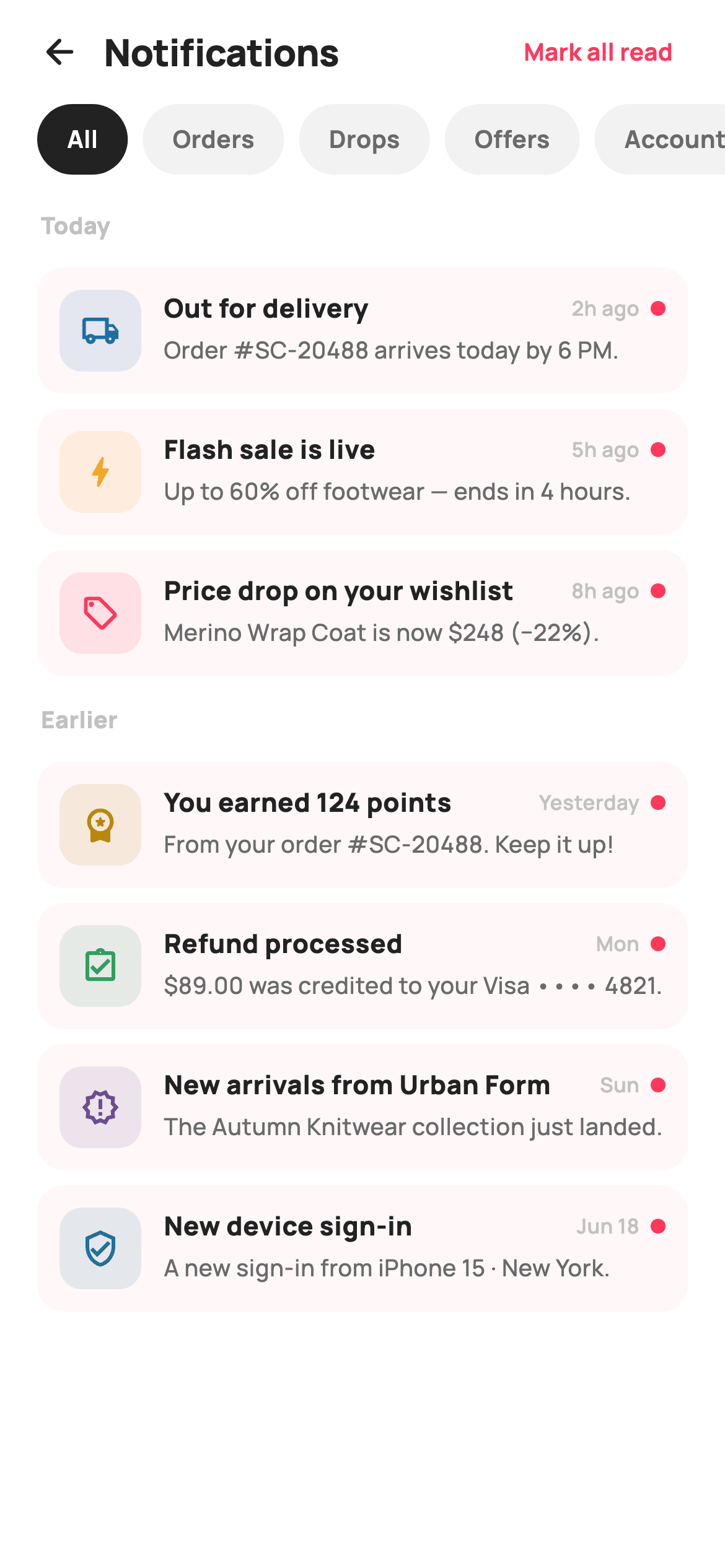
Every shopping app accumulates updates — a parcel out for delivery, a flash sale, a price drop, a refund — and dumping them into one flat list buries the parcel under the promotions. This tutorial builds StyleCart's notifications inbox in Flutter: rows grouped under Today and Earlier headers, a horizontal All / Orders / Drops / Offers / Account chip row that filters live, tinted per-type icon discs, unread dots with a softly tinted background, a mark-all-read header action, and an empty hint when a filter comes up dry. One self-contained file, no packages.
What you'll build
- ✓A date-grouped inbox that inserts Today / Earlier headers while iterating a filtered index list
- ✓Category filter chips (All / Orders / Drops / Offers / Account) that re-filter the list on tap
- ✓Notification rows with a 44px tinted icon disc, relative timestamp and an 8px unread dot
- ✓Unread tracking with a read-index `Set` and an `_allRead` flag, so the const seed data never mutates
- ✓An empty state that appears only when the active filter matches nothing
Step-by-step build
Create the file
Add a new file at lib/ecom_notifications_list/ecom_notifications_list_screen.dart in your Flutter project.
Register the bundled fonts
No external packages — this is pure Flutter. It does bundle its design font (Manrope), so drop the font file into fonts/ and declare it in pubspec.yaml:
flutter:
  fonts:
    - family: Manrope
      fonts:
- asset: fonts/Manrope-Regular.ttfBuild it, piece by piece
Here's how the screen goes together. Each block below is a real slice of the code with a plain-English explanation — paste them in order, or grab the whole file from the next section.
Two callbacks, a token palette and the filter vocabulary
import 'package:flutter/material.dart';

/// StyleCart — Notifications.
///
/// A date-grouped notification inbox: filter chips (All / Orders / Drops /
/// Offers / Account), and rows pairing a painted typed icon badge with a
/// title, body, timestamp and an unread dot. A "mark all read" header action
/// clears the unread state; an empty hint shows when a filter has nothing.
///
/// Self-contained per CONVENTIONS.md: pure Flutter, bundled Manrope, inline
/// Airbnb-style tokens, own light theme + SafeArea. Painter-free (Material
/// icons in painted tinted discs). Exposes callbacks only.
class EcomNotificationsListScreen extends StatefulWidget {
  const EcomNotificationsListScreen({super.key, this.onBack, this.onOpen});

  final VoidCallback? onBack;
  final ValueChanged<String>? onOpen;

  @override
  State<EcomNotificationsListScreen> createState() =>
      _EcomNotificationsListScreenState();
}

class _EcomNotificationsListScreenState
    extends State<EcomNotificationsListScreen> {
  static const String _font = 'Manrope';
  static const Color _canvas = Color(0xFFFFFFFF);
  static const Color _ink = Color(0xFF222222);
  static const Color _muted = Color(0xFF6A6A6A);
  static const Color _faint = Color(0xFFC1C1C1);
  static const Color _brand = Color(0xFFFF385C);
  static const Color _surface = Color(0xFFF2F2F2);

  static const List<String> _filters = <String>[
    'All',
    'Orders',
    'Drops',
    'Offers',
    'Account',
  ];
The screen exposes just `onBack` and `onOpen` — a `ValueChanged<String>` that hands the tapped notification's title outward — so navigation stays the host app's job. It is a `StatefulWidget` because read state and the active filter both live on screen. The palette is six `static const Color` tokens: `_ink` near-black for text and the active chip, `_brand` coral `0xFFFF385C` reserved for unread signals, `_surface` grey for idle chips, and `_faint` for timestamps and group labels. `_filters` is a plain `List<String>`, and its order is the chip order.
Seven notifications as const seed data, and three pieces of state
  static const List<_Notif> _seed = <_Notif>[
    _Notif('Orders', Icons.local_shipping_outlined, Color(0xFF1A6DB5),
        'Out for delivery', 'Order #SC-20488 arrives today by 6 PM.',
        '2h ago', 'Today'),
    _Notif('Drops', Icons.bolt_rounded, Color(0xFFF5A623),
        'Flash sale is live', 'Up to 60% off footwear — ends in 4 hours.',
        '5h ago', 'Today'),
    _Notif('Offers', Icons.local_offer_outlined, Color(0xFFFF385C),
        'Price drop on your wishlist', 'Merino Wrap Coat is now \$248 (−22%).',
        '8h ago', 'Today'),
    _Notif('Account', Icons.workspace_premium_rounded, Color(0xFFB8860B),
        'You earned 124 points', 'From your order #SC-20488. Keep it up!',
        'Yesterday', 'Earlier'),
    _Notif('Orders', Icons.assignment_turned_in_outlined, Color(0xFF2E9E5B),
        'Refund processed', '\$89.00 was credited to your Visa •••• 4821.',
        'Mon', 'Earlier'),
    _Notif('Drops', Icons.new_releases_outlined, Color(0xFF6A4C93),
        'New arrivals from Urban Form', 'The Autumn Knitwear collection just landed.',
        'Sun', 'Earlier'),
    _Notif('Account', Icons.verified_user_outlined, Color(0xFF1F6F8B),
        'New device sign-in', 'A new sign-in from iPhone 15 · New York.',
        'Jun 18', 'Earlier'),
  ];

  int _filter = 0;
  final Set<int> _read = <int>{};
  bool _allRead = false;

  bool _isUnread(int i) => !_allRead && !_read.contains(i);
`_seed` is a `static const List<_Notif>` where each entry bundles a category, a Material icon, a per-type tint (`0xFF1A6DB5` blue for shipping, `0xFFF5A623` amber for the flash sale, coral for the price drop, `0xFF2E9E5B` green for the refund), title, body, relative time and its date group. Because the list is const, read state cannot live inside it — so it lives beside it: a `Set<int> _read` of tapped indices, an `_allRead` bool for the header action, and `_isUnread(i)` combines them with `!_allRead && !_read.contains(i)`. Marking everything read is a single flag flip, not seven writes.
Building the grouped list in the build method
  @override
  Widget build(BuildContext context) {
    final List<int> indices = <int>[];
    for (int i = 0; i < _seed.length; i++) {
      if (_filter == 0 || _seed[i].category == _filters[_filter]) {
        indices.add(i);
      }
    }
    final int unread =
        indices.where(_isUnread).length;

    final List<Widget> rows = <Widget>[];
    String? group;
    for (final int i in indices) {
      if (_seed[i].group != group) {
        group = _seed[i].group;
        rows.add(_groupHeader(group));
      }
      rows.add(_row(i));
    }
    if (rows.isEmpty) rows.add(_empty());

    return Theme(
      data: ThemeData.light(useMaterial3: true),
      child: Scaffold(
        backgroundColor: _canvas,
        body: SafeArea(
          child: Column(
            children: <Widget>[
              _header(unread),
              _filterRow(),
              Expanded(
                child: ListView(
                  padding: const EdgeInsets.fromLTRB(20, 4, 20, 24),
                  children: rows,
                ),
              ),
            ],
          ),
        ),
      ),
    );
  }
`build` first collects `indices` — the seed positions whose `category` matches the active chip, with `_filter == 0` short-circuiting for All — then counts `unread` from that filtered set, so the header's Mark all read button reflects what is actually on screen. The grouping trick is a running `String? group`: while walking the indices, whenever `_seed[i].group` differs from the last one, a `_groupHeader` is pushed before the row, which yields Today / Earlier sections with no grouping library and no pre-bucketing. If nothing survived the filter, `_empty()` becomes the sole child. Everything renders inside a `ListView` under a `ThemeData.light(useMaterial3: true)` wrapper and a `SafeArea`.
A header whose action earns its place
  Widget _header(int unread) {
    return Padding(
      padding: const EdgeInsets.fromLTRB(8, 4, 16, 4),
      child: Row(
        children: <Widget>[
          IconButton(
            onPressed: widget.onBack,
            icon: const Icon(Icons.arrow_back_rounded, size: 22, color: _ink),
          ),
          const Text(
            'Notifications',
            style: TextStyle(
              fontFamily: _font,
              fontSize: 20,
              fontWeight: FontWeight.w800,
              letterSpacing: -0.3,
              color: _ink,
            ),
          ),
          const Spacer(),
          if (unread > 0)
            TextButton(
              onPressed: () => setState(() => _allRead = true),
              child: const Text(
                'Mark all read',
                style: TextStyle(
                  fontFamily: _font,
                  fontSize: 13,
                  fontWeight: FontWeight.w700,
                  color: _brand,
                ),
              ),
            ),
        ],
      ),
    );
  }
The header row is a back `IconButton`, the 20px `w800` 'Notifications' title with `letterSpacing: -0.3`, a `Spacer`, and then — only `if (unread > 0)` — a coral 'Mark all read' `TextButton`. Gating the button on the live unread count means it disappears the moment it would do nothing, which is tidier than disabling it. Its handler is one line: `setState(() => _allRead = true)`, and because `_isUnread` consults that flag first, every dot and tinted row clears in a single rebuild.
Filter chips and the faint group labels
  Widget _filterRow() {
    return SizedBox(
      height: 38,
      child: ListView.separated(
        scrollDirection: Axis.horizontal,
        padding: const EdgeInsets.symmetric(horizontal: 20),
        itemCount: _filters.length,
        separatorBuilder: (BuildContext _, int i) => const SizedBox(width: 8),
        itemBuilder: (BuildContext _, int i) {
          final bool active = _filter == i;
          return GestureDetector(
            onTap: () => setState(() => _filter = i),
            child: Container(
              padding: const EdgeInsets.symmetric(horizontal: 16),
              alignment: Alignment.center,
              decoration: BoxDecoration(
                color: active ? _ink : _surface,
                borderRadius: BorderRadius.circular(9999),
              ),
              child: Text(
                _filters[i],
                style: TextStyle(
                  fontFamily: _font,
                  fontSize: 13,
                  fontWeight: FontWeight.w700,
                  color: active ? _canvas : _muted,
                ),
              ),
            ),
          );
        },
      ),
    );
  }

  Widget _groupHeader(String label) {
    return Padding(
      padding: const EdgeInsets.fromLTRB(2, 14, 0, 6),
      child: Text(
        label,
        style: const TextStyle(
          fontFamily: _font,
          fontSize: 12.5,
          fontWeight: FontWeight.w800,
          letterSpacing: 0.2,
          color: _faint,
        ),
      ),
    );
  }
`_filterRow` is a 38px-tall horizontal `ListView.separated` with 8px gaps, so the five chips scroll if a narrow phone cannot fit them. Each chip is a `GestureDetector` around a `Container` with `BorderRadius.circular(9999)` — a true pill at any width — flipping `_ink` fill with `_canvas` text when active against `_surface` with `_muted` text when idle; selection is pure colour inversion, no border or shadow. `_groupHeader` renders Today / Earlier at just 12.5px `w800` in `_faint` grey: heavy weight keeps the label legible while the pale colour keeps it subordinate to the rows it introduces.
The notification row: tint, weight and dot all keyed to unread
  Widget _row(int i) {
    final _Notif n = _seed[i];
    final bool unread = _isUnread(i);
    return InkWell(
      onTap: () {
        setState(() => _read.add(i));
        widget.onOpen?.call(n.title);
      },
      borderRadius: BorderRadius.circular(14),
      child: Container(
        margin: const EdgeInsets.only(top: 8),
        padding: const EdgeInsets.all(12),
        decoration: BoxDecoration(
          color: unread ? _brand.withValues(alpha: 0.04) : _canvas,
          borderRadius: BorderRadius.circular(14),
        ),
        child: Row(
          crossAxisAlignment: CrossAxisAlignment.start,
          children: <Widget>[
            Container(
              width: 44,
              height: 44,
              decoration: BoxDecoration(
                color: n.tint.withValues(alpha: 0.12),
                borderRadius: BorderRadius.circular(12),
              ),
              child: Icon(n.icon, size: 21, color: n.tint),
            ),
            const SizedBox(width: 12),
            Expanded(
              child: Column(
                crossAxisAlignment: CrossAxisAlignment.start,
                children: <Widget>[
                  Row(
                    children: <Widget>[
                      Expanded(
                        child: Text(
                          n.title,
                          style: TextStyle(
                            fontFamily: _font,
                            fontSize: 14,
                            fontWeight:
                                unread ? FontWeight.w800 : FontWeight.w700,
                            color: _ink,
                          ),
                        ),
                      ),
                      const SizedBox(width: 8),
                      Text(
                        n.time,
                        style: const TextStyle(
                          fontFamily: _font,
                          fontSize: 11,
                          fontWeight: FontWeight.w600,
                          color: _faint,
                        ),
                      ),
                      if (unread) ...<Widget>[
                        const SizedBox(width: 6),
                        Container(
                          width: 8,
                          height: 8,
                          decoration: const BoxDecoration(
                            color: _brand,
                            shape: BoxShape.circle,
                          ),
                        ),
                      ],
                    ],
                  ),
                  const SizedBox(height: 3),
                  Text(
                    n.body,
                    style: const TextStyle(
                      fontFamily: _font,
                      fontSize: 12.5,
                      fontWeight: FontWeight.w500,
                      height: 1.4,
                      color: _muted,
                    ),
                  ),
                ],
              ),
            ),
          ],
        ),
      ),
    );
  }
`_row` wraps everything in an `InkWell` whose tap does two things: `_read.add(i)` inside `setState`, then `widget.onOpen?.call(n.title)` — reading and opening are one gesture. Unread state drives three cues at different intensities: the whole card gets a whisper of background at `_brand.withValues(alpha: 0.04)`, the title steps from `w700` to `w800`, and an 8px coral circle appears after the timestamp. The leading badge is a 44px rounded square filled with the notification's own tint at `alpha: 0.12` holding a 21px icon in the full tint — one hue per type, at two strengths. `CrossAxisAlignment.start` on the outer Row keeps the disc aligned to the title when the 12.5px body wraps to two lines.
The empty state and the _Notif model
  Widget _empty() {
    return Padding(
      padding: const EdgeInsets.only(top: 80),
      child: Column(
        children: <Widget>[
          Container(
            width: 64,
            height: 64,
            decoration: BoxDecoration(
              color: _surface,
              shape: BoxShape.circle,
            ),
            child: const Icon(Icons.notifications_none_rounded,
                size: 30, color: _faint),
          ),
          const SizedBox(height: 14),
          const Text(
            'Nothing here yet',
            style: TextStyle(
              fontFamily: _font,
              fontSize: 15,
              fontWeight: FontWeight.w800,
              color: _ink,
            ),
          ),
          const SizedBox(height: 4),
          const Text(
            'New updates for this filter will show up here.',
            style: TextStyle(
              fontFamily: _font,
              fontSize: 12.5,
              fontWeight: FontWeight.w500,
              color: _muted,
            ),
          ),
        ],
      ),
    );
  }
}

class _Notif {
  const _Notif(this.category, this.icon, this.tint, this.title, this.body,
      this.time, this.group);
  final String category;
  final IconData icon;
  final Color tint;
  final String title;
  final String body;
  final String time;
  final String group;
}
`_empty` sits 80px down: a 64px `_surface` circle holding a faint `notifications_none_rounded` icon, a 15px 'Nothing here yet' headline and a one-line explanation that new updates for this filter will appear here — it names the filter as the cause, so the reader tries another chip instead of assuming the inbox is broken. `_Notif` at the bottom is a seven-field const-constructible value class with no methods; keeping `category` and `group` as plain strings is what lets the filter comparison and the grouping loop both run on straight equality.
Full code
The complete, ready-to-paste source. Free to use in your projects — one click copies it all.
import 'package:flutter/material.dart';

/// StyleCart — Notifications.
///
/// A date-grouped notification inbox: filter chips (All / Orders / Drops /
/// Offers / Account), and rows pairing a painted typed icon badge with a
/// title, body, timestamp and an unread dot. A "mark all read" header action
/// clears the unread state; an empty hint shows when a filter has nothing.
///
/// Self-contained per CONVENTIONS.md: pure Flutter, bundled Manrope, inline
/// Airbnb-style tokens, own light theme + SafeArea. Painter-free (Material
/// icons in painted tinted discs). Exposes callbacks only.
class EcomNotificationsListScreen extends StatefulWidget {
  const EcomNotificationsListScreen({super.key, this.onBack, this.onOpen});

  final VoidCallback? onBack;
  final ValueChanged<String>? onOpen;

  @override
  State<EcomNotificationsListScreen> createState() =>
      _EcomNotificationsListScreenState();
}

class _EcomNotificationsListScreenState
    extends State<EcomNotificationsListScreen> {
  static const String _font = 'Manrope';
  static const Color _canvas = Color(0xFFFFFFFF);
  static const Color _ink = Color(0xFF222222);
  static const Color _muted = Color(0xFF6A6A6A);
  static const Color _faint = Color(0xFFC1C1C1);
  static const Color _brand = Color(0xFFFF385C);
  static const Color _surface = Color(0xFFF2F2F2);

  static const List<String> _filters = <String>[
    'All',
    'Orders',
    'Drops',
    'Offers',
    'Account',
  ];

  static const List<_Notif> _seed = <_Notif>[
    _Notif('Orders', Icons.local_shipping_outlined, Color(0xFF1A6DB5),
        'Out for delivery', 'Order #SC-20488 arrives today by 6 PM.',
        '2h ago', 'Today'),
    _Notif('Drops', Icons.bolt_rounded, Color(0xFFF5A623),
        'Flash sale is live', 'Up to 60% off footwear — ends in 4 hours.',
        '5h ago', 'Today'),
    _Notif('Offers', Icons.local_offer_outlined, Color(0xFFFF385C),
        'Price drop on your wishlist', 'Merino Wrap Coat is now \$248 (−22%).',
        '8h ago', 'Today'),
    _Notif('Account', Icons.workspace_premium_rounded, Color(0xFFB8860B),
        'You earned 124 points', 'From your order #SC-20488. Keep it up!',
        'Yesterday', 'Earlier'),
    _Notif('Orders', Icons.assignment_turned_in_outlined, Color(0xFF2E9E5B),
        'Refund processed', '\$89.00 was credited to your Visa •••• 4821.',
        'Mon', 'Earlier'),
    _Notif('Drops', Icons.new_releases_outlined, Color(0xFF6A4C93),
        'New arrivals from Urban Form', 'The Autumn Knitwear collection just landed.',
        'Sun', 'Earlier'),
    _Notif('Account', Icons.verified_user_outlined, Color(0xFF1F6F8B),
        'New device sign-in', 'A new sign-in from iPhone 15 · New York.',
        'Jun 18', 'Earlier'),
  ];

  int _filter = 0;
  final Set<int> _read = <int>{};
  bool _allRead = false;

  bool _isUnread(int i) => !_allRead && !_read.contains(i);

  @override
  Widget build(BuildContext context) {
    final List<int> indices = <int>[];
    for (int i = 0; i < _seed.length; i++) {
      if (_filter == 0 || _seed[i].category == _filters[_filter]) {
        indices.add(i);
      }
    }
    final int unread =
        indices.where(_isUnread).length;

    final List<Widget> rows = <Widget>[];
    String? group;
    for (final int i in indices) {
      if (_seed[i].group != group) {
        group = _seed[i].group;
        rows.add(_groupHeader(group));
      }
      rows.add(_row(i));
    }
    if (rows.isEmpty) rows.add(_empty());

    return Theme(
      data: ThemeData.light(useMaterial3: true),
      child: Scaffold(
        backgroundColor: _canvas,
        body: SafeArea(
          child: Column(
            children: <Widget>[
              _header(unread),
              _filterRow(),
              Expanded(
                child: ListView(
                  padding: const EdgeInsets.fromLTRB(20, 4, 20, 24),
                  children: rows,
                ),
              ),
            ],
          ),
        ),
      ),
    );
  }

  Widget _header(int unread) {
    return Padding(
      padding: const EdgeInsets.fromLTRB(8, 4, 16, 4),
      child: Row(
        children: <Widget>[
          IconButton(
            onPressed: widget.onBack,
            icon: const Icon(Icons.arrow_back_rounded, size: 22, color: _ink),
          ),
          const Text(
            'Notifications',
            style: TextStyle(
              fontFamily: _font,
              fontSize: 20,
              fontWeight: FontWeight.w800,
              letterSpacing: -0.3,
              color: _ink,
            ),
          ),
          const Spacer(),
          if (unread > 0)
            TextButton(
              onPressed: () => setState(() => _allRead = true),
              child: const Text(
                'Mark all read',
                style: TextStyle(
                  fontFamily: _font,
                  fontSize: 13,
                  fontWeight: FontWeight.w700,
                  color: _brand,
                ),
              ),
            ),
        ],
      ),
    );
  }

  Widget _filterRow() {
    return SizedBox(
      height: 38,
      child: ListView.separated(
        scrollDirection: Axis.horizontal,
        padding: const EdgeInsets.symmetric(horizontal: 20),
        itemCount: _filters.length,
        separatorBuilder: (BuildContext _, int i) => const SizedBox(width: 8),
        itemBuilder: (BuildContext _, int i) {
          final bool active = _filter == i;
          return GestureDetector(
            onTap: () => setState(() => _filter = i),
            child: Container(
              padding: const EdgeInsets.symmetric(horizontal: 16),
              alignment: Alignment.center,
              decoration: BoxDecoration(
                color: active ? _ink : _surface,
                borderRadius: BorderRadius.circular(9999),
              ),
              child: Text(
                _filters[i],
                style: TextStyle(
                  fontFamily: _font,
                  fontSize: 13,
                  fontWeight: FontWeight.w700,
                  color: active ? _canvas : _muted,
                ),
              ),
            ),
          );
        },
      ),
    );
  }

  Widget _groupHeader(String label) {
    return Padding(
      padding: const EdgeInsets.fromLTRB(2, 14, 0, 6),
      child: Text(
        label,
        style: const TextStyle(
          fontFamily: _font,
          fontSize: 12.5,
          fontWeight: FontWeight.w800,
          letterSpacing: 0.2,
          color: _faint,
        ),
      ),
    );
  }

  Widget _row(int i) {
    final _Notif n = _seed[i];
    final bool unread = _isUnread(i);
    return InkWell(
      onTap: () {
        setState(() => _read.add(i));
        widget.onOpen?.call(n.title);
      },
      borderRadius: BorderRadius.circular(14),
      child: Container(
        margin: const EdgeInsets.only(top: 8),
        padding: const EdgeInsets.all(12),
        decoration: BoxDecoration(
          color: unread ? _brand.withValues(alpha: 0.04) : _canvas,
          borderRadius: BorderRadius.circular(14),
        ),
        child: Row(
          crossAxisAlignment: CrossAxisAlignment.start,
          children: <Widget>[
            Container(
              width: 44,
              height: 44,
              decoration: BoxDecoration(
                color: n.tint.withValues(alpha: 0.12),
                borderRadius: BorderRadius.circular(12),
              ),
              child: Icon(n.icon, size: 21, color: n.tint),
            ),
            const SizedBox(width: 12),
            Expanded(
              child: Column(
                crossAxisAlignment: CrossAxisAlignment.start,
                children: <Widget>[
                  Row(
                    children: <Widget>[
                      Expanded(
                        child: Text(
                          n.title,
                          style: TextStyle(
                            fontFamily: _font,
                            fontSize: 14,
                            fontWeight:
                                unread ? FontWeight.w800 : FontWeight.w700,
                            color: _ink,
                          ),
                        ),
                      ),
                      const SizedBox(width: 8),
                      Text(
                        n.time,
                        style: const TextStyle(
                          fontFamily: _font,
                          fontSize: 11,
                          fontWeight: FontWeight.w600,
                          color: _faint,
                        ),
                      ),
                      if (unread) ...<Widget>[
                        const SizedBox(width: 6),
                        Container(
                          width: 8,
                          height: 8,
                          decoration: const BoxDecoration(
                            color: _brand,
                            shape: BoxShape.circle,
                          ),
                        ),
                      ],
                    ],
                  ),
                  const SizedBox(height: 3),
                  Text(
                    n.body,
                    style: const TextStyle(
                      fontFamily: _font,
                      fontSize: 12.5,
                      fontWeight: FontWeight.w500,
                      height: 1.4,
                      color: _muted,
                    ),
                  ),
                ],
              ),
            ),
          ],
        ),
      ),
    );
  }

  Widget _empty() {
    return Padding(
      padding: const EdgeInsets.only(top: 80),
      child: Column(
        children: <Widget>[
          Container(
            width: 64,
            height: 64,
            decoration: BoxDecoration(
              color: _surface,
              shape: BoxShape.circle,
            ),
            child: const Icon(Icons.notifications_none_rounded,
                size: 30, color: _faint),
          ),
          const SizedBox(height: 14),
          const Text(
            'Nothing here yet',
            style: TextStyle(
              fontFamily: _font,
              fontSize: 15,
              fontWeight: FontWeight.w800,
              color: _ink,
            ),
          ),
          const SizedBox(height: 4),
          const Text(
            'New updates for this filter will show up here.',
            style: TextStyle(
              fontFamily: _font,
              fontSize: 12.5,
              fontWeight: FontWeight.w500,
              color: _muted,
            ),
          ),
        ],
      ),
    );
  }
}

class _Notif {
  const _Notif(this.category, this.icon, this.tint, this.title, this.body,
      this.time, this.group);
  final String category;
  final IconData icon;
  final Color tint;
  final String title;
  final String body;
  final String time;
  final String group;
}
Plus bundled 5 binary assets (fonts/images). The CLI and MCP install those for you automatically.
Two faster ways to add it
Copy-paste works, but you can skip it entirely.
1. FlutterKit CLI
One command drops this screen — and its fonts — straight into your project.
$ flutterkit add ecom-notifications-list2. AI agent (MCP)
Connect FlutterKit's MCP server in Claude or Cursor and just ask your agent to install ecom-notifications-list — it fetches and writes the files for you.
FAQ
Is this notifications inbox screen free to use commercially?
Yes. FlutterKit screens are free to use, including in commercial apps. Copy the inbox from this page or install it with the CLI command shown, ship it in a store app, and modify it freely — no attribution or sign-up required.
Does this screen need any packages or font setup?
No packages at all — the vendored code declares an empty package list and imports only `flutter/material.dart`. The one asset is the Manrope font family, referenced as `fontFamily: 'Manrope'`, which ships bundled with the kit; the icons are all built-in Material icons in painted tinted discs, so there is no icon pack either.
Which Flutter version does this need?
Flutter 3.22 or newer, because the unread row tint and the icon discs use `Color.withValues(alpha: ...)`. On an older SDK, swap those two calls for `withOpacity(0.04)` and `withOpacity(0.12)`; the constructor also uses `super.key`, which needs Dart 2.17 (Flutter 3.0) or later.
How do I replace the seed list with real notifications from my backend?
Make the list a constructor parameter (`final List<_Notif> items`) instead of the `static const _seed`, and map your API payload into `_Notif` values — each needs a category matching one of the filter strings, an icon, a tint, and a group label like Today or Earlier computed from its timestamp. The filter, grouping and unread logic all key off indices, so nothing else changes.
Why is read state a Set of indices instead of a flag on each notification?
Because the seed list is `const`, its entries are immutable — so the screen stores read-ness beside the data: `_read` collects tapped indices and `_allRead` overrides everything at once. In production you would persist per-notification IDs rather than indices, but the pattern of keeping mutable UI state out of the model objects carries over directly.


