How to Build a Bank & Card Offers Screen in Flutter (Full Code + Preview)
Card-linked bank offers are where shopping apps quietly win price-sensitive shoppers, but most implementations bury the fine print behind a modal or a separate page. This tutorial builds StyleCart's bank and card offers screen in Flutter: five partner offers, each with a painter-drawn bank monogram, a bold savings headline, an eligible-cards line, a spend-terms pill and an outlined promo-code chip, plus a single-open Terms accordion that expands the conditions in place. Everything lives in one self-contained file, no images, no packages, just Manrope and a CustomPainter.
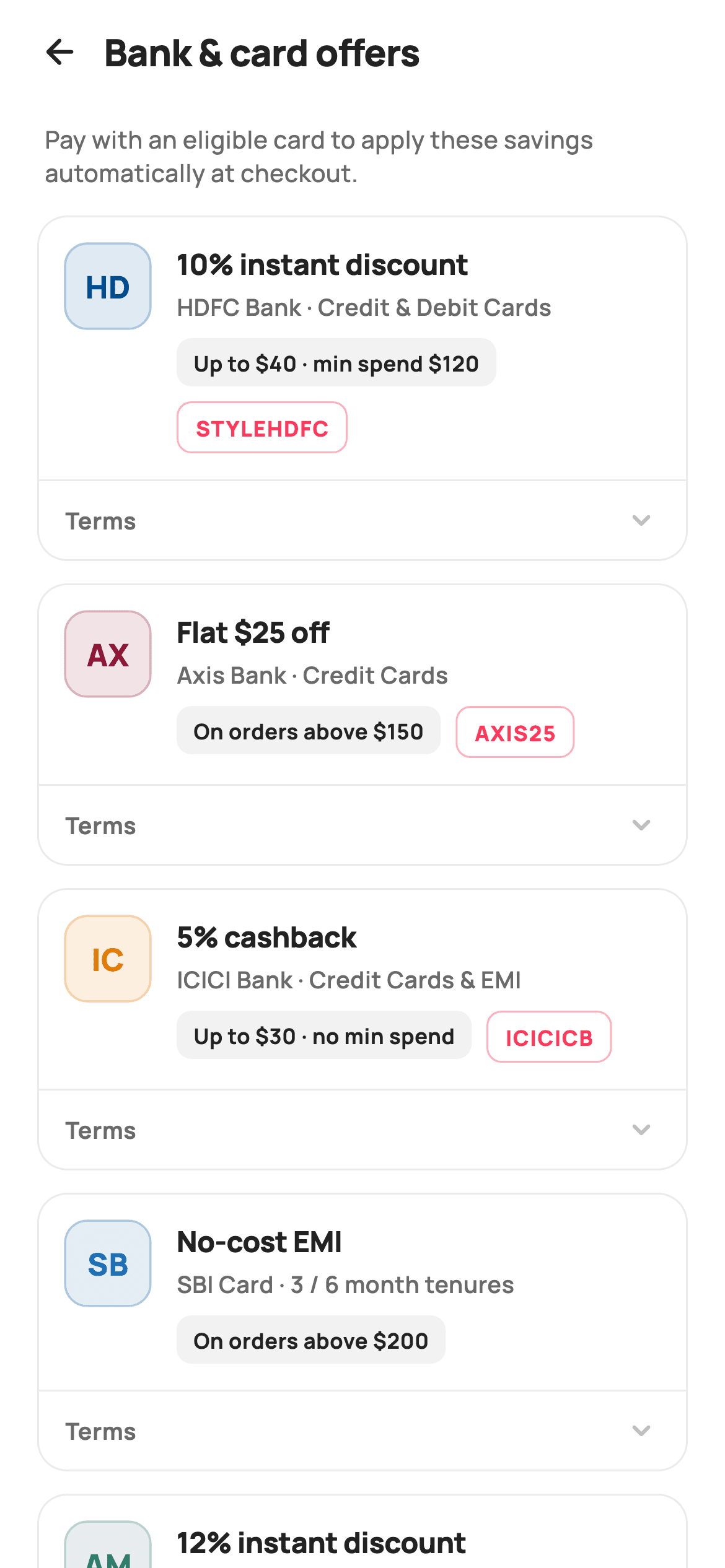
What you'll build
- ✓Painter-drawn 46x46 bank monograms: a tinted rounded square, a 1.2px stroke and centred initials, all from one CustomPainter
- ✓A const offers dataset where a nullable promo code decides whether a row shows one chip or two
- ✓Offer cards pairing a savings headline with a surface-grey terms pill and a coral-outlined code chip inside a Wrap
- ✓A single-open Terms accordion driven by one int of state, with the active row's label and chevron tinted brand coral
- ✓A ListView.builder that renders an intro note as item zero ahead of the offer list
Step-by-step build
Create the file
Add a new file at lib/ecom_offers_bank/ecom_offers_bank_screen.dart in your Flutter project.
Register the bundled fonts
No external packages — this is pure Flutter. It does bundle its design font (Manrope), so drop the font file into fonts/ and declare it in pubspec.yaml:
flutter:
  fonts:
    - family: Manrope
      fonts:
- asset: fonts/Manrope-Regular.ttfBuild it, piece by piece
Here's how the screen goes together. Each block below is a real slice of the code with a plain-English explanation — paste them in order, or grab the whole file from the next section.
A StatefulWidget shell and an Airbnb-flavoured palette
import 'package:flutter/material.dart';

/// StyleCart — Bank & Card Offers.
///
/// Instant-discount offers grouped by partner: each row pairs a painted bank
/// monogram with the headline saving, eligible cards, minimum spend and an
/// expandable terms line.
///
/// Self-contained per CONVENTIONS.md: pure Flutter, bundled Manrope, inline
/// Airbnb-style tokens, own light theme + SafeArea. Painter-only graphics
/// (bank monograms). Exposes callbacks only.
class EcomOffersBankScreen extends StatefulWidget {
  const EcomOffersBankScreen({super.key, this.onBack});

  final VoidCallback? onBack;

  @override
  State<EcomOffersBankScreen> createState() => _EcomOffersBankScreenState();
}

class _EcomOffersBankScreenState extends State<EcomOffersBankScreen> {
  static const String _font = 'Manrope';
  static const Color _canvas = Color(0xFFFFFFFF);
  static const Color _ink = Color(0xFF222222);
  static const Color _muted = Color(0xFF6A6A6A);
  static const Color _faint = Color(0xFFC1C1C1);
  static const Color _brand = Color(0xFFFF385C);
  static const Color _surface = Color(0xFFF2F2F2);
  static const Color _hairline = Color(0xFFEBEBEB);
`EcomOffersBankScreen` is stateful for exactly one reason: it has to remember which Terms row is expanded. Its only inputs are `super.key` and an optional `onBack` callback, so the screen stays backend-agnostic and drops into any navigator. The tokens are inline `static const` colours: `_canvas` pure white, `_ink` near-black, `_muted` and `_faint` greys for secondary text and idle chevrons, `_brand` coral `0xFFFF385C` reserved for accents, plus `_surface` and `_hairline` greys for pills and borders. Declaring `_font = 'Manrope'` once means every `TextStyle` references the constant instead of repeating a string literal.
Offers as data, including a nullable promo code
  static const List<_Offer> _offers = <_Offer>[
    _Offer('HD', Color(0xFF004C8F), 'HDFC Bank',
        '10% instant discount', 'Credit & Debit Cards',
        'Up to \$40 · min spend \$120', 'STYLEHDFC',
        'Valid once per card per month on orders above \$120. Max discount \$40.'),
    _Offer('AX', Color(0xFF8E1537), 'Axis Bank',
        'Flat \$25 off', 'Credit Cards',
        'On orders above \$150', 'AXIS25',
        'Applicable on a single transaction. Excludes clearance items.'),
    _Offer('IC', Color(0xFFE07A00), 'ICICI Bank',
        '5% cashback', 'Credit Cards & EMI',
        'Up to \$30 · no min spend', 'ICICICB',
        'Cashback credited within 90 days to the source card.'),
    _Offer('SB', Color(0xFF1A6DB5), 'SBI Card',
        'No-cost EMI', '3 / 6 month tenures',
        'On orders above \$200', null,
        'Interest waived by StyleCart. Processing fee may apply by the bank.'),
    _Offer('AM', Color(0xFF2E7D6B), 'Amex',
        '12% instant discount', 'Membership Rewards Cards',
        'Up to \$60 · min spend \$250', 'AMEX12',
        'Valid for Amex cardholders only. Limited-period offer.'),
  ];

  int _open = -1;
The five offers are a `static const List<_Offer>`, so all copy — bank name, headline, eligible cards, spend terms, code and full conditions — is edited in one block rather than scattered through widgets. Each entry also carries its own identity: two initials and a real-ish brand tint (`0xFF004C8F` for HDFC, `0xFF8E1537` for Axis, and so on) that the painter turns into a monogram. Note the SBI entry passes `null` for its code — no-cost EMI has no coupon to type — and the card builder will later use that to drop the code chip entirely. `int _open = -1` is the whole accordion state: the index of the expanded row, with -1 meaning all closed.
The build method and an off-by-one ListView trick
  @override
  Widget build(BuildContext context) {
    return Theme(
      data: ThemeData.light(useMaterial3: true),
      child: Scaffold(
        backgroundColor: _canvas,
        body: SafeArea(
          child: Column(
            children: <Widget>[
              _header(),
              Expanded(
                child: ListView.builder(
                  padding: const EdgeInsets.fromLTRB(20, 8, 20, 28),
                  itemCount: _offers.length + 1,
                  itemBuilder: (BuildContext _, int i) {
                    if (i == 0) return _intro();
                    return _offerCard(_offers[i - 1], i - 1);
                  },
                ),
              ),
            ],
          ),
        ),
      ),
    );
  }
The screen wraps itself in `Theme(data: ThemeData.light(useMaterial3: true))` so it renders identically inside a dark-themed host app, then lays a fixed `_header()` above an `Expanded` list. The `ListView.builder` sets `itemCount: _offers.length + 1` and treats index 0 as the `_intro()` note, mapping every later index to `_offers[i - 1]` — a common pattern for putting non-list content inside the scrollable without nesting a Column in a scroll view. Padding of `fromLTRB(20, 8, 20, 28)` gives the last card breathing room above the bottom edge.
Header row and the one-line intro
  Widget _header() {
    return Padding(
      padding: const EdgeInsets.fromLTRB(8, 4, 20, 6),
      child: Row(
        children: <Widget>[
          IconButton(
            onPressed: widget.onBack,
            icon: const Icon(Icons.arrow_back_rounded, size: 22, color: _ink),
          ),
          const Text(
            'Bank & card offers',
            style: TextStyle(
              fontFamily: _font,
              fontSize: 20,
              fontWeight: FontWeight.w800,
              letterSpacing: -0.3,
              color: _ink,
            ),
          ),
        ],
      ),
    );
  }

  Widget _intro() {
    return const Padding(
      padding: EdgeInsets.only(left: 4, bottom: 14, right: 8),
      child: Text(
        'Pay with an eligible card to apply these savings automatically at '
        'checkout.',
        style: TextStyle(
          fontFamily: _font,
          fontSize: 13,
          fontWeight: FontWeight.w500,
          height: 1.4,
          color: _muted,
        ),
      ),
    );
  }
The header is just a back `IconButton` firing `widget.onBack` beside the 20px `w800` title with `letterSpacing: -0.3` — no actions, because this screen is a leaf you read and leave. Its padding starts at 8 on the left so the icon's own touch-target padding lines the arrow up with the 20px content margin. `_intro()` is a single 13px `_muted` sentence telling shoppers the savings apply automatically at checkout; because it scrolls as list item zero rather than sitting in the header, it disappears once you are browsing the offers themselves.
The offer card: monogram, headline and two kinds of chip
  Widget _offerCard(_Offer o, int i) {
    final bool open = _open == i;
    return Container(
      margin: const EdgeInsets.only(bottom: 12),
      decoration: BoxDecoration(
        color: _canvas,
        borderRadius: BorderRadius.circular(16),
        border: Border.all(color: _hairline),
      ),
      child: Column(
        children: <Widget>[
          Padding(
            padding: const EdgeInsets.all(14),
            child: Row(
              crossAxisAlignment: CrossAxisAlignment.start,
              children: <Widget>[
                CustomPaint(
                  size: const Size(46, 46),
                  painter: _MonogramPainter(o.initials, o.tint),
                ),
                const SizedBox(width: 14),
                Expanded(
                  child: Column(
                    crossAxisAlignment: CrossAxisAlignment.start,
                    children: <Widget>[
                      Text(
                        o.headline,
                        style: const TextStyle(
                          fontFamily: _font,
                          fontSize: 15.5,
                          fontWeight: FontWeight.w800,
                          letterSpacing: -0.2,
                          color: _ink,
                        ),
                      ),
                      const SizedBox(height: 3),
                      Text(
                        '${o.bank} · ${o.cards}',
                        style: const TextStyle(
                          fontFamily: _font,
                          fontSize: 12.5,
                          fontWeight: FontWeight.w600,
                          color: _muted,
                        ),
                      ),
                      const SizedBox(height: 8),
                      Wrap(
                        spacing: 8,
                        runSpacing: 8,
                        children: <Widget>[
                          Container(
                            padding: const EdgeInsets.symmetric(
                                horizontal: 9, vertical: 5),
                            decoration: BoxDecoration(
                              color: _surface,
                              borderRadius: BorderRadius.circular(8),
                            ),
                            child: Text(
                              o.terms,
                              style: const TextStyle(
                                fontFamily: _font,
                                fontSize: 11.5,
                                fontWeight: FontWeight.w700,
                                color: _ink,
                              ),
                            ),
                          ),
                          if (o.code != null)
                            Container(
                              padding: const EdgeInsets.symmetric(
                                  horizontal: 9, vertical: 5),
                              decoration: BoxDecoration(
                                borderRadius: BorderRadius.circular(8),
                                border: Border.all(
                                  color: _brand.withValues(alpha: 0.4),
                                ),
                              ),
                              child: Text(
                                o.code!,
                                style: const TextStyle(
                                  fontFamily: _font,
                                  fontSize: 11.5,
                                  fontWeight: FontWeight.w800,
                                  letterSpacing: 0.6,
                                  color: _brand,
                                ),
                              ),
                            ),
                        ],
                      ),
                    ],
                  ),
                ),
              ],
            ),
          ),
Each card is a white `Container` with a 16px radius and a `_hairline` border — separation comes from the border, not elevation, keeping the list flat and calm. The top row starts with `CustomPaint(size: Size(46, 46))` running `_MonogramPainter`, then an `Expanded` column: the savings headline at 15.5px `w800`, and a merged `'${o.bank} · ${o.cards}'` line at 12.5px so bank and eligibility read as one phrase. The chips sit in a `Wrap` with 8px spacing, which lets a long terms string push the code chip onto a second line instead of overflowing. The two chips are deliberately unequal: the spend-terms pill gets a filled `_surface` grey, while the promo code gets a transparent chip outlined in `_brand.withValues(alpha: 0.4)` with coral text and `letterSpacing: 0.6` — codes are the thing you act on, so they get the accent. `if (o.code != null)` is all it takes for the SBI EMI row to render with one chip.
A single-open Terms accordion
          GestureDetector(
            onTap: () => setState(() => _open = open ? -1 : i),
            behavior: HitTestBehavior.opaque,
            child: Container(
              decoration: const BoxDecoration(
                border: Border(top: BorderSide(color: _hairline)),
              ),
              padding: const EdgeInsets.symmetric(horizontal: 14, vertical: 11),
              child: Row(
                children: <Widget>[
                  Text(
                    'Terms',
                    style: TextStyle(
                      fontFamily: _font,
                      fontSize: 12.5,
                      fontWeight: FontWeight.w700,
                      color: open ? _brand : _muted,
                    ),
                  ),
                  const Spacer(),
                  Icon(
                    open
                        ? Icons.keyboard_arrow_up_rounded
                        : Icons.keyboard_arrow_down_rounded,
                    size: 20,
                    color: open ? _brand : _faint,
                  ),
                ],
              ),
            ),
          ),
          if (open)
            Padding(
              padding: const EdgeInsets.fromLTRB(14, 0, 14, 14),
              child: Align(
                alignment: Alignment.centerLeft,
                child: Text(
                  o.detail,
                  style: const TextStyle(
                    fontFamily: _font,
                    fontSize: 12,
                    fontWeight: FontWeight.w500,
                    height: 1.45,
                    color: _muted,
                  ),
                ),
              ),
            ),
        ],
      ),
    );
  }
The Terms footer is a `GestureDetector` with `HitTestBehavior.opaque`, so the whole hairline-topped strip is tappable, not just the word. Its tap runs `setState(() => _open = open ? -1 : i)`: tapping the open row closes it, tapping any other row moves the single `_open` index there, which is why opening HDFC's terms automatically collapses Axis — one int enforces the single-open rule with no per-card booleans to keep in sync. The open state recolours both the 'Terms' label and the chevron from `_muted`/`_faint` to `_brand`, and swaps `keyboard_arrow_down_rounded` for the up variant. The detail paragraph itself is an `if (open)` child — 12px `_muted` text with `height: 1.45`, left-aligned via `Align` since the column would otherwise stretch it.
The _Offer model and the monogram painter
class _Offer {
  const _Offer(this.initials, this.tint, this.bank, this.headline, this.cards,
      this.terms, this.code, this.detail);
  final String initials;
  final Color tint;
  final String bank;
  final String headline;
  final String cards;
  final String terms;
  final String? code;
  final String detail;
}

/// A painted rounded-square bank monogram (tinted fill + white initials).
class _MonogramPainter extends CustomPainter {
  _MonogramPainter(this.initials, this.tint);
  final String initials;
  final Color tint;

  @override
  void paint(Canvas canvas, Size size) {
    final RRect box = RRect.fromRectAndRadius(
      Offset.zero & size,
      const Radius.circular(12),
    );
    canvas.drawRRect(box, Paint()..color = tint.withValues(alpha: 0.12));
    canvas.drawRRect(
      RRect.fromRectAndRadius(
        Rect.fromLTWH(0, 0, size.width, size.height),
        const Radius.circular(12),
      ),
      Paint()
        ..style = PaintingStyle.stroke
        ..strokeWidth = 1.2
        ..color = tint.withValues(alpha: 0.30),
    );

    final TextPainter tp = TextPainter(
      text: TextSpan(
        text: initials,
        style: TextStyle(
          fontFamily: 'Manrope',
          fontSize: size.width * 0.36,
          fontWeight: FontWeight.w800,
          letterSpacing: 0.3,
          color: tint,
        ),
      ),
      textDirection: TextDirection.ltr,
    )..layout();
    tp.paint(
      canvas,
      Offset((size.width - tp.width) / 2, (size.height - tp.height) / 2),
    );
  }

  @override
  bool shouldRepaint(_MonogramPainter old) =>
      old.initials != initials || old.tint != tint;
}
`_Offer` is a plain const class of eight fields — the only nullable one is `code`, encoding 'this offer has no coupon' in the type. `_MonogramPainter` draws the bank mark in three passes: a rounded square filled with `tint.withValues(alpha: 0.12)`, the same 12px-radius `RRect` stroked at 1.2px in `tint.withValues(alpha: 0.30)`, then the initials laid out with a `TextPainter` at `size.width * 0.36` and centred by subtracting the painter's measured width and height from the box. Because fill, stroke and glyph all derive from one `tint`, adding a bank means adding a list entry, not an asset. `shouldRepaint` compares `initials` and `tint`, so identical monograms never repaint.
Full code
The complete, ready-to-paste source. Free to use in your projects — one click copies it all.
import 'package:flutter/material.dart';

/// StyleCart — Bank & Card Offers.
///
/// Instant-discount offers grouped by partner: each row pairs a painted bank
/// monogram with the headline saving, eligible cards, minimum spend and an
/// expandable terms line.
///
/// Self-contained per CONVENTIONS.md: pure Flutter, bundled Manrope, inline
/// Airbnb-style tokens, own light theme + SafeArea. Painter-only graphics
/// (bank monograms). Exposes callbacks only.
class EcomOffersBankScreen extends StatefulWidget {
  const EcomOffersBankScreen({super.key, this.onBack});

  final VoidCallback? onBack;

  @override
  State<EcomOffersBankScreen> createState() => _EcomOffersBankScreenState();
}

class _EcomOffersBankScreenState extends State<EcomOffersBankScreen> {
  static const String _font = 'Manrope';
  static const Color _canvas = Color(0xFFFFFFFF);
  static const Color _ink = Color(0xFF222222);
  static const Color _muted = Color(0xFF6A6A6A);
  static const Color _faint = Color(0xFFC1C1C1);
  static const Color _brand = Color(0xFFFF385C);
  static const Color _surface = Color(0xFFF2F2F2);
  static const Color _hairline = Color(0xFFEBEBEB);

  static const List<_Offer> _offers = <_Offer>[
    _Offer('HD', Color(0xFF004C8F), 'HDFC Bank',
        '10% instant discount', 'Credit & Debit Cards',
        'Up to \$40 · min spend \$120', 'STYLEHDFC',
        'Valid once per card per month on orders above \$120. Max discount \$40.'),
    _Offer('AX', Color(0xFF8E1537), 'Axis Bank',
        'Flat \$25 off', 'Credit Cards',
        'On orders above \$150', 'AXIS25',
        'Applicable on a single transaction. Excludes clearance items.'),
    _Offer('IC', Color(0xFFE07A00), 'ICICI Bank',
        '5% cashback', 'Credit Cards & EMI',
        'Up to \$30 · no min spend', 'ICICICB',
        'Cashback credited within 90 days to the source card.'),
    _Offer('SB', Color(0xFF1A6DB5), 'SBI Card',
        'No-cost EMI', '3 / 6 month tenures',
        'On orders above \$200', null,
        'Interest waived by StyleCart. Processing fee may apply by the bank.'),
    _Offer('AM', Color(0xFF2E7D6B), 'Amex',
        '12% instant discount', 'Membership Rewards Cards',
        'Up to \$60 · min spend \$250', 'AMEX12',
        'Valid for Amex cardholders only. Limited-period offer.'),
  ];

  int _open = -1;

  @override
  Widget build(BuildContext context) {
    return Theme(
      data: ThemeData.light(useMaterial3: true),
      child: Scaffold(
        backgroundColor: _canvas,
        body: SafeArea(
          child: Column(
            children: <Widget>[
              _header(),
              Expanded(
                child: ListView.builder(
                  padding: const EdgeInsets.fromLTRB(20, 8, 20, 28),
                  itemCount: _offers.length + 1,
                  itemBuilder: (BuildContext _, int i) {
                    if (i == 0) return _intro();
                    return _offerCard(_offers[i - 1], i - 1);
                  },
                ),
              ),
            ],
          ),
        ),
      ),
    );
  }

  Widget _header() {
    return Padding(
      padding: const EdgeInsets.fromLTRB(8, 4, 20, 6),
      child: Row(
        children: <Widget>[
          IconButton(
            onPressed: widget.onBack,
            icon: const Icon(Icons.arrow_back_rounded, size: 22, color: _ink),
          ),
          const Text(
            'Bank & card offers',
            style: TextStyle(
              fontFamily: _font,
              fontSize: 20,
              fontWeight: FontWeight.w800,
              letterSpacing: -0.3,
              color: _ink,
            ),
          ),
        ],
      ),
    );
  }

  Widget _intro() {
    return const Padding(
      padding: EdgeInsets.only(left: 4, bottom: 14, right: 8),
      child: Text(
        'Pay with an eligible card to apply these savings automatically at '
        'checkout.',
        style: TextStyle(
          fontFamily: _font,
          fontSize: 13,
          fontWeight: FontWeight.w500,
          height: 1.4,
          color: _muted,
        ),
      ),
    );
  }

  Widget _offerCard(_Offer o, int i) {
    final bool open = _open == i;
    return Container(
      margin: const EdgeInsets.only(bottom: 12),
      decoration: BoxDecoration(
        color: _canvas,
        borderRadius: BorderRadius.circular(16),
        border: Border.all(color: _hairline),
      ),
      child: Column(
        children: <Widget>[
          Padding(
            padding: const EdgeInsets.all(14),
            child: Row(
              crossAxisAlignment: CrossAxisAlignment.start,
              children: <Widget>[
                CustomPaint(
                  size: const Size(46, 46),
                  painter: _MonogramPainter(o.initials, o.tint),
                ),
                const SizedBox(width: 14),
                Expanded(
                  child: Column(
                    crossAxisAlignment: CrossAxisAlignment.start,
                    children: <Widget>[
                      Text(
                        o.headline,
                        style: const TextStyle(
                          fontFamily: _font,
                          fontSize: 15.5,
                          fontWeight: FontWeight.w800,
                          letterSpacing: -0.2,
                          color: _ink,
                        ),
                      ),
                      const SizedBox(height: 3),
                      Text(
                        '${o.bank} · ${o.cards}',
                        style: const TextStyle(
                          fontFamily: _font,
                          fontSize: 12.5,
                          fontWeight: FontWeight.w600,
                          color: _muted,
                        ),
                      ),
                      const SizedBox(height: 8),
                      Wrap(
                        spacing: 8,
                        runSpacing: 8,
                        children: <Widget>[
                          Container(
                            padding: const EdgeInsets.symmetric(
                                horizontal: 9, vertical: 5),
                            decoration: BoxDecoration(
                              color: _surface,
                              borderRadius: BorderRadius.circular(8),
                            ),
                            child: Text(
                              o.terms,
                              style: const TextStyle(
                                fontFamily: _font,
                                fontSize: 11.5,
                                fontWeight: FontWeight.w700,
                                color: _ink,
                              ),
                            ),
                          ),
                          if (o.code != null)
                            Container(
                              padding: const EdgeInsets.symmetric(
                                  horizontal: 9, vertical: 5),
                              decoration: BoxDecoration(
                                borderRadius: BorderRadius.circular(8),
                                border: Border.all(
                                  color: _brand.withValues(alpha: 0.4),
                                ),
                              ),
                              child: Text(
                                o.code!,
                                style: const TextStyle(
                                  fontFamily: _font,
                                  fontSize: 11.5,
                                  fontWeight: FontWeight.w800,
                                  letterSpacing: 0.6,
                                  color: _brand,
                                ),
                              ),
                            ),
                        ],
                      ),
                    ],
                  ),
                ),
              ],
            ),
          ),
          GestureDetector(
            onTap: () => setState(() => _open = open ? -1 : i),
            behavior: HitTestBehavior.opaque,
            child: Container(
              decoration: const BoxDecoration(
                border: Border(top: BorderSide(color: _hairline)),
              ),
              padding: const EdgeInsets.symmetric(horizontal: 14, vertical: 11),
              child: Row(
                children: <Widget>[
                  Text(
                    'Terms',
                    style: TextStyle(
                      fontFamily: _font,
                      fontSize: 12.5,
                      fontWeight: FontWeight.w700,
                      color: open ? _brand : _muted,
                    ),
                  ),
                  const Spacer(),
                  Icon(
                    open
                        ? Icons.keyboard_arrow_up_rounded
                        : Icons.keyboard_arrow_down_rounded,
                    size: 20,
                    color: open ? _brand : _faint,
                  ),
                ],
              ),
            ),
          ),
          if (open)
            Padding(
              padding: const EdgeInsets.fromLTRB(14, 0, 14, 14),
              child: Align(
                alignment: Alignment.centerLeft,
                child: Text(
                  o.detail,
                  style: const TextStyle(
                    fontFamily: _font,
                    fontSize: 12,
                    fontWeight: FontWeight.w500,
                    height: 1.45,
                    color: _muted,
                  ),
                ),
              ),
            ),
        ],
      ),
    );
  }
}

class _Offer {
  const _Offer(this.initials, this.tint, this.bank, this.headline, this.cards,
      this.terms, this.code, this.detail);
  final String initials;
  final Color tint;
  final String bank;
  final String headline;
  final String cards;
  final String terms;
  final String? code;
  final String detail;
}

/// A painted rounded-square bank monogram (tinted fill + white initials).
class _MonogramPainter extends CustomPainter {
  _MonogramPainter(this.initials, this.tint);
  final String initials;
  final Color tint;

  @override
  void paint(Canvas canvas, Size size) {
    final RRect box = RRect.fromRectAndRadius(
      Offset.zero & size,
      const Radius.circular(12),
    );
    canvas.drawRRect(box, Paint()..color = tint.withValues(alpha: 0.12));
    canvas.drawRRect(
      RRect.fromRectAndRadius(
        Rect.fromLTWH(0, 0, size.width, size.height),
        const Radius.circular(12),
      ),
      Paint()
        ..style = PaintingStyle.stroke
        ..strokeWidth = 1.2
        ..color = tint.withValues(alpha: 0.30),
    );

    final TextPainter tp = TextPainter(
      text: TextSpan(
        text: initials,
        style: TextStyle(
          fontFamily: 'Manrope',
          fontSize: size.width * 0.36,
          fontWeight: FontWeight.w800,
          letterSpacing: 0.3,
          color: tint,
        ),
      ),
      textDirection: TextDirection.ltr,
    )..layout();
    tp.paint(
      canvas,
      Offset((size.width - tp.width) / 2, (size.height - tp.height) / 2),
    );
  }

  @override
  bool shouldRepaint(_MonogramPainter old) =>
      old.initials != initials || old.tint != tint;
}
Plus bundled 5 binary assets (fonts/images). The CLI and MCP install those for you automatically.
Two faster ways to add it
Copy-paste works, but you can skip it entirely.
1. FlutterKit CLI
One command drops this screen — and its fonts — straight into your project.
$ flutterkit add ecom-offers-bank2. AI agent (MCP)
Connect FlutterKit's MCP server in Claude or Cursor and just ask your agent to install ecom-offers-bank — it fetches and writes the files for you.
FAQ
Is this bank offers screen free to use in a commercial app?
Yes. FlutterKit screens are free, commercial use included — ship this offers list in a store app, marketplace or checkout flow as-is or restyled. Copy the code from this page or install it via the CLI; no attribution required.
How do I load real offers from my backend instead of the const list?
Replace the `static const List<_Offer> _offers` with a field passed into the constructor (or fetched in `initState`), and map your API response into `_Offer` values — initials, a tint, and the display strings. Keep `code` nullable so EMI-style offers without a coupon still drop the chip automatically, and keep `_open = -1` as local state since expansion is purely visual.
Can I make the promo code copy to the clipboard on tap?
Wrap the code chip's `Container` in a `GestureDetector` (or `InkWell`) and call `Clipboard.setData(ClipboardData(text: o.code!))` from `package:flutter/services.dart`, then confirm with a `SnackBar`. The chip is already visually styled as the actionable element — coral outline and spaced uppercase text — so making it tappable matches what shoppers expect.
What packages and fonts does this screen need?
No pub packages at all — the vendored code imports only `package:flutter/material.dart`, and the bank marks are painted, not image assets. The text expects a Manrope font family: declare Manrope under `fonts:` in your pubspec with the font files bundled, or change the single `_font` constant to a family you already ship.
Which Flutter version does this code require?
Flutter 3.27 or newer, because the code chip border and the monogram painter use `Color.withValues(alpha: ...)`. On an older SDK, replace those three calls with `withOpacity(...)`; the `super.key` constructor parameter only needs Dart 2.17, so nothing else is version-sensitive.


