How to Build a Shipment Tracking Timeline Screen in Flutter (Full Code + Preview)
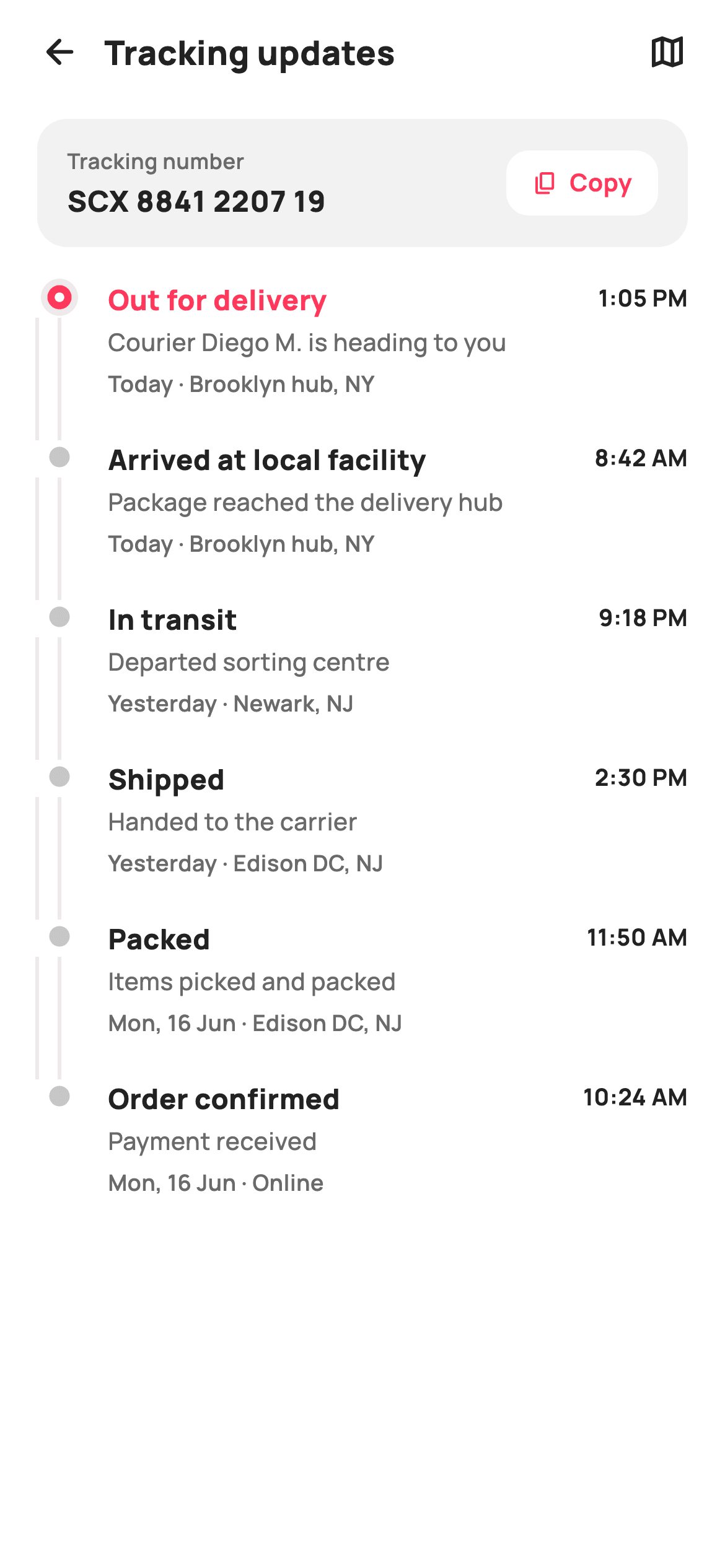
'Where is my package?' is the question every retail app answers dozens of times per order, and a plain status label never satisfies it. This tutorial builds StyleCart's tracking-updates screen in Flutter: a grey tracking-number card with a one-tap Copy pill, then a newest-first scan-event timeline driven by a `static const List<_Event>` and rendered by `_EventTile`. Each node is drawn by `_EventNodePainter` — a layered brand ring for the live event, a faint dot for completed stops, and a hairline rail that `IntrinsicHeight` keeps matched to each row's text.
Watch the Flutter UI walkthrough
A short screen recording of Tracking Updates running, if you'd rather see it before you read the code. The written tutorial below covers everything in it.
Can't see the video? Watch it on YouTube.
What you'll build
- ✓A `_trackingBar` card showing the tracking number beside a white Copy pill wired to `onCopy`
- ✓A six-event history modelled as `_Event` records with an `_Ev.active` / `_Ev.done` state enum
- ✓An `_EventTile` row that puts title and time on one line, then detail, then date and location
- ✓An `_EventNodePainter` that draws a three-circle brand ring for the live stop and a 2px connector rail
- ✓An `IntrinsicHeight` trick that stretches the painted rail to exactly the height of each row's text
Step-by-step build
Create the file
Add a new file at lib/ecom_order_tracking_detail/ecom_order_tracking_detail_screen.dart in your Flutter project.
Register the bundled fonts
No external packages — this is pure Flutter. It does bundle its design font (Manrope), so drop the font file into fonts/ and declare it in pubspec.yaml:
flutter:
  fonts:
    - family: Manrope
      fonts:
- asset: fonts/Manrope-Regular.ttfBuild it, piece by piece
Here's how the screen goes together. Each block below is a real slice of the code with a plain-English explanation — paste them in order, or grab the whole file from the next section.
Callbacks, tokens and the event history as data
import 'package:flutter/material.dart';

/// StyleCart — Tracking Updates.
///
/// The full scan-event history for a shipment: a header with the tracking
/// number, then a vertical timeline of every milestone (Ordered → Packed →
/// Shipped → In transit → Out for delivery → Delivered) with date, time and
/// location, newest at the top.
///
/// Self-contained per CONVENTIONS.md: pure Flutter, bundled Manrope, inline
/// Airbnb-style tokens, own light theme + SafeArea. The timeline nodes are a
/// CustomPainter (no emoji glyph, no network). Exposes callbacks only.
class EcomOrderTrackingDetailScreen extends StatelessWidget {
  const EcomOrderTrackingDetailScreen({
    super.key,
    this.onBack,
    this.onCopy,
    this.onMap,
  });

  final VoidCallback? onBack;
  final VoidCallback? onCopy;
  final VoidCallback? onMap;

  static const String _font = 'Manrope';
  static const Color _canvas = Color(0xFFFFFFFF);
  static const Color _ink = Color(0xFF222222);
  static const Color _muted = Color(0xFF6A6A6A);
  static const Color _brand = Color(0xFFFF385C);
  static const Color _surface = Color(0xFFF2F2F2);

  // Newest first; `active` is the most recent real event.
  static const List<_Event> _events = <_Event>[
    _Event('Out for delivery', 'Courier Diego M. is heading to you',
        'Today', '1:05 PM', 'Brooklyn hub, NY', _Ev.active),
    _Event('Arrived at local facility', 'Package reached the delivery hub',
        'Today', '8:42 AM', 'Brooklyn hub, NY', _Ev.done),
    _Event('In transit', 'Departed sorting centre',
        'Yesterday', '9:18 PM', 'Newark, NJ', _Ev.done),
    _Event('Shipped', 'Handed to the carrier',
        'Yesterday', '2:30 PM', 'Edison DC, NJ', _Ev.done),
    _Event('Packed', 'Items picked and packed',
        'Mon, 16 Jun', '11:50 AM', 'Edison DC, NJ', _Ev.done),
    _Event('Order confirmed', 'Payment received',
        'Mon, 16 Jun', '10:24 AM', 'Online', _Ev.done),
  ];
The screen is a `StatelessWidget` because nothing on it changes locally — the history arrives, the user reads it, and the only interactions leave the page through `onBack`, `onCopy` and `onMap`. Five inline colour tokens set the Airbnb-style palette: `_ink` `#222222`, `_muted` `#6A6A6A`, the coral `_brand` `#FF385C` and a `_surface` grey `#F2F2F2` for the tracking card. The interesting part is `_events`, a `static const List<_Event>` in reverse chronological order. The first entry — 'Out for delivery', courier Diego M., Brooklyn hub — carries `_Ev.active`, and every earlier stop is `_Ev.done`. Because the list is const and the order is the display order, swapping in real carrier data means replacing one list, not touching any widget code.
Forced light theme and a looped timeline
  @override
  Widget build(BuildContext context) {
    return Theme(
      data: ThemeData.light(useMaterial3: true),
      child: Scaffold(
        backgroundColor: _canvas,
        body: SafeArea(
          child: Column(
            children: <Widget>[
              _header(),
              _trackingBar(),
              Expanded(
                child: ListView(
                  padding: const EdgeInsets.fromLTRB(20, 18, 20, 28),
                  children: <Widget>[
                    for (int i = 0; i < _events.length; i++)
                      _EventTile(
                        event: _events[i],
                        isLast: i == _events.length - 1,
                      ),
                  ],
                ),
              ),
            ],
          ),
        ),
      ),
    );
  }
`build` wraps everything in `Theme(data: ThemeData.light(useMaterial3: true))` so the screen looks identical whether the host app is dark or light — the white `_canvas` and `#222222` ink are baked in rather than inherited. Inside `SafeArea`, a `Column` pins `_header()` and `_trackingBar()` at the top and gives the remaining height to a `ListView` via `Expanded`, so only the event history scrolls while the tracking number stays visible. The list children come from a collection-for over `_events`, passing `isLast: i == _events.length - 1` so the final row knows to stop drawing its connector rail. The `fromLTRB(20, 18, 20, 28)` padding leaves extra room at the bottom so the last event is not tight against the home indicator.
A header with a back arrow and a map shortcut
  Widget _header() {
    return Padding(
      padding: const EdgeInsets.fromLTRB(8, 4, 20, 8),
      child: Row(
        children: <Widget>[
          IconButton(
            onPressed: onBack,
            icon: const Icon(Icons.arrow_back_rounded, size: 22, color: _ink),
          ),
          const Text(
            'Tracking updates',
            style: TextStyle(
              fontFamily: _font,
              fontSize: 18,
              fontWeight: FontWeight.w800,
              color: _ink,
            ),
          ),
          const Spacer(),
          GestureDetector(
            onTap: onMap,
            child: const Icon(Icons.map_outlined, size: 22, color: _ink),
          ),
        ],
      ),
    );
  }
The header Row is asymmetric on purpose: the left padding is only 8px because the `IconButton` carries its own touch target inset, while the right side gets the full 20px because the map glyph is a bare `Icon` inside a `GestureDetector`. The 'Tracking updates' title sits at 18px `w800` in Manrope directly beside the arrow rather than centred — a left-aligned title reads as the name of a sub-page, which this is. A `Spacer` pushes `Icons.map_outlined` to the trailing edge; it fires `onMap`, giving the app a hook to open a live courier map without this screen knowing anything about maps.
The tracking-number card and Copy pill
  Widget _trackingBar() {
    return Container(
      margin: const EdgeInsets.fromLTRB(20, 4, 20, 0),
      padding: const EdgeInsets.symmetric(horizontal: 16, vertical: 14),
      decoration: BoxDecoration(
        color: _surface,
        borderRadius: BorderRadius.circular(16),
      ),
      child: Row(
        children: <Widget>[
          const Expanded(
            child: Column(
              crossAxisAlignment: CrossAxisAlignment.start,
              children: <Widget>[
                Text(
                  'Tracking number',
                  style: TextStyle(
                    fontFamily: _font,
                    fontSize: 11.5,
                    fontWeight: FontWeight.w600,
                    color: _muted,
                  ),
                ),
                SizedBox(height: 3),
                Text(
                  'SCX 8841 2207 19',
                  style: TextStyle(
                    fontFamily: _font,
                    fontSize: 15.5,
                    fontWeight: FontWeight.w800,
                    letterSpacing: 0.5,
                    color: _ink,
                  ),
                ),
              ],
            ),
          ),
          GestureDetector(
            onTap: onCopy,
            child: Container(
              padding:
                  const EdgeInsets.symmetric(horizontal: 14, vertical: 8),
              decoration: BoxDecoration(
                color: _canvas,
                borderRadius: BorderRadius.circular(12),
              ),
              child: Row(
                mainAxisSize: MainAxisSize.min,
                children: const <Widget>[
                  Icon(Icons.copy_rounded, size: 14, color: _brand),
                  SizedBox(width: 6),
                  Text(
                    'Copy',
                    style: TextStyle(
                      fontFamily: _font,
                      fontSize: 13,
                      fontWeight: FontWeight.w700,
                      color: _brand,
                    ),
                  ),
                ],
              ),
            ),
          ),
        ],
      ),
    );
  }
`_trackingBar` is a `_surface` `#F2F2F2` container with a 16px radius, so it reads as a card sitting on the white canvas without a shadow. The left `Expanded` column stacks a muted 11.5px label over the number 'SCX 8841 2207 19' at 15.5px `w800` with `letterSpacing: 0.5` — the extra tracking makes the grouped digits easier to read back over the phone. The Copy control is a white pill (`_canvas` on the grey card, 12px radius) holding a 14px `Icons.copy_rounded` and a 13px 'Copy' label, both in `_brand` coral. `mainAxisSize: MainAxisSize.min` keeps the pill hugging its content, and the whole thing is a `GestureDetector` calling `onCopy`, so clipboard access stays in the host app rather than importing `services` here.
The event model and its two-state enum
enum _Ev { active, done }

class _Event {
  const _Event(this.title, this.detail, this.date, this.time, this.place,
      this.state);
  final String title;
  final String detail;
  final String date;
  final String time;
  final String place;
  final _Ev state;
}
`_Ev` has only two values, `active` and `done`, because the timeline shows history — there is no 'pending' future stop to render as an outline. `_Event` is a const class with six fields: `title`, `detail`, `date`, `time`, `place` and `state`. Splitting `date` and `time` into separate strings is deliberate: the tile places the time on the title line and folds the date into a `'date · place'` footer, so the model stores them the way the layout consumes them. Keeping this as a private plain class rather than a `Map` gives the const list above compile-time checking and lets `_EventTile` read `event.state == _Ev.active` without string comparisons.
One timeline row with a stretched painted rail
/// One timeline row: a painted node + connector on the left, then the event
/// title, detail and place on the right, with the date/time aligned to the
/// trailing edge. IntrinsicHeight keeps the connector matched to text height.
class _EventTile extends StatelessWidget {
  const _EventTile({required this.event, required this.isLast});

  final _Event event;
  final bool isLast;

  static const String _font = 'Manrope';
  static const Color _ink = Color(0xFF222222);
  static const Color _muted = Color(0xFF6A6A6A);
  static const Color _brand = Color(0xFFFF385C);

  @override
  Widget build(BuildContext context) {
    final bool active = event.state == _Ev.active;
    return IntrinsicHeight(
      child: Row(
        crossAxisAlignment: CrossAxisAlignment.stretch,
        children: <Widget>[
          SizedBox(
            width: 24,
            child: CustomPaint(
              painter: _EventNodePainter(active: active, isLast: isLast),
            ),
          ),
          const SizedBox(width: 14),
          Expanded(
            child: Padding(
              padding: EdgeInsets.only(bottom: isLast ? 0 : 22),
              child: Column(
                crossAxisAlignment: CrossAxisAlignment.start,
                children: <Widget>[
                  Row(
                    crossAxisAlignment: CrossAxisAlignment.start,
                    children: <Widget>[
                      Expanded(
                        child: Text(
                          event.title,
                          style: TextStyle(
                            fontFamily: _font,
                            fontSize: 15,
                            fontWeight: FontWeight.w800,
                            color: active ? _brand : _ink,
                          ),
                        ),
                      ),
                      const SizedBox(width: 8),
                      Text(
                        event.time,
                        style: const TextStyle(
                          fontFamily: _font,
                          fontSize: 12.5,
                          fontWeight: FontWeight.w700,
                          color: _ink,
                        ),
                      ),
                    ],
                  ),
                  const SizedBox(height: 3),
                  Text(
                    event.detail,
                    style: const TextStyle(
                      fontFamily: _font,
                      fontSize: 13,
                      fontWeight: FontWeight.w500,
                      height: 1.35,
                      color: _muted,
                    ),
                  ),
                  const SizedBox(height: 5),
                  Text(
                    '${event.date} · ${event.place}',
                    style: const TextStyle(
                      fontFamily: _font,
                      fontSize: 12,
                      fontWeight: FontWeight.w600,
                      color: _muted,
                    ),
                  ),
                ],
              ),
            ),
          ),
        ],
      ),
    );
  }
}
`_EventTile` solves the classic timeline problem — the connector line must be exactly as tall as the row's text, which is unknown until layout. It wraps the Row in `IntrinsicHeight` with `crossAxisAlignment: CrossAxisAlignment.stretch`, so the 24px-wide `CustomPaint` on the left receives the same height as the text column and the painter can draw its line to `size.height`. Row spacing comes from `EdgeInsets.only(bottom: isLast ? 0 : 22)` on the text side, which means the painted rail also spans that 22px gap and the dots join up. The title row puts `event.title` in an `Expanded` at 15px `w800`, coloured `_brand` only when `active`, and the 12.5px time on the trailing edge. Below it the detail sits at 13px `_muted` with `height: 1.35`, then a 12px footer interpolating `'${event.date} · ${event.place}'`.
Painting the node: brand ring, faint dot, connector
/// Paints a timeline node: a filled brand ring for the latest event, a small
/// solid dot for completed ones, and the connector line below.
class _EventNodePainter extends CustomPainter {
  const _EventNodePainter({required this.active, required this.isLast});

  final bool active;
  final bool isLast;

  static const Color _brand = Color(0xFFFF385C);
  static const Color _faint = Color(0xFFC7C7C7);
  static const Color _hairline = Color(0xFFEBEBEB);
  static const Color _canvas = Color(0xFFFFFFFF);

  @override
  void paint(Canvas canvas, Size size) {
    final double cx = size.width / 2;
    const double cy = 9;

    if (!isLast) {
      canvas.drawLine(
        const Offset(0, cy + 11),
        Offset(0, size.height),
        Paint()
          ..color = _hairline
          ..strokeWidth = 2,
      );
      canvas.drawLine(
        Offset(cx, cy + 11),
        Offset(cx, size.height),
        Paint()
          ..color = _hairline
          ..strokeWidth = 2,
      );
    }

    final Offset c = Offset(cx, cy);
    if (active) {
      canvas.drawCircle(c, 10, Paint()..color = _brand.withValues(alpha: 0.16));
      canvas.drawCircle(c, 6.5, Paint()..color = _brand);
      canvas.drawCircle(c, 2.6, Paint()..color = _canvas);
    } else {
      canvas.drawCircle(c, 5.5, Paint()..color = _faint);
    }
  }

  @override
  bool shouldRepaint(_EventNodePainter old) =>
      old.active != active || old.isLast != isLast;
}
`_EventNodePainter` centres each node at `cx = size.width / 2` and a fixed `cy = 9`, so every dot aligns with the first line of its title. When `!isLast` it draws the connector from `cy + 11` — just below the largest ring — down to `size.height` in `_hairline` `#EBEBEB` at 2px, so the rail meets the next tile's dot without a visible seam. The active node is three concentric circles: a 10px halo at `_brand.withValues(alpha: 0.16)`, a 6.5px solid coral disc, and a 2.6px white centre that turns the disc into a ring with no stroke maths. Completed events get a single 5.5px `_faint` `#C7C7C7` dot. `shouldRepaint` compares only `active` and `isLast`, so scrolling never repaints a node whose state has not changed.
Full code
The complete, ready-to-paste source. Free to use in your projects — one click copies it all.
import 'package:flutter/material.dart';

/// StyleCart — Tracking Updates.
///
/// The full scan-event history for a shipment: a header with the tracking
/// number, then a vertical timeline of every milestone (Ordered → Packed →
/// Shipped → In transit → Out for delivery → Delivered) with date, time and
/// location, newest at the top.
///
/// Self-contained per CONVENTIONS.md: pure Flutter, bundled Manrope, inline
/// Airbnb-style tokens, own light theme + SafeArea. The timeline nodes are a
/// CustomPainter (no emoji glyph, no network). Exposes callbacks only.
class EcomOrderTrackingDetailScreen extends StatelessWidget {
  const EcomOrderTrackingDetailScreen({
    super.key,
    this.onBack,
    this.onCopy,
    this.onMap,
  });

  final VoidCallback? onBack;
  final VoidCallback? onCopy;
  final VoidCallback? onMap;

  static const String _font = 'Manrope';
  static const Color _canvas = Color(0xFFFFFFFF);
  static const Color _ink = Color(0xFF222222);
  static const Color _muted = Color(0xFF6A6A6A);
  static const Color _brand = Color(0xFFFF385C);
  static const Color _surface = Color(0xFFF2F2F2);

  // Newest first; `active` is the most recent real event.
  static const List<_Event> _events = <_Event>[
    _Event('Out for delivery', 'Courier Diego M. is heading to you',
        'Today', '1:05 PM', 'Brooklyn hub, NY', _Ev.active),
    _Event('Arrived at local facility', 'Package reached the delivery hub',
        'Today', '8:42 AM', 'Brooklyn hub, NY', _Ev.done),
    _Event('In transit', 'Departed sorting centre',
        'Yesterday', '9:18 PM', 'Newark, NJ', _Ev.done),
    _Event('Shipped', 'Handed to the carrier',
        'Yesterday', '2:30 PM', 'Edison DC, NJ', _Ev.done),
    _Event('Packed', 'Items picked and packed',
        'Mon, 16 Jun', '11:50 AM', 'Edison DC, NJ', _Ev.done),
    _Event('Order confirmed', 'Payment received',
        'Mon, 16 Jun', '10:24 AM', 'Online', _Ev.done),
  ];

  @override
  Widget build(BuildContext context) {
    return Theme(
      data: ThemeData.light(useMaterial3: true),
      child: Scaffold(
        backgroundColor: _canvas,
        body: SafeArea(
          child: Column(
            children: <Widget>[
              _header(),
              _trackingBar(),
              Expanded(
                child: ListView(
                  padding: const EdgeInsets.fromLTRB(20, 18, 20, 28),
                  children: <Widget>[
                    for (int i = 0; i < _events.length; i++)
                      _EventTile(
                        event: _events[i],
                        isLast: i == _events.length - 1,
                      ),
                  ],
                ),
              ),
            ],
          ),
        ),
      ),
    );
  }

  Widget _header() {
    return Padding(
      padding: const EdgeInsets.fromLTRB(8, 4, 20, 8),
      child: Row(
        children: <Widget>[
          IconButton(
            onPressed: onBack,
            icon: const Icon(Icons.arrow_back_rounded, size: 22, color: _ink),
          ),
          const Text(
            'Tracking updates',
            style: TextStyle(
              fontFamily: _font,
              fontSize: 18,
              fontWeight: FontWeight.w800,
              color: _ink,
            ),
          ),
          const Spacer(),
          GestureDetector(
            onTap: onMap,
            child: const Icon(Icons.map_outlined, size: 22, color: _ink),
          ),
        ],
      ),
    );
  }

  Widget _trackingBar() {
    return Container(
      margin: const EdgeInsets.fromLTRB(20, 4, 20, 0),
      padding: const EdgeInsets.symmetric(horizontal: 16, vertical: 14),
      decoration: BoxDecoration(
        color: _surface,
        borderRadius: BorderRadius.circular(16),
      ),
      child: Row(
        children: <Widget>[
          const Expanded(
            child: Column(
              crossAxisAlignment: CrossAxisAlignment.start,
              children: <Widget>[
                Text(
                  'Tracking number',
                  style: TextStyle(
                    fontFamily: _font,
                    fontSize: 11.5,
                    fontWeight: FontWeight.w600,
                    color: _muted,
                  ),
                ),
                SizedBox(height: 3),
                Text(
                  'SCX 8841 2207 19',
                  style: TextStyle(
                    fontFamily: _font,
                    fontSize: 15.5,
                    fontWeight: FontWeight.w800,
                    letterSpacing: 0.5,
                    color: _ink,
                  ),
                ),
              ],
            ),
          ),
          GestureDetector(
            onTap: onCopy,
            child: Container(
              padding:
                  const EdgeInsets.symmetric(horizontal: 14, vertical: 8),
              decoration: BoxDecoration(
                color: _canvas,
                borderRadius: BorderRadius.circular(12),
              ),
              child: Row(
                mainAxisSize: MainAxisSize.min,
                children: const <Widget>[
                  Icon(Icons.copy_rounded, size: 14, color: _brand),
                  SizedBox(width: 6),
                  Text(
                    'Copy',
                    style: TextStyle(
                      fontFamily: _font,
                      fontSize: 13,
                      fontWeight: FontWeight.w700,
                      color: _brand,
                    ),
                  ),
                ],
              ),
            ),
          ),
        ],
      ),
    );
  }
}

enum _Ev { active, done }

class _Event {
  const _Event(this.title, this.detail, this.date, this.time, this.place,
      this.state);
  final String title;
  final String detail;
  final String date;
  final String time;
  final String place;
  final _Ev state;
}

/// One timeline row: a painted node + connector on the left, then the event
/// title, detail and place on the right, with the date/time aligned to the
/// trailing edge. IntrinsicHeight keeps the connector matched to text height.
class _EventTile extends StatelessWidget {
  const _EventTile({required this.event, required this.isLast});

  final _Event event;
  final bool isLast;

  static const String _font = 'Manrope';
  static const Color _ink = Color(0xFF222222);
  static const Color _muted = Color(0xFF6A6A6A);
  static const Color _brand = Color(0xFFFF385C);

  @override
  Widget build(BuildContext context) {
    final bool active = event.state == _Ev.active;
    return IntrinsicHeight(
      child: Row(
        crossAxisAlignment: CrossAxisAlignment.stretch,
        children: <Widget>[
          SizedBox(
            width: 24,
            child: CustomPaint(
              painter: _EventNodePainter(active: active, isLast: isLast),
            ),
          ),
          const SizedBox(width: 14),
          Expanded(
            child: Padding(
              padding: EdgeInsets.only(bottom: isLast ? 0 : 22),
              child: Column(
                crossAxisAlignment: CrossAxisAlignment.start,
                children: <Widget>[
                  Row(
                    crossAxisAlignment: CrossAxisAlignment.start,
                    children: <Widget>[
                      Expanded(
                        child: Text(
                          event.title,
                          style: TextStyle(
                            fontFamily: _font,
                            fontSize: 15,
                            fontWeight: FontWeight.w800,
                            color: active ? _brand : _ink,
                          ),
                        ),
                      ),
                      const SizedBox(width: 8),
                      Text(
                        event.time,
                        style: const TextStyle(
                          fontFamily: _font,
                          fontSize: 12.5,
                          fontWeight: FontWeight.w700,
                          color: _ink,
                        ),
                      ),
                    ],
                  ),
                  const SizedBox(height: 3),
                  Text(
                    event.detail,
                    style: const TextStyle(
                      fontFamily: _font,
                      fontSize: 13,
                      fontWeight: FontWeight.w500,
                      height: 1.35,
                      color: _muted,
                    ),
                  ),
                  const SizedBox(height: 5),
                  Text(
                    '${event.date} · ${event.place}',
                    style: const TextStyle(
                      fontFamily: _font,
                      fontSize: 12,
                      fontWeight: FontWeight.w600,
                      color: _muted,
                    ),
                  ),
                ],
              ),
            ),
          ),
        ],
      ),
    );
  }
}

/// Paints a timeline node: a filled brand ring for the latest event, a small
/// solid dot for completed ones, and the connector line below.
class _EventNodePainter extends CustomPainter {
  const _EventNodePainter({required this.active, required this.isLast});

  final bool active;
  final bool isLast;

  static const Color _brand = Color(0xFFFF385C);
  static const Color _faint = Color(0xFFC7C7C7);
  static const Color _hairline = Color(0xFFEBEBEB);
  static const Color _canvas = Color(0xFFFFFFFF);

  @override
  void paint(Canvas canvas, Size size) {
    final double cx = size.width / 2;
    const double cy = 9;

    if (!isLast) {
      canvas.drawLine(
        const Offset(0, cy + 11),
        Offset(0, size.height),
        Paint()
          ..color = _hairline
          ..strokeWidth = 2,
      );
      canvas.drawLine(
        Offset(cx, cy + 11),
        Offset(cx, size.height),
        Paint()
          ..color = _hairline
          ..strokeWidth = 2,
      );
    }

    final Offset c = Offset(cx, cy);
    if (active) {
      canvas.drawCircle(c, 10, Paint()..color = _brand.withValues(alpha: 0.16));
      canvas.drawCircle(c, 6.5, Paint()..color = _brand);
      canvas.drawCircle(c, 2.6, Paint()..color = _canvas);
    } else {
      canvas.drawCircle(c, 5.5, Paint()..color = _faint);
    }
  }

  @override
  bool shouldRepaint(_EventNodePainter old) =>
      old.active != active || old.isLast != isLast;
}
Plus bundled 5 binary assets (fonts/images). The CLI and MCP install those for you automatically.
Two faster ways to add it
Copy-paste works, but you can skip it entirely.
1. FlutterKit CLI
One command drops this screen — and its fonts — straight into your project.
$ flutterkit add ecom-order-tracking-detail2. AI agent (MCP)
Connect FlutterKit's MCP server in Claude or Cursor and just ask your agent to install ecom-order-tracking-detail — it fetches and writes the files for you.
FAQ
Can I use this tracking screen in a commercial app for free?
Yes. FlutterKit screens are free for personal and commercial projects under an MIT-style licence, with no key to register and no attribution required. Copy the code from this page or run `flutterkit add ecom-order-tracking-detail` and ship it.
Does it need any pub packages or fonts?
No packages — it is pure Flutter with `package:flutter/material.dart` only, and the nodes are a `CustomPainter` rather than icons or images. The only asset is the Manrope font, which `flutterkit add ecom-order-tracking-detail` bundles and registers in `pubspec.yaml` for you.
Which Flutter version is required?
Flutter 3.22 or newer, because the active node's halo uses `_brand.withValues(alpha: 0.16)` and the constructor uses `super.key`. On an older 3.x SDK change that to `withOpacity(0.16)` and write the constructor as `{Key? key, ...}) : super(key: key)`.
How do I feed real carrier scan events into the timeline?
Turn the `static const _events` list into a constructor parameter of type `List<_Event>` (or make `_Event` public), map your carrier API's scans into it newest-first, and mark the first entry `_Ev.active`. The `ListView` loop and `isLast` logic need no changes — they only read the list's length and order.
Why is the connector rail always the right height, even when a detail line wraps?
Because `_EventTile` wraps its Row in `IntrinsicHeight` with `CrossAxisAlignment.stretch`. Flutter measures the text column first, then gives the 24px `CustomPaint` that same height, and the painter draws its line to `size.height`. Longer text simply produces a longer rail.


