How to Build a My Orders List Screen with Segmented Tabs in Flutter (Full Code + Preview)
Shoppers open an order history for one of three reasons: to see where a parcel is, to buy something again, or to check what got cancelled. This tutorial builds StyleCart's My Orders screen in Flutter so each of those jobs is one tap away. You get an `AnimatedContainer` segmented control driven by a single `_tab` int, a `_visible` getter that filters a const `_Order` list by `_Status`, an overlapping `_thumbStack` with a `+N` overflow chip, and `_cardActions` that swap between Track order and Reorder depending on status.
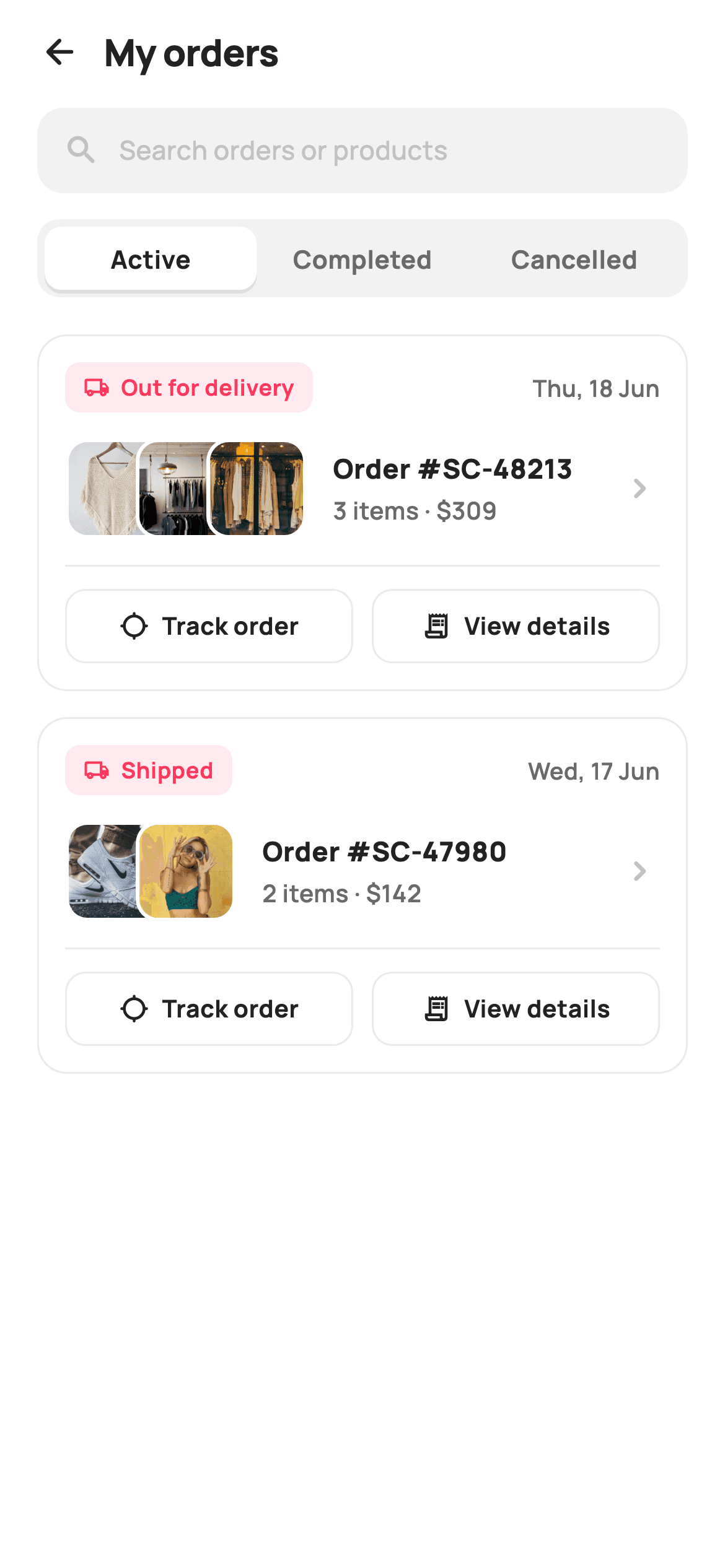
What you'll build
- ✓A three-way Active / Completed / Cancelled segmented control where the selected pill slides its white background and shadow via `AnimatedContainer`
- ✓A `_visible` getter that maps `_tab` to a `_Status` enum and filters a const `_Order` list, so tab switching is a filter, not a fetch
- ✓A `_statusPill` that picks colour and icon from two `switch` expressions on the enum — coral truck, green tick, grey cancel
- ✓An overlapping thumbnail `Stack` with a 38px step, 2px white borders and a computed `+N` chip for orders with more than three items
- ✓Per-status ghost buttons (`Track order` vs `Reorder`) plus `View details`, each firing an `ValueChanged<String>` callback with the order id
Step-by-step build
Create the file
Add a new file at lib/ecom_orders_list/ecom_orders_list_screen.dart in your Flutter project.
Register the bundled fonts
No external packages — this is pure Flutter. It does bundle its design font (Manrope), so drop the font file into fonts/ and declare it in pubspec.yaml:
flutter:
  fonts:
    - family: Manrope
      fonts:
- asset: fonts/Manrope-Regular.ttfBuild it, piece by piece
Here's how the screen goes together. Each block below is a real slice of the code with a plain-English explanation — paste them in order, or grab the whole file from the next section.
A StatefulWidget with four id-carrying callbacks
import 'package:flutter/material.dart';

/// StyleCart — My Orders.
///
/// The order history hub: a search field, Active / Completed / Cancelled
/// segmented tabs, and order cards each showing a stacked thumbnail row, a
/// status pill, the item count, total, and date. Tapping a card opens its
/// detail; completed cards expose a quick "Reorder" action.
///
/// Self-contained per CONVENTIONS.md: pure Flutter, bundled Manrope, inline
/// Airbnb-style tokens, own light theme + SafeArea, bundled webp. Exposes
/// callbacks only.
class EcomOrdersListScreen extends StatefulWidget {
  const EcomOrdersListScreen({
    super.key,
    this.onBack,
    this.onOpenOrder,
    this.onReorder,
    this.onTrack,
  });

  final VoidCallback? onBack;
  final ValueChanged<String>? onOpenOrder;
  final ValueChanged<String>? onReorder;
  final ValueChanged<String>? onTrack;

  @override
  State<EcomOrdersListScreen> createState() => _EcomOrdersListScreenState();
}

class _EcomOrdersListScreenState extends State<EcomOrdersListScreen> {
  static const String _font = 'Manrope';
  static const Color _canvas = Color(0xFFFFFFFF);
  static const Color _ink = Color(0xFF222222);
  static const Color _muted = Color(0xFF6A6A6A);
  static const Color _faint = Color(0xFFC1C1C1);
  static const Color _brand = Color(0xFFFF385C);
  static const Color _surface = Color(0xFFF2F2F2);
  static const Color _imageBg = Color(0xFFF5F5F5);
  static const Color _success = Color(0xFF2E9E5B);
  static const Color _hairline = Color(0xFFEBEBEB);

  static const String _dir = 'lib/screens/ecommerce/ecom_orders_list/images';

  int _tab = 0; // 0 active, 1 completed, 2 cancelled
`EcomOrdersListScreen` is stateful because the tab selection has to live somewhere, and that is the only mutable thing on the page: `int _tab = 0` with the comment mapping 0/1/2 to active/completed/cancelled. The four callbacks tell you how the screen wants to be wired. `onBack` is a plain `VoidCallback`, but `onOpenOrder`, `onReorder` and `onTrack` are all `ValueChanged<String>` so the host receives the order id (`'SC-48213'`) rather than an index into the local list — your router can navigate on it directly. The token block is the Airbnb-flavoured set: `_brand` coral `#FF385C`, `_success` green `#2E9E5B`, a `#F2F2F2` `_surface` for the search and tab troughs, a `#EBEBEB` `_hairline` for card borders, and a separate `#F5F5F5` `_imageBg` that shows behind thumbnails while a webp decodes. `_dir` points at the bundled image folder so `Image.asset` paths are built from one string.
Sample orders and the tab filter
  static const List<_Order> _orders = <_Order>[
    _Order('SC-48213', _Status.active, 'Out for delivery', 'Thu, 18 Jun', 309,
        3, <String>['p01', 'p02', 'p03']),
    _Order('SC-47980', _Status.active, 'Shipped', 'Wed, 17 Jun', 142, 2,
        <String>['p04', 'p05']),
    _Order('SC-47120', _Status.completed, 'Delivered', 'Sat, 07 Jun', 268, 4,
        <String>['p06', 'p01', 'p02', 'p03']),
    _Order('SC-46551', _Status.completed, 'Delivered', 'Mon, 26 May', 89, 1,
        <String>['p04']),
    _Order('SC-45013', _Status.completed, 'Delivered', 'Thu, 08 May', 196, 2,
        <String>['p05', 'p06']),
    _Order('SC-44877', _Status.cancelled, 'Cancelled', 'Sun, 27 Apr', 74, 1,
        <String>['p02']),
  ];

  List<_Order> get _visible {
    final _Status want = <int, _Status>{
      0: _Status.active,
      1: _Status.completed,
      2: _Status.cancelled,
    }[_tab]!;
    return _orders.where((_Order o) => o.status == want).toList();
  }
Six `_Order` records are declared `static const`, each with an id, a `_Status`, a display label, a short date, an integer total, an item count and a list of thumbnail keys. The mix is deliberate: two active orders carrying different labels ('Out for delivery', 'Shipped') to show that `statusLabel` is free text while `status` is the enum that drives colour and filtering; a four-item completed order to exercise the `+1` overflow chip; single-item orders to test the 'item' / 'items' pluralisation. The `_visible` getter is where tab switching actually happens — it looks `_tab` up in a `<int, _Status>` map (the `!` asserts the key exists) and runs `_orders.where(...)`. Because the data is const and the filter is a getter, `setState` on the tab is enough; nothing is copied or cached, and swapping the list for a server response only means replacing `_orders`.
Forced light theme, header and placeholder search
  @override
  Widget build(BuildContext context) {
    return Theme(
      data: ThemeData.light(useMaterial3: true),
      child: Scaffold(
        backgroundColor: _canvas,
        body: SafeArea(
          child: Column(
            children: <Widget>[
              _header(),
              _searchField(),
              const SizedBox(height: 14),
              _tabs(),
              const SizedBox(height: 8),
              Expanded(child: _list()),
            ],
          ),
        ),
      ),
    );
  }

  Widget _header() {
    return Padding(
      padding: const EdgeInsets.fromLTRB(8, 4, 20, 6),
      child: Row(
        children: <Widget>[
          IconButton(
            onPressed: widget.onBack,
            icon: const Icon(Icons.arrow_back_rounded, size: 22, color: _ink),
          ),
          const Text(
            'My orders',
            style: TextStyle(
              fontFamily: _font,
              fontSize: 20,
              fontWeight: FontWeight.w800,
              letterSpacing: -0.3,
              color: _ink,
            ),
          ),
        ],
      ),
    );
  }

  Widget _searchField() {
    return Padding(
      padding: const EdgeInsets.symmetric(horizontal: 20),
      child: Container(
        height: 46,
        padding: const EdgeInsets.symmetric(horizontal: 14),
        decoration: BoxDecoration(
          color: _surface,
          borderRadius: BorderRadius.circular(14),
        ),
        child: Row(
          children: const <Widget>[
            Icon(Icons.search_rounded, size: 20, color: _faint),
            SizedBox(width: 10),
            Text(
              'Search orders or products',
              style: TextStyle(
                fontFamily: _font,
                fontSize: 14,
                fontWeight: FontWeight.w500,
                color: _faint,
              ),
            ),
          ],
        ),
      ),
    );
  }
`build` wraps everything in `Theme(data: ThemeData.light(useMaterial3: true))` so the screen looks identical whether the host app is dark or not — the white `_canvas` and `#222222` ink are hard-coded and would clash with an inherited dark scaffold. Inside `SafeArea` the page is a plain `Column`: header, search, 14px gap, tabs, 8px gap, then `Expanded(child: _list())` so only the list scrolls and the search and tabs stay pinned. `_header` uses asymmetric padding `fromLTRB(8, 4, 20, 6)` — 8 on the left because the `IconButton` carries its own 12px hit padding and the arrow should visually align with the 20px content margin. The title is 20px `w800` with `-0.3` letter spacing. `_searchField` is not a `TextField`; it is a 46px `Container` with the `_surface` fill, 14px radius and `_faint` placeholder text and icon, so it renders as a tappable affordance you can route to a dedicated search screen without wiring a controller here.
The animated segmented tab control
  Widget _tabs() {
    const List<String> labels = <String>['Active', 'Completed', 'Cancelled'];
    return Padding(
      padding: const EdgeInsets.symmetric(horizontal: 20),
      child: Container(
        height: 42,
        padding: const EdgeInsets.all(4),
        decoration: BoxDecoration(
          color: _surface,
          borderRadius: BorderRadius.circular(12),
        ),
        child: Row(
          children: <Widget>[
            for (int i = 0; i < labels.length; i++)
              Expanded(
                child: GestureDetector(
                  onTap: () => setState(() => _tab = i),
                  child: AnimatedContainer(
                    duration: const Duration(milliseconds: 160),
                    alignment: Alignment.center,
                    decoration: BoxDecoration(
                      color: _tab == i ? _canvas : Colors.transparent,
                      borderRadius: BorderRadius.circular(9),
                      boxShadow: _tab == i
                          ? const <BoxShadow>[
                              BoxShadow(
                                color: Color(0x14000000),
                                blurRadius: 6,
                                offset: Offset(0, 2),
                              ),
                            ]
                          : null,
                    ),
                    child: Text(
                      labels[i],
                      style: TextStyle(
                        fontFamily: _font,
                        fontSize: 13.5,
                        fontWeight: FontWeight.w700,
                        color: _tab == i ? _ink : _muted,
                      ),
                    ),
                  ),
                ),
              ),
          ],
        ),
      ),
    );
  }
The tabs are a 42px `_surface` trough with 4px inner padding, and a collection-for emits one `Expanded` cell per label so all three share width equally. Each cell is a `GestureDetector` calling `setState(() => _tab = i)` around an `AnimatedContainer` with a 160ms duration. Selection is expressed entirely through the decoration: the active cell gets the white `_canvas` fill, a 9px radius (3px less than the trough's 12px so the inner corners sit concentric inside the 4px inset) and a `0x14000000` shadow with 6px blur offset 2px down; the inactive cells are `Colors.transparent` with `boxShadow: null`. Because `AnimatedContainer` tweens between decorations, tapping a new tab fades the white pill out of one cell and into the next rather than snapping. Text switches between `_ink` and `_muted` at 13.5px `w700` — no colour animation is needed there because the pill motion already carries the change.
The list and the per-tab empty state
  Widget _list() {
    final List<_Order> items = _visible;
    if (items.isEmpty) {
      return _emptyTab();
    }
    return ListView.separated(
      padding: const EdgeInsets.fromLTRB(20, 12, 20, 28),
      itemCount: items.length,
      separatorBuilder: (BuildContext c, int idx) =>
          const SizedBox(height: 14),
      itemBuilder: (BuildContext context, int i) => _orderCard(items[i]),
    );
  }

  Widget _emptyTab() {
    return Center(
      child: Column(
        mainAxisSize: MainAxisSize.min,
        children: const <Widget>[
          Icon(Icons.inbox_outlined, size: 44, color: _faint),
          SizedBox(height: 12),
          Text(
            'Nothing here yet',
            style: TextStyle(
              fontFamily: _font,
              fontSize: 15,
              fontWeight: FontWeight.w700,
              color: _muted,
            ),
          ),
        ],
      ),
    );
  }
`_list` reads `_visible` once into `items` and short-circuits to `_emptyTab()` when the filtered list is empty, so the empty state is per tab: a shopper with active orders but no cancellations sees cards on one tab and the inbox icon on another. The populated path is a `ListView.separated` with `fromLTRB(20, 12, 20, 28)` padding — 12 on top to breathe under the tabs, 28 at the bottom so the last card clears the home indicator — and a 14px `SizedBox` separator, which keeps the gaps between cards and never after the last one. `_emptyTab` is a centred `Column` with `mainAxisSize.min`: a 44px `inbox_outlined` icon in `_faint` and 'Nothing here yet' at 15px `w700` in `_muted`. The copy is neutral on purpose, since 'no cancelled orders' is good news and 'no completed orders' is not.
The order card and its colour-coded status pill
  Widget _orderCard(_Order o) {
    return GestureDetector(
      onTap: () => widget.onOpenOrder?.call(o.id),
      child: Container(
        padding: const EdgeInsets.all(14),
        decoration: BoxDecoration(
          color: _canvas,
          borderRadius: BorderRadius.circular(16),
          border: Border.all(color: _hairline),
        ),
        child: Column(
          crossAxisAlignment: CrossAxisAlignment.start,
          children: <Widget>[
            Row(
              children: <Widget>[
                _statusPill(o),
                const Spacer(),
                Text(
                  o.date,
                  style: const TextStyle(
                    fontFamily: _font,
                    fontSize: 12.5,
                    fontWeight: FontWeight.w600,
                    color: _muted,
                  ),
                ),
              ],
            ),
            const SizedBox(height: 14),
            Row(
              children: <Widget>[
                _thumbStack(o.thumbs),
                const SizedBox(width: 14),
                Expanded(
                  child: Column(
                    crossAxisAlignment: CrossAxisAlignment.start,
                    children: <Widget>[
                      Text(
                        'Order #${o.id}',
                        style: const TextStyle(
                          fontFamily: _font,
                          fontSize: 14.5,
                          fontWeight: FontWeight.w800,
                          color: _ink,
                        ),
                      ),
                      const SizedBox(height: 3),
                      Text(
                        '${o.items} item${o.items == 1 ? '' : 's'} · \$${o.total}',
                        style: const TextStyle(
                          fontFamily: _font,
                          fontSize: 13,
                          fontWeight: FontWeight.w600,
                          color: _muted,
                        ),
                      ),
                    ],
                  ),
                ),
                const Icon(Icons.chevron_right_rounded,
                    size: 22, color: _faint),
              ],
            ),
            const SizedBox(height: 14),
            const Divider(height: 1, color: _hairline),
            const SizedBox(height: 12),
            _cardActions(o),
          ],
        ),
      ),
    );
  }

  Widget _statusPill(_Order o) {
    final Color c = switch (o.status) {
      _Status.active => _brand,
      _Status.completed => _success,
      _Status.cancelled => _muted,
    };
    final IconData ic = switch (o.status) {
      _Status.active => Icons.local_shipping_outlined,
      _Status.completed => Icons.check_circle_outline_rounded,
      _Status.cancelled => Icons.cancel_outlined,
    };
    return Container(
      padding: const EdgeInsets.symmetric(horizontal: 10, vertical: 5),
      decoration: BoxDecoration(
        color: c.withValues(alpha: 0.10),
        borderRadius: BorderRadius.circular(8),
      ),
      child: Row(
        mainAxisSize: MainAxisSize.min,
        children: <Widget>[
          Icon(ic, size: 14, color: c),
          const SizedBox(width: 6),
          Text(
            o.statusLabel,
            style: TextStyle(
              fontFamily: _font,
              fontSize: 12,
              fontWeight: FontWeight.w700,
              color: c,
            ),
          ),
        ],
      ),
    );
  }
`_orderCard` is a white 16px-radius `Container` with a `_hairline` border, wrapped in a `GestureDetector` that fires `onOpenOrder?.call(o.id)` — the whole card is a tap target, not just the chevron. Row one is the status pill on the left and the date pushed right by a `Spacer`. Row two puts `_thumbStack` beside an `Expanded` column with 'Order #SC-48213' at 14.5px `w800` and a summary line built as `'${o.items} item${o.items == 1 ? '' : 's'} · \$${o.total}'` — the ternary handles pluralisation and the escaped dollar keeps Dart from treating `$` as interpolation. A 1px `Divider` separates the actions. `_statusPill` is where the enum pays off: two `switch` expressions pick `_brand`, `_success` or `_muted` and a matching `local_shipping_outlined`, `check_circle_outline_rounded` or `cancel_outlined` icon. The pill background is `c.withValues(alpha: 0.10)` with the icon and 12px `w700` label in full `c`, so one colour value produces both tint and foreground.
The overlapping thumbnail stack with a +N chip
  Widget _thumbStack(List<String> thumbs) {
    const double size = 54;
    const double step = 38;
    final List<String> shown = thumbs.take(3).toList();
    final int extra = thumbs.length - shown.length;
    final double width = size + step * (shown.length - 1) + (extra > 0 ? 22 : 0);
    return SizedBox(
      width: width,
      height: size,
      child: Stack(
        children: <Widget>[
          for (int i = 0; i < shown.length; i++)
            Positioned(
              left: i * step,
              child: Container(
                width: size,
                height: size,
                decoration: BoxDecoration(
                  color: _imageBg,
                  borderRadius: BorderRadius.circular(12),
                  border: Border.all(color: _canvas, width: 2),
                ),
                child: ClipRRect(
                  borderRadius: BorderRadius.circular(10),
                  child: Image.asset('$_dir/${shown[i]}.webp',
                      fit: BoxFit.cover),
                ),
              ),
            ),
          if (extra > 0)
            Positioned(
              left: shown.length * step,
              child: Container(
                width: size,
                height: size,
                alignment: Alignment.center,
                decoration: BoxDecoration(
                  color: _surface,
                  borderRadius: BorderRadius.circular(12),
                  border: Border.all(color: _canvas, width: 2),
                ),
                child: Text(
                  '+$extra',
                  style: const TextStyle(
                    fontFamily: _font,
                    fontSize: 13,
                    fontWeight: FontWeight.w800,
                    color: _muted,
                  ),
                ),
              ),
            ),
        ],
      ),
    );
  }
`_thumbStack` does its layout arithmetic up front. Each thumb is `size = 54` and each subsequent one is placed `step = 38` further left-to-right, so 16px of every image is hidden behind the next. `thumbs.take(3)` caps what is shown and `extra` is whatever remains; the `SizedBox` width is `size + step * (shown.length - 1)` plus 22px when an overflow chip is needed, which is exactly the visible sliver of a chip that overlaps by the same 38px step. Inside a `Stack`, each `Positioned(left: i * step)` tile is a `_imageBg` box with a 12px radius and a 2px `_canvas` border — that white border is what makes the overlap read as separate cards rather than one merged image. The `ClipRRect` uses a 10px radius, 2px less than the container, so the image corner sits flush inside the border. The overflow chip reuses the same geometry with a `_surface` fill and '+$extra' at 13px `w800`, positioned at `shown.length * step`.
Status-aware actions, the ghost button and the data model
  Widget _cardActions(_Order o) {
    final List<Widget> btns = <Widget>[];
    if (o.status == _Status.active) {
      btns.add(_ghostBtn('Track order', Icons.location_searching_rounded,
          () => widget.onTrack?.call(o.id)));
    } else if (o.status == _Status.completed) {
      btns.add(_ghostBtn('Reorder', Icons.refresh_rounded,
          () => widget.onReorder?.call(o.id)));
    } else {
      btns.add(_ghostBtn('Reorder', Icons.refresh_rounded,
          () => widget.onReorder?.call(o.id)));
    }
    btns.add(const SizedBox(width: 10));
    btns.add(_ghostBtn('View details', Icons.receipt_long_outlined,
        () => widget.onOpenOrder?.call(o.id)));
    return Row(children: btns);
  }

  Widget _ghostBtn(String label, IconData ic, VoidCallback onTap) {
    return Expanded(
      child: GestureDetector(
        onTap: onTap,
        child: Container(
          height: 40,
          alignment: Alignment.center,
          decoration: BoxDecoration(
            color: _canvas,
            borderRadius: BorderRadius.circular(11),
            border: Border.all(color: _hairline),
          ),
          child: Row(
            mainAxisAlignment: MainAxisAlignment.center,
            children: <Widget>[
              Icon(ic, size: 16, color: _ink),
              const SizedBox(width: 7),
              Text(
                label,
                style: const TextStyle(
                  fontFamily: _font,
                  fontSize: 13,
                  fontWeight: FontWeight.w700,
                  color: _ink,
                ),
              ),
            ],
          ),
        ),
      ),
    );
  }
}

enum _Status { active, completed, cancelled }

class _Order {
  const _Order(this.id, this.status, this.statusLabel, this.date, this.total,
      this.items, this.thumbs);
  final String id;
  final _Status status;
  final String statusLabel;
  final String date;
  final int total;
  final int items;
  final List<String> thumbs;
}
`_cardActions` builds a `List<Widget>` imperatively so the first button can depend on status: active orders get 'Track order' with `location_searching_rounded` firing `onTrack`, while completed and cancelled orders both get 'Reorder' with `refresh_rounded` firing `onReorder` — the two branches are written out separately so you can diverge them later (for instance hiding Reorder on cancelled orders). A 10px `SizedBox` and a 'View details' button firing `onOpenOrder` follow every time. `_ghostBtn` returns an `Expanded`, so two buttons always split the card width evenly; each is a 40px white box with an 11px radius and `_hairline` border, a 16px `_ink` icon and 13px `w700` label. There is no filled button on this screen — every card action is secondary to tapping the card itself. The file closes with the `_Status` enum and the immutable `_Order` class whose seven positional fields match the const table above.
Full code
The complete, ready-to-paste source. Free to use in your projects — one click copies it all.
import 'package:flutter/material.dart';

/// StyleCart — My Orders.
///
/// The order history hub: a search field, Active / Completed / Cancelled
/// segmented tabs, and order cards each showing a stacked thumbnail row, a
/// status pill, the item count, total, and date. Tapping a card opens its
/// detail; completed cards expose a quick "Reorder" action.
///
/// Self-contained per CONVENTIONS.md: pure Flutter, bundled Manrope, inline
/// Airbnb-style tokens, own light theme + SafeArea, bundled webp. Exposes
/// callbacks only.
class EcomOrdersListScreen extends StatefulWidget {
  const EcomOrdersListScreen({
    super.key,
    this.onBack,
    this.onOpenOrder,
    this.onReorder,
    this.onTrack,
  });

  final VoidCallback? onBack;
  final ValueChanged<String>? onOpenOrder;
  final ValueChanged<String>? onReorder;
  final ValueChanged<String>? onTrack;

  @override
  State<EcomOrdersListScreen> createState() => _EcomOrdersListScreenState();
}

class _EcomOrdersListScreenState extends State<EcomOrdersListScreen> {
  static const String _font = 'Manrope';
  static const Color _canvas = Color(0xFFFFFFFF);
  static const Color _ink = Color(0xFF222222);
  static const Color _muted = Color(0xFF6A6A6A);
  static const Color _faint = Color(0xFFC1C1C1);
  static const Color _brand = Color(0xFFFF385C);
  static const Color _surface = Color(0xFFF2F2F2);
  static const Color _imageBg = Color(0xFFF5F5F5);
  static const Color _success = Color(0xFF2E9E5B);
  static const Color _hairline = Color(0xFFEBEBEB);

  static const String _dir = 'lib/screens/ecommerce/ecom_orders_list/images';

  int _tab = 0; // 0 active, 1 completed, 2 cancelled

  static const List<_Order> _orders = <_Order>[
    _Order('SC-48213', _Status.active, 'Out for delivery', 'Thu, 18 Jun', 309,
        3, <String>['p01', 'p02', 'p03']),
    _Order('SC-47980', _Status.active, 'Shipped', 'Wed, 17 Jun', 142, 2,
        <String>['p04', 'p05']),
    _Order('SC-47120', _Status.completed, 'Delivered', 'Sat, 07 Jun', 268, 4,
        <String>['p06', 'p01', 'p02', 'p03']),
    _Order('SC-46551', _Status.completed, 'Delivered', 'Mon, 26 May', 89, 1,
        <String>['p04']),
    _Order('SC-45013', _Status.completed, 'Delivered', 'Thu, 08 May', 196, 2,
        <String>['p05', 'p06']),
    _Order('SC-44877', _Status.cancelled, 'Cancelled', 'Sun, 27 Apr', 74, 1,
        <String>['p02']),
  ];

  List<_Order> get _visible {
    final _Status want = <int, _Status>{
      0: _Status.active,
      1: _Status.completed,
      2: _Status.cancelled,
    }[_tab]!;
    return _orders.where((_Order o) => o.status == want).toList();
  }

  @override
  Widget build(BuildContext context) {
    return Theme(
      data: ThemeData.light(useMaterial3: true),
      child: Scaffold(
        backgroundColor: _canvas,
        body: SafeArea(
          child: Column(
            children: <Widget>[
              _header(),
              _searchField(),
              const SizedBox(height: 14),
              _tabs(),
              const SizedBox(height: 8),
              Expanded(child: _list()),
            ],
          ),
        ),
      ),
    );
  }

  Widget _header() {
    return Padding(
      padding: const EdgeInsets.fromLTRB(8, 4, 20, 6),
      child: Row(
        children: <Widget>[
          IconButton(
            onPressed: widget.onBack,
            icon: const Icon(Icons.arrow_back_rounded, size: 22, color: _ink),
          ),
          const Text(
            'My orders',
            style: TextStyle(
              fontFamily: _font,
              fontSize: 20,
              fontWeight: FontWeight.w800,
              letterSpacing: -0.3,
              color: _ink,
            ),
          ),
        ],
      ),
    );
  }

  Widget _searchField() {
    return Padding(
      padding: const EdgeInsets.symmetric(horizontal: 20),
      child: Container(
        height: 46,
        padding: const EdgeInsets.symmetric(horizontal: 14),
        decoration: BoxDecoration(
          color: _surface,
          borderRadius: BorderRadius.circular(14),
        ),
        child: Row(
          children: const <Widget>[
            Icon(Icons.search_rounded, size: 20, color: _faint),
            SizedBox(width: 10),
            Text(
              'Search orders or products',
              style: TextStyle(
                fontFamily: _font,
                fontSize: 14,
                fontWeight: FontWeight.w500,
                color: _faint,
              ),
            ),
          ],
        ),
      ),
    );
  }

  Widget _tabs() {
    const List<String> labels = <String>['Active', 'Completed', 'Cancelled'];
    return Padding(
      padding: const EdgeInsets.symmetric(horizontal: 20),
      child: Container(
        height: 42,
        padding: const EdgeInsets.all(4),
        decoration: BoxDecoration(
          color: _surface,
          borderRadius: BorderRadius.circular(12),
        ),
        child: Row(
          children: <Widget>[
            for (int i = 0; i < labels.length; i++)
              Expanded(
                child: GestureDetector(
                  onTap: () => setState(() => _tab = i),
                  child: AnimatedContainer(
                    duration: const Duration(milliseconds: 160),
                    alignment: Alignment.center,
                    decoration: BoxDecoration(
                      color: _tab == i ? _canvas : Colors.transparent,
                      borderRadius: BorderRadius.circular(9),
                      boxShadow: _tab == i
                          ? const <BoxShadow>[
                              BoxShadow(
                                color: Color(0x14000000),
                                blurRadius: 6,
                                offset: Offset(0, 2),
                              ),
                            ]
                          : null,
                    ),
                    child: Text(
                      labels[i],
                      style: TextStyle(
                        fontFamily: _font,
                        fontSize: 13.5,
                        fontWeight: FontWeight.w700,
                        color: _tab == i ? _ink : _muted,
                      ),
                    ),
                  ),
                ),
              ),
          ],
        ),
      ),
    );
  }

  Widget _list() {
    final List<_Order> items = _visible;
    if (items.isEmpty) {
      return _emptyTab();
    }
    return ListView.separated(
      padding: const EdgeInsets.fromLTRB(20, 12, 20, 28),
      itemCount: items.length,
      separatorBuilder: (BuildContext c, int idx) =>
          const SizedBox(height: 14),
      itemBuilder: (BuildContext context, int i) => _orderCard(items[i]),
    );
  }

  Widget _emptyTab() {
    return Center(
      child: Column(
        mainAxisSize: MainAxisSize.min,
        children: const <Widget>[
          Icon(Icons.inbox_outlined, size: 44, color: _faint),
          SizedBox(height: 12),
          Text(
            'Nothing here yet',
            style: TextStyle(
              fontFamily: _font,
              fontSize: 15,
              fontWeight: FontWeight.w700,
              color: _muted,
            ),
          ),
        ],
      ),
    );
  }

  Widget _orderCard(_Order o) {
    return GestureDetector(
      onTap: () => widget.onOpenOrder?.call(o.id),
      child: Container(
        padding: const EdgeInsets.all(14),
        decoration: BoxDecoration(
          color: _canvas,
          borderRadius: BorderRadius.circular(16),
          border: Border.all(color: _hairline),
        ),
        child: Column(
          crossAxisAlignment: CrossAxisAlignment.start,
          children: <Widget>[
            Row(
              children: <Widget>[
                _statusPill(o),
                const Spacer(),
                Text(
                  o.date,
                  style: const TextStyle(
                    fontFamily: _font,
                    fontSize: 12.5,
                    fontWeight: FontWeight.w600,
                    color: _muted,
                  ),
                ),
              ],
            ),
            const SizedBox(height: 14),
            Row(
              children: <Widget>[
                _thumbStack(o.thumbs),
                const SizedBox(width: 14),
                Expanded(
                  child: Column(
                    crossAxisAlignment: CrossAxisAlignment.start,
                    children: <Widget>[
                      Text(
                        'Order #${o.id}',
                        style: const TextStyle(
                          fontFamily: _font,
                          fontSize: 14.5,
                          fontWeight: FontWeight.w800,
                          color: _ink,
                        ),
                      ),
                      const SizedBox(height: 3),
                      Text(
                        '${o.items} item${o.items == 1 ? '' : 's'} · \$${o.total}',
                        style: const TextStyle(
                          fontFamily: _font,
                          fontSize: 13,
                          fontWeight: FontWeight.w600,
                          color: _muted,
                        ),
                      ),
                    ],
                  ),
                ),
                const Icon(Icons.chevron_right_rounded,
                    size: 22, color: _faint),
              ],
            ),
            const SizedBox(height: 14),
            const Divider(height: 1, color: _hairline),
            const SizedBox(height: 12),
            _cardActions(o),
          ],
        ),
      ),
    );
  }

  Widget _statusPill(_Order o) {
    final Color c = switch (o.status) {
      _Status.active => _brand,
      _Status.completed => _success,
      _Status.cancelled => _muted,
    };
    final IconData ic = switch (o.status) {
      _Status.active => Icons.local_shipping_outlined,
      _Status.completed => Icons.check_circle_outline_rounded,
      _Status.cancelled => Icons.cancel_outlined,
    };
    return Container(
      padding: const EdgeInsets.symmetric(horizontal: 10, vertical: 5),
      decoration: BoxDecoration(
        color: c.withValues(alpha: 0.10),
        borderRadius: BorderRadius.circular(8),
      ),
      child: Row(
        mainAxisSize: MainAxisSize.min,
        children: <Widget>[
          Icon(ic, size: 14, color: c),
          const SizedBox(width: 6),
          Text(
            o.statusLabel,
            style: TextStyle(
              fontFamily: _font,
              fontSize: 12,
              fontWeight: FontWeight.w700,
              color: c,
            ),
          ),
        ],
      ),
    );
  }

  Widget _thumbStack(List<String> thumbs) {
    const double size = 54;
    const double step = 38;
    final List<String> shown = thumbs.take(3).toList();
    final int extra = thumbs.length - shown.length;
    final double width = size + step * (shown.length - 1) + (extra > 0 ? 22 : 0);
    return SizedBox(
      width: width,
      height: size,
      child: Stack(
        children: <Widget>[
          for (int i = 0; i < shown.length; i++)
            Positioned(
              left: i * step,
              child: Container(
                width: size,
                height: size,
                decoration: BoxDecoration(
                  color: _imageBg,
                  borderRadius: BorderRadius.circular(12),
                  border: Border.all(color: _canvas, width: 2),
                ),
                child: ClipRRect(
                  borderRadius: BorderRadius.circular(10),
                  child: Image.asset('$_dir/${shown[i]}.webp',
                      fit: BoxFit.cover),
                ),
              ),
            ),
          if (extra > 0)
            Positioned(
              left: shown.length * step,
              child: Container(
                width: size,
                height: size,
                alignment: Alignment.center,
                decoration: BoxDecoration(
                  color: _surface,
                  borderRadius: BorderRadius.circular(12),
                  border: Border.all(color: _canvas, width: 2),
                ),
                child: Text(
                  '+$extra',
                  style: const TextStyle(
                    fontFamily: _font,
                    fontSize: 13,
                    fontWeight: FontWeight.w800,
                    color: _muted,
                  ),
                ),
              ),
            ),
        ],
      ),
    );
  }

  Widget _cardActions(_Order o) {
    final List<Widget> btns = <Widget>[];
    if (o.status == _Status.active) {
      btns.add(_ghostBtn('Track order', Icons.location_searching_rounded,
          () => widget.onTrack?.call(o.id)));
    } else if (o.status == _Status.completed) {
      btns.add(_ghostBtn('Reorder', Icons.refresh_rounded,
          () => widget.onReorder?.call(o.id)));
    } else {
      btns.add(_ghostBtn('Reorder', Icons.refresh_rounded,
          () => widget.onReorder?.call(o.id)));
    }
    btns.add(const SizedBox(width: 10));
    btns.add(_ghostBtn('View details', Icons.receipt_long_outlined,
        () => widget.onOpenOrder?.call(o.id)));
    return Row(children: btns);
  }

  Widget _ghostBtn(String label, IconData ic, VoidCallback onTap) {
    return Expanded(
      child: GestureDetector(
        onTap: onTap,
        child: Container(
          height: 40,
          alignment: Alignment.center,
          decoration: BoxDecoration(
            color: _canvas,
            borderRadius: BorderRadius.circular(11),
            border: Border.all(color: _hairline),
          ),
          child: Row(
            mainAxisAlignment: MainAxisAlignment.center,
            children: <Widget>[
              Icon(ic, size: 16, color: _ink),
              const SizedBox(width: 7),
              Text(
                label,
                style: const TextStyle(
                  fontFamily: _font,
                  fontSize: 13,
                  fontWeight: FontWeight.w700,
                  color: _ink,
                ),
              ),
            ],
          ),
        ),
      ),
    );
  }
}

enum _Status { active, completed, cancelled }

class _Order {
  const _Order(this.id, this.status, this.statusLabel, this.date, this.total,
      this.items, this.thumbs);
  final String id;
  final _Status status;
  final String statusLabel;
  final String date;
  final int total;
  final int items;
  final List<String> thumbs;
}
Plus bundled 11 binary assets (fonts/images). The CLI and MCP install those for you automatically.
Two faster ways to add it
Copy-paste works, but you can skip it entirely.
1. FlutterKit CLI
One command drops this screen — and its fonts — straight into your project.
$ flutterkit add ecom-orders-list2. AI agent (MCP)
Connect FlutterKit's MCP server in Claude or Cursor and just ask your agent to install ecom-orders-list — it fetches and writes the files for you.
FAQ
Can I use this My Orders screen in a commercial shopping app?
Yes. FlutterKit screens are free for personal and commercial projects under an MIT-style licence — copy the Dart from this page, run `flutterkit add ecom-orders-list`, or fetch it through MCP. No key, no attribution, no sign-up.
Which packages and fonts does it depend on?
No pub packages — it is pure Flutter material widgets. The only asset is the Manrope font family (plus six product webp thumbnails), and `flutterkit add ecom-orders-list` bundles those and writes the pubspec entries for you.
What Flutter version do I need?
Flutter 3.22 or newer. The status pill tints its background with `c.withValues(alpha: 0.10)` and the constructor uses `super.key`. On an older 3.x SDK change that call to `c.withOpacity(0.10)` and rewrite the constructor as `{Key? key, ...} : super(key: key)`.
How do I load real orders from my backend instead of the const list?
Replace the `static const List<_Order> _orders` with a field you populate from your API and map each response into `_Order`, keeping `status` as the enum and `statusLabel` as the human string your server sends. Because `_visible` is a getter over that list, the tabs, empty states and cards keep working unchanged — call `setState` once the data arrives. The thumbnail keys can become URLs if you swap `Image.asset` for `Image.network` inside `_thumbStack`.
Why does the tab indicator animate but the text colour does not?
The selected cell is an `AnimatedContainer` with a 160ms duration, so its white fill and shadow tween across when `_tab` changes. The label is a plain `Text` whose colour flips instantly between `_ink` and `_muted`; wrap it in `AnimatedDefaultTextStyle` with the same duration if you want the colour to cross-fade too.


