How to Build a Reorder Past Order Screen in Flutter (Full Code + Preview)
Repeat purchases are the cheapest revenue a store has, but a one-tap 'buy it again' breaks the moment one item is sold out or the shopper wants two of something. This tutorial builds StyleCart's reorder screen in Flutter: a mutable `_Line` list seeded from order #SC-45013, a 'Select all available' bar driven by an `_allSelected` getter, per-row 1–9 quantity steppers, a locked out-of-stock row, and a pinned `FilledButton` whose label sums units and dollars live and disables itself when nothing is chosen.
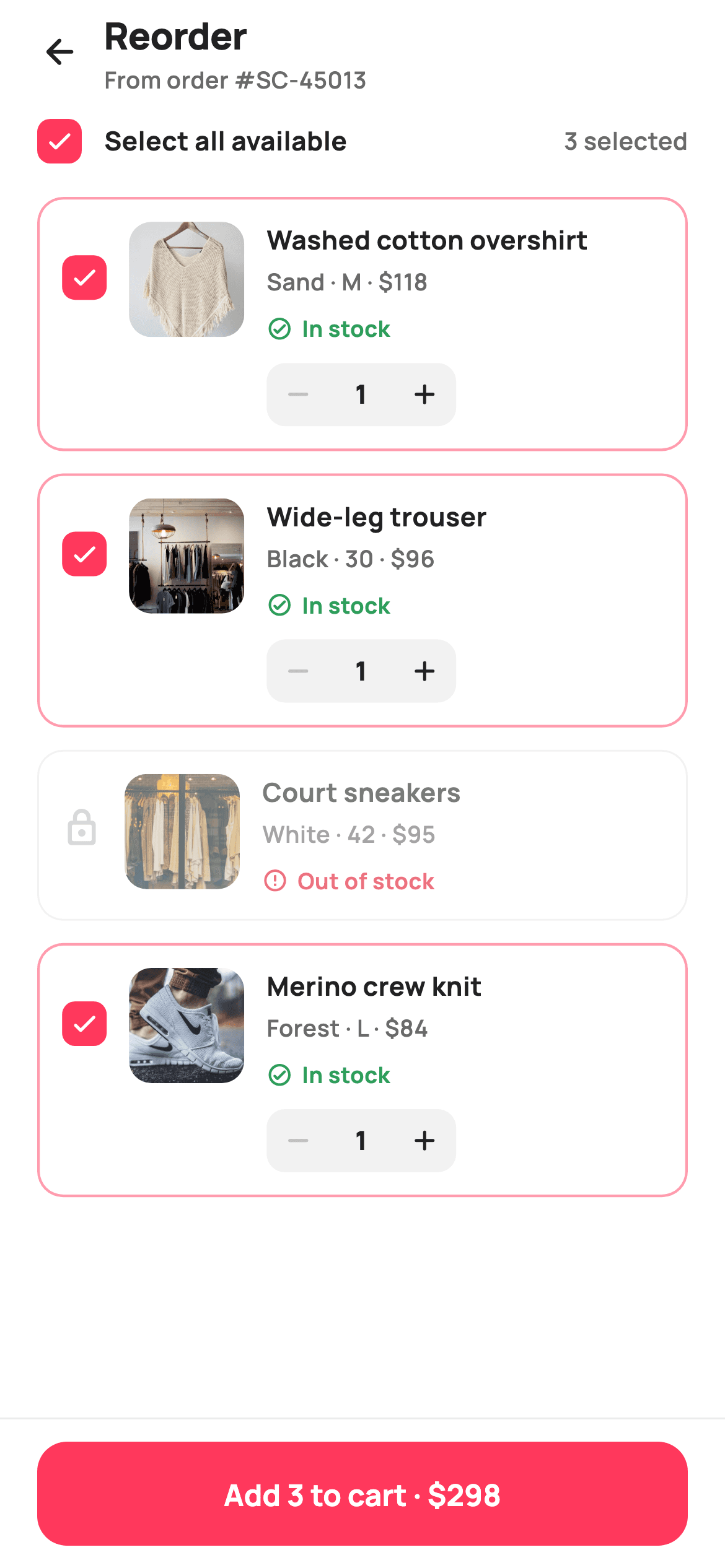
What you'll build
- ✓A mutable `_Line` model (id, name, variant, price, inStock, selected, qty) that the whole screen derives from
- ✓Three computed getters — `_selectedUnits`, `_selectedTotal`, `_allSelected` — so no total is ever stored twice
- ✓A `_toggleAll` select-all bar that skips out-of-stock lines and flips to 'deselect all' when every available item is on
- ✓A brand-tinted `_checkbox` Container and a `_stepBtn` quantity stepper clamped to 1–9 with faint disabled arrows
- ✓A pinned add bar whose `FilledButton` reads 'Add 3 to cart · $298' and fires `onAddToCart(int)` with the unit count
Step-by-step build
Create the file
Add a new file at lib/ecom_orders_reorder/ecom_orders_reorder_screen.dart in your Flutter project.
Register the bundled fonts
No external packages — this is pure Flutter. It does bundle its design font (Manrope), so drop the font file into fonts/ and declare it in pubspec.yaml:
flutter:
  fonts:
    - family: Manrope
      fonts:
- asset: fonts/Manrope-Regular.ttfBuild it, piece by piece
Here's how the screen goes together. Each block below is a real slice of the code with a plain-English explanation — paste them in order, or grab the whole file from the next section.
Tokens, callbacks and the seeded order lines
import 'package:flutter/material.dart';

/// StyleCart — Reorder.
///
/// Re-adds the items from a past order: a select-all header, per-item rows with
/// an availability flag, a quantity stepper, and a checkbox; an out-of-stock
/// item is shown locked. A pinned bar adds the selected items (and their
/// quantities) back to the cart.
///
/// Self-contained per CONVENTIONS.md: pure Flutter, bundled Manrope, inline
/// Airbnb-style tokens, own light theme + SafeArea, bundled webp. Exposes
/// callbacks only.
class EcomOrdersReorderScreen extends StatefulWidget {
  const EcomOrdersReorderScreen({
    super.key,
    this.onBack,
    this.onAddToCart,
  });

  final VoidCallback? onBack;

  /// Fires with the total number of units being re-added to the cart.
  final ValueChanged<int>? onAddToCart;

  @override
  State<EcomOrdersReorderScreen> createState() =>
      _EcomOrdersReorderScreenState();
}

class _EcomOrdersReorderScreenState extends State<EcomOrdersReorderScreen> {
  static const String _font = 'Manrope';
  static const Color _canvas = Color(0xFFFFFFFF);
  static const Color _ink = Color(0xFF222222);
  static const Color _muted = Color(0xFF6A6A6A);
  static const Color _faint = Color(0xFFC1C1C1);
  static const Color _brand = Color(0xFFFF385C);
  static const Color _surface = Color(0xFFF2F2F2);
  static const Color _imageBg = Color(0xFFF5F5F5);
  static const Color _success = Color(0xFF2E9E5B);
  static const Color _danger = Color(0xFFE0162B);
  static const Color _hairline = Color(0xFFEBEBEB);

  static const String _dir =
      'lib/screens/ecommerce/ecom_orders_reorder/images';

  late final List<_Line> _lines = <_Line>[
    _Line('p01', 'Washed cotton overshirt', 'Sand · M', 118, true, true, 1),
    _Line('p02', 'Wide-leg trouser', 'Black · 30', 96, true, true, 1),
    _Line('p03', 'Court sneakers', 'White · 42', 95, false, false, 1),
    _Line('p04', 'Merino crew knit', 'Forest · L', 84, true, true, 1),
  ];
`EcomOrdersReorderScreen` is a `StatefulWidget` — unlike a receipt or error page, the shopper edits this one — and it exposes only two callbacks: `onBack` and `onAddToCart`, typed `ValueChanged<int>` so the host receives the total unit count rather than a list it has to re-count. The palette is Airbnb-flavoured: `_brand` `#FF385C` for the coral checkbox and button, `_success` `#2E9E5B` and `_danger` `#E0162B` reserved for the stock chips, and `_faint` `#C1C1C1` for anything disabled. The four `_Line` entries are declared `late final` so the list itself is fixed while its fields stay mutable; note line `p03`, the court sneakers, is constructed with `inStock: false, selected: false` — that single row drives every locked-state branch further down.
Derived totals and the select-all toggle
  int get _selectedUnits {
    int u = 0;
    for (final _Line l in _lines) {
      if (l.selected && l.inStock) u += l.qty;
    }
    return u;
  }

  int get _selectedTotal {
    int t = 0;
    for (final _Line l in _lines) {
      if (l.selected && l.inStock) t += l.price * l.qty;
    }
    return t;
  }

  bool get _allSelected =>
      _lines.where((_Line l) => l.inStock).every((_Line l) => l.selected);

  void _toggleAll() {
    final bool target = !_allSelected;
    setState(() {
      for (final _Line l in _lines) {
        if (l.inStock) l.selected = target;
      }
    });
  }
Nothing about the selection is stored as separate state. `_selectedUnits` and `_selectedTotal` loop the lines and only count entries that are both `selected` and `inStock`, so an out-of-stock item can never leak into the price even if its flag were somehow true. `_allSelected` filters to in-stock lines first with `where` and then `every`, which is why the header reads 'Select all available' — the sneakers are simply not part of the question. `_toggleAll` computes `target = !_allSelected` once before the loop, then writes it to every in-stock line inside one `setState`; this makes the bar act as select-all when anything is unchecked and deselect-all only when the set is complete, with no separate boolean to keep in sync.
The forced light theme and the four-part column
  @override
  Widget build(BuildContext context) {
    return Theme(
      data: ThemeData.light(useMaterial3: true),
      child: Scaffold(
        backgroundColor: _canvas,
        body: SafeArea(
          child: Column(
            children: <Widget>[
              _header(),
              _selectAllBar(),
              Expanded(
                child: ListView(
                  padding: const EdgeInsets.fromLTRB(20, 8, 20, 24),
                  children: <Widget>[
                    for (int i = 0; i < _lines.length; i++) _row(i),
                  ],
                ),
              ),
              _addBar(),
            ],
          ),
        ),
      ),
    );
  }
`build` wraps everything in `Theme(data: ThemeData.light(useMaterial3: true))` so the screen renders on white `_canvas` even inside a host app running dark mode — the product thumbnails and hairline borders are tuned for light and would wash out otherwise. The `Scaffold` body is a plain `Column`: `_header()`, `_selectAllBar()`, an `Expanded` `ListView` and `_addBar()`. Because the header and select-all bar sit outside the ListView they stay pinned while rows scroll, and the add bar is pinned at the bottom for the same reason. The rows are emitted with a collection-for over indices, `for (int i = 0; i < _lines.length; i++) _row(i)`, so each row gets a stable index into the mutable list. The list padding is `fromLTRB(20, 8, 20, 24)`, giving extra room above the pinned bar.
Header with order reference and the select-all bar
  Widget _header() {
    return Padding(
      padding: const EdgeInsets.fromLTRB(8, 4, 20, 6),
      child: Row(
        children: <Widget>[
          IconButton(
            onPressed: widget.onBack,
            icon: const Icon(Icons.arrow_back_rounded, size: 22, color: _ink),
          ),
          const Expanded(
            child: Column(
              crossAxisAlignment: CrossAxisAlignment.start,
              children: <Widget>[
                Text(
                  'Reorder',
                  style: TextStyle(
                    fontFamily: _font,
                    fontSize: 20,
                    fontWeight: FontWeight.w800,
                    letterSpacing: -0.3,
                    color: _ink,
                  ),
                ),
                Text(
                  'From order #SC-45013',
                  style: TextStyle(
                    fontFamily: _font,
                    fontSize: 12.5,
                    fontWeight: FontWeight.w600,
                    color: _muted,
                  ),
                ),
              ],
            ),
          ),
        ],
      ),
    );
  }

  Widget _selectAllBar() {
    return Padding(
      padding: const EdgeInsets.fromLTRB(20, 6, 20, 10),
      child: GestureDetector(
        onTap: _toggleAll,
        child: Row(
          children: <Widget>[
            _checkbox(_allSelected),
            const SizedBox(width: 12),
            const Text(
              'Select all available',
              style: TextStyle(
                fontFamily: _font,
                fontSize: 14,
                fontWeight: FontWeight.w700,
                color: _ink,
              ),
            ),
            const Spacer(),
            Text(
              '$_selectedUnits selected',
              style: const TextStyle(
                fontFamily: _font,
                fontSize: 13,
                fontWeight: FontWeight.w600,
                color: _muted,
              ),
            ),
          ],
        ),
      ),
    );
  }
The header is a back `IconButton` plus a two-line title block: 'Reorder' at 20px `w800` with `letterSpacing: -0.3`, and 'From order #SC-45013' at 12.5px in `_muted`. That second line matters — the shopper needs to know which order is being replayed before touching any checkbox. The left padding is 8 rather than 20 because the IconButton carries its own hit-area padding, keeping the arrow optically aligned with the 20px content edge. `_selectAllBar` wraps the whole Row in a `GestureDetector` calling `_toggleAll`, so the label is tappable, not just the 24px box. The trailing `'$_selectedUnits selected'` is built from the getter so it updates when a stepper changes quantity, not only when a checkbox flips — units, not lines, are what will land in the cart.
A checkbox drawn with a Container
  Widget _checkbox(bool on) {
    return Container(
      width: 24,
      height: 24,
      decoration: BoxDecoration(
        color: on ? _brand : _canvas,
        borderRadius: BorderRadius.circular(7),
        border: on ? null : Border.all(color: _faint, width: 2),
      ),
      child: on
          ? const Icon(Icons.check_rounded, size: 16, color: _canvas)
          : null,
    );
  }
`_checkbox(bool on)` is not Material's `Checkbox` — it is a 24×24 `Container` with `BorderRadius.circular(7)`. When `on` is true it fills solid `_brand` coral and drops a 16px white `check_rounded` icon in the centre; when off it is white with a 2px `_faint` border and no child. Skipping the built-in widget avoids the Material ripple, the 48px touch target padding and the theme's checkbox colour, all of which would fight the tight 12px row layout. Because it is stateless and takes a bool, the same function serves the select-all bar and every row, and the tap handling lives in whichever `GestureDetector` wraps it — the header's toggles all lines, a row's toggles one.
Product rows with a locked out-of-stock state
  Widget _row(int i) {
    final _Line l = _lines[i];
    final bool active = l.inStock;
    return Opacity(
      opacity: active ? 1 : 0.6,
      child: Container(
        margin: const EdgeInsets.only(bottom: 12),
        padding: const EdgeInsets.all(12),
        decoration: BoxDecoration(
          color: _canvas,
          borderRadius: BorderRadius.circular(14),
          border: Border.all(
            color: l.selected && active ? _brand.withValues(alpha: 0.5) : _hairline,
            width: l.selected && active ? 1.4 : 1,
          ),
        ),
        child: Row(
          crossAxisAlignment: CrossAxisAlignment.start,
          children: <Widget>[
            GestureDetector(
              onTap: active
                  ? () => setState(() => l.selected = !l.selected)
                  : null,
              child: Padding(
                padding: const EdgeInsets.only(top: 18),
                child: active
                    ? _checkbox(l.selected)
                    : const Icon(Icons.lock_outline_rounded,
                        size: 22, color: _faint),
              ),
            ),
            const SizedBox(width: 12),
            Container(
              width: 62,
              height: 62,
              decoration: BoxDecoration(
                color: _imageBg,
                borderRadius: BorderRadius.circular(12),
              ),
              child: ClipRRect(
                borderRadius: BorderRadius.circular(12),
                child: Image.asset('$_dir/${l.id}.webp', fit: BoxFit.cover),
              ),
            ),
            const SizedBox(width: 12),
            Expanded(
              child: Column(
                crossAxisAlignment: CrossAxisAlignment.start,
                children: <Widget>[
                  Text(
                    l.name,
                    maxLines: 1,
                    overflow: TextOverflow.ellipsis,
                    style: const TextStyle(
                      fontFamily: _font,
                      fontSize: 14,
                      fontWeight: FontWeight.w700,
                      color: _ink,
                    ),
                  ),
                  const SizedBox(height: 3),
                  Text(
                    '${l.variant} · \$${l.price}',
                    style: const TextStyle(
                      fontFamily: _font,
                      fontSize: 12.5,
                      fontWeight: FontWeight.w600,
                      color: _muted,
                    ),
                  ),
                  const SizedBox(height: 8),
                  active ? _stockChip(true) : _stockChip(false),
                  if (active) ...<Widget>[
                    const SizedBox(height: 10),
                    _qtyStepper(l),
                  ],
                ],
              ),
            ),
          ],
        ),
      ),
    );
  }
`_row(i)` reads `active = l.inStock` and branches on it four times. The whole card is wrapped in `Opacity(opacity: active ? 1 : 0.6)` so the sneakers row visibly recedes. The border is `_brand.withValues(alpha: 0.5)` at 1.4px when selected and active, otherwise a 1px `_hairline`, giving a soft coral outline to chosen items. The leading slot swaps between `_checkbox(l.selected)` and a 22px `lock_outline_rounded` in `_faint`, and its `GestureDetector.onTap` is `null` when inactive so a locked row ignores taps entirely. That leading widget carries `EdgeInsets.only(top: 18)` to centre it against the 62px thumbnail, which is an `Image.asset('$_dir/${l.id}.webp')` clipped to 12px corners over an `_imageBg` placeholder. The text column shows name, then `'${l.variant} · \$${l.price}'`, then the stock chip, and only spreads in the `_qtyStepper` when the line is active.
Stock chips and the 1–9 quantity stepper
  Widget _stockChip(bool inStock) {
    final Color c = inStock ? _success : _danger;
    return Row(
      mainAxisSize: MainAxisSize.min,
      children: <Widget>[
        Icon(
          inStock ? Icons.check_circle_outline_rounded : Icons.error_outline_rounded,
          size: 14,
          color: c,
        ),
        const SizedBox(width: 5),
        Text(
          inStock ? 'In stock' : 'Out of stock',
          style: TextStyle(
            fontFamily: _font,
            fontSize: 12,
            fontWeight: FontWeight.w700,
            color: c,
          ),
        ),
      ],
    );
  }

  Widget _qtyStepper(_Line l) {
    return Container(
      decoration: BoxDecoration(
        color: _surface,
        borderRadius: BorderRadius.circular(10),
      ),
      child: Row(
        mainAxisSize: MainAxisSize.min,
        children: <Widget>[
          _stepBtn(Icons.remove_rounded, l.qty > 1,
              () => setState(() => l.qty--)),
          SizedBox(
            width: 34,
            child: Text(
              '${l.qty}',
              textAlign: TextAlign.center,
              style: const TextStyle(
                fontFamily: _font,
                fontSize: 14,
                fontWeight: FontWeight.w800,
                color: _ink,
              ),
            ),
          ),
          _stepBtn(Icons.add_rounded, l.qty < 9,
              () => setState(() => l.qty++)),
        ],
      ),
    );
  }

  Widget _stepBtn(IconData ic, bool enabled, VoidCallback onTap) {
    return GestureDetector(
      onTap: enabled ? onTap : null,
      child: Container(
        width: 34,
        height: 34,
        alignment: Alignment.center,
        child: Icon(ic, size: 18, color: enabled ? _ink : _faint),
      ),
    );
  }
`_stockChip` picks one colour `c` from `inStock` — `_success` green or `_danger` red — and applies it to both a 14px icon (`check_circle_outline_rounded` or `error_outline_rounded`) and a 12px `w700` label, so the chip never mixes two hues. `_qtyStepper` is a `_surface` `#F2F2F2` pill at 10px radius with a minus button, a fixed 34px-wide centred count at 14px `w800`, and a plus button; fixing the width stops the pill jittering when the digit changes. Bounds live in the call site: minus is enabled only while `l.qty > 1` and plus only while `l.qty < 9`. `_stepBtn` receives that `enabled` flag and sets `onTap` to `null` and the icon colour to `_faint` when false, so the limit is communicated visually instead of silently swallowing a tap. Each press is a one-line `setState(() => l.qty--)` mutating the model directly.
The pinned add bar and the _Line model
  Widget _addBar() {
    final bool can = _selectedUnits > 0;
    return Container(
      decoration: const BoxDecoration(
        color: _canvas,
        border: Border(top: BorderSide(color: _hairline)),
      ),
      child: SafeArea(
        top: false,
        child: Padding(
          padding: const EdgeInsets.fromLTRB(20, 12, 20, 12),
          child: SizedBox(
            height: 56,
            child: FilledButton(
              onPressed: can ? () => widget.onAddToCart?.call(_selectedUnits) : null,
              style: FilledButton.styleFrom(
                backgroundColor: _brand,
                foregroundColor: _canvas,
                disabledBackgroundColor: _surface,
                disabledForegroundColor: _faint,
                minimumSize: const Size.fromHeight(56),
                shape: RoundedRectangleBorder(
                  borderRadius: BorderRadius.circular(16),
                ),
              ),
              child: Text(
                can
                    ? 'Add $_selectedUnits to cart · \$$_selectedTotal'
                    : 'Select items to reorder',
                style: const TextStyle(
                  fontFamily: _font,
                  fontSize: 16,
                  fontWeight: FontWeight.w700,
                ),
              ),
            ),
          ),
        ),
      ),
    );
  }
}

class _Line {
  _Line(this.id, this.name, this.variant, this.price, this.inStock,
      this.selected, this.qty);
  final String id;
  final String name;
  final String variant;
  final int price;
  final bool inStock;
  bool selected;
  int qty;
}
`_addBar` computes `can = _selectedUnits > 0` and uses it twice. `onPressed` is `null` when nothing is selected, which lets `FilledButton.styleFrom` swap to `disabledBackgroundColor: _surface` and `disabledForegroundColor: _faint` automatically; when enabled the button is full `_brand` coral on white. The label also flips: `'Add $_selectedUnits to cart · \$$_selectedTotal'` versus the instructional 'Select items to reorder', so the button explains its own disabled state. The tap forwards `_selectedUnits` to `widget.onAddToCart` — the host adds that many units and the screen never touches a cart itself. The bar is a `Container` with a top `_hairline` border wrapping `SafeArea(top: false)`, so the white background runs under the home indicator while the 56px, 16px-radius button stays above it. `_Line` closes the file: five `final` identity fields and two mutable ones, `selected` and `qty`, which is exactly the state the screen edits.
Full code
The complete, ready-to-paste source. Free to use in your projects — one click copies it all.
import 'package:flutter/material.dart';

/// StyleCart — Reorder.
///
/// Re-adds the items from a past order: a select-all header, per-item rows with
/// an availability flag, a quantity stepper, and a checkbox; an out-of-stock
/// item is shown locked. A pinned bar adds the selected items (and their
/// quantities) back to the cart.
///
/// Self-contained per CONVENTIONS.md: pure Flutter, bundled Manrope, inline
/// Airbnb-style tokens, own light theme + SafeArea, bundled webp. Exposes
/// callbacks only.
class EcomOrdersReorderScreen extends StatefulWidget {
  const EcomOrdersReorderScreen({
    super.key,
    this.onBack,
    this.onAddToCart,
  });

  final VoidCallback? onBack;

  /// Fires with the total number of units being re-added to the cart.
  final ValueChanged<int>? onAddToCart;

  @override
  State<EcomOrdersReorderScreen> createState() =>
      _EcomOrdersReorderScreenState();
}

class _EcomOrdersReorderScreenState extends State<EcomOrdersReorderScreen> {
  static const String _font = 'Manrope';
  static const Color _canvas = Color(0xFFFFFFFF);
  static const Color _ink = Color(0xFF222222);
  static const Color _muted = Color(0xFF6A6A6A);
  static const Color _faint = Color(0xFFC1C1C1);
  static const Color _brand = Color(0xFFFF385C);
  static const Color _surface = Color(0xFFF2F2F2);
  static const Color _imageBg = Color(0xFFF5F5F5);
  static const Color _success = Color(0xFF2E9E5B);
  static const Color _danger = Color(0xFFE0162B);
  static const Color _hairline = Color(0xFFEBEBEB);

  static const String _dir =
      'lib/screens/ecommerce/ecom_orders_reorder/images';

  late final List<_Line> _lines = <_Line>[
    _Line('p01', 'Washed cotton overshirt', 'Sand · M', 118, true, true, 1),
    _Line('p02', 'Wide-leg trouser', 'Black · 30', 96, true, true, 1),
    _Line('p03', 'Court sneakers', 'White · 42', 95, false, false, 1),
    _Line('p04', 'Merino crew knit', 'Forest · L', 84, true, true, 1),
  ];

  int get _selectedUnits {
    int u = 0;
    for (final _Line l in _lines) {
      if (l.selected && l.inStock) u += l.qty;
    }
    return u;
  }

  int get _selectedTotal {
    int t = 0;
    for (final _Line l in _lines) {
      if (l.selected && l.inStock) t += l.price * l.qty;
    }
    return t;
  }

  bool get _allSelected =>
      _lines.where((_Line l) => l.inStock).every((_Line l) => l.selected);

  void _toggleAll() {
    final bool target = !_allSelected;
    setState(() {
      for (final _Line l in _lines) {
        if (l.inStock) l.selected = target;
      }
    });
  }

  @override
  Widget build(BuildContext context) {
    return Theme(
      data: ThemeData.light(useMaterial3: true),
      child: Scaffold(
        backgroundColor: _canvas,
        body: SafeArea(
          child: Column(
            children: <Widget>[
              _header(),
              _selectAllBar(),
              Expanded(
                child: ListView(
                  padding: const EdgeInsets.fromLTRB(20, 8, 20, 24),
                  children: <Widget>[
                    for (int i = 0; i < _lines.length; i++) _row(i),
                  ],
                ),
              ),
              _addBar(),
            ],
          ),
        ),
      ),
    );
  }

  Widget _header() {
    return Padding(
      padding: const EdgeInsets.fromLTRB(8, 4, 20, 6),
      child: Row(
        children: <Widget>[
          IconButton(
            onPressed: widget.onBack,
            icon: const Icon(Icons.arrow_back_rounded, size: 22, color: _ink),
          ),
          const Expanded(
            child: Column(
              crossAxisAlignment: CrossAxisAlignment.start,
              children: <Widget>[
                Text(
                  'Reorder',
                  style: TextStyle(
                    fontFamily: _font,
                    fontSize: 20,
                    fontWeight: FontWeight.w800,
                    letterSpacing: -0.3,
                    color: _ink,
                  ),
                ),
                Text(
                  'From order #SC-45013',
                  style: TextStyle(
                    fontFamily: _font,
                    fontSize: 12.5,
                    fontWeight: FontWeight.w600,
                    color: _muted,
                  ),
                ),
              ],
            ),
          ),
        ],
      ),
    );
  }

  Widget _selectAllBar() {
    return Padding(
      padding: const EdgeInsets.fromLTRB(20, 6, 20, 10),
      child: GestureDetector(
        onTap: _toggleAll,
        child: Row(
          children: <Widget>[
            _checkbox(_allSelected),
            const SizedBox(width: 12),
            const Text(
              'Select all available',
              style: TextStyle(
                fontFamily: _font,
                fontSize: 14,
                fontWeight: FontWeight.w700,
                color: _ink,
              ),
            ),
            const Spacer(),
            Text(
              '$_selectedUnits selected',
              style: const TextStyle(
                fontFamily: _font,
                fontSize: 13,
                fontWeight: FontWeight.w600,
                color: _muted,
              ),
            ),
          ],
        ),
      ),
    );
  }

  Widget _checkbox(bool on) {
    return Container(
      width: 24,
      height: 24,
      decoration: BoxDecoration(
        color: on ? _brand : _canvas,
        borderRadius: BorderRadius.circular(7),
        border: on ? null : Border.all(color: _faint, width: 2),
      ),
      child: on
          ? const Icon(Icons.check_rounded, size: 16, color: _canvas)
          : null,
    );
  }

  Widget _row(int i) {
    final _Line l = _lines[i];
    final bool active = l.inStock;
    return Opacity(
      opacity: active ? 1 : 0.6,
      child: Container(
        margin: const EdgeInsets.only(bottom: 12),
        padding: const EdgeInsets.all(12),
        decoration: BoxDecoration(
          color: _canvas,
          borderRadius: BorderRadius.circular(14),
          border: Border.all(
            color: l.selected && active ? _brand.withValues(alpha: 0.5) : _hairline,
            width: l.selected && active ? 1.4 : 1,
          ),
        ),
        child: Row(
          crossAxisAlignment: CrossAxisAlignment.start,
          children: <Widget>[
            GestureDetector(
              onTap: active
                  ? () => setState(() => l.selected = !l.selected)
                  : null,
              child: Padding(
                padding: const EdgeInsets.only(top: 18),
                child: active
                    ? _checkbox(l.selected)
                    : const Icon(Icons.lock_outline_rounded,
                        size: 22, color: _faint),
              ),
            ),
            const SizedBox(width: 12),
            Container(
              width: 62,
              height: 62,
              decoration: BoxDecoration(
                color: _imageBg,
                borderRadius: BorderRadius.circular(12),
              ),
              child: ClipRRect(
                borderRadius: BorderRadius.circular(12),
                child: Image.asset('$_dir/${l.id}.webp', fit: BoxFit.cover),
              ),
            ),
            const SizedBox(width: 12),
            Expanded(
              child: Column(
                crossAxisAlignment: CrossAxisAlignment.start,
                children: <Widget>[
                  Text(
                    l.name,
                    maxLines: 1,
                    overflow: TextOverflow.ellipsis,
                    style: const TextStyle(
                      fontFamily: _font,
                      fontSize: 14,
                      fontWeight: FontWeight.w700,
                      color: _ink,
                    ),
                  ),
                  const SizedBox(height: 3),
                  Text(
                    '${l.variant} · \$${l.price}',
                    style: const TextStyle(
                      fontFamily: _font,
                      fontSize: 12.5,
                      fontWeight: FontWeight.w600,
                      color: _muted,
                    ),
                  ),
                  const SizedBox(height: 8),
                  active ? _stockChip(true) : _stockChip(false),
                  if (active) ...<Widget>[
                    const SizedBox(height: 10),
                    _qtyStepper(l),
                  ],
                ],
              ),
            ),
          ],
        ),
      ),
    );
  }

  Widget _stockChip(bool inStock) {
    final Color c = inStock ? _success : _danger;
    return Row(
      mainAxisSize: MainAxisSize.min,
      children: <Widget>[
        Icon(
          inStock ? Icons.check_circle_outline_rounded : Icons.error_outline_rounded,
          size: 14,
          color: c,
        ),
        const SizedBox(width: 5),
        Text(
          inStock ? 'In stock' : 'Out of stock',
          style: TextStyle(
            fontFamily: _font,
            fontSize: 12,
            fontWeight: FontWeight.w700,
            color: c,
          ),
        ),
      ],
    );
  }

  Widget _qtyStepper(_Line l) {
    return Container(
      decoration: BoxDecoration(
        color: _surface,
        borderRadius: BorderRadius.circular(10),
      ),
      child: Row(
        mainAxisSize: MainAxisSize.min,
        children: <Widget>[
          _stepBtn(Icons.remove_rounded, l.qty > 1,
              () => setState(() => l.qty--)),
          SizedBox(
            width: 34,
            child: Text(
              '${l.qty}',
              textAlign: TextAlign.center,
              style: const TextStyle(
                fontFamily: _font,
                fontSize: 14,
                fontWeight: FontWeight.w800,
                color: _ink,
              ),
            ),
          ),
          _stepBtn(Icons.add_rounded, l.qty < 9,
              () => setState(() => l.qty++)),
        ],
      ),
    );
  }

  Widget _stepBtn(IconData ic, bool enabled, VoidCallback onTap) {
    return GestureDetector(
      onTap: enabled ? onTap : null,
      child: Container(
        width: 34,
        height: 34,
        alignment: Alignment.center,
        child: Icon(ic, size: 18, color: enabled ? _ink : _faint),
      ),
    );
  }

  Widget _addBar() {
    final bool can = _selectedUnits > 0;
    return Container(
      decoration: const BoxDecoration(
        color: _canvas,
        border: Border(top: BorderSide(color: _hairline)),
      ),
      child: SafeArea(
        top: false,
        child: Padding(
          padding: const EdgeInsets.fromLTRB(20, 12, 20, 12),
          child: SizedBox(
            height: 56,
            child: FilledButton(
              onPressed: can ? () => widget.onAddToCart?.call(_selectedUnits) : null,
              style: FilledButton.styleFrom(
                backgroundColor: _brand,
                foregroundColor: _canvas,
                disabledBackgroundColor: _surface,
                disabledForegroundColor: _faint,
                minimumSize: const Size.fromHeight(56),
                shape: RoundedRectangleBorder(
                  borderRadius: BorderRadius.circular(16),
                ),
              ),
              child: Text(
                can
                    ? 'Add $_selectedUnits to cart · \$$_selectedTotal'
                    : 'Select items to reorder',
                style: const TextStyle(
                  fontFamily: _font,
                  fontSize: 16,
                  fontWeight: FontWeight.w700,
                ),
              ),
            ),
          ),
        ),
      ),
    );
  }
}

class _Line {
  _Line(this.id, this.name, this.variant, this.price, this.inStock,
      this.selected, this.qty);
  final String id;
  final String name;
  final String variant;
  final int price;
  final bool inStock;
  bool selected;
  int qty;
}
Plus bundled 9 binary assets (fonts/images). The CLI and MCP install those for you automatically.
Two faster ways to add it
Copy-paste works, but you can skip it entirely.
1. FlutterKit CLI
One command drops this screen — and its fonts — straight into your project.
$ flutterkit add ecom-orders-reorder2. AI agent (MCP)
Connect FlutterKit's MCP server in Claude or Cursor and just ask your agent to install ecom-orders-reorder — it fetches and writes the files for you.
FAQ
Can I use this reorder screen in a commercial app for free?
Yes. FlutterKit screens are free for personal and commercial projects under MIT-style terms — no licence key, no attribution and no sign-up. Copy the code from this page, run `flutterkit add ecom-orders-reorder`, or pull it through MCP and ship it.
Does it depend on any pub packages or fonts?
No packages — it is pure Flutter, `package:flutter/material.dart` only. It uses the Manrope font, which is bundled when you install with `flutterkit add ecom-orders-reorder`; if you copy the file by hand, add Manrope to your `pubspec.yaml` fonts or change the `_font` constant. The four product thumbnails are webp assets read from `_dir`.
Which Flutter version do I need?
Flutter 3.22 or newer, because the constructor uses `super.key` and the selected-row border uses `_brand.withValues(alpha: 0.5)`. On an older 3.x SDK replace that with `withOpacity(0.5)` and expand the constructor to `{Key? key, ...} : super(key: key)`.
How do I feed real order lines from my backend instead of the hard-coded list?
Add a `List<_Line> lines` (or your own model) parameter to the widget and assign it in `initState` instead of the `late final` literal. Keep `inStock` as a field so the lock, opacity and `_allSelected` filter keep working, and map your product image URL into the thumbnail slot in `_row` — swap `Image.asset` for `Image.network` there. Every total is a getter over `_lines`, so nothing else needs to change.
Why does `onAddToCart` only receive a unit count and not the selected items?
The screen is deliberately backend-agnostic: it reports how many units are going in so the host can show a toast or badge, while the actual line data is still available in its own state. If your cart API needs the items, change the callback to `ValueChanged<List<_Line>>` and pass `_lines.where((l) => l.selected && l.inStock).toList()` — the same filter the getters already use.


