How to Build a Pickup or Drop-off Return Screen in Flutter (Full Code + Preview)
Returns are where shopping apps quietly lose trust: shoppers want to know how the item gets back, and forcing a single courier flow ignores anyone who walks past a store daily. This tutorial builds StyleCart's return-method screen in Flutter — two radio-style cards toggle between courier pickup and store drop-off, the body swaps between an editable address plus a horizontal slot picker and a store card topped by a fully painted mini-map, and a pinned button relabels itself with the chosen slot before firing a single boolean callback.
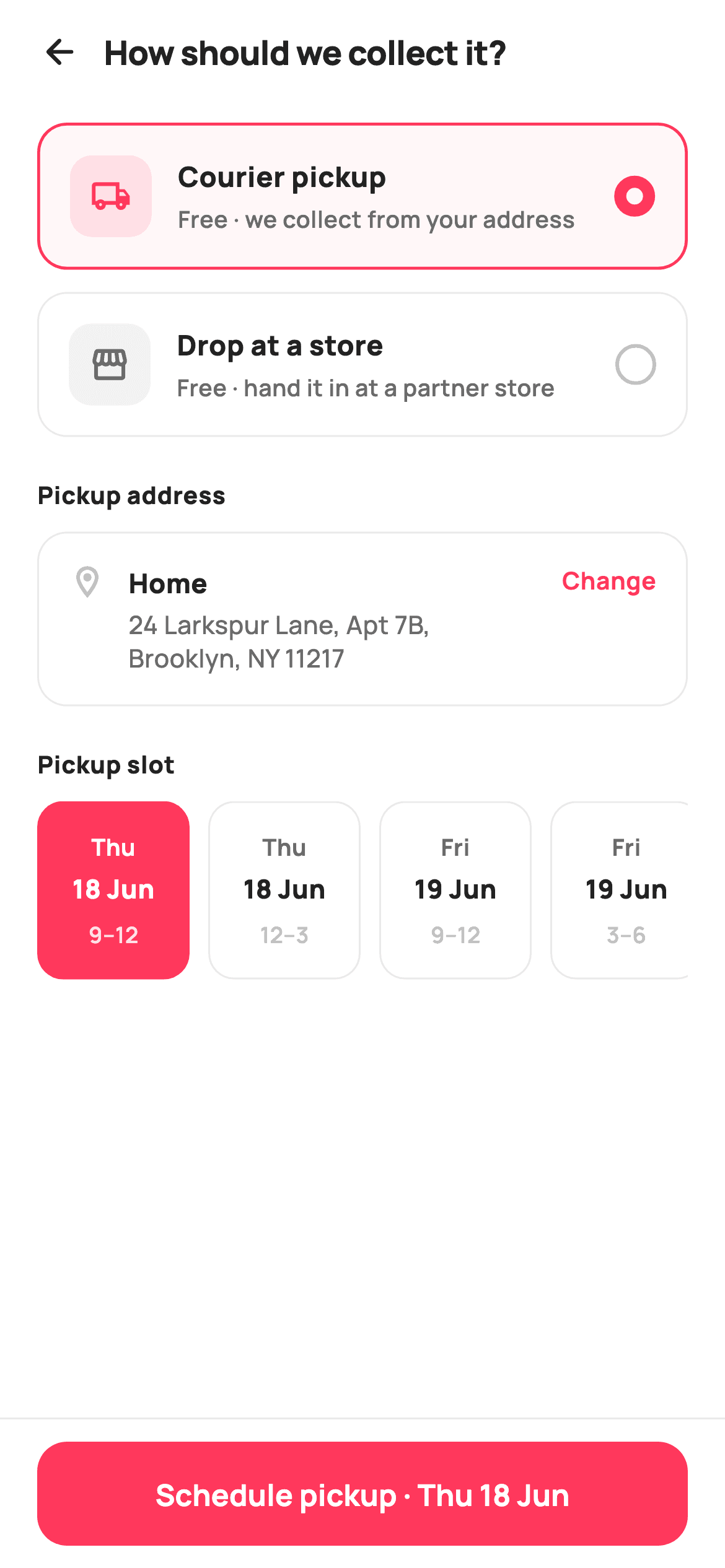
What you'll build
- ✓Two selectable method cards whose radio dot is drawn with nothing but a border-width jump
- ✓A conditional body that spreads pickup or drop-off widget lists straight into one ListView
- ✓A horizontal date/time slot picker whose selected chip inverts to a coral fill
- ✓A store card with a CustomPaint mini-map — block grid, roads, park and a teardrop pin, zero assets
- ✓A pinned schedule bar that interpolates the chosen slot into its own label
Step-by-step build
Create the file
Add a new file at lib/ecom_orders_return_method/ecom_orders_return_method_screen.dart in your Flutter project.
Register the bundled fonts
No external packages — this is pure Flutter. It does bundle its design font (Manrope), so drop the font file into fonts/ and declare it in pubspec.yaml:
flutter:
  fonts:
    - family: Manrope
      fonts:
- asset: fonts/Manrope-Regular.ttfBuild it, piece by piece
Here's how the screen goes together. Each block below is a real slice of the code with a plain-English explanation — paste them in order, or grab the whole file from the next section.
Two booleans of state and a slot table
import 'package:flutter/material.dart';

/// StyleCart — Pickup or Drop-off.
///
/// Choose how the return travels back: a courier pickup (reveals a pickup
/// address + a horizontal slot picker) or a drop-off at a partner store
/// (reveals a painted mini-map store card). A pinned bar schedules the return.
///
/// Self-contained per CONVENTIONS.md: pure Flutter, bundled Manrope, inline
/// Airbnb-style tokens, own light theme + SafeArea. Painter-only graphics.
/// Exposes callbacks only.
class EcomOrdersReturnMethodScreen extends StatefulWidget {
  const EcomOrdersReturnMethodScreen({
    super.key,
    this.onBack,
    this.onChangeAddress,
    this.onSchedule,
  });

  final VoidCallback? onBack;
  final VoidCallback? onChangeAddress;

  /// Fires with `true` for courier pickup, `false` for store drop-off.
  final ValueChanged<bool>? onSchedule;

  @override
  State<EcomOrdersReturnMethodScreen> createState() =>
      _EcomOrdersReturnMethodScreenState();
}

class _EcomOrdersReturnMethodScreenState
    extends State<EcomOrdersReturnMethodScreen> {
  static const String _font = 'Manrope';
  static const Color _canvas = Color(0xFFFFFFFF);
  static const Color _ink = Color(0xFF222222);
  static const Color _muted = Color(0xFF6A6A6A);
  static const Color _faint = Color(0xFFC1C1C1);
  static const Color _brand = Color(0xFFFF385C);
  static const Color _surface = Color(0xFFF2F2F2);
  static const Color _success = Color(0xFF2E9E5B);
  static const Color _hairline = Color(0xFFEBEBEB);

  bool _pickup = true;
  int _slot = 0;

  static const List<_Slot> _slots = <_Slot>[
    _Slot('Thu', '18 Jun', '9–12'),
    _Slot('Thu', '18 Jun', '12–3'),
    _Slot('Fri', '19 Jun', '9–12'),
    _Slot('Fri', '19 Jun', '3–6'),
    _Slot('Sat', '20 Jun', '10–1'),
  ];
The widget is stateful but its entire state is `bool _pickup` and `int _slot` — which method is chosen and which slot chip is lit. Three callbacks go out: `onBack`, `onChangeAddress`, and `onSchedule`, which is typed `ValueChanged<bool>` so one handler serves both CTAs — `true` means courier pickup, `false` means drop-off. The palette is Airbnb-flavoured: `_brand` coral `0xFFFF385C` for selection and the CTA, with `_success` green kept aside solely for the store's Open-now badge. The five pickup windows live in `static const List<_Slot> _slots` as `(day, date, window)` value objects, so the chip copy is data, not widget code.
One ListView, two bodies
  @override
  Widget build(BuildContext context) {
    return Theme(
      data: ThemeData.light(useMaterial3: true),
      child: Scaffold(
        backgroundColor: _canvas,
        body: SafeArea(
          child: Column(
            children: <Widget>[
              _header(),
              Expanded(
                child: ListView(
                  padding: const EdgeInsets.fromLTRB(20, 8, 20, 24),
                  children: <Widget>[
                    _methodCard(
                      pickup: true,
                      icon: Icons.local_shipping_outlined,
                      title: 'Courier pickup',
                      subtitle: 'Free · we collect from your address',
                    ),
                    const SizedBox(height: 12),
                    _methodCard(
                      pickup: false,
                      icon: Icons.storefront_outlined,
                      title: 'Drop at a store',
                      subtitle: 'Free · hand it in at a partner store',
                    ),
                    const SizedBox(height: 22),
                    if (_pickup) ..._pickupDetails() else ..._dropDetails(),
                  ],
                ),
              ),
              _scheduleBar(),
            ],
          ),
        ),
      ),
    );
  }

  Widget _header() {
    return Padding(
      padding: const EdgeInsets.fromLTRB(8, 4, 20, 6),
      child: Row(
        children: <Widget>[
          IconButton(
            onPressed: widget.onBack,
            icon: const Icon(Icons.arrow_back_rounded, size: 22, color: _ink),
          ),
          const Text(
            'How should we collect it?',
            style: TextStyle(
              fontFamily: _font,
              fontSize: 18,
              fontWeight: FontWeight.w800,
              letterSpacing: -0.3,
              color: _ink,
            ),
          ),
        ],
      ),
    );
  }
`build` wraps everything in `Theme(data: ThemeData.light(useMaterial3: true))` so the screen keeps its own light look regardless of the host app's theme. The Column stacks the header, an `Expanded` ListView, and `_scheduleBar` as a sibling — outside the scroll view, which is what pins it. The interesting line is 82: `if (_pickup) ..._pickupDetails() else ..._dropDetails()` — both builders return `List<Widget>` and the collection-if spreads whichever applies directly into the ListView's children, so switching method is just a `setState` rebuild, no navigation and no nested scroll view. The header's `fromLTRB(8, 4, 20, 6)` padding is asymmetric because the back `IconButton` brings its own touch padding on the left.
Method cards with a border-trick radio
  Widget _methodCard({
    required bool pickup,
    required IconData icon,
    required String title,
    required String subtitle,
  }) {
    final bool on = _pickup == pickup;
    return GestureDetector(
      onTap: () => setState(() => _pickup = pickup),
      child: Container(
        padding: const EdgeInsets.all(16),
        decoration: BoxDecoration(
          color: on ? _brand.withValues(alpha: 0.04) : _canvas,
          borderRadius: BorderRadius.circular(16),
          border: Border.all(
            color: on ? _brand : _hairline,
            width: on ? 1.6 : 1,
          ),
        ),
        child: Row(
          children: <Widget>[
            Container(
              width: 44,
              height: 44,
              alignment: Alignment.center,
              decoration: BoxDecoration(
                color: on ? _brand.withValues(alpha: 0.12) : _surface,
                borderRadius: BorderRadius.circular(12),
              ),
              child: Icon(icon, size: 22, color: on ? _brand : _muted),
            ),
            const SizedBox(width: 14),
            Expanded(
              child: Column(
                crossAxisAlignment: CrossAxisAlignment.start,
                children: <Widget>[
                  Text(
                    title,
                    style: const TextStyle(
                      fontFamily: _font,
                      fontSize: 15,
                      fontWeight: FontWeight.w800,
                      color: _ink,
                    ),
                  ),
                  const SizedBox(height: 3),
                  Text(
                    subtitle,
                    style: const TextStyle(
                      fontFamily: _font,
                      fontSize: 12.5,
                      fontWeight: FontWeight.w600,
                      color: _muted,
                    ),
                  ),
                ],
              ),
            ),
            const SizedBox(width: 10),
            Container(
              width: 22,
              height: 22,
              decoration: BoxDecoration(
                shape: BoxShape.circle,
                border: Border.all(
                  color: on ? _brand : _faint,
                  width: on ? 6.5 : 2,
                ),
              ),
            ),
          ],
        ),
      ),
    );
  }
Each `_methodCard` carries its own identity as a `pickup` bool and computes `on = _pickup == pickup`, so tapping either card is one `setState(() => _pickup = pickup)` and the pair can never both be selected. Selection is shown three ways at once: the card fills with `_brand.withValues(alpha: 0.04)`, the border swaps from a 1px `_hairline` to a 1.6px coral, and the leading icon tile re-tints from `_surface` grey to 12% coral. The radio itself is the neat part — a bare 22px circle `Container` whose border width jumps from 2 to 6.5 when active; at that diameter the thick coral ring closes in around a small white hole, reading as a filled radio without a `Radio` widget or any inner child.
Pickup details: address row and slot rail
  List<Widget> _pickupDetails() {
    return <Widget>[
      _sectionTitle('Pickup address'),
      const SizedBox(height: 10),
      GestureDetector(
        onTap: widget.onChangeAddress,
        child: Container(
          padding: const EdgeInsets.all(16),
          decoration: BoxDecoration(
            color: _canvas,
            borderRadius: BorderRadius.circular(16),
            border: Border.all(color: _hairline),
          ),
          child: Row(
            crossAxisAlignment: CrossAxisAlignment.start,
            children: <Widget>[
              const Icon(Icons.location_on_outlined, size: 20, color: _faint),
              const SizedBox(width: 12),
              const Expanded(
                child: Column(
                  crossAxisAlignment: CrossAxisAlignment.start,
                  children: <Widget>[
                    Text(
                      'Home',
                      style: TextStyle(
                        fontFamily: _font,
                        fontSize: 14.5,
                        fontWeight: FontWeight.w800,
                        color: _ink,
                      ),
                    ),
                    SizedBox(height: 3),
                    Text(
                      '24 Larkspur Lane, Apt 7B, Brooklyn, NY 11217',
                      style: TextStyle(
                        fontFamily: _font,
                        fontSize: 13.5,
                        fontWeight: FontWeight.w500,
                        height: 1.35,
                        color: _muted,
                      ),
                    ),
                  ],
                ),
              ),
              SizedBox(width: 8),
              Text(
                'Change',
                style: TextStyle(
                  fontFamily: _font,
                  fontSize: 13,
                  fontWeight: FontWeight.w700,
                  color: _brand,
                ),
              ),
            ],
          ),
        ),
      ),
      const SizedBox(height: 22),
      _sectionTitle('Pickup slot'),
      const SizedBox(height: 10),
      SizedBox(
        height: 96,
        child: ListView.separated(
          scrollDirection: Axis.horizontal,
          itemCount: _slots.length,
          separatorBuilder: (BuildContext c, int idx) =>
              const SizedBox(width: 10),
          itemBuilder: (BuildContext c, int i) => _slotCard(i),
        ),
      ),
    ];
  }
`_pickupDetails` returns a plain widget list: a section title, the address card, another title, and the slot rail. The entire address card sits inside a `GestureDetector` wired to `widget.onChangeAddress`, so the tap target is the full card while the coral 'Change' text is only the visual affordance — far easier to hit than a link-sized target. `crossAxisAlignment: CrossAxisAlignment.start` keeps the location pin aligned with the 'Home' line when the two-line Brooklyn address wraps. The slots render inside a fixed `SizedBox(height: 96)` holding a horizontal `ListView.separated` with 10px separators, so five chips scroll off-screen gracefully on narrow phones instead of shrinking.
Slot chips that invert when chosen
  Widget _slotCard(int i) {
    final _Slot s = _slots[i];
    final bool on = _slot == i;
    return GestureDetector(
      onTap: () => setState(() => _slot = i),
      child: Container(
        width: 82,
        padding: const EdgeInsets.symmetric(vertical: 12),
        decoration: BoxDecoration(
          color: on ? _brand : _canvas,
          borderRadius: BorderRadius.circular(14),
          border: Border.all(color: on ? _brand : _hairline),
        ),
        child: Column(
          mainAxisAlignment: MainAxisAlignment.center,
          children: <Widget>[
            Text(
              s.day,
              style: TextStyle(
                fontFamily: _font,
                fontSize: 12.5,
                fontWeight: FontWeight.w700,
                color: on ? _canvas : _muted,
              ),
            ),
            const SizedBox(height: 4),
            Text(
              s.date,
              style: TextStyle(
                fontFamily: _font,
                fontSize: 14,
                fontWeight: FontWeight.w800,
                color: on ? _canvas : _ink,
              ),
            ),
            const SizedBox(height: 6),
            Text(
              s.window,
              style: TextStyle(
                fontFamily: _font,
                fontSize: 12,
                fontWeight: FontWeight.w600,
                color: on ? _canvas.withValues(alpha: 0.85) : _faint,
              ),
            ),
          ],
        ),
      ),
    );
  }
`_slotCard(i)` compares `_slot == i` and inverts the whole chip on selection: the background flips from `_canvas` white to solid `_brand`, and every text colour flips to white so contrast survives the fill. The three lines keep their hierarchy even on the coral chip — day at `w700` muted-or-white, date at 14px `w800` as the anchor, and the time window dimmed to `_canvas.withValues(alpha: 0.85)` so it stays subordinate on both states. A fixed `width: 82` with vertical-only padding gives every chip the same footprint, which is what makes the rail scan like a calendar strip.
Drop-off details: painted map card and QR note
  List<Widget> _dropDetails() {
    return <Widget>[
      _sectionTitle('Nearest drop-off store'),
      const SizedBox(height: 10),
      Container(
        decoration: BoxDecoration(
          color: _canvas,
          borderRadius: BorderRadius.circular(16),
          border: Border.all(color: _hairline),
        ),
        child: Column(
          children: <Widget>[
            ClipRRect(
              borderRadius: const BorderRadius.vertical(
                  top: Radius.circular(16)),
              child: SizedBox(
                height: 120,
                width: double.infinity,
                child: CustomPaint(painter: _MiniMapPainter()),
              ),
            ),
            Padding(
              padding: const EdgeInsets.all(16),
              child: Row(
                crossAxisAlignment: CrossAxisAlignment.start,
                children: <Widget>[
                  const Expanded(
                    child: Column(
                      crossAxisAlignment: CrossAxisAlignment.start,
                      children: <Widget>[
                        Text(
                          'StyleCart · SoHo',
                          style: TextStyle(
                            fontFamily: _font,
                            fontSize: 15,
                            fontWeight: FontWeight.w800,
                            color: _ink,
                          ),
                        ),
                        SizedBox(height: 3),
                        Text(
                          '112 Spring St · 0.6 mi away',
                          style: TextStyle(
                            fontFamily: _font,
                            fontSize: 13,
                            fontWeight: FontWeight.w600,
                            color: _muted,
                          ),
                        ),
                      ],
                    ),
                  ),
                  Container(
                    padding: const EdgeInsets.symmetric(
                        horizontal: 10, vertical: 6),
                    decoration: BoxDecoration(
                      color: _success.withValues(alpha: 0.12),
                      borderRadius: BorderRadius.circular(8),
                    ),
                    child: const Text(
                      'Open now',
                      style: TextStyle(
                        fontFamily: _font,
                        fontSize: 12,
                        fontWeight: FontWeight.w700,
                        color: _success,
                      ),
                    ),
                  ),
                ],
              ),
            ),
          ],
        ),
      ),
      const SizedBox(height: 14),
      Container(
        padding: const EdgeInsets.all(14),
        decoration: BoxDecoration(
          color: _surface,
          borderRadius: BorderRadius.circular(14),
        ),
        child: Row(
          children: const <Widget>[
            Icon(Icons.info_outline_rounded, size: 18, color: _muted),
            SizedBox(width: 10),
            Expanded(
              child: Text(
                'Drop off any time within 7 days. Bring the QR label we’ll '
                'send to your email.',
                style: TextStyle(
                  fontFamily: _font,
                  fontSize: 12.5,
                  fontWeight: FontWeight.w500,
                  height: 1.4,
                  color: _muted,
                ),
              ),
            ),
          ],
        ),
      ),
    ];
  }
The store card is a bordered Column whose top half is a `SizedBox(height: 120)` filled by `CustomPaint(painter: _MiniMapPainter())`; a `ClipRRect` rounds only the top two corners so the map fuses with the card instead of floating inside it. Below, the store row pairs 'StyleCart · SoHo' and its '0.6 mi away' distance with an 'Open now' pill in `_success` green over a 12% tint — the one place the green token appears, so open status pops against an otherwise coral screen. A separate `_surface` note card with an info icon carries the operational fine print: seven days to drop off, bring the emailed QR label.
A schedule bar that says what it will do
  Widget _sectionTitle(String text) {
    return Text(
      text,
      style: const TextStyle(
        fontFamily: _font,
        fontSize: 13,
        fontWeight: FontWeight.w800,
        letterSpacing: 0.3,
        color: _ink,
      ),
    );
  }

  Widget _scheduleBar() {
    return Container(
      decoration: const BoxDecoration(
        color: _canvas,
        border: Border(top: BorderSide(color: _hairline)),
      ),
      child: SafeArea(
        top: false,
        child: Padding(
          padding: const EdgeInsets.fromLTRB(20, 12, 20, 12),
          child: SizedBox(
            height: 56,
            child: FilledButton(
              onPressed: () => widget.onSchedule?.call(_pickup),
              style: FilledButton.styleFrom(
                backgroundColor: _brand,
                foregroundColor: _canvas,
                minimumSize: const Size.fromHeight(56),
                shape: RoundedRectangleBorder(
                  borderRadius: BorderRadius.circular(16),
                ),
              ),
              child: Text(
                _pickup
                    ? 'Schedule pickup · ${_slots[_slot].day} ${_slots[_slot].date}'
                    : 'Confirm drop-off',
                style: const TextStyle(
                  fontFamily: _font,
                  fontSize: 16,
                  fontWeight: FontWeight.w700,
                ),
              ),
            ),
          ),
        ),
      ),
    );
  }
}

class _Slot {
  const _Slot(this.day, this.date, this.window);
  final String day;
  final String date;
  final String window;
}
`_scheduleBar` is a top-hairlined Container wrapping `SafeArea(top: false)`, so the white background extends beneath the home indicator while the 56px `FilledButton` stays above it. The label is the screen's payoff: in pickup mode it interpolates the live selection — `'Schedule pickup · ${_slots[_slot].day} ${_slots[_slot].date}'` renders as 'Schedule pickup · Thu 18 Jun' — and in drop-off mode it reads 'Confirm drop-off', so the button restates the decision before committing it. `onPressed` calls `widget.onSchedule?.call(_pickup)`, handing the backend the single bool it needs. The tiny `_Slot` class at the end is just three final Strings with a const constructor.
Painting the mini-map
/// A lightweight painted map preview: block grid, two roads, a park, and a
/// brand store pin — no tiles, no network.
class _MiniMapPainter extends CustomPainter {
  const _MiniMapPainter();

  @override
  void paint(Canvas canvas, Size size) {
    final Rect r = Offset.zero & size;
    canvas.drawRect(r, Paint()..color = const Color(0xFFEDF0F2));

    final Paint block = Paint()..color = const Color(0xFFE2E7EA);
    const double cell = 34;
    for (double y = -8; y < size.height; y += cell) {
      for (double x = -8; x < size.width; x += cell) {
        canvas.drawRRect(
          RRect.fromRectAndRadius(
            Rect.fromLTWH(x + 4, y + 4, cell - 10, cell - 10),
            const Radius.circular(3),
          ),
          block,
        );
      }
    }

    // Park patch.
    canvas.drawRRect(
      RRect.fromRectAndRadius(
        Rect.fromLTWH(size.width * 0.06, size.height * 0.5,
            size.width * 0.26, size.height * 0.4),
        const Radius.circular(6),
      ),
      Paint()..color = const Color(0xFFCFE6D2),
    );

    // Roads.
    final Paint road = Paint()
      ..color = const Color(0xFFFFFFFF)
      ..strokeWidth = 9
      ..strokeCap = StrokeCap.round;
    canvas.drawLine(
        Offset(0, size.height * 0.62), Offset(size.width, size.height * 0.42),
        road);
    canvas.drawLine(
        Offset(size.width * 0.66, 0), Offset(size.width * 0.78, size.height),
        road);

    // Store pin (teardrop) at the road junction.
    final Offset pin = Offset(size.width * 0.7, size.height * 0.5);
    const double pr = 11;
    final Path tear = Path()
      ..moveTo(pin.dx, pin.dy + pr * 1.7)
      ..quadraticBezierTo(pin.dx - pr, pin.dy + pr * 0.4, pin.dx - pr,
          pin.dy - pr * 0.2)
      ..arcToPoint(Offset(pin.dx + pr, pin.dy - pr * 0.2),
          radius: const Radius.circular(pr))
      ..quadraticBezierTo(
          pin.dx + pr, pin.dy + pr * 0.4, pin.dx, pin.dy + pr * 1.7)
      ..close();
    canvas.drawShadow(tear, const Color(0x55000000), 3, true);
    canvas.drawPath(tear, Paint()..color = const Color(0xFFFF385C));
    canvas.drawCircle(
        Offset(pin.dx, pin.dy - pr * 0.15), 4, Paint()..color = Colors.white);
  }

  @override
  bool shouldRepaint(_MiniMapPainter old) => false;
}
`_MiniMapPainter` fakes a map tile in four layers with no network and no image. It floods the canvas `0xFFEDF0F2`, then loops a 34px grid of small rounded rects starting at `-8` so partial blocks bleed off every edge like real buildings at a viewport boundary. A green `0xFFCFE6D2` RRect sized in fractions of `size` becomes the park, and two 9px white round-cap `drawLine` roads cross the canvas at slight diagonals. The teardrop pin sits at `(0.7w, 0.5h)` — deliberately on the road junction — built as a `Path` of two quadratic béziers meeting an `arcToPoint` for the round head, given depth by `drawShadow`, filled with the same `0xFFFF385C` brand coral, and finished with a 4px white dot. `shouldRepaint` returns `false` since nothing here reads state.
Full code
The complete, ready-to-paste source. Free to use in your projects — one click copies it all.
import 'package:flutter/material.dart';
/// StyleCart — Pickup or Drop-off.
///
/// Choose how the return travels back: a courier pickup (reveals a pickup
/// address + a horizontal slot picker) or a drop-off at a partner store
/// (reveals a painted mini-map store card). A pinned bar schedules the return.
///
/// Self-contained per CONVENTIONS.md: pure Flutter, bundled Manrope, inline
/// Airbnb-style tokens, own light theme + SafeArea. Painter-only graphics.
/// Exposes callbacks only.
class EcomOrdersReturnMethodScreen extends StatefulWidget {
const EcomOrdersReturnMethodScreen({
super.key,
this.onBack,
this.onChangeAddress,
this.onSchedule,
});
final VoidCallback? onBack;
final VoidCallback? onChangeAddress;
/// Fires with `true` for courier pickup, `false` for store drop-off.
final ValueChanged<bool>? onSchedule;
@override
State<EcomOrdersReturnMethodScreen> createState() =>
_EcomOrdersReturnMethodScreenState();
}
class _EcomOrdersReturnMethodScreenState
extends State<EcomOrdersReturnMethodScreen> {
static const String _font = 'Manrope';
static const Color _canvas = Color(0xFFFFFFFF);
static const Color _ink = Color(0xFF222222);
static const Color _muted = Color(0xFF6A6A6A);
static const Color _faint = Color(0xFFC1C1C1);
static const Color _brand = Color(0xFFFF385C);
static const Color _surface = Color(0xFFF2F2F2);
static const Color _success = Color(0xFF2E9E5B);
static const Color _hairline = Color(0xFFEBEBEB);
bool _pickup = true;
int _slot = 0;
static const List<_Slot> _slots = <_Slot>[
_Slot('Thu', '18 Jun', '9–12'),
_Slot('Thu', '18 Jun', '12–3'),
_Slot('Fri', '19 Jun', '9–12'),
_Slot('Fri', '19 Jun', '3–6'),
_Slot('Sat', '20 Jun', '10–1'),
];
@override
Widget build(BuildContext context) {
return Theme(
data: ThemeData.light(useMaterial3: true),
child: Scaffold(
backgroundColor: _canvas,
body: SafeArea(
child: Column(
children: <Widget>[
_header(),
Expanded(
child: ListView(
padding: const EdgeInsets.fromLTRB(20, 8, 20, 24),
children: <Widget>[
_methodCard(
pickup: true,
icon: Icons.local_shipping_outlined,
title: 'Courier pickup',
subtitle: 'Free · we collect from your address',
),
const SizedBox(height: 12),
_methodCard(
pickup: false,
icon: Icons.storefront_outlined,
title: 'Drop at a store',
subtitle: 'Free · hand it in at a partner store',
),
const SizedBox(height: 22),
if (_pickup) ..._pickupDetails() else ..._dropDetails(),
],
),
),
_scheduleBar(),
],
),
),
),
);
}
Widget _header() {
return Padding(
padding: const EdgeInsets.fromLTRB(8, 4, 20, 6),
child: Row(
children: <Widget>[
IconButton(
onPressed: widget.onBack,
icon: const Icon(Icons.arrow_back_rounded, size: 22, color: _ink),
),
const Text(
'How should we collect it?',
style: TextStyle(
fontFamily: _font,
fontSize: 18,
fontWeight: FontWeight.w800,
letterSpacing: -0.3,
color: _ink,
),
),
],
),
);
}
Widget _methodCard({
required bool pickup,
required IconData icon,
required String title,
required String subtitle,
}) {
final bool on = _pickup == pickup;
return GestureDetector(
onTap: () => setState(() => _pickup = pickup),
child: Container(
padding: const EdgeInsets.all(16),
decoration: BoxDecoration(
color: on ? _brand.withValues(alpha: 0.04) : _canvas,
borderRadius: BorderRadius.circular(16),
border: Border.all(
color: on ? _brand : _hairline,
width: on ? 1.6 : 1,
),
),
child: Row(
children: <Widget>[
Container(
width: 44,
height: 44,
alignment: Alignment.center,
decoration: BoxDecoration(
color: on ? _brand.withValues(alpha: 0.12) : _surface,
borderRadius: BorderRadius.circular(12),
),
child: Icon(icon, size: 22, color: on ? _brand : _muted),
),
const SizedBox(width: 14),
Expanded(
child: Column(
crossAxisAlignment: CrossAxisAlignment.start,
children: <Widget>[
Text(
title,
style: const TextStyle(
fontFamily: _font,
fontSize: 15,
fontWeight: FontWeight.w800,
color: _ink,
),
),
const SizedBox(height: 3),
Text(
subtitle,
style: const TextStyle(
fontFamily: _font,
fontSize: 12.5,
fontWeight: FontWeight.w600,
color: _muted,
),
),
],
),
),
const SizedBox(width: 10),
Container(
width: 22,
height: 22,
decoration: BoxDecoration(
shape: BoxShape.circle,
border: Border.all(
color: on ? _brand : _faint,
width: on ? 6.5 : 2,
),
),
),
],
),
),
);
}
List<Widget> _pickupDetails() {
return <Widget>[
_sectionTitle('Pickup address'),
const SizedBox(height: 10),
GestureDetector(
onTap: widget.onChangeAddress,
child: Container(
padding: const EdgeInsets.all(16),
decoration: BoxDecoration(
color: _canvas,
borderRadius: BorderRadius.circular(16),
border: Border.all(color: _hairline),
),
child: Row(
crossAxisAlignment: CrossAxisAlignment.start,
children: <Widget>[
const Icon(Icons.location_on_outlined, size: 20, color: _faint),
const SizedBox(width: 12),
const Expanded(
child: Column(
crossAxisAlignment: CrossAxisAlignment.start,
children: <Widget>[
Text(
'Home',
style: TextStyle(
fontFamily: _font,
fontSize: 14.5,
fontWeight: FontWeight.w800,
color: _ink,
),
),
SizedBox(height: 3),
Text(
'24 Larkspur Lane, Apt 7B, Brooklyn, NY 11217',
style: TextStyle(
fontFamily: _font,
fontSize: 13.5,
fontWeight: FontWeight.w500,
height: 1.35,
color: _muted,
),
),
],
),
),
SizedBox(width: 8),
Text(
'Change',
style: TextStyle(
fontFamily: _font,
fontSize: 13,
fontWeight: FontWeight.w700,
color: _brand,
),
),
],
),
),
),
const SizedBox(height: 22),
_sectionTitle('Pickup slot'),
const SizedBox(height: 10),
SizedBox(
height: 96,
child: ListView.separated(
scrollDirection: Axis.horizontal,
itemCount: _slots.length,
separatorBuilder: (BuildContext c, int idx) =>
const SizedBox(width: 10),
itemBuilder: (BuildContext c, int i) => _slotCard(i),
),
),
];
}
Widget _slotCard(int i) {
final _Slot s = _slots[i];
final bool on = _slot == i;
return GestureDetector(
onTap: () => setState(() => _slot = i),
child: Container(
width: 82,
padding: const EdgeInsets.symmetric(vertical: 12),
decoration: BoxDecoration(
color: on ? _brand : _canvas,
borderRadius: BorderRadius.circular(14),
border: Border.all(color: on ? _brand : _hairline),
),
child: Column(
mainAxisAlignment: MainAxisAlignment.center,
children: <Widget>[
Text(
s.day,
style: TextStyle(
fontFamily: _font,
fontSize: 12.5,
fontWeight: FontWeight.w700,
color: on ? _canvas : _muted,
),
),
const SizedBox(height: 4),
Text(
s.date,
style: TextStyle(
fontFamily: _font,
fontSize: 14,
fontWeight: FontWeight.w800,
color: on ? _canvas : _ink,
),
),
const SizedBox(height: 6),
Text(
s.window,
style: TextStyle(
fontFamily: _font,
fontSize: 12,
fontWeight: FontWeight.w600,
color: on ? _canvas.withValues(alpha: 0.85) : _faint,
),
),
],
),
),
);
}
List<Widget> _dropDetails() {
return <Widget>[
_sectionTitle('Nearest drop-off store'),
const SizedBox(height: 10),
Container(
decoration: BoxDecoration(
color: _canvas,
borderRadius: BorderRadius.circular(16),
border: Border.all(color: _hairline),
),
child: Column(
children: <Widget>[
ClipRRect(
borderRadius: const BorderRadius.vertical(
top: Radius.circular(16)),
child: SizedBox(
height: 120,
width: double.infinity,
child: CustomPaint(painter: _MiniMapPainter()),
),
),
Padding(
padding: const EdgeInsets.all(16),
child: Row(
crossAxisAlignment: CrossAxisAlignment.start,
children: <Widget>[
const Expanded(
child: Column(
crossAxisAlignment: CrossAxisAlignment.start,
children: <Widget>[
Text(
'StyleCart · SoHo',
style: TextStyle(
fontFamily: _font,
fontSize: 15,
fontWeight: FontWeight.w800,
color: _ink,
),
),
SizedBox(height: 3),
Text(
'112 Spring St · 0.6 mi away',
style: TextStyle(
fontFamily: _font,
fontSize: 13,
fontWeight: FontWeight.w600,
color: _muted,
),
),
],
),
),
Container(
padding: const EdgeInsets.symmetric(
horizontal: 10, vertical: 6),
decoration: BoxDecoration(
color: _success.withValues(alpha: 0.12),
borderRadius: BorderRadius.circular(8),
),
child: const Text(
'Open now',
style: TextStyle(
fontFamily: _font,
fontSize: 12,
fontWeight: FontWeight.w700,
color: _success,
),
),
),
],
),
),
],
),
),
const SizedBox(height: 14),
Container(
padding: const EdgeInsets.all(14),
decoration: BoxDecoration(
color: _surface,
borderRadius: BorderRadius.circular(14),
),
child: Row(
children: const <Widget>[
Icon(Icons.info_outline_rounded, size: 18, color: _muted),
SizedBox(width: 10),
Expanded(
child: Text(
'Drop off any time within 7 days. Bring the QR label we’ll '
'send to your email.',
style: TextStyle(
fontFamily: _font,
fontSize: 12.5,
fontWeight: FontWeight.w500,
height: 1.4,
color: _muted,
),
),
),
],
),
),
];
}
Widget _sectionTitle(String text) {
return Text(
text,
style: const TextStyle(
fontFamily: _font,
fontSize: 13,
fontWeight: FontWeight.w800,
letterSpacing: 0.3,
color: _ink,
),
);
}
Widget _scheduleBar() {
return Container(
decoration: const BoxDecoration(
color: _canvas,
border: Border(top: BorderSide(color: _hairline)),
),
child: SafeArea(
top: false,
child: Padding(
padding: const EdgeInsets.fromLTRB(20, 12, 20, 12),
child: SizedBox(
height: 56,
child: FilledButton(
onPressed: () => widget.onSchedule?.call(_pickup),
style: FilledButton.styleFrom(
backgroundColor: _brand,
foregroundColor: _canvas,
minimumSize: const Size.fromHeight(56),
shape: RoundedRectangleBorder(
borderRadius: BorderRadius.circular(16),
),
),
child: Text(
_pickup
? 'Schedule pickup · ${_slots[_slot].day} ${_slots[_slot].date}'
: 'Confirm drop-off',
style: const TextStyle(
fontFamily: _font,
fontSize: 16,
fontWeight: FontWeight.w700,
),
),
),
),
),
),
);
}
}
class _Slot {
const _Slot(this.day, this.date, this.window);
final String day;
final String date;
final String window;
}
/// A lightweight painted map preview: block grid, two roads, a park, and a
/// brand store pin — no tiles, no network.
class _MiniMapPainter extends CustomPainter {
const _MiniMapPainter();
@override
void paint(Canvas canvas, Size size) {
final Rect r = Offset.zero & size;
canvas.drawRect(r, Paint()..color = const Color(0xFFEDF0F2));
final Paint block = Paint()..color = const Color(0xFFE2E7EA);
const double cell = 34;
for (double y = -8; y < size.height; y += cell) {
for (double x = -8; x < size.width; x += cell) {
canvas.drawRRect(
RRect.fromRectAndRadius(
Rect.fromLTWH(x + 4, y + 4, cell - 10, cell - 10),
const Radius.circular(3),
),
block,
);
}
}
// Park patch.
canvas.drawRRect(
RRect.fromRectAndRadius(
Rect.fromLTWH(size.width * 0.06, size.height * 0.5,
size.width * 0.26, size.height * 0.4),
const Radius.circular(6),
),
Paint()..color = const Color(0xFFCFE6D2),
);
// Roads.
final Paint road = Paint()
..color = const Color(0xFFFFFFFF)
..strokeWidth = 9
..strokeCap = StrokeCap.round;
canvas.drawLine(
Offset(0, size.height * 0.62), Offset(size.width, size.height * 0.42),
road);
canvas.drawLine(
Offset(size.width * 0.66, 0), Offset(size.width * 0.78, size.height),
road);
// Store pin (teardrop) at the road junction.
final Offset pin = Offset(size.width * 0.7, size.height * 0.5);
const double pr = 11;
final Path tear = Path()
..moveTo(pin.dx, pin.dy + pr * 1.7)
..quadraticBezierTo(pin.dx - pr, pin.dy + pr * 0.4, pin.dx - pr,
pin.dy - pr * 0.2)
..arcToPoint(Offset(pin.dx + pr, pin.dy - pr * 0.2),
radius: const Radius.circular(pr))
..quadraticBezierTo(
pin.dx + pr, pin.dy + pr * 0.4, pin.dx, pin.dy + pr * 1.7)
..close();
canvas.drawShadow(tear, const Color(0x55000000), 3, true);
canvas.drawPath(tear, Paint()..color = const Color(0xFFFF385C));
canvas.drawCircle(
Offset(pin.dx, pin.dy - pr * 0.15), 4, Paint()..color = Colors.white);
}
@override
bool shouldRepaint(_MiniMapPainter old) => false;
}
Plus bundled 5 binary assets (fonts/images). The CLI and MCP install those for you automatically.
Two faster ways to add it
Copy-paste works, but you can skip it entirely.
1. FlutterKit CLI
One command drops this screen — and its fonts — straight into your project.
$ flutterkit add ecom-orders-return-method2. AI agent (MCP)
Connect FlutterKit's MCP server in Claude or Cursor and just ask your agent to install ecom-orders-return-method — it fetches and writes the files for you.
FAQ
Is this return-method screen free to use in a commercial app?
Yes. FlutterKit screens are free to use, including commercially — drop this pickup/drop-off screen into a client project or a store release as-is or restyled, with no licence fee and no attribution required.
Does it need any packages, plugins, or downloaded fonts?
No packages at all — the code.json lists an empty dependency set. Even the mini-map is a `CustomPainter`, so there is no maps SDK to configure. The only asset is the bundled Manrope font family, referenced through the `_font` constant; register Manrope in your `pubspec.yaml` fonts section (or swap `_font` for a family you already ship) and the screen runs on plain Flutter.
Which Flutter version does this code require?
Flutter 3.27 or newer, because the tints use `Color.withValues(alpha: ...)` in the method cards, the slot chips, and the Open-now badge. On an older SDK, replace each `withValues(alpha: x)` with `withOpacity(x)`; the constructor also uses `super.key`, which needs Dart 2.17 / Flutter 3.0 at minimum.
How do I replace the painted mini-map with a real map?
Swap the `CustomPaint(painter: _MiniMapPainter())` inside the 120px `SizedBox` for a `GoogleMap` or `FlutterMap` widget centred on the store's coordinates — the `ClipRRect` above it already handles the rounded top corners. Keeping the painter as a loading placeholder also works well, since it costs nothing and matches the brand colour of a real pin marker.
How do I load real pickup slots instead of the hard-coded five?
Replace the `static const _slots` list with slots fetched from your API — keep the `_Slot(day, date, window)` shape, or map `DateTime` ranges into it with `intl` formatting. Nothing else changes: the rail's `itemCount`, the chip builder, and even the CTA label all read from `_slots[_slot]`, so the button keeps announcing the newly selected real slot automatically. Just reset `_slot = 0` when a fresh list arrives so the index stays valid.


