How to Build a Similar Products Discovery Screen in Flutter (Full Code + Preview)
The most valuable pixels on a product page are the ones shown after the shopper has decided about the item they came for. This tutorial builds StyleCart's similar-products screen in Flutter: a horizontal 'Complete the look' rail whose bundle button sums three prices with a single `fold`, then a two-column grid of look-alike items with a percent-off badge computed from the was-price, a frosted wishlist heart and a five-point star drawn by a `CustomPainter`. Everything is pure Flutter, driven by two small const lists.
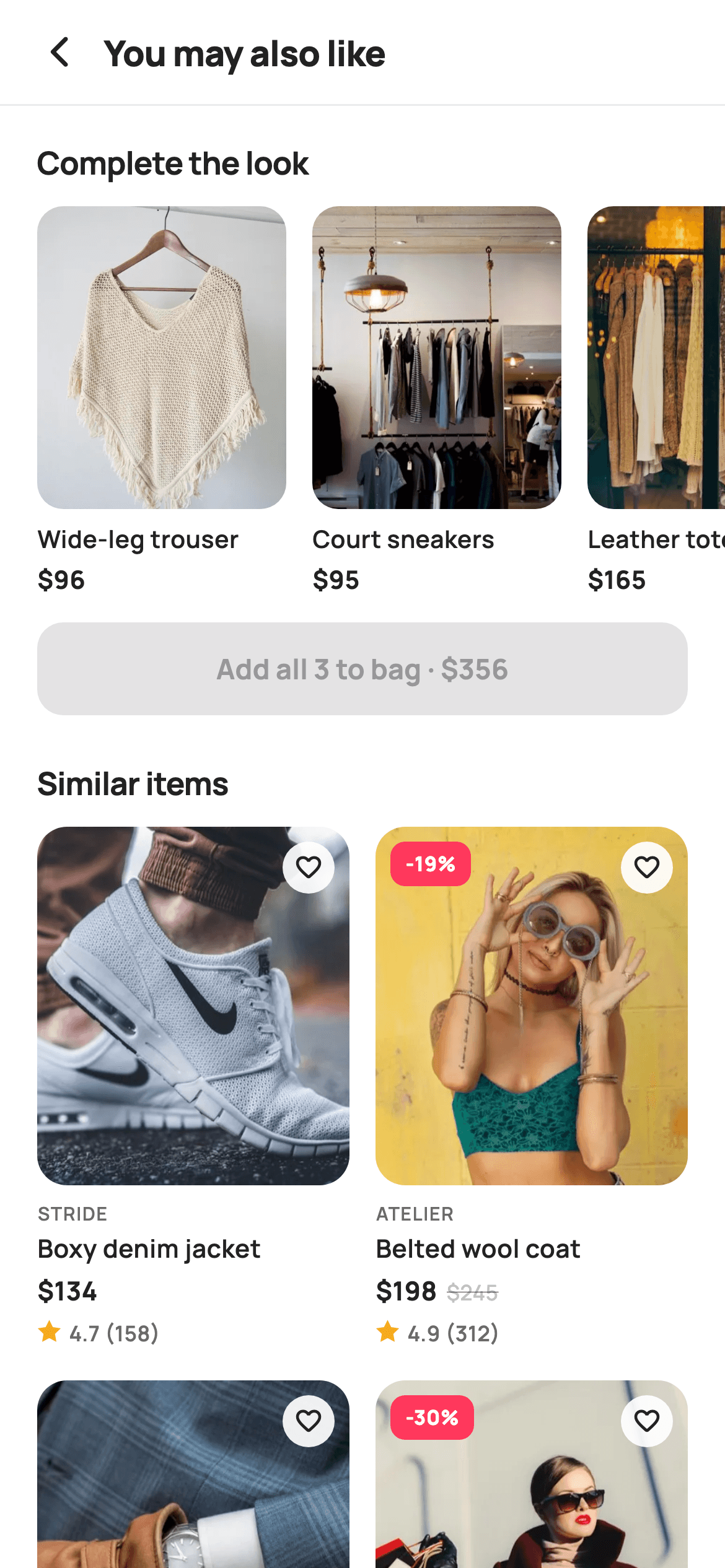
What you'll build
- ✓A horizontal `ListView.separated` rail of 134px product cards and a dark `FilledButton` whose label reads the bundle total from `_look.fold`
- ✓A non-scrolling `GridView.builder` nested inside the page `ListView` using `shrinkWrap` and `NeverScrollableScrollPhysics`
- ✓A product card where `sale` and `off` are derived from `p.was` and `p.price`, driving a coral `-24%` badge and a struck-through was-price
- ✓A translucent 28px wishlist heart built from `_canvas.withValues(alpha: 0.92)` over the image
- ✓A `_StarPainter` that walks ten polar points alternating outer and inner radius to draw an amber star
Step-by-step build
Create the file
Add a new file at lib/ecom_product_similar/ecom_product_similar_screen.dart in your Flutter project.
Register the bundled fonts
No external packages — this is pure Flutter. It does bundle its design font (Manrope), so drop the font file into fonts/ and declare it in pubspec.yaml:
flutter:
  fonts:
    - family: Manrope
      fonts:
- asset: fonts/Manrope-Regular.ttfBuild it, piece by piece
Here's how the screen goes together. Each block below is a real slice of the code with a plain-English explanation — paste them in order, or grab the whole file from the next section.
Callbacks, Airbnb-style tokens and two const product lists
import 'dart:math' as math;

import 'package:flutter/material.dart';

/// StyleCart — Similar Products.
///
/// Discovery off a product page: a "complete the look" rail with a bundle price,
/// then a two-column grid of visually-similar items with wishlist hearts,
/// painted ratings and prices.
///
/// Self-contained per CONVENTIONS.md: pure Flutter, bundled Manrope, inline
/// Airbnb-style tokens, own light theme + SafeArea, bundled webp. Stars are a
/// CustomPainter (no emoji glyph). Exposes callbacks only.
class EcomProductSimilarScreen extends StatelessWidget {
  const EcomProductSimilarScreen({
    super.key,
    this.onBack,
    this.onProduct,
    this.onAddLook,
  });

  final VoidCallback? onBack;
  final ValueChanged<String>? onProduct;
  final VoidCallback? onAddLook;

  static const String _font = 'Manrope';
  static const Color _canvas = Color(0xFFFFFFFF);
  static const Color _ink = Color(0xFF222222);
  static const Color _muted = Color(0xFF6A6A6A);
  static const Color _faint = Color(0xFFC1C1C1);
  static const Color _brand = Color(0xFFFF385C);
  static const Color _imageBg = Color(0xFFF5F5F5);
  static const Color _hairline = Color(0xFFEBEBEB);

  static const String _dir =
      'lib/screens/ecommerce/ecom_product_similar/images';

  static const List<_P> _look = <_P>[
    _P('Wide-leg trouser', 'Atelier', 96, 0, 4.7, 142, 'p01.webp'),
    _P('Court sneakers', 'Stride', 95, 0, 4.8, 268, 'p02.webp'),
    _P('Leather tote', 'Maison', 165, 0, 4.9, 204, 'p03.webp'),
  ];
  static const List<_P> _grid = <_P>[
    _P('Boxy denim jacket', 'Stride', 134, 0, 4.7, 158, 'p04.webp'),
    _P('Belted wool coat', 'Atelier', 198, 245, 4.9, 312, 'p05.webp'),
    _P('Silk slip dress', 'Aria', 138, 0, 4.5, 88, 'p06.webp'),
    _P('Knit cardigan', 'Maison', 64, 92, 4.4, 142, 'p07.webp'),
    _P('Cropped trench', 'Atelier', 158, 0, 4.8, 214, 'p08.webp'),
    _P('Ribbed knit top', 'Maison', 54, 0, 4.3, 74, 'p09.webp'),
    _P('Pleated midi skirt', 'Aria', 76, 105, 4.6, 120, 'p10.webp'),
  ];
`EcomProductSimilarScreen` is a `StatelessWidget` because nothing on it changes locally: it exposes `onBack`, `onProduct` (a `ValueChanged<String>` that receives the tapped product title) and `onAddLook`, and leaves the navigation and cart writes to the host app. The palette is deliberately restrained — `_ink` `#222222`, `_muted` `#6A6A6A`, `_faint` `#C1C1C1` for the struck-out price, and a single coral `_brand` `#FF385C` that appears only on the sale badge, so the discount is the one thing that shouts. The catalogue is two `static const List<_P>` lists: `_look` holds exactly three items (trouser, sneakers, tote) whose prices get summed into the bundle button, while `_grid` holds seven similar items. Notice the `was` column: items like the belted wool coat carry `198, 245` while most carry `was = 0`, and that zero is what later switches the sale treatment off.
Forcing a light theme and stacking rail and grid in one ListView
  @override
  Widget build(BuildContext context) {
    return Theme(
      data: ThemeData.light(useMaterial3: true),
      child: Scaffold(
        backgroundColor: _canvas,
        body: SafeArea(
          child: Column(
            children: <Widget>[
              _header(),
              const Divider(height: 1, color: _hairline),
              Expanded(
                child: ListView(
                  padding: const EdgeInsets.only(bottom: 24),
                  children: <Widget>[
                    _section('Complete the look', const EdgeInsets.fromLTRB(20, 18, 20, 12)),
                    _lookRail(),
                    Padding(
                      padding: const EdgeInsets.fromLTRB(20, 24, 20, 12),
                      child: _section('Similar items', EdgeInsets.zero),
                    ),
                    _gridView(),
                  ],
                ),
              ),
            ],
          ),
        ),
      ),
    );
  }
`build` wraps everything in `Theme(data: ThemeData.light(useMaterial3: true))` so the screen renders identically even if the host app is dark — a white `_canvas` product grid with `_ink` text would otherwise inherit dark surfaces and disappear. Inside the `SafeArea`, a `Column` pins `_header()` and a one-pixel `Divider` in `_hairline` `#EBEBEB` at the top, and an `Expanded` `ListView` carries the rest. That `ListView` has only four children: a section title, `_lookRail()`, a second section title, and `_gridView()`. The two section titles get different padding on purpose: the first passes `EdgeInsets.fromLTRB(20, 18, 20, 12)` straight into `_section`, while the second wraps `_section(..., EdgeInsets.zero)` in its own `Padding` with 24px of top space so the grid heading sits further from the bundle button above it. `padding: EdgeInsets.only(bottom: 24)` keeps the last grid row off the home indicator.
Header row and the reusable section title
  Widget _header() {
    return Padding(
      padding: const EdgeInsets.fromLTRB(8, 4, 20, 4),
      child: Row(
        children: <Widget>[
          IconButton(
            onPressed: onBack,
            icon: const Icon(Icons.arrow_back_ios_new_rounded,
                size: 20, color: _ink),
          ),
          const Expanded(
            child: Text(
              'You may also like',
              style: TextStyle(
                fontFamily: _font,
                fontSize: 19,
                fontWeight: FontWeight.w800,
                letterSpacing: -0.3,
                color: _ink,
              ),
            ),
          ),
        ],
      ),
    );
  }

  Widget _section(String t, EdgeInsets pad) {
    return Padding(
      padding: pad,
      child: Text(
        t,
        style: const TextStyle(
          fontFamily: _font,
          fontSize: 17,
          fontWeight: FontWeight.w700,
          letterSpacing: -0.3,
          color: _ink,
        ),
      ),
    );
  }
`_header` is a plain `Row` rather than an `AppBar`, which is why the left padding is 8 instead of 20: the `IconButton` carries its own 48px touch target, so 8px of padding lines its 20px `arrow_back_ios_new_rounded` glyph up with the 20px content margin used everywhere else. The title 'You may also like' sits in an `Expanded` `Text` at 19px Manrope w800 with `letterSpacing: -0.3`, tight tracking that reads as a display heading rather than body copy. `_section` is a two-line helper that takes the title string and an `EdgeInsets` so callers control spacing, and renders 17px w700 with the same negative tracking. Keeping the heading style in one place means the rail and grid headings can never drift apart when the font size is tuned later.
The Complete-the-look rail and the auto-summed bundle button
  Widget _lookRail() {
    final int bundle = _look.fold(0, (int s, _P p) => s + p.price);
    return Column(
      children: <Widget>[
        SizedBox(
          height: 210,
          child: ListView.separated(
            scrollDirection: Axis.horizontal,
            padding: const EdgeInsets.symmetric(horizontal: 20),
            itemCount: _look.length,
            separatorBuilder: (_, _) => const SizedBox(width: 14),
            itemBuilder: (BuildContext context, int i) {
              final _P p = _look[i];
              return GestureDetector(
                onTap: () => onProduct?.call(p.title),
                child: SizedBox(
                  width: 134,
                  child: Column(
                    crossAxisAlignment: CrossAxisAlignment.start,
                    children: <Widget>[
                      Expanded(
                        child: ClipRRect(
                          borderRadius: BorderRadius.circular(14),
                          child: Stack(
                            fit: StackFit.expand,
                            children: <Widget>[
                              Container(color: _imageBg),
                              Image.asset('$_dir/${p.asset}',
                                  fit: BoxFit.cover),
                            ],
                          ),
                        ),
                      ),
                      const SizedBox(height: 7),
                      Text(
                        p.title,
                        maxLines: 1,
                        overflow: TextOverflow.ellipsis,
                        style: const TextStyle(
                          fontFamily: _font,
                          fontSize: 13,
                          fontWeight: FontWeight.w600,
                          color: _ink,
                        ),
                      ),
                      const SizedBox(height: 2),
                      Text(
                        '\$${p.price}',
                        style: const TextStyle(
                          fontFamily: _font,
                          fontSize: 13.5,
                          fontWeight: FontWeight.w700,
                          color: _ink,
                        ),
                      ),
                    ],
                  ),
                ),
              );
            },
          ),
        ),
        const SizedBox(height: 14),
        Padding(
          padding: const EdgeInsets.symmetric(horizontal: 20),
          child: SizedBox(
            height: 50,
            width: double.infinity,
            child: FilledButton(
              onPressed: onAddLook,
              style: FilledButton.styleFrom(
                backgroundColor: _ink,
                foregroundColor: _canvas,
                shape: RoundedRectangleBorder(
                  borderRadius: BorderRadius.circular(14),
                ),
              ),
              child: Text(
                'Add all 3 to bag · \$$bundle',
                style: const TextStyle(
                  fontFamily: _font,
                  fontSize: 15,
                  fontWeight: FontWeight.w700,
                ),
              ),
            ),
          ),
        ),
      ],
    );
  }
The first line does the interesting work: `_look.fold(0, (s, p) => s + p.price)` totals the three rail prices (96 + 95 + 165 = 356) before any widget is built, and that `bundle` integer is interpolated into the button label `'Add all 3 to bag · \$$bundle'`. Because the label and the total come from the same list, editing `_look` can never leave a stale price on the button. The rail is a 210px-tall horizontal `ListView.separated` with 14px gaps and 20px edge padding; each item is a 134px-wide `Column` where the image is `Expanded` so it absorbs whatever height remains after the title and price lines. The image sits in a `ClipRRect` with 14px radius over a `Container(color: _imageBg)`, a `#F5F5F5` plate visible while the webp decodes. Tapping calls `onProduct?.call(p.title)`. The button is a 50px full-width `FilledButton` styled `_ink` on `_canvas` with 14px corners, matching the card radius so the rail reads as one component.
A grid that scrolls with the page instead of inside it
  Widget _gridView() {
    return GridView.builder(
      shrinkWrap: true,
      physics: const NeverScrollableScrollPhysics(),
      padding: const EdgeInsets.symmetric(horizontal: 20),
      gridDelegate: const SliverGridDelegateWithFixedCrossAxisCount(
        crossAxisCount: 2,
        mainAxisSpacing: 18,
        crossAxisSpacing: 14,
        childAspectRatio: 0.60,
      ),
      itemCount: _grid.length,
      itemBuilder: (BuildContext context, int i) => _card(_grid[i]),
    );
  }
`_gridView` is a `GridView.builder` living inside the outer `ListView`, and the two flags that make that work are `shrinkWrap: true`, so the grid measures its full height instead of demanding infinite space, and `physics: NeverScrollableScrollPhysics()`, so a vertical drag falls through to the page scroll rather than being captured by a second scrollable. `SliverGridDelegateWithFixedCrossAxisCount` fixes `crossAxisCount: 2` with `crossAxisSpacing: 14` (the same gap as the rail) and `mainAxisSpacing: 18`. The `childAspectRatio: 0.60` is the number to tune: with seven items the grid produces four rows, and 0.60 gives each cell enough height for a tall portrait image plus the four text lines the card stacks underneath. The horizontal padding of 20 matches the headings so the grid's left edge aligns with the section title above.
The product card: sale math, wishlist heart and strikethrough price
  Widget _card(_P p) {
    final bool sale = p.was > p.price && p.was > 0;
    final int off = sale ? (100 - (p.price * 100 / p.was)).round() : 0;
    return GestureDetector(
      onTap: () => onProduct?.call(p.title),
      child: Column(
        crossAxisAlignment: CrossAxisAlignment.start,
        children: <Widget>[
          Expanded(
            child: ClipRRect(
              borderRadius: BorderRadius.circular(16),
              child: Stack(
                fit: StackFit.expand,
                children: <Widget>[
                  Container(color: _imageBg),
                  Image.asset('$_dir/${p.asset}', fit: BoxFit.cover),
                  if (sale)
                    Positioned(
                      left: 8,
                      top: 8,
                      child: Container(
                        padding: const EdgeInsets.symmetric(
                            horizontal: 8, vertical: 4),
                        decoration: BoxDecoration(
                          color: _brand,
                          borderRadius: BorderRadius.circular(8),
                        ),
                        child: Text(
                          '-$off%',
                          style: const TextStyle(
                            fontFamily: _font,
                            fontSize: 11,
                            fontWeight: FontWeight.w800,
                            color: _canvas,
                          ),
                        ),
                      ),
                    ),
                  Positioned(
                    right: 8,
                    top: 8,
                    child: Container(
                      width: 28,
                      height: 28,
                      decoration: BoxDecoration(
                        color: _canvas.withValues(alpha: 0.92),
                        shape: BoxShape.circle,
                      ),
                      child: const Icon(Icons.favorite_border_rounded,
                          size: 16, color: _ink),
                    ),
                  ),
                ],
              ),
            ),
          ),
          const SizedBox(height: 8),
          Text(
            p.brand.toUpperCase(),
            style: const TextStyle(
              fontFamily: _font,
              fontSize: 10,
              fontWeight: FontWeight.w600,
              letterSpacing: 0.6,
              color: _muted,
            ),
          ),
          const SizedBox(height: 2),
          Text(
            p.title,
            maxLines: 1,
            overflow: TextOverflow.ellipsis,
            style: const TextStyle(
              fontFamily: _font,
              fontSize: 13.5,
              fontWeight: FontWeight.w600,
              color: _ink,
            ),
          ),
          const SizedBox(height: 4),
          Row(
            children: <Widget>[
              Text(
                '\$${p.price}',
                style: const TextStyle(
                  fontFamily: _font,
                  fontSize: 14,
                  fontWeight: FontWeight.w700,
                  color: _ink,
                ),
              ),
              if (sale) ...<Widget>[
                const SizedBox(width: 5),
                Text(
                  '\$${p.was}',
                  style: const TextStyle(
                    fontFamily: _font,
                    fontSize: 11.5,
                    fontWeight: FontWeight.w500,
                    color: _faint,
                    decoration: TextDecoration.lineThrough,
                  ),
                ),
              ],
            ],
          ),
          const SizedBox(height: 4),
          Row(
            children: <Widget>[
              SizedBox(
                width: 13,
                height: 13,
                child: CustomPaint(painter: _StarPainter()),
              ),
              const SizedBox(width: 4),
              Text(
                '${p.rating} (${p.reviews})',
                style: const TextStyle(
                  fontFamily: _font,
                  fontSize: 11.5,
                  fontWeight: FontWeight.w600,
                  color: _muted,
                ),
              ),
            ],
          ),
        ],
      ),
    );
  }
`_card` computes two values first: `sale` is true only when `p.was > p.price && p.was > 0`, which is how the `was = 0` entries opt out, and `off` rounds `100 - price * 100 / was` — the coat at 198 from 245 yields `-19%`. The image `Stack` layers the `_imageBg` plate, the webp, and two `Positioned` overlays 8px from the corners: a coral `_brand` pill with the `-$off%` label at 11px w800, shown only `if (sale)`, and a 28px circle in `_canvas.withValues(alpha: 0.92)` holding a 16px `favorite_border_rounded` heart. The 0.92 alpha lets a hint of the photo through. Below, the brand renders `toUpperCase()` at 10px with `letterSpacing: 0.6` in `_muted`, then the title with an ellipsis, then a `Row` of the current price and — via a spread `if (sale) ...[]` — the was-price at 11.5px in `_faint` with `TextDecoration.lineThrough`. The last row pairs a 13px `CustomPaint(painter: _StarPainter())` with `'${p.rating} (${p.reviews})'`.
The _P record and a polar-coordinate star painter
class _P {
  const _P(this.title, this.brand, this.price, this.was, this.rating,
      this.reviews, this.asset);
  final String title;
  final String brand;
  final int price;
  final int was;
  final double rating;
  final int reviews;
  final String asset;
}

/// Paints a filled five-point amber star.
class _StarPainter extends CustomPainter {
  @override
  void paint(Canvas canvas, Size size) {
    final Path star = _starPath(
        size.width / 2, size.height / 2, size.width / 2, size.width / 4);
    canvas.drawPath(star, Paint()..color = const Color(0xFFF5A623));
  }

  Path _starPath(double cx, double cy, double outer, double inner) {
    final Path p = Path();
    const double step = math.pi / 5;
    double a = -math.pi / 2;
    for (int i = 0; i < 10; i++) {
      final double r = i.isEven ? outer : inner;
      final double x = cx + r * math.cos(a);
      final double y = cy + r * math.sin(a);
      if (i == 0) {
        p.moveTo(x, y);
      } else {
        p.lineTo(x, y);
      }
      a += step;
    }
    p.close();
    return p;
  }

  @override
  bool shouldRepaint(_StarPainter oldDelegate) => false;
}
`_P` is a seven-field const class — `title`, `brand`, `price`, `was`, `rating`, `reviews`, `asset` — with prices as `int` so the bundle `fold` and the percent-off arithmetic stay integer until the final `round()`. `_StarPainter` avoids the emoji star and any icon font by drawing the shape itself. `_starPath` receives the centre, an `outer` radius of `size.width / 2` and an `inner` radius of `size.width / 4`, then loops ten times with `step = math.pi / 5` (36 degrees), alternating `i.isEven ? outer : inner` so even indices land on the five points and odd indices on the five valleys. Starting the angle at `-math.pi / 2` puts the first vertex straight up, so the star stands upright instead of tilted. The path is closed and filled once with `#F5A623` amber. `shouldRepaint` returns false because the painter has no inputs — the same star is drawn for every card, so Flutter can cache the layer.
Full code
The complete, ready-to-paste source. Free to use in your projects — one click copies it all.
import 'dart:math' as math;

import 'package:flutter/material.dart';

/// StyleCart — Similar Products.
///
/// Discovery off a product page: a "complete the look" rail with a bundle price,
/// then a two-column grid of visually-similar items with wishlist hearts,
/// painted ratings and prices.
///
/// Self-contained per CONVENTIONS.md: pure Flutter, bundled Manrope, inline
/// Airbnb-style tokens, own light theme + SafeArea, bundled webp. Stars are a
/// CustomPainter (no emoji glyph). Exposes callbacks only.
class EcomProductSimilarScreen extends StatelessWidget {
  const EcomProductSimilarScreen({
    super.key,
    this.onBack,
    this.onProduct,
    this.onAddLook,
  });

  final VoidCallback? onBack;
  final ValueChanged<String>? onProduct;
  final VoidCallback? onAddLook;

  static const String _font = 'Manrope';
  static const Color _canvas = Color(0xFFFFFFFF);
  static const Color _ink = Color(0xFF222222);
  static const Color _muted = Color(0xFF6A6A6A);
  static const Color _faint = Color(0xFFC1C1C1);
  static const Color _brand = Color(0xFFFF385C);
  static const Color _imageBg = Color(0xFFF5F5F5);
  static const Color _hairline = Color(0xFFEBEBEB);

  static const String _dir =
      'lib/screens/ecommerce/ecom_product_similar/images';

  static const List<_P> _look = <_P>[
    _P('Wide-leg trouser', 'Atelier', 96, 0, 4.7, 142, 'p01.webp'),
    _P('Court sneakers', 'Stride', 95, 0, 4.8, 268, 'p02.webp'),
    _P('Leather tote', 'Maison', 165, 0, 4.9, 204, 'p03.webp'),
  ];
  static const List<_P> _grid = <_P>[
    _P('Boxy denim jacket', 'Stride', 134, 0, 4.7, 158, 'p04.webp'),
    _P('Belted wool coat', 'Atelier', 198, 245, 4.9, 312, 'p05.webp'),
    _P('Silk slip dress', 'Aria', 138, 0, 4.5, 88, 'p06.webp'),
    _P('Knit cardigan', 'Maison', 64, 92, 4.4, 142, 'p07.webp'),
    _P('Cropped trench', 'Atelier', 158, 0, 4.8, 214, 'p08.webp'),
    _P('Ribbed knit top', 'Maison', 54, 0, 4.3, 74, 'p09.webp'),
    _P('Pleated midi skirt', 'Aria', 76, 105, 4.6, 120, 'p10.webp'),
  ];

  @override
  Widget build(BuildContext context) {
    return Theme(
      data: ThemeData.light(useMaterial3: true),
      child: Scaffold(
        backgroundColor: _canvas,
        body: SafeArea(
          child: Column(
            children: <Widget>[
              _header(),
              const Divider(height: 1, color: _hairline),
              Expanded(
                child: ListView(
                  padding: const EdgeInsets.only(bottom: 24),
                  children: <Widget>[
                    _section('Complete the look', const EdgeInsets.fromLTRB(20, 18, 20, 12)),
                    _lookRail(),
                    Padding(
                      padding: const EdgeInsets.fromLTRB(20, 24, 20, 12),
                      child: _section('Similar items', EdgeInsets.zero),
                    ),
                    _gridView(),
                  ],
                ),
              ),
            ],
          ),
        ),
      ),
    );
  }

  Widget _header() {
    return Padding(
      padding: const EdgeInsets.fromLTRB(8, 4, 20, 4),
      child: Row(
        children: <Widget>[
          IconButton(
            onPressed: onBack,
            icon: const Icon(Icons.arrow_back_ios_new_rounded,
                size: 20, color: _ink),
          ),
          const Expanded(
            child: Text(
              'You may also like',
              style: TextStyle(
                fontFamily: _font,
                fontSize: 19,
                fontWeight: FontWeight.w800,
                letterSpacing: -0.3,
                color: _ink,
              ),
            ),
          ),
        ],
      ),
    );
  }

  Widget _section(String t, EdgeInsets pad) {
    return Padding(
      padding: pad,
      child: Text(
        t,
        style: const TextStyle(
          fontFamily: _font,
          fontSize: 17,
          fontWeight: FontWeight.w700,
          letterSpacing: -0.3,
          color: _ink,
        ),
      ),
    );
  }

  Widget _lookRail() {
    final int bundle = _look.fold(0, (int s, _P p) => s + p.price);
    return Column(
      children: <Widget>[
        SizedBox(
          height: 210,
          child: ListView.separated(
            scrollDirection: Axis.horizontal,
            padding: const EdgeInsets.symmetric(horizontal: 20),
            itemCount: _look.length,
            separatorBuilder: (_, _) => const SizedBox(width: 14),
            itemBuilder: (BuildContext context, int i) {
              final _P p = _look[i];
              return GestureDetector(
                onTap: () => onProduct?.call(p.title),
                child: SizedBox(
                  width: 134,
                  child: Column(
                    crossAxisAlignment: CrossAxisAlignment.start,
                    children: <Widget>[
                      Expanded(
                        child: ClipRRect(
                          borderRadius: BorderRadius.circular(14),
                          child: Stack(
                            fit: StackFit.expand,
                            children: <Widget>[
                              Container(color: _imageBg),
                              Image.asset('$_dir/${p.asset}',
                                  fit: BoxFit.cover),
                            ],
                          ),
                        ),
                      ),
                      const SizedBox(height: 7),
                      Text(
                        p.title,
                        maxLines: 1,
                        overflow: TextOverflow.ellipsis,
                        style: const TextStyle(
                          fontFamily: _font,
                          fontSize: 13,
                          fontWeight: FontWeight.w600,
                          color: _ink,
                        ),
                      ),
                      const SizedBox(height: 2),
                      Text(
                        '\$${p.price}',
                        style: const TextStyle(
                          fontFamily: _font,
                          fontSize: 13.5,
                          fontWeight: FontWeight.w700,
                          color: _ink,
                        ),
                      ),
                    ],
                  ),
                ),
              );
            },
          ),
        ),
        const SizedBox(height: 14),
        Padding(
          padding: const EdgeInsets.symmetric(horizontal: 20),
          child: SizedBox(
            height: 50,
            width: double.infinity,
            child: FilledButton(
              onPressed: onAddLook,
              style: FilledButton.styleFrom(
                backgroundColor: _ink,
                foregroundColor: _canvas,
                shape: RoundedRectangleBorder(
                  borderRadius: BorderRadius.circular(14),
                ),
              ),
              child: Text(
                'Add all 3 to bag · \$$bundle',
                style: const TextStyle(
                  fontFamily: _font,
                  fontSize: 15,
                  fontWeight: FontWeight.w700,
                ),
              ),
            ),
          ),
        ),
      ],
    );
  }

  Widget _gridView() {
    return GridView.builder(
      shrinkWrap: true,
      physics: const NeverScrollableScrollPhysics(),
      padding: const EdgeInsets.symmetric(horizontal: 20),
      gridDelegate: const SliverGridDelegateWithFixedCrossAxisCount(
        crossAxisCount: 2,
        mainAxisSpacing: 18,
        crossAxisSpacing: 14,
        childAspectRatio: 0.60,
      ),
      itemCount: _grid.length,
      itemBuilder: (BuildContext context, int i) => _card(_grid[i]),
    );
  }

  Widget _card(_P p) {
    final bool sale = p.was > p.price && p.was > 0;
    final int off = sale ? (100 - (p.price * 100 / p.was)).round() : 0;
    return GestureDetector(
      onTap: () => onProduct?.call(p.title),
      child: Column(
        crossAxisAlignment: CrossAxisAlignment.start,
        children: <Widget>[
          Expanded(
            child: ClipRRect(
              borderRadius: BorderRadius.circular(16),
              child: Stack(
                fit: StackFit.expand,
                children: <Widget>[
                  Container(color: _imageBg),
                  Image.asset('$_dir/${p.asset}', fit: BoxFit.cover),
                  if (sale)
                    Positioned(
                      left: 8,
                      top: 8,
                      child: Container(
                        padding: const EdgeInsets.symmetric(
                            horizontal: 8, vertical: 4),
                        decoration: BoxDecoration(
                          color: _brand,
                          borderRadius: BorderRadius.circular(8),
                        ),
                        child: Text(
                          '-$off%',
                          style: const TextStyle(
                            fontFamily: _font,
                            fontSize: 11,
                            fontWeight: FontWeight.w800,
                            color: _canvas,
                          ),
                        ),
                      ),
                    ),
                  Positioned(
                    right: 8,
                    top: 8,
                    child: Container(
                      width: 28,
                      height: 28,
                      decoration: BoxDecoration(
                        color: _canvas.withValues(alpha: 0.92),
                        shape: BoxShape.circle,
                      ),
                      child: const Icon(Icons.favorite_border_rounded,
                          size: 16, color: _ink),
                    ),
                  ),
                ],
              ),
            ),
          ),
          const SizedBox(height: 8),
          Text(
            p.brand.toUpperCase(),
            style: const TextStyle(
              fontFamily: _font,
              fontSize: 10,
              fontWeight: FontWeight.w600,
              letterSpacing: 0.6,
              color: _muted,
            ),
          ),
          const SizedBox(height: 2),
          Text(
            p.title,
            maxLines: 1,
            overflow: TextOverflow.ellipsis,
            style: const TextStyle(
              fontFamily: _font,
              fontSize: 13.5,
              fontWeight: FontWeight.w600,
              color: _ink,
            ),
          ),
          const SizedBox(height: 4),
          Row(
            children: <Widget>[
              Text(
                '\$${p.price}',
                style: const TextStyle(
                  fontFamily: _font,
                  fontSize: 14,
                  fontWeight: FontWeight.w700,
                  color: _ink,
                ),
              ),
              if (sale) ...<Widget>[
                const SizedBox(width: 5),
                Text(
                  '\$${p.was}',
                  style: const TextStyle(
                    fontFamily: _font,
                    fontSize: 11.5,
                    fontWeight: FontWeight.w500,
                    color: _faint,
                    decoration: TextDecoration.lineThrough,
                  ),
                ),
              ],
            ],
          ),
          const SizedBox(height: 4),
          Row(
            children: <Widget>[
              SizedBox(
                width: 13,
                height: 13,
                child: CustomPaint(painter: _StarPainter()),
              ),
              const SizedBox(width: 4),
              Text(
                '${p.rating} (${p.reviews})',
                style: const TextStyle(
                  fontFamily: _font,
                  fontSize: 11.5,
                  fontWeight: FontWeight.w600,
                  color: _muted,
                ),
              ),
            ],
          ),
        ],
      ),
    );
  }
}

class _P {
  const _P(this.title, this.brand, this.price, this.was, this.rating,
      this.reviews, this.asset);
  final String title;
  final String brand;
  final int price;
  final int was;
  final double rating;
  final int reviews;
  final String asset;
}

/// Paints a filled five-point amber star.
class _StarPainter extends CustomPainter {
  @override
  void paint(Canvas canvas, Size size) {
    final Path star = _starPath(
        size.width / 2, size.height / 2, size.width / 2, size.width / 4);
    canvas.drawPath(star, Paint()..color = const Color(0xFFF5A623));
  }

  Path _starPath(double cx, double cy, double outer, double inner) {
    final Path p = Path();
    const double step = math.pi / 5;
    double a = -math.pi / 2;
    for (int i = 0; i < 10; i++) {
      final double r = i.isEven ? outer : inner;
      final double x = cx + r * math.cos(a);
      final double y = cy + r * math.sin(a);
      if (i == 0) {
        p.moveTo(x, y);
      } else {
        p.lineTo(x, y);
      }
      a += step;
    }
    p.close();
    return p;
  }

  @override
  bool shouldRepaint(_StarPainter oldDelegate) => false;
}
Plus bundled 15 binary assets (fonts/images). The CLI and MCP install those for you automatically.
Two faster ways to add it
Copy-paste works, but you can skip it entirely.
1. FlutterKit CLI
One command drops this screen — and its fonts — straight into your project.
$ flutterkit add ecom-product-similar2. AI agent (MCP)
Connect FlutterKit's MCP server in Claude or Cursor and just ask your agent to install ecom-product-similar — it fetches and writes the files for you.
FAQ
Can I use this similar-products screen in a commercial shopping app?
Yes. FlutterKit screens are free for personal and commercial projects under an MIT-style licence, with no key to enter and no attribution required. Copy the Dart from this page or run `flutterkit add ecom-product-similar` and ship it.
Does this screen need any pub packages or fonts?
No pub packages — it is pure Flutter plus `dart:math` for the star geometry. It does use the Manrope font, which the `flutterkit add ecom-product-similar` command bundles and registers in your pubspec along with the ten product webp images under `lib/screens/ecommerce/ecom_product_similar/images`.
Which Flutter version is required?
Flutter 3.22 or newer, because the wishlist heart background uses `_canvas.withValues(alpha: 0.92)` and the constructor uses `super.key`. On an older SDK replace `withValues(alpha: 0.92)` with `withOpacity(0.92)` and expand the constructor to `{Key? key, ...} : super(key: key)`.
How do I feed real products into the rail and grid?
Replace the two `static const List<_P>` lists with constructor parameters (say `List<_P> look` and `List<_P> grid`) and swap `Image.asset` for `Image.network` using the `asset` field as a URL. The bundle button already reads its total from `_look.fold`, and its label hard-codes 'Add all 3' — change that to `_look.length` if the rail can vary. Keep `was = 0` for items without a discount so the sale badge stays hidden.
Why is the percent-off badge computed rather than stored?
Because a stored percentage can drift from the two prices it describes. `_card` derives `off` from `p.price` and `p.was` every build, so a price edit in the list automatically corrects the badge, and the `sale` guard (`was > price && was > 0`) means a bad row can never show a negative or zero discount.


