How to Build a Delete Confirmation Screen in Flutter (Full Code + Preview)
Deleting a saved address is a two-tap mistake waiting to happen, so the confirmation has to slow the user down without patronising them. This tutorial builds StyleCart's delete-confirm overlay in Flutter: a dimmed scrim you can tap to back out, a card previewing exactly what is about to go, a bottom sheet with a painted warning mark and unequal Delete/Keep buttons, and after confirming, a dark undo bar that restores the address during a short grace period. One StatefulWidget, one boolean, no packages.
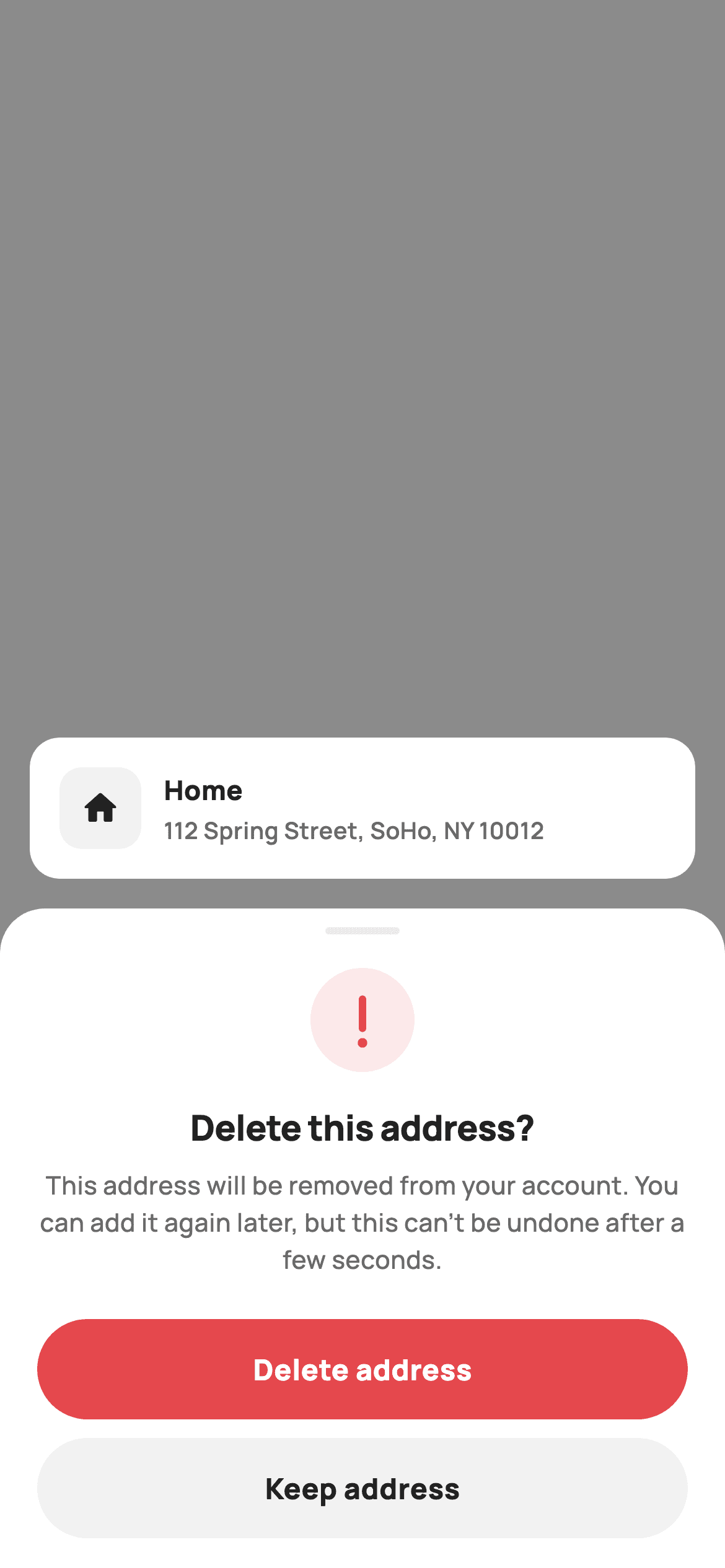
What you'll build
- ✓A 45%-black scrim overlay whose entire surface is a tap-to-keep escape hatch
- ✓An item preview card that shows the exact address about to be removed
- ✓A rounded danger bottom sheet with a CustomPaint exclamation mark and honest consequence copy
- ✓A filled red Delete pill over a neutral grey Keep pill, deliberately ranked
- ✓A single-boolean deleted state that swaps the preview card for an undo bar wired to onUndo
Step-by-step build
Create the file
Add a new file at lib/ecom_profile_address_delete/ecom_profile_address_delete_screen.dart in your Flutter project.
Register the bundled fonts
No external packages — this is pure Flutter. It does bundle its design font (Manrope), so drop the font file into fonts/ and declare it in pubspec.yaml:
flutter:
  fonts:
    - family: Manrope
      fonts:
- asset: fonts/Manrope-Regular.ttfBuild it, piece by piece
Here's how the screen goes together. Each block below is a real slice of the code with a plain-English explanation — paste them in order, or grab the whole file from the next section.
Three callbacks and nothing else
import 'package:flutter/material.dart';

/// StyleCart — Delete confirm (reusable danger sheet).
///
/// A reusable destructive-confirmation pattern shown over a dimmed context:
/// the item being removed is previewed in a card, a bottom sheet states the
/// consequence with a painted warning mark and offers Delete (danger) / Keep.
/// Confirming flips to a deleted state with an "undo" bar for a brief grace
/// period. Modelled on deleting a saved address, but reused for cards/account.
///
/// Self-contained per CONVENTIONS.md: pure Flutter, bundled Manrope, inline
/// Airbnb-style tokens, own light theme + SafeArea. Painter-only graphics
/// (warning mark). Exposes callbacks only.
class EcomProfileAddressDeleteScreen extends StatefulWidget {
  const EcomProfileAddressDeleteScreen({
    super.key,
    this.onKeep,
    this.onDeleted,
    this.onUndo,
  });

  final VoidCallback? onKeep;
  final VoidCallback? onDeleted;
  final VoidCallback? onUndo;

  @override
  State<EcomProfileAddressDeleteScreen> createState() =>
      _EcomProfileAddressDeleteScreenState();
}
`EcomProfileAddressDeleteScreen` exposes exactly three optional `VoidCallback`s — `onKeep`, `onDeleted`, `onUndo` — and no data parameters, because a confirmation overlay's whole job is to report a decision outward. The doc comment spells out the reuse intent: it is modelled on removing a saved address but the same pattern serves payment cards or account deletion, since nothing below the copy is address-specific. It is a `StatefulWidget` rather than stateless because the screen itself owns the flip between 'confirming' and 'deleted', not the host.
An Airbnb-flavoured token set and one boolean
class _EcomProfileAddressDeleteScreenState
    extends State<EcomProfileAddressDeleteScreen> {
  static const String _font = 'Manrope';
  static const Color _canvas = Color(0xFFFFFFFF);
  static const Color _ink = Color(0xFF222222);
  static const Color _muted = Color(0xFF6A6A6A);
  static const Color _brand = Color(0xFFFF385C);
  static const Color _surface = Color(0xFFF2F2F2);
  static const Color _hairline = Color(0xFFEBEBEB);
  static const Color _danger = Color(0xFFE5484D);

  bool _deleted = false;
The palette keeps `_brand` coral (`0xFFFF385C`) and `_danger` red (`0xFFE5484D`) as separate constants even though they look related — danger paints the destructive button and warning mark, while brand appears only once, on the Undo label, where it reads as an interactive accent rather than another alarm. `_surface` grey and `_hairline` handle the Keep button and grab handle. The entire screen's state is `bool _deleted`; there is no controller, timer or model, which is what makes the widget trivially embeddable.
A scrim that is itself the Keep button
  @override
  Widget build(BuildContext context) {
    return Theme(
      data: ThemeData.light(useMaterial3: true),
      child: Scaffold(
        backgroundColor: Colors.black.withValues(alpha: 0.45),
        body: Stack(
          children: <Widget>[
            // Tap scrim to keep (dismiss).
            Positioned.fill(
              child: GestureDetector(
                onTap: widget.onKeep,
                behavior: HitTestBehavior.opaque,
              ),
            ),
            SafeArea(
              child: Column(
                children: <Widget>[
                  const Spacer(),
                  Padding(
                    padding: const EdgeInsets.all(16),
                    child: _deleted ? _undoBar() : _previewCard(),
                  ),
                  if (!_deleted) _confirmSheet(),
                ],
              ),
            ),
          ],
        ),
      ),
    );
  }
The `Scaffold` background is `Colors.black.withValues(alpha: 0.45)` — the dim layer is the scaffold, not an extra widget — and a `Positioned.fill` `GestureDetector` with `HitTestBehavior.opaque` sits under everything, forwarding any scrim tap to `widget.onKeep`. Backing out of a destructive prompt should never require finding the safe button. Inside `SafeArea`, a `Spacer` pins content to the bottom, and one ternary does all the routing: `_deleted ? _undoBar() : _previewCard()` in the padded slot, with `_confirmSheet()` appended only while `!_deleted`.
Previewing what is about to disappear
  Widget _previewCard() {
    return Container(
      padding: const EdgeInsets.all(16),
      decoration: BoxDecoration(
        color: _canvas,
        borderRadius: BorderRadius.circular(16),
      ),
      child: Row(
        children: <Widget>[
          Container(
            width: 44,
            height: 44,
            decoration: BoxDecoration(
              color: _surface,
              borderRadius: BorderRadius.circular(12),
            ),
            child: const Icon(Icons.home_rounded, size: 22, color: _ink),
          ),
          const SizedBox(width: 12),
          const Expanded(
            child: Column(
              crossAxisAlignment: CrossAxisAlignment.start,
              children: <Widget>[
                Text(
                  'Home',
                  style: TextStyle(
                    fontFamily: _font,
                    fontSize: 14.5,
                    fontWeight: FontWeight.w800,
                    color: _ink,
                  ),
                ),
                SizedBox(height: 2),
                Text(
                  '112 Spring Street, SoHo, NY 10012',
                  maxLines: 1,
                  overflow: TextOverflow.ellipsis,
                  style: TextStyle(
                    fontFamily: _font,
                    fontSize: 12.5,
                    fontWeight: FontWeight.w600,
                    color: _muted,
                  ),
                ),
              ],
            ),
          ),
        ],
      ),
    );
  }
The preview card floats above the sheet on the dimmed backdrop: a white 16px-radius container holding a 44x44 `_surface` tile with a `home_rounded` icon, then a two-line column — 'Home' at 14.5px `w800` and the full street address at 12.5px muted. The address line carries `maxLines: 1` with `TextOverflow.ellipsis`, so a long address truncates instead of reflowing the card. Showing the concrete item here matters: the sheet's question 'Delete this address?' is only answerable because the card says which one.
The sheet's warning mark and consequence copy
  Widget _confirmSheet() {
    return Container(
      width: double.infinity,
      padding: const EdgeInsets.fromLTRB(20, 10, 20, 16),
      decoration: const BoxDecoration(
        color: _canvas,
        borderRadius: BorderRadius.vertical(top: Radius.circular(24)),
      ),
      child: Column(
        mainAxisSize: MainAxisSize.min,
        children: <Widget>[
          Container(
            width: 40,
            height: 4,
            decoration: BoxDecoration(
              color: _hairline,
              borderRadius: BorderRadius.circular(2),
            ),
          ),
          const SizedBox(height: 18),
          CustomPaint(
            size: const Size(56, 56),
            painter: _WarningPainter(),
          ),
          const SizedBox(height: 16),
          const Text(
            'Delete this address?',
            style: TextStyle(
              fontFamily: _font,
              fontSize: 19,
              fontWeight: FontWeight.w800,
              letterSpacing: -0.3,
              color: _ink,
            ),
          ),
          const SizedBox(height: 8),
          const Text(
            'This address will be removed from your account. You can add it '
            'again later, but this can’t be undone after a few seconds.',
            textAlign: TextAlign.center,
            style: TextStyle(
              fontFamily: _font,
              fontSize: 13.5,
              fontWeight: FontWeight.w500,
              height: 1.45,
              color: _muted,
            ),
          ),
          const SizedBox(height: 22),
`_confirmSheet` is a full-width white container rounded only at the top (`BorderRadius.vertical(top: Radius.circular(24))`), opening with a 40x4 hairline grab handle so it reads as a sheet even though it is just a column pinned to the bottom. A 56x56 `CustomPaint` running `_WarningPainter` replaces any icon-font warning glyph. The copy is deliberately honest about the undo mechanic: 'You can add it again later, but this can't be undone after a few seconds' primes the reader for the grace-period bar instead of surprising them with it.
Delete and Keep, ranked not equal
          GestureDetector(
            onTap: () {
              setState(() => _deleted = true);
              widget.onDeleted?.call();
            },
            child: Container(
              height: 54,
              alignment: Alignment.center,
              decoration: BoxDecoration(
                color: _danger,
                borderRadius: BorderRadius.circular(9999),
              ),
              child: const Text(
                'Delete address',
                style: TextStyle(
                  fontFamily: _font,
                  fontSize: 15.5,
                  fontWeight: FontWeight.w800,
                  color: Colors.white,
                ),
              ),
            ),
          ),
          const SizedBox(height: 10),
          GestureDetector(
            onTap: widget.onKeep,
            child: Container(
              height: 54,
              alignment: Alignment.center,
              decoration: BoxDecoration(
                color: _surface,
                borderRadius: BorderRadius.circular(9999),
              ),
              child: const Text(
                'Keep address',
                style: TextStyle(
                  fontFamily: _font,
                  fontSize: 15.5,
                  fontWeight: FontWeight.w800,
                  color: _ink,
                ),
              ),
            ),
          ),
        ],
      ),
    );
  }
Both actions are 54px-tall `GestureDetector` containers with `borderRadius: BorderRadius.circular(9999)` — a stadium shape at any height — but only Delete gets the `_danger` fill and white text; Keep sits below it in flat `_surface` grey with ink text. The visual weight is inverted from safety logic on purpose: the user opened this flow to delete, so the primary slot honours that intent while the scrim, the Keep pill and the undo bar together provide three ways back. The Delete handler does two things in order — `setState(() => _deleted = true)` flips the UI instantly, then `widget.onDeleted?.call()` notifies the host.
The undo bar and its state round-trip
  Widget _undoBar() {
    return Container(
      padding: const EdgeInsets.fromLTRB(16, 12, 12, 12),
      decoration: BoxDecoration(
        color: _ink,
        borderRadius: BorderRadius.circular(14),
      ),
      child: Row(
        children: <Widget>[
          const Icon(Icons.check_circle_outline_rounded,
              size: 20, color: Colors.white),
          const SizedBox(width: 10),
          const Expanded(
            child: Text(
              'Address deleted',
              style: TextStyle(
                fontFamily: _font,
                fontSize: 14,
                fontWeight: FontWeight.w700,
                color: Colors.white,
              ),
            ),
          ),
          GestureDetector(
            onTap: () {
              setState(() => _deleted = false);
              widget.onUndo?.call();
            },
            child: Container(
              padding: const EdgeInsets.symmetric(horizontal: 14, vertical: 8),
              child: const Text(
                'Undo',
                style: TextStyle(
                  fontFamily: _font,
                  fontSize: 14,
                  fontWeight: FontWeight.w800,
                  color: _brand,
                ),
              ),
            ),
          ),
        ],
      ),
    );
  }
}
Once `_deleted` is true the sheet vanishes and `_undoBar` takes the preview card's slot: a dark `_ink` container with a white `check_circle_outline_rounded`, an 'Address deleted' label, and an Undo affordance coloured `_brand` — the one place coral appears, marking it as the tappable element in a dark bar. Undo is not a bare `Text` but a container with `EdgeInsets.symmetric(horizontal: 14, vertical: 8)`, buying a finger-sized hit target without visible chrome. Tapping it sets `_deleted = false`, resurrecting the sheet and card, and fires `widget.onUndo?.call()` so the host can cancel its pending removal.
Painting the exclamation mark
/// A painted danger warning mark: tinted disc + exclamation.
class _WarningPainter extends CustomPainter {
  const _WarningPainter();

  static const Color _danger = Color(0xFFE5484D);

  @override
  void paint(Canvas canvas, Size size) {
    final Offset c = size.center(Offset.zero);
    canvas.drawCircle(
        c, size.width / 2, Paint()..color = _danger.withValues(alpha: 0.12));
    final Paint p = Paint()
      ..color = _danger
      ..strokeWidth = 4
      ..strokeCap = StrokeCap.round;
    // Exclamation stem.
    canvas.drawLine(
      Offset(c.dx, size.height * 0.30),
      Offset(c.dx, size.height * 0.58),
      p,
    );
    // Dot.
    canvas.drawCircle(Offset(c.dx, size.height * 0.72), 2.6,
        Paint()..color = _danger);
  }

  @override
  bool shouldRepaint(_WarningPainter old) => false;
}
`_WarningPainter` draws three primitives: a backing disc in `_danger.withValues(alpha: 0.12)` filling the full 56px box, then the exclamation stem as a single `drawLine` from 30% to 58% of the height with `strokeWidth: 4` and `StrokeCap.round`, and finally a solid 2.6px dot at 72%. Every coordinate is a fraction of `size`, so passing a bigger `Size` to the `CustomPaint` scales the mark cleanly. Since nothing it draws depends on state, `shouldRepaint` returns `false` and the painter never re-runs after the first frame.
Full code
The complete, ready-to-paste source. Free to use in your projects — one click copies it all.
import 'package:flutter/material.dart';

/// StyleCart — Delete confirm (reusable danger sheet).
///
/// A reusable destructive-confirmation pattern shown over a dimmed context:
/// the item being removed is previewed in a card, a bottom sheet states the
/// consequence with a painted warning mark and offers Delete (danger) / Keep.
/// Confirming flips to a deleted state with an "undo" bar for a brief grace
/// period. Modelled on deleting a saved address, but reused for cards/account.
///
/// Self-contained per CONVENTIONS.md: pure Flutter, bundled Manrope, inline
/// Airbnb-style tokens, own light theme + SafeArea. Painter-only graphics
/// (warning mark). Exposes callbacks only.
class EcomProfileAddressDeleteScreen extends StatefulWidget {
  const EcomProfileAddressDeleteScreen({
    super.key,
    this.onKeep,
    this.onDeleted,
    this.onUndo,
  });

  final VoidCallback? onKeep;
  final VoidCallback? onDeleted;
  final VoidCallback? onUndo;

  @override
  State<EcomProfileAddressDeleteScreen> createState() =>
      _EcomProfileAddressDeleteScreenState();
}

class _EcomProfileAddressDeleteScreenState
    extends State<EcomProfileAddressDeleteScreen> {
  static const String _font = 'Manrope';
  static const Color _canvas = Color(0xFFFFFFFF);
  static const Color _ink = Color(0xFF222222);
  static const Color _muted = Color(0xFF6A6A6A);
  static const Color _brand = Color(0xFFFF385C);
  static const Color _surface = Color(0xFFF2F2F2);
  static const Color _hairline = Color(0xFFEBEBEB);
  static const Color _danger = Color(0xFFE5484D);

  bool _deleted = false;

  @override
  Widget build(BuildContext context) {
    return Theme(
      data: ThemeData.light(useMaterial3: true),
      child: Scaffold(
        backgroundColor: Colors.black.withValues(alpha: 0.45),
        body: Stack(
          children: <Widget>[
            // Tap scrim to keep (dismiss).
            Positioned.fill(
              child: GestureDetector(
                onTap: widget.onKeep,
                behavior: HitTestBehavior.opaque,
              ),
            ),
            SafeArea(
              child: Column(
                children: <Widget>[
                  const Spacer(),
                  Padding(
                    padding: const EdgeInsets.all(16),
                    child: _deleted ? _undoBar() : _previewCard(),
                  ),
                  if (!_deleted) _confirmSheet(),
                ],
              ),
            ),
          ],
        ),
      ),
    );
  }

  Widget _previewCard() {
    return Container(
      padding: const EdgeInsets.all(16),
      decoration: BoxDecoration(
        color: _canvas,
        borderRadius: BorderRadius.circular(16),
      ),
      child: Row(
        children: <Widget>[
          Container(
            width: 44,
            height: 44,
            decoration: BoxDecoration(
              color: _surface,
              borderRadius: BorderRadius.circular(12),
            ),
            child: const Icon(Icons.home_rounded, size: 22, color: _ink),
          ),
          const SizedBox(width: 12),
          const Expanded(
            child: Column(
              crossAxisAlignment: CrossAxisAlignment.start,
              children: <Widget>[
                Text(
                  'Home',
                  style: TextStyle(
                    fontFamily: _font,
                    fontSize: 14.5,
                    fontWeight: FontWeight.w800,
                    color: _ink,
                  ),
                ),
                SizedBox(height: 2),
                Text(
                  '112 Spring Street, SoHo, NY 10012',
                  maxLines: 1,
                  overflow: TextOverflow.ellipsis,
                  style: TextStyle(
                    fontFamily: _font,
                    fontSize: 12.5,
                    fontWeight: FontWeight.w600,
                    color: _muted,
                  ),
                ),
              ],
            ),
          ),
        ],
      ),
    );
  }

  Widget _confirmSheet() {
    return Container(
      width: double.infinity,
      padding: const EdgeInsets.fromLTRB(20, 10, 20, 16),
      decoration: const BoxDecoration(
        color: _canvas,
        borderRadius: BorderRadius.vertical(top: Radius.circular(24)),
      ),
      child: Column(
        mainAxisSize: MainAxisSize.min,
        children: <Widget>[
          Container(
            width: 40,
            height: 4,
            decoration: BoxDecoration(
              color: _hairline,
              borderRadius: BorderRadius.circular(2),
            ),
          ),
          const SizedBox(height: 18),
          CustomPaint(
            size: const Size(56, 56),
            painter: _WarningPainter(),
          ),
          const SizedBox(height: 16),
          const Text(
            'Delete this address?',
            style: TextStyle(
              fontFamily: _font,
              fontSize: 19,
              fontWeight: FontWeight.w800,
              letterSpacing: -0.3,
              color: _ink,
            ),
          ),
          const SizedBox(height: 8),
          const Text(
            'This address will be removed from your account. You can add it '
            'again later, but this can’t be undone after a few seconds.',
            textAlign: TextAlign.center,
            style: TextStyle(
              fontFamily: _font,
              fontSize: 13.5,
              fontWeight: FontWeight.w500,
              height: 1.45,
              color: _muted,
            ),
          ),
          const SizedBox(height: 22),
          GestureDetector(
            onTap: () {
              setState(() => _deleted = true);
              widget.onDeleted?.call();
            },
            child: Container(
              height: 54,
              alignment: Alignment.center,
              decoration: BoxDecoration(
                color: _danger,
                borderRadius: BorderRadius.circular(9999),
              ),
              child: const Text(
                'Delete address',
                style: TextStyle(
                  fontFamily: _font,
                  fontSize: 15.5,
                  fontWeight: FontWeight.w800,
                  color: Colors.white,
                ),
              ),
            ),
          ),
          const SizedBox(height: 10),
          GestureDetector(
            onTap: widget.onKeep,
            child: Container(
              height: 54,
              alignment: Alignment.center,
              decoration: BoxDecoration(
                color: _surface,
                borderRadius: BorderRadius.circular(9999),
              ),
              child: const Text(
                'Keep address',
                style: TextStyle(
                  fontFamily: _font,
                  fontSize: 15.5,
                  fontWeight: FontWeight.w800,
                  color: _ink,
                ),
              ),
            ),
          ),
        ],
      ),
    );
  }

  Widget _undoBar() {
    return Container(
      padding: const EdgeInsets.fromLTRB(16, 12, 12, 12),
      decoration: BoxDecoration(
        color: _ink,
        borderRadius: BorderRadius.circular(14),
      ),
      child: Row(
        children: <Widget>[
          const Icon(Icons.check_circle_outline_rounded,
              size: 20, color: Colors.white),
          const SizedBox(width: 10),
          const Expanded(
            child: Text(
              'Address deleted',
              style: TextStyle(
                fontFamily: _font,
                fontSize: 14,
                fontWeight: FontWeight.w700,
                color: Colors.white,
              ),
            ),
          ),
          GestureDetector(
            onTap: () {
              setState(() => _deleted = false);
              widget.onUndo?.call();
            },
            child: Container(
              padding: const EdgeInsets.symmetric(horizontal: 14, vertical: 8),
              child: const Text(
                'Undo',
                style: TextStyle(
                  fontFamily: _font,
                  fontSize: 14,
                  fontWeight: FontWeight.w800,
                  color: _brand,
                ),
              ),
            ),
          ),
        ],
      ),
    );
  }
}

/// A painted danger warning mark: tinted disc + exclamation.
class _WarningPainter extends CustomPainter {
  const _WarningPainter();

  static const Color _danger = Color(0xFFE5484D);

  @override
  void paint(Canvas canvas, Size size) {
    final Offset c = size.center(Offset.zero);
    canvas.drawCircle(
        c, size.width / 2, Paint()..color = _danger.withValues(alpha: 0.12));
    final Paint p = Paint()
      ..color = _danger
      ..strokeWidth = 4
      ..strokeCap = StrokeCap.round;
    // Exclamation stem.
    canvas.drawLine(
      Offset(c.dx, size.height * 0.30),
      Offset(c.dx, size.height * 0.58),
      p,
    );
    // Dot.
    canvas.drawCircle(Offset(c.dx, size.height * 0.72), 2.6,
        Paint()..color = _danger);
  }

  @override
  bool shouldRepaint(_WarningPainter old) => false;
}
Plus bundled 5 binary assets (fonts/images). The CLI and MCP install those for you automatically.
Two faster ways to add it
Copy-paste works, but you can skip it entirely.
1. FlutterKit CLI
One command drops this screen — and its fonts — straight into your project.
$ flutterkit add ecom-profile-address-delete2. AI agent (MCP)
Connect FlutterKit's MCP server in Claude or Cursor and just ask your agent to install ecom-profile-address-delete — it fetches and writes the files for you.
FAQ
Can I use this delete confirmation screen in a commercial app for free?
Yes. FlutterKit screens are free to use, commercial projects included. Copy the overlay and its painter straight from this page — or install via the CLI command shown — and ship it in a production settings or checkout flow. No attribution or sign-up required.
What packages or fonts does this screen depend on?
None beyond Flutter itself — the vendored code declares an empty package list. The typography is Manrope, referenced as a bundled font family (`fontFamily: 'Manrope'`), so add the Manrope files to your `pubspec.yaml` fonts section or swap the `_font` constant for a family you already ship. The warning mark is a CustomPainter, so no icon pack is needed either.
Which Flutter version do I need?
Flutter 3.22 or newer, because the scrim and the painter's backing disc use `Color.withValues(alpha: ...)`. On an older SDK, replace those two calls with `withOpacity(0.45)` and `withOpacity(0.12)`. The constructor also uses `super.key`, which needs Dart 2.17 / Flutter 3.0 or later.
How do I make the undo grace period actually expire?
The widget flips `_deleted` and fires `onDeleted` immediately, but the real removal should live in the host. In your `onDeleted` handler, start a `Timer(const Duration(seconds: 5), ...)` that commits the API delete when it fires; in `onUndo`, cancel that timer and keep the record. That way the screen's copy — 'this can't be undone after a few seconds' — stays truthful, and a killed app mid-grace-period simply never deletes.
How do I show this over my existing addresses screen instead of as a full route?
Push it with a transparent route so the addresses list stays visible under the built-in 45%-black scaffold: `Navigator.push` with a `PageRouteBuilder` where `opaque: false` and `barrierColor` is left null, or use `showGeneralDialog` with a transparent barrier. Wire `onKeep` and `onUndo` to `Navigator.pop`, and pop after your grace-period timer starts in `onDeleted`.


