How to Build a Product Rate & Review Screen in Flutter (Full Code + Preview)
Most review forms collect nothing because they open with an empty text box and expect the shopper to write. This screen inverts that: the buyer can leave a useful review with five taps and zero typing — a star rating with a live caption, a three-way fit verdict, toggleable quality tags — and only then is invited to add photos or a sentence. You'll build the whole thing in Flutter, including the custom-painted tappable stars, a pinned Submit bar, and callbacks that hand the rating to whatever backend you use.
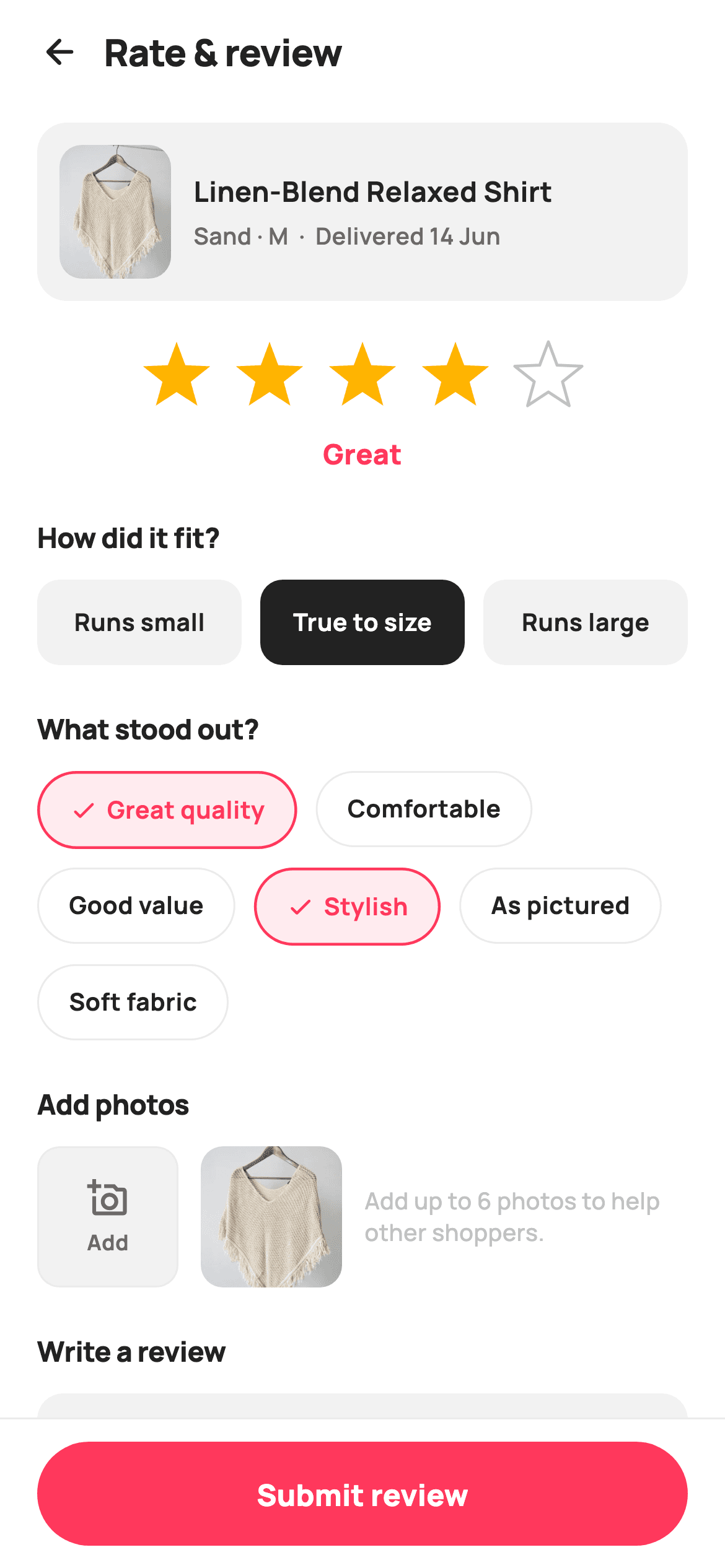
What you'll build
- ✓Five tappable stars drawn by a CustomPainter, with a caption that shifts live from 'Poor' to 'Love it' as the rating changes
- ✓A three-way fit selector (Runs small / True to size / Runs large) built from equal-width Expanded segments
- ✓A Wrap of toggleable quality-tag pills whose selected state adds a check icon, a coral tint and a thicker border
- ✓An add-photos row with a dashed-feel placeholder tile, an uploaded thumbnail and helper copy
- ✓A pinned footer Submit button above the home indicator that reports the rating through onSubmit(rating)
Step-by-step build
Create the file
Add a new file at lib/ecom_rate_product/ecom_rate_product_screen.dart in your Flutter project.
Register the bundled fonts
No external packages — this is pure Flutter. It does bundle its design font (Manrope), so drop the font file into fonts/ and declare it in pubspec.yaml:
flutter:
  fonts:
    - family: Manrope
      fonts:
- asset: fonts/Manrope-Regular.ttfBuild it, piece by piece
Here's how the screen goes together. Each block below is a real slice of the code with a plain-English explanation — paste them in order, or grab the whole file from the next section.
Tokens, copy lists and four pieces of state
import 'dart:math' as math;

import 'package:flutter/material.dart';

/// StyleCart — Rate & Review.
///
/// Lets a buyer rate a delivered product: a big tappable star row, a fit
/// sentiment selector, quick quality tags, a photo-upload row, and a free-text
/// review with a pinned Submit bar.
///
/// Self-contained per CONVENTIONS.md: pure Flutter, bundled Manrope, inline
/// Airbnb-style tokens, own light theme + SafeArea. Painter-only graphics
/// (tappable stars), one bundled product webp. Exposes callbacks only.
class EcomRateProductScreen extends StatefulWidget {
  const EcomRateProductScreen({
    super.key,
    this.onBack,
    this.onSubmit,
  });

  final VoidCallback? onBack;
  final ValueChanged<int>? onSubmit;

  @override
  State<EcomRateProductScreen> createState() => _EcomRateProductScreenState();
}

class _EcomRateProductScreenState extends State<EcomRateProductScreen> {
  static const String _font = 'Manrope';
  static const Color _canvas = Color(0xFFFFFFFF);
  static const Color _ink = Color(0xFF222222);
  static const Color _muted = Color(0xFF6A6A6A);
  static const Color _faint = Color(0xFFC1C1C1);
  static const Color _brand = Color(0xFFFF385C);
  static const Color _surface = Color(0xFFF2F2F2);
  static const Color _imageBg = Color(0xFFF5F5F5);
  static const Color _hairline = Color(0xFFEBEBEB);

  static const List<String> _ratingWords = <String>[
    'Tap to rate',
    'Poor',
    'Fair',
    'Good',
    'Great',
    'Love it',
  ];
  static const List<String> _fits = <String>['Runs small', 'True to size', 'Runs large'];
  static const List<String> _tags = <String>[
    'Great quality',
    'Comfortable',
    'Good value',
    'Stylish',
    'As pictured',
    'Soft fabric',
  ];

  int _rating = 4;
  int _fit = 1;
  final Set<String> _picked = <String>{'Great quality', 'Stylish'};
  final TextEditingController _comment = TextEditingController();

  @override
  void dispose() {
    _comment.dispose();
    super.dispose();
  }
The widget is a `StatefulWidget` exposing just `onBack` and a `ValueChanged<int>? onSubmit` — the screen owns the form, the host app owns what happens to it. All the wording lives in three `static const` lists: `_ratingWords` has six entries because index 0 is the unrated prompt 'Tap to rate' and indices 1–5 map straight onto star counts, so `_ratingWords[_rating]` never needs an off-by-one adjustment. State is exactly four fields: an `int _rating`, an `int _fit` index, a `Set<String> _picked` for tags (a Set makes toggling a one-liner later), and a `TextEditingController` that gets disposed. The palette is Airbnb-flavoured — `_brand` is the coral `0xFFFF385C`, with `_surface`/`_hairline` greys doing the quiet work.
One Column: header, scrolling form, pinned footer
  @override
  Widget build(BuildContext context) {
    return Theme(
      data: ThemeData.light(useMaterial3: true),
      child: Scaffold(
        backgroundColor: _canvas,
        body: SafeArea(
          child: Column(
            children: <Widget>[
              _header(),
              Expanded(
                child: ListView(
                  padding: const EdgeInsets.fromLTRB(20, 8, 20, 24),
                  children: <Widget>[
                    _productCard(),
                    const SizedBox(height: 22),
                    _starBlock(),
                    const SizedBox(height: 24),
                    _sectionTitle('How did it fit?'),
                    const SizedBox(height: 12),
                    _fitRow(),
                    const SizedBox(height: 24),
                    _sectionTitle('What stood out?'),
                    const SizedBox(height: 12),
                    _tagWrap(),
                    const SizedBox(height: 24),
                    _sectionTitle('Add photos'),
                    const SizedBox(height: 12),
                    _photoRow(),
                    const SizedBox(height: 24),
                    _sectionTitle('Write a review'),
                    const SizedBox(height: 12),
                    _commentField(),
                  ],
                ),
              ),
              _footer(),
            ],
          ),
        ),
      ),
    );
  }
`build` wraps everything in `Theme(data: ThemeData.light(useMaterial3: true))` so the screen looks the same regardless of the host app's theme. The skeleton is a `Column` of three parts: `_header()`, an `Expanded` `ListView`, and `_footer()`. Because the footer sits outside the `ListView`, the Submit button never scrolls away — the form scrolls under it. Inside the list, each section is a `_sectionTitle` followed 12px later by its control, with 24px between sections; those two constants alone give the page its rhythm, and the `fromLTRB(20, 8, 20, 24)` padding keeps the last field clear of the footer's hairline.
Header and the delivered-product card
  Widget _header() {
    return Padding(
      padding: const EdgeInsets.fromLTRB(8, 4, 20, 6),
      child: Row(
        children: <Widget>[
          IconButton(
            onPressed: widget.onBack,
            icon: const Icon(Icons.arrow_back_rounded, size: 22, color: _ink),
          ),
          const Text(
            'Rate & review',
            style: TextStyle(
              fontFamily: _font,
              fontSize: 20,
              fontWeight: FontWeight.w800,
              letterSpacing: -0.3,
              color: _ink,
            ),
          ),
        ],
      ),
    );
  }

  Widget _productCard() {
    return Container(
      padding: const EdgeInsets.all(12),
      decoration: BoxDecoration(
        color: _surface,
        borderRadius: BorderRadius.circular(16),
      ),
      child: Row(
        children: <Widget>[
          ClipRRect(
            borderRadius: BorderRadius.circular(12),
            child: Container(
              width: 60,
              height: 72,
              color: _imageBg,
              child: Image.asset(
                'lib/screens/ecommerce/ecom_rate_product/images/p01.webp',
                fit: BoxFit.cover,
              ),
            ),
          ),
          const SizedBox(width: 12),
          const Expanded(
            child: Column(
              crossAxisAlignment: CrossAxisAlignment.start,
              children: <Widget>[
                Text(
                  'Linen-Blend Relaxed Shirt',
                  maxLines: 2,
                  overflow: TextOverflow.ellipsis,
                  style: TextStyle(
                    fontFamily: _font,
                    fontSize: 15,
                    fontWeight: FontWeight.w700,
                    color: _ink,
                  ),
                ),
                SizedBox(height: 4),
                Text(
                  'Sand · M  ·  Delivered 14 Jun',
                  style: TextStyle(
                    fontFamily: _font,
                    fontSize: 12.5,
                    fontWeight: FontWeight.w600,
                    color: _muted,
                  ),
                ),
              ],
            ),
          ),
        ],
      ),
    );
  }
The header is just a back `IconButton` and a 20px `w800` title — no actions, because the only meaningful action lives in the footer. `_productCard` anchors the review to a concrete purchase: a 60×72 `Image.asset` thumbnail (portrait, because it's apparel) clipped by `ClipRRect` at radius 12 inside a `_surface` container at radius 16, next to the product name and a one-line 'Sand · M · Delivered 14 Jun' in `_muted`. Showing the variant and delivery date answers 'which order is this about?' before the shopper rates anything; `maxLines: 2` with ellipsis keeps long product names from pushing the card taller.
Tappable stars with a live caption
  Widget _starBlock() {
    return Column(
      children: <Widget>[
        Row(
          mainAxisAlignment: MainAxisAlignment.center,
          children: <Widget>[
            for (int i = 1; i <= 5; i++)
              GestureDetector(
                onTap: () => setState(() => _rating = i),
                behavior: HitTestBehavior.opaque,
                child: Padding(
                  padding: const EdgeInsets.symmetric(horizontal: 6),
                  child: CustomPaint(
                    size: const Size(38, 38),
                    painter: _StarPainter(filled: i <= _rating),
                  ),
                ),
              ),
          ],
        ),
        const SizedBox(height: 12),
        Text(
          _ratingWords[_rating],
          style: const TextStyle(
            fontFamily: _font,
            fontSize: 15,
            fontWeight: FontWeight.w800,
            color: _brand,
          ),
        ),
      ],
    );
  }

  Widget _fitRow() {
    return Row(
      children: <Widget>[
        for (int i = 0; i < _fits.length; i++) ...<Widget>[
          Expanded(
            child: GestureDetector(
              onTap: () => setState(() => _fit = i),
              child: Container(
                height: 46,
                alignment: Alignment.center,
                decoration: BoxDecoration(
                  color: _fit == i ? _ink : _surface,
                  borderRadius: BorderRadius.circular(12),
                ),
                child: Text(
                  _fits[i],
                  style: TextStyle(
                    fontFamily: _font,
                    fontSize: 13,
                    fontWeight: FontWeight.w700,
                    color: _fit == i ? _canvas : _ink,
                  ),
                ),
              ),
            ),
          ),
          if (i < _fits.length - 1) const SizedBox(width: 10),
        ],
      ],
    );
  }
`_starBlock` builds the row with a collection-for from 1 to 5: each star is a `GestureDetector` with `HitTestBehavior.opaque` (so taps land on the whole 38px square plus its 6px horizontal padding, not just the painted path) around a `CustomPaint` whose `_StarPainter(filled: i <= _rating)` fills every star up to the current rating. Under it, `_ratingWords[_rating]` renders in `_brand` coral, so tapping the fourth star instantly flips the caption to 'Great' — cheap, satisfying feedback from one `setState`. `_fitRow` is the same trick for a segmented control: three `Expanded` `GestureDetector`s where the selected segment inverts to `_ink` on white and the spread's `if (i < _fits.length - 1)` inserts 10px gaps only between segments.
Toggleable tags and the add-photos row
  Widget _tagWrap() {
    return Wrap(
      spacing: 10,
      runSpacing: 10,
      children: <Widget>[
        for (final String t in _tags)
          GestureDetector(
            onTap: () => setState(() {
              if (!_picked.add(t)) _picked.remove(t);
            }),
            child: Container(
              padding: const EdgeInsets.symmetric(horizontal: 16, vertical: 10),
              decoration: BoxDecoration(
                color: _picked.contains(t) ? _brand.withValues(alpha: 0.10) : _canvas,
                borderRadius: BorderRadius.circular(9999),
                border: Border.all(
                  color: _picked.contains(t) ? _brand : _hairline,
                  width: _picked.contains(t) ? 1.5 : 1,
                ),
              ),
              child: Row(
                mainAxisSize: MainAxisSize.min,
                children: <Widget>[
                  if (_picked.contains(t)) ...<Widget>[
                    const Icon(Icons.check_rounded, size: 15, color: _brand),
                    const SizedBox(width: 5),
                  ],
                  Text(
                    t,
                    style: TextStyle(
                      fontFamily: _font,
                      fontSize: 13,
                      fontWeight: FontWeight.w700,
                      color: _picked.contains(t) ? _brand : _ink,
                    ),
                  ),
                ],
              ),
            ),
          ),
      ],
    );
  }

  Widget _photoRow() {
    return Row(
      children: <Widget>[
        Container(
          width: 76,
          height: 76,
          decoration: BoxDecoration(
            color: _surface,
            borderRadius: BorderRadius.circular(12),
            border: Border.all(color: _hairline),
          ),
          child: const Column(
            mainAxisAlignment: MainAxisAlignment.center,
            children: <Widget>[
              Icon(Icons.add_a_photo_outlined, size: 22, color: _muted),
              SizedBox(height: 4),
              Text(
                'Add',
                style: TextStyle(
                  fontFamily: _font,
                  fontSize: 11.5,
                  fontWeight: FontWeight.w700,
                  color: _muted,
                ),
              ),
            ],
          ),
        ),
        const SizedBox(width: 12),
        ClipRRect(
          borderRadius: BorderRadius.circular(12),
          child: Image.asset(
            'lib/screens/ecommerce/ecom_rate_product/images/p01.webp',
            width: 76,
            height: 76,
            fit: BoxFit.cover,
          ),
        ),
        const SizedBox(width: 12),
        const Expanded(
          child: Text(
            'Add up to 6 photos to help other shoppers.',
            style: TextStyle(
              fontFamily: _font,
              fontSize: 12.5,
              fontWeight: FontWeight.w500,
              height: 1.35,
              color: _faint,
            ),
          ),
        ),
      ],
    );
  }
The tag toggle is one line: `if (!_picked.add(t)) _picked.remove(t)` — `Set.add` returns false when the element already exists, so the same expression adds or removes. A selected pill gets three simultaneous cues: a `_brand.withValues(alpha: 0.10)` tint, a border that jumps from `_hairline` at 1px to `_brand` at 1.5px, and a 15px `Icons.check_rounded` spread in via a collection-if. Laying them in a `Wrap` with 10px `spacing`/`runSpacing` lets six tags reflow on any width. `_photoRow` pairs a 76px 'Add' placeholder tile (camera icon over an 11.5px label) with an already-uploaded thumbnail, then uses the remaining width for 'Add up to 6 photos…' helper text in `_faint` — showing one uploaded photo makes the empty tile read as repeatable, not decorative.
The free-text field, styled by its container
  Widget _commentField() {
    return Container(
      decoration: BoxDecoration(
        color: _surface,
        borderRadius: BorderRadius.circular(14),
      ),
      padding: const EdgeInsets.symmetric(horizontal: 14, vertical: 4),
      child: TextField(
        controller: _comment,
        maxLines: 4,
        style: const TextStyle(
          fontFamily: _font,
          fontSize: 14,
          fontWeight: FontWeight.w500,
          color: _ink,
        ),
        decoration: const InputDecoration(
          border: InputBorder.none,
          hintText: 'Tell others what you liked or what could be better…',
          hintStyle: TextStyle(
            fontFamily: _font,
            fontSize: 14,
            fontWeight: FontWeight.w500,
            color: _faint,
          ),
        ),
      ),
    );
  }

  Widget _sectionTitle(String text) {
    return Text(
      text,
      style: const TextStyle(
        fontFamily: _font,
        fontSize: 15,
        fontWeight: FontWeight.w800,
        letterSpacing: -0.2,
        color: _ink,
      ),
    );
  }
Rather than fighting `InputDecoration` borders, `_commentField` puts a plain `TextField` with `border: InputBorder.none` inside a `_surface` `Container` at radius 14 — the container is the visual field, which is far less code than a matching `OutlineInputBorder` and keeps the fill flush to the rounded corners. `maxLines: 4` gives it a paragraph's height up front so it reads as optional prose, and the hint 'Tell others what you liked or what could be better…' prompts in both directions instead of begging for praise. `_sectionTitle` below it is the single 15px `w800` style every section header shares.
The pinned Submit bar
  Widget _footer() {
    return Container(
      decoration: const BoxDecoration(
        color: _canvas,
        border: Border(top: BorderSide(color: _hairline)),
      ),
      child: SafeArea(
        top: false,
        child: Padding(
          padding: const EdgeInsets.fromLTRB(20, 12, 20, 12),
          child: SizedBox(
            height: 56,
            child: ElevatedButton(
              onPressed: () => widget.onSubmit?.call(_rating),
              style: ElevatedButton.styleFrom(
                backgroundColor: _brand,
                foregroundColor: _canvas,
                elevation: 0,
                minimumSize: const Size.fromHeight(56),
                shape: RoundedRectangleBorder(
                  borderRadius: BorderRadius.circular(9999),
                ),
              ),
              child: const Text(
                'Submit review',
                style: TextStyle(
                  fontFamily: _font,
                  fontSize: 16,
                  fontWeight: FontWeight.w800,
                ),
              ),
            ),
          ),
        ),
      ),
    );
  }
}
`_footer` is a white `Container` whose only decoration is a top `Border` in `_hairline` — the hairline separates it from scrolling content without a shadow. Inside, `SafeArea(top: false)` sits within the container, so the white background extends under the home indicator while the button stays above it. The button itself is a 56px `ElevatedButton` with `elevation: 0`, a `borderRadius.circular(9999)` full-pill shape and `Size.fromHeight(56)` for guaranteed full width; its `onPressed` fires `widget.onSubmit?.call(_rating)`, handing the host app the star count.
Painting the five-point star
/// A single tappable five-point star (filled or outlined). dart:math for the
/// vertex geometry so the points sit symmetrically.
class _StarPainter extends CustomPainter {
  _StarPainter({required this.filled});
  final bool filled;

  static const Color _star = Color(0xFFFFB400);
  static const Color _faint = Color(0xFFC1C1C1);

  @override
  void paint(Canvas canvas, Size size) {
    final double cx = size.width / 2;
    final double cy = size.height / 2;
    final double rOuter = size.width / 2;
    final double rInner = rOuter * 0.42;
    final Path path = Path();
    for (int i = 0; i < 10; i++) {
      final double r = i.isEven ? rOuter : rInner;
      final double a = -math.pi / 2 + i * math.pi / 5;
      final double x = cx + r * math.cos(a);
      final double y = cy + r * math.sin(a);
      if (i == 0) {
        path.moveTo(x, y);
      } else {
        path.lineTo(x, y);
      }
    }
    path.close();
    if (filled) {
      canvas.drawPath(path, Paint()..color = _star);
    } else {
      canvas.drawPath(
        path,
        Paint()
          ..style = PaintingStyle.stroke
          ..strokeWidth = 1.6
          ..strokeJoin = StrokeJoin.round
          ..color = _faint,
      );
    }
  }

  @override
  bool shouldRepaint(_StarPainter old) => old.filled != filled;
}
`_StarPainter` computes all ten vertices in one loop: even indices use the outer radius (half the widget width), odd indices use `rOuter * 0.42` for the inner notches, and each angle is `-math.pi / 2 + i * math.pi / 5` — the `-pi/2` start is what points the star straight up. A filled star is one `drawPath` in `0xFFFFB400` amber; an unfilled one strokes the same path at 1.6px with `StrokeJoin.round`, which softens the ten sharp corners so the outline matches the filled star's friendly weight. `shouldRepaint` compares only `filled`, so tapping a star repaints exactly the stars whose state actually changed. No icon font, no SVG asset — 5 taps' worth of geometry in ~40 lines.
Full code
The complete, ready-to-paste source. Free to use in your projects — one click copies it all.
import 'dart:math' as math;

import 'package:flutter/material.dart';

/// StyleCart — Rate & Review.
///
/// Lets a buyer rate a delivered product: a big tappable star row, a fit
/// sentiment selector, quick quality tags, a photo-upload row, and a free-text
/// review with a pinned Submit bar.
///
/// Self-contained per CONVENTIONS.md: pure Flutter, bundled Manrope, inline
/// Airbnb-style tokens, own light theme + SafeArea. Painter-only graphics
/// (tappable stars), one bundled product webp. Exposes callbacks only.
class EcomRateProductScreen extends StatefulWidget {
  const EcomRateProductScreen({
    super.key,
    this.onBack,
    this.onSubmit,
  });

  final VoidCallback? onBack;
  final ValueChanged<int>? onSubmit;

  @override
  State<EcomRateProductScreen> createState() => _EcomRateProductScreenState();
}

class _EcomRateProductScreenState extends State<EcomRateProductScreen> {
  static const String _font = 'Manrope';
  static const Color _canvas = Color(0xFFFFFFFF);
  static const Color _ink = Color(0xFF222222);
  static const Color _muted = Color(0xFF6A6A6A);
  static const Color _faint = Color(0xFFC1C1C1);
  static const Color _brand = Color(0xFFFF385C);
  static const Color _surface = Color(0xFFF2F2F2);
  static const Color _imageBg = Color(0xFFF5F5F5);
  static const Color _hairline = Color(0xFFEBEBEB);

  static const List<String> _ratingWords = <String>[
    'Tap to rate',
    'Poor',
    'Fair',
    'Good',
    'Great',
    'Love it',
  ];
  static const List<String> _fits = <String>['Runs small', 'True to size', 'Runs large'];
  static const List<String> _tags = <String>[
    'Great quality',
    'Comfortable',
    'Good value',
    'Stylish',
    'As pictured',
    'Soft fabric',
  ];

  int _rating = 4;
  int _fit = 1;
  final Set<String> _picked = <String>{'Great quality', 'Stylish'};
  final TextEditingController _comment = TextEditingController();

  @override
  void dispose() {
    _comment.dispose();
    super.dispose();
  }

  @override
  Widget build(BuildContext context) {
    return Theme(
      data: ThemeData.light(useMaterial3: true),
      child: Scaffold(
        backgroundColor: _canvas,
        body: SafeArea(
          child: Column(
            children: <Widget>[
              _header(),
              Expanded(
                child: ListView(
                  padding: const EdgeInsets.fromLTRB(20, 8, 20, 24),
                  children: <Widget>[
                    _productCard(),
                    const SizedBox(height: 22),
                    _starBlock(),
                    const SizedBox(height: 24),
                    _sectionTitle('How did it fit?'),
                    const SizedBox(height: 12),
                    _fitRow(),
                    const SizedBox(height: 24),
                    _sectionTitle('What stood out?'),
                    const SizedBox(height: 12),
                    _tagWrap(),
                    const SizedBox(height: 24),
                    _sectionTitle('Add photos'),
                    const SizedBox(height: 12),
                    _photoRow(),
                    const SizedBox(height: 24),
                    _sectionTitle('Write a review'),
                    const SizedBox(height: 12),
                    _commentField(),
                  ],
                ),
              ),
              _footer(),
            ],
          ),
        ),
      ),
    );
  }

  Widget _header() {
    return Padding(
      padding: const EdgeInsets.fromLTRB(8, 4, 20, 6),
      child: Row(
        children: <Widget>[
          IconButton(
            onPressed: widget.onBack,
            icon: const Icon(Icons.arrow_back_rounded, size: 22, color: _ink),
          ),
          const Text(
            'Rate & review',
            style: TextStyle(
              fontFamily: _font,
              fontSize: 20,
              fontWeight: FontWeight.w800,
              letterSpacing: -0.3,
              color: _ink,
            ),
          ),
        ],
      ),
    );
  }

  Widget _productCard() {
    return Container(
      padding: const EdgeInsets.all(12),
      decoration: BoxDecoration(
        color: _surface,
        borderRadius: BorderRadius.circular(16),
      ),
      child: Row(
        children: <Widget>[
          ClipRRect(
            borderRadius: BorderRadius.circular(12),
            child: Container(
              width: 60,
              height: 72,
              color: _imageBg,
              child: Image.asset(
                'lib/screens/ecommerce/ecom_rate_product/images/p01.webp',
                fit: BoxFit.cover,
              ),
            ),
          ),
          const SizedBox(width: 12),
          const Expanded(
            child: Column(
              crossAxisAlignment: CrossAxisAlignment.start,
              children: <Widget>[
                Text(
                  'Linen-Blend Relaxed Shirt',
                  maxLines: 2,
                  overflow: TextOverflow.ellipsis,
                  style: TextStyle(
                    fontFamily: _font,
                    fontSize: 15,
                    fontWeight: FontWeight.w700,
                    color: _ink,
                  ),
                ),
                SizedBox(height: 4),
                Text(
                  'Sand · M  ·  Delivered 14 Jun',
                  style: TextStyle(
                    fontFamily: _font,
                    fontSize: 12.5,
                    fontWeight: FontWeight.w600,
                    color: _muted,
                  ),
                ),
              ],
            ),
          ),
        ],
      ),
    );
  }

  Widget _starBlock() {
    return Column(
      children: <Widget>[
        Row(
          mainAxisAlignment: MainAxisAlignment.center,
          children: <Widget>[
            for (int i = 1; i <= 5; i++)
              GestureDetector(
                onTap: () => setState(() => _rating = i),
                behavior: HitTestBehavior.opaque,
                child: Padding(
                  padding: const EdgeInsets.symmetric(horizontal: 6),
                  child: CustomPaint(
                    size: const Size(38, 38),
                    painter: _StarPainter(filled: i <= _rating),
                  ),
                ),
              ),
          ],
        ),
        const SizedBox(height: 12),
        Text(
          _ratingWords[_rating],
          style: const TextStyle(
            fontFamily: _font,
            fontSize: 15,
            fontWeight: FontWeight.w800,
            color: _brand,
          ),
        ),
      ],
    );
  }

  Widget _fitRow() {
    return Row(
      children: <Widget>[
        for (int i = 0; i < _fits.length; i++) ...<Widget>[
          Expanded(
            child: GestureDetector(
              onTap: () => setState(() => _fit = i),
              child: Container(
                height: 46,
                alignment: Alignment.center,
                decoration: BoxDecoration(
                  color: _fit == i ? _ink : _surface,
                  borderRadius: BorderRadius.circular(12),
                ),
                child: Text(
                  _fits[i],
                  style: TextStyle(
                    fontFamily: _font,
                    fontSize: 13,
                    fontWeight: FontWeight.w700,
                    color: _fit == i ? _canvas : _ink,
                  ),
                ),
              ),
            ),
          ),
          if (i < _fits.length - 1) const SizedBox(width: 10),
        ],
      ],
    );
  }

  Widget _tagWrap() {
    return Wrap(
      spacing: 10,
      runSpacing: 10,
      children: <Widget>[
        for (final String t in _tags)
          GestureDetector(
            onTap: () => setState(() {
              if (!_picked.add(t)) _picked.remove(t);
            }),
            child: Container(
              padding: const EdgeInsets.symmetric(horizontal: 16, vertical: 10),
              decoration: BoxDecoration(
                color: _picked.contains(t) ? _brand.withValues(alpha: 0.10) : _canvas,
                borderRadius: BorderRadius.circular(9999),
                border: Border.all(
                  color: _picked.contains(t) ? _brand : _hairline,
                  width: _picked.contains(t) ? 1.5 : 1,
                ),
              ),
              child: Row(
                mainAxisSize: MainAxisSize.min,
                children: <Widget>[
                  if (_picked.contains(t)) ...<Widget>[
                    const Icon(Icons.check_rounded, size: 15, color: _brand),
                    const SizedBox(width: 5),
                  ],
                  Text(
                    t,
                    style: TextStyle(
                      fontFamily: _font,
                      fontSize: 13,
                      fontWeight: FontWeight.w700,
                      color: _picked.contains(t) ? _brand : _ink,
                    ),
                  ),
                ],
              ),
            ),
          ),
      ],
    );
  }

  Widget _photoRow() {
    return Row(
      children: <Widget>[
        Container(
          width: 76,
          height: 76,
          decoration: BoxDecoration(
            color: _surface,
            borderRadius: BorderRadius.circular(12),
            border: Border.all(color: _hairline),
          ),
          child: const Column(
            mainAxisAlignment: MainAxisAlignment.center,
            children: <Widget>[
              Icon(Icons.add_a_photo_outlined, size: 22, color: _muted),
              SizedBox(height: 4),
              Text(
                'Add',
                style: TextStyle(
                  fontFamily: _font,
                  fontSize: 11.5,
                  fontWeight: FontWeight.w700,
                  color: _muted,
                ),
              ),
            ],
          ),
        ),
        const SizedBox(width: 12),
        ClipRRect(
          borderRadius: BorderRadius.circular(12),
          child: Image.asset(
            'lib/screens/ecommerce/ecom_rate_product/images/p01.webp',
            width: 76,
            height: 76,
            fit: BoxFit.cover,
          ),
        ),
        const SizedBox(width: 12),
        const Expanded(
          child: Text(
            'Add up to 6 photos to help other shoppers.',
            style: TextStyle(
              fontFamily: _font,
              fontSize: 12.5,
              fontWeight: FontWeight.w500,
              height: 1.35,
              color: _faint,
            ),
          ),
        ),
      ],
    );
  }

  Widget _commentField() {
    return Container(
      decoration: BoxDecoration(
        color: _surface,
        borderRadius: BorderRadius.circular(14),
      ),
      padding: const EdgeInsets.symmetric(horizontal: 14, vertical: 4),
      child: TextField(
        controller: _comment,
        maxLines: 4,
        style: const TextStyle(
          fontFamily: _font,
          fontSize: 14,
          fontWeight: FontWeight.w500,
          color: _ink,
        ),
        decoration: const InputDecoration(
          border: InputBorder.none,
          hintText: 'Tell others what you liked or what could be better…',
          hintStyle: TextStyle(
            fontFamily: _font,
            fontSize: 14,
            fontWeight: FontWeight.w500,
            color: _faint,
          ),
        ),
      ),
    );
  }

  Widget _sectionTitle(String text) {
    return Text(
      text,
      style: const TextStyle(
        fontFamily: _font,
        fontSize: 15,
        fontWeight: FontWeight.w800,
        letterSpacing: -0.2,
        color: _ink,
      ),
    );
  }

  Widget _footer() {
    return Container(
      decoration: const BoxDecoration(
        color: _canvas,
        border: Border(top: BorderSide(color: _hairline)),
      ),
      child: SafeArea(
        top: false,
        child: Padding(
          padding: const EdgeInsets.fromLTRB(20, 12, 20, 12),
          child: SizedBox(
            height: 56,
            child: ElevatedButton(
              onPressed: () => widget.onSubmit?.call(_rating),
              style: ElevatedButton.styleFrom(
                backgroundColor: _brand,
                foregroundColor: _canvas,
                elevation: 0,
                minimumSize: const Size.fromHeight(56),
                shape: RoundedRectangleBorder(
                  borderRadius: BorderRadius.circular(9999),
                ),
              ),
              child: const Text(
                'Submit review',
                style: TextStyle(
                  fontFamily: _font,
                  fontSize: 16,
                  fontWeight: FontWeight.w800,
                ),
              ),
            ),
          ),
        ),
      ),
    );
  }
}

/// A single tappable five-point star (filled or outlined). dart:math for the
/// vertex geometry so the points sit symmetrically.
class _StarPainter extends CustomPainter {
  _StarPainter({required this.filled});
  final bool filled;

  static const Color _star = Color(0xFFFFB400);
  static const Color _faint = Color(0xFFC1C1C1);

  @override
  void paint(Canvas canvas, Size size) {
    final double cx = size.width / 2;
    final double cy = size.height / 2;
    final double rOuter = size.width / 2;
    final double rInner = rOuter * 0.42;
    final Path path = Path();
    for (int i = 0; i < 10; i++) {
      final double r = i.isEven ? rOuter : rInner;
      final double a = -math.pi / 2 + i * math.pi / 5;
      final double x = cx + r * math.cos(a);
      final double y = cy + r * math.sin(a);
      if (i == 0) {
        path.moveTo(x, y);
      } else {
        path.lineTo(x, y);
      }
    }
    path.close();
    if (filled) {
      canvas.drawPath(path, Paint()..color = _star);
    } else {
      canvas.drawPath(
        path,
        Paint()
          ..style = PaintingStyle.stroke
          ..strokeWidth = 1.6
          ..strokeJoin = StrokeJoin.round
          ..color = _faint,
      );
    }
  }

  @override
  bool shouldRepaint(_StarPainter old) => old.filled != filled;
}
Plus bundled 6 binary assets (fonts/images). The CLI and MCP install those for you automatically.
Two faster ways to add it
Copy-paste works, but you can skip it entirely.
1. FlutterKit CLI
One command drops this screen — and its fonts — straight into your project.
$ flutterkit add ecom-rate-product2. AI agent (MCP)
Connect FlutterKit's MCP server in Claude or Cursor and just ask your agent to install ecom-rate-product — it fetches and writes the files for you.
FAQ
Is this rate-and-review screen free to use commercially?
Yes. FlutterKit screens are free to use, including in commercial apps — you can ship this review form in a store app you charge for. Copy the code from this page and adapt the tags, fit labels and product card to your catalogue; no attribution required.
What packages and fonts does it need?
No pub packages at all — the imports are `dart:math` and `package:flutter/material.dart`, and the stars are painted rather than pulled from an icon pack. The text expects a bundled Manrope font family (declare it in pubspec.yaml with the font files); the product thumbnail is one bundled webp asset you'd swap for your own image.
Which Flutter version does this need?
Flutter 3.27 or newer, because the tag pills tint their fill with `_brand.withValues(alpha: 0.10)`. On an older SDK, replace both `withValues` calls with `withOpacity(0.10)`. The constructor also uses `super.key`, so you need at least Dart 2.17 / Flutter 3.0 either way.
onSubmit only sends the rating — how do I get the fit, tags and comment out?
Widen the callback. Replace `ValueChanged<int>? onSubmit` with something like `void Function(int rating, String fit, Set<String> tags, String comment)?`, then call it with `_fits[_fit]`, `_picked` and `_comment.text` from the footer button. The screen already holds all four values as state; only the callback signature narrows them to the star count.
How do I make the add-photos tile actually pick images?
Wrap the placeholder tile in a `GestureDetector` and call a picker such as `image_picker`'s `pickMultiImage`, storing the results in a `List<XFile>` in state. Then replace the hard-coded `Image.asset` thumbnail with a loop that renders one 76px `ClipRRect(child: Image.file(...))` per picked file, and hide the helper text once you hit the six-photo cap the copy promises.


