How to Build a Live Search Suggestions Screen in Flutter (Full Code + Preview)
Typeahead is where a shopping app either feels instant or feels like a form. This tutorial builds StyleCart's live search-suggestions screen in Flutter: a pill search field whose `onChanged` writes into a `_q` state string, one `ListView` that interleaves query completions, category rows, brand monograms and product thumbnails, and a `_highlighted` helper that splits every row's text into three `TextSpan`s so the typed substring lights up in `#FF385C` as you type. Pure Flutter, bundled Manrope, callbacks only.
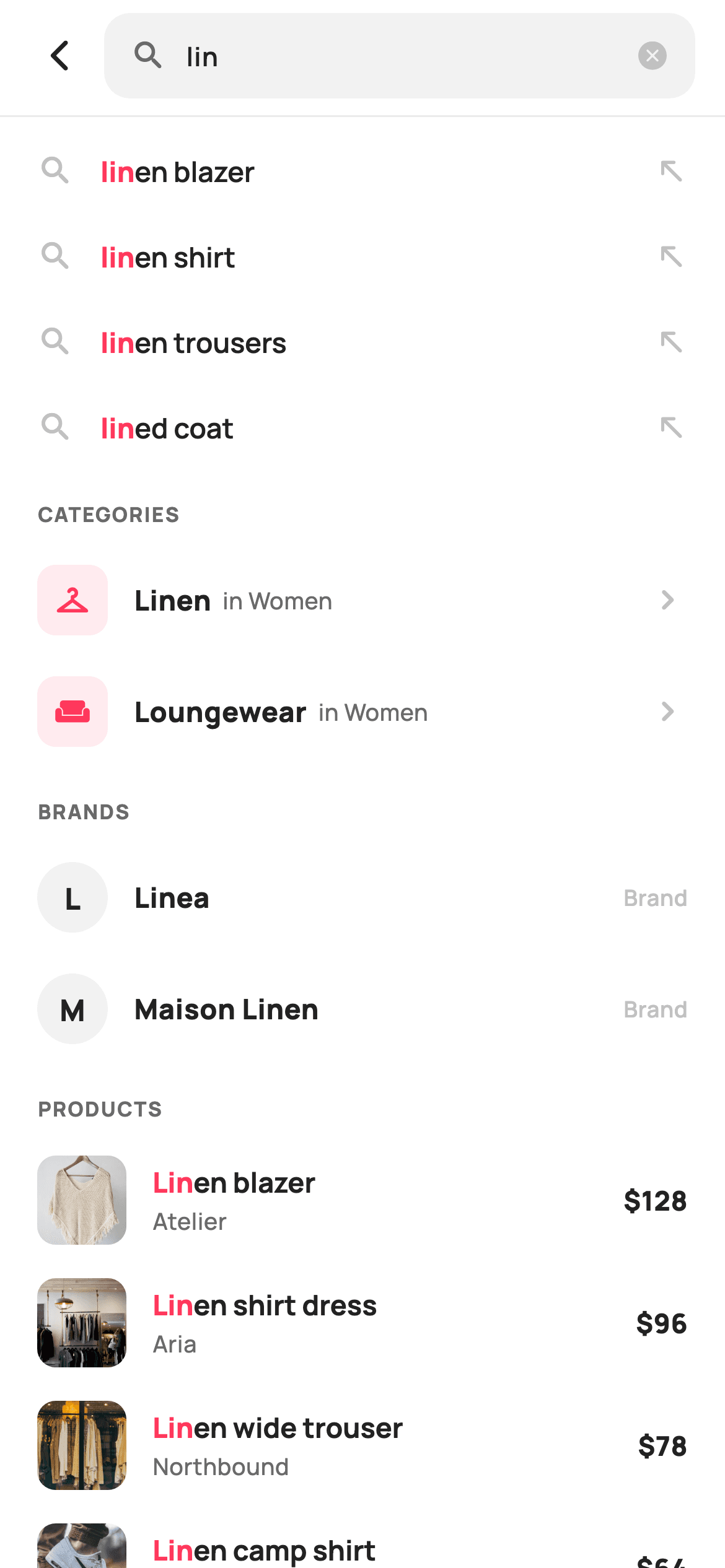
What you'll build
- ✓A pill search field backed by a `TextEditingController` pre-seeded with the `query` parameter and a cancel icon that appears only while `_q` is non-empty
- ✓One `ListView` that spreads four `static const` lists — `_completions`, `_cats`, `_brands`, `_prods` — into a single scroll with conditional section labels
- ✓Category rows with a `_brand.withValues(alpha: 0.10)` icon tile and brand rows with a circular `substring(0, 1)` monogram
- ✓Product rows layering a `#F5F5F5` placeholder under a 48px `Image.asset` thumbnail with brand and price
- ✓A `_highlighted` function that finds the live query with a case-insensitive `indexOf` and renders the match as a bold red `TextSpan`
Step-by-step build
Create the file
Add a new file at lib/ecom_search_suggest/ecom_search_suggest_screen.dart in your Flutter project.
Register the bundled fonts
No external packages — this is pure Flutter. It does bundle its design font (Manrope), so drop the font file into fonts/ and declare it in pubspec.yaml:
flutter:
  fonts:
    - family: Manrope
      fonts:
- asset: fonts/Manrope-Regular.ttfBuild it, piece by piece
Here's how the screen goes together. Each block below is a real slice of the code with a plain-English explanation — paste them in order, or grab the whole file from the next section.
A stateful screen with a seeded query and four callbacks
import 'package:flutter/material.dart';

/// StyleCart — Search Suggestions (live typeahead).
///
/// As the shopper types, a single scroll blends three result kinds: matching
/// query completions, categories and brands as compact rows, and product
/// matches as thumbnail rows with price. Pre-seeded with a partial query.
///
/// Self-contained per CONVENTIONS.md: pure Flutter, bundled Manrope, inline
/// Airbnb-style tokens, own light theme + SafeArea, bundled webp thumbnails. No
/// emoji glyphs. Exposes callbacks only; the typed query is internal.
class EcomSearchSuggestScreen extends StatefulWidget {
  const EcomSearchSuggestScreen({
    super.key,
    this.query = 'lin',
    this.onBack,
    this.onSubmit,
    this.onTerm,
    this.onProduct,
  });

  final String query;
  final VoidCallback? onBack;
  final ValueChanged<String>? onSubmit;

  /// A suggestion / completion / category / brand was tapped.
  final ValueChanged<String>? onTerm;
  final ValueChanged<String>? onProduct;

  @override
  State<EcomSearchSuggestScreen> createState() =>
      _EcomSearchSuggestScreenState();
}
Unlike most StyleCart screens this one is a `StatefulWidget`, because the typed query has to live somewhere and the file deliberately keeps it internal. The constructor takes `query` with a default of `'lin'` — a partial word chosen so the preview immediately shows highlighting across every row — plus four callbacks. `onSubmit` is a `ValueChanged<String>` that receives the full field text when the keyboard's search key is pressed, while `onTerm` fires for anything that is a search term (completions, categories, brands) and `onProduct` for a thumbnail row. Splitting term taps from product taps matters: a term should re-run the search, a product should open a detail page, and the host app should not have to string-match to tell them apart.
Tokens, seeded result data and the query state
class _EcomSearchSuggestScreenState extends State<EcomSearchSuggestScreen> {
  static const String _font = 'Manrope';
  static const Color _canvas = Color(0xFFFFFFFF);
  static const Color _ink = Color(0xFF222222);
  static const Color _muted = Color(0xFF6A6A6A);
  static const Color _faint = Color(0xFFC1C1C1);
  static const Color _brand = Color(0xFFFF385C);
  static const Color _surface = Color(0xFFF2F2F2);
  static const Color _imageBg = Color(0xFFF5F5F5);

  static const String _dir =
      'lib/screens/ecommerce/ecom_search_suggest/images';

  static const List<String> _completions = <String>[
    'linen blazer',
    'linen shirt',
    'linen trousers',
    'lined coat',
  ];
  static const List<_Cat> _cats = <_Cat>[
    _Cat('Linen', 'in Women', Icons.checkroom_rounded),
    _Cat('Loungewear', 'in Women', Icons.weekend_rounded),
  ];
  static const List<String> _brands = <String>['Linea', 'Maison Linen'];
  static const List<_Prod> _prods = <_Prod>[
    _Prod('Linen blazer', 'Atelier', 128, 'p01.webp'),
    _Prod('Linen shirt dress', 'Aria', 96, 'p02.webp'),
    _Prod('Linen wide trouser', 'Northbound', 78, 'p03.webp'),
    _Prod('Linen camp shirt', 'Stride', 64, 'p04.webp'),
    _Prod('Linen tote', 'Maison', 112, 'p05.webp'),
    _Prod('Linen blend cardigan', 'Maison', 84, 'p06.webp'),
  ];

  late final TextEditingController _ctl =
      TextEditingController(text: widget.query);
  late String _q = widget.query;
The palette is the Airbnb-style set: `_ink #222222`, `_muted #6A6A6A`, `_faint #C1C1C1` for icons and hints, `_brand #FF385C` for the highlight, `_surface #F2F2F2` for the pill and monogram discs, and a separate `_imageBg #F5F5F5` so thumbnails have a placeholder while webp assets decode. The four result lists are `static const` — `_completions` of four strings, `_cats` of `_Cat` records carrying a label, scope and icon, `_brands` of two strings, and `_prods` of six `_Prod` records with title, brand, an `int` price and an asset filename under `_dir`. State is just two fields: `late final TextEditingController _ctl` initialised from `widget.query` so the field opens pre-filled, and `late String _q = widget.query` mirroring it, which is what the highlighter reads. `dispose` releases the controller.
One ListView that blends four result kinds
  @override
  void dispose() {
    _ctl.dispose();
    super.dispose();
  }

  @override
  Widget build(BuildContext context) {
    return Theme(
      data: ThemeData.light(useMaterial3: true),
      child: Scaffold(
        backgroundColor: _canvas,
        body: SafeArea(
          child: Column(
            children: <Widget>[
              _searchRow(),
              const Divider(height: 1, color: Color(0xFFEBEBEB)),
              Expanded(
                child: ListView(
                  padding: const EdgeInsets.fromLTRB(0, 6, 0, 24),
                  children: <Widget>[
                    ..._completions.map(_completionRow),
                    if (_cats.isNotEmpty) _label('Categories'),
                    ..._cats.map(_catRow),
                    if (_brands.isNotEmpty) _label('Brands'),
                    ..._brands.map(_brandRow),
                    _label('Products'),
                    ..._prods.map(_prodRow),
                  ],
                ),
              ),
            ],
          ),
        ),
      ),
    );
  }
`build` wraps everything in `Theme(data: ThemeData.light(useMaterial3: true))` so the screen ignores whatever theme the host app runs and always renders on the white `_canvas`. Inside `SafeArea`, a `Column` places `_searchRow()` above a 1px `Divider` in `#EBEBEB`, then an `Expanded` `ListView` with `fromLTRB(0, 6, 0, 24)` padding. The list is assembled with spread operators: `..._completions.map(_completionRow)` comes first with no header because completions are what the shopper expects directly under the field, then `if (_cats.isNotEmpty) _label('Categories')` guards each header so an empty category list never leaves a lonely caption. Products always get a label. Because rows are plain widgets rather than a `ListView.builder`, the mix of heights and kinds costs nothing extra to lay out at this size.
The pill search field with a self-clearing cancel icon
  Widget _searchRow() {
    return Padding(
      padding: const EdgeInsets.fromLTRB(8, 6, 16, 8),
      child: Row(
        children: <Widget>[
          IconButton(
            onPressed: widget.onBack,
            icon: const Icon(Icons.arrow_back_ios_new_rounded,
                size: 20, color: _ink),
          ),
          Expanded(
            child: Container(
              height: 46,
              padding: const EdgeInsets.symmetric(horizontal: 14),
              decoration: BoxDecoration(
                color: _surface,
                borderRadius: BorderRadius.circular(14),
              ),
              child: Row(
                children: <Widget>[
                  const Icon(Icons.search_rounded, size: 20, color: _muted),
                  const SizedBox(width: 10),
                  Expanded(
                    child: TextField(
                      controller: _ctl,
                      autofocus: false,
                      cursorColor: _brand,
                      textInputAction: TextInputAction.search,
                      onChanged: (String v) => setState(() => _q = v),
                      onSubmitted: widget.onSubmit,
                      style: const TextStyle(
                        fontFamily: _font,
                        fontSize: 14,
                        fontWeight: FontWeight.w600,
                        color: _ink,
                      ),
                      decoration: const InputDecoration(
                        isDense: true,
                        border: InputBorder.none,
                        hintText: 'Search for items, brands…',
                        hintStyle: TextStyle(
                          fontFamily: _font,
                          fontSize: 14,
                          fontWeight: FontWeight.w500,
                          color: _faint,
                        ),
                      ),
                    ),
                  ),
                  if (_q.isNotEmpty)
                    GestureDetector(
                      onTap: () => setState(() {
                        _q = '';
                        _ctl.clear();
                      }),
                      child: const Icon(Icons.cancel_rounded,
                          size: 18, color: _faint),
                    ),
                ],
              ),
            ),
          ),
        ],
      ),
    );
  }
The search row pads `fromLTRB(8, 6, 16, 8)` — less on the left because the back `IconButton` carries its own touch inset. The pill is a 46px `Container` in `_surface` with a 14px radius, holding a `_muted` search icon and an `Expanded` `TextField`. The field sets `autofocus: false` so the keyboard does not jump up over the pre-seeded results, `cursorColor: _brand`, and `textInputAction: TextInputAction.search` to relabel the keyboard's return key. `onChanged` is a one-liner `setState(() => _q = v)`, which is the whole live-update mechanism: every row rebuilds and re-highlights on each keystroke. The decoration is `isDense` with `InputBorder.none` since the pill already draws the boundary. The trailing `cancel_rounded` icon is wrapped in `if (_q.isNotEmpty)` and its `GestureDetector` resets both `_q` and `_ctl.clear()` — updating only one would desync the field from the highlighter.
Section captions and query-completion rows
  Widget _label(String t) {
    return Padding(
      padding: const EdgeInsets.fromLTRB(20, 16, 20, 8),
      child: Text(
        t.toUpperCase(),
        style: const TextStyle(
          fontFamily: _font,
          fontSize: 11,
          fontWeight: FontWeight.w800,
          letterSpacing: 0.8,
          color: _muted,
        ),
      ),
    );
  }

  Widget _completionRow(String term) {
    return InkWell(
      onTap: () => widget.onTerm?.call(term),
      child: Padding(
        padding: const EdgeInsets.symmetric(horizontal: 20, vertical: 13),
        child: Row(
          children: <Widget>[
            const Icon(Icons.search_rounded, size: 20, color: _faint),
            const SizedBox(width: 14),
            Expanded(child: _highlighted(term)),
            const Icon(Icons.north_west_rounded, size: 18, color: _faint),
          ],
        ),
      ),
    );
  }
`_label` uppercases its text and renders it at 11px `w800` with `letterSpacing: 0.8` in `_muted`, padded `fromLTRB(20, 16, 20, 8)` — the 16px top gap is what visually separates one result kind from the previous one, because the rows themselves have no dividers. `_completionRow` is an `InkWell` around a `Row` with 13px vertical padding: a `_faint` search icon on the left, the term through `_highlighted(term)` in `Expanded`, and a `north_west_rounded` arrow on the right. That arrow is the Google-style affordance meaning 'put this in the field', which is why the row fires `onTerm` rather than `onSubmit` — the host decides whether tapping a completion searches immediately or just fills the box. Icons are `_faint` rather than `_muted` so the highlighted text is the only strong element in the row.
Category tiles and brand monograms
  Widget _catRow(_Cat c) {
    return InkWell(
      onTap: () => widget.onTerm?.call(c.label),
      child: Padding(
        padding: const EdgeInsets.symmetric(horizontal: 20, vertical: 11),
        child: Row(
          children: <Widget>[
            Container(
              width: 38,
              height: 38,
              decoration: BoxDecoration(
                color: _brand.withValues(alpha: 0.10),
                borderRadius: BorderRadius.circular(10),
              ),
              child: Icon(c.icon, size: 20, color: _brand),
            ),
            const SizedBox(width: 14),
            Expanded(
              child: Row(
                children: <Widget>[
                  Text(
                    c.label,
                    style: const TextStyle(
                      fontFamily: _font,
                      fontSize: 15,
                      fontWeight: FontWeight.w800,
                      color: _ink,
                    ),
                  ),
                  const SizedBox(width: 6),
                  Text(
                    c.scope,
                    style: const TextStyle(
                      fontFamily: _font,
                      fontSize: 12.5,
                      fontWeight: FontWeight.w500,
                      color: _muted,
                    ),
                  ),
                ],
              ),
            ),
            const Icon(Icons.chevron_right_rounded, size: 22, color: _faint),
          ],
        ),
      ),
    );
  }

  Widget _brandRow(String b) {
    return InkWell(
      onTap: () => widget.onTerm?.call(b),
      child: Padding(
        padding: const EdgeInsets.symmetric(horizontal: 20, vertical: 11),
        child: Row(
          children: <Widget>[
            Container(
              width: 38,
              height: 38,
              alignment: Alignment.center,
              decoration: const BoxDecoration(
                color: _surface,
                shape: BoxShape.circle,
              ),
              child: Text(
                b.substring(0, 1),
                style: const TextStyle(
                  fontFamily: _font,
                  fontSize: 16,
                  fontWeight: FontWeight.w800,
                  color: _ink,
                ),
              ),
            ),
            const SizedBox(width: 14),
            Expanded(
              child: Text(
                b,
                style: const TextStyle(
                  fontFamily: _font,
                  fontSize: 15,
                  fontWeight: FontWeight.w800,
                  color: _ink,
                ),
              ),
            ),
            const Text(
              'Brand',
              style: TextStyle(
                fontFamily: _font,
                fontSize: 12,
                fontWeight: FontWeight.w600,
                color: _faint,
              ),
            ),
          ],
        ),
      ),
    );
  }
Both rows are 38px-avatar layouts with 11px vertical padding, but they differ in shape to be scannable at a glance. `_catRow` draws a rounded square at `_brand.withValues(alpha: 0.10)` with the category's `IconData` in full `_brand`, then a nested `Row` placing the 15px `w800` label beside its 12.5px `_muted` scope ('in Women') with a 6px gap, and a `chevron_right_rounded` at the end signalling navigation into a category. `_brandRow` instead uses a `BoxShape.circle` in `_surface` containing `b.substring(0, 1)` at 16px `w800` — a free monogram that needs no logo asset — and ends with a small `_faint` 'Brand' tag rather than a chevron. Neither row runs through `_highlighted`; category and brand names are short and the tile already tells you what they are. Both tap through `onTerm` with the label, so 'Linea' becomes a search the same way a completion does.
Product rows with placeholder-backed thumbnails and price
  Widget _prodRow(_Prod p) {
    return InkWell(
      onTap: () => widget.onProduct?.call(p.title),
      child: Padding(
        padding: const EdgeInsets.symmetric(horizontal: 20, vertical: 9),
        child: Row(
          children: <Widget>[
            ClipRRect(
              borderRadius: BorderRadius.circular(10),
              child: SizedBox(
                width: 48,
                height: 48,
                child: Stack(
                  fit: StackFit.expand,
                  children: <Widget>[
                    Container(color: _imageBg),
                    Image.asset('$_dir/${p.asset}', fit: BoxFit.cover),
                  ],
                ),
              ),
            ),
            const SizedBox(width: 14),
            Expanded(
              child: Column(
                crossAxisAlignment: CrossAxisAlignment.start,
                children: <Widget>[
                  _highlighted(p.title, bold: true),
                  const SizedBox(height: 2),
                  Text(
                    p.brand,
                    style: const TextStyle(
                      fontFamily: _font,
                      fontSize: 12.5,
                      fontWeight: FontWeight.w500,
                      color: _muted,
                    ),
                  ),
                ],
              ),
            ),
            Text(
              '\$${p.price}',
              style: const TextStyle(
                fontFamily: _font,
                fontSize: 14.5,
                fontWeight: FontWeight.w800,
                color: _ink,
              ),
            ),
          ],
        ),
      ),
    );
  }
`_prodRow` uses tighter 9px vertical padding because six product rows follow each other and the 48px thumbnail already gives the row height. The image sits inside `ClipRRect(borderRadius: 10)` around a `SizedBox(48, 48)` holding a `Stack` with `fit: StackFit.expand`: a `Container(color: _imageBg)` is painted first and `Image.asset('$_dir/${p.asset}', fit: BoxFit.cover)` on top, so the frame is a neutral grey during decode rather than a flash of white. The title goes through `_highlighted(p.title, bold: true)` — bold because a product name should read heavier than a completion — with the brand under it at 12.5px `_muted` and a 2px gap. The price is `'\$${p.price}'` at 14.5px `w800`, rendered from an `int` so there is no decimal noise for whole-dollar prices. Tapping calls `onProduct` with the title, the one row that does not feed back into search.
Highlighting the live substring and the record classes
  /// Renders [text] with the live query substring emphasised in brand red.
  Widget _highlighted(String text, {bool bold = false}) {
    final FontWeight base = bold ? FontWeight.w700 : FontWeight.w600;
    final String q = _q.trim();
    final int idx =
        q.isEmpty ? -1 : text.toLowerCase().indexOf(q.toLowerCase());
    if (idx < 0) {
      return Text(
        text,
        maxLines: 1,
        overflow: TextOverflow.ellipsis,
        style: TextStyle(
            fontFamily: _font, fontSize: 15, fontWeight: base, color: _ink),
      );
    }
    final String before = text.substring(0, idx);
    final String match = text.substring(idx, idx + q.length);
    final String after = text.substring(idx + q.length);
    return RichText(
      maxLines: 1,
      overflow: TextOverflow.ellipsis,
      text: TextSpan(
        style: TextStyle(
            fontFamily: _font, fontSize: 15, fontWeight: base, color: _ink),
        children: <TextSpan>[
          TextSpan(text: before),
          TextSpan(
            text: match,
            style: const TextStyle(
                fontWeight: FontWeight.w800, color: _brand),
          ),
          TextSpan(text: after),
        ],
      ),
    );
  }
}

class _Cat {
  const _Cat(this.label, this.scope, this.icon);
  final String label;
  final String scope;
  final IconData icon;
}

class _Prod {
  const _Prod(this.title, this.brand, this.price, this.asset);
  final String title;
  final String brand;
  final int price;
  final String asset;
}
`_highlighted` is the piece that makes the screen feel live. It trims `_q`, lowercases both it and the row text, and takes `indexOf` — so 'LIN' still matches 'Linen blazer' and the untouched original casing is what gets displayed. When there is no match, or the query is empty, it returns a plain single-line `Text` with ellipsis at the caller's base weight (`w700` when `bold`, else `w600`). Otherwise it slices `before`, `match` and `after` by index and builds a `RichText` whose middle `TextSpan` overrides only `fontWeight: w800` and `color: _brand`, inheriting the font and 15px size from the parent span. Only the first occurrence is highlighted, which is what a shopper expects. The file closes with `_Cat` and `_Prod`, two tiny `const` classes whose typed fields keep the seed lists readable and let a real API response map straight into them.
Full code
The complete, ready-to-paste source. Free to use in your projects — one click copies it all.
import 'package:flutter/material.dart';

/// StyleCart — Search Suggestions (live typeahead).
///
/// As the shopper types, a single scroll blends three result kinds: matching
/// query completions, categories and brands as compact rows, and product
/// matches as thumbnail rows with price. Pre-seeded with a partial query.
///
/// Self-contained per CONVENTIONS.md: pure Flutter, bundled Manrope, inline
/// Airbnb-style tokens, own light theme + SafeArea, bundled webp thumbnails. No
/// emoji glyphs. Exposes callbacks only; the typed query is internal.
class EcomSearchSuggestScreen extends StatefulWidget {
  const EcomSearchSuggestScreen({
    super.key,
    this.query = 'lin',
    this.onBack,
    this.onSubmit,
    this.onTerm,
    this.onProduct,
  });

  final String query;
  final VoidCallback? onBack;
  final ValueChanged<String>? onSubmit;

  /// A suggestion / completion / category / brand was tapped.
  final ValueChanged<String>? onTerm;
  final ValueChanged<String>? onProduct;

  @override
  State<EcomSearchSuggestScreen> createState() =>
      _EcomSearchSuggestScreenState();
}

class _EcomSearchSuggestScreenState extends State<EcomSearchSuggestScreen> {
  static const String _font = 'Manrope';
  static const Color _canvas = Color(0xFFFFFFFF);
  static const Color _ink = Color(0xFF222222);
  static const Color _muted = Color(0xFF6A6A6A);
  static const Color _faint = Color(0xFFC1C1C1);
  static const Color _brand = Color(0xFFFF385C);
  static const Color _surface = Color(0xFFF2F2F2);
  static const Color _imageBg = Color(0xFFF5F5F5);

  static const String _dir =
      'lib/screens/ecommerce/ecom_search_suggest/images';

  static const List<String> _completions = <String>[
    'linen blazer',
    'linen shirt',
    'linen trousers',
    'lined coat',
  ];
  static const List<_Cat> _cats = <_Cat>[
    _Cat('Linen', 'in Women', Icons.checkroom_rounded),
    _Cat('Loungewear', 'in Women', Icons.weekend_rounded),
  ];
  static const List<String> _brands = <String>['Linea', 'Maison Linen'];
  static const List<_Prod> _prods = <_Prod>[
    _Prod('Linen blazer', 'Atelier', 128, 'p01.webp'),
    _Prod('Linen shirt dress', 'Aria', 96, 'p02.webp'),
    _Prod('Linen wide trouser', 'Northbound', 78, 'p03.webp'),
    _Prod('Linen camp shirt', 'Stride', 64, 'p04.webp'),
    _Prod('Linen tote', 'Maison', 112, 'p05.webp'),
    _Prod('Linen blend cardigan', 'Maison', 84, 'p06.webp'),
  ];

  late final TextEditingController _ctl =
      TextEditingController(text: widget.query);
  late String _q = widget.query;

  @override
  void dispose() {
    _ctl.dispose();
    super.dispose();
  }

  @override
  Widget build(BuildContext context) {
    return Theme(
      data: ThemeData.light(useMaterial3: true),
      child: Scaffold(
        backgroundColor: _canvas,
        body: SafeArea(
          child: Column(
            children: <Widget>[
              _searchRow(),
              const Divider(height: 1, color: Color(0xFFEBEBEB)),
              Expanded(
                child: ListView(
                  padding: const EdgeInsets.fromLTRB(0, 6, 0, 24),
                  children: <Widget>[
                    ..._completions.map(_completionRow),
                    if (_cats.isNotEmpty) _label('Categories'),
                    ..._cats.map(_catRow),
                    if (_brands.isNotEmpty) _label('Brands'),
                    ..._brands.map(_brandRow),
                    _label('Products'),
                    ..._prods.map(_prodRow),
                  ],
                ),
              ),
            ],
          ),
        ),
      ),
    );
  }

  Widget _searchRow() {
    return Padding(
      padding: const EdgeInsets.fromLTRB(8, 6, 16, 8),
      child: Row(
        children: <Widget>[
          IconButton(
            onPressed: widget.onBack,
            icon: const Icon(Icons.arrow_back_ios_new_rounded,
                size: 20, color: _ink),
          ),
          Expanded(
            child: Container(
              height: 46,
              padding: const EdgeInsets.symmetric(horizontal: 14),
              decoration: BoxDecoration(
                color: _surface,
                borderRadius: BorderRadius.circular(14),
              ),
              child: Row(
                children: <Widget>[
                  const Icon(Icons.search_rounded, size: 20, color: _muted),
                  const SizedBox(width: 10),
                  Expanded(
                    child: TextField(
                      controller: _ctl,
                      autofocus: false,
                      cursorColor: _brand,
                      textInputAction: TextInputAction.search,
                      onChanged: (String v) => setState(() => _q = v),
                      onSubmitted: widget.onSubmit,
                      style: const TextStyle(
                        fontFamily: _font,
                        fontSize: 14,
                        fontWeight: FontWeight.w600,
                        color: _ink,
                      ),
                      decoration: const InputDecoration(
                        isDense: true,
                        border: InputBorder.none,
                        hintText: 'Search for items, brands…',
                        hintStyle: TextStyle(
                          fontFamily: _font,
                          fontSize: 14,
                          fontWeight: FontWeight.w500,
                          color: _faint,
                        ),
                      ),
                    ),
                  ),
                  if (_q.isNotEmpty)
                    GestureDetector(
                      onTap: () => setState(() {
                        _q = '';
                        _ctl.clear();
                      }),
                      child: const Icon(Icons.cancel_rounded,
                          size: 18, color: _faint),
                    ),
                ],
              ),
            ),
          ),
        ],
      ),
    );
  }

  Widget _label(String t) {
    return Padding(
      padding: const EdgeInsets.fromLTRB(20, 16, 20, 8),
      child: Text(
        t.toUpperCase(),
        style: const TextStyle(
          fontFamily: _font,
          fontSize: 11,
          fontWeight: FontWeight.w800,
          letterSpacing: 0.8,
          color: _muted,
        ),
      ),
    );
  }

  Widget _completionRow(String term) {
    return InkWell(
      onTap: () => widget.onTerm?.call(term),
      child: Padding(
        padding: const EdgeInsets.symmetric(horizontal: 20, vertical: 13),
        child: Row(
          children: <Widget>[
            const Icon(Icons.search_rounded, size: 20, color: _faint),
            const SizedBox(width: 14),
            Expanded(child: _highlighted(term)),
            const Icon(Icons.north_west_rounded, size: 18, color: _faint),
          ],
        ),
      ),
    );
  }

  Widget _catRow(_Cat c) {
    return InkWell(
      onTap: () => widget.onTerm?.call(c.label),
      child: Padding(
        padding: const EdgeInsets.symmetric(horizontal: 20, vertical: 11),
        child: Row(
          children: <Widget>[
            Container(
              width: 38,
              height: 38,
              decoration: BoxDecoration(
                color: _brand.withValues(alpha: 0.10),
                borderRadius: BorderRadius.circular(10),
              ),
              child: Icon(c.icon, size: 20, color: _brand),
            ),
            const SizedBox(width: 14),
            Expanded(
              child: Row(
                children: <Widget>[
                  Text(
                    c.label,
                    style: const TextStyle(
                      fontFamily: _font,
                      fontSize: 15,
                      fontWeight: FontWeight.w800,
                      color: _ink,
                    ),
                  ),
                  const SizedBox(width: 6),
                  Text(
                    c.scope,
                    style: const TextStyle(
                      fontFamily: _font,
                      fontSize: 12.5,
                      fontWeight: FontWeight.w500,
                      color: _muted,
                    ),
                  ),
                ],
              ),
            ),
            const Icon(Icons.chevron_right_rounded, size: 22, color: _faint),
          ],
        ),
      ),
    );
  }

  Widget _brandRow(String b) {
    return InkWell(
      onTap: () => widget.onTerm?.call(b),
      child: Padding(
        padding: const EdgeInsets.symmetric(horizontal: 20, vertical: 11),
        child: Row(
          children: <Widget>[
            Container(
              width: 38,
              height: 38,
              alignment: Alignment.center,
              decoration: const BoxDecoration(
                color: _surface,
                shape: BoxShape.circle,
              ),
              child: Text(
                b.substring(0, 1),
                style: const TextStyle(
                  fontFamily: _font,
                  fontSize: 16,
                  fontWeight: FontWeight.w800,
                  color: _ink,
                ),
              ),
            ),
            const SizedBox(width: 14),
            Expanded(
              child: Text(
                b,
                style: const TextStyle(
                  fontFamily: _font,
                  fontSize: 15,
                  fontWeight: FontWeight.w800,
                  color: _ink,
                ),
              ),
            ),
            const Text(
              'Brand',
              style: TextStyle(
                fontFamily: _font,
                fontSize: 12,
                fontWeight: FontWeight.w600,
                color: _faint,
              ),
            ),
          ],
        ),
      ),
    );
  }

  Widget _prodRow(_Prod p) {
    return InkWell(
      onTap: () => widget.onProduct?.call(p.title),
      child: Padding(
        padding: const EdgeInsets.symmetric(horizontal: 20, vertical: 9),
        child: Row(
          children: <Widget>[
            ClipRRect(
              borderRadius: BorderRadius.circular(10),
              child: SizedBox(
                width: 48,
                height: 48,
                child: Stack(
                  fit: StackFit.expand,
                  children: <Widget>[
                    Container(color: _imageBg),
                    Image.asset('$_dir/${p.asset}', fit: BoxFit.cover),
                  ],
                ),
              ),
            ),
            const SizedBox(width: 14),
            Expanded(
              child: Column(
                crossAxisAlignment: CrossAxisAlignment.start,
                children: <Widget>[
                  _highlighted(p.title, bold: true),
                  const SizedBox(height: 2),
                  Text(
                    p.brand,
                    style: const TextStyle(
                      fontFamily: _font,
                      fontSize: 12.5,
                      fontWeight: FontWeight.w500,
                      color: _muted,
                    ),
                  ),
                ],
              ),
            ),
            Text(
              '\$${p.price}',
              style: const TextStyle(
                fontFamily: _font,
                fontSize: 14.5,
                fontWeight: FontWeight.w800,
                color: _ink,
              ),
            ),
          ],
        ),
      ),
    );
  }

  /// Renders [text] with the live query substring emphasised in brand red.
  Widget _highlighted(String text, {bool bold = false}) {
    final FontWeight base = bold ? FontWeight.w700 : FontWeight.w600;
    final String q = _q.trim();
    final int idx =
        q.isEmpty ? -1 : text.toLowerCase().indexOf(q.toLowerCase());
    if (idx < 0) {
      return Text(
        text,
        maxLines: 1,
        overflow: TextOverflow.ellipsis,
        style: TextStyle(
            fontFamily: _font, fontSize: 15, fontWeight: base, color: _ink),
      );
    }
    final String before = text.substring(0, idx);
    final String match = text.substring(idx, idx + q.length);
    final String after = text.substring(idx + q.length);
    return RichText(
      maxLines: 1,
      overflow: TextOverflow.ellipsis,
      text: TextSpan(
        style: TextStyle(
            fontFamily: _font, fontSize: 15, fontWeight: base, color: _ink),
        children: <TextSpan>[
          TextSpan(text: before),
          TextSpan(
            text: match,
            style: const TextStyle(
                fontWeight: FontWeight.w800, color: _brand),
          ),
          TextSpan(text: after),
        ],
      ),
    );
  }
}

class _Cat {
  const _Cat(this.label, this.scope, this.icon);
  final String label;
  final String scope;
  final IconData icon;
}

class _Prod {
  const _Prod(this.title, this.brand, this.price, this.asset);
  final String title;
  final String brand;
  final int price;
  final String asset;
}
Plus bundled 11 binary assets (fonts/images). The CLI and MCP install those for you automatically.
Two faster ways to add it
Copy-paste works, but you can skip it entirely.
1. FlutterKit CLI
One command drops this screen — and its fonts — straight into your project.
$ flutterkit add ecom-search-suggest2. AI agent (MCP)
Connect FlutterKit's MCP server in Claude or Cursor and just ask your agent to install ecom-search-suggest — it fetches and writes the files for you.
FAQ
Can I use this search suggestions screen in a commercial app for free?
Yes. FlutterKit screens are free for personal and commercial projects under MIT-style terms, with no licence key and no attribution requirement. Copy the code from this page, run `flutterkit add ecom-search-suggest`, or fetch it through MCP, and ship it.
How do I feed real suggestions from my search API?
Replace the four `static const` lists with fields set from your backend, and call your endpoint inside the `TextField`'s `onChanged` (debounced with a short `Timer`) before the `setState`. Because `_highlighted` reads `_q` at build time, results and highlighting stay in sync automatically — map your JSON into `_Cat` and `_Prod` records and the row builders need no changes.
Why is the query highlighted in red on some rows but not on categories or brands?
Only completions and product titles go through `_highlighted`. Category and brand rows are short labels with a tile or monogram already identifying them, so the file leaves them plain to keep the red emphasis meaningful. If you want it everywhere, swap the `Text(c.label ...)` and `Text(b ...)` calls for `_highlighted(c.label)` and `_highlighted(b)`.
Which packages and fonts does this screen need?
No pub packages — it is pure Flutter with `material.dart` only. It uses the Manrope font and six webp thumbnails under `lib/screens/ecommerce/ecom_search_suggest/images`; the CLI install bundles the font and the assets and registers them in `pubspec.yaml` for you.
What Flutter version is required?
Flutter 3.22 or newer, because the category tile uses `_brand.withValues(alpha: 0.10)` and the constructor uses `super.key`. On an older 3.x SDK change that to `withOpacity(0.10)` and rewrite the constructor as `{Key? key, ...}) : super(key: key)`.


