How to Build a Visual Search Screen in Flutter (Full Code + Preview)
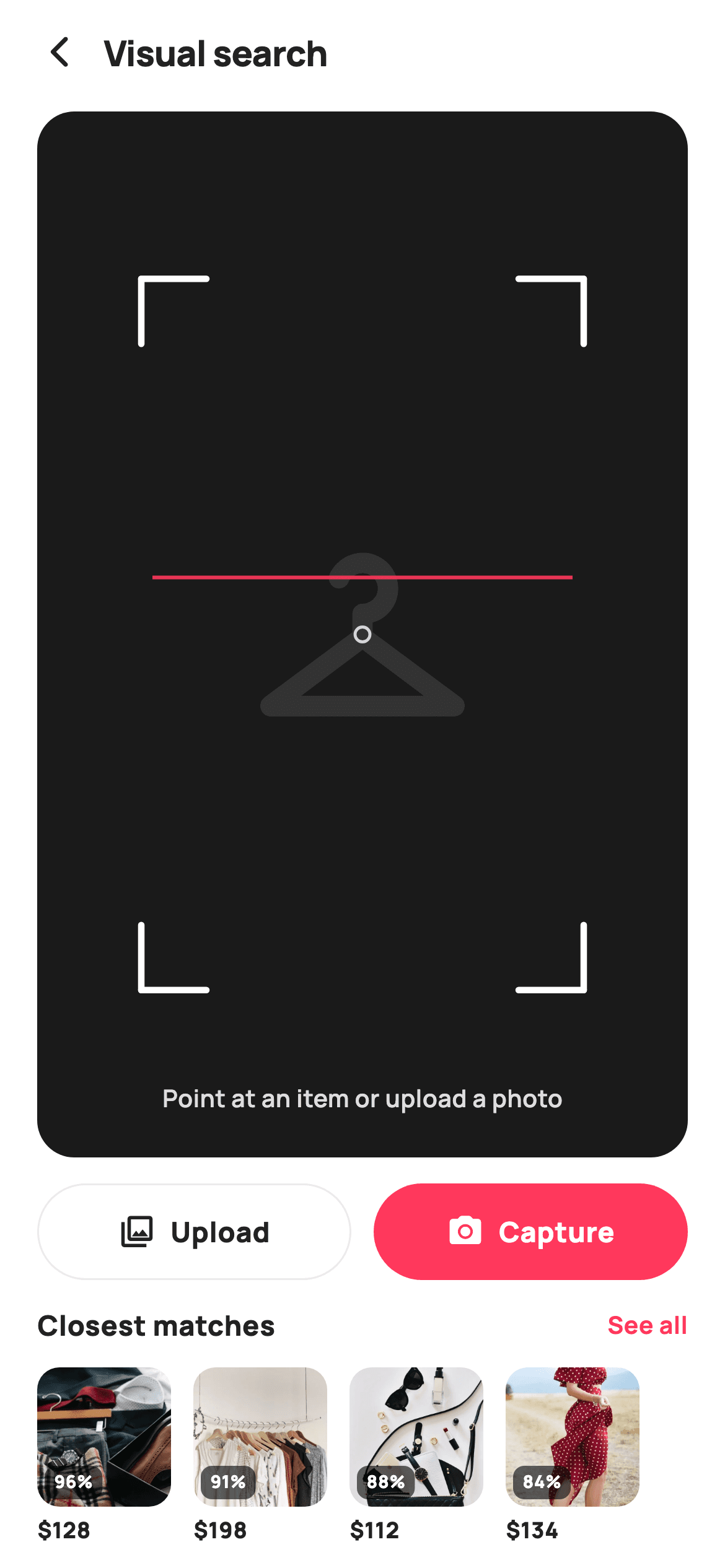
Search-by-photo only works if the shopper trusts the camera view before they tap. This tutorial builds StyleCart's visual search screen in Flutter: a near-black `_viewfinder` panel filling the middle of the canvas, a `_ScanFramePainter` drawing four L-shaped corner brackets, a coral scan line and a centre reticle over a garment silhouette, an outlined Upload pill paired with a filled Capture pill, and a 96px rail of `_Match` results with translucent percent-match badges. Pure Flutter with bundled Manrope, exposing five callbacks so the camera and matching service stay yours.
What you'll build
- ✓A `Stack`-based viewfinder clipped to a 20px radius with a `Color(0xFF1A1A1A)` ground and a 132px `Icons.checkroom_rounded` silhouette standing in for the live camera feed
- ✓A `_ScanFramePainter` whose frame is 16% inset on every edge, with bracket arms sized at 10% of width and a scan line placed 42% down the frame
- ✓An Upload / Capture pair where the primary action is filled `Color(0xFFFF385C)` and the secondary is only a 1px `0xFFEBEBEB` outline
- ✓A `ListView.separated` rail of 72px-wide `_Match` cards showing a 60% black percent badge over each bundled webp
- ✓Five optional callbacks (`onBack`, `onCapture`, `onUpload`, `onProduct`, `onSeeAll`) that keep the widget free of camera or network code
Step-by-step build
Create the file
Add a new file at lib/ecom_search_visual/ecom_search_visual_screen.dart in your Flutter project.
Register the bundled fonts
No external packages — this is pure Flutter. It does bundle its design font (Manrope), so drop the font file into fonts/ and declare it in pubspec.yaml:
flutter:
  fonts:
    - family: Manrope
      fonts:
- asset: fonts/Manrope-Regular.ttfBuild it, piece by piece
Here's how the screen goes together. Each block below is a real slice of the code with a plain-English explanation — paste them in order, or grab the whole file from the next section.
Callbacks, tokens and the hard-coded match list
import 'package:flutter/material.dart';

/// StyleCart — Visual / Photo Search.
///
/// "Search by image": a framed viewfinder with a painted scan overlay (corner
/// brackets + reticle + scan line), capture / upload actions, and a preview rail
/// of the closest visual matches.
///
/// Self-contained per CONVENTIONS.md: pure Flutter, bundled Manrope, inline
/// Airbnb-style tokens, own light theme + SafeArea, bundled webp matches. The
/// scan overlay is a CustomPainter (no emoji glyph). Exposes callbacks only.
class EcomSearchVisualScreen extends StatelessWidget {
  const EcomSearchVisualScreen({
    super.key,
    this.onBack,
    this.onCapture,
    this.onUpload,
    this.onProduct,
    this.onSeeAll,
  });

  final VoidCallback? onBack;
  final VoidCallback? onCapture;
  final VoidCallback? onUpload;
  final ValueChanged<String>? onProduct;
  final VoidCallback? onSeeAll;

  static const String _font = 'Manrope';
  static const Color _canvas = Color(0xFFFFFFFF);
  static const Color _ink = Color(0xFF222222);
  static const Color _brand = Color(0xFFFF385C);
  static const Color _imageBg = Color(0xFFF5F5F5);
  static const Color _viewfinder = Color(0xFF1A1A1A);

  static const String _dir =
      'lib/screens/ecommerce/ecom_search_visual/images';

  static const List<_Match> _matches = <_Match>[
    _Match('Linen blazer', 128, 96, 'p11.webp'),
    _Match('Tailored coat', 198, 91, 'p12.webp'),
    _Match('Wool overshirt', 112, 88, 'p13.webp'),
    _Match('Boxy denim', 134, 84, 'p14.webp'),
  ];
`EcomSearchVisualScreen` is a `StatelessWidget`: nothing on this screen changes on its own, so there is no controller to manage. The constructor takes five nullable callbacks — `onBack`, `onCapture`, `onUpload`, `onSeeAll` and an `onProduct` typed `ValueChanged<String>` so the tapped match's title travels out with the event. Design tokens are static consts: `_canvas` white, `_ink` `0xFF222222`, the coral `_brand` `0xFFFF385C`, a `_imageBg` grey for thumbnails still loading, and `_viewfinder` `0xFF1A1A1A` for the camera panel. `_dir` points at the bundled image folder so asset paths are assembled in one place. The `_matches` list holds four `_Match` records — title, price in whole dollars, match percentage and webp filename — already sorted 96 → 84 so the rail reads as ranked without any sorting code at runtime.
Forcing a light theme and stacking the viewfinder
  @override
  Widget build(BuildContext context) {
    return Theme(
      data: ThemeData.light(useMaterial3: true),
      child: Scaffold(
        backgroundColor: _canvas,
        body: SafeArea(
          child: Column(
            children: <Widget>[
              _header(),
              Expanded(
                child: Padding(
                  padding: const EdgeInsets.fromLTRB(20, 4, 20, 8),
                  child: ClipRRect(
                    borderRadius: BorderRadius.circular(20),
                    child: Stack(
                      fit: StackFit.expand,
                      children: <Widget>[
                        Container(color: _viewfinder),
                        // Subject silhouette behind the scan frame.
                        const Center(
                          child: Icon(Icons.checkroom_rounded,
                              size: 132, color: Color(0xFF333333)),
                        ),
                        const Positioned.fill(
                          child: CustomPaint(painter: _ScanFramePainter()),
                        ),
                        const Positioned(
                          left: 0,
                          right: 0,
                          bottom: 22,
                          child: Center(
                            child: Text(
                              'Point at an item or upload a photo',
                              style: TextStyle(
                                fontFamily: _font,
                                fontSize: 13,
                                fontWeight: FontWeight.w600,
                                color: Color(0xFFDDDDDD),
                              ),
                            ),
                          ),
                        ),
                      ],
                    ),
                  ),
                ),
              ),
              _actions(),
              _matchPreview(),
            ],
          ),
        ),
      ),
    );
  }
`build` wraps everything in `Theme(data: ThemeData.light(useMaterial3: true))` so the screen looks identical whether the host app is dark or light, then a `Scaffold` with `SafeArea` and a `Column`. The header sits on top, the viewfinder takes `Expanded` so it stretches to whatever height is left after the actions and match rail claim theirs, and the two bottom sections are fixed. The viewfinder itself is a `ClipRRect` at radius 20 around a `Stack` with `fit: StackFit.expand`: a solid `_viewfinder` container at the bottom, a centred 132px `Icons.checkroom_rounded` in `0xFF333333` acting as the subject silhouette (just visible against the near-black), a `Positioned.fill` `CustomPaint` for the scan overlay, and a hint line pinned 22px from the bottom in `0xFFDDDDDD` 13px `w600`. In a real app the silhouette layer is where the camera preview would go.
A minimal back-and-title header
  Widget _header() {
    return Padding(
      padding: const EdgeInsets.fromLTRB(8, 4, 20, 4),
      child: Row(
        children: <Widget>[
          IconButton(
            onPressed: onBack,
            icon: const Icon(Icons.arrow_back_ios_new_rounded,
                size: 20, color: _ink),
          ),
          const Expanded(
            child: Text(
              'Visual search',
              style: TextStyle(
                fontFamily: _font,
                fontSize: 19,
                fontWeight: FontWeight.w800,
                letterSpacing: -0.3,
                color: _ink,
              ),
            ),
          ),
        ],
      ),
    );
  }
`_header` is deliberately sparse so the viewfinder dominates. The `Row` has an `IconButton` with `Icons.arrow_back_ios_new_rounded` at 20px in `_ink` wired to `onBack`, then an `Expanded` 'Visual search' title at 19px `w800` with `letterSpacing: -0.3`, the same tight tracking the rest of the StyleCart set uses for headings. Padding is `fromLTRB(8, 4, 20, 4)`: the 8px left leaves room for the `IconButton`'s own 48px touch target so the arrow glyph visually aligns with the 20px content margin used everywhere else, while the 4px vertical keeps the header short. There is no trailing action — flash, flip camera and the like belong to the capture flow, not this entry screen.
Upload and Capture as a ranked pill pair
  Widget _actions() {
    return Padding(
      padding: const EdgeInsets.fromLTRB(20, 6, 20, 6),
      child: Row(
        children: <Widget>[
          Expanded(
            child: GestureDetector(
              onTap: onUpload,
              child: Container(
                height: 52,
                alignment: Alignment.center,
                decoration: BoxDecoration(
                  borderRadius: BorderRadius.circular(99),
                  border: Border.all(color: const Color(0xFFEBEBEB)),
                ),
                child: const Row(
                  mainAxisAlignment: MainAxisAlignment.center,
                  children: <Widget>[
                    Icon(Icons.photo_library_outlined, size: 20, color: _ink),
                    SizedBox(width: 8),
                    Text(
                      'Upload',
                      style: TextStyle(
                        fontFamily: _font,
                        fontSize: 15,
                        fontWeight: FontWeight.w800,
                        color: _ink,
                      ),
                    ),
                  ],
                ),
              ),
            ),
          ),
          const SizedBox(width: 12),
          Expanded(
            child: GestureDetector(
              onTap: onCapture,
              child: Container(
                height: 52,
                alignment: Alignment.center,
                decoration: BoxDecoration(
                  color: _brand,
                  borderRadius: BorderRadius.circular(99),
                ),
                child: const Row(
                  mainAxisAlignment: MainAxisAlignment.center,
                  children: <Widget>[
                    Icon(Icons.camera_alt_rounded, size: 20, color: _canvas),
                    SizedBox(width: 8),
                    Text(
                      'Capture',
                      style: TextStyle(
                        fontFamily: _font,
                        fontSize: 15,
                        fontWeight: FontWeight.w800,
                        color: _canvas,
                      ),
                    ),
                  ],
                ),
              ),
            ),
          ),
        ],
      ),
    );
  }
`_actions` places two `Expanded` `GestureDetector`s of equal width with a 12px gap, both 52px tall with a `BorderRadius.circular(99)` pill shape. They are not equals though: Upload is only a 1px `0xFFEBEBEB` outline with `_ink` text and `Icons.photo_library_outlined`, while Capture is filled solid `_brand` with white text and `Icons.camera_alt_rounded`. Both labels are 15px `w800` Manrope with an 8px gap between icon and text. Putting the filled button on the right makes it the thumb-side default for the camera path the screen is named after, while Upload stays a full-size, obviously tappable alternative rather than a text link. Each fires its own callback (`onUpload`, `onCapture`) so the host decides whether to open `image_picker`, a camera package, or a file dialog on desktop.
The 'Closest matches' rail with percent badges
  Widget _matchPreview() {
    return Padding(
      padding: const EdgeInsets.fromLTRB(20, 8, 20, 12),
      child: Column(
        crossAxisAlignment: CrossAxisAlignment.start,
        children: <Widget>[
          Row(
            children: <Widget>[
              const Expanded(
                child: Text(
                  'Closest matches',
                  style: TextStyle(
                    fontFamily: _font,
                    fontSize: 15,
                    fontWeight: FontWeight.w800,
                    color: _ink,
                  ),
                ),
              ),
              GestureDetector(
                onTap: onSeeAll,
                child: const Text(
                  'See all',
                  style: TextStyle(
                    fontFamily: _font,
                    fontSize: 13,
                    fontWeight: FontWeight.w700,
                    color: _brand,
                  ),
                ),
              ),
            ],
          ),
          const SizedBox(height: 12),
          SizedBox(
            height: 96,
            child: ListView.separated(
              scrollDirection: Axis.horizontal,
              itemCount: _matches.length,
              separatorBuilder: (_, _) => const SizedBox(width: 12),
              itemBuilder: (BuildContext context, int i) {
                final _Match m = _matches[i];
                return GestureDetector(
                  onTap: () => onProduct?.call(m.title),
                  child: SizedBox(
                    width: 72,
                    child: Column(
                      crossAxisAlignment: CrossAxisAlignment.start,
                      children: <Widget>[
                        Expanded(
                          child: ClipRRect(
                            borderRadius: BorderRadius.circular(12),
                            child: Stack(
                              fit: StackFit.expand,
                              children: <Widget>[
                                Container(color: _imageBg),
                                Image.asset('$_dir/${m.asset}',
                                    fit: BoxFit.cover),
                                Positioned(
                                  left: 4,
                                  bottom: 4,
                                  child: Container(
                                    padding: const EdgeInsets.symmetric(
                                        horizontal: 5, vertical: 2),
                                    decoration: BoxDecoration(
                                      color: Colors.black
                                          .withValues(alpha: 0.6),
                                      borderRadius: BorderRadius.circular(6),
                                    ),
                                    child: Text(
                                      '${m.match}%',
                                      style: const TextStyle(
                                        fontFamily: _font,
                                        fontSize: 9.5,
                                        fontWeight: FontWeight.w800,
                                        color: _canvas,
                                      ),
                                    ),
                                  ),
                                ),
                              ],
                            ),
                          ),
                        ),
                        const SizedBox(height: 4),
                        Text(
                          '\$${m.price}',
                          style: const TextStyle(
                            fontFamily: _font,
                            fontSize: 12,
                            fontWeight: FontWeight.w800,
                            color: _ink,
                          ),
                        ),
                      ],
                    ),
                  ),
                );
              },
            ),
          ),
        ],
      ),
    );
  }
}
`_matchPreview` starts with a header row: 'Closest matches' at 15px `w800` and a `_brand`-coloured 'See all' link at 13px `w700` wired to `onSeeAll`. Beneath it a 96px-tall `SizedBox` hosts a horizontal `ListView.separated` with 12px gaps, using the `(_, _)` wildcard separator syntax. Each item is a 72px-wide `Column`: an `Expanded` `ClipRRect` at radius 12 stacking a `_imageBg` placeholder, `Image.asset('$_dir/${m.asset}', fit: BoxFit.cover)` and a badge `Positioned` 4px from the bottom-left. That badge is `Colors.black.withValues(alpha: 0.6)` with a 6px radius, and the text is `'${m.match}%'` at a tiny 9.5px `w800` white — readable over any photo without blocking it. Under the image a 4px gap and the price as `'\$${m.price}'` at 12px. Tapping calls `onProduct?.call(m.title)`, so the parent receives the product name rather than an index.
The `_Match` record
class _Match {
  const _Match(this.title, this.price, this.match, this.asset);
  final String title;
  final int price;
  final int match;
  final String asset;
}
`_Match` is a tiny immutable value class with a const positional constructor: `title`, `price` as an `int` in whole dollars, `match` as an `int` percentage and `asset` as the webp filename. Keeping price and match as integers means the rail can format them with plain string interpolation and no `NumberFormat` dependency, which is part of why the file has no pub packages at all. When you connect a real similarity service, this is the shape to map its response into — a score in 0–100 and an image reference — and the rest of the rail keeps working unchanged because it only reads these four fields.
Painting brackets, scan line and reticle
/// Paints viewfinder corner brackets, a centre reticle and a scan line.
class _ScanFramePainter extends CustomPainter {
  const _ScanFramePainter();

  @override
  void paint(Canvas canvas, Size size) {
    const Color brand = Color(0xFFFF385C);
    final double w = size.width;
    final double h = size.height;
    final Rect frame = Rect.fromLTRB(
        w * 0.16, h * 0.16, w * 0.84, h * 0.84);
    final double len = w * 0.10;

    final Paint corner = Paint()
      ..style = PaintingStyle.stroke
      ..strokeWidth = 3.5
      ..strokeCap = StrokeCap.round
      ..color = Colors.white;

    // Four L-shaped corners.
    void bracket(Offset o, double dx, double dy) {
      canvas.drawLine(o, o.translate(dx, 0), corner);
      canvas.drawLine(o, o.translate(0, dy), corner);
    }

    bracket(frame.topLeft, len, len);
    bracket(frame.topRight, -len, len);
    bracket(frame.bottomLeft, len, -len);
    bracket(frame.bottomRight, -len, -len);

    // Scan line across the frame.
    final double scanY = frame.top + frame.height * 0.42;
    canvas.drawLine(
      Offset(frame.left + 6, scanY),
      Offset(frame.right - 6, scanY),
      Paint()
        ..strokeWidth = 2
        ..color = brand.withValues(alpha: 0.9),
    );

    // Centre reticle.
    final Offset c = frame.center;
    final Paint ret = Paint()
      ..style = PaintingStyle.stroke
      ..strokeWidth = 1.6
      ..color = Colors.white.withValues(alpha: 0.8);
    canvas.drawCircle(c, 4, ret);
  }

  @override
  bool shouldRepaint(_ScanFramePainter oldDelegate) => false;
}
`_ScanFramePainter` draws everything relative to the widget size, so it stays sharp at any resolution. The frame is `Rect.fromLTRB(w*0.16, h*0.16, w*0.84, h*0.84)` — a 16% inset on every side — and bracket arm length `len` is 10% of the width. A local `bracket(o, dx, dy)` helper draws two lines from a corner: one horizontal, one vertical. It is called four times with the signs flipped (`-len` where the arm must point back inward), which is how one helper yields all four L-shapes. The stroke is 3.5px white with `StrokeCap.round`. The scan line sits at 42% of the frame height, inset 6px from each side, in brand coral at 90% alpha. Finally a 4px-radius circle at `frame.center` with a 1.6px 80% white stroke gives the reticle. `shouldRepaint` returns `false` because the painter has no fields, so Flutter never redraws it needlessly.
Full code
The complete, ready-to-paste source. Free to use in your projects — one click copies it all.
import 'package:flutter/material.dart';
/// StyleCart — Visual / Photo Search.
///
/// "Search by image": a framed viewfinder with a painted scan overlay (corner
/// brackets + reticle + scan line), capture / upload actions, and a preview rail
/// of the closest visual matches.
///
/// Self-contained per CONVENTIONS.md: pure Flutter, bundled Manrope, inline
/// Airbnb-style tokens, own light theme + SafeArea, bundled webp matches. The
/// scan overlay is a CustomPainter (no emoji glyph). Exposes callbacks only.
class EcomSearchVisualScreen extends StatelessWidget {
const EcomSearchVisualScreen({
super.key,
this.onBack,
this.onCapture,
this.onUpload,
this.onProduct,
this.onSeeAll,
});
final VoidCallback? onBack;
final VoidCallback? onCapture;
final VoidCallback? onUpload;
final ValueChanged<String>? onProduct;
final VoidCallback? onSeeAll;
static const String _font = 'Manrope';
static const Color _canvas = Color(0xFFFFFFFF);
static const Color _ink = Color(0xFF222222);
static const Color _brand = Color(0xFFFF385C);
static const Color _imageBg = Color(0xFFF5F5F5);
static const Color _viewfinder = Color(0xFF1A1A1A);
static const String _dir =
'lib/screens/ecommerce/ecom_search_visual/images';
static const List<_Match> _matches = <_Match>[
_Match('Linen blazer', 128, 96, 'p11.webp'),
_Match('Tailored coat', 198, 91, 'p12.webp'),
_Match('Wool overshirt', 112, 88, 'p13.webp'),
_Match('Boxy denim', 134, 84, 'p14.webp'),
];
@override
Widget build(BuildContext context) {
return Theme(
data: ThemeData.light(useMaterial3: true),
child: Scaffold(
backgroundColor: _canvas,
body: SafeArea(
child: Column(
children: <Widget>[
_header(),
Expanded(
child: Padding(
padding: const EdgeInsets.fromLTRB(20, 4, 20, 8),
child: ClipRRect(
borderRadius: BorderRadius.circular(20),
child: Stack(
fit: StackFit.expand,
children: <Widget>[
Container(color: _viewfinder),
// Subject silhouette behind the scan frame.
const Center(
child: Icon(Icons.checkroom_rounded,
size: 132, color: Color(0xFF333333)),
),
const Positioned.fill(
child: CustomPaint(painter: _ScanFramePainter()),
),
const Positioned(
left: 0,
right: 0,
bottom: 22,
child: Center(
child: Text(
'Point at an item or upload a photo',
style: TextStyle(
fontFamily: _font,
fontSize: 13,
fontWeight: FontWeight.w600,
color: Color(0xFFDDDDDD),
),
),
),
),
],
),
),
),
),
_actions(),
_matchPreview(),
],
),
),
),
);
}
Widget _header() {
return Padding(
padding: const EdgeInsets.fromLTRB(8, 4, 20, 4),
child: Row(
children: <Widget>[
IconButton(
onPressed: onBack,
icon: const Icon(Icons.arrow_back_ios_new_rounded,
size: 20, color: _ink),
),
const Expanded(
child: Text(
'Visual search',
style: TextStyle(
fontFamily: _font,
fontSize: 19,
fontWeight: FontWeight.w800,
letterSpacing: -0.3,
color: _ink,
),
),
),
],
),
);
}
Widget _actions() {
return Padding(
padding: const EdgeInsets.fromLTRB(20, 6, 20, 6),
child: Row(
children: <Widget>[
Expanded(
child: GestureDetector(
onTap: onUpload,
child: Container(
height: 52,
alignment: Alignment.center,
decoration: BoxDecoration(
borderRadius: BorderRadius.circular(99),
border: Border.all(color: const Color(0xFFEBEBEB)),
),
child: const Row(
mainAxisAlignment: MainAxisAlignment.center,
children: <Widget>[
Icon(Icons.photo_library_outlined, size: 20, color: _ink),
SizedBox(width: 8),
Text(
'Upload',
style: TextStyle(
fontFamily: _font,
fontSize: 15,
fontWeight: FontWeight.w800,
color: _ink,
),
),
],
),
),
),
),
const SizedBox(width: 12),
Expanded(
child: GestureDetector(
onTap: onCapture,
child: Container(
height: 52,
alignment: Alignment.center,
decoration: BoxDecoration(
color: _brand,
borderRadius: BorderRadius.circular(99),
),
child: const Row(
mainAxisAlignment: MainAxisAlignment.center,
children: <Widget>[
Icon(Icons.camera_alt_rounded, size: 20, color: _canvas),
SizedBox(width: 8),
Text(
'Capture',
style: TextStyle(
fontFamily: _font,
fontSize: 15,
fontWeight: FontWeight.w800,
color: _canvas,
),
),
],
),
),
),
),
],
),
);
}
Widget _matchPreview() {
return Padding(
padding: const EdgeInsets.fromLTRB(20, 8, 20, 12),
child: Column(
crossAxisAlignment: CrossAxisAlignment.start,
children: <Widget>[
Row(
children: <Widget>[
const Expanded(
child: Text(
'Closest matches',
style: TextStyle(
fontFamily: _font,
fontSize: 15,
fontWeight: FontWeight.w800,
color: _ink,
),
),
),
GestureDetector(
onTap: onSeeAll,
child: const Text(
'See all',
style: TextStyle(
fontFamily: _font,
fontSize: 13,
fontWeight: FontWeight.w700,
color: _brand,
),
),
),
],
),
const SizedBox(height: 12),
SizedBox(
height: 96,
child: ListView.separated(
scrollDirection: Axis.horizontal,
itemCount: _matches.length,
separatorBuilder: (_, _) => const SizedBox(width: 12),
itemBuilder: (BuildContext context, int i) {
final _Match m = _matches[i];
return GestureDetector(
onTap: () => onProduct?.call(m.title),
child: SizedBox(
width: 72,
child: Column(
crossAxisAlignment: CrossAxisAlignment.start,
children: <Widget>[
Expanded(
child: ClipRRect(
borderRadius: BorderRadius.circular(12),
child: Stack(
fit: StackFit.expand,
children: <Widget>[
Container(color: _imageBg),
Image.asset('$_dir/${m.asset}',
fit: BoxFit.cover),
Positioned(
left: 4,
bottom: 4,
child: Container(
padding: const EdgeInsets.symmetric(
horizontal: 5, vertical: 2),
decoration: BoxDecoration(
color: Colors.black
.withValues(alpha: 0.6),
borderRadius: BorderRadius.circular(6),
),
child: Text(
'${m.match}%',
style: const TextStyle(
fontFamily: _font,
fontSize: 9.5,
fontWeight: FontWeight.w800,
color: _canvas,
),
),
),
),
],
),
),
),
const SizedBox(height: 4),
Text(
'\$${m.price}',
style: const TextStyle(
fontFamily: _font,
fontSize: 12,
fontWeight: FontWeight.w800,
color: _ink,
),
),
],
),
),
);
},
),
),
],
),
);
}
}
class _Match {
const _Match(this.title, this.price, this.match, this.asset);
final String title;
final int price;
final int match;
final String asset;
}
/// Paints viewfinder corner brackets, a centre reticle and a scan line.
class _ScanFramePainter extends CustomPainter {
const _ScanFramePainter();
@override
void paint(Canvas canvas, Size size) {
const Color brand = Color(0xFFFF385C);
final double w = size.width;
final double h = size.height;
final Rect frame = Rect.fromLTRB(
w * 0.16, h * 0.16, w * 0.84, h * 0.84);
final double len = w * 0.10;
final Paint corner = Paint()
..style = PaintingStyle.stroke
..strokeWidth = 3.5
..strokeCap = StrokeCap.round
..color = Colors.white;
// Four L-shaped corners.
void bracket(Offset o, double dx, double dy) {
canvas.drawLine(o, o.translate(dx, 0), corner);
canvas.drawLine(o, o.translate(0, dy), corner);
}
bracket(frame.topLeft, len, len);
bracket(frame.topRight, -len, len);
bracket(frame.bottomLeft, len, -len);
bracket(frame.bottomRight, -len, -len);
// Scan line across the frame.
final double scanY = frame.top + frame.height * 0.42;
canvas.drawLine(
Offset(frame.left + 6, scanY),
Offset(frame.right - 6, scanY),
Paint()
..strokeWidth = 2
..color = brand.withValues(alpha: 0.9),
);
// Centre reticle.
final Offset c = frame.center;
final Paint ret = Paint()
..style = PaintingStyle.stroke
..strokeWidth = 1.6
..color = Colors.white.withValues(alpha: 0.8);
canvas.drawCircle(c, 4, ret);
}
@override
bool shouldRepaint(_ScanFramePainter oldDelegate) => false;
}
Plus bundled 9 binary assets (fonts/images). The CLI and MCP install those for you automatically.
Two faster ways to add it
Copy-paste works, but you can skip it entirely.
1. FlutterKit CLI
One command drops this screen — and its fonts — straight into your project.
$ flutterkit add ecom-search-visual2. AI agent (MCP)
Connect FlutterKit's MCP server in Claude or Cursor and just ask your agent to install ecom-search-visual — it fetches and writes the files for you.
FAQ
Can I use this visual search screen in a commercial app for free?
Yes. FlutterKit screens are free under an MIT-style licence for personal and commercial projects, with no licence key and no attribution required. Copy the code from this page, run `flutterkit add ecom-search-visual`, or pull it through the MCP server, then ship it.
Does it need any pub packages or fonts?
No pub packages — the whole file is `package:flutter/material.dart`, and the scan overlay is a `CustomPainter` rather than an SVG. The only extra is the Manrope font family plus four webp thumbnails, and both are bundled automatically by `flutterkit add ecom-search-visual`.
How do I replace the silhouette with a live camera feed?
Swap the `Center(child: Icon(Icons.checkroom_rounded ...))` layer inside the viewfinder `Stack` for your `CameraPreview` widget. Because the `_ScanFramePainter` sits in a `Positioned.fill` above it and the hint text above that, the brackets, scan line and reticle will render on top of the preview with no other changes. Keep `StackFit.expand` so the preview fills the clipped 20px-radius panel.
How do I feed real matches from an image-similarity API?
Turn `_matches` into a constructor parameter (or lift the widget into a `StatefulWidget` and set it after `onCapture` resolves), and map each API result into a `_Match` with a 0–100 `match` score and an image reference. If the images come from the network, change `Image.asset` in the rail to `Image.network`; the `_imageBg` grey placeholder underneath already covers the loading gap.
Which Flutter version does this need?
Flutter 3.22 or newer. The constructor uses `super.key`, the badge and painter use `Color.withValues(alpha: ...)`, and the separator uses the `(_, _)` wildcard syntax. On an older SDK replace `withValues(alpha: x)` with `withOpacity(x)`, name the separator parameters, and expand the constructor to `{Key? key} : super(key: key)`.


