How to Build a Wishlist Share Bottom Sheet in Flutter (Full Code + Preview)
Sharing a wishlist usually means handing someone a link, but in person the fastest handoff is a camera pointed at a QR code. This tutorial builds StyleCart's share sheet in Flutter: a bottom sheet over a tappable `0x66000000` scrim, a QR card painted entirely by `_QrPainter` from a deterministic bit formula, a copy-link row whose `FilledButton` flips from coral 'Copy' to ink 'Copied' via `_copied`, an 'Allow others to add items' `Switch` bound to `_allowAdds`, and four tinted channel tiles that report their label through `onChannel`. No pub packages, no network, no image assets.
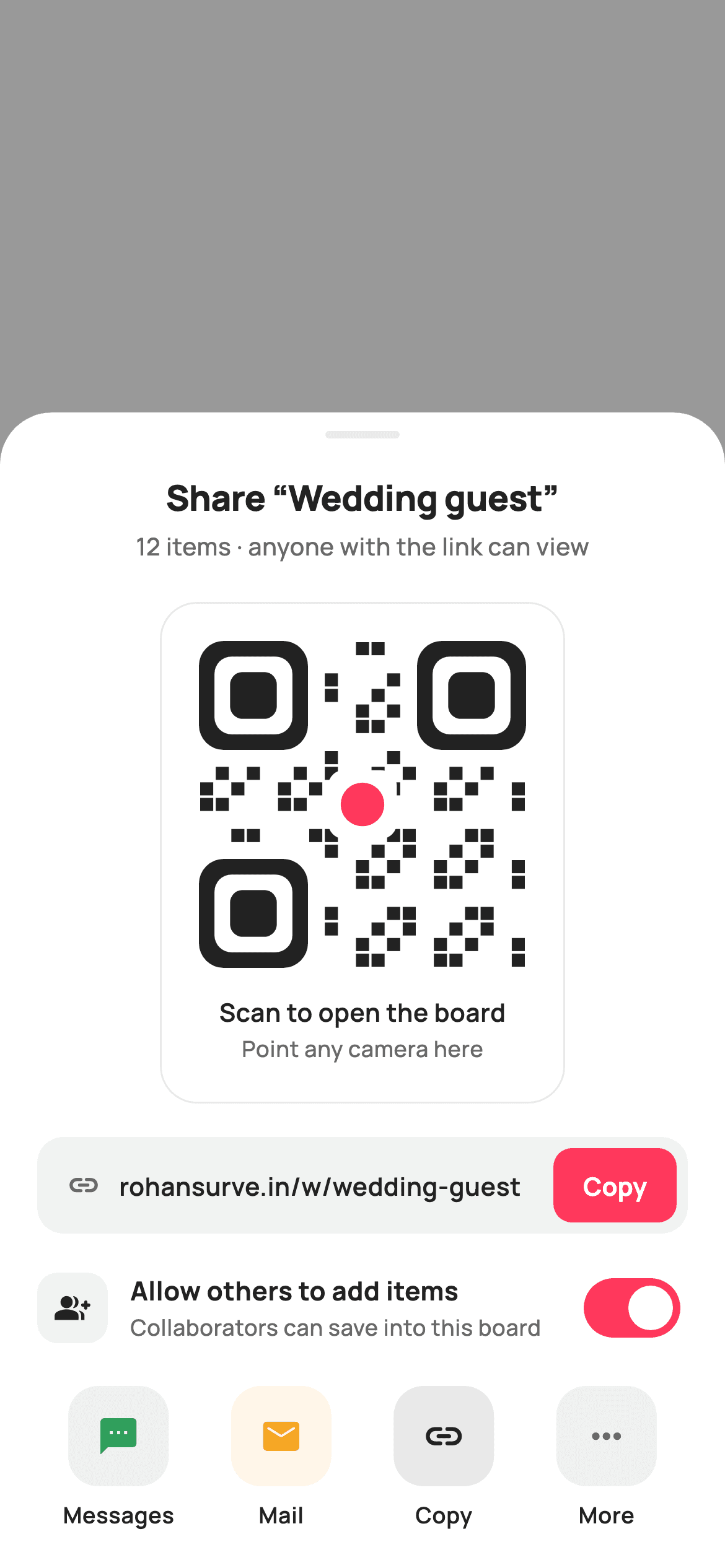
What you'll build
- ✓A dismissable bottom sheet layered over a 40% black scrim with a `Positioned.fill` `GestureDetector` wired to `onClose`
- ✓A 176px QR card drawn by `_QrPainter` — three rounded finder squares, a hash-driven 21×21 module grid and a heart-red centre dot
- ✓A copy-link row whose button swaps colour and label the moment `_copied` becomes true
- ✓A collaborator `Switch` styled with a coral track and transparent outline, held in `_allowAdds`
- ✓A four-up channel row built from a `static const List<_Channel>` with 10% tinted icon tiles
Step-by-step build
Create the file
Add a new file at lib/ecom_wishlist_share/ecom_wishlist_share_screen.dart in your Flutter project.
Register the bundled fonts
No external packages — this is pure Flutter. It does bundle its design font (Manrope), so drop the font file into fonts/ and declare it in pubspec.yaml:
flutter:
  fonts:
    - family: Manrope
      fonts:
- asset: fonts/Manrope-Regular.ttfBuild it, piece by piece
Here's how the screen goes together. Each block below is a real slice of the code with a plain-English explanation — paste them in order, or grab the whole file from the next section.
Callbacks, tokens and the channel table
import 'package:flutter/material.dart';

/// StyleCart — Share Wishlist.
///
/// A dimmed-scrim bottom sheet to share a wishlist board: a painted QR card a
/// friend can scan, a copy-link row, and a row of share channels. Toggles let
/// the owner allow others to add items or keep the board view-only.
///
/// Self-contained per CONVENTIONS.md: pure Flutter, bundled Manrope, inline
/// Airbnb-style tokens, own light theme + SafeArea. The QR is a CustomPainter
/// (deterministic module grid — no emoji glyph, no network). Exposes callbacks
/// only.
class EcomWishlistShareScreen extends StatefulWidget {
  const EcomWishlistShareScreen({
    super.key,
    this.onClose,
    this.onCopyLink,
    this.onChannel,
  });

  final VoidCallback? onClose;
  final VoidCallback? onCopyLink;
  final ValueChanged<String>? onChannel;

  @override
  State<EcomWishlistShareScreen> createState() =>
      _EcomWishlistShareScreenState();
}

class _EcomWishlistShareScreenState extends State<EcomWishlistShareScreen> {
  static const String _font = 'Manrope';
  static const Color _canvas = Color(0xFFFFFFFF);
  static const Color _ink = Color(0xFF222222);
  static const Color _muted = Color(0xFF6A6A6A);
  static const Color _faint = Color(0xFFC1C1C1);
  static const Color _brand = Color(0xFFFF385C);
  static const Color _surface = Color(0xFFF2F2F2);
  static const Color _hairline = Color(0xFFEBEBEB);

  static const String _link = 'rohansurve.in/w/wedding-guest';

  bool _allowAdds = true;
  bool _copied = false;

  static const List<_Channel> _channels = <_Channel>[
    _Channel('Messages', Icons.sms_rounded, Color(0xFF2E9E5B)),
    _Channel('Mail', Icons.mail_rounded, Color(0xFFF5A623)),
    _Channel('Copy', Icons.link_rounded, Color(0xFF222222)),
    _Channel('More', Icons.more_horiz_rounded, Color(0xFF6A6A6A)),
  ];
`EcomWishlistShareScreen` is a `StatefulWidget` exposing exactly three callbacks: `onClose` for the scrim tap, `onCopyLink` for the copy button, and `onChannel`, a `ValueChanged<String>` that hands back the tapped channel's label rather than an index, so the host can switch on 'Messages' or 'Mail' without knowing tile order. The state class carries Airbnb-style tokens — `_ink` `#222222`, `_muted` `#6A6A6A`, `_faint` `#C1C1C1` for the off switch track, coral `_brand` `#FF385C`, `_surface` `#F2F2F2` for the link pill and `_hairline` `#EBEBEB`. The shareable URL is a `static const _link` string and two mutable flags drive the UI: `_allowAdds` (defaults to true) and `_copied` (false). The four channels are a `static const List<_Channel>` pairing a label, an `Icons.*_rounded` glyph and a tint — green for Messages, amber for Mail, ink for Copy, muted grey for More — so adding WhatsApp later is a one-line data change.
Scrim, stack and a bottom-aligned sheet
  @override
  Widget build(BuildContext context) {
    return Theme(
      data: ThemeData.light(useMaterial3: true),
      child: Scaffold(
        backgroundColor: Colors.transparent,
        body: Stack(
          children: <Widget>[
            // Dimmed scrim — tap to dismiss.
            Positioned.fill(
              child: GestureDetector(
                onTap: widget.onClose,
                child: const ColoredBox(color: Color(0x66000000)),
              ),
            ),
            Align(
              alignment: Alignment.bottomCenter,
              child: _sheet(),
            ),
          ],
        ),
      ),
    );
  }
`build` wraps everything in `Theme(data: ThemeData.light(useMaterial3: true))` so the sheet renders identically regardless of the host app's theme. The `Scaffold` gets `backgroundColor: Colors.transparent`, which matters because the widget is meant to sit on top of whatever screen opened it; a default white scaffold would hide it. Inside a `Stack`, `Positioned.fill` holds a `GestureDetector` around a `ColoredBox` of `0x66000000` — 40% black — and its `onTap` is simply `widget.onClose`, so tapping anywhere outside the sheet dismisses it without the sheet needing its own close button. `Align(alignment: Alignment.bottomCenter)` then pins `_sheet()` to the bottom edge, leaving the top of the screen as scrim.
The sheet body: handle, title and section stack
  Widget _sheet() {
    return Container(
      decoration: const BoxDecoration(
        color: _canvas,
        borderRadius: BorderRadius.vertical(top: Radius.circular(28)),
      ),
      child: SafeArea(
        top: false,
        child: SingleChildScrollView(
          child: Padding(
            padding: const EdgeInsets.fromLTRB(20, 10, 20, 20),
            child: Column(
              mainAxisSize: MainAxisSize.min,
              children: <Widget>[
                Container(
                  width: 40,
                  height: 4,
                  decoration: BoxDecoration(
                    color: _hairline,
                    borderRadius: BorderRadius.circular(2),
                  ),
                ),
                const SizedBox(height: 18),
                const Text(
                  'Share “Wedding guest”',
                  style: TextStyle(
                    fontFamily: _font,
                    fontSize: 19,
                    fontWeight: FontWeight.w800,
                    letterSpacing: -0.3,
                    color: _ink,
                  ),
                ),
                const SizedBox(height: 4),
                const Text(
                  '12 items · anyone with the link can view',
                  style: TextStyle(
                    fontFamily: _font,
                    fontSize: 13,
                    fontWeight: FontWeight.w500,
                    color: _muted,
                  ),
                ),
                const SizedBox(height: 20),
                _qrCard(),
                const SizedBox(height: 18),
                _linkRow(),
                const SizedBox(height: 16),
                _allowRow(),
                const SizedBox(height: 18),
                _channelRow(),
              ],
            ),
          ),
        ),
      ),
    );
  }
`_sheet` is a white `Container` with `BorderRadius.vertical(top: Radius.circular(28))`, so only the top corners round — the bottom sits flush with the device edge. `SafeArea(top: false)` is placed inside the container rather than outside, which keeps the white background extending under the home indicator while padding the content above it. A `SingleChildScrollView` guards against short phones, and the `Column` uses `mainAxisSize: MainAxisSize.min` so the sheet hugs its content instead of filling the screen. The 40×4 grab handle is a `_hairline` pill with radius 2, followed by the 19px `w800` title 'Share “Wedding guest”' with `letterSpacing: -0.3` and a 13px muted line stating the item count and current visibility. The four sections — `_qrCard`, `_linkRow`, `_allowRow`, `_channelRow` — are separated by 18/16/18px gaps, slightly tighter around the toggle to group it with the link.
The QR card container
  Widget _qrCard() {
    return Container(
      padding: const EdgeInsets.all(20),
      decoration: BoxDecoration(
        color: _canvas,
        borderRadius: BorderRadius.circular(20),
        border: Border.all(color: _hairline),
      ),
      child: Column(
        children: <Widget>[
          SizedBox(
            width: 176,
            height: 176,
            child: CustomPaint(painter: const _QrPainter()),
          ),
          const SizedBox(height: 14),
          const Text(
            'Scan to open the board',
            style: TextStyle(
              fontFamily: _font,
              fontSize: 13.5,
              fontWeight: FontWeight.w600,
              color: _ink,
            ),
          ),
          const SizedBox(height: 2),
          const Text(
            'Point any camera here',
            style: TextStyle(
              fontFamily: _font,
              fontSize: 12,
              fontWeight: FontWeight.w500,
              color: _muted,
            ),
          ),
        ],
      ),
    );
  }
`_qrCard` is a bordered white panel (radius 20, `_hairline` border, 20px padding) rather than a filled grey one, because the QR needs maximum contrast around it to scan reliably — a tinted background would reduce the quiet zone. The code itself is a fixed `SizedBox(width: 176, height: 176)` around `CustomPaint(painter: const _QrPainter())`; the painter is `const` because it takes no parameters, so Flutter can reuse the same instance every rebuild. Fixed square dimensions matter here: the painter divides `size.width` by 21 to get its module size, so a non-square box would produce stretched modules. Two captions follow — 'Scan to open the board' at 13.5px `w600` in ink and 'Point any camera here' at 12px muted — spaced only 2px apart so they read as one instruction.
Copy-link row with a Copied state
  Widget _linkRow() {
    return Container(
      padding: const EdgeInsets.fromLTRB(16, 6, 6, 6),
      decoration: BoxDecoration(
        color: _surface,
        borderRadius: BorderRadius.circular(14),
      ),
      child: Row(
        children: <Widget>[
          const Icon(Icons.link_rounded, size: 18, color: _muted),
          const SizedBox(width: 10),
          const Expanded(
            child: Text(
              _link,
              maxLines: 1,
              overflow: TextOverflow.ellipsis,
              style: TextStyle(
                fontFamily: _font,
                fontSize: 13.5,
                fontWeight: FontWeight.w600,
                color: _ink,
              ),
            ),
          ),
          const SizedBox(width: 8),
          SizedBox(
            height: 40,
            child: FilledButton(
              onPressed: () {
                setState(() => _copied = true);
                widget.onCopyLink?.call();
              },
              style: FilledButton.styleFrom(
                backgroundColor: _copied ? _ink : _brand,
                foregroundColor: _canvas,
                padding: const EdgeInsets.symmetric(horizontal: 16),
                shape: RoundedRectangleBorder(
                  borderRadius: BorderRadius.circular(10),
                ),
              ),
              child: Text(
                _copied ? 'Copied' : 'Copy',
                style: const TextStyle(
                  fontFamily: _font,
                  fontSize: 13.5,
                  fontWeight: FontWeight.w700,
                ),
              ),
            ),
          ),
        ],
      ),
    );
  }
The link row is a `_surface` pill with asymmetric padding `fromLTRB(16, 6, 6, 6)` — 16px on the left for the text, 6px on the right so the button sits nearly flush inside the pill. A link icon, then the URL in an `Expanded` `Text` with `maxLines: 1` and `TextOverflow.ellipsis` so a long slug truncates rather than pushing the button off-screen. The 40px-tall `FilledButton` is where the state lives: its `onPressed` calls `setState(() => _copied = true)` and then `widget.onCopyLink?.call()`, so the host does the actual clipboard write while the widget handles feedback. `backgroundColor` reads `_copied ? _ink : _brand` and the label reads `_copied ? 'Copied' : 'Copy'`, so one boolean drives both the colour shift from coral to near-black and the text. Note `_copied` never resets — the sheet is short-lived, so once copied it stays confirmed.
The collaborator toggle
  Widget _allowRow() {
    return Row(
      children: <Widget>[
        Container(
          width: 38,
          height: 38,
          decoration: BoxDecoration(
            color: _surface,
            borderRadius: BorderRadius.circular(11),
          ),
          child: const Icon(Icons.group_add_rounded, size: 19, color: _ink),
        ),
        const SizedBox(width: 12),
        const Expanded(
          child: Column(
            crossAxisAlignment: CrossAxisAlignment.start,
            children: <Widget>[
              Text(
                'Allow others to add items',
                style: TextStyle(
                  fontFamily: _font,
                  fontSize: 14,
                  fontWeight: FontWeight.w700,
                  color: _ink,
                ),
              ),
              SizedBox(height: 1),
              Text(
                'Collaborators can save into this board',
                style: TextStyle(
                  fontFamily: _font,
                  fontSize: 12,
                  fontWeight: FontWeight.w500,
                  color: _muted,
                ),
              ),
            ],
          ),
        ),
        Switch(
          value: _allowAdds,
          onChanged: (bool v) => setState(() => _allowAdds = v),
          activeThumbColor: _canvas,
          activeTrackColor: _brand,
          inactiveThumbColor: _canvas,
          inactiveTrackColor: _faint,
          trackOutlineColor: WidgetStateProperty.all(Colors.transparent),
        ),
      ],
    );
  }
`_allowRow` is a three-part `Row`: a 38×38 `_surface` tile (radius 11) holding a 19px `Icons.group_add_rounded`, an `Expanded` two-line label column, and a `Switch`. The title 'Allow others to add items' sits at 14px `w700` and the description 'Collaborators can save into this board' at 12px muted, with just 1px between them so they stack tightly. The `Switch` is fully restyled: `activeTrackColor: _brand` gives the on state a coral track, `inactiveTrackColor: _faint` uses the light grey `#C1C1C1`, both thumbs stay white via `activeThumbColor` and `inactiveThumbColor`, and `trackOutlineColor: WidgetStateProperty.all(Colors.transparent)` removes the Material 3 track border, which would otherwise draw a dark ring around the grey track. `onChanged` just writes `_allowAdds` through `setState`; there is no callback for it, so a host that needs to persist the value should add one alongside `onCopyLink`.
Four channel tiles from one data list
  Widget _channelRow() {
    return Row(
      mainAxisAlignment: MainAxisAlignment.spaceBetween,
      children: <Widget>[
        for (final _Channel c in _channels)
          Expanded(
            child: GestureDetector(
              onTap: () => widget.onChannel?.call(c.label),
              behavior: HitTestBehavior.opaque,
              child: Column(
                children: <Widget>[
                  Container(
                    width: 54,
                    height: 54,
                    decoration: BoxDecoration(
                      color: c.tint.withValues(alpha: 0.10),
                      borderRadius: BorderRadius.circular(16),
                    ),
                    child: Icon(c.icon, size: 23, color: c.tint),
                  ),
                  const SizedBox(height: 7),
                  Text(
                    c.label,
                    style: const TextStyle(
                      fontFamily: _font,
                      fontSize: 12,
                      fontWeight: FontWeight.w600,
                      color: _ink,
                    ),
                  ),
                ],
              ),
            ),
          ),
      ],
    );
  }
}

class _Channel {
  const _Channel(this.label, this.icon, this.tint);
  final String label;
  final IconData icon;
  final Color tint;
}
`_channelRow` builds its tiles with a collection-for over `_channels`, each wrapped in `Expanded` so the four take equal width and `mainAxisAlignment.spaceBetween` becomes a no-op safety net. Each tile is a `GestureDetector` with `behavior: HitTestBehavior.opaque`, which is essential: without it, taps on the empty space between the icon and its label would fall through to the scrim and dismiss the sheet. The `onTap` fires `widget.onChannel?.call(c.label)`. The icon sits in a 54×54 box (radius 16) filled with `c.tint.withValues(alpha: 0.10)` — the same colour at 10% — so Messages gets a pale green tile with a green icon, Mail pale amber, and so on, the two-layer accent pattern that keeps tiles distinct without heavy colour. Labels are 12px `w600` ink. The `_Channel` class is a three-field const holder — `label`, `icon`, `tint` — which is what lets the whole list be `static const`.
Painting a stylised QR code
/// Paints a stylised QR code: three finder squares plus a deterministic module
/// grid driven by a fixed bit table (no randomness, no network) so it renders
/// identically every frame and in the golden harness.
class _QrPainter extends CustomPainter {
  const _QrPainter();

  // 21×21 module field. Finder patterns are drawn separately; the data area is
  // filled from this hand-authored bit table so the result looks like a real
  // QR without encoding anything scannable.
  static const int _n = 21;

  @override
  void paint(Canvas canvas, Size size) {
    final double m = size.width / _n; // module size
    final Paint dark = Paint()..color = const Color(0xFF222222);

    // Quiet-zone background.
    canvas.drawRRect(
      RRect.fromRectAndRadius(
        Rect.fromLTWH(0, 0, size.width, size.height),
        const Radius.circular(8),
      ),
      Paint()..color = const Color(0xFFFFFFFF),
    );

    // Data modules: a fixed pseudo-pattern (avoid the finder corners).
    for (int y = 0; y < _n; y++) {
      for (int x = 0; x < _n; x++) {
        if (_inFinder(x, y)) continue;
        // Deterministic checker-ish hash — stable across frames.
        final int h = (x * 7 + y * 13 + x * y * 3) % 5;
        if (h == 0 || h == 2) {
          canvas.drawRect(
            Rect.fromLTWH(x * m + m * 0.08, y * m + m * 0.08, m * 0.84, m * 0.84),
            dark,
          );
        }
      }
    }

    // Three finder patterns (top-left, top-right, bottom-left).
    _finder(canvas, 0, 0, m, dark);
    _finder(canvas, (_n - 7) * m, 0, m, dark);
    _finder(canvas, 0, (_n - 7) * m, m, dark);

    // Brand centre dot — the StyleCart heart accent inside the QR.
    final double cx = size.width / 2;
    final double cy = size.height / 2;
    canvas.drawRRect(
      RRect.fromRectAndRadius(
        Rect.fromCenter(center: Offset(cx, cy), width: m * 4.4, height: m * 4.4),
        Radius.circular(m),
      ),
      Paint()..color = const Color(0xFFFFFFFF),
    );
    canvas.drawCircle(Offset(cx, cy), m * 1.4, Paint()..color = _brandRed);
  }

  static const Color _brandRed = Color(0xFFFF385C);

  bool _inFinder(int x, int y) {
    const int f = 8; // 7-module finder + 1 separator
    final bool tl = x < f && y < f;
    final bool tr = x >= _n - f && y < f;
    final bool bl = x < f && y >= _n - f;
    return tl || tr || bl;
  }

  void _finder(Canvas canvas, double left, double top, double m, Paint dark) {
    // Outer 7×7 ring.
    canvas.drawRRect(
      RRect.fromRectAndRadius(
        Rect.fromLTWH(left, top, m * 7, m * 7),
        Radius.circular(m * 1.6),
      ),
      dark,
    );
    // Punch the white gap.
    canvas.drawRRect(
      RRect.fromRectAndRadius(
        Rect.fromLTWH(left + m, top + m, m * 5, m * 5),
        Radius.circular(m * 1.1),
      ),
      Paint()..color = const Color(0xFFFFFFFF),
    );
    // Solid inner 3×3.
    canvas.drawRRect(
      RRect.fromRectAndRadius(
        Rect.fromLTWH(left + m * 2, top + m * 2, m * 3, m * 3),
        Radius.circular(m * 0.8),
      ),
      dark,
    );
  }

  @override
  bool shouldRepaint(_QrPainter oldDelegate) => false;
}
`_QrPainter` fakes a QR convincingly without encoding data. The module size is `size.width / 21`. After painting a white rounded quiet zone it loops a 21×21 grid, skipping any cell where `_inFinder` is true (an 8-module square in three corners — 7 for the finder plus 1 separator). Remaining cells are filled when `(x * 7 + y * 13 + x * y * 3) % 5` equals 0 or 2, giving roughly 40% density with a pseudo-random look that is fully deterministic — identical every frame and in golden tests. Each module is inset 8% per side (`m * 0.84` wide) so dots stay separate. `_finder` stacks three `RRect`s per corner: a 7×7 dark ring, a 5×5 white punch, then a solid 3×3 core, radii scaling from `m * 1.6` down to `m * 0.8`. Finally a white `m * 4.4` square is cleared in the centre and a coral circle of radius `m * 1.4` becomes the brand mark. `shouldRepaint` returns false since nothing changes.
Full code
The complete, ready-to-paste source. Free to use in your projects — one click copies it all.
import 'package:flutter/material.dart';

/// StyleCart — Share Wishlist.
///
/// A dimmed-scrim bottom sheet to share a wishlist board: a painted QR card a
/// friend can scan, a copy-link row, and a row of share channels. Toggles let
/// the owner allow others to add items or keep the board view-only.
///
/// Self-contained per CONVENTIONS.md: pure Flutter, bundled Manrope, inline
/// Airbnb-style tokens, own light theme + SafeArea. The QR is a CustomPainter
/// (deterministic module grid — no emoji glyph, no network). Exposes callbacks
/// only.
class EcomWishlistShareScreen extends StatefulWidget {
  const EcomWishlistShareScreen({
    super.key,
    this.onClose,
    this.onCopyLink,
    this.onChannel,
  });

  final VoidCallback? onClose;
  final VoidCallback? onCopyLink;
  final ValueChanged<String>? onChannel;

  @override
  State<EcomWishlistShareScreen> createState() =>
      _EcomWishlistShareScreenState();
}

class _EcomWishlistShareScreenState extends State<EcomWishlistShareScreen> {
  static const String _font = 'Manrope';
  static const Color _canvas = Color(0xFFFFFFFF);
  static const Color _ink = Color(0xFF222222);
  static const Color _muted = Color(0xFF6A6A6A);
  static const Color _faint = Color(0xFFC1C1C1);
  static const Color _brand = Color(0xFFFF385C);
  static const Color _surface = Color(0xFFF2F2F2);
  static const Color _hairline = Color(0xFFEBEBEB);

  static const String _link = 'rohansurve.in/w/wedding-guest';

  bool _allowAdds = true;
  bool _copied = false;

  static const List<_Channel> _channels = <_Channel>[
    _Channel('Messages', Icons.sms_rounded, Color(0xFF2E9E5B)),
    _Channel('Mail', Icons.mail_rounded, Color(0xFFF5A623)),
    _Channel('Copy', Icons.link_rounded, Color(0xFF222222)),
    _Channel('More', Icons.more_horiz_rounded, Color(0xFF6A6A6A)),
  ];

  @override
  Widget build(BuildContext context) {
    return Theme(
      data: ThemeData.light(useMaterial3: true),
      child: Scaffold(
        backgroundColor: Colors.transparent,
        body: Stack(
          children: <Widget>[
            // Dimmed scrim — tap to dismiss.
            Positioned.fill(
              child: GestureDetector(
                onTap: widget.onClose,
                child: const ColoredBox(color: Color(0x66000000)),
              ),
            ),
            Align(
              alignment: Alignment.bottomCenter,
              child: _sheet(),
            ),
          ],
        ),
      ),
    );
  }

  Widget _sheet() {
    return Container(
      decoration: const BoxDecoration(
        color: _canvas,
        borderRadius: BorderRadius.vertical(top: Radius.circular(28)),
      ),
      child: SafeArea(
        top: false,
        child: SingleChildScrollView(
          child: Padding(
            padding: const EdgeInsets.fromLTRB(20, 10, 20, 20),
            child: Column(
              mainAxisSize: MainAxisSize.min,
              children: <Widget>[
                Container(
                  width: 40,
                  height: 4,
                  decoration: BoxDecoration(
                    color: _hairline,
                    borderRadius: BorderRadius.circular(2),
                  ),
                ),
                const SizedBox(height: 18),
                const Text(
                  'Share “Wedding guest”',
                  style: TextStyle(
                    fontFamily: _font,
                    fontSize: 19,
                    fontWeight: FontWeight.w800,
                    letterSpacing: -0.3,
                    color: _ink,
                  ),
                ),
                const SizedBox(height: 4),
                const Text(
                  '12 items · anyone with the link can view',
                  style: TextStyle(
                    fontFamily: _font,
                    fontSize: 13,
                    fontWeight: FontWeight.w500,
                    color: _muted,
                  ),
                ),
                const SizedBox(height: 20),
                _qrCard(),
                const SizedBox(height: 18),
                _linkRow(),
                const SizedBox(height: 16),
                _allowRow(),
                const SizedBox(height: 18),
                _channelRow(),
              ],
            ),
          ),
        ),
      ),
    );
  }

  Widget _qrCard() {
    return Container(
      padding: const EdgeInsets.all(20),
      decoration: BoxDecoration(
        color: _canvas,
        borderRadius: BorderRadius.circular(20),
        border: Border.all(color: _hairline),
      ),
      child: Column(
        children: <Widget>[
          SizedBox(
            width: 176,
            height: 176,
            child: CustomPaint(painter: const _QrPainter()),
          ),
          const SizedBox(height: 14),
          const Text(
            'Scan to open the board',
            style: TextStyle(
              fontFamily: _font,
              fontSize: 13.5,
              fontWeight: FontWeight.w600,
              color: _ink,
            ),
          ),
          const SizedBox(height: 2),
          const Text(
            'Point any camera here',
            style: TextStyle(
              fontFamily: _font,
              fontSize: 12,
              fontWeight: FontWeight.w500,
              color: _muted,
            ),
          ),
        ],
      ),
    );
  }

  Widget _linkRow() {
    return Container(
      padding: const EdgeInsets.fromLTRB(16, 6, 6, 6),
      decoration: BoxDecoration(
        color: _surface,
        borderRadius: BorderRadius.circular(14),
      ),
      child: Row(
        children: <Widget>[
          const Icon(Icons.link_rounded, size: 18, color: _muted),
          const SizedBox(width: 10),
          const Expanded(
            child: Text(
              _link,
              maxLines: 1,
              overflow: TextOverflow.ellipsis,
              style: TextStyle(
                fontFamily: _font,
                fontSize: 13.5,
                fontWeight: FontWeight.w600,
                color: _ink,
              ),
            ),
          ),
          const SizedBox(width: 8),
          SizedBox(
            height: 40,
            child: FilledButton(
              onPressed: () {
                setState(() => _copied = true);
                widget.onCopyLink?.call();
              },
              style: FilledButton.styleFrom(
                backgroundColor: _copied ? _ink : _brand,
                foregroundColor: _canvas,
                padding: const EdgeInsets.symmetric(horizontal: 16),
                shape: RoundedRectangleBorder(
                  borderRadius: BorderRadius.circular(10),
                ),
              ),
              child: Text(
                _copied ? 'Copied' : 'Copy',
                style: const TextStyle(
                  fontFamily: _font,
                  fontSize: 13.5,
                  fontWeight: FontWeight.w700,
                ),
              ),
            ),
          ),
        ],
      ),
    );
  }

  Widget _allowRow() {
    return Row(
      children: <Widget>[
        Container(
          width: 38,
          height: 38,
          decoration: BoxDecoration(
            color: _surface,
            borderRadius: BorderRadius.circular(11),
          ),
          child: const Icon(Icons.group_add_rounded, size: 19, color: _ink),
        ),
        const SizedBox(width: 12),
        const Expanded(
          child: Column(
            crossAxisAlignment: CrossAxisAlignment.start,
            children: <Widget>[
              Text(
                'Allow others to add items',
                style: TextStyle(
                  fontFamily: _font,
                  fontSize: 14,
                  fontWeight: FontWeight.w700,
                  color: _ink,
                ),
              ),
              SizedBox(height: 1),
              Text(
                'Collaborators can save into this board',
                style: TextStyle(
                  fontFamily: _font,
                  fontSize: 12,
                  fontWeight: FontWeight.w500,
                  color: _muted,
                ),
              ),
            ],
          ),
        ),
        Switch(
          value: _allowAdds,
          onChanged: (bool v) => setState(() => _allowAdds = v),
          activeThumbColor: _canvas,
          activeTrackColor: _brand,
          inactiveThumbColor: _canvas,
          inactiveTrackColor: _faint,
          trackOutlineColor: WidgetStateProperty.all(Colors.transparent),
        ),
      ],
    );
  }

  Widget _channelRow() {
    return Row(
      mainAxisAlignment: MainAxisAlignment.spaceBetween,
      children: <Widget>[
        for (final _Channel c in _channels)
          Expanded(
            child: GestureDetector(
              onTap: () => widget.onChannel?.call(c.label),
              behavior: HitTestBehavior.opaque,
              child: Column(
                children: <Widget>[
                  Container(
                    width: 54,
                    height: 54,
                    decoration: BoxDecoration(
                      color: c.tint.withValues(alpha: 0.10),
                      borderRadius: BorderRadius.circular(16),
                    ),
                    child: Icon(c.icon, size: 23, color: c.tint),
                  ),
                  const SizedBox(height: 7),
                  Text(
                    c.label,
                    style: const TextStyle(
                      fontFamily: _font,
                      fontSize: 12,
                      fontWeight: FontWeight.w600,
                      color: _ink,
                    ),
                  ),
                ],
              ),
            ),
          ),
      ],
    );
  }
}

class _Channel {
  const _Channel(this.label, this.icon, this.tint);
  final String label;
  final IconData icon;
  final Color tint;
}

/// Paints a stylised QR code: three finder squares plus a deterministic module
/// grid driven by a fixed bit table (no randomness, no network) so it renders
/// identically every frame and in the golden harness.
class _QrPainter extends CustomPainter {
  const _QrPainter();

  // 21×21 module field. Finder patterns are drawn separately; the data area is
  // filled from this hand-authored bit table so the result looks like a real
  // QR without encoding anything scannable.
  static const int _n = 21;

  @override
  void paint(Canvas canvas, Size size) {
    final double m = size.width / _n; // module size
    final Paint dark = Paint()..color = const Color(0xFF222222);

    // Quiet-zone background.
    canvas.drawRRect(
      RRect.fromRectAndRadius(
        Rect.fromLTWH(0, 0, size.width, size.height),
        const Radius.circular(8),
      ),
      Paint()..color = const Color(0xFFFFFFFF),
    );

    // Data modules: a fixed pseudo-pattern (avoid the finder corners).
    for (int y = 0; y < _n; y++) {
      for (int x = 0; x < _n; x++) {
        if (_inFinder(x, y)) continue;
        // Deterministic checker-ish hash — stable across frames.
        final int h = (x * 7 + y * 13 + x * y * 3) % 5;
        if (h == 0 || h == 2) {
          canvas.drawRect(
            Rect.fromLTWH(x * m + m * 0.08, y * m + m * 0.08, m * 0.84, m * 0.84),
            dark,
          );
        }
      }
    }

    // Three finder patterns (top-left, top-right, bottom-left).
    _finder(canvas, 0, 0, m, dark);
    _finder(canvas, (_n - 7) * m, 0, m, dark);
    _finder(canvas, 0, (_n - 7) * m, m, dark);

    // Brand centre dot — the StyleCart heart accent inside the QR.
    final double cx = size.width / 2;
    final double cy = size.height / 2;
    canvas.drawRRect(
      RRect.fromRectAndRadius(
        Rect.fromCenter(center: Offset(cx, cy), width: m * 4.4, height: m * 4.4),
        Radius.circular(m),
      ),
      Paint()..color = const Color(0xFFFFFFFF),
    );
    canvas.drawCircle(Offset(cx, cy), m * 1.4, Paint()..color = _brandRed);
  }

  static const Color _brandRed = Color(0xFFFF385C);

  bool _inFinder(int x, int y) {
    const int f = 8; // 7-module finder + 1 separator
    final bool tl = x < f && y < f;
    final bool tr = x >= _n - f && y < f;
    final bool bl = x < f && y >= _n - f;
    return tl || tr || bl;
  }

  void _finder(Canvas canvas, double left, double top, double m, Paint dark) {
    // Outer 7×7 ring.
    canvas.drawRRect(
      RRect.fromRectAndRadius(
        Rect.fromLTWH(left, top, m * 7, m * 7),
        Radius.circular(m * 1.6),
      ),
      dark,
    );
    // Punch the white gap.
    canvas.drawRRect(
      RRect.fromRectAndRadius(
        Rect.fromLTWH(left + m, top + m, m * 5, m * 5),
        Radius.circular(m * 1.1),
      ),
      Paint()..color = const Color(0xFFFFFFFF),
    );
    // Solid inner 3×3.
    canvas.drawRRect(
      RRect.fromRectAndRadius(
        Rect.fromLTWH(left + m * 2, top + m * 2, m * 3, m * 3),
        Radius.circular(m * 0.8),
      ),
      dark,
    );
  }

  @override
  bool shouldRepaint(_QrPainter oldDelegate) => false;
}
Plus bundled 5 binary assets (fonts/images). The CLI and MCP install those for you automatically.
Two faster ways to add it
Copy-paste works, but you can skip it entirely.
1. FlutterKit CLI
One command drops this screen — and its fonts — straight into your project.
$ flutterkit add ecom-wishlist-share2. AI agent (MCP)
Connect FlutterKit's MCP server in Claude or Cursor and just ask your agent to install ecom-wishlist-share — it fetches and writes the files for you.
FAQ
Can I use this share sheet in a commercial app?
Yes. FlutterKit screens are free for personal and commercial projects under an MIT-style licence. There is no key to enter — run `flutterkit add ecom-wishlist-share`, drop the file into your project and ship it, with or without attribution.
Does it need any pub packages or a QR library?
No. The file is pure Flutter with no pub dependencies — the QR is drawn by `_QrPainter` using nothing but `Canvas` calls. The only asset is the Manrope font, which `flutterkit add` bundles and registers in your pubspec for you.
Which Flutter version does this require?
Flutter 3.22 or newer. The code uses `super.key` in the constructor, `Color.withValues(alpha: 0.10)` on the channel tiles and `WidgetStateProperty` on the switch. On an older 3.x SDK swap `withValues(alpha: x)` for `withOpacity(x)`, `WidgetStateProperty` for `MaterialStateProperty`, and `activeThumbColor` for `activeColor`.
The QR is decorative — how do I make it actually scannable?
`_QrPainter` fills modules from the hash `(x * 7 + y * 13 + x * y * 3) % 5`, so it looks right but encodes nothing. To make it real, add the `qr_flutter` package and replace the `CustomPaint(painter: const _QrPainter())` inside `_qrCard` with `QrImageView(data: _link, size: 176)`. Keep the white bordered card around it for contrast, and drop the centre dot unless you use a high error-correction level, since covering modules breaks decoding.
Why does the Copy button never go back to 'Copy'?
`_copied` is set to true in `onPressed` and never reset, because the sheet is dismissed shortly after and a permanent 'Copied' state is clearer than a flash. If you want it to revert, start a `Future.delayed(const Duration(seconds: 2))` after the `setState` call and set `_copied = false` inside it, guarding with `if (mounted)`.


