How to Build a Fintech Bank Transfer Screen in Flutter (Full Code + Preview)
Adding a bank beneficiary is where a fintech app earns or loses trust: one wrong digit in a sort code sends money to a stranger. This tutorial builds a Revolut-inspired bank-transfer form in Flutter that toggles between UK details (account number and sort code) and international ones (IBAN and BIC), relabelling fields, hints and keyboards as it flips. Controller listeners keep a pill-shaped Continue button disabled until the account holder and both bank fields are filled, and a Confirmation-of-Payee note reassures the sender before any money moves.
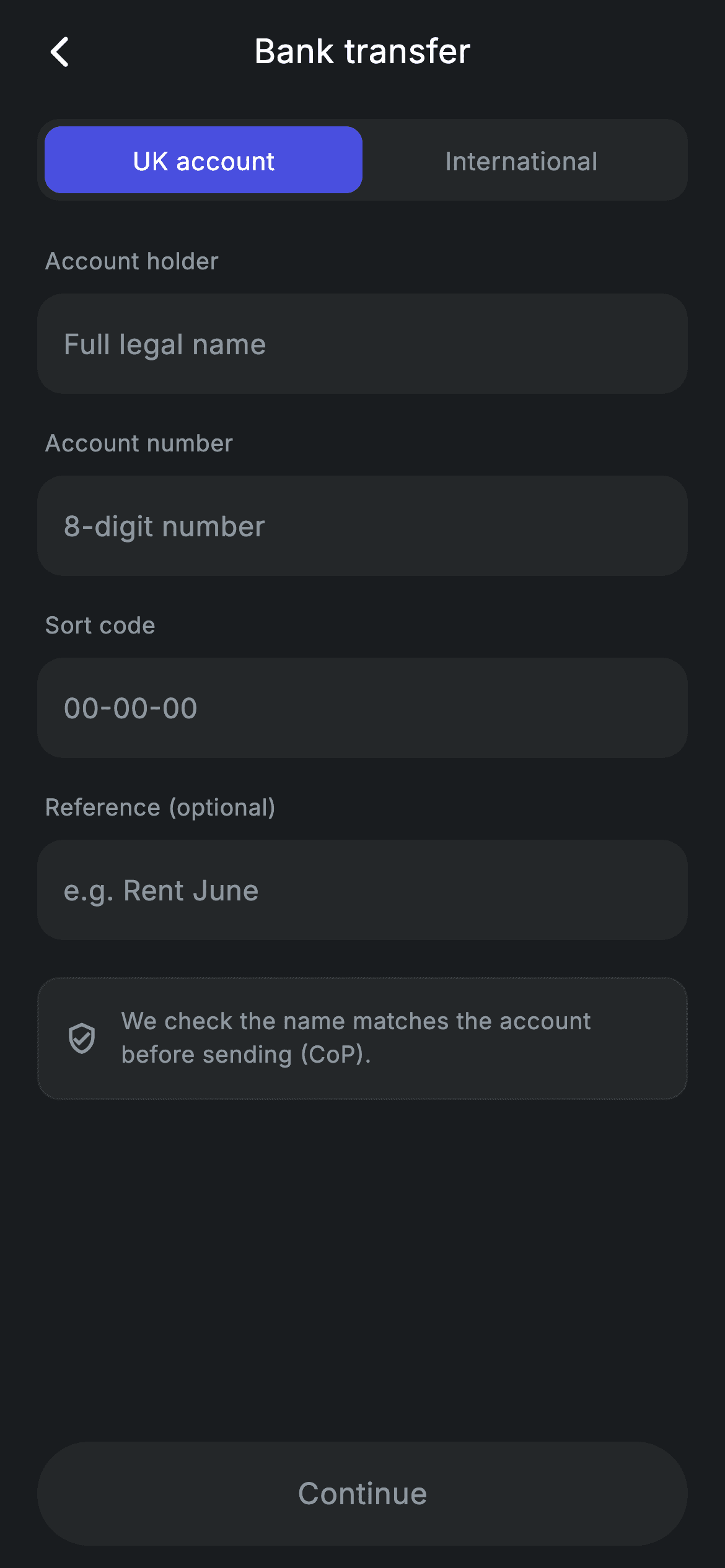
What you'll build
- ✓A segmented UK / International switch whose active pill fills with indigo `_brand` while the inactive side stays transparent
- ✓Form fields that swap label, hint and keyboard type in one rebuild — '8-digit number' with a number pad for UK, 'DE00 0000…' free text for IBAN
- ✓A Continue pill that enables itself through controller listeners the moment all three required fields have text
- ✓A reusable `_Field` input on a dark `#242729` surface with the bundled Inter font and a brand-coloured cursor
- ✓A hairline-bordered Confirmation-of-Payee note that explains the name check before sending
Step-by-step build
Create the file
Add a new file at lib/fintech_bank_transfer/fintech_bank_transfer_screen.dart in your Flutter project.
Register the bundled fonts
No external packages — this is pure Flutter. It does bundle its design font (Inter), so drop the font file into fonts/ and declare it in pubspec.yaml:
flutter:
  fonts:
    - family: Inter
      fonts:
- asset: fonts/Inter-Regular.ttfBuild it, piece by piece
Here's how the screen goes together. Each block below is a real slice of the code with a plain-English explanation — paste them in order, or grab the whole file from the next section.
One dark palette, four controllers, one boolean
import 'package:flutter/material.dart';

/// Bank transfer — IBAN / account + sort code entry (Revolut-inspired design).
///
/// Self-contained per CONVENTIONS.md: pure Flutter only, the exact design font
/// (Inter) is bundled under `fonts/`, no network calls, and the screen forces
/// its own dark theme. A country switch toggles UK (account + sort code) vs
/// international (IBAN + BIC); Continue enables once required fields are filled.
class FintechBankTransferScreen extends StatefulWidget {
  const FintechBankTransferScreen({super.key, this.onBack, this.onContinue});

  final VoidCallback? onBack;
  final VoidCallback? onContinue;

  @override
  State<FintechBankTransferScreen> createState() =>
      _FintechBankTransferScreenState();
}

class _FintechBankTransferScreenState extends State<FintechBankTransferScreen> {
  static const String _font = 'Inter';
  static const Color _bg = Color(0xFF191C1F);
  static const Color _surface = Color(0xFF242729);
  static const Color _brand = Color(0xFF494FDF);
  static const Color _muted = Color(0xFF8D969E);
  static const Color _hairline = Color(0xFF2E3235);

  bool _international = false;
  final TextEditingController _holder = TextEditingController();
  final TextEditingController _a = TextEditingController(); // account / IBAN
  final TextEditingController _b = TextEditingController(); // sort code / BIC
  final TextEditingController _ref = TextEditingController();
The whole screen hangs off remarkably little state: a `_international` boolean and four `TextEditingController`s — `_holder`, `_a`, `_b` and `_ref`. The comments on `_a` and `_b` are the design in miniature: `_a` holds 'account / IBAN' and `_b` holds 'sort code / BIC', so switching country never clears or recreates fields, it only changes how the same two controllers are labelled. The palette is five `static const Color`s on the state class — near-black `_bg` (#191C1F), a raised `_surface` (#242729), indigo `_brand` (#494FDF), grey `_muted` and a `_hairline` — and the widget exposes only `onBack` and `onContinue` callbacks, keeping navigation the caller's job.
Listeners for the required fields, and the validity rule
  @override
  void initState() {
    super.initState();
    for (final TextEditingController c in <TextEditingController>[
      _holder,
      _a,
      _b
    ]) {
      c.addListener(() => setState(() {}));
    }
  }

  @override
  void dispose() {
    _holder.dispose();
    _a.dispose();
    _b.dispose();
    _ref.dispose();
    super.dispose();
  }

  bool get _valid =>
      _holder.text.trim().isNotEmpty &&
      _a.text.trim().isNotEmpty &&
      _b.text.trim().isNotEmpty;
`initState` loops over exactly three controllers — `_holder`, `_a`, `_b` — attaching `c.addListener(() => setState(() {}))` to each, so every keystroke in a required field triggers a rebuild and the Continue button re-evaluates. `_ref` is deliberately left out of the loop: the reference is optional, so typing in it should not cause rebuilds it cannot affect. The `_valid` getter is the single source of truth — three `trim().isNotEmpty` checks ANDed together — and because it is a getter rather than a stored flag, it can never drift out of sync with what is actually typed. `dispose` still releases all four controllers, `_ref` included.
The build: a forced dark theme and a swapping form
  @override
  Widget build(BuildContext context) {
    return Theme(
      data: ThemeData.dark(useMaterial3: true),
      child: Scaffold(
        backgroundColor: _bg,
        body: SafeArea(
          child: Column(
            children: <Widget>[
              _buildAppBar(),
              Expanded(
                child: ListView(
                  physics: const BouncingScrollPhysics(),
                  padding: const EdgeInsets.fromLTRB(20, 8, 20, 24),
                  children: <Widget>[
                    _buildToggle(),
                    const SizedBox(height: 24),
                    _label('Account holder'),
                    _Field(controller: _holder, hint: 'Full legal name'),
                    const SizedBox(height: 18),
                    _label(_international ? 'IBAN' : 'Account number'),
                    _Field(
                      controller: _a,
                      hint: _international
                          ? 'DE00 0000 0000 0000 0000 00'
                          : '8-digit number',
                      keyboard: _international
                          ? TextInputType.text
                          : TextInputType.number,
                    ),
                    const SizedBox(height: 18),
                    _label(_international ? 'BIC / SWIFT' : 'Sort code'),
                    _Field(
                      controller: _b,
                      hint: _international ? 'NOVADEFFXXX' : '00-00-00',
                    ),
                    const SizedBox(height: 18),
                    _label('Reference (optional)'),
                    _Field(controller: _ref, hint: 'e.g. Rent June'),
                    const SizedBox(height: 20),
                    _buildSecurityNote(),
                  ],
                ),
              ),
              _buildContinue(),
            ],
          ),
        ),
      ),
    );
  }
The root wraps everything in `Theme(data: ThemeData.dark(useMaterial3: true))`, so the screen is dark regardless of the host app's theme — important for a drop-in screen that was designed against one background. The form is a `ListView` with `BouncingScrollPhysics` inside `Expanded`, while `_buildContinue()` sits as a Column sibling below it, pinned outside the scroll area. The swap logic lives inline in ternaries: the second field's label flips between 'IBAN' and 'Account number', its hint between a spaced 'DE00 0000…' pattern and '8-digit number', and its `keyboard` between free text and `TextInputType.number` — an IBAN contains letters, so only the UK path gets the number pad.
A centred title without an AppBar
  Widget _buildAppBar() {
    return Padding(
      padding: const EdgeInsets.fromLTRB(8, 4, 8, 4),
      child: Row(
        children: <Widget>[
          IconButton(
            onPressed: widget.onBack,
            icon: const Icon(Icons.arrow_back_ios_new_rounded,
                size: 20, color: Colors.white),
          ),
          const Expanded(
            child: Text(
              'Bank transfer',
              textAlign: TextAlign.center,
              style: TextStyle(
                fontFamily: _font,
                fontSize: 18,
                fontWeight: FontWeight.w500,
                letterSpacing: 0.24,
                color: Colors.white,
              ),
            ),
          ),
          const SizedBox(width: 48),
        ],
      ),
    );
  }
The header is a hand-rolled `Row` rather than a Material `AppBar`: a back `IconButton` wired to `widget.onBack`, the 'Bank transfer' title inside `Expanded` with `textAlign: TextAlign.center`, and then `const SizedBox(width: 48)`. That trailing box is the trick — it mirrors the width of the icon button on the left, so the centred text is truly centred on the screen rather than pulled toward the side with no icon. The title runs Inter at 18px `w500` with the `0.24` letter-spacing every text style on this screen shares.
The UK / International segmented switch
  Widget _buildToggle() {
    return Container(
      height: 44,
      padding: const EdgeInsets.all(4),
      decoration: BoxDecoration(
        color: _surface,
        borderRadius: BorderRadius.circular(12),
      ),
      child: Row(
        children: <Widget>[
          _seg('UK account', false),
          _seg('International', true),
        ],
      ),
    );
  }

  Widget _seg(String label, bool intl) {
    final bool active = _international == intl;
    return Expanded(
      child: GestureDetector(
        onTap: () => setState(() => _international = intl),
        behavior: HitTestBehavior.opaque,
        child: Container(
          alignment: Alignment.center,
          decoration: BoxDecoration(
            color: active ? _brand : Colors.transparent,
            borderRadius: BorderRadius.circular(9),
          ),
          child: Text(
            label,
            style: TextStyle(
              fontFamily: _font,
              fontSize: 13.5,
              fontWeight: FontWeight.w500,
              letterSpacing: 0.24,
              color: active ? Colors.white : _muted,
            ),
          ),
        ),
      ),
    );
  }

  Widget _label(String text) {
    return Padding(
      padding: const EdgeInsets.only(left: 4, bottom: 8),
      child: Text(
        text,
        style: const TextStyle(
          fontFamily: _font,
          fontSize: 12.5,
          fontWeight: FontWeight.w500,
          letterSpacing: 0.24,
          color: _muted,
        ),
      ),
    );
  }
`_buildToggle` is a 44px-tall `_surface` container with 4px of inner padding, holding two `_seg` segments in a Row. Each segment compares its own `intl` flag against `_international` to decide whether it is active: the active pill paints `_brand` at a 9px radius (3px tighter than the 12px outer radius, so the inset looks concentric) while the inactive one stays transparent with `_muted` text. `HitTestBehavior.opaque` on the `GestureDetector` makes the entire half tappable, not just the text glyphs. `_label` is a companion helper that renders the muted 12.5px captions above each field with a 4px left nudge to optically align with the field text.
The Confirmation-of-Payee note
  Widget _buildSecurityNote() {
    return Container(
      padding: const EdgeInsets.all(14),
      decoration: BoxDecoration(
        color: _surface,
        borderRadius: BorderRadius.circular(12),
        border: Border.all(color: _hairline),
      ),
      child: Row(
        children: const <Widget>[
          Icon(Icons.verified_user_outlined, size: 18, color: _muted),
          SizedBox(width: 12),
          Expanded(
            child: Text(
              'We check the name matches the account before sending (CoP).',
              style: TextStyle(
                fontFamily: _font,
                fontSize: 12.5,
                height: 1.4,
                letterSpacing: 0.24,
                color: _muted,
              ),
            ),
          ),
        ],
      ),
    );
  }
Below the reference field sits a quiet reassurance card: a `_surface` container with a 1px `_hairline` border, a `verified_user_outlined` icon and the line 'We check the name matches the account before sending (CoP).' Confirmation of Payee is a real UK banking scheme, and mentioning it at entry time is what stops the anxious 'did I type the right person?' moment later. Everything in the row is `_muted` — icon and text alike — because this is context, not a warning; the `Expanded` around the text lets the sentence wrap at `height: 1.4` without pushing the icon.
A Continue pill that answers to _valid
  Widget _buildContinue() {
    return Padding(
      padding: const EdgeInsets.fromLTRB(20, 8, 20, 12),
      child: SizedBox(
        width: double.infinity,
        height: 56,
        child: Material(
          color: _valid ? _brand : _surface,
          borderRadius: BorderRadius.circular(9999),
          child: InkWell(
            borderRadius: BorderRadius.circular(9999),
            onTap: _valid ? widget.onContinue : null,
            child: Center(
              child: Text(
                'Continue',
                style: TextStyle(
                  fontFamily: _font,
                  fontSize: 16,
                  fontWeight: FontWeight.w500,
                  letterSpacing: 0.24,
                  color: _valid ? Colors.white : _muted,
                ),
              ),
            ),
          ),
        ),
      ),
    );
  }
The button is built from `Material` + `InkWell` rather than a `FilledButton`, with `BorderRadius.circular(9999)` producing a full stadium pill at 56px tall. Every visual decision reads `_valid`: the Material colour flips between `_brand` and `_surface`, the label between white and `_muted`, and `onTap` becomes `null` when invalid — which also kills the ripple, so a disabled tap gives no feedback at all. Because the required controllers call `setState` on every edit, this button enables live as the third field receives its first character, with no submit-time validation pass.
_Field: one input, styled once
class _Field extends StatelessWidget {
  const _Field({
    required this.controller,
    required this.hint,
    this.keyboard,
  });

  final TextEditingController controller;
  final String hint;
  final TextInputType? keyboard;

  @override
  Widget build(BuildContext context) {
    return Container(
      height: 54,
      padding: const EdgeInsets.symmetric(horizontal: 14),
      decoration: BoxDecoration(
        color: _FintechBankTransferScreenState._surface,
        borderRadius: BorderRadius.circular(14),
      ),
      child: Center(
        child: TextField(
          controller: controller,
          keyboardType: keyboard,
          cursorColor: _FintechBankTransferScreenState._brand,
          style: const TextStyle(
            fontFamily: _FintechBankTransferScreenState._font,
            fontSize: 15,
            letterSpacing: 0.24,
            color: Colors.white,
          ),
          decoration: InputDecoration(
            isDense: true,
            border: InputBorder.none,
            hintText: hint,
            hintStyle: const TextStyle(
              fontFamily: _FintechBankTransferScreenState._font,
              fontSize: 15,
              letterSpacing: 0.24,
              color: _FintechBankTransferScreenState._muted,
            ),
          ),
        ),
      ),
    );
  }
}
`_Field` is a stateless wrapper used by all four inputs: a 54px `_surface` container at a 14px radius, with a borderless `TextField` centred inside it via `Center` plus `isDense` — the container is the visual field, so `InputBorder.none` strips Material's own underline. It reaches into `_FintechBankTransferScreenState._surface` and friends for its colours, which is legal here because both classes share a library and keeps the palette defined exactly once. The cursor is tinted `_brand` and the hint takes `_muted` at the same 15px size as the input text, so the field does not jump when typing starts. The optional `keyboard` parameter is what lets the account-number field request a number pad.
Full code
The complete, ready-to-paste source. Free to use in your projects — one click copies it all.
import 'package:flutter/material.dart';

/// Bank transfer — IBAN / account + sort code entry (Revolut-inspired design).
///
/// Self-contained per CONVENTIONS.md: pure Flutter only, the exact design font
/// (Inter) is bundled under `fonts/`, no network calls, and the screen forces
/// its own dark theme. A country switch toggles UK (account + sort code) vs
/// international (IBAN + BIC); Continue enables once required fields are filled.
class FintechBankTransferScreen extends StatefulWidget {
  const FintechBankTransferScreen({super.key, this.onBack, this.onContinue});

  final VoidCallback? onBack;
  final VoidCallback? onContinue;

  @override
  State<FintechBankTransferScreen> createState() =>
      _FintechBankTransferScreenState();
}

class _FintechBankTransferScreenState extends State<FintechBankTransferScreen> {
  static const String _font = 'Inter';
  static const Color _bg = Color(0xFF191C1F);
  static const Color _surface = Color(0xFF242729);
  static const Color _brand = Color(0xFF494FDF);
  static const Color _muted = Color(0xFF8D969E);
  static const Color _hairline = Color(0xFF2E3235);

  bool _international = false;
  final TextEditingController _holder = TextEditingController();
  final TextEditingController _a = TextEditingController(); // account / IBAN
  final TextEditingController _b = TextEditingController(); // sort code / BIC
  final TextEditingController _ref = TextEditingController();

  @override
  void initState() {
    super.initState();
    for (final TextEditingController c in <TextEditingController>[
      _holder,
      _a,
      _b
    ]) {
      c.addListener(() => setState(() {}));
    }
  }

  @override
  void dispose() {
    _holder.dispose();
    _a.dispose();
    _b.dispose();
    _ref.dispose();
    super.dispose();
  }

  bool get _valid =>
      _holder.text.trim().isNotEmpty &&
      _a.text.trim().isNotEmpty &&
      _b.text.trim().isNotEmpty;

  @override
  Widget build(BuildContext context) {
    return Theme(
      data: ThemeData.dark(useMaterial3: true),
      child: Scaffold(
        backgroundColor: _bg,
        body: SafeArea(
          child: Column(
            children: <Widget>[
              _buildAppBar(),
              Expanded(
                child: ListView(
                  physics: const BouncingScrollPhysics(),
                  padding: const EdgeInsets.fromLTRB(20, 8, 20, 24),
                  children: <Widget>[
                    _buildToggle(),
                    const SizedBox(height: 24),
                    _label('Account holder'),
                    _Field(controller: _holder, hint: 'Full legal name'),
                    const SizedBox(height: 18),
                    _label(_international ? 'IBAN' : 'Account number'),
                    _Field(
                      controller: _a,
                      hint: _international
                          ? 'DE00 0000 0000 0000 0000 00'
                          : '8-digit number',
                      keyboard: _international
                          ? TextInputType.text
                          : TextInputType.number,
                    ),
                    const SizedBox(height: 18),
                    _label(_international ? 'BIC / SWIFT' : 'Sort code'),
                    _Field(
                      controller: _b,
                      hint: _international ? 'NOVADEFFXXX' : '00-00-00',
                    ),
                    const SizedBox(height: 18),
                    _label('Reference (optional)'),
                    _Field(controller: _ref, hint: 'e.g. Rent June'),
                    const SizedBox(height: 20),
                    _buildSecurityNote(),
                  ],
                ),
              ),
              _buildContinue(),
            ],
          ),
        ),
      ),
    );
  }

  Widget _buildAppBar() {
    return Padding(
      padding: const EdgeInsets.fromLTRB(8, 4, 8, 4),
      child: Row(
        children: <Widget>[
          IconButton(
            onPressed: widget.onBack,
            icon: const Icon(Icons.arrow_back_ios_new_rounded,
                size: 20, color: Colors.white),
          ),
          const Expanded(
            child: Text(
              'Bank transfer',
              textAlign: TextAlign.center,
              style: TextStyle(
                fontFamily: _font,
                fontSize: 18,
                fontWeight: FontWeight.w500,
                letterSpacing: 0.24,
                color: Colors.white,
              ),
            ),
          ),
          const SizedBox(width: 48),
        ],
      ),
    );
  }

  Widget _buildToggle() {
    return Container(
      height: 44,
      padding: const EdgeInsets.all(4),
      decoration: BoxDecoration(
        color: _surface,
        borderRadius: BorderRadius.circular(12),
      ),
      child: Row(
        children: <Widget>[
          _seg('UK account', false),
          _seg('International', true),
        ],
      ),
    );
  }

  Widget _seg(String label, bool intl) {
    final bool active = _international == intl;
    return Expanded(
      child: GestureDetector(
        onTap: () => setState(() => _international = intl),
        behavior: HitTestBehavior.opaque,
        child: Container(
          alignment: Alignment.center,
          decoration: BoxDecoration(
            color: active ? _brand : Colors.transparent,
            borderRadius: BorderRadius.circular(9),
          ),
          child: Text(
            label,
            style: TextStyle(
              fontFamily: _font,
              fontSize: 13.5,
              fontWeight: FontWeight.w500,
              letterSpacing: 0.24,
              color: active ? Colors.white : _muted,
            ),
          ),
        ),
      ),
    );
  }

  Widget _label(String text) {
    return Padding(
      padding: const EdgeInsets.only(left: 4, bottom: 8),
      child: Text(
        text,
        style: const TextStyle(
          fontFamily: _font,
          fontSize: 12.5,
          fontWeight: FontWeight.w500,
          letterSpacing: 0.24,
          color: _muted,
        ),
      ),
    );
  }

  Widget _buildSecurityNote() {
    return Container(
      padding: const EdgeInsets.all(14),
      decoration: BoxDecoration(
        color: _surface,
        borderRadius: BorderRadius.circular(12),
        border: Border.all(color: _hairline),
      ),
      child: Row(
        children: const <Widget>[
          Icon(Icons.verified_user_outlined, size: 18, color: _muted),
          SizedBox(width: 12),
          Expanded(
            child: Text(
              'We check the name matches the account before sending (CoP).',
              style: TextStyle(
                fontFamily: _font,
                fontSize: 12.5,
                height: 1.4,
                letterSpacing: 0.24,
                color: _muted,
              ),
            ),
          ),
        ],
      ),
    );
  }

  Widget _buildContinue() {
    return Padding(
      padding: const EdgeInsets.fromLTRB(20, 8, 20, 12),
      child: SizedBox(
        width: double.infinity,
        height: 56,
        child: Material(
          color: _valid ? _brand : _surface,
          borderRadius: BorderRadius.circular(9999),
          child: InkWell(
            borderRadius: BorderRadius.circular(9999),
            onTap: _valid ? widget.onContinue : null,
            child: Center(
              child: Text(
                'Continue',
                style: TextStyle(
                  fontFamily: _font,
                  fontSize: 16,
                  fontWeight: FontWeight.w500,
                  letterSpacing: 0.24,
                  color: _valid ? Colors.white : _muted,
                ),
              ),
            ),
          ),
        ),
      ),
    );
  }
}

class _Field extends StatelessWidget {
  const _Field({
    required this.controller,
    required this.hint,
    this.keyboard,
  });

  final TextEditingController controller;
  final String hint;
  final TextInputType? keyboard;

  @override
  Widget build(BuildContext context) {
    return Container(
      height: 54,
      padding: const EdgeInsets.symmetric(horizontal: 14),
      decoration: BoxDecoration(
        color: _FintechBankTransferScreenState._surface,
        borderRadius: BorderRadius.circular(14),
      ),
      child: Center(
        child: TextField(
          controller: controller,
          keyboardType: keyboard,
          cursorColor: _FintechBankTransferScreenState._brand,
          style: const TextStyle(
            fontFamily: _FintechBankTransferScreenState._font,
            fontSize: 15,
            letterSpacing: 0.24,
            color: Colors.white,
          ),
          decoration: InputDecoration(
            isDense: true,
            border: InputBorder.none,
            hintText: hint,
            hintStyle: const TextStyle(
              fontFamily: _FintechBankTransferScreenState._font,
              fontSize: 15,
              letterSpacing: 0.24,
              color: _FintechBankTransferScreenState._muted,
            ),
          ),
        ),
      ),
    );
  }
}
Plus bundled 1 binary asset (fonts/images). The CLI and MCP install those for you automatically.
Two faster ways to add it
Copy-paste works, but you can skip it entirely.
1. FlutterKit CLI
One command drops this screen — and its fonts — straight into your project.
$ flutterkit add fintech-bank-transfer2. AI agent (MCP)
Connect FlutterKit's MCP server in Claude or Cursor and just ask your agent to install fintech-bank-transfer — it fetches and writes the files for you.
FAQ
Is this bank transfer screen free to use commercially?
Yes. FlutterKit screens are free to use, including in commercial fintech and wallet apps. Copy the code from this page or install it with the CLI command shown, ship it in a paid product — no attribution or sign-up required.
Does this screen need any packages or fonts?
No packages at all — the code imports only `package:flutter/material.dart`. The one asset is the Inter font, referenced by `fontFamily: 'Inter'` and bundled with the screen; declare it under `fonts:` in your pubspec (or swap in `google_fonts` if you prefer fetching it) and everything else is pure Flutter.
Which Flutter version does this need?
Flutter 3.0 or newer (Dart 2.17+), because the constructor uses the super parameter `super.key`. On an older SDK, expand it to `{Key? key, ...} : super(key: key)`. There is no `Color.withValues` here, so nothing forces a 3.22+ SDK, and `ThemeData.dark(useMaterial3: true)` works on any 3.x release.
How do I add real formatting for the sort code and IBAN?
Give `_Field` an `inputFormatters` parameter and pass it through to the `TextField`. For the UK path, combine `FilteringTextInputFormatter.digitsOnly` with a small `TextInputFormatter` that inserts a dash after every second digit to match the `00-00-00` hint; for IBAN, uppercase the input and group it in blocks of four. Add a length check to `_valid` (8 digits for the account, 6 for the sort code) so Continue only enables on plausible values, not just non-empty ones.
Why doesn't typing in the reference field enable the Continue button?
Because `_ref` never gets a listener in `initState` and `_valid` never reads it — the reference is optional, so it neither triggers rebuilds nor counts toward validity. If your backend requires a reference (some business transfers do), add `_ref` to the listener loop and append `_ref.text.trim().isNotEmpty` to the `_valid` getter.


