How to Build a Fintech Recipients List Screen in Flutter (Full Code + Preview)
Every money-transfer flow starts with picking who to pay, and a recipients list that lags or renders blank avatars makes a banking app feel untrustworthy immediately. This tutorial walks through a Revolut-style recipients screen in pure Flutter: a live search box that filters seven seeded payees by name, @tag or bank reference as you type, a quick-action row for New, Scan and Bank, tinted-initial avatars that survive missing or failed photos, and a dedicated empty state that echoes the query. You end with one self-contained dark-themed file wired through three callbacks.
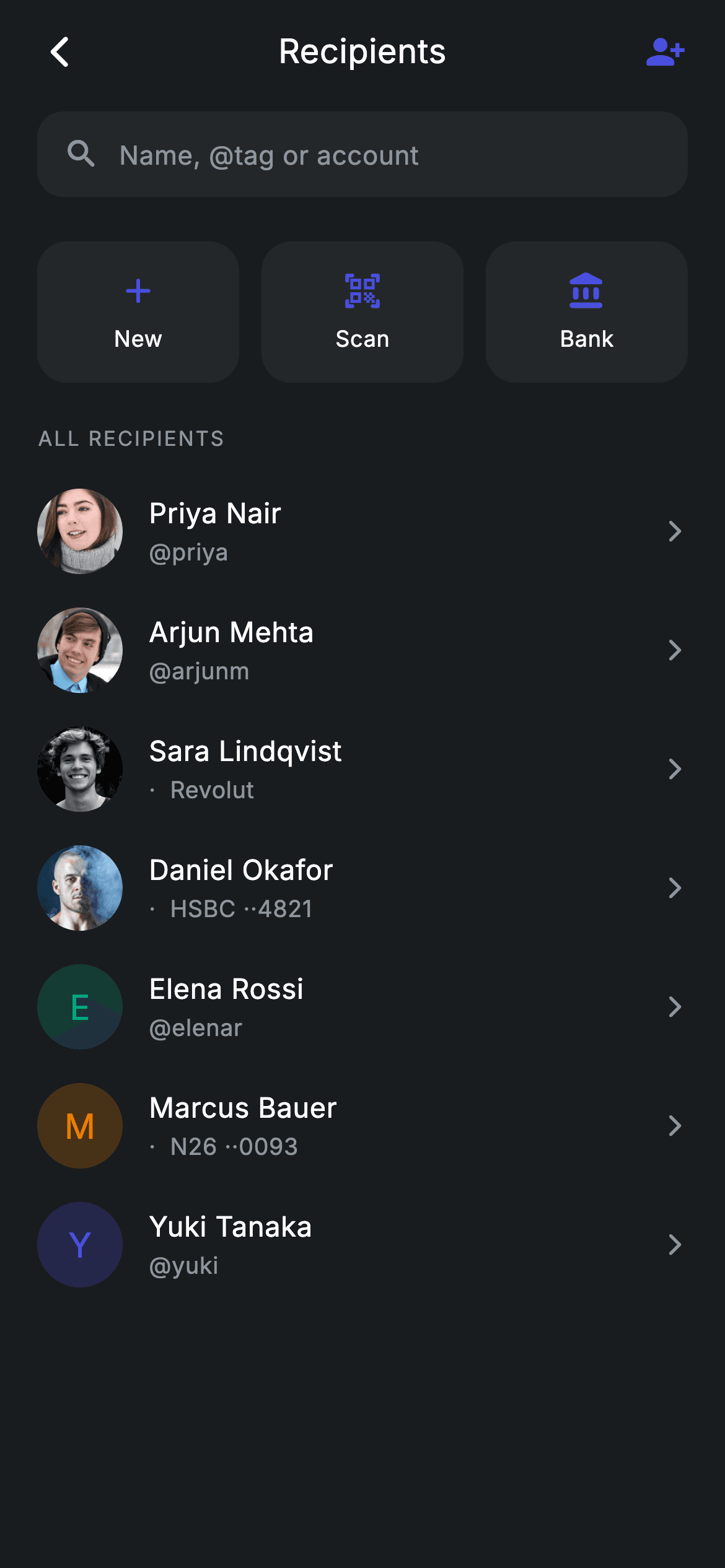
What you'll build
- ✓A live search that re-filters the recipient list on every keystroke, matching name or handle
- ✓A quick-action row of three equal-width New, Scan and Bank cards that hides itself while a search is active
- ✓Recipient tiles with a photo avatar, an @tag or masked bank reference, and a trailing chevron
- ✓A tinted-initial avatar fallback that covers both a missing photo and a failed asset load
- ✓An empty state that quotes the failing query back at the user instead of showing a generic message
Step-by-step build
Create the file
Add a new file at lib/fintech_recipients/fintech_recipients_screen.dart in your Flutter project.
Register the bundled fonts
No external packages — this is pure Flutter. It does bundle its design font (Inter), so drop the font file into fonts/ and declare it in pubspec.yaml:
flutter:
  fonts:
    - family: Inter
      fonts:
- asset: fonts/Inter-Regular.ttfBuild it, piece by piece
Here's how the screen goes together. Each block below is a real slice of the code with a plain-English explanation — paste them in order, or grab the whole file from the next section.
One state variable, three exits
import 'package:flutter/material.dart';

/// Recipients — beneficiaries / contacts list (Revolut-inspired design system).
///
/// Self-contained per CONVENTIONS.md: pure Flutter only, the exact design font
/// (Inter) is bundled under `fonts/`, contact photos are bundled assets, and the
/// screen forces its own dark theme so it renders standalone when pushed as a
/// route. A live search box filters the list; recipients are grouped by initial.
class FintechRecipientsScreen extends StatefulWidget {
  const FintechRecipientsScreen({
    super.key,
    this.onBack,
    this.onAdd,
    this.onRecipientTap,
  });

  final VoidCallback? onBack;
  final VoidCallback? onAdd;
  final VoidCallback? onRecipientTap;

  @override
  State<FintechRecipientsScreen> createState() =>
      _FintechRecipientsScreenState();
}
`FintechRecipientsScreen` is a `StatefulWidget` for exactly one reason: the search query changes as the user types. Everything the screen can do outward goes through three nullable `VoidCallback`s — `onBack`, `onAdd`, `onRecipientTap` — so the host app decides what tapping a person or the add button actually does, and the screen still runs standalone when every callback is left null. The constructor uses `super.key`, and the doc comment pins the conventions the rest of the file follows: pure Flutter, the Inter font bundled under `fonts/`, contact photos as bundled assets.
Revolut tokens, seed data, and the filter getter
class _FintechRecipientsScreenState extends State<FintechRecipientsScreen> {
  // ── Revolut design tokens ────────────────────────────────────────────────
  static const String _font = 'Inter';
  static const Color _bg = Color(0xFF191C1F);
  static const Color _surface = Color(0xFF242729);
  static const Color _brand = Color(0xFF494FDF);
  static const Color _teal = Color(0xFF00A87E);
  static const Color _amber = Color(0xFFEC7E00);
  static const Color _muted = Color(0xFF8D969E);

  static const String _imgBase =
      'lib/screens/fintech/fintech_recipients/images';

  static const List<_Recipient> _all = <_Recipient>[
    _Recipient('Priya Nair', '@priya', '$_imgBase/avatar_5.jpg', _brand),
    _Recipient('Arjun Mehta', '@arjunm', '$_imgBase/avatar_8.jpg', _teal),
    _Recipient('Sara Lindqvist', '·  Revolut', '$_imgBase/avatar_12.jpg',
        _amber),
    _Recipient('Daniel Okafor', '·  HSBC ··4821', '$_imgBase/avatar_3.jpg',
        _brand),
    _Recipient('Elena Rossi', '@elenar', null, _teal),
    _Recipient('Marcus Bauer', '·  N26 ··0093', null, _amber),
    _Recipient('Yuki Tanaka', '@yuki', null, _brand),
  ];

  String _query = '';

  List<_Recipient> get _filtered {
    if (_query.isEmpty) {
      return _all;
    }
    final String q = _query.toLowerCase();
    return _all
        .where((_Recipient r) =>
            r.name.toLowerCase().contains(q) ||
            r.handle.toLowerCase().contains(q))
        .toList();
  }
The palette is six `static const Color`s: a near-black `_bg` (`0xFF191C1F`), a raised `_surface`, indigo `_brand` (`0xFF494FDF`) for interactive accents, plus `_teal` and `_amber` that only ever tint avatars, and `_muted` grey for secondary text. The `_all` list seeds seven `_Recipient`s whose handles deliberately mix formats — `@priya`, `· Revolut`, `· HSBC ··4821` — and three of them pass `null` for the image so the fallback path is exercised out of the box. `_filtered` lowercases the query once, then keeps a recipient if either `name` or `handle` contains it; when `_query` is empty it returns `_all` directly instead of allocating a new list.
Build: forcing dark, then choosing list or empty state
  @override
  Widget build(BuildContext context) {
    final List<_Recipient> list = _filtered;
    return Theme(
      data: ThemeData.dark(useMaterial3: true),
      child: Scaffold(
        backgroundColor: _bg,
        body: SafeArea(
          child: Column(
            children: <Widget>[
              _buildAppBar(),
              _buildSearch(),
              Expanded(
                child: list.isEmpty
                    ? _buildEmpty()
                    : ListView(
                        physics: const BouncingScrollPhysics(),
                        padding: const EdgeInsets.fromLTRB(0, 8, 0, 24),
                        children: <Widget>[
                          if (_query.isEmpty) _buildQuickRow(),
                          _sectionLabel('All recipients'),
                          for (final _Recipient r in list)
                            _RecipientTile(
                              recipient: r,
                              onTap: widget.onRecipientTap,
                            ),
                        ],
                      ),
              ),
            ],
          ),
        ),
      ),
    );
  }
The whole tree sits inside `Theme(data: ThemeData.dark(useMaterial3: true))`, so ripples, text selection and icon defaults come out dark even if the host app is light — that is what lets the screen be pushed as a route anywhere. The body is a fixed `Column` of app bar and search, with the list in an `Expanded` that flips to `_buildEmpty()` when the filter comes back empty. Inside the `ListView`, `if (_query.isEmpty) _buildQuickRow()` removes the New/Scan/Bank shortcuts the moment a search starts, so matches surface at the top instead of below three cards, and a collection-for stamps a `_RecipientTile` per result, forwarding `widget.onRecipientTap`.
A hand-rolled app bar and the borderless search field
  Widget _buildAppBar() {
    return Padding(
      padding: const EdgeInsets.fromLTRB(8, 4, 8, 4),
      child: Row(
        children: <Widget>[
          IconButton(
            onPressed: widget.onBack,
            icon: const Icon(Icons.arrow_back_ios_new_rounded,
                size: 20, color: Colors.white),
          ),
          const Expanded(
            child: Text(
              'Recipients',
              textAlign: TextAlign.center,
              style: TextStyle(
                fontFamily: _font,
                fontSize: 18,
                fontWeight: FontWeight.w500,
                letterSpacing: 0.24,
                color: Colors.white,
              ),
            ),
          ),
          IconButton(
            onPressed: widget.onAdd,
            icon: const Icon(Icons.person_add_alt_1_rounded,
                size: 22, color: _brand),
          ),
        ],
      ),
    );
  }

  Widget _buildSearch() {
    return Padding(
      padding: const EdgeInsets.fromLTRB(20, 4, 20, 8),
      child: Container(
        height: 46,
        padding: const EdgeInsets.symmetric(horizontal: 14),
        decoration: BoxDecoration(
          color: _surface,
          borderRadius: BorderRadius.circular(14),
        ),
        child: Row(
          children: <Widget>[
            const Icon(Icons.search_rounded, size: 20, color: _muted),
            const SizedBox(width: 10),
            Expanded(
              child: TextField(
                onChanged: (String v) => setState(() => _query = v),
                cursorColor: _brand,
                style: const TextStyle(
                  fontFamily: _font,
                  fontSize: 14,
                  letterSpacing: 0.24,
                  color: Colors.white,
                ),
                decoration: const InputDecoration(
                  isDense: true,
                  border: InputBorder.none,
                  hintText: 'Name, @tag or account',
                  hintStyle: TextStyle(
                    fontFamily: _font,
                    fontSize: 14,
                    letterSpacing: 0.24,
                    color: _muted,
                  ),
                ),
              ),
            ),
          ],
        ),
      ),
    );
  }
The header is a plain `Row`, not an `AppBar`: a white `arrow_back_ios_new_rounded`, the title centred by wrapping it in `Expanded` with `textAlign: TextAlign.center`, and `person_add_alt_1_rounded` in `_brand` — the one indigo accent in the header marks the primary action. The search box is a 46px `_surface` container with a 14px radius holding a `TextField` stripped bare (`isDense: true`, `border: InputBorder.none`) so the container supplies all the chrome. There is no `TextEditingController`; `onChanged` just writes into `_query` via `setState`, which is enough because the field owns its own text and the state only needs the value for filtering. The hint 'Name, @tag or account' quietly documents the three things `_filtered` matches on.
Quick actions and the overline section label
  Widget _buildQuickRow() {
    return Padding(
      padding: const EdgeInsets.fromLTRB(20, 8, 20, 4),
      child: Row(
        children: <Widget>[
          _QuickAction(
            icon: Icons.add_rounded,
            label: 'New',
            onTap: widget.onAdd,
          ),
          const SizedBox(width: 12),
          _QuickAction(
            icon: Icons.qr_code_scanner_rounded,
            label: 'Scan',
            onTap: widget.onRecipientTap,
          ),
          const SizedBox(width: 12),
          _QuickAction(
            icon: Icons.account_balance_rounded,
            label: 'Bank',
            onTap: widget.onRecipientTap,
          ),
        ],
      ),
    );
  }

  Widget _sectionLabel(String text) {
    return Padding(
      padding: const EdgeInsets.fromLTRB(20, 18, 20, 10),
      child: Text(
        text.toUpperCase(),
        style: const TextStyle(
          fontFamily: _font,
          fontSize: 11,
          fontWeight: FontWeight.w500,
          letterSpacing: 1.0,
          color: _muted,
        ),
      ),
    );
  }
`_buildQuickRow` places three `_QuickAction`s — `add_rounded` for New, `qr_code_scanner_rounded` for Scan, `account_balance_rounded` for Bank — separated by fixed 12px `SizedBox`es; the equal widths come from each card expanding itself, covered in a later chunk. New forwards `widget.onAdd` while Scan and Bank reuse `onRecipientTap`, keeping the public API at three callbacks instead of five. `_sectionLabel` uppercases its text and renders it at 11px `w500` with `letterSpacing: 1.0` in `_muted` — the classic overline treatment that separates 'ALL RECIPIENTS' from content without a divider.
An empty state that proves the search worked
  Widget _buildEmpty() {
    return Center(
      child: Column(
        mainAxisSize: MainAxisSize.min,
        children: <Widget>[
          Container(
            width: 64,
            height: 64,
            decoration: const BoxDecoration(
              shape: BoxShape.circle,
              color: _surface,
            ),
            child: const Icon(Icons.search_off_rounded,
                size: 28, color: _muted),
          ),
          const SizedBox(height: 16),
          Text(
            'No one matches "$_query"',
            style: const TextStyle(
              fontFamily: _font,
              fontSize: 14,
              letterSpacing: 0.24,
              color: _muted,
            ),
          ),
        ],
      ),
    );
  }
}

class _Recipient {
  const _Recipient(this.name, this.handle, this.img, this.tint);

  final String name;
  final String handle;
  final String? img;
  final Color tint;
}
When nothing matches, `_buildEmpty` centres a 64px circular `_surface` badge with `search_off_rounded` above the line `'No one matches "$_query"'`. Interpolating the live query is the important choice: quoting the exact text back tells the user their input was read and simply matched no one, where a generic 'No results' can read as a glitch. Below it, `_Recipient` is a four-field const model — `name`, `handle`, nullable `img`, and a `tint` — and carrying the tint per contact is what gives each fallback avatar a stable, personal colour.
Recipient tiles and the equal-width action cards
class _RecipientTile extends StatelessWidget {
  const _RecipientTile({required this.recipient, this.onTap});

  final _Recipient recipient;
  final VoidCallback? onTap;

  @override
  Widget build(BuildContext context) {
    return InkWell(
      onTap: onTap,
      child: Padding(
        padding: const EdgeInsets.symmetric(horizontal: 20, vertical: 9),
        child: Row(
          children: <Widget>[
            ClipOval(
              child: _Avatar(
                url: recipient.img,
                tint: recipient.tint,
                initial: recipient.name.characters.first,
                size: 46,
              ),
            ),
            const SizedBox(width: 14),
            Expanded(
              child: Column(
                crossAxisAlignment: CrossAxisAlignment.start,
                children: <Widget>[
                  Text(
                    recipient.name,
                    maxLines: 1,
                    overflow: TextOverflow.ellipsis,
                    style: const TextStyle(
                      fontFamily: _FintechRecipientsScreenState._font,
                      fontSize: 15,
                      fontWeight: FontWeight.w500,
                      letterSpacing: 0.24,
                      color: Colors.white,
                    ),
                  ),
                  const SizedBox(height: 2),
                  Text(
                    recipient.handle,
                    maxLines: 1,
                    overflow: TextOverflow.ellipsis,
                    style: const TextStyle(
                      fontFamily: _FintechRecipientsScreenState._font,
                      fontSize: 12.5,
                      letterSpacing: 0.24,
                      color: _FintechRecipientsScreenState._muted,
                    ),
                  ),
                ],
              ),
            ),
            const Icon(Icons.arrow_forward_ios_rounded,
                size: 14, color: _FintechRecipientsScreenState._muted),
          ],
        ),
      ),
    );
  }
}

class _QuickAction extends StatelessWidget {
  const _QuickAction({required this.icon, required this.label, this.onTap});

  final IconData icon;
  final String label;
  final VoidCallback? onTap;

  @override
  Widget build(BuildContext context) {
    return Expanded(
      child: InkWell(
        borderRadius: BorderRadius.circular(16),
        onTap: onTap,
        child: Container(
          height: 76,
          decoration: BoxDecoration(
            color: _FintechRecipientsScreenState._surface,
            borderRadius: BorderRadius.circular(16),
          ),
          child: Column(
            mainAxisAlignment: MainAxisAlignment.center,
            children: <Widget>[
              Icon(icon, size: 22, color: _FintechRecipientsScreenState._brand),
              const SizedBox(height: 6),
              Text(
                label,
                style: const TextStyle(
                  fontFamily: _FintechRecipientsScreenState._font,
                  fontSize: 12,
                  fontWeight: FontWeight.w500,
                  letterSpacing: 0.24,
                  color: Colors.white,
                ),
              ),
            ],
          ),
        ),
      ),
    );
  }
}
`_RecipientTile` is an `InkWell` row: a `ClipOval` around a 46px `_Avatar`, then name at 15px `w500` white over the handle at 12.5px `_muted`, both guarded with `maxLines: 1` and ellipsis so a long bank reference cannot wrap the tile, and a small 14px chevron closing the row. Note the private widgets reach straight into `_FintechRecipientsScreenState._font` and `._muted` — fine in Dart because underscore privacy is per library, so same-file classes share the tokens without duplication. `_QuickAction` returns an `Expanded`, which is how the three cards split the row into equal thirds after the fixed gaps; each is a 76px `_surface` card whose `InkWell` gets `borderRadius: BorderRadius.circular(16)` to match the container, keeping the ripple inside the rounded corners.
An avatar that never renders blank
/// Avatar that never renders blank: shows a tinted initial when no photo is set
/// or while it loads, and falls back to it permanently if the asset fails.
class _Avatar extends StatelessWidget {
  const _Avatar({
    required this.url,
    required this.tint,
    required this.initial,
    required this.size,
  });

  final String? url;
  final Color tint;
  final String initial;
  final double size;

  Widget _fallback() {
    return Container(
      width: size,
      height: size,
      color: tint.withValues(alpha: 0.22),
      alignment: Alignment.center,
      child: Text(
        initial.toUpperCase(),
        style: TextStyle(
          fontFamily: _FintechRecipientsScreenState._font,
          fontSize: size * 0.40,
          fontWeight: FontWeight.w500,
          color: tint,
        ),
      ),
    );
  }

  @override
  Widget build(BuildContext context) {
    if (url == null) {
      return _fallback();
    }
    return Image.asset(
      url!,
      width: size,
      height: size,
      fit: BoxFit.cover,
      gaplessPlayback: true,
      errorBuilder: (BuildContext context, Object error, StackTrace? stack) =>
          _fallback(),
    );
  }
}
`_Avatar` handles the two ways a photo can be absent. A `null` url short-circuits to `_fallback()`; a real url goes through `Image.asset` with an `errorBuilder` that returns the same fallback, so a missing or corrupt bundled jpg degrades to the tinted initial instead of an error box. The fallback is a square of `tint.withValues(alpha: 0.22)` — the recipient's own colour at 22% — with the uppercased initial drawn in the full-strength tint at `size * 0.40`, so it scales with whatever size the tile requests. Upstream, the initial comes from `recipient.name.characters.first`, the grapheme-aware accessor that stays safe if a name starts with an emoji or accented cluster, and `gaplessPlayback: true` keeps the last frame on screen during rebuilds rather than flashing.
Full code
The complete, ready-to-paste source. Free to use in your projects — one click copies it all.
import 'package:flutter/material.dart';

/// Recipients — beneficiaries / contacts list (Revolut-inspired design system).
///
/// Self-contained per CONVENTIONS.md: pure Flutter only, the exact design font
/// (Inter) is bundled under `fonts/`, contact photos are bundled assets, and the
/// screen forces its own dark theme so it renders standalone when pushed as a
/// route. A live search box filters the list; recipients are grouped by initial.
class FintechRecipientsScreen extends StatefulWidget {
  const FintechRecipientsScreen({
    super.key,
    this.onBack,
    this.onAdd,
    this.onRecipientTap,
  });

  final VoidCallback? onBack;
  final VoidCallback? onAdd;
  final VoidCallback? onRecipientTap;

  @override
  State<FintechRecipientsScreen> createState() =>
      _FintechRecipientsScreenState();
}

class _FintechRecipientsScreenState extends State<FintechRecipientsScreen> {
  // ── Revolut design tokens ────────────────────────────────────────────────
  static const String _font = 'Inter';
  static const Color _bg = Color(0xFF191C1F);
  static const Color _surface = Color(0xFF242729);
  static const Color _brand = Color(0xFF494FDF);
  static const Color _teal = Color(0xFF00A87E);
  static const Color _amber = Color(0xFFEC7E00);
  static const Color _muted = Color(0xFF8D969E);

  static const String _imgBase =
      'lib/screens/fintech/fintech_recipients/images';

  static const List<_Recipient> _all = <_Recipient>[
    _Recipient('Priya Nair', '@priya', '$_imgBase/avatar_5.jpg', _brand),
    _Recipient('Arjun Mehta', '@arjunm', '$_imgBase/avatar_8.jpg', _teal),
    _Recipient('Sara Lindqvist', '·  Revolut', '$_imgBase/avatar_12.jpg',
        _amber),
    _Recipient('Daniel Okafor', '·  HSBC ··4821', '$_imgBase/avatar_3.jpg',
        _brand),
    _Recipient('Elena Rossi', '@elenar', null, _teal),
    _Recipient('Marcus Bauer', '·  N26 ··0093', null, _amber),
    _Recipient('Yuki Tanaka', '@yuki', null, _brand),
  ];

  String _query = '';

  List<_Recipient> get _filtered {
    if (_query.isEmpty) {
      return _all;
    }
    final String q = _query.toLowerCase();
    return _all
        .where((_Recipient r) =>
            r.name.toLowerCase().contains(q) ||
            r.handle.toLowerCase().contains(q))
        .toList();
  }

  @override
  Widget build(BuildContext context) {
    final List<_Recipient> list = _filtered;
    return Theme(
      data: ThemeData.dark(useMaterial3: true),
      child: Scaffold(
        backgroundColor: _bg,
        body: SafeArea(
          child: Column(
            children: <Widget>[
              _buildAppBar(),
              _buildSearch(),
              Expanded(
                child: list.isEmpty
                    ? _buildEmpty()
                    : ListView(
                        physics: const BouncingScrollPhysics(),
                        padding: const EdgeInsets.fromLTRB(0, 8, 0, 24),
                        children: <Widget>[
                          if (_query.isEmpty) _buildQuickRow(),
                          _sectionLabel('All recipients'),
                          for (final _Recipient r in list)
                            _RecipientTile(
                              recipient: r,
                              onTap: widget.onRecipientTap,
                            ),
                        ],
                      ),
              ),
            ],
          ),
        ),
      ),
    );
  }

  Widget _buildAppBar() {
    return Padding(
      padding: const EdgeInsets.fromLTRB(8, 4, 8, 4),
      child: Row(
        children: <Widget>[
          IconButton(
            onPressed: widget.onBack,
            icon: const Icon(Icons.arrow_back_ios_new_rounded,
                size: 20, color: Colors.white),
          ),
          const Expanded(
            child: Text(
              'Recipients',
              textAlign: TextAlign.center,
              style: TextStyle(
                fontFamily: _font,
                fontSize: 18,
                fontWeight: FontWeight.w500,
                letterSpacing: 0.24,
                color: Colors.white,
              ),
            ),
          ),
          IconButton(
            onPressed: widget.onAdd,
            icon: const Icon(Icons.person_add_alt_1_rounded,
                size: 22, color: _brand),
          ),
        ],
      ),
    );
  }

  Widget _buildSearch() {
    return Padding(
      padding: const EdgeInsets.fromLTRB(20, 4, 20, 8),
      child: Container(
        height: 46,
        padding: const EdgeInsets.symmetric(horizontal: 14),
        decoration: BoxDecoration(
          color: _surface,
          borderRadius: BorderRadius.circular(14),
        ),
        child: Row(
          children: <Widget>[
            const Icon(Icons.search_rounded, size: 20, color: _muted),
            const SizedBox(width: 10),
            Expanded(
              child: TextField(
                onChanged: (String v) => setState(() => _query = v),
                cursorColor: _brand,
                style: const TextStyle(
                  fontFamily: _font,
                  fontSize: 14,
                  letterSpacing: 0.24,
                  color: Colors.white,
                ),
                decoration: const InputDecoration(
                  isDense: true,
                  border: InputBorder.none,
                  hintText: 'Name, @tag or account',
                  hintStyle: TextStyle(
                    fontFamily: _font,
                    fontSize: 14,
                    letterSpacing: 0.24,
                    color: _muted,
                  ),
                ),
              ),
            ),
          ],
        ),
      ),
    );
  }

  Widget _buildQuickRow() {
    return Padding(
      padding: const EdgeInsets.fromLTRB(20, 8, 20, 4),
      child: Row(
        children: <Widget>[
          _QuickAction(
            icon: Icons.add_rounded,
            label: 'New',
            onTap: widget.onAdd,
          ),
          const SizedBox(width: 12),
          _QuickAction(
            icon: Icons.qr_code_scanner_rounded,
            label: 'Scan',
            onTap: widget.onRecipientTap,
          ),
          const SizedBox(width: 12),
          _QuickAction(
            icon: Icons.account_balance_rounded,
            label: 'Bank',
            onTap: widget.onRecipientTap,
          ),
        ],
      ),
    );
  }

  Widget _sectionLabel(String text) {
    return Padding(
      padding: const EdgeInsets.fromLTRB(20, 18, 20, 10),
      child: Text(
        text.toUpperCase(),
        style: const TextStyle(
          fontFamily: _font,
          fontSize: 11,
          fontWeight: FontWeight.w500,
          letterSpacing: 1.0,
          color: _muted,
        ),
      ),
    );
  }

  Widget _buildEmpty() {
    return Center(
      child: Column(
        mainAxisSize: MainAxisSize.min,
        children: <Widget>[
          Container(
            width: 64,
            height: 64,
            decoration: const BoxDecoration(
              shape: BoxShape.circle,
              color: _surface,
            ),
            child: const Icon(Icons.search_off_rounded,
                size: 28, color: _muted),
          ),
          const SizedBox(height: 16),
          Text(
            'No one matches "$_query"',
            style: const TextStyle(
              fontFamily: _font,
              fontSize: 14,
              letterSpacing: 0.24,
              color: _muted,
            ),
          ),
        ],
      ),
    );
  }
}

class _Recipient {
  const _Recipient(this.name, this.handle, this.img, this.tint);

  final String name;
  final String handle;
  final String? img;
  final Color tint;
}

class _RecipientTile extends StatelessWidget {
  const _RecipientTile({required this.recipient, this.onTap});

  final _Recipient recipient;
  final VoidCallback? onTap;

  @override
  Widget build(BuildContext context) {
    return InkWell(
      onTap: onTap,
      child: Padding(
        padding: const EdgeInsets.symmetric(horizontal: 20, vertical: 9),
        child: Row(
          children: <Widget>[
            ClipOval(
              child: _Avatar(
                url: recipient.img,
                tint: recipient.tint,
                initial: recipient.name.characters.first,
                size: 46,
              ),
            ),
            const SizedBox(width: 14),
            Expanded(
              child: Column(
                crossAxisAlignment: CrossAxisAlignment.start,
                children: <Widget>[
                  Text(
                    recipient.name,
                    maxLines: 1,
                    overflow: TextOverflow.ellipsis,
                    style: const TextStyle(
                      fontFamily: _FintechRecipientsScreenState._font,
                      fontSize: 15,
                      fontWeight: FontWeight.w500,
                      letterSpacing: 0.24,
                      color: Colors.white,
                    ),
                  ),
                  const SizedBox(height: 2),
                  Text(
                    recipient.handle,
                    maxLines: 1,
                    overflow: TextOverflow.ellipsis,
                    style: const TextStyle(
                      fontFamily: _FintechRecipientsScreenState._font,
                      fontSize: 12.5,
                      letterSpacing: 0.24,
                      color: _FintechRecipientsScreenState._muted,
                    ),
                  ),
                ],
              ),
            ),
            const Icon(Icons.arrow_forward_ios_rounded,
                size: 14, color: _FintechRecipientsScreenState._muted),
          ],
        ),
      ),
    );
  }
}

class _QuickAction extends StatelessWidget {
  const _QuickAction({required this.icon, required this.label, this.onTap});

  final IconData icon;
  final String label;
  final VoidCallback? onTap;

  @override
  Widget build(BuildContext context) {
    return Expanded(
      child: InkWell(
        borderRadius: BorderRadius.circular(16),
        onTap: onTap,
        child: Container(
          height: 76,
          decoration: BoxDecoration(
            color: _FintechRecipientsScreenState._surface,
            borderRadius: BorderRadius.circular(16),
          ),
          child: Column(
            mainAxisAlignment: MainAxisAlignment.center,
            children: <Widget>[
              Icon(icon, size: 22, color: _FintechRecipientsScreenState._brand),
              const SizedBox(height: 6),
              Text(
                label,
                style: const TextStyle(
                  fontFamily: _FintechRecipientsScreenState._font,
                  fontSize: 12,
                  fontWeight: FontWeight.w500,
                  letterSpacing: 0.24,
                  color: Colors.white,
                ),
              ),
            ],
          ),
        ),
      ),
    );
  }
}

/// Avatar that never renders blank: shows a tinted initial when no photo is set
/// or while it loads, and falls back to it permanently if the asset fails.
class _Avatar extends StatelessWidget {
  const _Avatar({
    required this.url,
    required this.tint,
    required this.initial,
    required this.size,
  });

  final String? url;
  final Color tint;
  final String initial;
  final double size;

  Widget _fallback() {
    return Container(
      width: size,
      height: size,
      color: tint.withValues(alpha: 0.22),
      alignment: Alignment.center,
      child: Text(
        initial.toUpperCase(),
        style: TextStyle(
          fontFamily: _FintechRecipientsScreenState._font,
          fontSize: size * 0.40,
          fontWeight: FontWeight.w500,
          color: tint,
        ),
      ),
    );
  }

  @override
  Widget build(BuildContext context) {
    if (url == null) {
      return _fallback();
    }
    return Image.asset(
      url!,
      width: size,
      height: size,
      fit: BoxFit.cover,
      gaplessPlayback: true,
      errorBuilder: (BuildContext context, Object error, StackTrace? stack) =>
          _fallback(),
    );
  }
}
Plus bundled 5 binary assets (fonts/images). The CLI and MCP install those for you automatically.
Two faster ways to add it
Copy-paste works, but you can skip it entirely.
1. FlutterKit CLI
One command drops this screen — and its fonts — straight into your project.
$ flutterkit add fintech-recipients2. AI agent (MCP)
Connect FlutterKit's MCP server in Claude or Cursor and just ask your agent to install fintech-recipients — it fetches and writes the files for you.
FAQ
Can I use this recipients screen in a commercial Flutter app?
Yes. FlutterKit screens are free to use, including commercially — you can ship this recipients list in a client project or your own fintech app, adapt the tokens to your brand, and swap the seed data for your real payees.
What packages and fonts does this screen need?
No pub packages beyond the Flutter SDK — the code.json lists an empty package set. The only asset dependencies are the Inter font family, declared in pubspec and referenced via the `_font` constant, and the avatar jpgs under the `_imgBase` path. Three of the seven seeded recipients intentionally ship without a photo, so the screen looks complete even before you add any images.
Which Flutter version does this code require?
The avatar fallback calls `tint.withValues(alpha: 0.22)`, which needs Flutter 3.27 or newer. On an older SDK, change that one call to `tint.withOpacity(0.22)` and everything else compiles — the rest of the file only relies on super parameters (`super.key`), available since Dart 2.17 / Flutter 3.0.
How do I load real recipients from an API instead of the hard-coded list?
Move `_all` from a `static const` into a regular state field, e.g. `List<_Recipient> _all = [];`, fetch your payees in `initState`, and map each API record to a `_Recipient(name, handle, imageUrlOrNull, tint)` inside `setState`. The `_filtered` getter and the build method need no changes, because they already read whatever `_all` holds. Assign tints by cycling through `_brand`, `_teal` and `_amber` (for example by index modulo 3) so fallback avatars stay varied.
Can the avatars come from network URLs rather than bundled assets?
Yes — in `_Avatar.build`, replace `Image.asset(url!, ...)` with `Image.network(url!, ...)` and keep the existing `errorBuilder`, which already routes any load failure to the tinted-initial fallback. For a smoother experience add a `loadingBuilder` that returns `_fallback()` until the frame arrives, so the initial shows while the photo downloads instead of an empty circle.


