How to Build a Scheduled Payment Setup Screen in Flutter (Full Code + Preview)
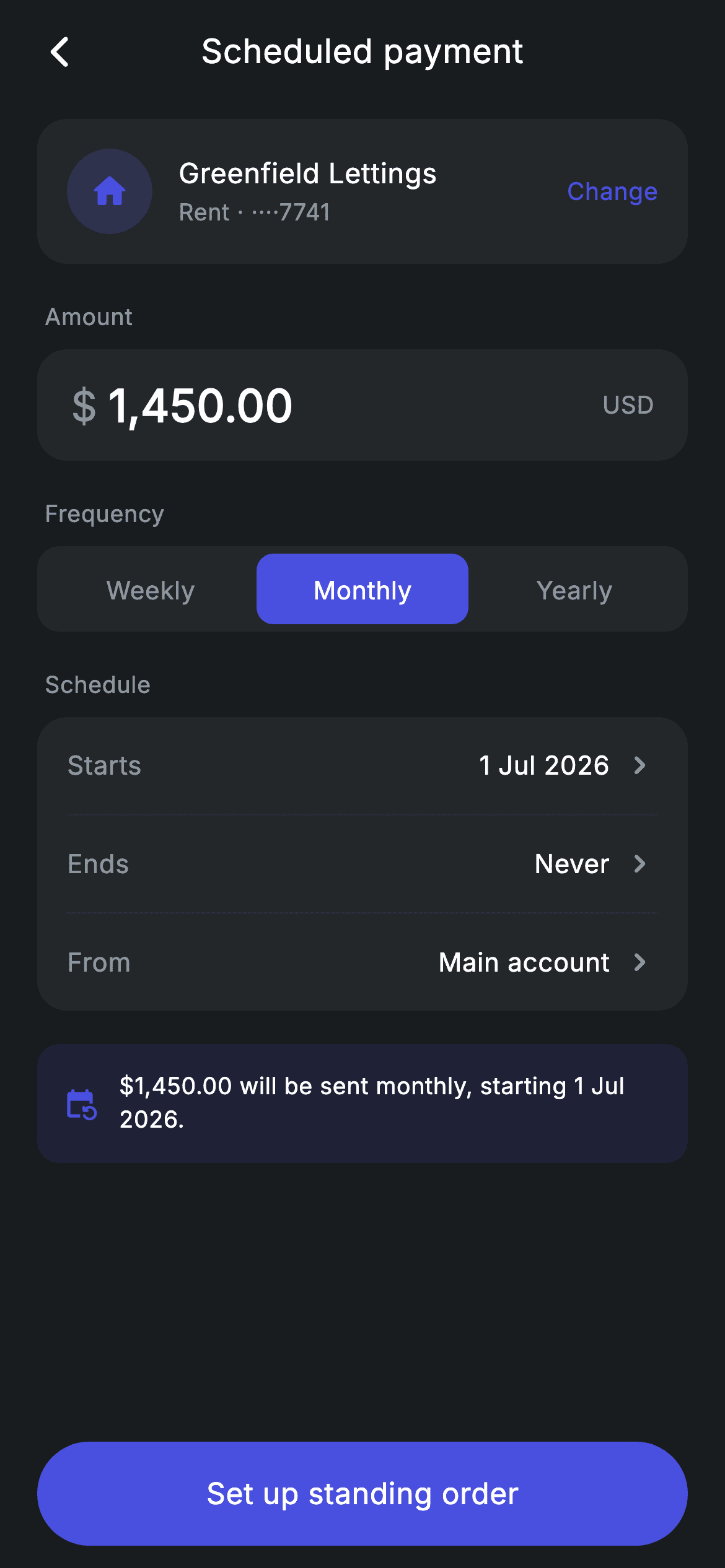
Standing orders are set once and forgotten, so the setup screen has to leave no doubt about what was agreed. This tutorial builds a scheduled-payment form in Flutter — a recipient card with a Change action, an amount field with the currency split out, a three-way weekly/monthly/yearly segmented control, chevron rows for start, end and funding account, and a tinted summary sentence that rewrites itself as the frequency changes. You'll see how one getter turns a tab index into readable prose.
Watch the Flutter UI walkthrough
A short screen recording of Fintech · Scheduled Payment running, if you'd rather see it before you read the code. The written tutorial below covers everything in it.
Can't see the video? Watch it on YouTube.
What you'll build
- ✓A frequency segmented control where the selected pill fills and the label inverts
- ✓A live summary sentence that reads '…will be sent monthly, starting 1 Jul 2026' and updates on tap
- ✓An amount display that renders the currency symbol in muted grey and the figure in white
- ✓A grouped schedule card with chevron rows and hairlines that add no extra vertical space
Step-by-step build
Create the file
Add a new file at lib/fintech_scheduled_payment/fintech_scheduled_payment_screen.dart in your Flutter project.
Register the bundled fonts
No external packages — this is pure Flutter. It does bundle its design font (Inter), so drop the font file into fonts/ and declare it in pubspec.yaml:
flutter:
  fonts:
    - family: Inter
      fonts:
- asset: fonts/Inter-Regular.ttfBuild it, piece by piece
Here's how the screen goes together. Each block below is a real slice of the code with a plain-English explanation — paste them in order, or grab the whole file from the next section.
One int of state and the word it produces
import 'package:flutter/material.dart';

/// Scheduled payment — set up a standing order (Revolut-inspired design system).
///
/// Self-contained per CONVENTIONS.md: pure Flutter only, the exact design font
/// (Inter) is bundled under `fonts/`, no network images, and the screen forces
/// its own dark theme. A frequency segmented control and editable rows drive
/// live state; the summary line updates as the schedule changes.
class FintechScheduledPaymentScreen extends StatefulWidget {
  const FintechScheduledPaymentScreen({super.key, this.onBack, this.onSave});

  final VoidCallback? onBack;
  final VoidCallback? onSave;

  @override
  State<FintechScheduledPaymentScreen> createState() =>
      _FintechScheduledPaymentScreenState();
}

class _FintechScheduledPaymentScreenState
    extends State<FintechScheduledPaymentScreen> {
  static const String _font = 'Inter';
  static const Color _bg = Color(0xFF191C1F);
  static const Color _surface = Color(0xFF242729);
  static const Color _brand = Color(0xFF494FDF);
  static const Color _muted = Color(0xFF8D969E);
  static const Color _hairline = Color(0xFF2E3235);

  static const List<String> _freqs = <String>['Weekly', 'Monthly', 'Yearly'];
  int _freq = 1;

  String get _freqWord => _freqs[_freq].toLowerCase();
For all its form-like appearance, this screen holds exactly one piece of state: `int _freq`, initialised to 1 so 'Monthly' is pre-selected — the frequency most standing orders use. `_freqs` holds the three labels in title case for the tabs. The clever part is `_freqWord`, a getter returning `_freqs[_freq].toLowerCase()`. Storing the labels once in the form the buttons need, then lower-casing on demand for prose, avoids keeping two parallel lists in sync. That single getter is what makes the summary sentence at the bottom read naturally rather than saying 'sent Monthly'.
The form structure, with the schedule card inline
  @override
  Widget build(BuildContext context) {
    return Theme(
      data: ThemeData.dark(useMaterial3: true),
      child: Scaffold(
        backgroundColor: _bg,
        body: SafeArea(
          child: Column(
            children: <Widget>[
              _buildAppBar(),
              Expanded(
                child: ListView(
                  physics: const BouncingScrollPhysics(),
                  padding: const EdgeInsets.fromLTRB(20, 8, 20, 24),
                  children: <Widget>[
                    _buildRecipient(),
                    const SizedBox(height: 20),
                    _label('Amount'),
                    _buildAmount(),
                    const SizedBox(height: 20),
                    _label('Frequency'),
                    _buildFreq(),
                    const SizedBox(height: 20),
                    _label('Schedule'),
                    Container(
                      padding: const EdgeInsets.symmetric(horizontal: 16),
                      decoration: BoxDecoration(
                        color: _surface,
                        borderRadius: BorderRadius.circular(16),
                      ),
                      child: Column(
                        children: <Widget>[
                          _editRow('Starts', '1 Jul 2026'),
                          const Divider(height: 1, color: _hairline),
                          _editRow('Ends', 'Never'),
                          const Divider(height: 1, color: _hairline),
                          _editRow('From', 'Main account'),
                        ],
                      ),
                    ),
                    const SizedBox(height: 18),
                    _buildSummary(),
                  ],
                ),
              ),
              _buildSave(),
            ],
          ),
        ),
      ),
    );
  }
The body is an app bar, an `Expanded` ListView, and a pinned save button. Inside the list, sections alternate a `_label` with its control: Amount, Frequency, Schedule. Notice the schedule group is built inline rather than extracted into a helper — it's the only grouped card on the screen, so the three `_editRow` calls with `Divider(height: 1)` between them read perfectly clearly in place. The container sets only horizontal padding, letting each row supply its own vertical inset so the dividers sit flush. The summary block comes last, after an 18px gap, positioned as the final thing you read before tapping save.
The recipient card
  Widget _buildRecipient() {
    return Container(
      padding: const EdgeInsets.all(16),
      decoration: BoxDecoration(
        color: _surface,
        borderRadius: BorderRadius.circular(16),
      ),
      child: Row(
        children: <Widget>[
          Container(
            width: 46,
            height: 46,
            alignment: Alignment.center,
            decoration: BoxDecoration(
              color: _brand.withValues(alpha: 0.2),
              shape: BoxShape.circle,
            ),
            child: const Icon(Icons.home_rounded, size: 22, color: _brand),
          ),
          const SizedBox(width: 14),
          Expanded(
            child: Column(
              crossAxisAlignment: CrossAxisAlignment.start,
              children: const <Widget>[
                Text(
                  'Greenfield Lettings',
                  style: TextStyle(
                    fontFamily: _font,
                    fontSize: 15,
                    fontWeight: FontWeight.w500,
                    letterSpacing: 0.24,
                    color: Colors.white,
                  ),
                ),
                SizedBox(height: 2),
                Text(
                  'Rent · ····7741',
                  style: TextStyle(
                    fontFamily: _font,
                    fontSize: 12.5,
                    letterSpacing: 0.24,
                    color: _muted,
                  ),
                ),
              ],
            ),
          ),
          const Text(
            'Change',
            style: TextStyle(
              fontFamily: _font,
              fontSize: 13,
              fontWeight: FontWeight.w500,
              letterSpacing: 0.24,
              color: _brand,
            ),
          ),
        ],
      ),
    );
  }
The recipient sits in an `_surface` card with a 46px circle tinted `_brand` at 20% holding a home icon — the icon hints at the payment's purpose without needing a payee logo. Beside it, an `Expanded` column shows the payee name over 'Rent · ····7741', a masked account reference that identifies the destination without printing it in full. The trailing 'Change' is styled in `_brand` to read as a link, though it has no tap handler wired as written; adding a GestureDetector and a callback around that Text is the natural extension point.
Splitting the currency symbol from the amount
  Widget _buildAmount() {
    return Container(
      height: 60,
      padding: const EdgeInsets.symmetric(horizontal: 18),
      decoration: BoxDecoration(
        color: _surface,
        borderRadius: BorderRadius.circular(16),
      ),
      child: Row(
        children: const <Widget>[
          Text(
            r'$',
            style: TextStyle(
              fontFamily: _font,
              fontSize: 22,
              fontWeight: FontWeight.w500,
              color: _muted,
            ),
          ),
          SizedBox(width: 6),
          Text(
            '1,450.00',
            style: TextStyle(
              fontFamily: _font,
              fontSize: 24,
              fontWeight: FontWeight.w600,
              letterSpacing: 0.24,
              color: Colors.white,
            ),
          ),
          Spacer(),
          Text(
            'USD',
            style: TextStyle(
              fontFamily: _font,
              fontSize: 13,
              fontWeight: FontWeight.w500,
              letterSpacing: 0.24,
              color: _muted,
            ),
          ),
        ],
      ),
    );
  }
The amount row is a 60px `_surface` container holding three text widgets rather than one formatted string. The `$` is drawn separately at 22px in `_muted`, then the figure at 24px w600 in white, then a `Spacer()` pushes 'USD' to the right edge. Separating the symbol from the number is a deliberate typographic choice — the currency is context, the figure is the content, so making the symbol smaller and greyer puts the visual weight where it belongs. The `$` is written as a raw string, `r'$'`, since a bare dollar sign would otherwise start a Dart interpolation and fail to compile.
The frequency segmented control
  Widget _buildFreq() {
    return Container(
      height: 46,
      padding: const EdgeInsets.all(4),
      decoration: BoxDecoration(
        color: _surface,
        borderRadius: BorderRadius.circular(12),
      ),
      child: Row(
        children: <Widget>[
          for (int i = 0; i < _freqs.length; i++)
            Expanded(
              child: GestureDetector(
                onTap: () => setState(() => _freq = i),
                behavior: HitTestBehavior.opaque,
                child: Container(
                  alignment: Alignment.center,
                  decoration: BoxDecoration(
                    color: _freq == i ? _brand : Colors.transparent,
                    borderRadius: BorderRadius.circular(9),
                  ),
                  child: Text(
                    _freqs[i],
                    style: TextStyle(
                      fontFamily: _font,
                      fontSize: 13.5,
                      fontWeight: FontWeight.w500,
                      letterSpacing: 0.24,
                      color: _freq == i ? Colors.white : _muted,
                    ),
                  ),
                ),
              ),
            ),
        ],
      ),
    );
  }

  Widget _label(String text) {
    return Padding(
      padding: const EdgeInsets.only(left: 4, bottom: 8),
      child: Text(
        text,
        style: const TextStyle(
          fontFamily: _font,
          fontSize: 12.5,
          fontWeight: FontWeight.w500,
          letterSpacing: 0.24,
          color: _muted,
        ),
      ),
    );
  }
A 46px `_surface` track with `EdgeInsets.all(4)` gives the gutter around the selected pill. A collection-for builds the three tabs, each wrapped in `Expanded` so they split the width evenly regardless of label length. The selected tab gets a solid `_brand` fill with a 9px radius and white text; the others stay transparent with `_muted` text. `behavior: HitTestBehavior.opaque` on each GestureDetector is what makes the full tab area tappable — without it, taps on the transparent region of an unselected tab pass straight through and nothing happens. `_label` below is the small muted caption that sits above each control, indented 4px so it aligns optically with the card beneath.
Edit rows and the live summary
  Widget _editRow(String label, String value) {
    return Padding(
      padding: const EdgeInsets.symmetric(vertical: 16),
      child: Row(
        children: <Widget>[
          Text(
            label,
            style: const TextStyle(
              fontFamily: _font,
              fontSize: 14,
              letterSpacing: 0.24,
              color: _muted,
            ),
          ),
          const Spacer(),
          Text(
            value,
            style: const TextStyle(
              fontFamily: _font,
              fontSize: 14,
              fontWeight: FontWeight.w500,
              letterSpacing: 0.24,
              color: Colors.white,
            ),
          ),
          const SizedBox(width: 6),
          const Icon(Icons.chevron_right_rounded, size: 20, color: _muted),
        ],
      ),
    );
  }

  Widget _buildSummary() {
    return Container(
      padding: const EdgeInsets.all(14),
      decoration: BoxDecoration(
        color: _brand.withValues(alpha: 0.12),
        borderRadius: BorderRadius.circular(12),
      ),
      child: Row(
        children: <Widget>[
          const Icon(Icons.event_repeat_rounded, size: 18, color: _brand),
          const SizedBox(width: 12),
          Expanded(
            child: Text(
              r'$1,450.00 will be sent ' '$_freqWord, starting 1 Jul 2026.',
              style: const TextStyle(
                fontFamily: _font,
                fontSize: 12.5,
                height: 1.4,
                letterSpacing: 0.24,
                color: Colors.white,
              ),
            ),
          ),
        ],
      ),
    );
  }
`_editRow` is a Row of a muted label, a `Spacer()`, the white value and a chevron — the standard 'tap to change' pattern, though as written the rows are display-only and you'd wrap them in an InkWell to make them live. The summary below is the payoff for the `_freqWord` getter. Its text is `r'$1,450.00 will be sent ' '$_freqWord, starting 1 Jul 2026.'` — two adjacent string literals joined at compile time, where the first is raw so the dollar amount survives literally and the second is a normal string so `$_freqWord` interpolates. That mixed pair is the tidy way to have literal dollars and live interpolation in one sentence. The box is filled `_brand` at 12% opacity, light enough for white text to stay readable.
Full code
The complete, ready-to-paste source. Free to use in your projects — one click copies it all.
import 'package:flutter/material.dart';

/// Scheduled payment — set up a standing order (Revolut-inspired design system).
///
/// Self-contained per CONVENTIONS.md: pure Flutter only, the exact design font
/// (Inter) is bundled under `fonts/`, no network images, and the screen forces
/// its own dark theme. A frequency segmented control and editable rows drive
/// live state; the summary line updates as the schedule changes.
class FintechScheduledPaymentScreen extends StatefulWidget {
  const FintechScheduledPaymentScreen({super.key, this.onBack, this.onSave});

  final VoidCallback? onBack;
  final VoidCallback? onSave;

  @override
  State<FintechScheduledPaymentScreen> createState() =>
      _FintechScheduledPaymentScreenState();
}

class _FintechScheduledPaymentScreenState
    extends State<FintechScheduledPaymentScreen> {
  static const String _font = 'Inter';
  static const Color _bg = Color(0xFF191C1F);
  static const Color _surface = Color(0xFF242729);
  static const Color _brand = Color(0xFF494FDF);
  static const Color _muted = Color(0xFF8D969E);
  static const Color _hairline = Color(0xFF2E3235);

  static const List<String> _freqs = <String>['Weekly', 'Monthly', 'Yearly'];
  int _freq = 1;

  String get _freqWord => _freqs[_freq].toLowerCase();

  @override
  Widget build(BuildContext context) {
    return Theme(
      data: ThemeData.dark(useMaterial3: true),
      child: Scaffold(
        backgroundColor: _bg,
        body: SafeArea(
          child: Column(
            children: <Widget>[
              _buildAppBar(),
              Expanded(
                child: ListView(
                  physics: const BouncingScrollPhysics(),
                  padding: const EdgeInsets.fromLTRB(20, 8, 20, 24),
                  children: <Widget>[
                    _buildRecipient(),
                    const SizedBox(height: 20),
                    _label('Amount'),
                    _buildAmount(),
                    const SizedBox(height: 20),
                    _label('Frequency'),
                    _buildFreq(),
                    const SizedBox(height: 20),
                    _label('Schedule'),
                    Container(
                      padding: const EdgeInsets.symmetric(horizontal: 16),
                      decoration: BoxDecoration(
                        color: _surface,
                        borderRadius: BorderRadius.circular(16),
                      ),
                      child: Column(
                        children: <Widget>[
                          _editRow('Starts', '1 Jul 2026'),
                          const Divider(height: 1, color: _hairline),
                          _editRow('Ends', 'Never'),
                          const Divider(height: 1, color: _hairline),
                          _editRow('From', 'Main account'),
                        ],
                      ),
                    ),
                    const SizedBox(height: 18),
                    _buildSummary(),
                  ],
                ),
              ),
              _buildSave(),
            ],
          ),
        ),
      ),
    );
  }

  Widget _buildAppBar() {
    return Padding(
      padding: const EdgeInsets.fromLTRB(8, 4, 8, 4),
      child: Row(
        children: <Widget>[
          IconButton(
            onPressed: widget.onBack,
            icon: const Icon(Icons.arrow_back_ios_new_rounded,
                size: 20, color: Colors.white),
          ),
          const Expanded(
            child: Text(
              'Scheduled payment',
              textAlign: TextAlign.center,
              style: TextStyle(
                fontFamily: _font,
                fontSize: 18,
                fontWeight: FontWeight.w500,
                letterSpacing: 0.24,
                color: Colors.white,
              ),
            ),
          ),
          const SizedBox(width: 48),
        ],
      ),
    );
  }

  Widget _buildRecipient() {
    return Container(
      padding: const EdgeInsets.all(16),
      decoration: BoxDecoration(
        color: _surface,
        borderRadius: BorderRadius.circular(16),
      ),
      child: Row(
        children: <Widget>[
          Container(
            width: 46,
            height: 46,
            alignment: Alignment.center,
            decoration: BoxDecoration(
              color: _brand.withValues(alpha: 0.2),
              shape: BoxShape.circle,
            ),
            child: const Icon(Icons.home_rounded, size: 22, color: _brand),
          ),
          const SizedBox(width: 14),
          Expanded(
            child: Column(
              crossAxisAlignment: CrossAxisAlignment.start,
              children: const <Widget>[
                Text(
                  'Greenfield Lettings',
                  style: TextStyle(
                    fontFamily: _font,
                    fontSize: 15,
                    fontWeight: FontWeight.w500,
                    letterSpacing: 0.24,
                    color: Colors.white,
                  ),
                ),
                SizedBox(height: 2),
                Text(
                  'Rent · ····7741',
                  style: TextStyle(
                    fontFamily: _font,
                    fontSize: 12.5,
                    letterSpacing: 0.24,
                    color: _muted,
                  ),
                ),
              ],
            ),
          ),
          const Text(
            'Change',
            style: TextStyle(
              fontFamily: _font,
              fontSize: 13,
              fontWeight: FontWeight.w500,
              letterSpacing: 0.24,
              color: _brand,
            ),
          ),
        ],
      ),
    );
  }

  Widget _buildAmount() {
    return Container(
      height: 60,
      padding: const EdgeInsets.symmetric(horizontal: 18),
      decoration: BoxDecoration(
        color: _surface,
        borderRadius: BorderRadius.circular(16),
      ),
      child: Row(
        children: const <Widget>[
          Text(
            r'$',
            style: TextStyle(
              fontFamily: _font,
              fontSize: 22,
              fontWeight: FontWeight.w500,
              color: _muted,
            ),
          ),
          SizedBox(width: 6),
          Text(
            '1,450.00',
            style: TextStyle(
              fontFamily: _font,
              fontSize: 24,
              fontWeight: FontWeight.w600,
              letterSpacing: 0.24,
              color: Colors.white,
            ),
          ),
          Spacer(),
          Text(
            'USD',
            style: TextStyle(
              fontFamily: _font,
              fontSize: 13,
              fontWeight: FontWeight.w500,
              letterSpacing: 0.24,
              color: _muted,
            ),
          ),
        ],
      ),
    );
  }

  Widget _buildFreq() {
    return Container(
      height: 46,
      padding: const EdgeInsets.all(4),
      decoration: BoxDecoration(
        color: _surface,
        borderRadius: BorderRadius.circular(12),
      ),
      child: Row(
        children: <Widget>[
          for (int i = 0; i < _freqs.length; i++)
            Expanded(
              child: GestureDetector(
                onTap: () => setState(() => _freq = i),
                behavior: HitTestBehavior.opaque,
                child: Container(
                  alignment: Alignment.center,
                  decoration: BoxDecoration(
                    color: _freq == i ? _brand : Colors.transparent,
                    borderRadius: BorderRadius.circular(9),
                  ),
                  child: Text(
                    _freqs[i],
                    style: TextStyle(
                      fontFamily: _font,
                      fontSize: 13.5,
                      fontWeight: FontWeight.w500,
                      letterSpacing: 0.24,
                      color: _freq == i ? Colors.white : _muted,
                    ),
                  ),
                ),
              ),
            ),
        ],
      ),
    );
  }

  Widget _label(String text) {
    return Padding(
      padding: const EdgeInsets.only(left: 4, bottom: 8),
      child: Text(
        text,
        style: const TextStyle(
          fontFamily: _font,
          fontSize: 12.5,
          fontWeight: FontWeight.w500,
          letterSpacing: 0.24,
          color: _muted,
        ),
      ),
    );
  }

  Widget _editRow(String label, String value) {
    return Padding(
      padding: const EdgeInsets.symmetric(vertical: 16),
      child: Row(
        children: <Widget>[
          Text(
            label,
            style: const TextStyle(
              fontFamily: _font,
              fontSize: 14,
              letterSpacing: 0.24,
              color: _muted,
            ),
          ),
          const Spacer(),
          Text(
            value,
            style: const TextStyle(
              fontFamily: _font,
              fontSize: 14,
              fontWeight: FontWeight.w500,
              letterSpacing: 0.24,
              color: Colors.white,
            ),
          ),
          const SizedBox(width: 6),
          const Icon(Icons.chevron_right_rounded, size: 20, color: _muted),
        ],
      ),
    );
  }

  Widget _buildSummary() {
    return Container(
      padding: const EdgeInsets.all(14),
      decoration: BoxDecoration(
        color: _brand.withValues(alpha: 0.12),
        borderRadius: BorderRadius.circular(12),
      ),
      child: Row(
        children: <Widget>[
          const Icon(Icons.event_repeat_rounded, size: 18, color: _brand),
          const SizedBox(width: 12),
          Expanded(
            child: Text(
              r'$1,450.00 will be sent ' '$_freqWord, starting 1 Jul 2026.',
              style: const TextStyle(
                fontFamily: _font,
                fontSize: 12.5,
                height: 1.4,
                letterSpacing: 0.24,
                color: Colors.white,
              ),
            ),
          ),
        ],
      ),
    );
  }

  Widget _buildSave() {
    return Padding(
      padding: const EdgeInsets.fromLTRB(20, 0, 20, 12),
      child: SizedBox(
        width: double.infinity,
        height: 56,
        child: Material(
          color: _brand,
          borderRadius: BorderRadius.circular(9999),
          child: InkWell(
            borderRadius: BorderRadius.circular(9999),
            onTap: widget.onSave,
            child: const Center(
              child: Text(
                'Set up standing order',
                style: TextStyle(
                  fontFamily: _font,
                  fontSize: 16,
                  fontWeight: FontWeight.w500,
                  letterSpacing: 0.24,
                  color: Colors.white,
                ),
              ),
            ),
          ),
        ),
      ),
    );
  }
}
Plus bundled 1 binary asset (fonts/images). The CLI and MCP install those for you automatically.
Two faster ways to add it
Copy-paste works, but you can skip it entirely.
1. FlutterKit CLI
One command drops this screen — and its fonts — straight into your project.
$ flutterkit add fintech-scheduled-payment2. AI agent (MCP)
Connect FlutterKit's MCP server in Claude or Cursor and just ask your agent to install fintech-scheduled-payment — it fetches and writes the files for you.
FAQ
Is this Flutter scheduled payment screen free to use?
Yes. The complete Dart source on this page is free for personal and commercial projects. Copy it directly, install it with the FlutterKit CLI (flutterkit add fintech-scheduled-payment), or have an AI agent add it for you over MCP.
How do I make the Starts and Ends rows open a date picker?
Add nullable DateTime fields to the state, wrap each `_editRow` in an InkWell, and call Flutter's built-in `showDatePicker` — it's part of the material library, so no package is needed. Store the result in setState and format it into the row's value. Once the start date is real, interpolate it into the summary sentence the same way `_freqWord` is, and both will stay in sync automatically.
Does it need any external packages or images?
No to both. It's pure Flutter on the material library, uses built-in Material icons, and ships no images — the recipient avatar is a tinted circle with an icon. The only bundled asset is the Inter font, registered in pubspec.yaml as shown in step 2, which the CLI and MCP install for you.
Which Flutter version does it target?
It uses Color.withValues() and super parameters, so Flutter 3.22+ (Dart 3). On an older SDK, change the two withValues(alpha: ...) calls — the recipient circle and the summary box — to withOpacity(...) and everything else compiles unchanged.

