How to Build a Monthly Bank Statement Screen in Flutter (Full Code + Preview)
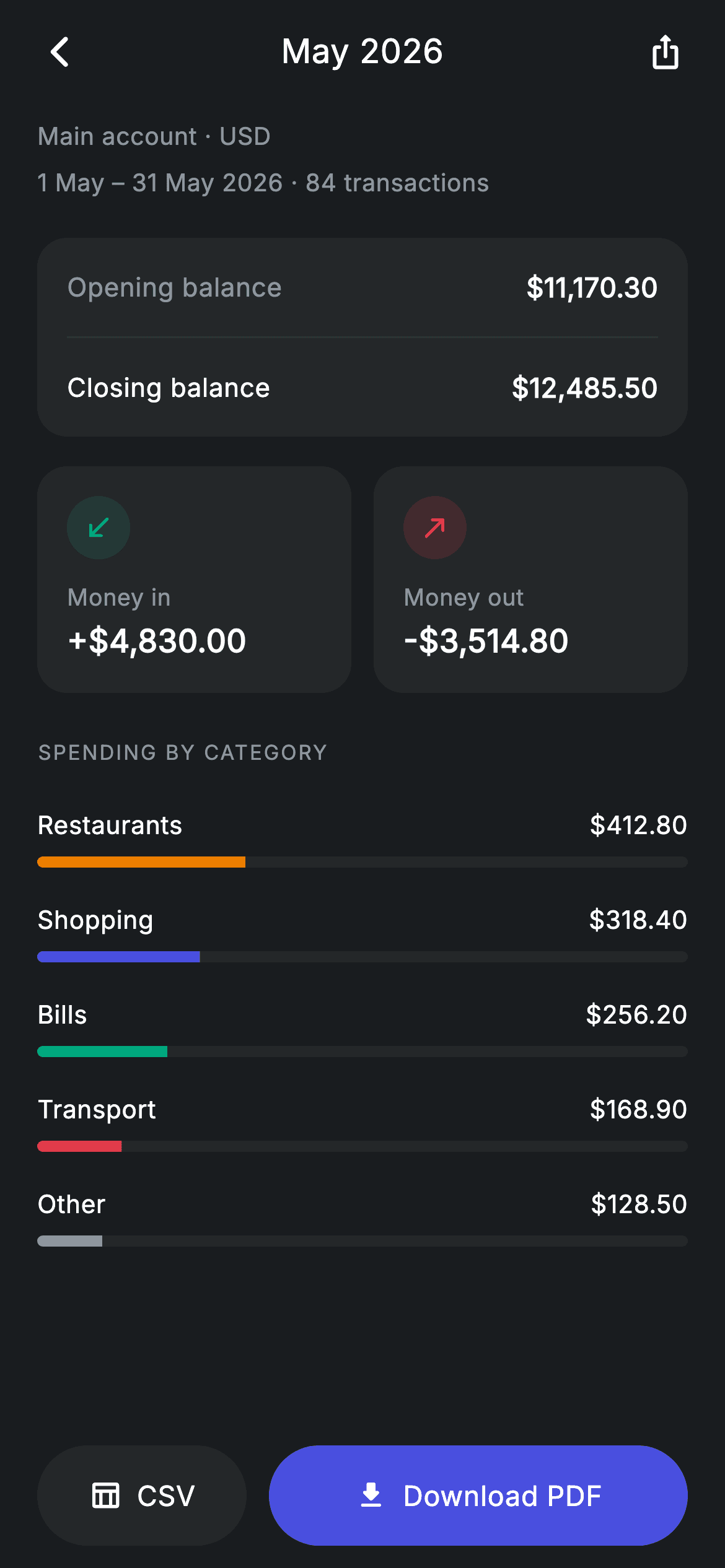
A monthly statement has to answer three questions fast: what did I start with, what moved, and where did it go. This tutorial builds a statement detail screen in Flutter — opening and closing balances in a grouped card, side-by-side money-in and money-out tiles, a five-category spending breakdown rendered as tinted progress bars, and an export footer weighted 2:1 toward the PDF action. Every bar is a LinearProgressIndicator, so there's no charting dependency anywhere.
Watch the Flutter UI walkthrough
A short screen recording of Fintech · Statement Detail running, if you'd rather see it before you read the code. The written tutorial below covers everything in it.
Can't see the video? Watch it on YouTube.
What you'll build
- ✓A category breakdown built from tinted progress bars, each carrying its own colour on its record
- ✓Side-by-side money-in and money-out tiles with directional arrows and semantic tints
- ✓An export footer where flex values give the primary action twice the width of the secondary
- ✓A period header stating the date range and transaction count so the statement is self-describing
Step-by-step build
Create the file
Add a new file at lib/fintech_statement_detail/fintech_statement_detail_screen.dart in your Flutter project.
Register the bundled fonts
No external packages — this is pure Flutter. It does bundle its design font (Inter), so drop the font file into fonts/ and declare it in pubspec.yaml:
flutter:
  fonts:
    - family: Inter
      fonts:
- asset: fonts/Inter-Regular.ttfBuild it, piece by piece
Here's how the screen goes together. Each block below is a real slice of the code with a plain-English explanation — paste them in order, or grab the whole file from the next section.
The category data with colours attached
import 'package:flutter/material.dart';

/// Statement detail — a single monthly statement + export (Revolut-inspired).
///
/// Self-contained per CONVENTIONS.md: pure Flutter only, the exact design font
/// (Inter) is bundled under `fonts/`, no network images, and the screen forces
/// its own dark theme. Opening/closing balances, money in vs out, a category
/// breakdown and PDF/CSV export actions make it read like a real statement.
class FintechStatementDetailScreen extends StatelessWidget {
  const FintechStatementDetailScreen({
    super.key,
    this.onBack,
    this.onDownload,
  });

  final VoidCallback? onBack;
  final VoidCallback? onDownload;

  static const String _font = 'Inter';
  static const Color _bg = Color(0xFF191C1F);
  static const Color _surface = Color(0xFF242729);
  static const Color _brand = Color(0xFF494FDF);
  static const Color _teal = Color(0xFF00A87E);
  static const Color _amber = Color(0xFFEC7E00);
  static const Color _red = Color(0xFFE23B4A);
  static const Color _muted = Color(0xFF8D969E);
  static const Color _hairline = Color(0xFF2E3235);

  static const List<_Cat> _cats = <_Cat>[
    _Cat('Restaurants', 412.80, 0.32, _amber),
    _Cat('Shopping', 318.40, 0.25, _brand),
    _Cat('Bills', 256.20, 0.20, _teal),
    _Cat('Transport', 168.90, 0.13, _red),
    _Cat('Other', 128.50, 0.10, _muted),
  ];
The screen is stateless with two callbacks, `onBack` and `onDownload`. Its palette is the widest in this fintech set — five accents — because four of them are consumed as category tints rather than as states. `_cats` holds five `_Cat` records, each with a name, an amount, a pre-computed fraction of total spend, and its own tint. Storing the fraction rather than deriving it means the bars need no total to divide by, and storing the tint on the record means the bar widget contains no colour logic at all. Note 'Other' deliberately takes `_muted` grey, the visual convention for a catch-all bucket.
The page flow and the category loop
  @override
  Widget build(BuildContext context) {
    return Theme(
      data: ThemeData.dark(useMaterial3: true),
      child: Scaffold(
        backgroundColor: _bg,
        body: SafeArea(
          child: Column(
            children: <Widget>[
              _buildAppBar(),
              Expanded(
                child: ListView(
                  physics: const BouncingScrollPhysics(),
                  padding: const EdgeInsets.fromLTRB(20, 8, 20, 24),
                  children: <Widget>[
                    _buildHeader(),
                    const SizedBox(height: 20),
                    _buildBalances(),
                    const SizedBox(height: 16),
                    _buildFlow(),
                    const SizedBox(height: 24),
                    _sectionLabel('Spending by category'),
                    const SizedBox(height: 12),
                    for (final _Cat c in _cats) _CatBar(cat: c),
                  ],
                ),
              ),
              _buildExport(),
            ],
          ),
        ),
      ),
    );
  }
The body is an app bar, an `Expanded` ListView, and a pinned export row. The list runs header, balances, flow tiles, then a section label followed by `for (final _Cat c in _cats) _CatBar(cat: c)` — a collection-for emitting one bar per category directly into the children list, with each `_CatBar` supplying its own vertical padding so no separators are needed. The app bar is slightly different from its siblings in this kit: instead of a balancing empty box on the right it carries a real share IconButton, which happens to balance the leading back button at the same 48px width.
A self-describing period header
  Widget _buildHeader() {
    return const Column(
      crossAxisAlignment: CrossAxisAlignment.start,
      children: <Widget>[
        Text(
          'Main account · USD',
          style: TextStyle(
            fontFamily: _font,
            fontSize: 13,
            letterSpacing: 0.24,
            color: _muted,
          ),
        ),
        SizedBox(height: 6),
        Text(
          '1 May – 31 May 2026 · 84 transactions',
          style: TextStyle(
            fontFamily: _font,
            fontSize: 13,
            letterSpacing: 0.24,
            color: _muted,
          ),
        ),
      ],
    );
  }
The header is a const Column of two muted lines: 'Main account · USD' and '1 May – 31 May 2026 · 84 transactions'. Both are set at the same 13px in `_muted`, so neither competes with the balances below. This block does real work despite being plain text — a statement that names its account, currency, exact date range and transaction count is self-describing, which matters when someone screenshots it or exports it. Note the en dash in the date range rather than a hyphen, the correct typographic mark for a span.
Opening and closing balances
  Widget _buildBalances() {
    return Container(
      padding: const EdgeInsets.symmetric(horizontal: 16),
      decoration: BoxDecoration(
        color: _surface,
        borderRadius: BorderRadius.circular(16),
      ),
      child: Column(
        children: <Widget>[
          _row('Opening balance', r'$11,170.30'),
          const Divider(height: 1, color: _hairline),
          _row('Closing balance', r'$12,485.50', bold: true),
        ],
      ),
    );
  }

  Widget _row(String label, String value, {bool bold = false}) {
    return Padding(
      padding: const EdgeInsets.symmetric(vertical: 16),
      child: Row(
        mainAxisAlignment: MainAxisAlignment.spaceBetween,
        children: <Widget>[
          Text(
            label,
            style: TextStyle(
              fontFamily: _font,
              fontSize: 14,
              fontWeight: bold ? FontWeight.w500 : FontWeight.w400,
              letterSpacing: 0.24,
              color: bold ? Colors.white : _muted,
            ),
          ),
          Text(
            value,
            style: const TextStyle(
              fontFamily: _font,
              fontSize: 14.5,
              fontWeight: FontWeight.w600,
              letterSpacing: 0.24,
              color: Colors.white,
            ),
          ),
        ],
      ),
    );
  }
The balances card sets only horizontal padding, letting each `_row` add its own 16px vertical inset so the `Divider(height: 1)` between them occupies exactly one pixel and contributes no spacing. `_row` takes an optional `bold` flag that flips the *label* from `_muted` w400 to white w500 — the value is already w600 in white on both rows. That means the closing balance gains emphasis purely through label contrast, with no font-size change that would break the alignment between the two figures. It's the same pattern used across the review screens in this set.
The money-in and money-out tiles
  Widget _buildFlow() {
    return Row(
      children: <Widget>[
        Expanded(child: _flowCard('Money in', r'+$4,830.00', _teal,
            Icons.south_west_rounded)),
        const SizedBox(width: 12),
        Expanded(child: _flowCard('Money out', r'-$3,514.80', _red,
            Icons.north_east_rounded)),
      ],
    );
  }

  Widget _flowCard(String label, String value, Color tint, IconData icon) {
    return Container(
      padding: const EdgeInsets.all(16),
      decoration: BoxDecoration(
        color: _surface,
        borderRadius: BorderRadius.circular(16),
      ),
      child: Column(
        crossAxisAlignment: CrossAxisAlignment.start,
        children: <Widget>[
          Container(
            width: 34,
            height: 34,
            decoration: BoxDecoration(
              color: tint.withValues(alpha: 0.16),
              shape: BoxShape.circle,
            ),
            child: Icon(icon, size: 17, color: tint),
          ),
          const SizedBox(height: 12),
          Text(
            label,
            style: const TextStyle(
              fontFamily: _font,
              fontSize: 12.5,
              letterSpacing: 0.24,
              color: _muted,
            ),
          ),
          const SizedBox(height: 2),
          Text(
            value,
            style: const TextStyle(
              fontFamily: _font,
              fontSize: 17,
              fontWeight: FontWeight.w600,
              letterSpacing: 0.24,
              color: Colors.white,
            ),
          ),
        ],
      ),
    );
  }
`_buildFlow` is a Row of two `Expanded` cards with a 12px gap, so they split the width exactly and stay equal however long the numbers get. `_flowCard` takes a label, a value, a tint and an icon, and builds a left-aligned Column: a 34px circle filled with `tint.withValues(alpha: 0.16)` around the icon at full tint, then the caption, then the figure at 17px w600. The direction is encoded twice over — `south_west_rounded` in teal for money arriving, `north_east_rounded` in red for money leaving — so the pair is readable at a glance even before you parse the signs on the numbers.
The weighted export footer
  Widget _buildExport() {
    return Padding(
      padding: const EdgeInsets.fromLTRB(20, 0, 20, 12),
      child: Row(
        children: <Widget>[
          Expanded(
            child: SizedBox(
              height: 54,
              child: Material(
                color: _surface,
                borderRadius: BorderRadius.circular(9999),
                child: InkWell(
                  borderRadius: BorderRadius.circular(9999),
                  onTap: onDownload,
                  child: Row(
                    mainAxisAlignment: MainAxisAlignment.center,
                    children: const <Widget>[
                      Icon(Icons.table_chart_outlined,
                          size: 18, color: Colors.white),
                      SizedBox(width: 8),
                      Text(
                        'CSV',
                        style: TextStyle(
                          fontFamily: _font,
                          fontSize: 15,
                          fontWeight: FontWeight.w500,
                          letterSpacing: 0.24,
                          color: Colors.white,
                        ),
                      ),
                    ],
                  ),
                ),
              ),
            ),
          ),
          const SizedBox(width: 12),
          Expanded(
            flex: 2,
            child: SizedBox(
              height: 54,
              child: Material(
                color: _brand,
                borderRadius: BorderRadius.circular(9999),
                child: InkWell(
                  borderRadius: BorderRadius.circular(9999),
                  onTap: onDownload,
                  child: Row(
                    mainAxisAlignment: MainAxisAlignment.center,
                    children: const <Widget>[
                      Icon(Icons.download_rounded,
                          size: 18, color: Colors.white),
                      SizedBox(width: 8),
                      Text(
                        'Download PDF',
                        style: TextStyle(
                          fontFamily: _font,
                          fontSize: 15,
                          fontWeight: FontWeight.w500,
                          letterSpacing: 0.24,
                          color: Colors.white,
                        ),
                      ),
                    ],
                  ),
                ),
              ),
            ),
          ),
        ],
      ),
    );
  }
Both export buttons are Material + InkWell with matching 9999 radii so their ripples follow the pill shape. The interesting detail is the flex: the CSV button is a plain `Expanded` (flex 1 by default) while the PDF button is `Expanded(flex: 2)`, giving it twice the width. Combined with the colour split — `_surface` grey for CSV, solid `_brand` for PDF — the hierarchy is stated twice, by size and by weight. That's the right call here because most people want the PDF; CSV is the power-user option and shouldn't claim equal space. Both currently call the same `onDownload` callback, so you'd add a format argument when wiring them for real.
The category record and its bar
class _Cat {
  const _Cat(this.name, this.amount, this.fraction, this.tint);
  final String name;
  final double amount;
  final double fraction;
  final Color tint;
}

class _CatBar extends StatelessWidget {
  const _CatBar({required this.cat});

  final _Cat cat;

  @override
  Widget build(BuildContext context) {
    return Padding(
      padding: const EdgeInsets.symmetric(vertical: 9),
      child: Column(
        children: <Widget>[
          Row(
            children: <Widget>[
              Text(
                cat.name,
                style: const TextStyle(
                  fontFamily: FintechStatementDetailScreen._font,
                  fontSize: 13.5,
                  fontWeight: FontWeight.w500,
                  letterSpacing: 0.24,
                  color: Colors.white,
                ),
              ),
              const Spacer(),
              Text(
                '\$${cat.amount.toStringAsFixed(2)}',
                style: const TextStyle(
                  fontFamily: FintechStatementDetailScreen._font,
                  fontSize: 13.5,
                  fontWeight: FontWeight.w500,
                  letterSpacing: 0.24,
                  color: Colors.white,
                ),
              ),
            ],
          ),
          const SizedBox(height: 8),
          ClipRRect(
            borderRadius: BorderRadius.circular(9999),
            child: LinearProgressIndicator(
              value: cat.fraction,
              minHeight: 6,
              backgroundColor: FintechStatementDetailScreen._surface,
              valueColor: AlwaysStoppedAnimation<Color>(cat.tint),
            ),
          ),
        ],
      ),
    );
  }
}
_Cat is the four-field immutable record. _CatBar renders one row: a Row with the name, a `Spacer()`, and the amount formatted by `cat.amount.toStringAsFixed(2)` so every figure shows two decimals and the column stays even. Below it, a `LinearProgressIndicator` with `value: cat.fraction`, `minHeight: 6`, an `_surface` track and the category's own tint through `AlwaysStoppedAnimation` — that wrapper is required because valueColor expects an Animation, even for a static colour. The ClipRRect with a 9999 radius is what rounds the ends, since LinearProgressIndicator draws square by default. Like other helpers in this kit, `_CatBar` reads `FintechStatementDetailScreen._font` and `._surface` directly, since Dart's privacy is per-file.
Full code
The complete, ready-to-paste source. Free to use in your projects — one click copies it all.
import 'package:flutter/material.dart';

/// Statement detail — a single monthly statement + export (Revolut-inspired).
///
/// Self-contained per CONVENTIONS.md: pure Flutter only, the exact design font
/// (Inter) is bundled under `fonts/`, no network images, and the screen forces
/// its own dark theme. Opening/closing balances, money in vs out, a category
/// breakdown and PDF/CSV export actions make it read like a real statement.
class FintechStatementDetailScreen extends StatelessWidget {
  const FintechStatementDetailScreen({
    super.key,
    this.onBack,
    this.onDownload,
  });

  final VoidCallback? onBack;
  final VoidCallback? onDownload;

  static const String _font = 'Inter';
  static const Color _bg = Color(0xFF191C1F);
  static const Color _surface = Color(0xFF242729);
  static const Color _brand = Color(0xFF494FDF);
  static const Color _teal = Color(0xFF00A87E);
  static const Color _amber = Color(0xFFEC7E00);
  static const Color _red = Color(0xFFE23B4A);
  static const Color _muted = Color(0xFF8D969E);
  static const Color _hairline = Color(0xFF2E3235);

  static const List<_Cat> _cats = <_Cat>[
    _Cat('Restaurants', 412.80, 0.32, _amber),
    _Cat('Shopping', 318.40, 0.25, _brand),
    _Cat('Bills', 256.20, 0.20, _teal),
    _Cat('Transport', 168.90, 0.13, _red),
    _Cat('Other', 128.50, 0.10, _muted),
  ];

  @override
  Widget build(BuildContext context) {
    return Theme(
      data: ThemeData.dark(useMaterial3: true),
      child: Scaffold(
        backgroundColor: _bg,
        body: SafeArea(
          child: Column(
            children: <Widget>[
              _buildAppBar(),
              Expanded(
                child: ListView(
                  physics: const BouncingScrollPhysics(),
                  padding: const EdgeInsets.fromLTRB(20, 8, 20, 24),
                  children: <Widget>[
                    _buildHeader(),
                    const SizedBox(height: 20),
                    _buildBalances(),
                    const SizedBox(height: 16),
                    _buildFlow(),
                    const SizedBox(height: 24),
                    _sectionLabel('Spending by category'),
                    const SizedBox(height: 12),
                    for (final _Cat c in _cats) _CatBar(cat: c),
                  ],
                ),
              ),
              _buildExport(),
            ],
          ),
        ),
      ),
    );
  }

  Widget _buildAppBar() {
    return Padding(
      padding: const EdgeInsets.fromLTRB(8, 4, 8, 4),
      child: Row(
        children: <Widget>[
          IconButton(
            onPressed: onBack,
            icon: const Icon(Icons.arrow_back_ios_new_rounded,
                size: 20, color: Colors.white),
          ),
          const Expanded(
            child: Text(
              'May 2026',
              textAlign: TextAlign.center,
              style: TextStyle(
                fontFamily: _font,
                fontSize: 18,
                fontWeight: FontWeight.w500,
                letterSpacing: 0.24,
                color: Colors.white,
              ),
            ),
          ),
          IconButton(
            onPressed: onDownload,
            icon: const Icon(Icons.ios_share_rounded,
                size: 20, color: Colors.white),
          ),
        ],
      ),
    );
  }

  Widget _buildHeader() {
    return const Column(
      crossAxisAlignment: CrossAxisAlignment.start,
      children: <Widget>[
        Text(
          'Main account · USD',
          style: TextStyle(
            fontFamily: _font,
            fontSize: 13,
            letterSpacing: 0.24,
            color: _muted,
          ),
        ),
        SizedBox(height: 6),
        Text(
          '1 May – 31 May 2026 · 84 transactions',
          style: TextStyle(
            fontFamily: _font,
            fontSize: 13,
            letterSpacing: 0.24,
            color: _muted,
          ),
        ),
      ],
    );
  }

  Widget _buildBalances() {
    return Container(
      padding: const EdgeInsets.symmetric(horizontal: 16),
      decoration: BoxDecoration(
        color: _surface,
        borderRadius: BorderRadius.circular(16),
      ),
      child: Column(
        children: <Widget>[
          _row('Opening balance', r'$11,170.30'),
          const Divider(height: 1, color: _hairline),
          _row('Closing balance', r'$12,485.50', bold: true),
        ],
      ),
    );
  }

  Widget _row(String label, String value, {bool bold = false}) {
    return Padding(
      padding: const EdgeInsets.symmetric(vertical: 16),
      child: Row(
        mainAxisAlignment: MainAxisAlignment.spaceBetween,
        children: <Widget>[
          Text(
            label,
            style: TextStyle(
              fontFamily: _font,
              fontSize: 14,
              fontWeight: bold ? FontWeight.w500 : FontWeight.w400,
              letterSpacing: 0.24,
              color: bold ? Colors.white : _muted,
            ),
          ),
          Text(
            value,
            style: const TextStyle(
              fontFamily: _font,
              fontSize: 14.5,
              fontWeight: FontWeight.w600,
              letterSpacing: 0.24,
              color: Colors.white,
            ),
          ),
        ],
      ),
    );
  }

  Widget _buildFlow() {
    return Row(
      children: <Widget>[
        Expanded(child: _flowCard('Money in', r'+$4,830.00', _teal,
            Icons.south_west_rounded)),
        const SizedBox(width: 12),
        Expanded(child: _flowCard('Money out', r'-$3,514.80', _red,
            Icons.north_east_rounded)),
      ],
    );
  }

  Widget _flowCard(String label, String value, Color tint, IconData icon) {
    return Container(
      padding: const EdgeInsets.all(16),
      decoration: BoxDecoration(
        color: _surface,
        borderRadius: BorderRadius.circular(16),
      ),
      child: Column(
        crossAxisAlignment: CrossAxisAlignment.start,
        children: <Widget>[
          Container(
            width: 34,
            height: 34,
            decoration: BoxDecoration(
              color: tint.withValues(alpha: 0.16),
              shape: BoxShape.circle,
            ),
            child: Icon(icon, size: 17, color: tint),
          ),
          const SizedBox(height: 12),
          Text(
            label,
            style: const TextStyle(
              fontFamily: _font,
              fontSize: 12.5,
              letterSpacing: 0.24,
              color: _muted,
            ),
          ),
          const SizedBox(height: 2),
          Text(
            value,
            style: const TextStyle(
              fontFamily: _font,
              fontSize: 17,
              fontWeight: FontWeight.w600,
              letterSpacing: 0.24,
              color: Colors.white,
            ),
          ),
        ],
      ),
    );
  }

  Widget _sectionLabel(String text) {
    return Text(
      text.toUpperCase(),
      style: const TextStyle(
        fontFamily: _font,
        fontSize: 11,
        fontWeight: FontWeight.w500,
        letterSpacing: 1.0,
        color: _muted,
      ),
    );
  }

  Widget _buildExport() {
    return Padding(
      padding: const EdgeInsets.fromLTRB(20, 0, 20, 12),
      child: Row(
        children: <Widget>[
          Expanded(
            child: SizedBox(
              height: 54,
              child: Material(
                color: _surface,
                borderRadius: BorderRadius.circular(9999),
                child: InkWell(
                  borderRadius: BorderRadius.circular(9999),
                  onTap: onDownload,
                  child: Row(
                    mainAxisAlignment: MainAxisAlignment.center,
                    children: const <Widget>[
                      Icon(Icons.table_chart_outlined,
                          size: 18, color: Colors.white),
                      SizedBox(width: 8),
                      Text(
                        'CSV',
                        style: TextStyle(
                          fontFamily: _font,
                          fontSize: 15,
                          fontWeight: FontWeight.w500,
                          letterSpacing: 0.24,
                          color: Colors.white,
                        ),
                      ),
                    ],
                  ),
                ),
              ),
            ),
          ),
          const SizedBox(width: 12),
          Expanded(
            flex: 2,
            child: SizedBox(
              height: 54,
              child: Material(
                color: _brand,
                borderRadius: BorderRadius.circular(9999),
                child: InkWell(
                  borderRadius: BorderRadius.circular(9999),
                  onTap: onDownload,
                  child: Row(
                    mainAxisAlignment: MainAxisAlignment.center,
                    children: const <Widget>[
                      Icon(Icons.download_rounded,
                          size: 18, color: Colors.white),
                      SizedBox(width: 8),
                      Text(
                        'Download PDF',
                        style: TextStyle(
                          fontFamily: _font,
                          fontSize: 15,
                          fontWeight: FontWeight.w500,
                          letterSpacing: 0.24,
                          color: Colors.white,
                        ),
                      ),
                    ],
                  ),
                ),
              ),
            ),
          ),
        ],
      ),
    );
  }
}

class _Cat {
  const _Cat(this.name, this.amount, this.fraction, this.tint);
  final String name;
  final double amount;
  final double fraction;
  final Color tint;
}

class _CatBar extends StatelessWidget {
  const _CatBar({required this.cat});

  final _Cat cat;

  @override
  Widget build(BuildContext context) {
    return Padding(
      padding: const EdgeInsets.symmetric(vertical: 9),
      child: Column(
        children: <Widget>[
          Row(
            children: <Widget>[
              Text(
                cat.name,
                style: const TextStyle(
                  fontFamily: FintechStatementDetailScreen._font,
                  fontSize: 13.5,
                  fontWeight: FontWeight.w500,
                  letterSpacing: 0.24,
                  color: Colors.white,
                ),
              ),
              const Spacer(),
              Text(
                '\$${cat.amount.toStringAsFixed(2)}',
                style: const TextStyle(
                  fontFamily: FintechStatementDetailScreen._font,
                  fontSize: 13.5,
                  fontWeight: FontWeight.w500,
                  letterSpacing: 0.24,
                  color: Colors.white,
                ),
              ),
            ],
          ),
          const SizedBox(height: 8),
          ClipRRect(
            borderRadius: BorderRadius.circular(9999),
            child: LinearProgressIndicator(
              value: cat.fraction,
              minHeight: 6,
              backgroundColor: FintechStatementDetailScreen._surface,
              valueColor: AlwaysStoppedAnimation<Color>(cat.tint),
            ),
          ),
        ],
      ),
    );
  }
}
Plus bundled 1 binary asset (fonts/images). The CLI and MCP install those for you automatically.
Two faster ways to add it
Copy-paste works, but you can skip it entirely.
1. FlutterKit CLI
One command drops this screen — and its fonts — straight into your project.
$ flutterkit add fintech-statement-detail2. AI agent (MCP)
Connect FlutterKit's MCP server in Claude or Cursor and just ask your agent to install fintech-statement-detail — it fetches and writes the files for you.
FAQ
Is this Flutter bank statement screen free to use?
Yes. The complete Dart source on this page is free for personal and commercial projects. Copy it directly, install it with the FlutterKit CLI (flutterkit add fintech-statement-detail), or have an AI agent add it for you over MCP.
How do I compute the category fractions from real spending?
Sum your category amounts, then set each record's fraction to `amount / total`. Because `_CatBar` reads the fraction straight off the record and LinearProgressIndicator expects a 0–1 value, that's the only change needed — and it keeps the bars proportional even when a month has an unusual outlier. If you'd rather not precompute, drop the fraction field and divide inside `_CatBar` using a total passed down from the parent.
Does the download button actually export a PDF?
No — both footer buttons and the share icon fire the `onDownload` callback and nothing else, so the screen stays dependency-free. Real export needs a package such as `pdf` plus `path_provider` and `share_plus`, wired into that callback. Add a format argument to distinguish the CSV and PDF buttons, which currently share one handler.
Which Flutter version does it target?
It uses Color.withValues() and super parameters, so Flutter 3.22+ (Dart 3). On an older SDK, change the single withValues(alpha: 0.16) call inside `_flowCard` to withOpacity(0.16). The only bundled asset is the Inter font, registered in pubspec.yaml as shown in step 2.

