How to Build a Spending by Category Breakdown in Flutter (Full Code + Preview)
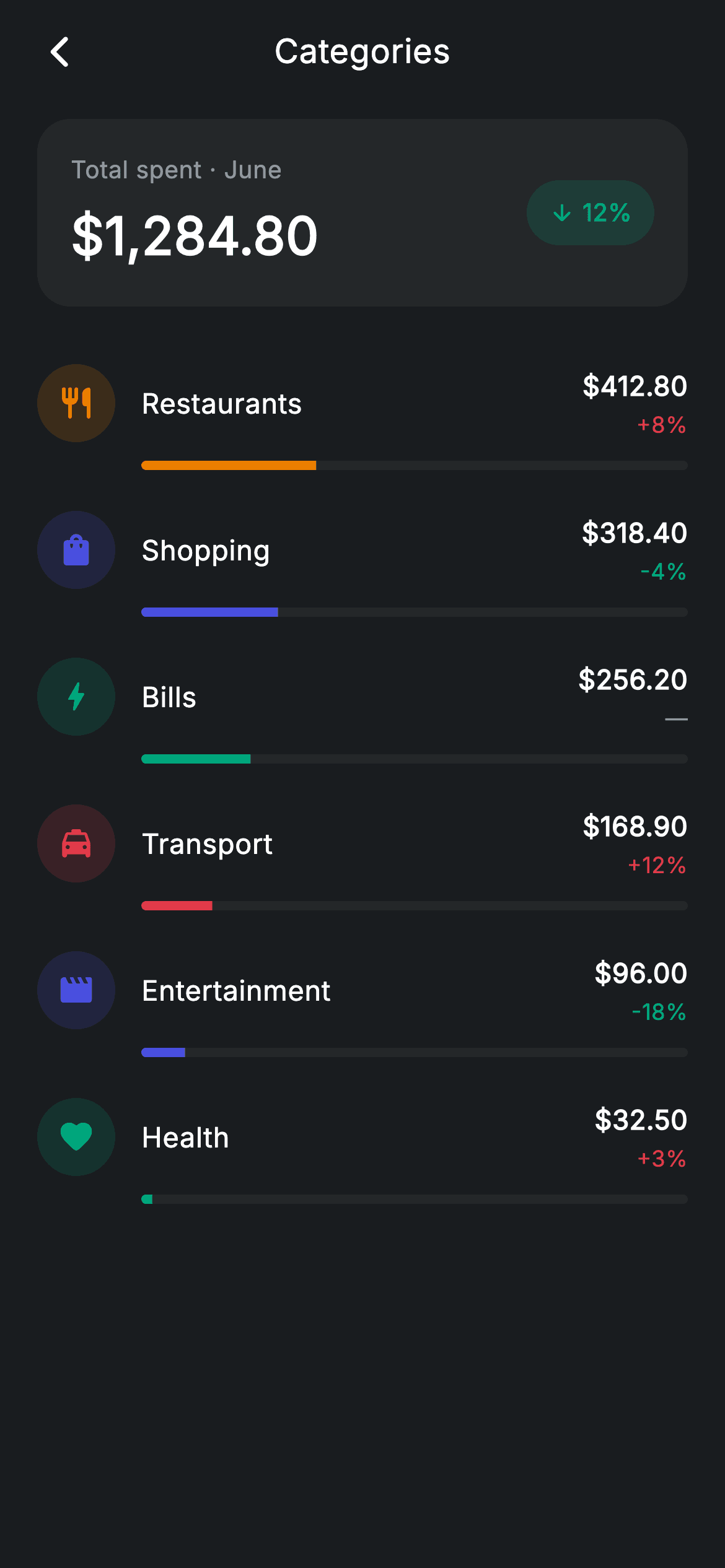
Spending breakdowns need to answer two questions per row — how much, and is that more or less than last month — without turning into a chart. This tutorial builds that in Flutter using a `LinearProgressIndicator` as the share bar and a three-state delta where *up is red*, because spending more is bad news. Above the list sits a total card with a teal 'down 12%' pill. Every bar is tinted with its category's own colour, so the list reads as a chart laid flat.
Watch the Flutter UI walkthrough
A short screen recording of Fintech · Spending Categories running, if you'd rather see it before you read the code. The written tutorial below covers everything in it.
Can't see the video? Watch it on YouTube.
What you'll build
- ✓A category row combining a tinted icon, an amount, a delta, and a share bar
- ✓Inverted delta semantics: red for up, teal for down, grey em-dash for flat
- ✓A share bar built from `LinearProgressIndicator` + `ClipRRect` — no custom painter
- ✓A bar indented to align under the label rather than under the icon
- ✓A total card with a rounded 'down 12%' pill pushed right by a `Spacer`
- ✓A six-field `_Cat` model carrying its own colour, fraction and delta
Step-by-step build
Create the file
Add a new file at lib/fintech_spending_categories/fintech_spending_categories_screen.dart in your Flutter project.
Register the bundled fonts
No external packages — this is pure Flutter. It does bundle its design font (Inter), so drop the font file into fonts/ and declare it in pubspec.yaml:
flutter:
  fonts:
    - family: Inter
      fonts:
- asset: fonts/Inter-Regular.ttfBuild it, piece by piece
Here's how the screen goes together. Each block below is a real slice of the code with a plain-English explanation — paste them in order, or grab the whole file from the next section.
The category model and its six const rows
class FintechSpendingCategoriesScreen extends StatelessWidget {
  const FintechSpendingCategoriesScreen({
    super.key,
    this.onBack,
    this.onCategoryTap,
  });

  final VoidCallback? onBack;
  final VoidCallback? onCategoryTap;

  static const String _font = 'Inter';
  static const Color _bg = Color(0xFF191C1F);
  static const Color _surface = Color(0xFF242729);
  static const Color _brand = Color(0xFF494FDF);
  static const Color _teal = Color(0xFF00A87E);
  static const Color _amber = Color(0xFFEC7E00);
  static const Color _red = Color(0xFFE23B4A);
  static const Color _muted = Color(0xFF8D969E);

  static const List<_Cat> _cats = <_Cat>[
    _Cat('Restaurants', 412.80, 0.32, 8, Icons.restaurant_rounded, _amber),
    _Cat('Shopping', 318.40, 0.25, -4, Icons.shopping_bag_rounded, _brand),
    _Cat('Bills', 256.20, 0.20, 0, Icons.bolt_rounded, _teal),
    _Cat('Transport', 168.90, 0.13, 12, Icons.local_taxi_rounded, _red),
    _Cat('Entertainment', 96.00, 0.08, -18, Icons.movie_rounded, _brand),
    _Cat('Health', 32.50, 0.02, 3, Icons.favorite_rounded, _teal),
  ];
Each `_Cat` carries a name, an `amount`, a `fraction` already normalised to 0–1, an integer `delta` percentage, an icon and a tint. Storing `fraction` alongside `amount` rather than computing it means the bar never has to know the total — 0.32 goes straight into the progress indicator. The list is ordered largest-first, which matters because nothing sorts it at render time; the order in this `const` list *is* the order on screen. Colours repeat across the six (brand and teal each appear twice), which is fine — they distinguish neighbours, they don't identify categories globally.
Total card with a rounded delta pill
  Widget _buildTotal() {
    return Container(
      padding: const EdgeInsets.all(18),
      decoration: BoxDecoration(
        color: _surface,
        borderRadius: BorderRadius.circular(18),
      ),
      child: Row(
        children: <Widget>[
          Column(
            crossAxisAlignment: CrossAxisAlignment.start,
            children: const <Widget>[
              Text(
                'Total spent · June',
                style: TextStyle(
                  fontFamily: _font,
                  fontSize: 13,
                  letterSpacing: 0.24,
                  color: _muted,
                ),
              ),
              SizedBox(height: 6),
              Text(
                r'$1,284.80',
                style: TextStyle(
                  fontFamily: _font,
                  fontSize: 28,
                  fontWeight: FontWeight.w600,
                  letterSpacing: 0.24,
                  color: Colors.white,
                ),
              ),
            ],
          ),
          const Spacer(),
          Container(
            padding: const EdgeInsets.symmetric(horizontal: 12, vertical: 8),
            decoration: BoxDecoration(
              color: _teal.withValues(alpha: 0.16),
              borderRadius: BorderRadius.circular(9999),
            ),
            child: Row(
              mainAxisSize: MainAxisSize.min,
              children: const <Widget>[
                Icon(Icons.arrow_downward_rounded, size: 14, color: _teal),
                SizedBox(width: 4),
                Text(
                  '12%',
                  style: TextStyle(
                    fontFamily: _font,
                    fontSize: 13,
                    fontWeight: FontWeight.w600,
                    letterSpacing: 0.24,
                    color: _teal,
                  ),
                ),
              ],
            ),
          ),
        ],
      ),
    );
  }
A `Row` with the label-and-amount `Column` on the left, a `Spacer()` in the middle, and the delta pill hard right — `Spacer` is the lightest way to split a row into two ends without wrapping either side in `Expanded`. The pill is a 9999-radius `Container` at `_teal.withValues(alpha: 0.16)` whose inner `Row` sets `mainAxisSize: MainAxisSize.min` so it hugs the arrow and '12%' rather than stretching. The arrow is `arrow_downward_rounded` in teal: on a spending screen, *down* is the good direction, which is the opposite of the convention on an investing screen.
Three-state delta colour, with up meaning bad
class _CatTile extends StatelessWidget {
  const _CatTile({required this.cat, this.onTap});

  final _Cat cat;
  final VoidCallback? onTap;

  @override
  Widget build(BuildContext context) {
    final bool up = cat.delta > 0;
    final bool flat = cat.delta == 0;
    final Color deltaColor = flat
        ? FintechSpendingCategoriesScreen._muted
        : (up
            ? FintechSpendingCategoriesScreen._red
            : FintechSpendingCategoriesScreen._teal);
    return InkWell(
      onTap: onTap,
      borderRadius: BorderRadius.circular(12),
      child: Padding(
        padding: const EdgeInsets.symmetric(vertical: 11),
`_CatTile` computes two booleans, `up` and `flat`, then resolves `deltaColor` through a nested conditional: flat → muted, up → `_red`, otherwise `_teal`. Note the inversion — a *positive* delta is red here, because spending 8% more on restaurants is not a win. Handling `flat` as its own case matters too: Bills has a delta of exactly 0, and colouring it green or red would imply a change that didn't happen. The `InkWell` carries `borderRadius: BorderRadius.circular(12)` so its ripple is rounded even though the row itself has no painted background.
The row: icon, name, amount, delta
        child: Column(
          children: <Widget>[
            Row(
              children: <Widget>[
                Container(
                  width: 42,
                  height: 42,
                  decoration: BoxDecoration(
                    color: cat.tint.withValues(alpha: 0.16),
                    shape: BoxShape.circle,
                  ),
                  child: Icon(cat.icon, size: 20, color: cat.tint),
                ),
                const SizedBox(width: 14),
                Expanded(
                  child: Text(
                    cat.name,
                    style: const TextStyle(
                      fontFamily: FintechSpendingCategoriesScreen._font,
                      fontSize: 15,
                      fontWeight: FontWeight.w500,
                      letterSpacing: 0.24,
                      color: Colors.white,
                    ),
                  ),
                ),
                Column(
                  crossAxisAlignment: CrossAxisAlignment.end,
                  children: <Widget>[
                    Text(
                      '\$${cat.amount.toStringAsFixed(2)}',
                      style: const TextStyle(
                        fontFamily: FintechSpendingCategoriesScreen._font,
                        fontSize: 14.5,
                        fontWeight: FontWeight.w600,
                        letterSpacing: 0.24,
                        color: Colors.white,
                      ),
                    ),
                    const SizedBox(height: 2),
                    Text(
                      flat ? '—' : '${up ? '+' : ''}${cat.delta}%',
                      style: TextStyle(
                        fontFamily: FintechSpendingCategoriesScreen._font,
                        fontSize: 12,
                        fontWeight: FontWeight.w500,
                        letterSpacing: 0.24,
                        color: deltaColor,
                      ),
                    ),
                  ],
                ),
              ],
            ),
A 42px circle filled `cat.tint.withValues(alpha: 0.16)` holds the full-strength category icon — the same tint recipe used throughout the design system. The name is `Expanded`, so it absorbs the slack and keeps the right-hand `Column` pinned to the edge whatever the name's length. That trailing column is `CrossAxisAlignment.end`, giving right-aligned numbers so the decimal points line up down the list. The amount is formatted with `toStringAsFixed(2)`, and the delta uses a manual `'+'` prefix for positives — `toStringAsFixed` and `int` interpolation both only ever print a minus.
The share bar
            const SizedBox(height: 10),
            Padding(
              padding: const EdgeInsets.only(left: 56),
              child: ClipRRect(
                borderRadius: BorderRadius.circular(9999),
                child: LinearProgressIndicator(
                  value: cat.fraction,
                  minHeight: 5,
                  backgroundColor: FintechSpendingCategoriesScreen._surface,
                  valueColor: AlwaysStoppedAnimation<Color>(cat.tint),
                ),
              ),
            ),
No custom painter needed: `LinearProgressIndicator` with `value: cat.fraction` draws a determinate bar, `minHeight: 5` makes it a thin rule instead of Material's default 4px-with-padding look, `backgroundColor: _surface` supplies the unfilled track, and `valueColor: AlwaysStoppedAnimation<Color>(cat.tint)` sets the fill — the `AlwaysStoppedAnimation` wrapper is required because the property takes an `Animation<Color>`, not a plain `Color`. `ClipRRect` at a 9999 radius rounds both ends, which the widget won't do on its own. The `EdgeInsets.only(left: 56)` matches the 42px icon plus the 14px gap, so the bar starts exactly under the category name rather than under the icon.
Full code
The complete, ready-to-paste source. Free to use in your projects — one click copies it all.
import 'package:flutter/material.dart';

/// Spending categories — breakdown by category (Revolut-inspired design system).
///
/// Self-contained per CONVENTIONS.md: pure Flutter only, the exact design font
/// (Inter) is bundled under `fonts/`, no network images, and the screen forces
/// its own dark theme. Each category shows its share bar and month-on-month
/// delta; tapping one opens its transactions.
class FintechSpendingCategoriesScreen extends StatelessWidget {
  const FintechSpendingCategoriesScreen({
    super.key,
    this.onBack,
    this.onCategoryTap,
  });

  final VoidCallback? onBack;
  final VoidCallback? onCategoryTap;

  static const String _font = 'Inter';
  static const Color _bg = Color(0xFF191C1F);
  static const Color _surface = Color(0xFF242729);
  static const Color _brand = Color(0xFF494FDF);
  static const Color _teal = Color(0xFF00A87E);
  static const Color _amber = Color(0xFFEC7E00);
  static const Color _red = Color(0xFFE23B4A);
  static const Color _muted = Color(0xFF8D969E);

  static const List<_Cat> _cats = <_Cat>[
    _Cat('Restaurants', 412.80, 0.32, 8, Icons.restaurant_rounded, _amber),
    _Cat('Shopping', 318.40, 0.25, -4, Icons.shopping_bag_rounded, _brand),
    _Cat('Bills', 256.20, 0.20, 0, Icons.bolt_rounded, _teal),
    _Cat('Transport', 168.90, 0.13, 12, Icons.local_taxi_rounded, _red),
    _Cat('Entertainment', 96.00, 0.08, -18, Icons.movie_rounded, _brand),
    _Cat('Health', 32.50, 0.02, 3, Icons.favorite_rounded, _teal),
  ];

  @override
  Widget build(BuildContext context) {
    return Theme(
      data: ThemeData.dark(useMaterial3: true),
      child: Scaffold(
        backgroundColor: _bg,
        body: SafeArea(
          child: Column(
            children: <Widget>[
              _buildAppBar(),
              Expanded(
                child: ListView(
                  physics: const BouncingScrollPhysics(),
                  padding: const EdgeInsets.fromLTRB(20, 8, 20, 24),
                  children: <Widget>[
                    _buildTotal(),
                    const SizedBox(height: 20),
                    for (final _Cat c in _cats)
                      _CatTile(cat: c, onTap: onCategoryTap),
                  ],
                ),
              ),
            ],
          ),
        ),
      ),
    );
  }

  Widget _buildAppBar() {
    return Padding(
      padding: const EdgeInsets.fromLTRB(8, 4, 8, 4),
      child: Row(
        children: <Widget>[
          IconButton(
            onPressed: onBack,
            icon: const Icon(Icons.arrow_back_ios_new_rounded,
                size: 20, color: Colors.white),
          ),
          const Expanded(
            child: Text(
              'Categories',
              textAlign: TextAlign.center,
              style: TextStyle(
                fontFamily: _font,
                fontSize: 18,
                fontWeight: FontWeight.w500,
                letterSpacing: 0.24,
                color: Colors.white,
              ),
            ),
          ),
          const SizedBox(width: 48),
        ],
      ),
    );
  }

  Widget _buildTotal() {
    return Container(
      padding: const EdgeInsets.all(18),
      decoration: BoxDecoration(
        color: _surface,
        borderRadius: BorderRadius.circular(18),
      ),
      child: Row(
        children: <Widget>[
          Column(
            crossAxisAlignment: CrossAxisAlignment.start,
            children: const <Widget>[
              Text(
                'Total spent · June',
                style: TextStyle(
                  fontFamily: _font,
                  fontSize: 13,
                  letterSpacing: 0.24,
                  color: _muted,
                ),
              ),
              SizedBox(height: 6),
              Text(
                r'$1,284.80',
                style: TextStyle(
                  fontFamily: _font,
                  fontSize: 28,
                  fontWeight: FontWeight.w600,
                  letterSpacing: 0.24,
                  color: Colors.white,
                ),
              ),
            ],
          ),
          const Spacer(),
          Container(
            padding: const EdgeInsets.symmetric(horizontal: 12, vertical: 8),
            decoration: BoxDecoration(
              color: _teal.withValues(alpha: 0.16),
              borderRadius: BorderRadius.circular(9999),
            ),
            child: Row(
              mainAxisSize: MainAxisSize.min,
              children: const <Widget>[
                Icon(Icons.arrow_downward_rounded, size: 14, color: _teal),
                SizedBox(width: 4),
                Text(
                  '12%',
                  style: TextStyle(
                    fontFamily: _font,
                    fontSize: 13,
                    fontWeight: FontWeight.w600,
                    letterSpacing: 0.24,
                    color: _teal,
                  ),
                ),
              ],
            ),
          ),
        ],
      ),
    );
  }
}

class _Cat {
  const _Cat(this.name, this.amount, this.fraction, this.delta, this.icon,
      this.tint);
  final String name;
  final double amount;
  final double fraction;
  final int delta; // % vs last month
  final IconData icon;
  final Color tint;
}

class _CatTile extends StatelessWidget {
  const _CatTile({required this.cat, this.onTap});

  final _Cat cat;
  final VoidCallback? onTap;

  @override
  Widget build(BuildContext context) {
    final bool up = cat.delta > 0;
    final bool flat = cat.delta == 0;
    final Color deltaColor = flat
        ? FintechSpendingCategoriesScreen._muted
        : (up
            ? FintechSpendingCategoriesScreen._red
            : FintechSpendingCategoriesScreen._teal);
    return InkWell(
      onTap: onTap,
      borderRadius: BorderRadius.circular(12),
      child: Padding(
        padding: const EdgeInsets.symmetric(vertical: 11),
        child: Column(
          children: <Widget>[
            Row(
              children: <Widget>[
                Container(
                  width: 42,
                  height: 42,
                  decoration: BoxDecoration(
                    color: cat.tint.withValues(alpha: 0.16),
                    shape: BoxShape.circle,
                  ),
                  child: Icon(cat.icon, size: 20, color: cat.tint),
                ),
                const SizedBox(width: 14),
                Expanded(
                  child: Text(
                    cat.name,
                    style: const TextStyle(
                      fontFamily: FintechSpendingCategoriesScreen._font,
                      fontSize: 15,
                      fontWeight: FontWeight.w500,
                      letterSpacing: 0.24,
                      color: Colors.white,
                    ),
                  ),
                ),
                Column(
                  crossAxisAlignment: CrossAxisAlignment.end,
                  children: <Widget>[
                    Text(
                      '\$${cat.amount.toStringAsFixed(2)}',
                      style: const TextStyle(
                        fontFamily: FintechSpendingCategoriesScreen._font,
                        fontSize: 14.5,
                        fontWeight: FontWeight.w600,
                        letterSpacing: 0.24,
                        color: Colors.white,
                      ),
                    ),
                    const SizedBox(height: 2),
                    Text(
                      flat ? '—' : '${up ? '+' : ''}${cat.delta}%',
                      style: TextStyle(
                        fontFamily: FintechSpendingCategoriesScreen._font,
                        fontSize: 12,
                        fontWeight: FontWeight.w500,
                        letterSpacing: 0.24,
                        color: deltaColor,
                      ),
                    ),
                  ],
                ),
              ],
            ),
            const SizedBox(height: 10),
            Padding(
              padding: const EdgeInsets.only(left: 56),
              child: ClipRRect(
                borderRadius: BorderRadius.circular(9999),
                child: LinearProgressIndicator(
                  value: cat.fraction,
                  minHeight: 5,
                  backgroundColor: FintechSpendingCategoriesScreen._surface,
                  valueColor: AlwaysStoppedAnimation<Color>(cat.tint),
                ),
              ),
            ),
          ],
        ),
      ),
    );
  }
}
Plus bundled 1 binary asset (fonts/images). The CLI and MCP install those for you automatically.
Two faster ways to add it
Copy-paste works, but you can skip it entirely.
1. FlutterKit CLI
One command drops this screen — and its fonts — straight into your project.
$ flutterkit add fintech-spending-categories2. AI agent (MCP)
Connect FlutterKit's MCP server in Claude or Cursor and just ask your agent to install fintech-spending-categories — it fetches and writes the files for you.
FAQ
Is this spending breakdown free to use?
Yes. The complete Dart source on this page is free for personal and commercial apps. Copy it from the code block, install it with the FlutterKit CLI (flutterkit add fintech-spending-categories), or add it through an AI agent over MCP.
Why is a positive delta shown in red?
Because this is a spending screen, not a portfolio. Spending 12% more than last month is the outcome the user probably wants to avoid, so up is red and down is teal — the inverse of a stocks list. The flat case gets a grey em-dash so a 0% change isn't mis-signalled either way.
Do I need a charting package for the bars?
No. Each bar is a stock LinearProgressIndicator wrapped in ClipRRect for rounded ends. The whole screen is pure Flutter with no third-party dependencies; the only asset is the bundled Inter font.
How do I compute fraction from real data?
Sum the amounts, then set fraction to amount / total for each category before building the list. Keeping fraction on the model (rather than computing it inside _CatTile) means the tile stays a pure render function and never needs to know about its siblings.
Which Flutter version does it target?
It uses Color.withValues(alpha:), super parameters and Material 3, so it targets Flutter 3.27+ (Dart 3). On an older SDK, swap each withValues(alpha: x) for withOpacity(x) and it compiles back to Flutter 3.10.

