How to Build a Split the Bill Screen in Flutter (Full Code + Preview)
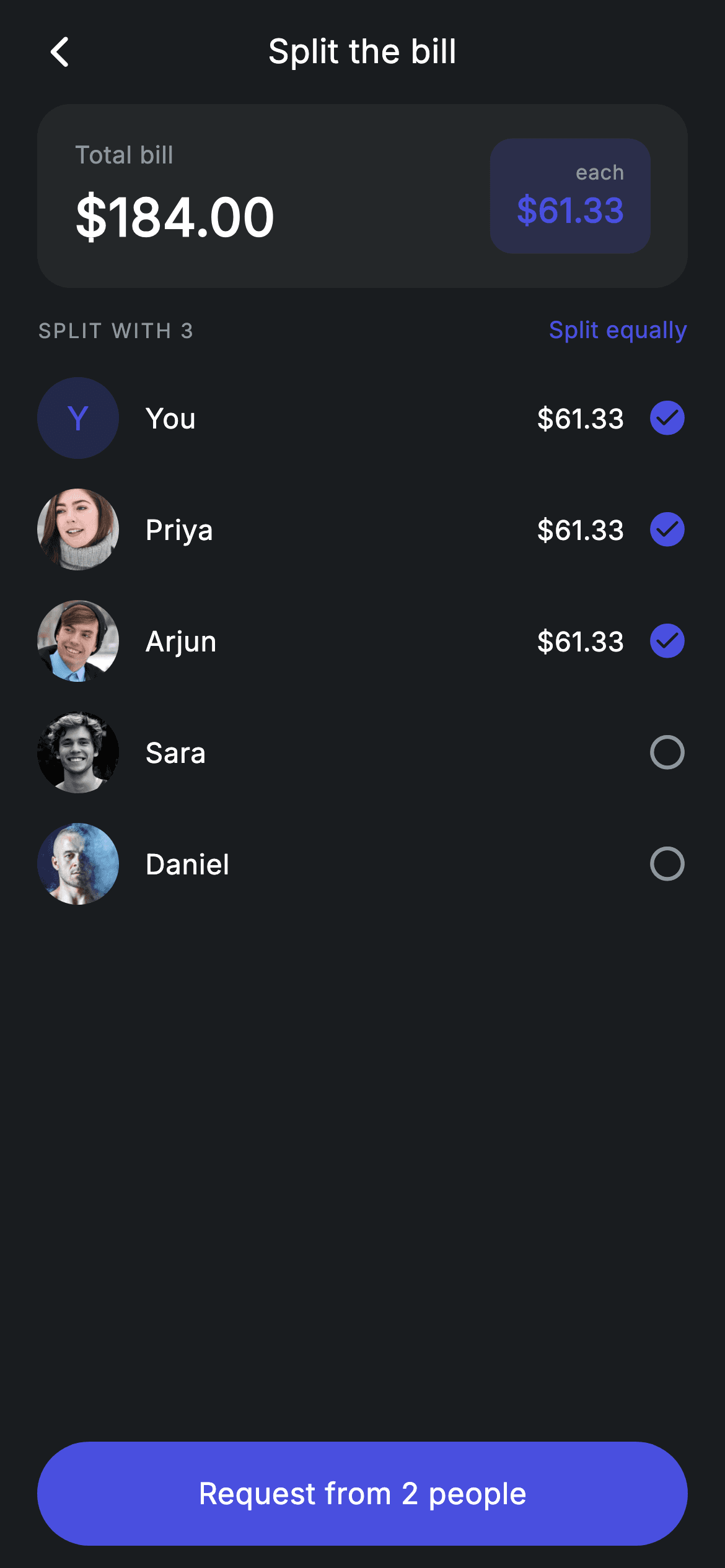
Tap a friend in or out and every number on the screen moves: the 'each' amount, the per-row shares, the 'SPLIT WITH 3' heading, and the CTA's people count. That all works because nothing is stored except a `Set<int>` of selected indices — the per-person amount is a getter dividing the total by the set's size, so there is no derived value that can go stale. You also get an avatar widget that falls back to a tinted monogram when there's no photo or the image fails to load.
Watch the Flutter UI walkthrough
A short screen recording of Fintech · Split Bill running, if you'd rather see it before you read the code. The written tutorial below covers everything in it.
Can't see the video? Watch it on YouTube.
What you'll build
- ✓Participant selection backed by a `Set<int>`, with add/remove toggling on tap
- ✓A per-person amount computed by a getter and guarded against division by zero
- ✓Rows that show their share only while selected, with a check/ring icon pair for state
- ✓An avatar with a two-tier fallback: no URL and failed-load both land on a tinted initial
- ✓A CTA that requires at least two participants and excludes 'You' from its people count
Step-by-step build
Create the file
Add a new file at lib/fintech_split_bill/fintech_split_bill_screen.dart in your Flutter project.
Register the bundled fonts
No external packages — this is pure Flutter. It does bundle its design font (Inter), so drop the font file into fonts/ and declare it in pubspec.yaml:
flutter:
  fonts:
    - family: Inter
      fonts:
- asset: fonts/Inter-Regular.ttfBuild it, piece by piece
Here's how the screen goes together. Each block below is a real slice of the code with a plain-English explanation — paste them in order, or grab the whole file from the next section.
One Set, one getter
class FintechSplitBillScreen extends StatefulWidget {
  const FintechSplitBillScreen({super.key, this.onBack, this.onContinue});

  final VoidCallback? onBack;
  final VoidCallback? onContinue;

  @override
  State<FintechSplitBillScreen> createState() => _FintechSplitBillScreenState();
}

class _FintechSplitBillScreenState extends State<FintechSplitBillScreen> {
  static const String _font = 'Inter';
  static const Color _bg = Color(0xFF191C1F);
  static const Color _surface = Color(0xFF242729);
  static const Color _brand = Color(0xFF494FDF);
  static const Color _teal = Color(0xFF00A87E);
  static const Color _amber = Color(0xFFEC7E00);
  static const Color _muted = Color(0xFF8D969E);

  static const String _imgBase =
      'lib/screens/fintech/fintech_split_bill/images';

  static const List<_Person> _people = <_Person>[
    _Person('You', null, _brand),
    _Person('Priya', '$_imgBase/avatar_5.jpg', _brand),
    _Person('Arjun', '$_imgBase/avatar_8.jpg', _teal),
    _Person('Sara', '$_imgBase/avatar_12.jpg', _amber),
    _Person('Daniel', '$_imgBase/avatar_3.jpg', _brand),
  ];

  static const double _total = 184.00;

  // First three selected by default (You + Priya + Arjun).
  final Set<int> _selected = <int>{0, 1, 2};

  double get _perPerson =>
      _selected.isEmpty ? 0 : _total / _selected.length;
The people list is `static const`, but `_selected` is a mutable `Set<int>` seeded with `{0, 1, 2}`. A `Set` is the right structure here — it gives contains/add/remove directly and can't hold a duplicate, which a `List` would allow if a tap handler ever fired twice. Note the first `_Person` has a `null` image: 'You' has no avatar asset and relies on the monogram fallback, which is exactly the case the `_Avatar` widget exists to handle. `_perPerson` guards the empty case with `_selected.isEmpty ? 0 : _total / _selected.length` — without that, deselecting everyone would divide by zero and render `NaN` or `Infinity` across the screen.
Toggling participants
  @override
  Widget build(BuildContext context) {
    return Theme(
      data: ThemeData.dark(useMaterial3: true),
      child: Scaffold(
        backgroundColor: _bg,
        body: SafeArea(
          child: Column(
            children: <Widget>[
              _buildAppBar(),
              _buildTotalCard(),
              Expanded(
                child: ListView(
                  physics: const BouncingScrollPhysics(),
                  padding: const EdgeInsets.fromLTRB(20, 14, 20, 24),
                  children: <Widget>[
                    Row(
                      mainAxisAlignment: MainAxisAlignment.spaceBetween,
                      children: <Widget>[
                        Text(
                          'SPLIT WITH ${_selected.length}',
                          style: const TextStyle(
                            fontFamily: _font,
                            fontSize: 11,
                            fontWeight: FontWeight.w500,
                            letterSpacing: 1.0,
                            color: _muted,
                          ),
                        ),
                        const Text(
                          'Split equally',
                          style: TextStyle(
                            fontFamily: _font,
                            fontSize: 12.5,
                            fontWeight: FontWeight.w500,
                            letterSpacing: 0.24,
                            color: _brand,
                          ),
                        ),
                      ],
                    ),
                    const SizedBox(height: 8),
                    for (int i = 0; i < _people.length; i++)
                      _PersonRow(
                        person: _people[i],
                        amount: _selected.contains(i) ? _perPerson : 0,
                        selected: _selected.contains(i),
                        onTap: () => setState(() {
                          if (_selected.contains(i)) {
                            _selected.remove(i);
                          } else {
                            _selected.add(i);
                          }
                        }),
                      ),
                  ],
                ),
              ),
              _buildButton(),
            ],
          ),
        ),
      ),
    );
  }
The section heading interpolates the live count — `'SPLIT WITH ${_selected.length}'` — so the label is derived rather than hard-coded. Each row is built by index so its `onTap` can toggle membership: `if (_selected.contains(i)) remove else add`, all inside one `setState`. The amount passed to a row is `_selected.contains(i) ? _perPerson : 0`, meaning an unselected person is handed zero rather than being given a special 'excluded' flag — the row then decides not to display it. Everything on the page flows from that single set.
The total card and the live 'each' chip
  Widget _buildTotalCard() {
    return Container(
      margin: const EdgeInsets.symmetric(horizontal: 20),
      padding: const EdgeInsets.symmetric(horizontal: 20, vertical: 18),
      decoration: BoxDecoration(
        color: _surface,
        borderRadius: BorderRadius.circular(18),
      ),
      child: Row(
        children: <Widget>[
          Column(
            crossAxisAlignment: CrossAxisAlignment.start,
            children: <Widget>[
              const Text(
                'Total bill',
                style: TextStyle(
                  fontFamily: _font,
                  fontSize: 13,
                  letterSpacing: 0.24,
                  color: _muted,
                ),
              ),
              const SizedBox(height: 4),
              Text(
                '\$${_total.toStringAsFixed(2)}',
                style: const TextStyle(
                  fontFamily: _font,
                  fontSize: 28,
                  fontWeight: FontWeight.w600,
                  letterSpacing: 0.24,
                  color: Colors.white,
                ),
              ),
            ],
          ),
          const Spacer(),
          Container(
            padding: const EdgeInsets.symmetric(horizontal: 14, vertical: 10),
            decoration: BoxDecoration(
              color: _brand.withValues(alpha: 0.18),
              borderRadius: BorderRadius.circular(12),
            ),
            child: Column(
              crossAxisAlignment: CrossAxisAlignment.end,
              children: <Widget>[
                const Text(
                  'each',
                  style: TextStyle(
                    fontFamily: _font,
                    fontSize: 11,
                    letterSpacing: 0.24,
                    color: _muted,
                  ),
                ),
                Text(
                  '\$${_perPerson.toStringAsFixed(2)}',
                  style: const TextStyle(
                    fontFamily: _font,
                    fontSize: 18,
                    fontWeight: FontWeight.w600,
                    letterSpacing: 0.24,
                    color: _brand,
                  ),
                ),
              ],
            ),
          ),
        ],
      ),
    );
  }
The card pairs the fixed bill total on the left with a brand-tinted chip on the right showing the per-person share. Putting the changing number in a tinted `_brand.withValues(alpha: 0.18)` box is what makes it read as the *result* of the selection below, rather than a second static fact — and it's the element users watch while tapping people in and out. Both amounts use `toStringAsFixed(2)`, so an even split of \$184 across four people renders as \$46.00 rather than \$46, keeping the decimal alignment intact.
The CTA and its people arithmetic
  Widget _buildButton() {
    final bool valid = _selected.length >= 2;
    return Padding(
      padding: const EdgeInsets.fromLTRB(20, 0, 20, 12),
      child: SizedBox(
        width: double.infinity,
        height: 56,
        child: Material(
          color: valid ? _brand : _surface,
          borderRadius: BorderRadius.circular(9999),
          child: InkWell(
            borderRadius: BorderRadius.circular(9999),
            onTap: valid ? widget.onContinue : null,
            child: Center(
              child: Text(
                'Request from ${_selected.length - (_selected.contains(0) ? 1 : 0)} people',
                style: TextStyle(
                  fontFamily: _font,
                  fontSize: 16,
                  fontWeight: FontWeight.w500,
                  letterSpacing: 0.24,
                  color: valid ? Colors.white : _muted,
                ),
              ),
            ),
          ),
        ),
      ),
    );
  }
`valid = _selected.length >= 2` — a split needs at least two participants, so the button stays inert below that, with `Material` colour, `onTap`, and label colour all deriving from the flag. The label itself does a small piece of real thinking: `'Request from ${_selected.length - (_selected.contains(0) ? 1 : 0)} people'` subtracts one when index 0 ('You') is in the set, because you don't request money from yourself. That's the kind of detail that separates a plausible mockup from a screen that would actually ship.
The participant row
class _PersonRow extends StatelessWidget {
  const _PersonRow({
    required this.person,
    required this.amount,
    required this.selected,
    required this.onTap,
  });

  final _Person person;
  final double amount;
  final bool selected;
  final VoidCallback onTap;

  @override
  Widget build(BuildContext context) {
    return InkWell(
      borderRadius: BorderRadius.circular(12),
      onTap: onTap,
      child: Padding(
        padding: const EdgeInsets.symmetric(vertical: 8),
        child: Row(
          children: <Widget>[
            ClipOval(
              child: _Avatar(
                url: person.img,
                tint: person.tint,
                initial: person.name.characters.first,
                size: 44,
              ),
            ),
            const SizedBox(width: 14),
            Expanded(
              child: Text(
                person.name,
                style: const TextStyle(
                  fontFamily: _FintechSplitBillScreenState._font,
                  fontSize: 15,
                  fontWeight: FontWeight.w500,
                  letterSpacing: 0.24,
                  color: Colors.white,
                ),
              ),
            ),
            if (selected)
              Text(
                '\$${amount.toStringAsFixed(2)}',
                style: const TextStyle(
                  fontFamily: _FintechSplitBillScreenState._font,
                  fontSize: 14.5,
                  fontWeight: FontWeight.w500,
                  letterSpacing: 0.24,
                  color: Colors.white,
                ),
              ),
            const SizedBox(width: 12),
            Icon(
              selected
                  ? Icons.check_circle_rounded
                  : Icons.radio_button_unchecked_rounded,
              size: 22,
              color: selected
                  ? _FintechSplitBillScreenState._brand
                  : _FintechSplitBillScreenState._muted,
            ),
          ],
        ),
      ),
    );
  }
}
The row expresses selection twice. The amount is spread in with `if (selected)`, so an excluded person simply has no number rather than showing \$0.00 — cleaner, and it avoids implying they owe nothing when they're actually not part of the split. The trailing icon swaps between `check_circle_rounded` in brand and `radio_button_unchecked_rounded` in muted grey, giving shape and colour as two independent signals. The `InkWell` carries a `borderRadius` so its ripple is rounded, the name sits in `Expanded` to absorb slack, and `ClipOval` around `_Avatar` is what makes the photo circular — clipping outside the widget means `_Avatar` itself never has to know its own shape.
An avatar with two fallbacks
class _Avatar extends StatelessWidget {
  const _Avatar({
    required this.url,
    required this.tint,
    required this.initial,
    required this.size,
  });

  final String? url;
  final Color tint;
  final String initial;
  final double size;

  Widget _fallback() {
    return Container(
      width: size,
      height: size,
      color: tint.withValues(alpha: 0.22),
      alignment: Alignment.center,
      child: Text(
        initial.toUpperCase(),
        style: TextStyle(
          fontFamily: _FintechSplitBillScreenState._font,
          fontSize: size * 0.40,
          fontWeight: FontWeight.w500,
          color: tint,
        ),
      ),
    );
  }

  @override
  Widget build(BuildContext context) {
    if (url == null) {
      return _fallback();
    }
    return Image.asset(
      url!,
      width: size,
      height: size,
      fit: BoxFit.cover,
      gaplessPlayback: true,
      errorBuilder: (BuildContext context, Object error, StackTrace? stack) =>
          _fallback(),
    );
  }
}
`_Avatar` handles both ways an image can be absent. A `null` `url` returns `_fallback()` immediately — that's the 'You' case. A non-null URL renders `Image.asset` with an `errorBuilder` that *also* returns `_fallback()`, so a missing or corrupt asset degrades to a monogram instead of throwing a red error box. `gaplessPlayback: true` keeps the previous frame on screen while a new image decodes, avoiding a flash if the URL changes. The fallback itself scales with the widget: `fontSize: size * 0.40` means the same class works at 44px in this list or at 96px in a profile header, and `initial.toUpperCase()` normalises a lowercase name. `initial` is supplied by the caller as `person.name.characters.first`, which returns a full grapheme cluster rather than a possibly-broken UTF-16 code unit.
Full code
The complete, ready-to-paste source. Free to use in your projects — one click copies it all.
import 'package:flutter/material.dart';

/// Split bill — choose participants and divide a total (Revolut-inspired design).
///
/// Self-contained per CONVENTIONS.md: pure Flutter only, the exact design font
/// (Inter) is bundled under `fonts/`, contact photos are bundled assets, and the
/// screen forces its own dark theme. Tapping people toggles them in/out of the
/// split and the per-person amount recomputes live.
class FintechSplitBillScreen extends StatefulWidget {
  const FintechSplitBillScreen({super.key, this.onBack, this.onContinue});

  final VoidCallback? onBack;
  final VoidCallback? onContinue;

  @override
  State<FintechSplitBillScreen> createState() => _FintechSplitBillScreenState();
}

class _FintechSplitBillScreenState extends State<FintechSplitBillScreen> {
  static const String _font = 'Inter';
  static const Color _bg = Color(0xFF191C1F);
  static const Color _surface = Color(0xFF242729);
  static const Color _brand = Color(0xFF494FDF);
  static const Color _teal = Color(0xFF00A87E);
  static const Color _amber = Color(0xFFEC7E00);
  static const Color _muted = Color(0xFF8D969E);

  static const String _imgBase =
      'lib/screens/fintech/fintech_split_bill/images';

  static const List<_Person> _people = <_Person>[
    _Person('You', null, _brand),
    _Person('Priya', '$_imgBase/avatar_5.jpg', _brand),
    _Person('Arjun', '$_imgBase/avatar_8.jpg', _teal),
    _Person('Sara', '$_imgBase/avatar_12.jpg', _amber),
    _Person('Daniel', '$_imgBase/avatar_3.jpg', _brand),
  ];

  static const double _total = 184.00;

  // First three selected by default (You + Priya + Arjun).
  final Set<int> _selected = <int>{0, 1, 2};

  double get _perPerson =>
      _selected.isEmpty ? 0 : _total / _selected.length;

  @override
  Widget build(BuildContext context) {
    return Theme(
      data: ThemeData.dark(useMaterial3: true),
      child: Scaffold(
        backgroundColor: _bg,
        body: SafeArea(
          child: Column(
            children: <Widget>[
              _buildAppBar(),
              _buildTotalCard(),
              Expanded(
                child: ListView(
                  physics: const BouncingScrollPhysics(),
                  padding: const EdgeInsets.fromLTRB(20, 14, 20, 24),
                  children: <Widget>[
                    Row(
                      mainAxisAlignment: MainAxisAlignment.spaceBetween,
                      children: <Widget>[
                        Text(
                          'SPLIT WITH ${_selected.length}',
                          style: const TextStyle(
                            fontFamily: _font,
                            fontSize: 11,
                            fontWeight: FontWeight.w500,
                            letterSpacing: 1.0,
                            color: _muted,
                          ),
                        ),
                        const Text(
                          'Split equally',
                          style: TextStyle(
                            fontFamily: _font,
                            fontSize: 12.5,
                            fontWeight: FontWeight.w500,
                            letterSpacing: 0.24,
                            color: _brand,
                          ),
                        ),
                      ],
                    ),
                    const SizedBox(height: 8),
                    for (int i = 0; i < _people.length; i++)
                      _PersonRow(
                        person: _people[i],
                        amount: _selected.contains(i) ? _perPerson : 0,
                        selected: _selected.contains(i),
                        onTap: () => setState(() {
                          if (_selected.contains(i)) {
                            _selected.remove(i);
                          } else {
                            _selected.add(i);
                          }
                        }),
                      ),
                  ],
                ),
              ),
              _buildButton(),
            ],
          ),
        ),
      ),
    );
  }

  Widget _buildAppBar() {
    return Padding(
      padding: const EdgeInsets.fromLTRB(8, 4, 8, 4),
      child: Row(
        children: <Widget>[
          IconButton(
            onPressed: widget.onBack,
            icon: const Icon(Icons.arrow_back_ios_new_rounded,
                size: 20, color: Colors.white),
          ),
          const Expanded(
            child: Text(
              'Split the bill',
              textAlign: TextAlign.center,
              style: TextStyle(
                fontFamily: _font,
                fontSize: 18,
                fontWeight: FontWeight.w500,
                letterSpacing: 0.24,
                color: Colors.white,
              ),
            ),
          ),
          const SizedBox(width: 48),
        ],
      ),
    );
  }

  Widget _buildTotalCard() {
    return Container(
      margin: const EdgeInsets.symmetric(horizontal: 20),
      padding: const EdgeInsets.symmetric(horizontal: 20, vertical: 18),
      decoration: BoxDecoration(
        color: _surface,
        borderRadius: BorderRadius.circular(18),
      ),
      child: Row(
        children: <Widget>[
          Column(
            crossAxisAlignment: CrossAxisAlignment.start,
            children: <Widget>[
              const Text(
                'Total bill',
                style: TextStyle(
                  fontFamily: _font,
                  fontSize: 13,
                  letterSpacing: 0.24,
                  color: _muted,
                ),
              ),
              const SizedBox(height: 4),
              Text(
                '\$${_total.toStringAsFixed(2)}',
                style: const TextStyle(
                  fontFamily: _font,
                  fontSize: 28,
                  fontWeight: FontWeight.w600,
                  letterSpacing: 0.24,
                  color: Colors.white,
                ),
              ),
            ],
          ),
          const Spacer(),
          Container(
            padding: const EdgeInsets.symmetric(horizontal: 14, vertical: 10),
            decoration: BoxDecoration(
              color: _brand.withValues(alpha: 0.18),
              borderRadius: BorderRadius.circular(12),
            ),
            child: Column(
              crossAxisAlignment: CrossAxisAlignment.end,
              children: <Widget>[
                const Text(
                  'each',
                  style: TextStyle(
                    fontFamily: _font,
                    fontSize: 11,
                    letterSpacing: 0.24,
                    color: _muted,
                  ),
                ),
                Text(
                  '\$${_perPerson.toStringAsFixed(2)}',
                  style: const TextStyle(
                    fontFamily: _font,
                    fontSize: 18,
                    fontWeight: FontWeight.w600,
                    letterSpacing: 0.24,
                    color: _brand,
                  ),
                ),
              ],
            ),
          ),
        ],
      ),
    );
  }

  Widget _buildButton() {
    final bool valid = _selected.length >= 2;
    return Padding(
      padding: const EdgeInsets.fromLTRB(20, 0, 20, 12),
      child: SizedBox(
        width: double.infinity,
        height: 56,
        child: Material(
          color: valid ? _brand : _surface,
          borderRadius: BorderRadius.circular(9999),
          child: InkWell(
            borderRadius: BorderRadius.circular(9999),
            onTap: valid ? widget.onContinue : null,
            child: Center(
              child: Text(
                'Request from ${_selected.length - (_selected.contains(0) ? 1 : 0)} people',
                style: TextStyle(
                  fontFamily: _font,
                  fontSize: 16,
                  fontWeight: FontWeight.w500,
                  letterSpacing: 0.24,
                  color: valid ? Colors.white : _muted,
                ),
              ),
            ),
          ),
        ),
      ),
    );
  }
}

class _Person {
  const _Person(this.name, this.img, this.tint);

  final String name;
  final String? img;
  final Color tint;
}

class _PersonRow extends StatelessWidget {
  const _PersonRow({
    required this.person,
    required this.amount,
    required this.selected,
    required this.onTap,
  });

  final _Person person;
  final double amount;
  final bool selected;
  final VoidCallback onTap;

  @override
  Widget build(BuildContext context) {
    return InkWell(
      borderRadius: BorderRadius.circular(12),
      onTap: onTap,
      child: Padding(
        padding: const EdgeInsets.symmetric(vertical: 8),
        child: Row(
          children: <Widget>[
            ClipOval(
              child: _Avatar(
                url: person.img,
                tint: person.tint,
                initial: person.name.characters.first,
                size: 44,
              ),
            ),
            const SizedBox(width: 14),
            Expanded(
              child: Text(
                person.name,
                style: const TextStyle(
                  fontFamily: _FintechSplitBillScreenState._font,
                  fontSize: 15,
                  fontWeight: FontWeight.w500,
                  letterSpacing: 0.24,
                  color: Colors.white,
                ),
              ),
            ),
            if (selected)
              Text(
                '\$${amount.toStringAsFixed(2)}',
                style: const TextStyle(
                  fontFamily: _FintechSplitBillScreenState._font,
                  fontSize: 14.5,
                  fontWeight: FontWeight.w500,
                  letterSpacing: 0.24,
                  color: Colors.white,
                ),
              ),
            const SizedBox(width: 12),
            Icon(
              selected
                  ? Icons.check_circle_rounded
                  : Icons.radio_button_unchecked_rounded,
              size: 22,
              color: selected
                  ? _FintechSplitBillScreenState._brand
                  : _FintechSplitBillScreenState._muted,
            ),
          ],
        ),
      ),
    );
  }
}

class _Avatar extends StatelessWidget {
  const _Avatar({
    required this.url,
    required this.tint,
    required this.initial,
    required this.size,
  });

  final String? url;
  final Color tint;
  final String initial;
  final double size;

  Widget _fallback() {
    return Container(
      width: size,
      height: size,
      color: tint.withValues(alpha: 0.22),
      alignment: Alignment.center,
      child: Text(
        initial.toUpperCase(),
        style: TextStyle(
          fontFamily: _FintechSplitBillScreenState._font,
          fontSize: size * 0.40,
          fontWeight: FontWeight.w500,
          color: tint,
        ),
      ),
    );
  }

  @override
  Widget build(BuildContext context) {
    if (url == null) {
      return _fallback();
    }
    return Image.asset(
      url!,
      width: size,
      height: size,
      fit: BoxFit.cover,
      gaplessPlayback: true,
      errorBuilder: (BuildContext context, Object error, StackTrace? stack) =>
          _fallback(),
    );
  }
}
Plus bundled 5 binary assets (fonts/images). The CLI and MCP install those for you automatically.
Two faster ways to add it
Copy-paste works, but you can skip it entirely.
1. FlutterKit CLI
One command drops this screen — and its fonts — straight into your project.
$ flutterkit add fintech-split-bill2. AI agent (MCP)
Connect FlutterKit's MCP server in Claude or Cursor and just ask your agent to install fintech-split-bill — it fetches and writes the files for you.
FAQ
Is this split bill screen free to use?
Yes. The full Dart source on this page is free for personal and commercial apps. Copy it from the code block, install it with the FlutterKit CLI (flutterkit add fintech-split-bill), or add it via an AI agent over MCP.
Does it need any packages?
No — it's pure Flutter on material.dart. It does ship bundled avatar JPGs plus the Inter font family, both registered in pubspec.yaml as shown in the dependencies step; the CLI and MCP install them for you.
How do I support uneven splits?
Replace the Set<int> with a Map<int, double> of index to share and drop the _perPerson getter in favour of reading that map. Seed it with the equal split, then let each row edit its own value — the 'Split equally' link at the top of the list is the natural place to reset it back.
How do I load contacts and their photos from the network?
Build the _people list from your contacts source and swap Image.asset for Image.network inside _Avatar. Keep the errorBuilder exactly as it is — it already covers a failed fetch by falling back to the tinted monogram.
Which Flutter version does it target?
It uses Color.withValues(alpha:) and Material 3, so it targets Flutter 3.27+. On an older SDK, replace the two withValues(alpha: x) calls — the 'each' chip and the avatar fallback — with withOpacity(x), and it compiles back to Flutter 3.10.

