How to Build a Split Bill Summary Screen in Flutter (Full Code + Preview)
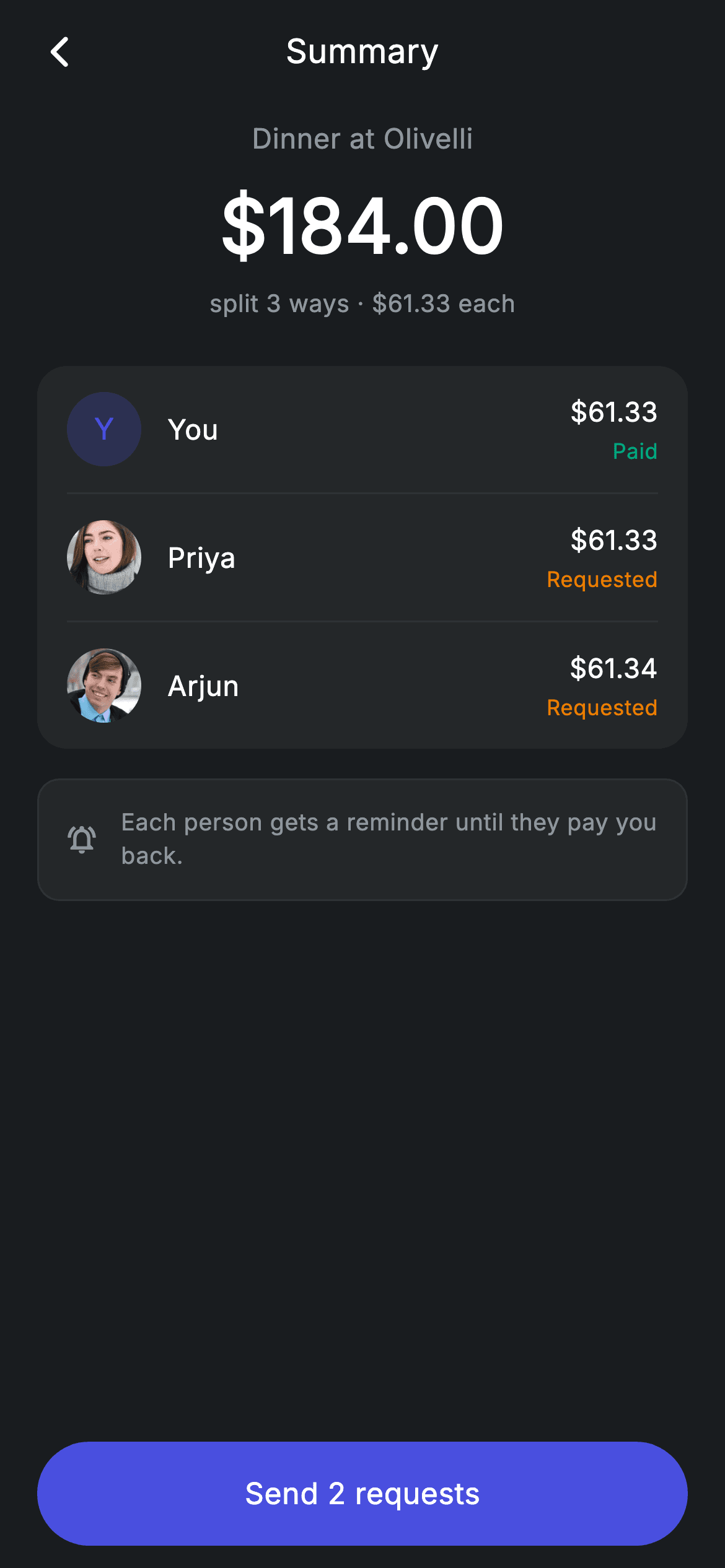
Splitting a bill three ways rarely divides evenly, and the summary screen has to be honest about it. This tutorial builds a Revolut-style split review in Flutter — a $184 total over a 'split 3 ways' line, then a card listing each participant with their exact share, a Paid or Requested status, and an avatar that falls back to a tinted initial when there's no photo. One person carries the extra cent, and the code shows it rather than rounding it away.
Watch the Flutter UI walkthrough
A short screen recording of Fintech · Split Summary running, if you'd rather see it before you read the code. The written tutorial below covers everything in it.
Can't see the video? Watch it on YouTube.
What you'll build
- ✓An avatar widget that falls back to a coloured monogram when the image is null or fails to load
- ✓Per-person rows pairing an exact share with a colour-coded Paid or Requested status
- ✓A participant card whose dividers are emitted by index so no row ends with a stray rule
- ✓A CTA that counts the outstanding requests rather than saying a generic 'Confirm'
Step-by-step build
Create the file
Add a new file at lib/fintech_split_summary/fintech_split_summary_screen.dart in your Flutter project.
Register the bundled fonts
No external packages — this is pure Flutter. It does bundle its design font (Inter), so drop the font file into fonts/ and declare it in pubspec.yaml:
flutter:
  fonts:
    - family: Inter
      fonts:
- asset: fonts/Inter-Regular.ttfBuild it, piece by piece
Here's how the screen goes together. Each block below is a real slice of the code with a plain-English explanation — paste them in order, or grab the whole file from the next section.
Three shares that don't divide evenly
import 'package:flutter/material.dart';

/// Split summary — review the breakdown before sending requests (Revolut-style).
///
/// Self-contained per CONVENTIONS.md: pure Flutter only, the exact design font
/// (Inter) is bundled under `fonts/`, contact photos are bundled assets, and the
/// screen forces its own dark theme. Each participant shows their share and a
/// status pill so the split reads like a real product.
class FintechSplitSummaryScreen extends StatelessWidget {
  const FintechSplitSummaryScreen({
    super.key,
    this.onBack,
    this.onConfirm,
  });

  final VoidCallback? onBack;
  final VoidCallback? onConfirm;

  static const String _font = 'Inter';
  static const Color _bg = Color(0xFF191C1F);
  static const Color _surface = Color(0xFF242729);
  static const Color _brand = Color(0xFF494FDF);
  static const Color _teal = Color(0xFF00A87E);
  static const Color _amber = Color(0xFFEC7E00);
  static const Color _muted = Color(0xFF8D969E);
  static const Color _hairline = Color(0xFF2E3235);

  static const String _imgBase =
      'lib/screens/fintech/fintech_split_summary/images';

  static const List<_Share> _shares = <_Share>[
    _Share('You', null, _brand, 61.33, _Status.paid),
    _Share('Priya', '$_imgBase/avatar_5.jpg', _brand, 61.33, _Status.pending),
    _Share('Arjun', '$_imgBase/avatar_8.jpg', _teal, 61.34, _Status.pending),
  ];
The screen is stateless with `onBack` and `onConfirm`. `_shares` holds three `_Share` records, and the amounts are the detail worth noticing: 61.33, 61.33 and 61.34. A $184 bill over three people doesn't divide cleanly, so one person absorbs the extra cent — showing the real per-person figure rather than a rounded $61.33 across the board is what keeps the listed shares adding up to the total. Note the first entry, 'You', passes `null` for its image, which is what exercises the avatar's fallback path, and each record carries its own `tint` plus a `_Status` enum value.
The page and the divider-interleaved card
  @override
  Widget build(BuildContext context) {
    return Theme(
      data: ThemeData.dark(useMaterial3: true),
      child: Scaffold(
        backgroundColor: _bg,
        body: SafeArea(
          child: Column(
            children: <Widget>[
              _buildAppBar(),
              Expanded(
                child: ListView(
                  physics: const BouncingScrollPhysics(),
                  padding: const EdgeInsets.fromLTRB(20, 8, 20, 24),
                  children: <Widget>[
                    _buildHeader(),
                    const SizedBox(height: 24),
                    Container(
                      padding: const EdgeInsets.symmetric(horizontal: 16),
                      decoration: BoxDecoration(
                        color: _surface,
                        borderRadius: BorderRadius.circular(16),
                      ),
                      child: Column(
                        children: <Widget>[
                          for (int i = 0; i < _shares.length; i++) ...<Widget>[
                            if (i != 0)
                              const Divider(height: 1, color: _hairline),
                            _ShareRow(share: _shares[i]),
                          ],
                        ],
                      ),
                    ),
                    const SizedBox(height: 16),
                    _buildNote(),
                  ],
                ),
              ),
              _buildButton(),
            ],
          ),
        ),
      ),
    );
  }
The body is an app bar, an `Expanded` ListView and a pinned confirm button. The participants card is built inline, with only horizontal padding so each row supplies its own vertical inset and a `Divider(height: 1)` occupies exactly one pixel. The loop is the pattern to note: `for (int i = 0; i < _shares.length; i++) ...<Widget>[if (i != 0) const Divider(...), _ShareRow(...)]`. Nesting a collection-if inside a collection-for's spread adds a rule *before* every row except the first, which yields N rows and N−1 dividers with nothing butting against the card's rounded bottom edge.
The total and the split maths
  Widget _buildAppBar() {
    return Padding(
      padding: const EdgeInsets.fromLTRB(8, 4, 8, 4),
      child: Row(
        children: <Widget>[
          IconButton(
            onPressed: onBack,
            icon: const Icon(Icons.arrow_back_ios_new_rounded,
                size: 20, color: Colors.white),
          ),
          const Expanded(
            child: Text(
              'Summary',
              textAlign: TextAlign.center,
              style: TextStyle(
                fontFamily: _font,
                fontSize: 18,
                fontWeight: FontWeight.w500,
                letterSpacing: 0.24,
                color: Colors.white,
              ),
            ),
          ),
          const SizedBox(width: 48),
        ],
      ),
    );
  }

  Widget _buildHeader() {
    return Column(
      children: const <Widget>[
        Text(
          'Dinner at Olivelli',
          style: TextStyle(
            fontFamily: _font,
            fontSize: 15,
            letterSpacing: 0.24,
            color: _muted,
          ),
        ),
        SizedBox(height: 8),
        Text(
          r'$184.00',
          style: TextStyle(
            fontFamily: _font,
            fontSize: 40,
            fontWeight: FontWeight.w600,
            letterSpacing: 0.24,
            color: Colors.white,
          ),
        ),
        SizedBox(height: 4),
        Text(
          'split 3 ways · \$61.33 each',
          style: TextStyle(
            fontFamily: _font,
            fontSize: 13,
            letterSpacing: 0.24,
            color: _muted,
          ),
        ),
      ],
    );
  }
The app bar centres 'Summary' with the standard balancing trick — an `Expanded` centre-aligned Text offset by a `const SizedBox(width: 48)` matching the leading IconButton's tap target. The header below is a centred const Column: the occasion in muted 15px, the total at 40px w600, then 'split 3 ways · $61.33 each'. Putting the context above the number and the method below it means the whole arrangement can be read in one pass. Both money strings use the raw prefix or an escaped `\$` so Dart doesn't treat the dollar sign as the start of an interpolation, which would be a compile error.
The reminder note and the counting CTA
  Widget _buildNote() {
    return Container(
      padding: const EdgeInsets.all(14),
      decoration: BoxDecoration(
        color: _surface,
        borderRadius: BorderRadius.circular(12),
        border: Border.all(color: _hairline),
      ),
      child: Row(
        children: const <Widget>[
          Icon(Icons.notifications_active_outlined, size: 18, color: _muted),
          SizedBox(width: 12),
          Expanded(
            child: Text(
              'Each person gets a reminder until they pay you back.',
              style: TextStyle(
                fontFamily: _font,
                fontSize: 12.5,
                height: 1.4,
                letterSpacing: 0.24,
                color: _muted,
              ),
            ),
          ),
        ],
      ),
    );
  }

  Widget _buildButton() {
    return Padding(
      padding: const EdgeInsets.fromLTRB(20, 0, 20, 12),
      child: SizedBox(
        width: double.infinity,
        height: 56,
        child: Material(
          color: _brand,
          borderRadius: BorderRadius.circular(9999),
          child: InkWell(
            borderRadius: BorderRadius.circular(9999),
            onTap: onConfirm,
            child: const Center(
              child: Text(
                'Send 2 requests',
                style: TextStyle(
                  fontFamily: _font,
                  fontSize: 16,
                  fontWeight: FontWeight.w500,
                  letterSpacing: 0.24,
                  color: Colors.white,
                ),
              ),
            ),
          ),
        ),
      ),
    );
  }
The note is a bordered `_surface` box pairing a bell icon with 'Each person gets a reminder until they pay you back' — it answers the question this screen always raises, which is whether the requester has to chase people manually. The button is Material plus InkWell with a 9999 radius on both so the ripple follows the pill, and its label is 'Send 2 requests', not 'Confirm'. Two, not three, because you don't request money from yourself: the count reflects the pending participants only. Stating the number on the button is what makes the action unambiguous before it's irreversible.
The share row and its status
enum _Status { paid, pending }

class _Share {
  const _Share(this.name, this.img, this.tint, this.amount, this.status);

  final String name;
  final String? img;
  final Color tint;
  final double amount;
  final _Status status;
}

class _ShareRow extends StatelessWidget {
  const _ShareRow({required this.share});

  final _Share share;

  @override
  Widget build(BuildContext context) {
    final bool paid = share.status == _Status.paid;
    return Padding(
      padding: const EdgeInsets.symmetric(vertical: 14),
      child: Row(
        children: <Widget>[
          ClipOval(
            child: _Avatar(
              url: share.img,
              tint: share.tint,
              initial: share.name.characters.first,
              size: 40,
            ),
          ),
          const SizedBox(width: 14),
          Expanded(
            child: Text(
              share.name,
              style: const TextStyle(
                fontFamily: FintechSplitSummaryScreen._font,
                fontSize: 15,
                fontWeight: FontWeight.w500,
                letterSpacing: 0.24,
                color: Colors.white,
              ),
            ),
          ),
          Column(
            crossAxisAlignment: CrossAxisAlignment.end,
            children: <Widget>[
              Text(
                '\$${share.amount.toStringAsFixed(2)}',
                style: const TextStyle(
                  fontFamily: FintechSplitSummaryScreen._font,
                  fontSize: 14.5,
                  fontWeight: FontWeight.w500,
                  letterSpacing: 0.24,
                  color: Colors.white,
                ),
              ),
              const SizedBox(height: 3),
              Text(
                paid ? 'Paid' : 'Requested',
                style: TextStyle(
                  fontFamily: FintechSplitSummaryScreen._font,
                  fontSize: 11.5,
                  fontWeight: FontWeight.w500,
                  letterSpacing: 0.24,
                  color: paid
                      ? FintechSplitSummaryScreen._teal
                      : FintechSplitSummaryScreen._amber,
                ),
              ),
            ],
          ),
        ],
      ),
    );
  }
}
`_Status` is a two-value enum and `_Share` is the five-field record. `_ShareRow` derives `paid` once at the top, then lays out a `ClipOval`-wrapped 40px avatar, an `Expanded` name, and a right-aligned Column of amount over status. Setting `crossAxisAlignment: CrossAxisAlignment.end` on that trailing Column is what keeps the amounts and their status labels flush to the right edge regardless of their differing widths. The amount is formatted with `toStringAsFixed(2)`, so every figure shows two decimals and the column stays even. The status text switches both its wording and its colour — teal 'Paid' or amber 'Requested' — so the outstanding entries are scannable without reading.
An avatar with two fallback paths
class _Avatar extends StatelessWidget {
  const _Avatar({
    required this.url,
    required this.tint,
    required this.initial,
    required this.size,
  });

  final String? url;
  final Color tint;
  final String initial;
  final double size;

  Widget _fallback() {
    return Container(
      width: size,
      height: size,
      color: tint.withValues(alpha: 0.22),
      alignment: Alignment.center,
      child: Text(
        initial.toUpperCase(),
        style: TextStyle(
          fontFamily: FintechSplitSummaryScreen._font,
          fontSize: size * 0.40,
          fontWeight: FontWeight.w500,
          color: tint,
        ),
      ),
    );
  }

  @override
  Widget build(BuildContext context) {
    if (url == null) {
      return _fallback();
    }
    return Image.asset(
      url!,
      width: size,
      height: size,
      fit: BoxFit.cover,
      gaplessPlayback: true,
      errorBuilder: (BuildContext context, Object error, StackTrace? stack) =>
          _fallback(),
    );
  }
}
`_Avatar` is the reusable piece and it handles failure twice over. Its `_fallback()` builds a monogram — the first character upper-cased, sized at `size * 0.40` so it scales with the circle, over a fill of `tint.withValues(alpha: 0.22)`. build() returns that fallback immediately when `url` is null, which is the 'You' case. When there is an image it renders `Image.asset` with an `errorBuilder` pointing at the same `_fallback()`, so a missing or corrupt asset degrades to a monogram instead of showing Flutter's grey broken-image box. `gaplessPlayback: true` keeps the previous frame on screen if the image ever swaps, avoiding a flicker. Note the circle comes from the `ClipOval` in the parent rather than from this widget, which is why `_fallback` uses a square Container.
Full code
The complete, ready-to-paste source. Free to use in your projects — one click copies it all.
import 'package:flutter/material.dart';

/// Split summary — review the breakdown before sending requests (Revolut-style).
///
/// Self-contained per CONVENTIONS.md: pure Flutter only, the exact design font
/// (Inter) is bundled under `fonts/`, contact photos are bundled assets, and the
/// screen forces its own dark theme. Each participant shows their share and a
/// status pill so the split reads like a real product.
class FintechSplitSummaryScreen extends StatelessWidget {
  const FintechSplitSummaryScreen({
    super.key,
    this.onBack,
    this.onConfirm,
  });

  final VoidCallback? onBack;
  final VoidCallback? onConfirm;

  static const String _font = 'Inter';
  static const Color _bg = Color(0xFF191C1F);
  static const Color _surface = Color(0xFF242729);
  static const Color _brand = Color(0xFF494FDF);
  static const Color _teal = Color(0xFF00A87E);
  static const Color _amber = Color(0xFFEC7E00);
  static const Color _muted = Color(0xFF8D969E);
  static const Color _hairline = Color(0xFF2E3235);

  static const String _imgBase =
      'lib/screens/fintech/fintech_split_summary/images';

  static const List<_Share> _shares = <_Share>[
    _Share('You', null, _brand, 61.33, _Status.paid),
    _Share('Priya', '$_imgBase/avatar_5.jpg', _brand, 61.33, _Status.pending),
    _Share('Arjun', '$_imgBase/avatar_8.jpg', _teal, 61.34, _Status.pending),
  ];

  @override
  Widget build(BuildContext context) {
    return Theme(
      data: ThemeData.dark(useMaterial3: true),
      child: Scaffold(
        backgroundColor: _bg,
        body: SafeArea(
          child: Column(
            children: <Widget>[
              _buildAppBar(),
              Expanded(
                child: ListView(
                  physics: const BouncingScrollPhysics(),
                  padding: const EdgeInsets.fromLTRB(20, 8, 20, 24),
                  children: <Widget>[
                    _buildHeader(),
                    const SizedBox(height: 24),
                    Container(
                      padding: const EdgeInsets.symmetric(horizontal: 16),
                      decoration: BoxDecoration(
                        color: _surface,
                        borderRadius: BorderRadius.circular(16),
                      ),
                      child: Column(
                        children: <Widget>[
                          for (int i = 0; i < _shares.length; i++) ...<Widget>[
                            if (i != 0)
                              const Divider(height: 1, color: _hairline),
                            _ShareRow(share: _shares[i]),
                          ],
                        ],
                      ),
                    ),
                    const SizedBox(height: 16),
                    _buildNote(),
                  ],
                ),
              ),
              _buildButton(),
            ],
          ),
        ),
      ),
    );
  }

  Widget _buildAppBar() {
    return Padding(
      padding: const EdgeInsets.fromLTRB(8, 4, 8, 4),
      child: Row(
        children: <Widget>[
          IconButton(
            onPressed: onBack,
            icon: const Icon(Icons.arrow_back_ios_new_rounded,
                size: 20, color: Colors.white),
          ),
          const Expanded(
            child: Text(
              'Summary',
              textAlign: TextAlign.center,
              style: TextStyle(
                fontFamily: _font,
                fontSize: 18,
                fontWeight: FontWeight.w500,
                letterSpacing: 0.24,
                color: Colors.white,
              ),
            ),
          ),
          const SizedBox(width: 48),
        ],
      ),
    );
  }

  Widget _buildHeader() {
    return Column(
      children: const <Widget>[
        Text(
          'Dinner at Olivelli',
          style: TextStyle(
            fontFamily: _font,
            fontSize: 15,
            letterSpacing: 0.24,
            color: _muted,
          ),
        ),
        SizedBox(height: 8),
        Text(
          r'$184.00',
          style: TextStyle(
            fontFamily: _font,
            fontSize: 40,
            fontWeight: FontWeight.w600,
            letterSpacing: 0.24,
            color: Colors.white,
          ),
        ),
        SizedBox(height: 4),
        Text(
          'split 3 ways · \$61.33 each',
          style: TextStyle(
            fontFamily: _font,
            fontSize: 13,
            letterSpacing: 0.24,
            color: _muted,
          ),
        ),
      ],
    );
  }

  Widget _buildNote() {
    return Container(
      padding: const EdgeInsets.all(14),
      decoration: BoxDecoration(
        color: _surface,
        borderRadius: BorderRadius.circular(12),
        border: Border.all(color: _hairline),
      ),
      child: Row(
        children: const <Widget>[
          Icon(Icons.notifications_active_outlined, size: 18, color: _muted),
          SizedBox(width: 12),
          Expanded(
            child: Text(
              'Each person gets a reminder until they pay you back.',
              style: TextStyle(
                fontFamily: _font,
                fontSize: 12.5,
                height: 1.4,
                letterSpacing: 0.24,
                color: _muted,
              ),
            ),
          ),
        ],
      ),
    );
  }

  Widget _buildButton() {
    return Padding(
      padding: const EdgeInsets.fromLTRB(20, 0, 20, 12),
      child: SizedBox(
        width: double.infinity,
        height: 56,
        child: Material(
          color: _brand,
          borderRadius: BorderRadius.circular(9999),
          child: InkWell(
            borderRadius: BorderRadius.circular(9999),
            onTap: onConfirm,
            child: const Center(
              child: Text(
                'Send 2 requests',
                style: TextStyle(
                  fontFamily: _font,
                  fontSize: 16,
                  fontWeight: FontWeight.w500,
                  letterSpacing: 0.24,
                  color: Colors.white,
                ),
              ),
            ),
          ),
        ),
      ),
    );
  }
}

enum _Status { paid, pending }

class _Share {
  const _Share(this.name, this.img, this.tint, this.amount, this.status);

  final String name;
  final String? img;
  final Color tint;
  final double amount;
  final _Status status;
}

class _ShareRow extends StatelessWidget {
  const _ShareRow({required this.share});

  final _Share share;

  @override
  Widget build(BuildContext context) {
    final bool paid = share.status == _Status.paid;
    return Padding(
      padding: const EdgeInsets.symmetric(vertical: 14),
      child: Row(
        children: <Widget>[
          ClipOval(
            child: _Avatar(
              url: share.img,
              tint: share.tint,
              initial: share.name.characters.first,
              size: 40,
            ),
          ),
          const SizedBox(width: 14),
          Expanded(
            child: Text(
              share.name,
              style: const TextStyle(
                fontFamily: FintechSplitSummaryScreen._font,
                fontSize: 15,
                fontWeight: FontWeight.w500,
                letterSpacing: 0.24,
                color: Colors.white,
              ),
            ),
          ),
          Column(
            crossAxisAlignment: CrossAxisAlignment.end,
            children: <Widget>[
              Text(
                '\$${share.amount.toStringAsFixed(2)}',
                style: const TextStyle(
                  fontFamily: FintechSplitSummaryScreen._font,
                  fontSize: 14.5,
                  fontWeight: FontWeight.w500,
                  letterSpacing: 0.24,
                  color: Colors.white,
                ),
              ),
              const SizedBox(height: 3),
              Text(
                paid ? 'Paid' : 'Requested',
                style: TextStyle(
                  fontFamily: FintechSplitSummaryScreen._font,
                  fontSize: 11.5,
                  fontWeight: FontWeight.w500,
                  letterSpacing: 0.24,
                  color: paid
                      ? FintechSplitSummaryScreen._teal
                      : FintechSplitSummaryScreen._amber,
                ),
              ),
            ],
          ),
        ],
      ),
    );
  }
}

class _Avatar extends StatelessWidget {
  const _Avatar({
    required this.url,
    required this.tint,
    required this.initial,
    required this.size,
  });

  final String? url;
  final Color tint;
  final String initial;
  final double size;

  Widget _fallback() {
    return Container(
      width: size,
      height: size,
      color: tint.withValues(alpha: 0.22),
      alignment: Alignment.center,
      child: Text(
        initial.toUpperCase(),
        style: TextStyle(
          fontFamily: FintechSplitSummaryScreen._font,
          fontSize: size * 0.40,
          fontWeight: FontWeight.w500,
          color: tint,
        ),
      ),
    );
  }

  @override
  Widget build(BuildContext context) {
    if (url == null) {
      return _fallback();
    }
    return Image.asset(
      url!,
      width: size,
      height: size,
      fit: BoxFit.cover,
      gaplessPlayback: true,
      errorBuilder: (BuildContext context, Object error, StackTrace? stack) =>
          _fallback(),
    );
  }
}
Plus bundled 3 binary assets (fonts/images). The CLI and MCP install those for you automatically.
Two faster ways to add it
Copy-paste works, but you can skip it entirely.
1. FlutterKit CLI
One command drops this screen — and its fonts — straight into your project.
$ flutterkit add fintech-split-summary2. AI agent (MCP)
Connect FlutterKit's MCP server in Claude or Cursor and just ask your agent to install fintech-split-summary — it fetches and writes the files for you.
FAQ
Is this Flutter split bill screen free to use?
Yes. The complete Dart source on this page is free for personal and commercial projects. Copy it directly, install it with the FlutterKit CLI (flutterkit add fintech-split-summary), or have an AI agent add it for you over MCP.
How do I compute the shares so they always add up?
Work in whole cents. Divide the total in cents by the number of people using integer division, then distribute the remainder one cent at a time across the first N participants — that's how 18400 over three becomes 6133, 6133 and 6134. Doing it in doubles and rounding each share independently is what produces a split that's a cent short of the total.
Can I use network avatars instead of bundled images?
Yes — swap `Image.asset` for `Image.network` inside `_Avatar`. The `errorBuilder` already handles failure by falling back to the monogram, which matters more for network images than local ones, and you'll want to add a `loadingBuilder` returning `_fallback()` too so there's a monogram rather than a blank circle while the request is in flight.
Which Flutter version does it target?
It uses Color.withValues() and super parameters, so Flutter 3.22+ (Dart 3). On an older SDK, change the single withValues(alpha: 0.22) call in `_fallback` to withOpacity(0.22). It bundles the Inter font plus two contact photos, all registered in pubspec.yaml as shown in step 2.

