How to Build a Pay Merchant Checkout Screen in Flutter (Full Code + Preview)
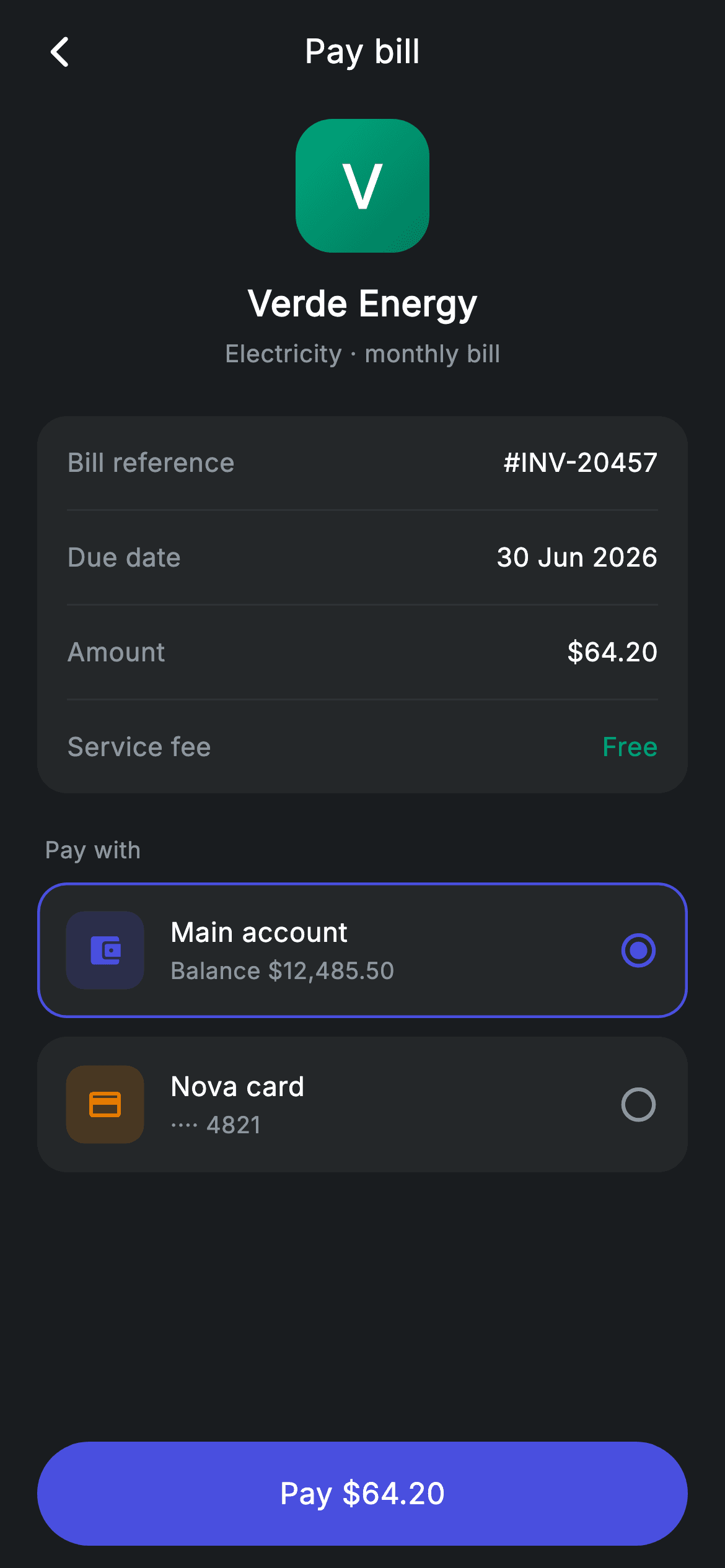
Paying a bill is where a fintech app earns trust: the user needs to see exactly who they are paying, what the total is, and where the money comes from before they commit. This tutorial builds a dark-themed 'Pay bill' checkout in pure Flutter — a gradient merchant monogram for Verde Energy, a bill-breakdown card listing reference, due date, amount and a free service fee, a two-option payment-method selector with radio-style selection, and a pinned pill button that repeats the $64.20 total. No packages, no network images, just the bundled Inter font.
What you'll build
- ✓A merchant identity header with a teal-gradient monogram tile standing in for a network logo
- ✓A bill-breakdown card whose four rows all come from one `_row` helper, with the fee tinted teal to read as 'Free'
- ✓A two-tile payment-method selector where a 1.5px indigo border and a swapped radio icon mark the active choice
- ✓A pinned full-width pay pill that keeps 'Pay $64.20' visible below the scrolling content
- ✓A screen that forces its own dark theme so it renders correctly inside any host app
Step-by-step build
Create the file
Add a new file at lib/fintech_pay_merchant/fintech_pay_merchant_screen.dart in your Flutter project.
Register the bundled fonts
No external packages — this is pure Flutter. It does bundle its design font (Inter), so drop the font file into fonts/ and declare it in pubspec.yaml:
flutter:
  fonts:
    - family: Inter
      fonts:
- asset: fonts/Inter-Regular.ttfBuild it, piece by piece
Here's how the screen goes together. Each block below is a real slice of the code with a plain-English explanation — paste them in order, or grab the whole file from the next section.
Two callbacks, a named palette, and one integer of state
import 'package:flutter/material.dart';

/// Pay merchant — settle a bill or pay a merchant (Revolut-inspired design).
///
/// Self-contained per CONVENTIONS.md: pure Flutter only, the exact design font
/// (Inter) is bundled under `fonts/`, the merchant mark is a painted monogram
/// (no network images), and the screen forces its own dark theme. A payment-
/// method selector and bill breakdown make the checkout read like a real flow.
class FintechPayMerchantScreen extends StatefulWidget {
  const FintechPayMerchantScreen({super.key, this.onBack, this.onPay});

  final VoidCallback? onBack;
  final VoidCallback? onPay;

  @override
  State<FintechPayMerchantScreen> createState() =>
      _FintechPayMerchantScreenState();
}

class _FintechPayMerchantScreenState extends State<FintechPayMerchantScreen> {
  static const String _font = 'Inter';
  static const Color _bg = Color(0xFF191C1F);
  static const Color _surface = Color(0xFF242729);
  static const Color _brand = Color(0xFF494FDF);
  static const Color _teal = Color(0xFF00A87E);
  static const Color _amber = Color(0xFFEC7E00);
  static const Color _muted = Color(0xFF8D969E);
  static const Color _hairline = Color(0xFF2E3235);

  int _method = 0; // 0 = main account, 1 = card
`FintechPayMerchantScreen` is a `StatefulWidget` exposing just `onBack` and `onPay` — navigation and payment are the host app's business, so they arrive as `VoidCallback?`s instead of being hard-wired. The palette is eight `static const Color`s: `_bg` (#191C1F) and `_surface` (#242729) form the dark ground, `_brand` indigo (#494FDF) is reserved for selection and the pay button, while `_teal` and `_amber` tint the two payment methods so they are distinguishable at a glance. The only mutable state is `int _method` — 0 for the main account, 1 for the card — which is all a single-choice selector needs.
Forced dark theme and the scroll-plus-pinned layout
  @override
  Widget build(BuildContext context) {
    return Theme(
      data: ThemeData.dark(useMaterial3: true),
      child: Scaffold(
        backgroundColor: _bg,
        body: SafeArea(
          child: Column(
            children: <Widget>[
              _buildAppBar(),
              Expanded(
                child: ListView(
                  physics: const BouncingScrollPhysics(),
                  padding: const EdgeInsets.fromLTRB(20, 8, 20, 24),
                  children: <Widget>[
                    _buildMerchant(),
                    const SizedBox(height: 24),
                    Container(
                      padding: const EdgeInsets.symmetric(horizontal: 16),
                      decoration: BoxDecoration(
                        color: _surface,
                        borderRadius: BorderRadius.circular(16),
                      ),
                      child: Column(
                        children: <Widget>[
                          _row('Bill reference', '#INV-20457'),
                          const Divider(height: 1, color: _hairline),
                          _row('Due date', '30 Jun 2026'),
                          const Divider(height: 1, color: _hairline),
                          _row('Amount', r'$64.20'),
                          const Divider(height: 1, color: _hairline),
                          _row('Service fee', 'Free', valueColor: _teal),
                        ],
                      ),
                    ),
                    const SizedBox(height: 22),
                    _label('Pay with'),
                    _methodTile(
                      0,
                      Icons.account_balance_wallet_rounded,
                      _brand,
                      'Main account',
                      r'Balance $12,485.50',
                    ),
                    const SizedBox(height: 10),
                    _methodTile(
                      1,
                      Icons.credit_card_rounded,
                      _amber,
                      'Nova card',
                      '···· 4821',
                    ),
                  ],
                ),
              ),
              _buildPay(),
            ],
          ),
        ),
      ),
    );
  }
`build` wraps everything in `Theme(data: ThemeData.dark(useMaterial3: true))`, so the screen stays dark even inside a light host app. The `Column` splits into three bands: the app bar, an `Expanded` `ListView`, and `_buildPay()` outside the scroll view — that placement is what pins the button while the bill scrolls behind it. Inside the list, the bill card is a `_surface` container at 16px radius holding four `_row` calls separated by 1px `_hairline` dividers; note `r'$64.20'` uses a raw string so Dart doesn't read the `$` as interpolation, and the 'Service fee' row passes `valueColor: _teal` so 'Free' reads as good news.
An app bar centred by a phantom 48px box
  Widget _buildAppBar() {
    return Padding(
      padding: const EdgeInsets.fromLTRB(8, 4, 8, 4),
      child: Row(
        children: <Widget>[
          IconButton(
            onPressed: widget.onBack,
            icon: const Icon(Icons.arrow_back_ios_new_rounded,
                size: 20, color: Colors.white),
          ),
          const Expanded(
            child: Text(
              'Pay bill',
              textAlign: TextAlign.center,
              style: TextStyle(
                fontFamily: _font,
                fontSize: 18,
                fontWeight: FontWeight.w500,
                letterSpacing: 0.24,
                color: Colors.white,
              ),
            ),
          ),
          const SizedBox(width: 48),
        ],
      ),
    );
  }
The app bar is a hand-rolled `Row` rather than an `AppBar`: an `IconButton` firing `widget.onBack`, an `Expanded` centred 'Pay bill' title at 18px `w500`, then `const SizedBox(width: 48)`. That trailing box exists purely to mirror the width of the leading icon button — without it the `Expanded` title would centre itself in the leftover space and sit visibly off-centre. The `letterSpacing: 0.24` here repeats on nearly every text style in the file, a small consistency that makes Inter sit a touch looser on dark ground.
The merchant monogram — a gradient tile, not an image
  Widget _buildMerchant() {
    return Column(
      children: <Widget>[
        Container(
          width: 72,
          height: 72,
          alignment: Alignment.center,
          decoration: BoxDecoration(
            gradient: const LinearGradient(
              begin: Alignment.topLeft,
              end: Alignment.bottomRight,
              colors: <Color>[Color(0xFF00A87E), Color(0xFF007A5C)],
            ),
            borderRadius: BorderRadius.circular(20),
          ),
          child: const Text(
            'V',
            style: TextStyle(
              fontFamily: _font,
              fontSize: 32,
              fontWeight: FontWeight.w700,
              color: Colors.white,
            ),
          ),
        ),
        const SizedBox(height: 14),
        const Text(
          'Verde Energy',
          style: TextStyle(
            fontFamily: _font,
            fontSize: 19,
            fontWeight: FontWeight.w600,
            letterSpacing: 0.24,
            color: Colors.white,
          ),
        ),
        const SizedBox(height: 4),
        const Text(
          'Electricity · monthly bill',
          style: TextStyle(
            fontFamily: _font,
            fontSize: 13,
            letterSpacing: 0.24,
            color: _muted,
          ),
        ),
      ],
    );
  }
`_buildMerchant` builds the payee identity with zero network dependencies: a 72×72 `Container` carrying a top-left-to-bottom-right `LinearGradient` from #00A87E to #007A5C, a 20px corner radius, and a single 32px `w700` 'V' centred inside. Beneath it, 'Verde Energy' at 19px `w600` and a `_muted` 'Electricity · monthly bill' caption answer who and what before the numbers appear. Swapping the monogram for a real logo later is one child change, but the gradient-plus-initial fallback is exactly what production payment apps show when a merchant has no artwork.
Reusable row and label helpers
  Widget _row(String label, String value, {Color? valueColor}) {
    return Padding(
      padding: const EdgeInsets.symmetric(vertical: 15),
      child: Row(
        mainAxisAlignment: MainAxisAlignment.spaceBetween,
        children: <Widget>[
          Text(
            label,
            style: const TextStyle(
              fontFamily: _font,
              fontSize: 14,
              letterSpacing: 0.24,
              color: _muted,
            ),
          ),
          Text(
            value,
            style: TextStyle(
              fontFamily: _font,
              fontSize: 14,
              fontWeight: FontWeight.w500,
              letterSpacing: 0.24,
              color: valueColor ?? Colors.white,
            ),
          ),
        ],
      ),
    );
  }

  Widget _label(String text) {
    return Padding(
      padding: const EdgeInsets.only(left: 4, bottom: 8),
      child: Text(
        text,
        style: const TextStyle(
          fontFamily: _font,
          fontSize: 12.5,
          fontWeight: FontWeight.w500,
          letterSpacing: 0.24,
          color: _muted,
        ),
      ),
    );
  }
`_row` is why the bill card stays four one-liners at the call site: a `Row` with `MainAxisAlignment.spaceBetween` pushing a `_muted` 14px label left and a white `w500` value right, with 15px vertical padding setting the rhythm between hairlines. The optional `valueColor` parameter defaults to white via `valueColor ?? Colors.white`, so only the fee row has to opt into teal. `_label` is the matching section-heading helper — 12.5px muted text with a 4px left nudge so 'Pay with' aligns optically with the rounded cards below it.
Method tiles that select with a border and a radio glyph
  Widget _methodTile(
      int index, IconData icon, Color tint, String title, String sub) {
    final bool active = _method == index;
    return GestureDetector(
      onTap: () => setState(() => _method = index),
      behavior: HitTestBehavior.opaque,
      child: Container(
        padding: const EdgeInsets.all(14),
        decoration: BoxDecoration(
          color: _surface,
          borderRadius: BorderRadius.circular(16),
          border: Border.all(
            color: active ? _brand : Colors.transparent,
            width: 1.5,
          ),
        ),
        child: Row(
          children: <Widget>[
            Container(
              width: 42,
              height: 42,
              alignment: Alignment.center,
              decoration: BoxDecoration(
                color: tint.withValues(alpha: 0.18),
                borderRadius: BorderRadius.circular(10),
              ),
              child: Icon(icon, size: 20, color: tint),
            ),
            const SizedBox(width: 14),
            Expanded(
              child: Column(
                crossAxisAlignment: CrossAxisAlignment.start,
                children: <Widget>[
                  Text(
                    title,
                    style: const TextStyle(
                      fontFamily: _font,
                      fontSize: 14.5,
                      fontWeight: FontWeight.w500,
                      letterSpacing: 0.24,
                      color: Colors.white,
                    ),
                  ),
                  const SizedBox(height: 2),
                  Text(
                    sub,
                    style: const TextStyle(
                      fontFamily: _font,
                      fontSize: 12.5,
                      letterSpacing: 0.24,
                      color: _muted,
                    ),
                  ),
                ],
              ),
            ),
            Icon(
              active
                  ? Icons.radio_button_checked_rounded
                  : Icons.radio_button_unchecked_rounded,
              size: 22,
              color: active ? _brand : _muted,
            ),
          ],
        ),
      ),
    );
  }
`_methodTile` compares its `index` against `_method` to compute `active`, and a `GestureDetector` with `HitTestBehavior.opaque` makes the whole card tappable — not just its visible pixels — before `setState` swaps the selection. The active state is announced twice: `Border.all` flips from transparent to 1.5px `_brand`, and the trailing icon switches between `radio_button_checked_rounded` and `radio_button_unchecked_rounded` in `_brand` versus `_muted`. Each tile's 42px icon chip is tinted with `tint.withValues(alpha: 0.18)` behind a full-strength icon, which is how the wallet reads indigo and the Nova card amber while both stay on the same `_surface` background.
The pinned pay pill that repeats the total
  Widget _buildPay() {
    return Padding(
      padding: const EdgeInsets.fromLTRB(20, 0, 20, 12),
      child: SizedBox(
        width: double.infinity,
        height: 56,
        child: Material(
          color: _brand,
          borderRadius: BorderRadius.circular(9999),
          child: InkWell(
            borderRadius: BorderRadius.circular(9999),
            onTap: widget.onPay,
            child: const Center(
              child: Text(
                r'Pay $64.20',
                style: TextStyle(
                  fontFamily: _font,
                  fontSize: 16,
                  fontWeight: FontWeight.w500,
                  letterSpacing: 0.24,
                  color: Colors.white,
                ),
              ),
            ),
          ),
        ),
      ),
    );
  }
}
`_buildPay` returns a 56px-tall, full-width `Material` in `_brand` with `borderRadius: BorderRadius.circular(9999)` — the oversized radius is a cheap way to guarantee a true pill at any height. Using `Material` + `InkWell` instead of a `GestureDetector` buys the ripple feedback, and `onTap: widget.onPay` hands the actual charge back to the caller. The label is `r'Pay $64.20'`: repeating the amount on the button itself means the user confirms the exact figure at the moment of commitment, even if the bill card has scrolled away.
Full code
The complete, ready-to-paste source. Free to use in your projects — one click copies it all.
import 'package:flutter/material.dart';

/// Pay merchant — settle a bill or pay a merchant (Revolut-inspired design).
///
/// Self-contained per CONVENTIONS.md: pure Flutter only, the exact design font
/// (Inter) is bundled under `fonts/`, the merchant mark is a painted monogram
/// (no network images), and the screen forces its own dark theme. A payment-
/// method selector and bill breakdown make the checkout read like a real flow.
class FintechPayMerchantScreen extends StatefulWidget {
  const FintechPayMerchantScreen({super.key, this.onBack, this.onPay});

  final VoidCallback? onBack;
  final VoidCallback? onPay;

  @override
  State<FintechPayMerchantScreen> createState() =>
      _FintechPayMerchantScreenState();
}

class _FintechPayMerchantScreenState extends State<FintechPayMerchantScreen> {
  static const String _font = 'Inter';
  static const Color _bg = Color(0xFF191C1F);
  static const Color _surface = Color(0xFF242729);
  static const Color _brand = Color(0xFF494FDF);
  static const Color _teal = Color(0xFF00A87E);
  static const Color _amber = Color(0xFFEC7E00);
  static const Color _muted = Color(0xFF8D969E);
  static const Color _hairline = Color(0xFF2E3235);

  int _method = 0; // 0 = main account, 1 = card

  @override
  Widget build(BuildContext context) {
    return Theme(
      data: ThemeData.dark(useMaterial3: true),
      child: Scaffold(
        backgroundColor: _bg,
        body: SafeArea(
          child: Column(
            children: <Widget>[
              _buildAppBar(),
              Expanded(
                child: ListView(
                  physics: const BouncingScrollPhysics(),
                  padding: const EdgeInsets.fromLTRB(20, 8, 20, 24),
                  children: <Widget>[
                    _buildMerchant(),
                    const SizedBox(height: 24),
                    Container(
                      padding: const EdgeInsets.symmetric(horizontal: 16),
                      decoration: BoxDecoration(
                        color: _surface,
                        borderRadius: BorderRadius.circular(16),
                      ),
                      child: Column(
                        children: <Widget>[
                          _row('Bill reference', '#INV-20457'),
                          const Divider(height: 1, color: _hairline),
                          _row('Due date', '30 Jun 2026'),
                          const Divider(height: 1, color: _hairline),
                          _row('Amount', r'$64.20'),
                          const Divider(height: 1, color: _hairline),
                          _row('Service fee', 'Free', valueColor: _teal),
                        ],
                      ),
                    ),
                    const SizedBox(height: 22),
                    _label('Pay with'),
                    _methodTile(
                      0,
                      Icons.account_balance_wallet_rounded,
                      _brand,
                      'Main account',
                      r'Balance $12,485.50',
                    ),
                    const SizedBox(height: 10),
                    _methodTile(
                      1,
                      Icons.credit_card_rounded,
                      _amber,
                      'Nova card',
                      '···· 4821',
                    ),
                  ],
                ),
              ),
              _buildPay(),
            ],
          ),
        ),
      ),
    );
  }

  Widget _buildAppBar() {
    return Padding(
      padding: const EdgeInsets.fromLTRB(8, 4, 8, 4),
      child: Row(
        children: <Widget>[
          IconButton(
            onPressed: widget.onBack,
            icon: const Icon(Icons.arrow_back_ios_new_rounded,
                size: 20, color: Colors.white),
          ),
          const Expanded(
            child: Text(
              'Pay bill',
              textAlign: TextAlign.center,
              style: TextStyle(
                fontFamily: _font,
                fontSize: 18,
                fontWeight: FontWeight.w500,
                letterSpacing: 0.24,
                color: Colors.white,
              ),
            ),
          ),
          const SizedBox(width: 48),
        ],
      ),
    );
  }

  Widget _buildMerchant() {
    return Column(
      children: <Widget>[
        Container(
          width: 72,
          height: 72,
          alignment: Alignment.center,
          decoration: BoxDecoration(
            gradient: const LinearGradient(
              begin: Alignment.topLeft,
              end: Alignment.bottomRight,
              colors: <Color>[Color(0xFF00A87E), Color(0xFF007A5C)],
            ),
            borderRadius: BorderRadius.circular(20),
          ),
          child: const Text(
            'V',
            style: TextStyle(
              fontFamily: _font,
              fontSize: 32,
              fontWeight: FontWeight.w700,
              color: Colors.white,
            ),
          ),
        ),
        const SizedBox(height: 14),
        const Text(
          'Verde Energy',
          style: TextStyle(
            fontFamily: _font,
            fontSize: 19,
            fontWeight: FontWeight.w600,
            letterSpacing: 0.24,
            color: Colors.white,
          ),
        ),
        const SizedBox(height: 4),
        const Text(
          'Electricity · monthly bill',
          style: TextStyle(
            fontFamily: _font,
            fontSize: 13,
            letterSpacing: 0.24,
            color: _muted,
          ),
        ),
      ],
    );
  }

  Widget _row(String label, String value, {Color? valueColor}) {
    return Padding(
      padding: const EdgeInsets.symmetric(vertical: 15),
      child: Row(
        mainAxisAlignment: MainAxisAlignment.spaceBetween,
        children: <Widget>[
          Text(
            label,
            style: const TextStyle(
              fontFamily: _font,
              fontSize: 14,
              letterSpacing: 0.24,
              color: _muted,
            ),
          ),
          Text(
            value,
            style: TextStyle(
              fontFamily: _font,
              fontSize: 14,
              fontWeight: FontWeight.w500,
              letterSpacing: 0.24,
              color: valueColor ?? Colors.white,
            ),
          ),
        ],
      ),
    );
  }

  Widget _label(String text) {
    return Padding(
      padding: const EdgeInsets.only(left: 4, bottom: 8),
      child: Text(
        text,
        style: const TextStyle(
          fontFamily: _font,
          fontSize: 12.5,
          fontWeight: FontWeight.w500,
          letterSpacing: 0.24,
          color: _muted,
        ),
      ),
    );
  }

  Widget _methodTile(
      int index, IconData icon, Color tint, String title, String sub) {
    final bool active = _method == index;
    return GestureDetector(
      onTap: () => setState(() => _method = index),
      behavior: HitTestBehavior.opaque,
      child: Container(
        padding: const EdgeInsets.all(14),
        decoration: BoxDecoration(
          color: _surface,
          borderRadius: BorderRadius.circular(16),
          border: Border.all(
            color: active ? _brand : Colors.transparent,
            width: 1.5,
          ),
        ),
        child: Row(
          children: <Widget>[
            Container(
              width: 42,
              height: 42,
              alignment: Alignment.center,
              decoration: BoxDecoration(
                color: tint.withValues(alpha: 0.18),
                borderRadius: BorderRadius.circular(10),
              ),
              child: Icon(icon, size: 20, color: tint),
            ),
            const SizedBox(width: 14),
            Expanded(
              child: Column(
                crossAxisAlignment: CrossAxisAlignment.start,
                children: <Widget>[
                  Text(
                    title,
                    style: const TextStyle(
                      fontFamily: _font,
                      fontSize: 14.5,
                      fontWeight: FontWeight.w500,
                      letterSpacing: 0.24,
                      color: Colors.white,
                    ),
                  ),
                  const SizedBox(height: 2),
                  Text(
                    sub,
                    style: const TextStyle(
                      fontFamily: _font,
                      fontSize: 12.5,
                      letterSpacing: 0.24,
                      color: _muted,
                    ),
                  ),
                ],
              ),
            ),
            Icon(
              active
                  ? Icons.radio_button_checked_rounded
                  : Icons.radio_button_unchecked_rounded,
              size: 22,
              color: active ? _brand : _muted,
            ),
          ],
        ),
      ),
    );
  }

  Widget _buildPay() {
    return Padding(
      padding: const EdgeInsets.fromLTRB(20, 0, 20, 12),
      child: SizedBox(
        width: double.infinity,
        height: 56,
        child: Material(
          color: _brand,
          borderRadius: BorderRadius.circular(9999),
          child: InkWell(
            borderRadius: BorderRadius.circular(9999),
            onTap: widget.onPay,
            child: const Center(
              child: Text(
                r'Pay $64.20',
                style: TextStyle(
                  fontFamily: _font,
                  fontSize: 16,
                  fontWeight: FontWeight.w500,
                  letterSpacing: 0.24,
                  color: Colors.white,
                ),
              ),
            ),
          ),
        ),
      ),
    );
  }
}
Plus bundled 1 binary asset (fonts/images). The CLI and MCP install those for you automatically.
Two faster ways to add it
Copy-paste works, but you can skip it entirely.
1. FlutterKit CLI
One command drops this screen — and its fonts — straight into your project.
$ flutterkit add fintech-pay-merchant2. AI agent (MCP)
Connect FlutterKit's MCP server in Claude or Cursor and just ask your agent to install fintech-pay-merchant — it fetches and writes the files for you.
FAQ
Is this pay merchant screen free to use commercially?
Yes. FlutterKit screens are free to use, including in commercial apps — you can copy the code from this page straight into a production bill-payment flow, ship it, and modify it however you like, with no attribution required.
Does this screen need any packages or font setup?
No packages at all — the pubspec additions are empty and every visual is built from Material widgets. The one asset is the Inter font family, referenced through the `_font` constant and bundled under `fonts/`; declare it in your pubspec (or substitute `google_fonts`) and everything else works out of the box.
Which Flutter version does this need?
Flutter 3.27 or newer, because the method-tile icon chips use `tint.withValues(alpha: 0.18)`. On an older SDK, replace that single call with `tint.withOpacity(0.18)`; the constructor's `super.key` also assumes Dart 2.17+, which any recent Flutter includes.
How do I feed this screen a real bill instead of the Verde Energy sample?
Promote the literals to constructor parameters — merchant name, category line, monogram letter and gradient, the four `_row` values, and the amount. Keep the amount as one field you format twice, since it appears in both the bill card and the `Pay $64.20` button label and the two must never disagree.
How do I add a third payment method, like a second card or Apple Pay?
Add another `_methodTile(2, icon, tint, title, sub)` under the existing two — the selector already generalises, because each tile just compares its `index` to the `_method` int. For a dynamic list, map over your saved methods with their list index and give each its own icon and tint colour.


