How to Build a Fintech My QR Code Screen in Flutter (Full Code + Preview)
Every peer-to-peer payment app needs a screen the user can flash at a friend: here is my code, scan it, pay me. This tutorial builds that screen in pure Flutter — a gradient brand card carrying an avatar, name and @tag, a QR code drawn entirely with CustomPainter (finder squares plus a seeded module grid, so there is no package and no image asset), and a Scan/Save button pair. You finish with a dark-themed, fully self-contained receive screen you can drop into any wallet flow.
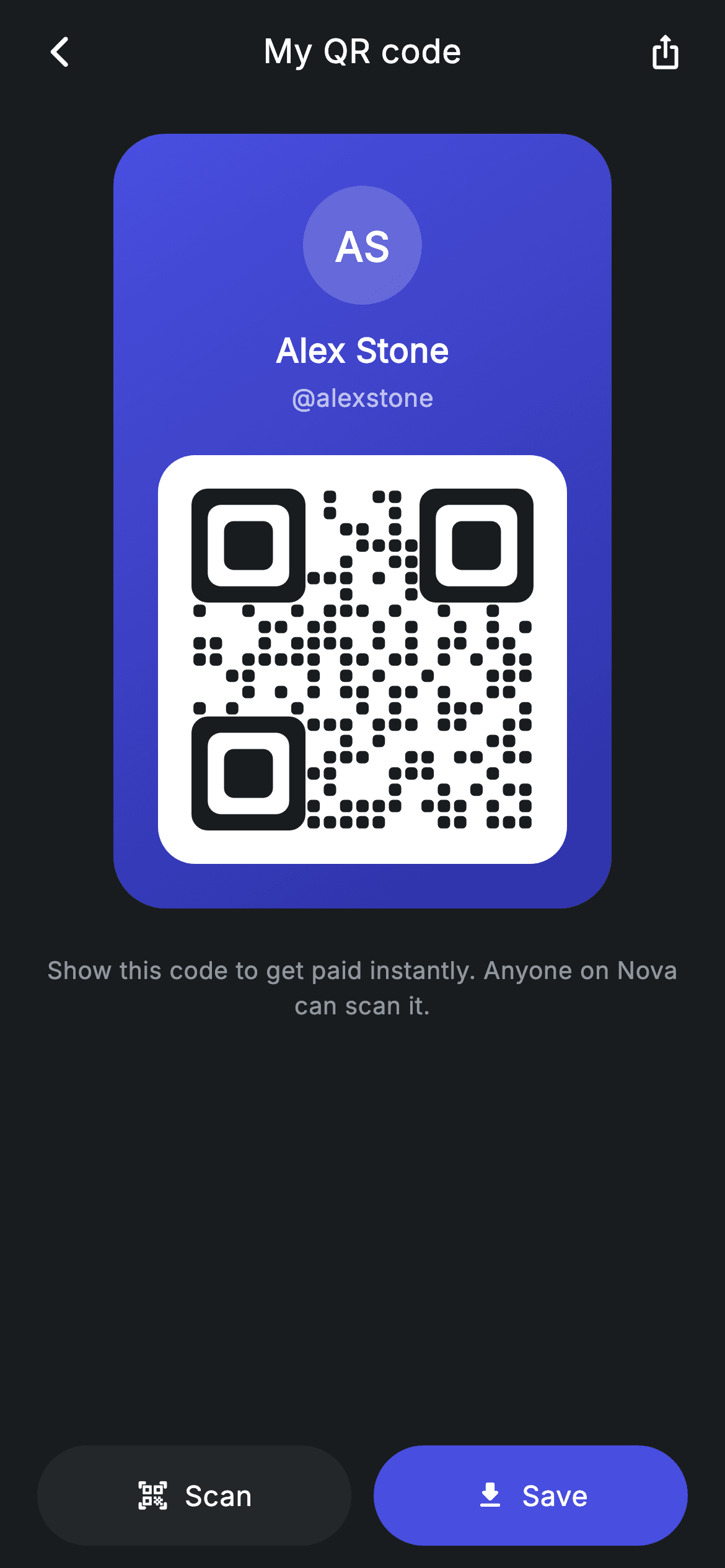
What you'll build
- ✓A blue-to-indigo gradient brand card with an initials avatar, display name and @tag
- ✓A QR code painted from scratch: three finder squares and a 21×21 module grid on a white plate
- ✓A tiny seeded pseudo-random generator so the same seed always paints the identical code
- ✓A Scan/Save pill pair where the two actions are deliberately coloured unequally
- ✓A forced dark theme that keeps the screen consistent inside any host app
Step-by-step build
Create the file
Add a new file at lib/fintech_my_qr/fintech_my_qr_screen.dart in your Flutter project.
Register the bundled fonts
No external packages — this is pure Flutter. It does bundle its design font (Inter), so drop the font file into fonts/ and declare it in pubspec.yaml:
flutter:
  fonts:
    - family: Inter
      fonts:
- asset: fonts/Inter-Regular.ttfBuild it, piece by piece
Here's how the screen goes together. Each block below is a real slice of the code with a plain-English explanation — paste them in order, or grab the whole file from the next section.
A stateless screen with two exits and a four-colour palette
import 'package:flutter/material.dart';

/// My QR — the user's personal receive code (Revolut-inspired design system).
///
/// Self-contained per CONVENTIONS.md: pure Flutter only, the exact design font
/// (Inter) is bundled under `fonts/`, no network images, and the screen forces
/// its own dark theme. The QR is fully custom-painted, so the screen has zero
/// asset/network dependencies; the @tag and brand card make it feel premium.
class FintechMyQrScreen extends StatelessWidget {
  const FintechMyQrScreen({
    super.key,
    this.onBack,
    this.onScan,
  });

  final VoidCallback? onBack;
  final VoidCallback? onScan;

  static const String _font = 'Inter';
  static const Color _bg = Color(0xFF191C1F);
  static const Color _surface = Color(0xFF242729);
  static const Color _brand = Color(0xFF494FDF);
  static const Color _muted = Color(0xFF8D969E);
`FintechMyQrScreen` is a `StatelessWidget` taking only `onBack` and `onScan` — a receive screen displays an identity, it has nothing to mutate, so state would be dead weight. The palette is four `static const Color`s: `_bg` near-black `#191C1F`, `_surface` `#242729` one step lighter for the secondary button, `_brand` indigo `#494FDF` for the card and the primary action, and `_muted` `#8D969E` for the caption. The header comment spells out the constraint the whole file obeys: pure Flutter, bundled Inter, no network images — the QR being custom-painted is what makes that possible.
Forced dark theme and the scroll/pin split
  @override
  Widget build(BuildContext context) {
    return Theme(
      data: ThemeData.dark(useMaterial3: true),
      child: Scaffold(
        backgroundColor: _bg,
        body: SafeArea(
          child: Column(
            children: <Widget>[
              _buildAppBar(),
              Expanded(
                child: SingleChildScrollView(
                  physics: const BouncingScrollPhysics(),
                  padding: const EdgeInsets.fromLTRB(24, 8, 24, 24),
                  child: Column(
                    children: <Widget>[
                      const SizedBox(height: 8),
                      _buildCard(),
                      const SizedBox(height: 24),
                      const Text(
                        'Show this code to get paid instantly. Anyone on Nova '
                        'can scan it.',
                        textAlign: TextAlign.center,
                        style: TextStyle(
                          fontFamily: _font,
                          fontSize: 13,
                          height: 1.45,
                          letterSpacing: 0.24,
                          color: _muted,
                        ),
                      ),
                    ],
                  ),
                ),
              ),
              _buildButtons(),
            ],
          ),
        ),
      ),
    );
  }
`build` wraps everything in `Theme(data: ThemeData.dark(useMaterial3: true))` so the screen stays dark even inside a light host app — a deliberate choice for a card that gets shown across a table in any lighting. Inside `SafeArea`, a `Column` splits the layout into three: the app bar, an `Expanded` `SingleChildScrollView` holding the card plus its 13px `_muted` caption ('Show this code to get paid instantly…'), and `_buildButtons()` outside the scroll view. That split is the point: on a short phone the card scrolls with `BouncingScrollPhysics`, but Scan and Save stay pinned to the bottom edge.
An app bar built from a plain Row
  Widget _buildAppBar() {
    return Padding(
      padding: const EdgeInsets.fromLTRB(8, 4, 8, 4),
      child: Row(
        children: <Widget>[
          IconButton(
            onPressed: onBack,
            icon: const Icon(Icons.arrow_back_ios_new_rounded,
                size: 20, color: Colors.white),
          ),
          const Expanded(
            child: Text(
              'My QR code',
              textAlign: TextAlign.center,
              style: TextStyle(
                fontFamily: _font,
                fontSize: 18,
                fontWeight: FontWeight.w500,
                letterSpacing: 0.24,
                color: Colors.white,
              ),
            ),
          ),
          IconButton(
            onPressed: () {},
            icon: const Icon(Icons.ios_share_rounded,
                size: 20, color: Colors.white),
          ),
        ],
      ),
    );
  }
Rather than an `AppBar`, the header is a `Padding`-wrapped `Row`: a back `IconButton` using `Icons.arrow_back_ios_new_rounded`, the 'My QR code' title centred inside an `Expanded`, and a share `IconButton` on the right. Because the two icon buttons are the same size, the `Expanded` title lands optically centred with no `Stack` or measuring tricks. The title runs 18px `w500` with the file's recurring `letterSpacing: 0.24`, and skipping `AppBar` avoids Material's elevation and surface-tint behaviour on a screen that already paints its own `#191C1F` canvas.
The gradient brand card and the white QR plate
  Widget _buildCard() {
    return Container(
      padding: const EdgeInsets.fromLTRB(24, 28, 24, 24),
      decoration: BoxDecoration(
        gradient: const LinearGradient(
          begin: Alignment.topLeft,
          end: Alignment.bottomRight,
          colors: <Color>[Color(0xFF494FDF), Color(0xFF2D31A6)],
        ),
        borderRadius: BorderRadius.circular(28),
      ),
      child: Column(
        children: <Widget>[
          Container(
            width: 64,
            height: 64,
            alignment: Alignment.center,
            decoration: BoxDecoration(
              color: Colors.white.withValues(alpha: 0.18),
              shape: BoxShape.circle,
            ),
            child: const Text(
              'AS',
              style: TextStyle(
                fontFamily: _font,
                fontSize: 22,
                fontWeight: FontWeight.w600,
                color: Colors.white,
              ),
            ),
          ),
          const SizedBox(height: 12),
          const Text(
            'Alex Stone',
            style: TextStyle(
              fontFamily: _font,
              fontSize: 18,
              fontWeight: FontWeight.w600,
              letterSpacing: 0.24,
              color: Colors.white,
            ),
          ),
          const SizedBox(height: 2),
          const Text(
            '@alexstone',
            style: TextStyle(
              fontFamily: _font,
              fontSize: 13.5,
              letterSpacing: 0.24,
              color: Colors.white70,
            ),
          ),
          const SizedBox(height: 22),
          Container(
            padding: const EdgeInsets.all(18),
            decoration: BoxDecoration(
              color: Colors.white,
              borderRadius: BorderRadius.circular(20),
            ),
            child: SizedBox(
              width: 184,
              height: 184,
              child: CustomPaint(painter: _QrPainter(seed: 5519023)),
            ),
          ),
        ],
      ),
    );
  }
`_buildCard` is a 28px-radius `Container` filled with a top-left-to-bottom-right `LinearGradient` from `#494FDF` to a darker indigo `#2D31A6`, so the card reads as a physical object against the flat background. The identity stack sits on top: a 64px circular avatar tinted `Colors.white.withValues(alpha: 0.18)` holding the initials 'AS', then 'Alex Stone' at 18px `w600` and `@alexstone` in `Colors.white70` — the @tag is the human-readable fallback when scanning is not an option. The QR itself lives on a white 20px-radius plate with 18px padding: real scanners need quiet space and contrast around a code, and keeping the plate white against the gradient mimics that convention. Inside, a 184×184 `SizedBox` hosts `CustomPaint(painter: _QrPainter(seed: 5519023))` — the seed is just an int, so every rebuild paints the same pattern.
Scan and Save, deliberately unequal
  Widget _buildButtons() {
    return Padding(
      padding: const EdgeInsets.fromLTRB(20, 0, 20, 12),
      child: Row(
        children: <Widget>[
          Expanded(
            child: SizedBox(
              height: 54,
              child: Material(
                color: _surface,
                borderRadius: BorderRadius.circular(9999),
                child: InkWell(
                  borderRadius: BorderRadius.circular(9999),
                  onTap: onScan,
                  child: Row(
                    mainAxisAlignment: MainAxisAlignment.center,
                    children: const <Widget>[
                      Icon(Icons.qr_code_scanner_rounded,
                          size: 18, color: Colors.white),
                      SizedBox(width: 8),
                      Text(
                        'Scan',
                        style: TextStyle(
                          fontFamily: _font,
                          fontSize: 15,
                          fontWeight: FontWeight.w500,
                          letterSpacing: 0.24,
                          color: Colors.white,
                        ),
                      ),
                    ],
                  ),
                ),
              ),
            ),
          ),
          const SizedBox(width: 12),
          Expanded(
            child: SizedBox(
              height: 54,
              child: Material(
                color: _brand,
                borderRadius: BorderRadius.circular(9999),
                child: InkWell(
                  borderRadius: BorderRadius.circular(9999),
                  onTap: () {},
                  child: Row(
                    mainAxisAlignment: MainAxisAlignment.center,
                    children: const <Widget>[
                      Icon(Icons.download_rounded,
                          size: 18, color: Colors.white),
                      SizedBox(width: 8),
                      Text(
                        'Save',
                        style: TextStyle(
                          fontFamily: _font,
                          fontSize: 15,
                          fontWeight: FontWeight.w500,
                          letterSpacing: 0.24,
                          color: Colors.white,
                        ),
                      ),
                    ],
                  ),
                ),
              ),
            ),
          ),
        ],
      ),
    );
  }
Two `Expanded` siblings share the bottom row so the buttons split the width evenly at 54px tall, with `BorderRadius.circular(9999)` turning each into a full pill. Both are built as `Material` + `InkWell` rather than `ElevatedButton`, which gives ripple feedback while sidestepping button theming inside the forced dark theme. The ranking is in the fills: Scan takes quiet `_surface` grey while Save takes `_brand` indigo, because on a my-code screen the resident action is keeping or sharing the code — Scan is the pivot to the opposite flow and gets `onTap: onScan` to hand navigation to the parent. Each pill pairs an 18px rounded icon with a 15px `w500` label separated by an 8px gap.
Painter setup, the module grid, and finder masking
/// Deterministic QR-style painter — finder squares + a seeded module grid.
/// Decorative (not a scannable code) but convincing and dependency-free.
class _QrPainter extends CustomPainter {
  _QrPainter({required this.seed});

  final int seed;

  @override
  void paint(Canvas canvas, Size size) {
    const int n = 21;
    final double cell = size.width / n;
    final Paint dark = Paint()..color = const Color(0xFF191C1F);

    bool isFinder(int r, int c) {
      bool inBox(int br, int bc) =>
          r >= br && r < br + 7 && c >= bc && c < bc + 7;
      return inBox(0, 0) || inBox(0, n - 7) || inBox(n - 7, 0);
    }

    void finder(int br, int bc) {
      canvas.drawRRect(
        RRect.fromRectAndRadius(
          Rect.fromLTWH(bc * cell, br * cell, 7 * cell, 7 * cell),
          Radius.circular(cell),
        ),
        dark,
      );
      canvas.drawRRect(
        RRect.fromRectAndRadius(
          Rect.fromLTWH((bc + 1) * cell, (br + 1) * cell, 5 * cell, 5 * cell),
          Radius.circular(cell * 0.8),
        ),
        Paint()..color = Colors.white,
      );
      canvas.drawRRect(
        RRect.fromRectAndRadius(
          Rect.fromLTWH((bc + 2) * cell, (br + 2) * cell, 3 * cell, 3 * cell),
          Radius.circular(cell * 0.6),
        ),
        dark,
      );
    }
`_QrPainter` divides the plate into a `n = 21` grid — the module count of a real Version 1 QR code — with `cell = size.width / n`, and paints modules in `#191C1F` so the code's dark matches the screen's background. `isFinder` tests whether a cell falls in any of three 7×7 corner boxes (top-left, top-right, bottom-left) so the random fill can skip that territory. The `finder` closure then draws each corner marker as three concentric `RRect`s — dark 7×7, white 5×5, dark 3×3 — with corner radii stepping down `cell` → `0.8` → `0.6` so the nesting looks drawn, not stamped. The docs are honest that this is decorative rather than scannable, which is exactly why it needs no dependency.
A seeded LCG, rounded modules, and finders on top
    int state = seed == 0 ? 1 : seed;
    int next() {
      state = (state * 1103515245 + 12345) & 0x7fffffff;
      return state;
    }

    for (int r = 0; r < n; r++) {
      for (int c = 0; c < n; c++) {
        if (isFinder(r, c)) {
          continue;
        }
        if (next() % 100 < 46) {
          canvas.drawRRect(
            RRect.fromRectAndRadius(
              Rect.fromLTWH(c * cell + cell * 0.12, r * cell + cell * 0.12,
                  cell * 0.76, cell * 0.76),
              Radius.circular(cell * 0.25),
            ),
            dark,
          );
        }
      }
    }

    finder(0, 0);
    finder(0, n - 7);
    finder(n - 7, 0);
  }

  @override
  bool shouldRepaint(covariant _QrPainter oldDelegate) => oldDelegate.seed != seed;
}
Randomness comes from a hand-rolled linear congruential generator: `state = (state * 1103515245 + 12345) & 0x7fffffff` — glibc's classic constants — with a guard mapping `seed == 0` to 1 so the sequence never collapses. Because it is seeded rather than using `Random()`, the same `seed` always yields the same code, so the QR does not shuffle on every repaint. The double loop fills roughly 46% of non-finder cells (`next() % 100 < 46`), drawing each module inset by `cell * 0.12` at 76% size with a `0.25 * cell` corner radius — that breathing room between rounded dots is what gives the code its softened fintech look. The three `finder` calls come last so the markers sit crisply over everything, and `shouldRepaint` only fires when `seed` changes.
Full code
The complete, ready-to-paste source. Free to use in your projects — one click copies it all.
import 'package:flutter/material.dart';

/// My QR — the user's personal receive code (Revolut-inspired design system).
///
/// Self-contained per CONVENTIONS.md: pure Flutter only, the exact design font
/// (Inter) is bundled under `fonts/`, no network images, and the screen forces
/// its own dark theme. The QR is fully custom-painted, so the screen has zero
/// asset/network dependencies; the @tag and brand card make it feel premium.
class FintechMyQrScreen extends StatelessWidget {
  const FintechMyQrScreen({
    super.key,
    this.onBack,
    this.onScan,
  });

  final VoidCallback? onBack;
  final VoidCallback? onScan;

  static const String _font = 'Inter';
  static const Color _bg = Color(0xFF191C1F);
  static const Color _surface = Color(0xFF242729);
  static const Color _brand = Color(0xFF494FDF);
  static const Color _muted = Color(0xFF8D969E);

  @override
  Widget build(BuildContext context) {
    return Theme(
      data: ThemeData.dark(useMaterial3: true),
      child: Scaffold(
        backgroundColor: _bg,
        body: SafeArea(
          child: Column(
            children: <Widget>[
              _buildAppBar(),
              Expanded(
                child: SingleChildScrollView(
                  physics: const BouncingScrollPhysics(),
                  padding: const EdgeInsets.fromLTRB(24, 8, 24, 24),
                  child: Column(
                    children: <Widget>[
                      const SizedBox(height: 8),
                      _buildCard(),
                      const SizedBox(height: 24),
                      const Text(
                        'Show this code to get paid instantly. Anyone on Nova '
                        'can scan it.',
                        textAlign: TextAlign.center,
                        style: TextStyle(
                          fontFamily: _font,
                          fontSize: 13,
                          height: 1.45,
                          letterSpacing: 0.24,
                          color: _muted,
                        ),
                      ),
                    ],
                  ),
                ),
              ),
              _buildButtons(),
            ],
          ),
        ),
      ),
    );
  }

  Widget _buildAppBar() {
    return Padding(
      padding: const EdgeInsets.fromLTRB(8, 4, 8, 4),
      child: Row(
        children: <Widget>[
          IconButton(
            onPressed: onBack,
            icon: const Icon(Icons.arrow_back_ios_new_rounded,
                size: 20, color: Colors.white),
          ),
          const Expanded(
            child: Text(
              'My QR code',
              textAlign: TextAlign.center,
              style: TextStyle(
                fontFamily: _font,
                fontSize: 18,
                fontWeight: FontWeight.w500,
                letterSpacing: 0.24,
                color: Colors.white,
              ),
            ),
          ),
          IconButton(
            onPressed: () {},
            icon: const Icon(Icons.ios_share_rounded,
                size: 20, color: Colors.white),
          ),
        ],
      ),
    );
  }

  Widget _buildCard() {
    return Container(
      padding: const EdgeInsets.fromLTRB(24, 28, 24, 24),
      decoration: BoxDecoration(
        gradient: const LinearGradient(
          begin: Alignment.topLeft,
          end: Alignment.bottomRight,
          colors: <Color>[Color(0xFF494FDF), Color(0xFF2D31A6)],
        ),
        borderRadius: BorderRadius.circular(28),
      ),
      child: Column(
        children: <Widget>[
          Container(
            width: 64,
            height: 64,
            alignment: Alignment.center,
            decoration: BoxDecoration(
              color: Colors.white.withValues(alpha: 0.18),
              shape: BoxShape.circle,
            ),
            child: const Text(
              'AS',
              style: TextStyle(
                fontFamily: _font,
                fontSize: 22,
                fontWeight: FontWeight.w600,
                color: Colors.white,
              ),
            ),
          ),
          const SizedBox(height: 12),
          const Text(
            'Alex Stone',
            style: TextStyle(
              fontFamily: _font,
              fontSize: 18,
              fontWeight: FontWeight.w600,
              letterSpacing: 0.24,
              color: Colors.white,
            ),
          ),
          const SizedBox(height: 2),
          const Text(
            '@alexstone',
            style: TextStyle(
              fontFamily: _font,
              fontSize: 13.5,
              letterSpacing: 0.24,
              color: Colors.white70,
            ),
          ),
          const SizedBox(height: 22),
          Container(
            padding: const EdgeInsets.all(18),
            decoration: BoxDecoration(
              color: Colors.white,
              borderRadius: BorderRadius.circular(20),
            ),
            child: SizedBox(
              width: 184,
              height: 184,
              child: CustomPaint(painter: _QrPainter(seed: 5519023)),
            ),
          ),
        ],
      ),
    );
  }

  Widget _buildButtons() {
    return Padding(
      padding: const EdgeInsets.fromLTRB(20, 0, 20, 12),
      child: Row(
        children: <Widget>[
          Expanded(
            child: SizedBox(
              height: 54,
              child: Material(
                color: _surface,
                borderRadius: BorderRadius.circular(9999),
                child: InkWell(
                  borderRadius: BorderRadius.circular(9999),
                  onTap: onScan,
                  child: Row(
                    mainAxisAlignment: MainAxisAlignment.center,
                    children: const <Widget>[
                      Icon(Icons.qr_code_scanner_rounded,
                          size: 18, color: Colors.white),
                      SizedBox(width: 8),
                      Text(
                        'Scan',
                        style: TextStyle(
                          fontFamily: _font,
                          fontSize: 15,
                          fontWeight: FontWeight.w500,
                          letterSpacing: 0.24,
                          color: Colors.white,
                        ),
                      ),
                    ],
                  ),
                ),
              ),
            ),
          ),
          const SizedBox(width: 12),
          Expanded(
            child: SizedBox(
              height: 54,
              child: Material(
                color: _brand,
                borderRadius: BorderRadius.circular(9999),
                child: InkWell(
                  borderRadius: BorderRadius.circular(9999),
                  onTap: () {},
                  child: Row(
                    mainAxisAlignment: MainAxisAlignment.center,
                    children: const <Widget>[
                      Icon(Icons.download_rounded,
                          size: 18, color: Colors.white),
                      SizedBox(width: 8),
                      Text(
                        'Save',
                        style: TextStyle(
                          fontFamily: _font,
                          fontSize: 15,
                          fontWeight: FontWeight.w500,
                          letterSpacing: 0.24,
                          color: Colors.white,
                        ),
                      ),
                    ],
                  ),
                ),
              ),
            ),
          ),
        ],
      ),
    );
  }
}

/// Deterministic QR-style painter — finder squares + a seeded module grid.
/// Decorative (not a scannable code) but convincing and dependency-free.
class _QrPainter extends CustomPainter {
  _QrPainter({required this.seed});

  final int seed;

  @override
  void paint(Canvas canvas, Size size) {
    const int n = 21;
    final double cell = size.width / n;
    final Paint dark = Paint()..color = const Color(0xFF191C1F);

    bool isFinder(int r, int c) {
      bool inBox(int br, int bc) =>
          r >= br && r < br + 7 && c >= bc && c < bc + 7;
      return inBox(0, 0) || inBox(0, n - 7) || inBox(n - 7, 0);
    }

    void finder(int br, int bc) {
      canvas.drawRRect(
        RRect.fromRectAndRadius(
          Rect.fromLTWH(bc * cell, br * cell, 7 * cell, 7 * cell),
          Radius.circular(cell),
        ),
        dark,
      );
      canvas.drawRRect(
        RRect.fromRectAndRadius(
          Rect.fromLTWH((bc + 1) * cell, (br + 1) * cell, 5 * cell, 5 * cell),
          Radius.circular(cell * 0.8),
        ),
        Paint()..color = Colors.white,
      );
      canvas.drawRRect(
        RRect.fromRectAndRadius(
          Rect.fromLTWH((bc + 2) * cell, (br + 2) * cell, 3 * cell, 3 * cell),
          Radius.circular(cell * 0.6),
        ),
        dark,
      );
    }

    int state = seed == 0 ? 1 : seed;
    int next() {
      state = (state * 1103515245 + 12345) & 0x7fffffff;
      return state;
    }

    for (int r = 0; r < n; r++) {
      for (int c = 0; c < n; c++) {
        if (isFinder(r, c)) {
          continue;
        }
        if (next() % 100 < 46) {
          canvas.drawRRect(
            RRect.fromRectAndRadius(
              Rect.fromLTWH(c * cell + cell * 0.12, r * cell + cell * 0.12,
                  cell * 0.76, cell * 0.76),
              Radius.circular(cell * 0.25),
            ),
            dark,
          );
        }
      }
    }

    finder(0, 0);
    finder(0, n - 7);
    finder(n - 7, 0);
  }

  @override
  bool shouldRepaint(covariant _QrPainter oldDelegate) => oldDelegate.seed != seed;
}
Plus bundled 1 binary asset (fonts/images). The CLI and MCP install those for you automatically.
Two faster ways to add it
Copy-paste works, but you can skip it entirely.
1. FlutterKit CLI
One command drops this screen — and its fonts — straight into your project.
$ flutterkit add fintech-my-qr2. AI agent (MCP)
Connect FlutterKit's MCP server in Claude or Cursor and just ask your agent to install fintech-my-qr — it fetches and writes the files for you.
FAQ
Is this My QR screen free to use in a commercial app?
Yes. FlutterKit screens are free to use, including commercially — copy the screen and its painter straight from this page and ship them in a production wallet or P2P app. No attribution required.
Do I need a QR package, image assets or icon fonts?
No packages at all — the code has an empty dependency list. The QR is a `CustomPainter`, every icon is a built-in Material icon, and the only font is Inter, which ships bundled under `fonts/` in the kit, so nothing is fetched over the network.
Which Flutter version does this screen require?
Flutter 3.27 or newer, because the avatar uses `Colors.white.withValues(alpha: 0.18)`. On an older SDK, swap that single call for `withOpacity(0.18)`; the constructor's `super.key` also assumes Dart 2.17+, which any recent Flutter includes.
How do I make the QR actually scannable with my payment payload?
Keep the white plate and 184×184 box, but replace `CustomPaint(painter: _QrPainter(...))` with a real encoder such as the `qr_flutter` package's `QrImageView`, passing your payment URI or user ID as the data. The rest of the screen — card, gradient, buttons — needs no changes.
How would I implement the Save button so it exports the card?
Wrap `_buildCard()`'s subtree in a `RepaintBoundary` with a `GlobalKey`, then in the Save handler call `findRenderObject()`, cast to `RenderRepaintBoundary`, and use `toImage()` plus `ByteData` to get PNG bytes you can hand to a share sheet or gallery saver. The button's `InkWell` already has an empty `onTap` waiting for exactly this.


