How to Build a Fintech Payment Request Link Screen in Flutter (Full Code + Preview)
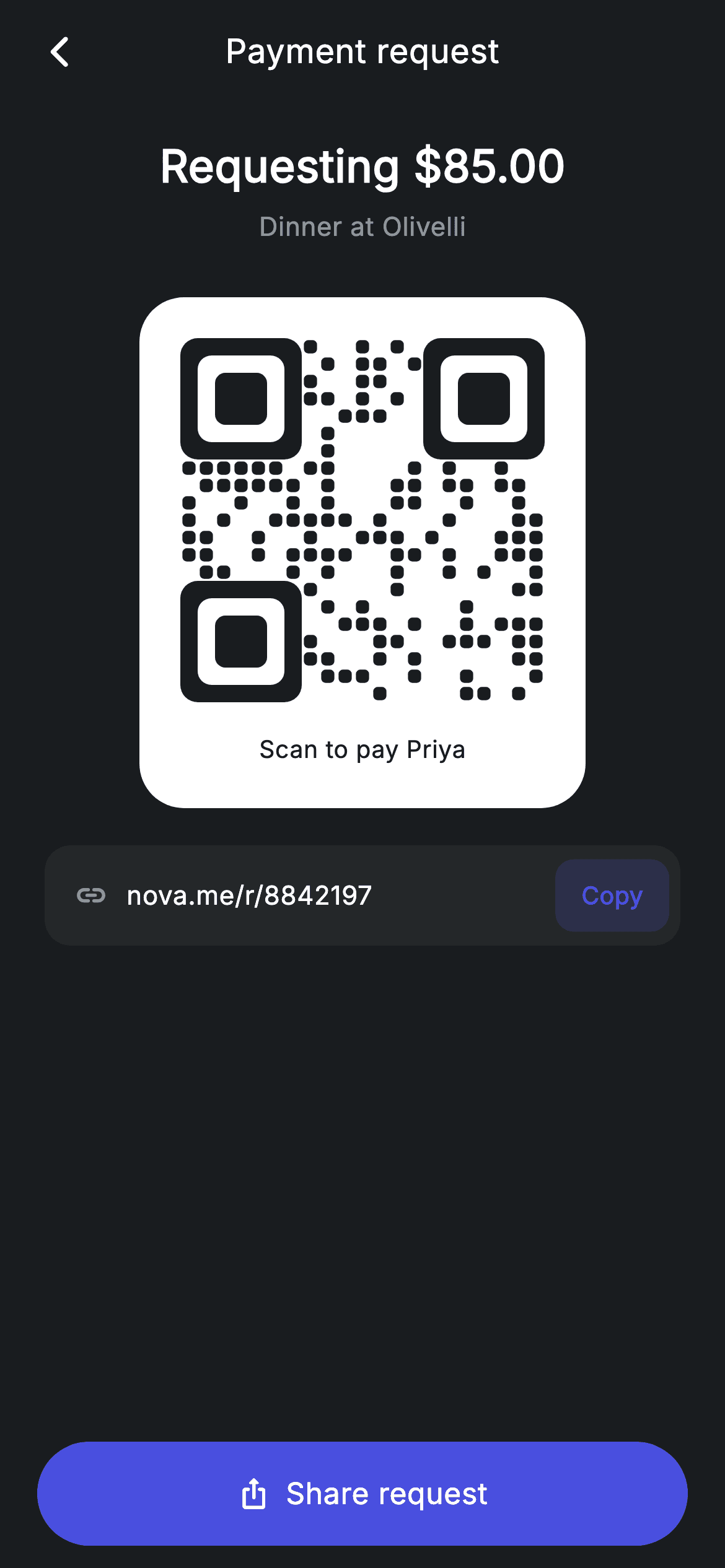
When someone owes you money, the fastest way to collect is a link they can tap and a QR they can scan — no account lookup, no typing an amount. This tutorial builds a Revolut-style payment request screen in Flutter: a dark scaffold that leads with the $85.00 amount and its note, a white card holding a QR code painted entirely with a CustomPainter (no qr package, no image asset), a copyable short-link row, and a pinned Share request button. By the end you'll have one self-contained widget with zero dependencies beyond Flutter itself.
What you'll build
- ✓A dark payment-request layout that leads with the requested amount and its 'Dinner at Olivelli' note
- ✓A QR code drawn from scratch with a CustomPainter — three rounded finder squares plus a seeded 21×21 module grid
- ✓A white QR card that stays high-contrast against the near-black scaffold for camera scanning
- ✓A short-link row with an ellipsis-safe URL and a tinted Copy pill built from Material + InkWell
- ✓A full-width pill-shaped Share request CTA pinned below the scroll area
Step-by-step build
Create the file
Add a new file at lib/fintech_request_link/fintech_request_link_screen.dart in your Flutter project.
Register the bundled fonts
No external packages — this is pure Flutter. It does bundle its design font (Inter), so drop the font file into fonts/ and declare it in pubspec.yaml:
flutter:
  fonts:
    - family: Inter
      fonts:
- asset: fonts/Inter-Regular.ttfBuild it, piece by piece
Here's how the screen goes together. Each block below is a real slice of the code with a plain-English explanation — paste them in order, or grab the whole file from the next section.
A stateless screen with a compact dark palette
import 'package:flutter/material.dart';

/// Request link — shareable payment link + QR (Revolut-inspired design system).
///
/// Self-contained per CONVENTIONS.md: pure Flutter only, the exact design font
/// (Inter) is bundled under `fonts/`, no network images, and the screen forces
/// its own dark theme. The QR is fully custom-painted (deterministic pattern),
/// so the screen has zero asset/network dependencies.
class FintechRequestLinkScreen extends StatelessWidget {
  const FintechRequestLinkScreen({
    super.key,
    this.onBack,
    this.onDone,
  });

  final VoidCallback? onBack;
  final VoidCallback? onDone;

  static const String _font = 'Inter';
  static const Color _bg = Color(0xFF191C1F);
  static const Color _surface = Color(0xFF242729);
  static const Color _brand = Color(0xFF494FDF);
  static const Color _muted = Color(0xFF8D969E);

  static const String _link = 'nova.me/r/8842197';
`FintechRequestLinkScreen` is a `StatelessWidget` taking only `onBack` and `onDone` callbacks — the screen displays an already-created request, so there is nothing to mutate locally. The palette is four static consts: `_bg` at `0xFF191C1F` (near-black), `_surface` at `0xFF242729` for the link row, `_brand` indigo `0xFF494FDF` for every actionable element, and `_muted` grey for secondary text. The short link itself is a const string (`nova.me/r/8842197`), and its digits reappear later as the QR painter's seed, so the code and the link visually 'belong' to the same request.
Build: pinned CTA below a scrolling column
  @override
  Widget build(BuildContext context) {
    return Theme(
      data: ThemeData.dark(useMaterial3: true),
      child: Scaffold(
        backgroundColor: _bg,
        body: SafeArea(
          child: Column(
            children: <Widget>[
              _buildAppBar(),
              Expanded(
                child: SingleChildScrollView(
                  physics: const BouncingScrollPhysics(),
                  padding: const EdgeInsets.fromLTRB(24, 8, 24, 24),
                  child: Column(
                    children: <Widget>[
                      const SizedBox(height: 8),
                      const Text(
                        r'Requesting $85.00',
                        style: TextStyle(
                          fontFamily: _font,
                          fontSize: 24,
                          fontWeight: FontWeight.w600,
                          letterSpacing: 0.24,
                          color: Colors.white,
                        ),
                      ),
                      const SizedBox(height: 6),
                      const Text(
                        'Dinner at Olivelli',
                        style: TextStyle(
                          fontFamily: _font,
                          fontSize: 14,
                          letterSpacing: 0.24,
                          color: _muted,
                        ),
                      ),
                      const SizedBox(height: 28),
                      _buildQrCard(),
                      const SizedBox(height: 20),
                      _buildLinkRow(),
                    ],
                  ),
                ),
              ),
              _buildShare(),
            ],
          ),
        ),
      ),
    );
  }
The whole screen is wrapped in `Theme(data: ThemeData.dark(useMaterial3: true))` so it forces its own dark theme regardless of the host app. Inside `SafeArea`, an outer `Column` stacks the app bar, an `Expanded` `SingleChildScrollView`, and `_buildShare()` — putting the CTA outside the scroll view is what keeps 'Share request' pinned to the bottom on any screen height. The scrollable content leads with the raw-string headline `r'Requesting $85.00'` (the `r` prefix stops Dart treating `$85` as interpolation) at 24px `w600`, with the 14px `_muted` note 'Dinner at Olivelli' right under it — amount first, context second.
Centring the app-bar title without an AppBar
  Widget _buildAppBar() {
    return Padding(
      padding: const EdgeInsets.fromLTRB(8, 4, 8, 4),
      child: Row(
        children: <Widget>[
          IconButton(
            onPressed: onBack,
            icon: const Icon(Icons.arrow_back_ios_new_rounded,
                size: 20, color: Colors.white),
          ),
          const Expanded(
            child: Text(
              'Payment request',
              textAlign: TextAlign.center,
              style: TextStyle(
                fontFamily: _font,
                fontSize: 18,
                fontWeight: FontWeight.w500,
                letterSpacing: 0.24,
                color: Colors.white,
              ),
            ),
          ),
          const SizedBox(width: 48),
        ],
      ),
    );
  }
The header is a hand-rolled `Row` rather than a Material `AppBar`: an `IconButton` with `arrow_back_ios_new_rounded` wired to `onBack`, then the 'Payment request' title inside `Expanded` with `textAlign: TextAlign.center`, then a trailing `SizedBox(width: 48)`. That 48px spacer mirrors the width of the leading icon button, so the centred text is optically centred on the screen instead of being pushed right by the asymmetric row. Skipping `AppBar` also avoids its default elevation and height, keeping the header flush with the `_bg` scaffold.
The white QR card
  Widget _buildQrCard() {
    return Container(
      padding: const EdgeInsets.all(22),
      decoration: BoxDecoration(
        color: Colors.white,
        borderRadius: BorderRadius.circular(24),
      ),
      child: Column(
        children: <Widget>[
          SizedBox(
            width: 196,
            height: 196,
            child: CustomPaint(painter: _QrPainter(seed: 8842197)),
          ),
          const SizedBox(height: 16),
          const Text(
            'Scan to pay Priya',
            style: TextStyle(
              fontFamily: _font,
              fontSize: 13,
              fontWeight: FontWeight.w500,
              letterSpacing: 0.24,
              color: Color(0xFF191C1F),
            ),
          ),
        ],
      ),
    );
  }
`_buildQrCard` is a pure-white `Container` with `BorderRadius.circular(24)` and 22px padding — white on the near-black `_bg` gives the QR the contrast a phone camera needs, and it is the only white surface on the screen so the eye lands there first. The code itself is a fixed `SizedBox(width: 196, height: 196)` driving `CustomPaint(painter: _QrPainter(seed: 8842197))` — note the seed is the same number as the link's path segment. The caption 'Scan to pay Priya' is set in `Color(0xFF191C1F)`, i.e. the scaffold colour reused as ink, which ties the card back to the palette instead of introducing a new black.
Link row with an inline Copy pill
  Widget _buildLinkRow() {
    return Container(
      height: 54,
      padding: const EdgeInsets.fromLTRB(16, 0, 6, 0),
      decoration: BoxDecoration(
        color: _surface,
        borderRadius: BorderRadius.circular(14),
      ),
      child: Row(
        children: <Widget>[
          const Icon(Icons.link_rounded, size: 18, color: _muted),
          const SizedBox(width: 10),
          const Expanded(
            child: Text(
              _link,
              maxLines: 1,
              overflow: TextOverflow.ellipsis,
              style: TextStyle(
                fontFamily: _font,
                fontSize: 14,
                letterSpacing: 0.24,
                color: Colors.white,
              ),
            ),
          ),
          Material(
            color: _brand.withValues(alpha: 0.18),
            borderRadius: BorderRadius.circular(10),
            child: InkWell(
              borderRadius: BorderRadius.circular(10),
              onTap: () {},
              child: const Padding(
                padding: EdgeInsets.symmetric(horizontal: 14, vertical: 10),
                child: Text(
                  'Copy',
                  style: TextStyle(
                    fontFamily: _font,
                    fontSize: 13,
                    fontWeight: FontWeight.w600,
                    letterSpacing: 0.24,
                    color: _brand,
                  ),
                ),
              ),
            ),
          ),
        ],
      ),
    );
  }
The link row is a 54px `_surface` container with asymmetric padding — `fromLTRB(16, 0, 6, 0)` — because the Copy pill carries its own padding and should sit 6px from the edge, not 16. The URL lives in `Expanded` with `maxLines: 1` and `TextOverflow.ellipsis`, so a longer real-world link truncates instead of overflowing the row. Copy is built as `Material` at `_brand.withValues(alpha: 0.18)` wrapping an `InkWell`: an 18% indigo tint with full-strength `_brand` text reads as a secondary action, and the Material layer is what lets the ripple paint inside the 10px rounded corners.
The pinned Share request CTA
  Widget _buildShare() {
    return Padding(
      padding: const EdgeInsets.fromLTRB(20, 0, 20, 12),
      child: SizedBox(
        width: double.infinity,
        height: 56,
        child: Material(
          color: _brand,
          borderRadius: BorderRadius.circular(9999),
          child: InkWell(
            borderRadius: BorderRadius.circular(9999),
            onTap: onDone,
            child: Row(
              mainAxisAlignment: MainAxisAlignment.center,
              children: const <Widget>[
                Icon(Icons.ios_share_rounded, size: 18, color: Colors.white),
                SizedBox(width: 8),
                Text(
                  'Share request',
                  style: TextStyle(
                    fontFamily: _font,
                    fontSize: 16,
                    fontWeight: FontWeight.w500,
                    letterSpacing: 0.24,
                    color: Colors.white,
                  ),
                ),
              ],
            ),
          ),
        ),
      ),
    );
  }
}
`_buildShare` sits outside the scroll view: a full-width, 56px-tall `Material` in solid `_brand` with `BorderRadius.circular(9999)` — the effectively-infinite radius is a simple way to get a stadium/pill shape at any height. The `InkWell` forwards its tap to `onDone`, and the label pairs `Icons.ios_share_rounded` with 'Share request' in a centred `Row`. Solid indigo here versus the 18% tint on Copy is the ranking: sharing the request is the screen's one primary action, copying the link is the fallback.
QR geometry: finder squares from three nested RRects
/// Deterministic QR-style painter — draws finder squares + a pseudo-random
/// module grid from a seed. Decorative (not a real scannable code) but visually
/// convincing and dependency-free.
class _QrPainter extends CustomPainter {
  _QrPainter({required this.seed});

  final int seed;

  @override
  void paint(Canvas canvas, Size size) {
    const int n = 21;
    final double cell = size.width / n;
    final Paint dark = Paint()..color = const Color(0xFF191C1F);

    bool isFinder(int r, int c) {
      bool inBox(int br, int bc) =>
          r >= br && r < br + 7 && c >= bc && c < bc + 7;
      return inBox(0, 0) || inBox(0, n - 7) || inBox(n - 7, 0);
    }

    void finder(int br, int bc) {
      canvas.drawRRect(
        RRect.fromRectAndRadius(
          Rect.fromLTWH(bc * cell, br * cell, 7 * cell, 7 * cell),
          Radius.circular(cell),
        ),
        dark,
      );
      canvas.drawRRect(
        RRect.fromRectAndRadius(
          Rect.fromLTWH((bc + 1) * cell, (br + 1) * cell, 5 * cell, 5 * cell),
          Radius.circular(cell * 0.8),
        ),
        Paint()..color = Colors.white,
      );
      canvas.drawRRect(
        RRect.fromRectAndRadius(
          Rect.fromLTWH((bc + 2) * cell, (br + 2) * cell, 3 * cell, 3 * cell),
          Radius.circular(cell * 0.6),
        ),
        dark,
      );
    }

    int state = seed == 0 ? 1 : seed;
    int next() {
      state = (state * 1103515245 + 12345) & 0x7fffffff;
      return state;
    }
`_QrPainter` divides the canvas into a 21×21 grid (`cell = size.width / n`, matching a real Version-1 QR). `isFinder` masks the three 7×7 corner regions via an `inBox` closure so the random grid never paints over them, and `finder` draws each one as three concentric rounded rects — dark 7×7, white 5×5, dark 3×3 — with radii scaled to the cell size, which is exactly the bullseye pattern scanners look for. Randomness comes from a hand-rolled linear congruential generator (`state * 1103515245 + 12345`, masked to 31 bits): seeding it with the request id makes the pattern deterministic, so the same request always renders the same code with no `dart:math` import.
Painting the module grid
    for (int r = 0; r < n; r++) {
      for (int c = 0; c < n; c++) {
        if (isFinder(r, c)) {
          continue;
        }
        if (next() % 100 < 46) {
          canvas.drawRRect(
            RRect.fromRectAndRadius(
              Rect.fromLTWH(
                  c * cell + cell * 0.12,
                  r * cell + cell * 0.12,
                  cell * 0.76,
                  cell * 0.76),
              Radius.circular(cell * 0.25),
            ),
            dark,
          );
        }
      }
    }

    finder(0, 0);
    finder(0, n - 7);
    finder(n - 7, 0);
  }

  @override
  bool shouldRepaint(covariant _QrPainter oldDelegate) => oldDelegate.seed != seed;
}
The double loop walks all 441 cells, skips finder zones, and fills a module whenever `next() % 100 < 46` — roughly 46% density, which is what makes the fake code look statistically like a real one. Each module is drawn at 76% of its cell (`cell * 0.12` inset on each side) with a `cell * 0.25` corner radius, giving the softened-dot look instead of hard squares. The three `finder(...)` calls come after the loop so the bullseyes paint on top, and `shouldRepaint` compares seeds — the painter only redraws if it is given a different request. Note the comment in the source: this is a decorative, deterministic pattern, not a scannable code.
Full code
The complete, ready-to-paste source. Free to use in your projects — one click copies it all.
import 'package:flutter/material.dart';

/// Request link — shareable payment link + QR (Revolut-inspired design system).
///
/// Self-contained per CONVENTIONS.md: pure Flutter only, the exact design font
/// (Inter) is bundled under `fonts/`, no network images, and the screen forces
/// its own dark theme. The QR is fully custom-painted (deterministic pattern),
/// so the screen has zero asset/network dependencies.
class FintechRequestLinkScreen extends StatelessWidget {
  const FintechRequestLinkScreen({
    super.key,
    this.onBack,
    this.onDone,
  });

  final VoidCallback? onBack;
  final VoidCallback? onDone;

  static const String _font = 'Inter';
  static const Color _bg = Color(0xFF191C1F);
  static const Color _surface = Color(0xFF242729);
  static const Color _brand = Color(0xFF494FDF);
  static const Color _muted = Color(0xFF8D969E);

  static const String _link = 'nova.me/r/8842197';

  @override
  Widget build(BuildContext context) {
    return Theme(
      data: ThemeData.dark(useMaterial3: true),
      child: Scaffold(
        backgroundColor: _bg,
        body: SafeArea(
          child: Column(
            children: <Widget>[
              _buildAppBar(),
              Expanded(
                child: SingleChildScrollView(
                  physics: const BouncingScrollPhysics(),
                  padding: const EdgeInsets.fromLTRB(24, 8, 24, 24),
                  child: Column(
                    children: <Widget>[
                      const SizedBox(height: 8),
                      const Text(
                        r'Requesting $85.00',
                        style: TextStyle(
                          fontFamily: _font,
                          fontSize: 24,
                          fontWeight: FontWeight.w600,
                          letterSpacing: 0.24,
                          color: Colors.white,
                        ),
                      ),
                      const SizedBox(height: 6),
                      const Text(
                        'Dinner at Olivelli',
                        style: TextStyle(
                          fontFamily: _font,
                          fontSize: 14,
                          letterSpacing: 0.24,
                          color: _muted,
                        ),
                      ),
                      const SizedBox(height: 28),
                      _buildQrCard(),
                      const SizedBox(height: 20),
                      _buildLinkRow(),
                    ],
                  ),
                ),
              ),
              _buildShare(),
            ],
          ),
        ),
      ),
    );
  }

  Widget _buildAppBar() {
    return Padding(
      padding: const EdgeInsets.fromLTRB(8, 4, 8, 4),
      child: Row(
        children: <Widget>[
          IconButton(
            onPressed: onBack,
            icon: const Icon(Icons.arrow_back_ios_new_rounded,
                size: 20, color: Colors.white),
          ),
          const Expanded(
            child: Text(
              'Payment request',
              textAlign: TextAlign.center,
              style: TextStyle(
                fontFamily: _font,
                fontSize: 18,
                fontWeight: FontWeight.w500,
                letterSpacing: 0.24,
                color: Colors.white,
              ),
            ),
          ),
          const SizedBox(width: 48),
        ],
      ),
    );
  }

  Widget _buildQrCard() {
    return Container(
      padding: const EdgeInsets.all(22),
      decoration: BoxDecoration(
        color: Colors.white,
        borderRadius: BorderRadius.circular(24),
      ),
      child: Column(
        children: <Widget>[
          SizedBox(
            width: 196,
            height: 196,
            child: CustomPaint(painter: _QrPainter(seed: 8842197)),
          ),
          const SizedBox(height: 16),
          const Text(
            'Scan to pay Priya',
            style: TextStyle(
              fontFamily: _font,
              fontSize: 13,
              fontWeight: FontWeight.w500,
              letterSpacing: 0.24,
              color: Color(0xFF191C1F),
            ),
          ),
        ],
      ),
    );
  }

  Widget _buildLinkRow() {
    return Container(
      height: 54,
      padding: const EdgeInsets.fromLTRB(16, 0, 6, 0),
      decoration: BoxDecoration(
        color: _surface,
        borderRadius: BorderRadius.circular(14),
      ),
      child: Row(
        children: <Widget>[
          const Icon(Icons.link_rounded, size: 18, color: _muted),
          const SizedBox(width: 10),
          const Expanded(
            child: Text(
              _link,
              maxLines: 1,
              overflow: TextOverflow.ellipsis,
              style: TextStyle(
                fontFamily: _font,
                fontSize: 14,
                letterSpacing: 0.24,
                color: Colors.white,
              ),
            ),
          ),
          Material(
            color: _brand.withValues(alpha: 0.18),
            borderRadius: BorderRadius.circular(10),
            child: InkWell(
              borderRadius: BorderRadius.circular(10),
              onTap: () {},
              child: const Padding(
                padding: EdgeInsets.symmetric(horizontal: 14, vertical: 10),
                child: Text(
                  'Copy',
                  style: TextStyle(
                    fontFamily: _font,
                    fontSize: 13,
                    fontWeight: FontWeight.w600,
                    letterSpacing: 0.24,
                    color: _brand,
                  ),
                ),
              ),
            ),
          ),
        ],
      ),
    );
  }

  Widget _buildShare() {
    return Padding(
      padding: const EdgeInsets.fromLTRB(20, 0, 20, 12),
      child: SizedBox(
        width: double.infinity,
        height: 56,
        child: Material(
          color: _brand,
          borderRadius: BorderRadius.circular(9999),
          child: InkWell(
            borderRadius: BorderRadius.circular(9999),
            onTap: onDone,
            child: Row(
              mainAxisAlignment: MainAxisAlignment.center,
              children: const <Widget>[
                Icon(Icons.ios_share_rounded, size: 18, color: Colors.white),
                SizedBox(width: 8),
                Text(
                  'Share request',
                  style: TextStyle(
                    fontFamily: _font,
                    fontSize: 16,
                    fontWeight: FontWeight.w500,
                    letterSpacing: 0.24,
                    color: Colors.white,
                  ),
                ),
              ],
            ),
          ),
        ),
      ),
    );
  }
}

/// Deterministic QR-style painter — draws finder squares + a pseudo-random
/// module grid from a seed. Decorative (not a real scannable code) but visually
/// convincing and dependency-free.
class _QrPainter extends CustomPainter {
  _QrPainter({required this.seed});

  final int seed;

  @override
  void paint(Canvas canvas, Size size) {
    const int n = 21;
    final double cell = size.width / n;
    final Paint dark = Paint()..color = const Color(0xFF191C1F);

    bool isFinder(int r, int c) {
      bool inBox(int br, int bc) =>
          r >= br && r < br + 7 && c >= bc && c < bc + 7;
      return inBox(0, 0) || inBox(0, n - 7) || inBox(n - 7, 0);
    }

    void finder(int br, int bc) {
      canvas.drawRRect(
        RRect.fromRectAndRadius(
          Rect.fromLTWH(bc * cell, br * cell, 7 * cell, 7 * cell),
          Radius.circular(cell),
        ),
        dark,
      );
      canvas.drawRRect(
        RRect.fromRectAndRadius(
          Rect.fromLTWH((bc + 1) * cell, (br + 1) * cell, 5 * cell, 5 * cell),
          Radius.circular(cell * 0.8),
        ),
        Paint()..color = Colors.white,
      );
      canvas.drawRRect(
        RRect.fromRectAndRadius(
          Rect.fromLTWH((bc + 2) * cell, (br + 2) * cell, 3 * cell, 3 * cell),
          Radius.circular(cell * 0.6),
        ),
        dark,
      );
    }

    int state = seed == 0 ? 1 : seed;
    int next() {
      state = (state * 1103515245 + 12345) & 0x7fffffff;
      return state;
    }

    for (int r = 0; r < n; r++) {
      for (int c = 0; c < n; c++) {
        if (isFinder(r, c)) {
          continue;
        }
        if (next() % 100 < 46) {
          canvas.drawRRect(
            RRect.fromRectAndRadius(
              Rect.fromLTWH(
                  c * cell + cell * 0.12,
                  r * cell + cell * 0.12,
                  cell * 0.76,
                  cell * 0.76),
              Radius.circular(cell * 0.25),
            ),
            dark,
          );
        }
      }
    }

    finder(0, 0);
    finder(0, n - 7);
    finder(n - 7, 0);
  }

  @override
  bool shouldRepaint(covariant _QrPainter oldDelegate) => oldDelegate.seed != seed;
}
Plus bundled 1 binary asset (fonts/images). The CLI and MCP install those for you automatically.
Two faster ways to add it
Copy-paste works, but you can skip it entirely.
1. FlutterKit CLI
One command drops this screen — and its fonts — straight into your project.
$ flutterkit add fintech-request-link2. AI agent (MCP)
Connect FlutterKit's MCP server in Claude or Cursor and just ask your agent to install fintech-request-link — it fetches and writes the files for you.
FAQ
Is this Flutter payment request screen free to use in commercial apps?
Yes. FlutterKit screens are free to use, including commercially. You can ship this request-link screen — QR painter, link row and all — in a client project or your own fintech app, and adapt the palette or copy however you like.
Do I need a QR package or any other dependency?
No packages at all — the code.json lists an empty package set. The QR is drawn by the included `_QrPainter`, so there is no qr_flutter, no network image, no SVG asset. The only asset is the Inter font, which the screen references via `fontFamily: 'Inter'`; bundle it under `fonts/` and declare it in pubspec.yaml (or swap in google_fonts if you prefer).
Which Flutter version does this code need?
The Copy pill uses `_brand.withValues(alpha: 0.18)`, which needs Flutter 3.27+. On an older SDK, change it to `_brand.withOpacity(0.18)` and everything else compiles. The constructor also uses `super.key`, so you need at least Dart 2.17 / Flutter 3.0 — which any 3.x project already satisfies.
The painted QR isn't scannable — how do I make it real?
`_QrPainter` is deliberately decorative: it draws correct finder squares and a seeded module grid, but no error correction or data encoding, so cameras won't decode it. For production, replace the `CustomPaint` inside `_buildQrCard` with `QrImageView(data: 'https://$_link', size: 196)` from the qr_flutter package, keeping the white card around it. Keep the painter for previews, placeholders, or skeleton states where a convincing look is all you need.
How do I make the Copy button actually copy the link?
The `InkWell`'s `onTap` is an empty closure in the vendored code. Wire it to `Clipboard.setData(ClipboardData(text: 'https://$_link'))` from `package:flutter/services.dart`, then confirm with a `SnackBar` or by briefly swapping the pill's label to 'Copied'. For the share button, pass an `onDone` that calls `Share.share(...)` from share_plus — the screen deliberately leaves platform side effects to its callbacks.


