How to Build a Verify Code Screen with Paste-Aware OTP Boxes in Flutter (Full Code + Preview)
Six separate code boxes look simple until a user pastes the whole code from an SMS into the first one, or taps backspace and expects the cursor to walk backwards. This tutorial builds Pulse's Verify Code screen in Flutter and handles both: a single `_onChanged` handler that auto-advances focus, steps back on delete, and spreads a pasted string across all six `TextEditingController`s. You also get a `Timer.periodic` resend countdown that swaps a muted timer for a tappable accent link, and a pinned Verify button that only lights up once `_complete` is true.
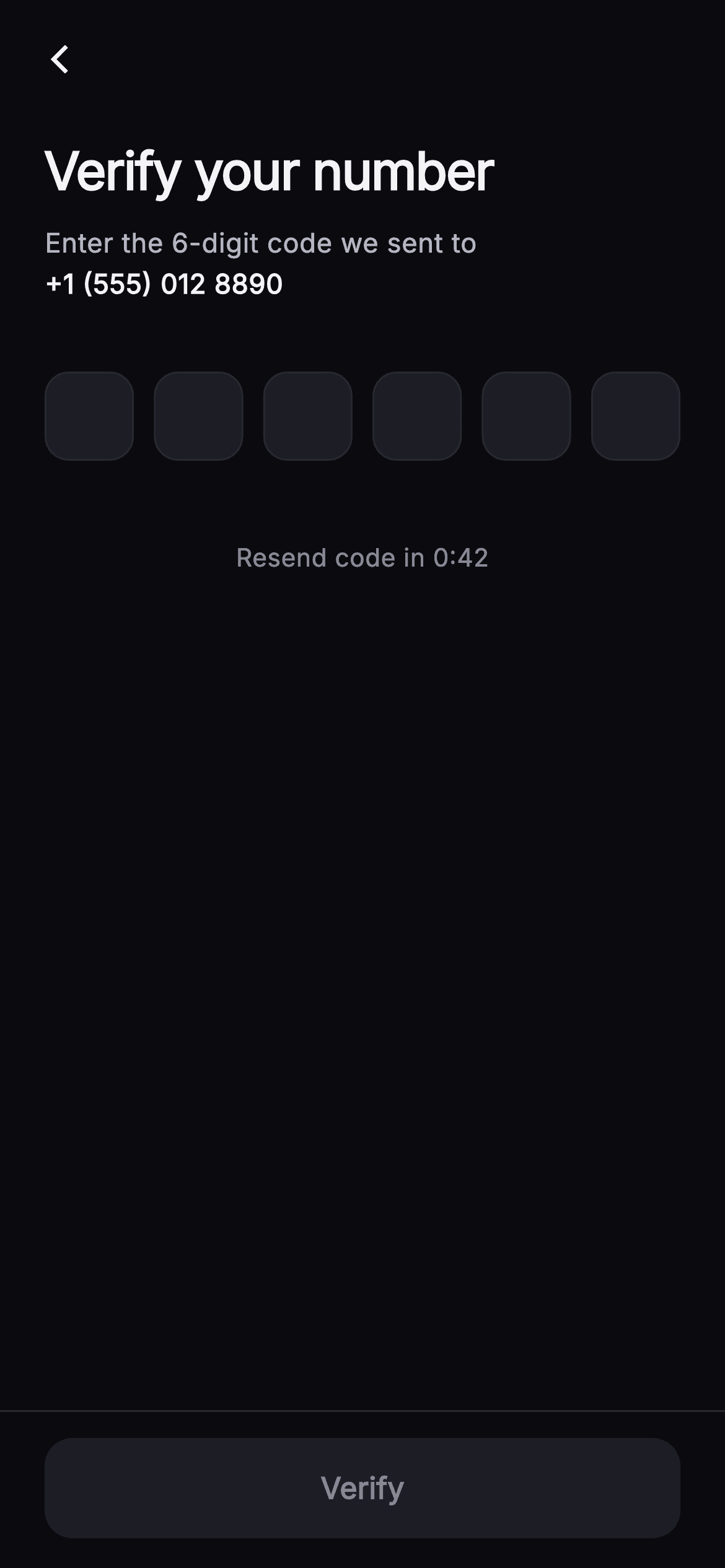
Watch the Flutter UI walkthrough
A short screen recording of Pulse · Verify Code running, if you'd rather see it before you read the code. The written tutorial below covers everything in it.
Can't see the video? Watch it on YouTube.
What you'll build
- ✓Six `_OtpBox` fields backed by parallel `_controllers` and `_nodes` lists, generated with `List.generate(_len, ...)`
- ✓An `_onChanged` handler that detects a multi-character paste, strips non-digits with a RegExp, and fills every box in one pass
- ✓A 42-second `Timer.periodic` countdown in `_secondsLeft` that flips the footer from 'Resend code in 0:42' to a tappable 'Resend code' link
- ✓A `_complete` getter that both enables the pinned indigo `FilledButton` and fires `onVerified` the moment the sixth digit lands
- ✓Border colours that change per box: hairline when empty, `#6E56F7` when filled, `#9B8CFF` at 1.6px while focused
Step-by-step build
Create the file
Add a new file at lib/social_auth_otp/social_auth_otp_screen.dart in your Flutter project.
Register the bundled fonts
No external packages — this is pure Flutter. It does bundle its design font (Inter), so drop the font file into fonts/ and declare it in pubspec.yaml:
flutter:
  fonts:
    - family: Inter
      fonts:
- asset: fonts/Inter-Regular.ttfBuild it, piece by piece
Here's how the screen goes together. Each block below is a real slice of the code with a plain-English explanation — paste them in order, or grab the whole file from the next section.
Callbacks, a destination string, and the Pulse palette
import 'package:flutter/material.dart';
import 'dart:async';

/// Verify Code — 6-box OTP entry for confirming a phone / email during Pulse
/// sign-up. Typing auto-advances box to box, backspace steps back, and a single
/// hidden field accepts pasted codes (paste support). A live resend countdown
/// disables the resend link until it hits zero. Self-contained per
/// CONVENTIONS.md: pure Flutter, bundled Inter font, own dark theme, SafeArea.
class SocialAuthOtpScreen extends StatefulWidget {
  const SocialAuthOtpScreen({
    super.key,
    this.onBack,
    this.onVerified,
    this.onResend,
    this.destination = '+1 (555) 012 8890',
  });

  final VoidCallback? onBack;

  /// Fires when all six digits are entered.
  final VoidCallback? onVerified;
  final VoidCallback? onResend;
  final String destination;

  static const String _font = 'Inter';
  static const Color _bg = Color(0xFF0B0B0F);
  static const Color _surfaceAlt = Color(0xFF1D1D26);
  static const Color _brand = Color(0xFF6E56F7);
  static const Color _accent = Color(0xFF9B8CFF);
  static const Color _hairline = Color(0xFF26262F);
  static const Color _textHi = Color(0xFFF4F4F7);
  static const Color _textLo = Color(0xFFB5B5C2);
  static const Color _muted = Color(0xFF8A8A99);

  @override
  State<SocialAuthOtpScreen> createState() => _SocialAuthOtpScreenState();
}
`SocialAuthOtpScreen` is a `StatefulWidget` because it owns a ticking timer and six live text fields, but its public surface is tiny: `onBack`, `onVerified`, `onResend`, and a `destination` string defaulting to a masked-looking `+1 (555) 012 8890`. Passing the destination in rather than hard-coding it means the same screen serves phone and email confirmation, since the copy under the headline just prints whatever you hand it. The colour set is the shared Pulse dark palette: `_bg #0B0B0F` behind everything, `_surfaceAlt #1D1D26` for the box fills and the disabled button, `_brand #6E56F7` indigo for the filled-box border and the Verify button, and a lighter `_accent #9B8CFF` reserved for the focused border, the cursor, and the resend link. Having two purples lets the screen say 'done' and 'active' with different colours without adding a third hue. `dart:async` is imported purely for `Timer`.
Parallel controllers and focus nodes, plus the resend countdown
class _SocialAuthOtpScreenState extends State<SocialAuthOtpScreen> {
  static const int _len = 6;
  final List<TextEditingController> _controllers =
      List<TextEditingController>.generate(_len, (_) => TextEditingController());
  final List<FocusNode> _nodes =
      List<FocusNode>.generate(_len, (_) => FocusNode());
  int _secondsLeft = 42;
  Timer? _timer;

  @override
  void initState() {
    super.initState();
    _startCountdown();
  }

  void _startCountdown() {
    _timer?.cancel();
    setState(() => _secondsLeft = 42);
    _timer = Timer.periodic(const Duration(seconds: 1), (Timer t) {
      if (_secondsLeft <= 1) {
        t.cancel();
        setState(() => _secondsLeft = 0);
      } else {
        setState(() => _secondsLeft--);
      }
    });
  }

  @override
  void dispose() {
    _timer?.cancel();
    for (final TextEditingController c in _controllers) {
      c.dispose();
    }
    for (final FocusNode n in _nodes) {
      n.dispose();
    }
    super.dispose();
  }

  bool get _complete =>
      _controllers.every((TextEditingController c) => c.text.isNotEmpty);
The state class builds two lists of length `_len = 6` with `List.generate`: one `TextEditingController` and one `FocusNode` per box, addressed by the same index. `_secondsLeft` starts at 42 and `_startCountdown` owns the whole resend cycle: it cancels any running timer, resets to 42 inside `setState`, then schedules `Timer.periodic` every second. The callback checks `_secondsLeft <= 1` before decrementing, so the timer cancels itself on the final tick and pins the value to exactly 0 rather than drifting negative. Because the method is idempotent it is safe to call from `initState` and again from the resend tap. `dispose` cancels the timer first, then loops both lists to release every controller and node; skipping that would leak six focus nodes per visit. `_complete` is a one-line getter using `every` on the controllers, and it is read in three places so keeping it derived rather than stored means it can never go stale.
One handler for typing, backspace, and paste
  void _onChanged(int i, String value) {
    // Handle paste of the full code into any box.
    if (value.length > 1) {
      final String digits = value.replaceAll(RegExp(r'[^0-9]'), '');
      for (int k = 0; k < _len; k++) {
        _controllers[k].text = k < digits.length ? digits[k] : '';
      }
      final int last = (digits.length).clamp(0, _len) - 1;
      if (last >= 0 && last < _len) {
        _nodes[last < _len - 1 ? last + 1 : last].requestFocus();
      }
      setState(() {});
      if (_complete) widget.onVerified?.call();
      return;
    }
    if (value.isNotEmpty && i < _len - 1) {
      _nodes[i + 1].requestFocus();
    } else if (value.isEmpty && i > 0) {
      _nodes[i - 1].requestFocus();
    }
    setState(() {});
    if (_complete) widget.onVerified?.call();
  }
`_onChanged(i, value)` receives the box index and its new text. The first branch handles paste: if `value.length > 1` the user dropped a whole code into one box, so the handler strips everything but digits with `RegExp(r'[^0-9]')`, then walks all six controllers and assigns `digits[k]` or an empty string, which also clears any stale boxes to the right. It then computes `last`, the clamped index of the final pasted digit, and focuses the box after it (or the last box), so a five-digit paste leaves the caret on box six. The normal path is two lines: a non-empty value on any box but the last moves focus forward, an empty value on any box but the first moves it back, which is what makes backspace feel like a single field. Both paths end with `setState` to redraw the borders, then call `widget.onVerified` if `_complete`, so a full paste verifies without touching the button.
Forced dark theme, back arrow, and the copy that names the destination
  @override
  Widget build(BuildContext context) {
    return Theme(
      data: ThemeData.dark(useMaterial3: true),
      child: Scaffold(
        backgroundColor: SocialAuthOtpScreen._bg,
        body: SafeArea(
          child: Column(
            crossAxisAlignment: CrossAxisAlignment.start,
            children: <Widget>[
              Padding(
                padding: const EdgeInsets.fromLTRB(8, 8, 8, 0),
                child: IconButton(
                  onPressed: widget.onBack,
                  icon: const Icon(Icons.arrow_back_ios_new,
                      size: 18, color: SocialAuthOtpScreen._textHi),
                ),
              ),
              Expanded(
                child: ListView(
                  padding: const EdgeInsets.fromLTRB(24, 16, 24, 24),
                  children: <Widget>[
                    const Text(
                      'Verify your number',
                      style: TextStyle(
                        fontFamily: SocialAuthOtpScreen._font,
                        fontSize: 28,
                        fontWeight: FontWeight.w700,
                        letterSpacing: -0.7,
                        color: SocialAuthOtpScreen._textHi,
                      ),
                    ),
                    const SizedBox(height: 8),
                    Text.rich(
                      TextSpan(
                        text: 'Enter the 6-digit code we sent to\n',
                        style: const TextStyle(
                          fontFamily: SocialAuthOtpScreen._font,
                          fontSize: 14.5,
                          height: 1.5,
                          color: SocialAuthOtpScreen._textLo,
                        ),
                        children: <TextSpan>[
                          TextSpan(
                            text: widget.destination,
                            style: const TextStyle(
                              fontWeight: FontWeight.w600,
                              color: SocialAuthOtpScreen._textHi,
                            ),
                          ),
                        ],
                      ),
                    ),
`build` wraps everything in `Theme(data: ThemeData.dark(useMaterial3: true))` so the `TextField` and `FilledButton` pick up dark defaults even if the host app is light, then paints `_bg` on the `Scaffold` and puts the whole layout inside `SafeArea`. The outer `Column` has three children: a bare back `IconButton` with `arrow_back_ios_new` at 18px in an 8px padding wrapper, an `Expanded` `ListView` for the body, and a pinned footer. The `ListView` carries 24px side padding and opens with 'Verify your number' at 28px `w700` and `letterSpacing: -0.7`. The subline is a `Text.rich`: the first span, 'Enter the 6-digit code we sent to' followed by a newline, is 14.5px `_textLo` grey, and the nested span prints `widget.destination` in `w600` `_textHi` white. Splitting it into spans is what lets the number stand out on its own line without a second widget, and it is the reader's cue that the code went to the right place.
The six-box row and the countdown-or-link footer
                    const SizedBox(height: 36),
                    Row(
                      mainAxisAlignment: MainAxisAlignment.spaceBetween,
                      children: List<Widget>.generate(_len, (int i) {
                        return _OtpBox(
                          controller: _controllers[i],
                          focusNode: _nodes[i],
                          onChanged: (String v) => _onChanged(i, v),
                        );
                      }),
                    ),
                    const SizedBox(height: 32),
                    Center(
                      child: _secondsLeft > 0
                          ? Text(
                              'Resend code in 0:${_secondsLeft.toString().padLeft(2, '0')}',
                              style: const TextStyle(
                                fontFamily: SocialAuthOtpScreen._font,
                                fontSize: 13.5,
                                fontWeight: FontWeight.w500,
                                color: SocialAuthOtpScreen._muted,
                              ),
                            )
                          : GestureDetector(
                              onTap: () {
                                widget.onResend?.call();
                                _startCountdown();
                              },
                              child: const Text(
                                'Resend code',
                                style: TextStyle(
                                  fontFamily: SocialAuthOtpScreen._font,
                                  fontSize: 14,
                                  fontWeight: FontWeight.w600,
                                  color: SocialAuthOtpScreen._accent,
                                ),
                              ),
                            ),
                    ),
                  ],
                ),
After a 36px gap, a `Row` with `spaceBetween` lays out six `_OtpBox` widgets from `List<Widget>.generate`, wiring each to `_controllers[i]`, `_nodes[i]`, and a closure that forwards the index into `_onChanged`. Because each box is a fixed 48px and the row spreads the remainder, the gutters scale with screen width instead of the boxes. Below, a `Center` holds a ternary on `_secondsLeft > 0`. While counting it shows a plain `Text` reading `'Resend code in 0:${_secondsLeft.toString().padLeft(2, '0')}'` in 13.5px `_muted`, and `padLeft` is what keeps '0:07' from collapsing to '0:7'. At zero it becomes a `GestureDetector` around 'Resend code' in 14px `w600` `_accent`, whose tap fires `widget.onResend` and immediately calls `_startCountdown` again, so the link vanishes and the 42-second clock restarts. Rendering the disabled state as muted text rather than a greyed button is a small choice that stops users hammering a link that will not respond.
A pinned Verify button gated on all six digits
              Container(
                decoration: const BoxDecoration(
                  color: SocialAuthOtpScreen._bg,
                  border: Border(
                      top: BorderSide(color: SocialAuthOtpScreen._hairline)),
                ),
                padding: const EdgeInsets.fromLTRB(24, 14, 24, 16),
                child: SizedBox(
                  width: double.infinity,
                  height: 54,
                  child: FilledButton(
                    onPressed: _complete ? widget.onVerified : null,
                    style: FilledButton.styleFrom(
                      backgroundColor: SocialAuthOtpScreen._brand,
                      foregroundColor: Colors.white,
                      disabledBackgroundColor: SocialAuthOtpScreen._surfaceAlt,
                      disabledForegroundColor: SocialAuthOtpScreen._muted,
                      shape: RoundedRectangleBorder(
                        borderRadius: BorderRadius.circular(15),
                      ),
                    ),
                    child: const Text(
                      'Verify',
                      style: TextStyle(
                        fontFamily: SocialAuthOtpScreen._font,
                        fontSize: 16,
                        fontWeight: FontWeight.w600,
                      ),
                    ),
                  ),
                ),
              ),
            ],
          ),
        ),
      ),
    );
  }
}
The footer is a `Container` painted `_bg` with a one-pixel `_hairline #26262F` top border and 24/14/24/16 padding, sitting outside the `ListView` so it stays fixed while the body scrolls under a keyboard. Inside is a full-width 54px `FilledButton` whose `onPressed` is `_complete ? widget.onVerified : null`, meaning the button is literally disabled until every controller holds text. The style spells out both states: `_brand` indigo with white text when enabled, `_surfaceAlt` with `_muted` text when disabled, and a 15px `RoundedRectangleBorder`. Because `_onChanged` already calls `onVerified` when the last digit lands, this button is really a fallback for users who paste a partial code and finish by hand, or who expect an explicit tap; either route reaches the same callback. The label 'Verify' is 16px `w600` in Inter.
_OtpBox: one TextField with three border states
class _OtpBox extends StatelessWidget {
  const _OtpBox({
    required this.controller,
    required this.focusNode,
    required this.onChanged,
  });
  final TextEditingController controller;
  final FocusNode focusNode;
  final ValueChanged<String> onChanged;

  @override
  Widget build(BuildContext context) {
    final bool filled = controller.text.isNotEmpty;
    final bool focused = focusNode.hasFocus;
    return SizedBox(
      width: 48,
      height: 58,
      child: TextField(
        controller: controller,
        focusNode: focusNode,
        onChanged: onChanged,
        textAlign: TextAlign.center,
        keyboardType: TextInputType.number,
        cursorColor: SocialAuthOtpScreen._accent,
        style: const TextStyle(
          fontFamily: SocialAuthOtpScreen._font,
          fontSize: 22,
          fontWeight: FontWeight.w700,
          color: SocialAuthOtpScreen._textHi,
        ),
        decoration: InputDecoration(
          counterText: '',
          filled: true,
          fillColor: SocialAuthOtpScreen._surfaceAlt,
          contentPadding: EdgeInsets.zero,
          enabledBorder: OutlineInputBorder(
            borderRadius: BorderRadius.circular(13),
            borderSide: BorderSide(
              color: filled
                  ? SocialAuthOtpScreen._brand
                  : SocialAuthOtpScreen._hairline,
            ),
          ),
          focusedBorder: OutlineInputBorder(
            borderRadius: BorderRadius.circular(13),
            borderSide: BorderSide(
              color: focused
                  ? SocialAuthOtpScreen._accent
                  : SocialAuthOtpScreen._brand,
              width: 1.6,
            ),
          ),
        ),
      ),
    );
  }
}
`_OtpBox` is a stateless 48x58 `SizedBox` around a `TextField`. It reads two booleans at build time, `filled` from `controller.text.isNotEmpty` and `focused` from `focusNode.hasFocus`, and since the parent calls `setState` on every change these are always fresh. The field is centred, uses `TextInputType.number`, an `_accent` cursor, and 22px `w700` text so a single digit reads as a big glyph. `counterText: ''` hides the character counter that a numeric field would otherwise show, and `contentPadding: EdgeInsets.zero` keeps the digit vertically centred in the short box. The borders do the state work: `enabledBorder` is 13px-rounded and coloured `_brand` when filled or `_hairline` when empty, while `focusedBorder` is 1.6px wide in `_accent` (falling back to `_brand`). So an empty box is a faint outline, a completed box glows indigo, and the box waiting for input has the brightest, thickest ring. Note there is no `maxLength: 1`, which is deliberate: it is what allows a pasted string to arrive intact for `_onChanged` to split.
Full code
The complete, ready-to-paste source. Free to use in your projects — one click copies it all.
import 'package:flutter/material.dart';
import 'dart:async';

/// Verify Code — 6-box OTP entry for confirming a phone / email during Pulse
/// sign-up. Typing auto-advances box to box, backspace steps back, and a single
/// hidden field accepts pasted codes (paste support). A live resend countdown
/// disables the resend link until it hits zero. Self-contained per
/// CONVENTIONS.md: pure Flutter, bundled Inter font, own dark theme, SafeArea.
class SocialAuthOtpScreen extends StatefulWidget {
  const SocialAuthOtpScreen({
    super.key,
    this.onBack,
    this.onVerified,
    this.onResend,
    this.destination = '+1 (555) 012 8890',
  });

  final VoidCallback? onBack;

  /// Fires when all six digits are entered.
  final VoidCallback? onVerified;
  final VoidCallback? onResend;
  final String destination;

  static const String _font = 'Inter';
  static const Color _bg = Color(0xFF0B0B0F);
  static const Color _surfaceAlt = Color(0xFF1D1D26);
  static const Color _brand = Color(0xFF6E56F7);
  static const Color _accent = Color(0xFF9B8CFF);
  static const Color _hairline = Color(0xFF26262F);
  static const Color _textHi = Color(0xFFF4F4F7);
  static const Color _textLo = Color(0xFFB5B5C2);
  static const Color _muted = Color(0xFF8A8A99);

  @override
  State<SocialAuthOtpScreen> createState() => _SocialAuthOtpScreenState();
}

class _SocialAuthOtpScreenState extends State<SocialAuthOtpScreen> {
  static const int _len = 6;
  final List<TextEditingController> _controllers =
      List<TextEditingController>.generate(_len, (_) => TextEditingController());
  final List<FocusNode> _nodes =
      List<FocusNode>.generate(_len, (_) => FocusNode());
  int _secondsLeft = 42;
  Timer? _timer;

  @override
  void initState() {
    super.initState();
    _startCountdown();
  }

  void _startCountdown() {
    _timer?.cancel();
    setState(() => _secondsLeft = 42);
    _timer = Timer.periodic(const Duration(seconds: 1), (Timer t) {
      if (_secondsLeft <= 1) {
        t.cancel();
        setState(() => _secondsLeft = 0);
      } else {
        setState(() => _secondsLeft--);
      }
    });
  }

  @override
  void dispose() {
    _timer?.cancel();
    for (final TextEditingController c in _controllers) {
      c.dispose();
    }
    for (final FocusNode n in _nodes) {
      n.dispose();
    }
    super.dispose();
  }

  bool get _complete =>
      _controllers.every((TextEditingController c) => c.text.isNotEmpty);

  void _onChanged(int i, String value) {
    // Handle paste of the full code into any box.
    if (value.length > 1) {
      final String digits = value.replaceAll(RegExp(r'[^0-9]'), '');
      for (int k = 0; k < _len; k++) {
        _controllers[k].text = k < digits.length ? digits[k] : '';
      }
      final int last = (digits.length).clamp(0, _len) - 1;
      if (last >= 0 && last < _len) {
        _nodes[last < _len - 1 ? last + 1 : last].requestFocus();
      }
      setState(() {});
      if (_complete) widget.onVerified?.call();
      return;
    }
    if (value.isNotEmpty && i < _len - 1) {
      _nodes[i + 1].requestFocus();
    } else if (value.isEmpty && i > 0) {
      _nodes[i - 1].requestFocus();
    }
    setState(() {});
    if (_complete) widget.onVerified?.call();
  }

  @override
  Widget build(BuildContext context) {
    return Theme(
      data: ThemeData.dark(useMaterial3: true),
      child: Scaffold(
        backgroundColor: SocialAuthOtpScreen._bg,
        body: SafeArea(
          child: Column(
            crossAxisAlignment: CrossAxisAlignment.start,
            children: <Widget>[
              Padding(
                padding: const EdgeInsets.fromLTRB(8, 8, 8, 0),
                child: IconButton(
                  onPressed: widget.onBack,
                  icon: const Icon(Icons.arrow_back_ios_new,
                      size: 18, color: SocialAuthOtpScreen._textHi),
                ),
              ),
              Expanded(
                child: ListView(
                  padding: const EdgeInsets.fromLTRB(24, 16, 24, 24),
                  children: <Widget>[
                    const Text(
                      'Verify your number',
                      style: TextStyle(
                        fontFamily: SocialAuthOtpScreen._font,
                        fontSize: 28,
                        fontWeight: FontWeight.w700,
                        letterSpacing: -0.7,
                        color: SocialAuthOtpScreen._textHi,
                      ),
                    ),
                    const SizedBox(height: 8),
                    Text.rich(
                      TextSpan(
                        text: 'Enter the 6-digit code we sent to\n',
                        style: const TextStyle(
                          fontFamily: SocialAuthOtpScreen._font,
                          fontSize: 14.5,
                          height: 1.5,
                          color: SocialAuthOtpScreen._textLo,
                        ),
                        children: <TextSpan>[
                          TextSpan(
                            text: widget.destination,
                            style: const TextStyle(
                              fontWeight: FontWeight.w600,
                              color: SocialAuthOtpScreen._textHi,
                            ),
                          ),
                        ],
                      ),
                    ),
                    const SizedBox(height: 36),
                    Row(
                      mainAxisAlignment: MainAxisAlignment.spaceBetween,
                      children: List<Widget>.generate(_len, (int i) {
                        return _OtpBox(
                          controller: _controllers[i],
                          focusNode: _nodes[i],
                          onChanged: (String v) => _onChanged(i, v),
                        );
                      }),
                    ),
                    const SizedBox(height: 32),
                    Center(
                      child: _secondsLeft > 0
                          ? Text(
                              'Resend code in 0:${_secondsLeft.toString().padLeft(2, '0')}',
                              style: const TextStyle(
                                fontFamily: SocialAuthOtpScreen._font,
                                fontSize: 13.5,
                                fontWeight: FontWeight.w500,
                                color: SocialAuthOtpScreen._muted,
                              ),
                            )
                          : GestureDetector(
                              onTap: () {
                                widget.onResend?.call();
                                _startCountdown();
                              },
                              child: const Text(
                                'Resend code',
                                style: TextStyle(
                                  fontFamily: SocialAuthOtpScreen._font,
                                  fontSize: 14,
                                  fontWeight: FontWeight.w600,
                                  color: SocialAuthOtpScreen._accent,
                                ),
                              ),
                            ),
                    ),
                  ],
                ),
              ),
              Container(
                decoration: const BoxDecoration(
                  color: SocialAuthOtpScreen._bg,
                  border: Border(
                      top: BorderSide(color: SocialAuthOtpScreen._hairline)),
                ),
                padding: const EdgeInsets.fromLTRB(24, 14, 24, 16),
                child: SizedBox(
                  width: double.infinity,
                  height: 54,
                  child: FilledButton(
                    onPressed: _complete ? widget.onVerified : null,
                    style: FilledButton.styleFrom(
                      backgroundColor: SocialAuthOtpScreen._brand,
                      foregroundColor: Colors.white,
                      disabledBackgroundColor: SocialAuthOtpScreen._surfaceAlt,
                      disabledForegroundColor: SocialAuthOtpScreen._muted,
                      shape: RoundedRectangleBorder(
                        borderRadius: BorderRadius.circular(15),
                      ),
                    ),
                    child: const Text(
                      'Verify',
                      style: TextStyle(
                        fontFamily: SocialAuthOtpScreen._font,
                        fontSize: 16,
                        fontWeight: FontWeight.w600,
                      ),
                    ),
                  ),
                ),
              ),
            ],
          ),
        ),
      ),
    );
  }
}

class _OtpBox extends StatelessWidget {
  const _OtpBox({
    required this.controller,
    required this.focusNode,
    required this.onChanged,
  });
  final TextEditingController controller;
  final FocusNode focusNode;
  final ValueChanged<String> onChanged;

  @override
  Widget build(BuildContext context) {
    final bool filled = controller.text.isNotEmpty;
    final bool focused = focusNode.hasFocus;
    return SizedBox(
      width: 48,
      height: 58,
      child: TextField(
        controller: controller,
        focusNode: focusNode,
        onChanged: onChanged,
        textAlign: TextAlign.center,
        keyboardType: TextInputType.number,
        cursorColor: SocialAuthOtpScreen._accent,
        style: const TextStyle(
          fontFamily: SocialAuthOtpScreen._font,
          fontSize: 22,
          fontWeight: FontWeight.w700,
          color: SocialAuthOtpScreen._textHi,
        ),
        decoration: InputDecoration(
          counterText: '',
          filled: true,
          fillColor: SocialAuthOtpScreen._surfaceAlt,
          contentPadding: EdgeInsets.zero,
          enabledBorder: OutlineInputBorder(
            borderRadius: BorderRadius.circular(13),
            borderSide: BorderSide(
              color: filled
                  ? SocialAuthOtpScreen._brand
                  : SocialAuthOtpScreen._hairline,
            ),
          ),
          focusedBorder: OutlineInputBorder(
            borderRadius: BorderRadius.circular(13),
            borderSide: BorderSide(
              color: focused
                  ? SocialAuthOtpScreen._accent
                  : SocialAuthOtpScreen._brand,
              width: 1.6,
            ),
          ),
        ),
      ),
    );
  }
}
Plus bundled 1 binary asset (fonts/images). The CLI and MCP install those for you automatically.
Two faster ways to add it
Copy-paste works, but you can skip it entirely.
1. FlutterKit CLI
One command drops this screen — and its fonts — straight into your project.
$ flutterkit add social-auth-otp2. AI agent (MCP)
Connect FlutterKit's MCP server in Claude or Cursor and just ask your agent to install social-auth-otp — it fetches and writes the files for you.
FAQ
Can I use this verify code screen in a commercial app?
Yes. FlutterKit screens are free under MIT-style terms for personal and commercial projects. Copy the code from this page or run `flutterkit add social-auth-otp`, drop it into your app, and wire `onVerified` to your own backend. No key, no sign-up, no attribution required.
Does it need any pub packages or fonts?
No packages at all: the imports are `flutter/material.dart` and `dart:async`, and the countdown, focus hopping, and paste handling are all standard-library code. The only asset is the Inter font, which `flutterkit add social-auth-otp` bundles and registers in pubspec for you.
Which Flutter version does it need?
Flutter 3.22 or newer, mainly because the constructor uses the `super.key` parameter shorthand. It does not use `withValues`, so no colour changes are needed on older SDKs; if you must target something earlier, expand the constructor to `{Key? key, ...}) : super(key: key)`.
Why does the OTP field use six separate TextFields instead of one?
Each box needs its own border state (empty, filled, focused) and its own focus target, which one field cannot express. The cost is coordinating them, and that is exactly what `_onChanged` does: it advances or retreats focus per keystroke and, because the boxes deliberately omit `maxLength: 1`, a paste lands in one box as a long string that the handler splits across all six.
How do I change the resend wait time or hook it to my SMS provider?
The 42-second value appears twice, once as the `_secondsLeft` initialiser and once in `_startCountdown`; change both or lift it into a constant. Then pass an `onResend` callback that calls your provider. The screen already restarts the timer after invoking it, so you only need to send the new code.


