How to Build an Empty Social Feed Screen in Flutter (Full Code + Preview)
A brand-new social account opens onto a feed with nothing in it, and a blank scroll view is the fastest way to lose that user. This tutorial builds an empty home feed in Flutter that stays useful: a `CustomPaint` illustration of concentric rings, four floating dots and a gradient card carrying a pulse wave, a 'Your feed is quiet' headline, a filled 'Find people to follow' CTA ranked above a text-only 'Explore topics' link, and a suggested-accounts card whose rows render gradient monogram avatars from a `_Suggest` list. Pure Flutter, dark theme, scrolls on short screens.
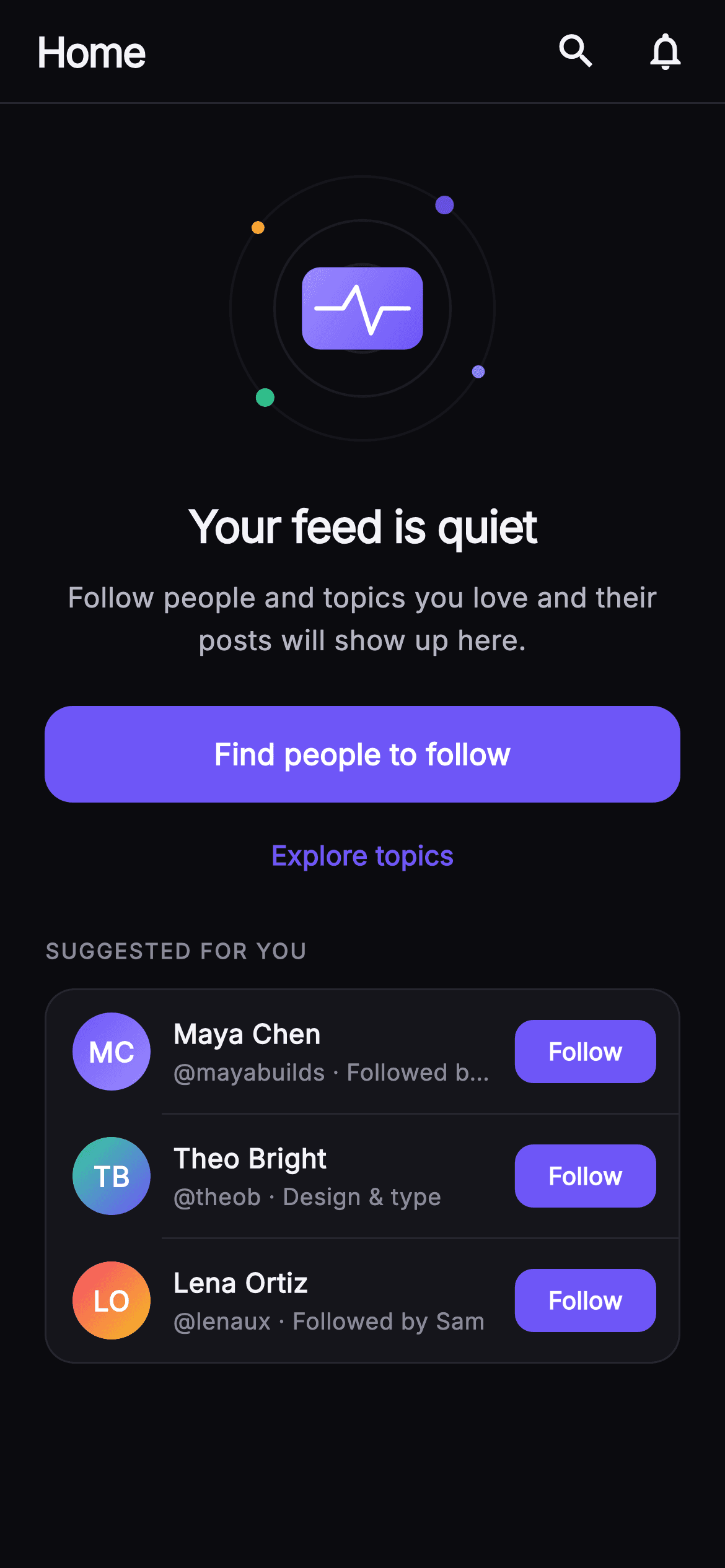
What you'll build
- ✓An `_EmptyIllustrationPainter` that draws three fading hairline rings, four coloured dots placed with `math.cos`/`math.sin`, and a gradient card with a white pulse `Path`
- ✓A zero-state body inside a `ListView` so the illustration, copy and CTA never overflow on short phones
- ✓A ranked action pair: a 52px `FilledButton` in `#6E56F7` above a `TextButton` explore link
- ✓A `_SuggestRow` list built from `const _Suggest` records with a computed `_initials` getter and per-row `onFollow(handle)` callback
- ✓A `_Monogram` avatar that needs no image assets — a circle with a two-stop `LinearGradient` per person
Step-by-step build
Create the file
Add a new file at lib/social_feed_empty/social_feed_empty_screen.dart in your Flutter project.
Register the bundled fonts
No external packages — this is pure Flutter. It does bundle its design font (Inter), so drop the font file into fonts/ and declare it in pubspec.yaml:
flutter:
  fonts:
    - family: Inter
      fonts:
- asset: fonts/Inter-Regular.ttfBuild it, piece by piece
Here's how the screen goes together. Each block below is a real slice of the code with a plain-English explanation — paste them in order, or grab the whole file from the next section.
Callbacks, palette and the suggested-accounts data
import 'dart:math' as math;

import 'package:flutter/material.dart';

/// Empty Feed — the zero-state for a home feed with nothing in it yet. A calm
/// painted illustration (concentric rings + a pulse wave through a card),
/// headline, subtext, a primary "Find people to follow" CTA, a secondary
/// explore link, and a short suggested-accounts card so it stays actionable.
/// Self-contained per CONVENTIONS.md: pure Flutter, bundled Inter font, own dark
/// theme, SafeArea, overflow-proof (scrolls on short screens).
class SocialFeedEmptyScreen extends StatelessWidget {
  const SocialFeedEmptyScreen({
    super.key,
    this.onFindPeople,
    this.onExplore,
    this.onFollow,
    this.onSearch,
    this.onNotifications,
  });

  final VoidCallback? onFindPeople;
  final VoidCallback? onExplore;
  final ValueChanged<String>? onFollow;
  final VoidCallback? onSearch;
  final VoidCallback? onNotifications;

  static const String _font = 'Inter';
  static const Color _bg = Color(0xFF0B0B0F);
  static const Color _surface = Color(0xFF15151B);
  static const Color _brand = Color(0xFF6E56F7);
  static const Color _hairline = Color(0xFF26262F);
  static const Color _textHi = Color(0xFFF4F4F7);
  static const Color _textLo = Color(0xFFB5B5C2);
  static const Color _muted = Color(0xFF8A8A99);

  static const List<_Suggest> _suggested = <_Suggest>[
    _Suggest('Maya Chen', 'mayabuilds', 'Followed by Dev', 0xFF6E56F7,
        0xFF9B8CFF),
    _Suggest('Theo Bright', 'theob', 'Design & type', 0xFF34D399, 0xFF6E56F7),
    _Suggest('Lena Ortiz', 'lenaux', 'Followed by Sam', 0xFFF4476B, 0xFFFBBF24),
  ];
`SocialFeedEmptyScreen` is a `StatelessWidget` because an empty state has nothing to mutate — it only offers ways out. Five optional callbacks cover every tap on the page: `onFindPeople`, `onExplore`, `onSearch`, `onNotifications`, and `onFollow`, which is a `ValueChanged<String>` so the host learns which handle was followed rather than just that a button was pressed. The palette is a near-black `_bg` (`#0B0B0F`), a slightly lifted `_surface` (`#15151B`) for the card, a `_hairline` (`#26262F`) for borders, and three text tiers (`_textHi`, `_textLo`, `_muted`). `_brand` violet `#6E56F7` is the only saturated colour outside the avatars. The three suggested people live in a `static const List<_Suggest>`, each carrying two ARGB ints for its avatar gradient, so adding a fourth suggestion is a one-line data edit.
Forcing dark mode and placing the painted illustration
  @override
  Widget build(BuildContext context) {
    return Theme(
      data: ThemeData.dark(useMaterial3: true),
      child: Scaffold(
        backgroundColor: _bg,
        body: SafeArea(
          child: Column(
            children: <Widget>[
              _TopBar(onSearch: onSearch, onNotifications: onNotifications),
              Expanded(
                child: ListView(
                  padding: const EdgeInsets.fromLTRB(24, 24, 24, 28),
                  children: <Widget>[
                    const SizedBox(height: 12),
                    Center(
                      child: SizedBox(
                        width: 148,
                        height: 148,
                        child: CustomPaint(painter: _EmptyIllustrationPainter()),
                      ),
                    ),
`build` wraps everything in `Theme(data: ThemeData.dark(useMaterial3: true))` so the screen looks identical no matter what theme the host app uses — the `IconButton` ripples and `Divider` defaults inherit dark values without extra styling. Inside `SafeArea`, a `Column` holds the fixed `_TopBar` and an `Expanded` `ListView`; using a scroll view rather than a `Column` with `Spacer`s is what makes the page overflow-proof on a short device, since the suggested card at the bottom simply scrolls into view. The illustration is a `CustomPaint` inside a 148×148 `SizedBox` — the painter expresses every radius as a fraction of `size.width`, so this one number is the only place the mark's scale is decided. Padding is 24 on the sides with 28 at the bottom so the card clears the home indicator.
Headline, subtext and a ranked CTA pair
                    const SizedBox(height: 26),
                    const Text(
                      'Your feed is quiet',
                      textAlign: TextAlign.center,
                      style: TextStyle(
                        fontFamily: _font,
                        fontSize: 24,
                        fontWeight: FontWeight.w700,
                        letterSpacing: -0.6,
                        color: _textHi,
                      ),
                    ),
                    const SizedBox(height: 10),
                    const Text(
                      'Follow people and topics you love and their posts will '
                      'show up here.',
                      textAlign: TextAlign.center,
                      style: TextStyle(
                        fontFamily: _font,
                        fontSize: 15,
                        height: 1.5,
                        color: _textLo,
                      ),
                    ),
                    const SizedBox(height: 24),
                    SizedBox(
                      width: double.infinity,
                      height: 52,
                      child: FilledButton(
                        onPressed: onFindPeople,
                        style: FilledButton.styleFrom(
                          backgroundColor: _brand,
                          foregroundColor: Colors.white,
                          shape: RoundedRectangleBorder(
                            borderRadius: BorderRadius.circular(15),
                          ),
                        ),
                        child: const Text(
                          'Find people to follow',
                          style: TextStyle(
                            fontFamily: _font,
                            fontSize: 16,
                            fontWeight: FontWeight.w600,
                          ),
                        ),
                      ),
                    ),
                    const SizedBox(height: 4),
                    Center(
                      child: TextButton(
                        onPressed: onExplore,
                        child: const Text(
                          'Explore topics',
                          style: TextStyle(
                            fontFamily: _font,
                            fontSize: 14.5,
                            fontWeight: FontWeight.w600,
                            color: _brand,
                          ),
                        ),
                      ),
                    ),
'Your feed is quiet' is set at 24px `w700` with `letterSpacing: -0.6`, and the subtext underneath is 15px with `height: 1.5` in `_textLo` — the copy tells the user what to do ('follow people and topics') rather than apologising for the emptiness. The two actions are deliberately unequal: a full-width 52px `FilledButton` in `_brand` with a 15px `borderRadius` carries 'Find people to follow', while 'Explore topics' is a bare `TextButton` in brand colour, centred and only 4px below. Following people is the one action that actually fills a feed, so it gets the fill; topic browsing is a secondary route and would compete if it were a second filled button. Both buttons pass their callbacks straight through, so a null callback simply renders the button disabled.
The suggested-for-you card and its dividers
                    const SizedBox(height: 20),
                    const Text(
                      'SUGGESTED FOR YOU',
                      style: TextStyle(
                        fontFamily: _font,
                        fontSize: 11.5,
                        fontWeight: FontWeight.w700,
                        letterSpacing: 1.0,
                        color: _muted,
                      ),
                    ),
                    const SizedBox(height: 12),
                    Container(
                      decoration: BoxDecoration(
                        color: _surface,
                        borderRadius: BorderRadius.circular(16),
                        border: Border.all(color: _hairline),
                      ),
                      child: Column(
                        children: <Widget>[
                          for (int i = 0; i < _suggested.length; i++) ...<Widget>[
                            _SuggestRow(
                              suggest: _suggested[i],
                              onFollow: onFollow,
                            ),
                            if (i != _suggested.length - 1)
                              const Divider(
                                height: 1,
                                indent: 62,
                                color: _hairline,
                              ),
                          ],
                        ],
                      ),
                    ),
                  ],
                ),
              ),
            ],
          ),
        ),
      ),
    );
  }
}
An 11.5px `w700` label in `_muted` with `letterSpacing: 1.0` — the all-caps 'SUGGESTED FOR YOU' — introduces the card so the section reads as a list header rather than more body copy. The card itself is a `Container` in `_surface` with a 16px radius and a `_hairline` border, the same surface/hairline pair used by the top bar so the page has one visual grammar. Its rows are emitted with a collection-for that spreads two widgets per iteration: the `_SuggestRow`, then `if (i != _suggested.length - 1)` a 1px `Divider`. That guard is what keeps a stray line from appearing under the last row against the rounded corner. `indent: 62` starts the divider past the 42px monogram plus 14px padding and 12px gap, so the line aligns with the name column exactly.
A fixed top bar with two icon actions
class _TopBar extends StatelessWidget {
  const _TopBar({this.onSearch, this.onNotifications});
  final VoidCallback? onSearch;
  final VoidCallback? onNotifications;

  @override
  Widget build(BuildContext context) {
    return Container(
      height: 56,
      padding: const EdgeInsets.fromLTRB(20, 0, 8, 0),
      decoration: const BoxDecoration(
        border: Border(
          bottom: BorderSide(color: SocialFeedEmptyScreen._hairline),
        ),
      ),
      child: Row(
        children: <Widget>[
          const Text(
            'Home',
            style: TextStyle(
              fontFamily: SocialFeedEmptyScreen._font,
              fontSize: 22,
              fontWeight: FontWeight.w800,
              letterSpacing: -0.8,
              color: SocialFeedEmptyScreen._textHi,
            ),
          ),
          const Spacer(),
          IconButton(
            onPressed: onSearch,
            icon: const Icon(Icons.search,
                size: 24, color: SocialFeedEmptyScreen._textHi),
            splashRadius: 22,
          ),
          IconButton(
            onPressed: onNotifications,
            icon: const Icon(Icons.notifications_none,
                size: 24, color: SocialFeedEmptyScreen._textHi),
            splashRadius: 22,
          ),
        ],
      ),
    );
  }
}
`_TopBar` is a 56px `Container` with only a bottom `BorderSide` in `_hairline` — no elevation, no `AppBar` — so it matches the flat dark surface below. The asymmetric padding `fromLTRB(20, 0, 8, 0)` is intentional: the 'Home' title needs a real 20px inset, but the trailing `IconButton`s carry their own 48px hit targets, so only 8px on the right keeps the glyphs visually aligned with the 24px content margin. The title is 22px `w800` with `letterSpacing: -0.8`, and a `Spacer` pushes search and `notifications_none` icons to the right. Each `IconButton` sets `splashRadius: 22` to keep the ripple from bleeding into its neighbour, and both take their callbacks from the parent screen rather than owning any navigation.
The _Suggest record and a follow row with computed initials
class _Suggest {
  const _Suggest(this.name, this.handle, this.note, this.colorA, this.colorB);
  final String name;
  final String handle;
  final String note;
  final int colorA;
  final int colorB;
}

class _SuggestRow extends StatelessWidget {
  const _SuggestRow({required this.suggest, this.onFollow});
  final _Suggest suggest;
  final ValueChanged<String>? onFollow;

  String get _initials {
    final List<String> p = suggest.name.trim().split(RegExp(r'\s+'));
    if (p.length == 1) return p.first.characters.first.toUpperCase();
    return (p.first[0] + p.last[0]).toUpperCase();
  }

  @override
  Widget build(BuildContext context) {
    return Padding(
      padding: const EdgeInsets.fromLTRB(14, 12, 12, 12),
      child: Row(
        children: <Widget>[
          _Monogram(
            initials: _initials,
            colorA: Color(suggest.colorA),
            colorB: Color(suggest.colorB),
          ),
          const SizedBox(width: 12),
          Expanded(
            child: Column(
              crossAxisAlignment: CrossAxisAlignment.start,
              children: <Widget>[
                Text(
                  suggest.name,
                  overflow: TextOverflow.ellipsis,
                  style: const TextStyle(
                    fontFamily: SocialFeedEmptyScreen._font,
                    fontSize: 14.5,
                    fontWeight: FontWeight.w700,
                    color: SocialFeedEmptyScreen._textHi,
                  ),
                ),
                const SizedBox(height: 2),
                Text(
                  '@${suggest.handle} · ${suggest.note}',
                  overflow: TextOverflow.ellipsis,
                  style: const TextStyle(
                    fontFamily: SocialFeedEmptyScreen._font,
                    fontSize: 12.5,
                    color: SocialFeedEmptyScreen._muted,
                  ),
                ),
              ],
            ),
          ),
          const SizedBox(width: 10),
          SizedBox(
            height: 34,
            child: FilledButton(
              onPressed: () => onFollow?.call(suggest.handle),
              style: FilledButton.styleFrom(
                backgroundColor: SocialFeedEmptyScreen._brand,
                foregroundColor: Colors.white,
                padding: const EdgeInsets.symmetric(horizontal: 18),
                shape: RoundedRectangleBorder(
                  borderRadius: BorderRadius.circular(10),
                ),
              ),
              child: const Text(
                'Follow',
                style: TextStyle(
                  fontFamily: SocialFeedEmptyScreen._font,
                  fontSize: 13,
                  fontWeight: FontWeight.w700,
                ),
              ),
            ),
          ),
        ],
      ),
    );
  }
}
`_Suggest` is a tiny const class holding name, handle, note, and two colour ints — ints rather than `Color` so the list can be a compile-time constant on all SDKs. `_SuggestRow` derives the avatar text through an `_initials` getter: it splits the name on `RegExp(r'\s+')`, returns the first character (via `.characters` for grapheme safety) for a single word, otherwise the first letters of the first and last words, uppercased. The row is `Padding(14, 12, 12, 12)` around a `Row` of monogram, an `Expanded` two-line column (name at 14.5px `w700`, then '@handle · note' at 12.5px in `_muted`, both `ellipsis`), and a 34px `FilledButton`. Its `onPressed` is `() => onFollow?.call(suggest.handle)`, which closes over the handle so the parent receives 'mayabuilds' rather than an index. The 10px radius is smaller than the main CTA's 15px, keeping it visually secondary.
Gradient monogram avatars with no assets
class _Monogram extends StatelessWidget {
  const _Monogram({
    required this.initials,
    required this.colorA,
    required this.colorB,
  });
  final String initials;
  final Color colorA;
  final Color colorB;

  @override
  Widget build(BuildContext context) {
    return Container(
      width: 42,
      height: 42,
      decoration: BoxDecoration(
        shape: BoxShape.circle,
        gradient: LinearGradient(
          begin: Alignment.topLeft,
          end: Alignment.bottomRight,
          colors: <Color>[colorA, colorB],
        ),
      ),
      child: Center(
        child: Text(
          initials,
          style: const TextStyle(
            fontFamily: SocialFeedEmptyScreen._font,
            fontSize: 15,
            fontWeight: FontWeight.w700,
            color: Colors.white,
          ),
        ),
      ),
    );
  }
}
`_Monogram` replaces profile images entirely: a 42px circular `Container` whose `BoxDecoration` uses `shape: BoxShape.circle` and a top-left to bottom-right `LinearGradient` between `colorA` and `colorB`. The colour pairs are chosen in the data — violet to lilac, green to violet, pink to amber — so each row has a distinct avatar without loading a single network image, which matters on a screen shown to a user who has followed nobody yet and therefore has no images to fetch. The initials sit centred in 15px `w700` white; white works on every pair because both stops are mid-saturation colours. Because it takes `Color` objects rather than ints, the widget is reusable anywhere in the app that has an avatar-less user.
Painting rings, floating dots and the pulse card
/// Concentric hairline rings with floating dots and a small card carrying a
/// painted pulse wave — a calm, on-brand empty-feed mark.
class _EmptyIllustrationPainter extends CustomPainter {
  @override
  void paint(Canvas canvas, Size size) {
    final Offset center = size.center(Offset.zero);
    const Color brand = SocialFeedEmptyScreen._brand;
    const Color accent = Color(0xFF9B8CFF);

    // Concentric rings.
    for (int i = 3; i >= 1; i--) {
      canvas.drawCircle(
        center,
        size.width * 0.16 * i,
        Paint()
          ..style = PaintingStyle.stroke
          ..strokeWidth = 1.4
          ..color = SocialFeedEmptyScreen._hairline
              .withValues(alpha: 0.9 - i * 0.18),
      );
    }

    // Floating dots on the outer ring.
    final double r = size.width * 0.48;
    const List<double> angles = <double>[-0.9, 0.5, 2.4, 3.8];
    final List<Color> dotColors = <Color>[
      brand,
      accent,
      const Color(0xFF34D399),
      const Color(0xFFFBBF24),
    ];
    for (int i = 0; i < angles.length; i++) {
      final Offset p = center +
          Offset(math.cos(angles[i]) * r, math.sin(angles[i]) * r);
      canvas.drawCircle(
        p,
        i.isEven ? 5 : 3.5,
        Paint()..color = dotColors[i].withValues(alpha: 0.9),
      );
    }

    // Center card.
    final Rect card = Rect.fromCenter(
      center: center,
      width: size.width * 0.44,
      height: size.width * 0.30,
    );
    final RRect rcard =
        RRect.fromRectAndRadius(card, const Radius.circular(10));
    canvas.drawRRect(
      rcard,
      Paint()
        ..shader = const LinearGradient(
          begin: Alignment.topLeft,
          end: Alignment.bottomRight,
          colors: <Color>[accent, brand],
        ).createShader(card),
    );

    // Pulse wave through the card.
    final Paint wave = Paint()
      ..style = PaintingStyle.stroke
      ..strokeWidth = 2.4
      ..strokeCap = StrokeCap.round
      ..strokeJoin = StrokeJoin.round
      ..color = Colors.white;
    final double cy = card.center.dy;
    final Path path = Path()
      ..moveTo(card.left + card.width * 0.12, cy)
      ..lineTo(card.left + card.width * 0.34, cy)
      ..lineTo(card.left + card.width * 0.45, cy - card.height * 0.26)
      ..lineTo(card.left + card.width * 0.57, cy + card.height * 0.30)
      ..lineTo(card.left + card.width * 0.66, cy)
      ..lineTo(card.left + card.width * 0.88, cy);
    canvas.drawPath(path, wave);
  }

  @override
  bool shouldRepaint(covariant CustomPainter oldDelegate) => false;
}
`_EmptyIllustrationPainter` draws in four passes. First, three stroked circles at radii `size.width * 0.16 * i` for i = 3, 2, 1, each with `_hairline.withValues(alpha: 0.9 - i * 0.18)` — the outer ring is the faintest (0.36) and the inner the strongest (0.72), so the eye is pulled to the centre. Second, four dots placed on a circle of radius `0.48 * width` at the hand-picked angles `-0.9, 0.5, 2.4, 3.8` radians using `math.cos`/`math.sin`; even-indexed dots are 5px and odd ones 3.5px, in brand, lilac `#9B8CFF`, green `#34D399`, and amber `#FBBF24` — the same accents as the avatars. Third, a `Rect.fromCenter` card at 44% × 30% of the width, rounded at 10 and filled through a `LinearGradient.createShader` from lilac to brand. Finally a white 2.4px `Path` with round caps runs flat, spikes up 26% of the card height, dips 30%, and flattens again — a heartbeat that says 'activity coming'. `shouldRepaint` returns `false` since nothing here depends on state.
Full code
The complete, ready-to-paste source. Free to use in your projects — one click copies it all.
import 'dart:math' as math;

import 'package:flutter/material.dart';

/// Empty Feed — the zero-state for a home feed with nothing in it yet. A calm
/// painted illustration (concentric rings + a pulse wave through a card),
/// headline, subtext, a primary "Find people to follow" CTA, a secondary
/// explore link, and a short suggested-accounts card so it stays actionable.
/// Self-contained per CONVENTIONS.md: pure Flutter, bundled Inter font, own dark
/// theme, SafeArea, overflow-proof (scrolls on short screens).
class SocialFeedEmptyScreen extends StatelessWidget {
  const SocialFeedEmptyScreen({
    super.key,
    this.onFindPeople,
    this.onExplore,
    this.onFollow,
    this.onSearch,
    this.onNotifications,
  });

  final VoidCallback? onFindPeople;
  final VoidCallback? onExplore;
  final ValueChanged<String>? onFollow;
  final VoidCallback? onSearch;
  final VoidCallback? onNotifications;

  static const String _font = 'Inter';
  static const Color _bg = Color(0xFF0B0B0F);
  static const Color _surface = Color(0xFF15151B);
  static const Color _brand = Color(0xFF6E56F7);
  static const Color _hairline = Color(0xFF26262F);
  static const Color _textHi = Color(0xFFF4F4F7);
  static const Color _textLo = Color(0xFFB5B5C2);
  static const Color _muted = Color(0xFF8A8A99);

  static const List<_Suggest> _suggested = <_Suggest>[
    _Suggest('Maya Chen', 'mayabuilds', 'Followed by Dev', 0xFF6E56F7,
        0xFF9B8CFF),
    _Suggest('Theo Bright', 'theob', 'Design & type', 0xFF34D399, 0xFF6E56F7),
    _Suggest('Lena Ortiz', 'lenaux', 'Followed by Sam', 0xFFF4476B, 0xFFFBBF24),
  ];

  @override
  Widget build(BuildContext context) {
    return Theme(
      data: ThemeData.dark(useMaterial3: true),
      child: Scaffold(
        backgroundColor: _bg,
        body: SafeArea(
          child: Column(
            children: <Widget>[
              _TopBar(onSearch: onSearch, onNotifications: onNotifications),
              Expanded(
                child: ListView(
                  padding: const EdgeInsets.fromLTRB(24, 24, 24, 28),
                  children: <Widget>[
                    const SizedBox(height: 12),
                    Center(
                      child: SizedBox(
                        width: 148,
                        height: 148,
                        child: CustomPaint(painter: _EmptyIllustrationPainter()),
                      ),
                    ),
                    const SizedBox(height: 26),
                    const Text(
                      'Your feed is quiet',
                      textAlign: TextAlign.center,
                      style: TextStyle(
                        fontFamily: _font,
                        fontSize: 24,
                        fontWeight: FontWeight.w700,
                        letterSpacing: -0.6,
                        color: _textHi,
                      ),
                    ),
                    const SizedBox(height: 10),
                    const Text(
                      'Follow people and topics you love and their posts will '
                      'show up here.',
                      textAlign: TextAlign.center,
                      style: TextStyle(
                        fontFamily: _font,
                        fontSize: 15,
                        height: 1.5,
                        color: _textLo,
                      ),
                    ),
                    const SizedBox(height: 24),
                    SizedBox(
                      width: double.infinity,
                      height: 52,
                      child: FilledButton(
                        onPressed: onFindPeople,
                        style: FilledButton.styleFrom(
                          backgroundColor: _brand,
                          foregroundColor: Colors.white,
                          shape: RoundedRectangleBorder(
                            borderRadius: BorderRadius.circular(15),
                          ),
                        ),
                        child: const Text(
                          'Find people to follow',
                          style: TextStyle(
                            fontFamily: _font,
                            fontSize: 16,
                            fontWeight: FontWeight.w600,
                          ),
                        ),
                      ),
                    ),
                    const SizedBox(height: 4),
                    Center(
                      child: TextButton(
                        onPressed: onExplore,
                        child: const Text(
                          'Explore topics',
                          style: TextStyle(
                            fontFamily: _font,
                            fontSize: 14.5,
                            fontWeight: FontWeight.w600,
                            color: _brand,
                          ),
                        ),
                      ),
                    ),
                    const SizedBox(height: 20),
                    const Text(
                      'SUGGESTED FOR YOU',
                      style: TextStyle(
                        fontFamily: _font,
                        fontSize: 11.5,
                        fontWeight: FontWeight.w700,
                        letterSpacing: 1.0,
                        color: _muted,
                      ),
                    ),
                    const SizedBox(height: 12),
                    Container(
                      decoration: BoxDecoration(
                        color: _surface,
                        borderRadius: BorderRadius.circular(16),
                        border: Border.all(color: _hairline),
                      ),
                      child: Column(
                        children: <Widget>[
                          for (int i = 0; i < _suggested.length; i++) ...<Widget>[
                            _SuggestRow(
                              suggest: _suggested[i],
                              onFollow: onFollow,
                            ),
                            if (i != _suggested.length - 1)
                              const Divider(
                                height: 1,
                                indent: 62,
                                color: _hairline,
                              ),
                          ],
                        ],
                      ),
                    ),
                  ],
                ),
              ),
            ],
          ),
        ),
      ),
    );
  }
}

class _TopBar extends StatelessWidget {
  const _TopBar({this.onSearch, this.onNotifications});
  final VoidCallback? onSearch;
  final VoidCallback? onNotifications;

  @override
  Widget build(BuildContext context) {
    return Container(
      height: 56,
      padding: const EdgeInsets.fromLTRB(20, 0, 8, 0),
      decoration: const BoxDecoration(
        border: Border(
          bottom: BorderSide(color: SocialFeedEmptyScreen._hairline),
        ),
      ),
      child: Row(
        children: <Widget>[
          const Text(
            'Home',
            style: TextStyle(
              fontFamily: SocialFeedEmptyScreen._font,
              fontSize: 22,
              fontWeight: FontWeight.w800,
              letterSpacing: -0.8,
              color: SocialFeedEmptyScreen._textHi,
            ),
          ),
          const Spacer(),
          IconButton(
            onPressed: onSearch,
            icon: const Icon(Icons.search,
                size: 24, color: SocialFeedEmptyScreen._textHi),
            splashRadius: 22,
          ),
          IconButton(
            onPressed: onNotifications,
            icon: const Icon(Icons.notifications_none,
                size: 24, color: SocialFeedEmptyScreen._textHi),
            splashRadius: 22,
          ),
        ],
      ),
    );
  }
}

class _Suggest {
  const _Suggest(this.name, this.handle, this.note, this.colorA, this.colorB);
  final String name;
  final String handle;
  final String note;
  final int colorA;
  final int colorB;
}

class _SuggestRow extends StatelessWidget {
  const _SuggestRow({required this.suggest, this.onFollow});
  final _Suggest suggest;
  final ValueChanged<String>? onFollow;

  String get _initials {
    final List<String> p = suggest.name.trim().split(RegExp(r'\s+'));
    if (p.length == 1) return p.first.characters.first.toUpperCase();
    return (p.first[0] + p.last[0]).toUpperCase();
  }

  @override
  Widget build(BuildContext context) {
    return Padding(
      padding: const EdgeInsets.fromLTRB(14, 12, 12, 12),
      child: Row(
        children: <Widget>[
          _Monogram(
            initials: _initials,
            colorA: Color(suggest.colorA),
            colorB: Color(suggest.colorB),
          ),
          const SizedBox(width: 12),
          Expanded(
            child: Column(
              crossAxisAlignment: CrossAxisAlignment.start,
              children: <Widget>[
                Text(
                  suggest.name,
                  overflow: TextOverflow.ellipsis,
                  style: const TextStyle(
                    fontFamily: SocialFeedEmptyScreen._font,
                    fontSize: 14.5,
                    fontWeight: FontWeight.w700,
                    color: SocialFeedEmptyScreen._textHi,
                  ),
                ),
                const SizedBox(height: 2),
                Text(
                  '@${suggest.handle} · ${suggest.note}',
                  overflow: TextOverflow.ellipsis,
                  style: const TextStyle(
                    fontFamily: SocialFeedEmptyScreen._font,
                    fontSize: 12.5,
                    color: SocialFeedEmptyScreen._muted,
                  ),
                ),
              ],
            ),
          ),
          const SizedBox(width: 10),
          SizedBox(
            height: 34,
            child: FilledButton(
              onPressed: () => onFollow?.call(suggest.handle),
              style: FilledButton.styleFrom(
                backgroundColor: SocialFeedEmptyScreen._brand,
                foregroundColor: Colors.white,
                padding: const EdgeInsets.symmetric(horizontal: 18),
                shape: RoundedRectangleBorder(
                  borderRadius: BorderRadius.circular(10),
                ),
              ),
              child: const Text(
                'Follow',
                style: TextStyle(
                  fontFamily: SocialFeedEmptyScreen._font,
                  fontSize: 13,
                  fontWeight: FontWeight.w700,
                ),
              ),
            ),
          ),
        ],
      ),
    );
  }
}

class _Monogram extends StatelessWidget {
  const _Monogram({
    required this.initials,
    required this.colorA,
    required this.colorB,
  });
  final String initials;
  final Color colorA;
  final Color colorB;

  @override
  Widget build(BuildContext context) {
    return Container(
      width: 42,
      height: 42,
      decoration: BoxDecoration(
        shape: BoxShape.circle,
        gradient: LinearGradient(
          begin: Alignment.topLeft,
          end: Alignment.bottomRight,
          colors: <Color>[colorA, colorB],
        ),
      ),
      child: Center(
        child: Text(
          initials,
          style: const TextStyle(
            fontFamily: SocialFeedEmptyScreen._font,
            fontSize: 15,
            fontWeight: FontWeight.w700,
            color: Colors.white,
          ),
        ),
      ),
    );
  }
}

/// Concentric hairline rings with floating dots and a small card carrying a
/// painted pulse wave — a calm, on-brand empty-feed mark.
class _EmptyIllustrationPainter extends CustomPainter {
  @override
  void paint(Canvas canvas, Size size) {
    final Offset center = size.center(Offset.zero);
    const Color brand = SocialFeedEmptyScreen._brand;
    const Color accent = Color(0xFF9B8CFF);

    // Concentric rings.
    for (int i = 3; i >= 1; i--) {
      canvas.drawCircle(
        center,
        size.width * 0.16 * i,
        Paint()
          ..style = PaintingStyle.stroke
          ..strokeWidth = 1.4
          ..color = SocialFeedEmptyScreen._hairline
              .withValues(alpha: 0.9 - i * 0.18),
      );
    }

    // Floating dots on the outer ring.
    final double r = size.width * 0.48;
    const List<double> angles = <double>[-0.9, 0.5, 2.4, 3.8];
    final List<Color> dotColors = <Color>[
      brand,
      accent,
      const Color(0xFF34D399),
      const Color(0xFFFBBF24),
    ];
    for (int i = 0; i < angles.length; i++) {
      final Offset p = center +
          Offset(math.cos(angles[i]) * r, math.sin(angles[i]) * r);
      canvas.drawCircle(
        p,
        i.isEven ? 5 : 3.5,
        Paint()..color = dotColors[i].withValues(alpha: 0.9),
      );
    }

    // Center card.
    final Rect card = Rect.fromCenter(
      center: center,
      width: size.width * 0.44,
      height: size.width * 0.30,
    );
    final RRect rcard =
        RRect.fromRectAndRadius(card, const Radius.circular(10));
    canvas.drawRRect(
      rcard,
      Paint()
        ..shader = const LinearGradient(
          begin: Alignment.topLeft,
          end: Alignment.bottomRight,
          colors: <Color>[accent, brand],
        ).createShader(card),
    );

    // Pulse wave through the card.
    final Paint wave = Paint()
      ..style = PaintingStyle.stroke
      ..strokeWidth = 2.4
      ..strokeCap = StrokeCap.round
      ..strokeJoin = StrokeJoin.round
      ..color = Colors.white;
    final double cy = card.center.dy;
    final Path path = Path()
      ..moveTo(card.left + card.width * 0.12, cy)
      ..lineTo(card.left + card.width * 0.34, cy)
      ..lineTo(card.left + card.width * 0.45, cy - card.height * 0.26)
      ..lineTo(card.left + card.width * 0.57, cy + card.height * 0.30)
      ..lineTo(card.left + card.width * 0.66, cy)
      ..lineTo(card.left + card.width * 0.88, cy);
    canvas.drawPath(path, wave);
  }

  @override
  bool shouldRepaint(covariant CustomPainter oldDelegate) => false;
}
Plus bundled 1 binary asset (fonts/images). The CLI and MCP install those for you automatically.
Two faster ways to add it
Copy-paste works, but you can skip it entirely.
1. FlutterKit CLI
One command drops this screen — and its fonts — straight into your project.
$ flutterkit add social-feed-empty2. AI agent (MCP)
Connect FlutterKit's MCP server in Claude or Cursor and just ask your agent to install social-feed-empty — it fetches and writes the files for you.
FAQ
Can I use this empty feed screen in a commercial app?
Yes. FlutterKit screens are free for personal and commercial projects under an MIT-style licence — no licence key, no attribution, no sign-up. Copy the code from this page, run `flutterkit add social-feed-empty`, or pull it through the MCP server and ship it.
Which packages and fonts does it depend on?
No pub packages at all — it is pure Flutter plus `dart:math` for the dot placement. The only asset is the Inter font, which `flutterkit add social-feed-empty` bundles and registers in `pubspec.yaml` for you; if you copy the file by hand, add Inter yourself or drop the `fontFamily` lines to fall back to the platform font.
What Flutter version is required?
Flutter 3.22 or newer. The painter calls `Color.withValues(alpha: ...)` for the ring and dot opacity, and the constructor uses the `super.key` super-parameter. On an older 3.x SDK, replace each `withValues(alpha: x)` with `withOpacity(x)` and expand the constructor to `{Key? key, ...}) : super(key: key)`.
How do I feed the suggested accounts from my API instead of the hard-coded list?
Turn `_suggested` into a constructor parameter (`List<_Suggest> suggested`) and drop the `static const`. Keep `_Suggest` as the row model — it only needs name, handle, note and two colour ints, so map your user objects into it and pick the gradient pair from a small palette by hashing the user id. Everything below, including the divider guard and `onFollow(handle)`, works unchanged.
Why are the avatars painted monograms rather than network images?
Because this screen appears when the user follows nobody, so there is nothing cached yet and a row of loading spinners would make the empty state feel broken. `_Monogram` draws a gradient circle with computed initials from `_initials`, which renders instantly with zero requests. Swap in a `CircleAvatar` with `NetworkImage` once you have real profile photos, keeping the monogram as the fallback.


