How to Build a For You Feed Screen in Flutter (Full Code + Preview)
A ranked feed has to explain itself: readers want to know why a post surfaced out of order, and an advert between two friends' posts must be labelled without looking cheap. This tutorial builds Pulse's For You tab in Flutter: a segmented For you / Following control with a 34px brand underline, `_PostCard` entries that carry a `_AffinityChip` reading 'Ranked for you' only when `ranked` is true, gradient media painted by `_MediaPainter` instead of downloaded images, and a `_SponsoredCard` on the `#15151B` surface with an outlined 'Learn more' CTA.
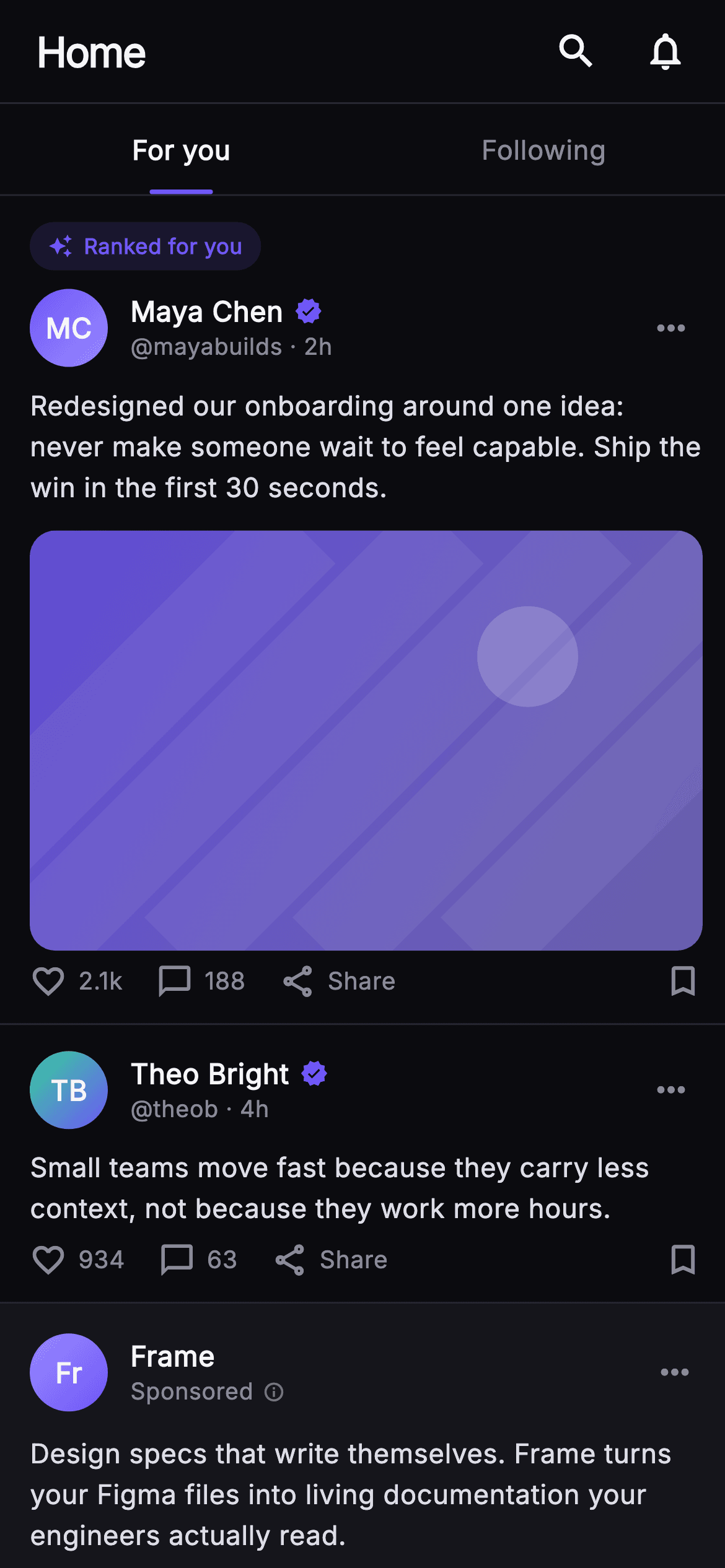
What you'll build
- ✓A `_SegTabs` row where the active tab is marked by a 2.5px-tall, 34px-wide `#6E56F7` bar and the inactive one keeps a transparent bar of the same size
- ✓A `_PostCard` that conditionally spreads a `_AffinityChip` above the author row via `if (ranked) ...[]`, so only algorithmically surfaced posts are labelled
- ✓A `_SponsoredCard` that reuses `_Monogram`, `_MediaPainter` and `_ActionBar` but swaps counts for 'Like' / 'Comment' labels through a `sponsored` flag
- ✓A `_MediaPainter` that draws a diagonal gradient, five translucent light streaks and a sun disc so feed imagery ships without any network calls
- ✓A `_fmt` helper that turns 2140 into '2.1k' and a `_initials` getter that derives 'MC' from 'Maya Chen' with a whitespace `RegExp`
Step-by-step build
Create the file
Add a new file at lib/social_feed_foryou/social_feed_foryou_screen.dart in your Flutter project.
Register the bundled fonts
No external packages — this is pure Flutter. It does bundle its design font (Inter), so drop the font file into fonts/ and declare it in pubspec.yaml:
flutter:
  fonts:
    - family: Inter
      fonts:
- asset: fonts/Inter-Regular.ttfBuild it, piece by piece
Here's how the screen goes together. Each block below is a real slice of the code with a plain-English explanation — paste them in order, or grab the whole file from the next section.
Five callbacks and a near-black Pulse palette
import 'package:flutter/material.dart';

/// For You Feed — the ranked/algorithmic tab of the Pulse home. A top bar, the
/// For-you / Following segmented control (For you active), a column of ranked
/// post cards carrying a small "Ranked for you" affinity chip, and a tasteful
/// sponsored card variant with its own CTA. Self-contained per CONVENTIONS.md:
/// pure Flutter, bundled Inter font, own dark theme, SafeArea, overflow-proof.
class SocialFeedForyouScreen extends StatelessWidget {
  const SocialFeedForyouScreen({
    super.key,
    this.onSwitchTab,
    this.onSearch,
    this.onNotifications,
    this.onPost,
    this.onSponsorCta,
  });

  final VoidCallback? onSwitchTab;
  final VoidCallback? onSearch;
  final VoidCallback? onNotifications;
  final ValueChanged<String>? onPost;
  final VoidCallback? onSponsorCta;

  static const String _font = 'Inter';
  static const Color _bg = Color(0xFF0B0B0F);
  static const Color _surface = Color(0xFF15151B);
  static const Color _brand = Color(0xFF6E56F7);
  static const Color _hairline = Color(0xFF26262F);
  static const Color _textHi = Color(0xFFF4F4F7);
  static const Color _muted = Color(0xFF8A8A99);
`SocialFeedForyouScreen` is a `StatelessWidget` because the ranking decision happens on a server, not on the device — the screen only renders what it is handed. Its constructor takes five nullable callbacks: `onSwitchTab` fires when the reader taps Following, `onSearch` and `onNotifications` belong to the top bar, `onPost` is a `ValueChanged<String>` that receives a post id such as `'y1'`, and `onSponsorCta` is kept separate so ad clicks can be tracked apart from organic taps. The palette is deliberately near-monochrome: `_bg` is `#0B0B0F`, `_surface` `#15151B`, `_hairline` `#26262F`, with `_textHi` at `#F4F4F7` and `_muted` at `#8A8A99`. The single accent, `_brand` `#6E56F7`, is reserved for the active tab underline, verified badges, the affinity chip and the sponsor CTA border, which keeps the eye moving to exactly those four things. `_font` pins Inter so the type does not fall back to Roboto.
Forcing a dark theme and ordering the ranked column
  @override
  Widget build(BuildContext context) {
    return Theme(
      data: ThemeData.dark(useMaterial3: true),
      child: Scaffold(
        backgroundColor: _bg,
        body: SafeArea(
          child: Column(
            children: <Widget>[
              _TopBar(onSearch: onSearch, onNotifications: onNotifications),
              _SegTabs(onFollowing: onSwitchTab),
              Expanded(
                child: ListView(
                  padding: EdgeInsets.zero,
                  children: <Widget>[
                    _PostCard(
                      post: const _Post(
                        id: 'y1',
                        name: 'Maya Chen',
                        handle: 'mayabuilds',
                        time: '2h',
                        colorA: 0xFF6E56F7,
                        colorB: 0xFF9B8CFF,
                        body:
                            'Redesigned our onboarding around one idea: never '
                            'make someone wait to feel capable. Ship the win in '
                            'the first 30 seconds.',
                        likes: 2140,
                        comments: 188,
                        hasMedia: true,
                      ),
                      ranked: true,
                      onTap: () => onPost?.call('y1'),
                    ),
                    _PostCard(
                      post: const _Post(
                        id: 'y2',
                        name: 'Theo Bright',
                        handle: 'theob',
                        time: '4h',
                        colorA: 0xFF34D399,
                        colorB: 0xFF6E56F7,
                        body:
                            'Small teams move fast because they carry less '
                            'context, not because they work more hours.',
                        likes: 934,
                        comments: 63,
                        hasMedia: false,
                      ),
                      ranked: false,
                      onTap: () => onPost?.call('y2'),
                    ),
                    _SponsoredCard(onCta: onSponsorCta),
                    _PostCard(
                      post: const _Post(
                        id: 'y3',
                        name: 'Lena Ortiz',
                        handle: 'lenaux',
                        time: '6h',
                        colorA: 0xFFF4476B,
                        colorB: 0xFFFBBF24,
                        body: 'Studio light study — warm to cool in four frames.',
                        likes: 1280,
                        comments: 97,
                        hasMedia: true,
                      ),
                      ranked: true,
                      onTap: () => onPost?.call('y3'),
                    ),
                    const SizedBox(height: 24),
                  ],
                ),
              ),
            ],
          ),
        ),
      ),
    );
  }
}
`build` wraps the `Scaffold` in `Theme(data: ThemeData.dark(useMaterial3: true))` so ink splashes, `OutlinedButton` and `IconButton` pick dark defaults regardless of the host app's theme. Inside `SafeArea`, a `Column` stacks `_TopBar`, `_SegTabs` and an `Expanded` `ListView` with `padding: EdgeInsets.zero` so the first card butts straight against the tab hairline. The feed order itself tells the story of a ranked tab: Maya Chen's post (`ranked: true`, 2,140 likes, `hasMedia: true`) leads, Theo Bright's text-only post is `ranked: false`, then `_SponsoredCard` sits third — after two organic posts, the standard position that stops a feed from opening on an advert — and Lena Ortiz's `ranked: true` photo post closes it. Each `_Post` carries its own `colorA` / `colorB` integer pair, which drives both the monogram gradient and the painted media, so every author has a consistent hue. `onTap: () => onPost?.call('y1')` forwards the id rather than the whole model. A trailing `SizedBox(height: 24)` keeps the last action bar clear of the home indicator.
Top bar and the segmented For you / Following tabs
class _TopBar extends StatelessWidget {
  const _TopBar({this.onSearch, this.onNotifications});
  final VoidCallback? onSearch;
  final VoidCallback? onNotifications;

  @override
  Widget build(BuildContext context) {
    return Container(
      height: 56,
      padding: const EdgeInsets.fromLTRB(20, 0, 8, 0),
      decoration: const BoxDecoration(
        border: Border(
          bottom: BorderSide(color: SocialFeedForyouScreen._hairline),
        ),
      ),
      child: Row(
        children: <Widget>[
          const Text(
            'Home',
            style: TextStyle(
              fontFamily: SocialFeedForyouScreen._font,
              fontSize: 22,
              fontWeight: FontWeight.w800,
              letterSpacing: -0.8,
              color: SocialFeedForyouScreen._textHi,
            ),
          ),
          const Spacer(),
          IconButton(
            onPressed: onSearch,
            icon: const Icon(Icons.search,
                size: 24, color: SocialFeedForyouScreen._textHi),
            splashRadius: 22,
          ),
          IconButton(
            onPressed: onNotifications,
            icon: const Icon(Icons.notifications_none,
                size: 24, color: SocialFeedForyouScreen._textHi),
            splashRadius: 22,
          ),
        ],
      ),
    );
  }
}

class _SegTabs extends StatelessWidget {
  const _SegTabs({this.onFollowing});
  final VoidCallback? onFollowing;

  @override
  Widget build(BuildContext context) {
    return Container(
      decoration: const BoxDecoration(
        border: Border(
          bottom: BorderSide(color: SocialFeedForyouScreen._hairline),
        ),
      ),
      child: Row(
        children: <Widget>[
          Expanded(child: _Tab(label: 'For you', active: true, onTap: () {})),
          Expanded(
            child: _Tab(label: 'Following', active: false, onTap: onFollowing),
          ),
        ],
      ),
    );
  }
}

class _Tab extends StatelessWidget {
  const _Tab({required this.label, required this.active, this.onTap});
  final String label;
  final bool active;
  final VoidCallback? onTap;

  @override
  Widget build(BuildContext context) {
    return InkWell(
      onTap: onTap,
      child: Column(
        mainAxisSize: MainAxisSize.min,
        children: <Widget>[
          const SizedBox(height: 14),
          Text(
            label,
            style: TextStyle(
              fontFamily: SocialFeedForyouScreen._font,
              fontSize: 14.5,
              fontWeight: active ? FontWeight.w700 : FontWeight.w500,
              color: active
                  ? SocialFeedForyouScreen._textHi
                  : SocialFeedForyouScreen._muted,
            ),
          ),
          const SizedBox(height: 11),
          Container(
            height: 2.5,
            width: 34,
            decoration: BoxDecoration(
              borderRadius: BorderRadius.circular(2),
              color:
                  active ? SocialFeedForyouScreen._brand : Colors.transparent,
            ),
          ),
        ],
      ),
    );
  }
}
`_TopBar` is a fixed 56px `Container` with asymmetric padding `fromLTRB(20, 0, 8, 0)` — 20 on the left aligns the 22px `w800` 'Home' wordmark with the card content, while only 8 on the right lets the two `IconButton`s' 22px `splashRadius` sit flush without visual dead space. `_SegTabs` places two `Expanded` `_Tab`s under a hairline border; 'For you' is hard-coded `active: true` with an empty `onTap`, and 'Following' routes to `onFollowing` because switching away is the only navigation this tab needs. The clever part is inside `_Tab`: both states render the same `Column` — 14px spacer, label, 11px spacer, then a `Container` 2.5px tall and 34px wide with `BorderRadius.circular(2)`. The inactive tab paints that bar `Colors.transparent` instead of omitting it, so both tabs measure identically and nothing shifts when the selection changes. Weight flips `w700` to `w500` and colour `_textHi` to `_muted` in the same `active ? :` expressions.
The _Post model and a card that labels its own ranking
// ── post card ───────────────────────────────────────────────────────────────
class _Post {
  const _Post({
    required this.id,
    required this.name,
    required this.handle,
    required this.time,
    required this.colorA,
    required this.colorB,
    required this.body,
    required this.likes,
    required this.comments,
    required this.hasMedia,
  });
  final String id;
  final String name;
  final String handle;
  final String time;
  final int colorA;
  final int colorB;
  final String body;
  final int likes;
  final int comments;
  final bool hasMedia;
}

class _PostCard extends StatelessWidget {
  const _PostCard({required this.post, required this.ranked, this.onTap});
  final _Post post;
  final bool ranked;
  final VoidCallback? onTap;

  String get _initials {
    final List<String> p = post.name.trim().split(RegExp(r'\s+'));
    if (p.length == 1) return p.first.characters.first.toUpperCase();
    return (p.first[0] + p.last[0]).toUpperCase();
  }

  @override
  Widget build(BuildContext context) {
    return GestureDetector(
      onTap: onTap,
      behavior: HitTestBehavior.opaque,
      child: Container(
        padding: const EdgeInsets.fromLTRB(16, 14, 12, 12),
        decoration: const BoxDecoration(
          border: Border(
            bottom: BorderSide(color: SocialFeedForyouScreen._hairline),
          ),
        ),
        child: Column(
          crossAxisAlignment: CrossAxisAlignment.start,
          children: <Widget>[
            if (ranked) ...<Widget>[
              const _AffinityChip(),
              const SizedBox(height: 10),
            ],
            Row(
              children: <Widget>[
                _Monogram(
                  initials: _initials,
                  colorA: Color(post.colorA),
                  colorB: Color(post.colorB),
                ),
                const SizedBox(width: 12),
                Expanded(
                  child: Column(
                    crossAxisAlignment: CrossAxisAlignment.start,
                    children: <Widget>[
                      Row(
                        children: <Widget>[
                          Flexible(
                            child: Text(
                              post.name,
                              overflow: TextOverflow.ellipsis,
                              style: const TextStyle(
                                fontFamily: SocialFeedForyouScreen._font,
                                fontSize: 15,
                                fontWeight: FontWeight.w700,
                                color: SocialFeedForyouScreen._textHi,
                              ),
                            ),
                          ),
                          const SizedBox(width: 6),
                          const Icon(Icons.verified,
                              size: 15, color: SocialFeedForyouScreen._brand),
                        ],
                      ),
                      Text(
                        '@${post.handle} · ${post.time}',
                        style: const TextStyle(
                          fontFamily: SocialFeedForyouScreen._font,
                          fontSize: 12.5,
                          color: SocialFeedForyouScreen._muted,
                        ),
                      ),
                    ],
                  ),
                ),
                const Icon(Icons.more_horiz,
                    color: SocialFeedForyouScreen._muted, size: 22),
                const SizedBox(width: 6),
              ],
            ),
            const SizedBox(height: 10),
            Text(
              post.body,
              style: const TextStyle(
                fontFamily: SocialFeedForyouScreen._font,
                fontSize: 14.5,
                height: 1.5,
                color: Color(0xFFDDDDE6),
              ),
            ),
            if (post.hasMedia) ...<Widget>[
              const SizedBox(height: 12),
              ClipRRect(
                borderRadius: BorderRadius.circular(14),
                child: AspectRatio(
                  aspectRatio: 16 / 10,
                  child: CustomPaint(
                    painter:
                        _MediaPainter(Color(post.colorA), Color(post.colorB)),
                    child: const SizedBox.expand(),
                  ),
                ),
              ),
            ],
            const SizedBox(height: 6),
            _ActionBar(likes: post.likes, comments: post.comments),
          ],
        ),
      ),
    );
  }
}
`_Post` is a plain `const` class with ten final fields; storing `colorA` and `colorB` as `int` lets every post be a compile-time constant and converted with `Color(post.colorA)` at build time. `_PostCard`'s `_initials` getter splits the name on `RegExp(r'\s+')`, returns the first character for a single-word name, otherwise concatenates the first letters of the first and last words — 'Maya Chen' becomes 'MC'. The `GestureDetector` uses `HitTestBehavior.opaque` so a tap on the padding still counts as opening the post. The header is a `Row` of `_Monogram`, then an `Expanded` column holding a `Flexible` name with `TextOverflow.ellipsis` beside a 15px `Icons.verified` in `_brand`, over a 12.5px handle-and-time line. The ranking signal is the spread `if (ranked) ...[_AffinityChip(), SizedBox(height: 10)]` at the top of the column: unranked posts skip both widgets entirely. Body text is `#DDDDE6` at 14.5px with `height: 1.5`, and when `hasMedia` is true a `ClipRRect(14)` clips a 16:10 `AspectRatio` filled by `_MediaPainter` in the author's two colours.
The Ranked for you affinity chip
class _AffinityChip extends StatelessWidget {
  const _AffinityChip();

  @override
  Widget build(BuildContext context) {
    return Container(
      padding: const EdgeInsets.symmetric(horizontal: 10, vertical: 5),
      decoration: BoxDecoration(
        color: SocialFeedForyouScreen._brand.withValues(alpha: 0.14),
        borderRadius: BorderRadius.circular(20),
      ),
      child: const Row(
        mainAxisSize: MainAxisSize.min,
        children: <Widget>[
          Icon(Icons.auto_awesome,
              size: 13, color: SocialFeedForyouScreen._brand),
          SizedBox(width: 6),
          Text(
            'Ranked for you',
            style: TextStyle(
              fontFamily: SocialFeedForyouScreen._font,
              fontSize: 11.5,
              fontWeight: FontWeight.w700,
              color: SocialFeedForyouScreen._brand,
            ),
          ),
        ],
      ),
    );
  }
}
`_AffinityChip` is a tiny, argument-free `StatelessWidget`, which is why every call site can be `const`. Its `Container` uses `EdgeInsets.symmetric(horizontal: 10, vertical: 5)` and a fully rounded `BorderRadius.circular(20)` pill. The fill is `_brand.withValues(alpha: 0.14)` — a 14% tint of the indigo over the near-black background — rather than a solid colour, so the chip reads as a quiet annotation and not as a button competing with the real actions below. Inside, a `Row` with `mainAxisSize: MainAxisSize.min` hugs its content: a 13px `Icons.auto_awesome` sparkle in solid `_brand`, a 6px gap, and 'Ranked for you' at 11.5px `w700` in the same indigo. Keeping text and icon in the full-strength colour while the background is translucent is what gives the chip enough contrast to pass on `#0B0B0F` without a border. Because the chip is placed before the author row rather than beside the name, it explains the post's presence before the reader has even registered who wrote it.
The sponsored card: same parts, honest labelling
class _SponsoredCard extends StatelessWidget {
  const _SponsoredCard({this.onCta});
  final VoidCallback? onCta;

  @override
  Widget build(BuildContext context) {
    return Container(
      padding: const EdgeInsets.fromLTRB(16, 16, 16, 14),
      decoration: const BoxDecoration(
        color: SocialFeedForyouScreen._surface,
        border: Border(
          bottom: BorderSide(color: SocialFeedForyouScreen._hairline),
        ),
      ),
      child: Column(
        crossAxisAlignment: CrossAxisAlignment.start,
        children: <Widget>[
          Row(
            children: <Widget>[
              const _Monogram(
                initials: 'Fr',
                colorA: Color(0xFF9B8CFF),
                colorB: Color(0xFF6E56F7),
              ),
              const SizedBox(width: 12),
              Expanded(
                child: Column(
                  crossAxisAlignment: CrossAxisAlignment.start,
                  children: <Widget>[
                    const Text(
                      'Frame',
                      style: TextStyle(
                        fontFamily: SocialFeedForyouScreen._font,
                        fontSize: 15,
                        fontWeight: FontWeight.w700,
                        color: SocialFeedForyouScreen._textHi,
                      ),
                    ),
                    Row(
                      children: <Widget>[
                        const Text(
                          'Sponsored',
                          style: TextStyle(
                            fontFamily: SocialFeedForyouScreen._font,
                            fontSize: 12.5,
                            color: SocialFeedForyouScreen._muted,
                          ),
                        ),
                        const SizedBox(width: 5),
                        Icon(Icons.info_outline,
                            size: 12,
                            color: SocialFeedForyouScreen._muted
                                .withValues(alpha: 0.8)),
                      ],
                    ),
                  ],
                ),
              ),
              const Icon(Icons.more_horiz,
                  color: SocialFeedForyouScreen._muted, size: 22),
            ],
          ),
          const SizedBox(height: 12),
          const Text(
            'Design specs that write themselves. Frame turns your Figma files '
            'into living documentation your engineers actually read.',
            style: TextStyle(
              fontFamily: SocialFeedForyouScreen._font,
              fontSize: 14.5,
              height: 1.5,
              color: Color(0xFFDDDDE6),
            ),
          ),
          const SizedBox(height: 12),
          ClipRRect(
            borderRadius: BorderRadius.circular(14),
            child: AspectRatio(
              aspectRatio: 16 / 9,
              child: CustomPaint(
                painter: _MediaPainter(Color(0xFF6E56F7), Color(0xFF9B8CFF)),
                child: const SizedBox.expand(),
              ),
            ),
          ),
          const SizedBox(height: 14),
          SizedBox(
            width: double.infinity,
            height: 44,
            child: OutlinedButton(
              onPressed: onCta,
              style: OutlinedButton.styleFrom(
                foregroundColor: SocialFeedForyouScreen._brand,
                side: const BorderSide(color: SocialFeedForyouScreen._brand),
                shape: RoundedRectangleBorder(
                  borderRadius: BorderRadius.circular(12),
                ),
              ),
              child: const Text(
                'Learn more',
                style: TextStyle(
                  fontFamily: SocialFeedForyouScreen._font,
                  fontSize: 14.5,
                  fontWeight: FontWeight.w700,
                ),
              ),
            ),
          ),
          const SizedBox(height: 10),
          const _ActionBar(likes: 0, comments: 0, sponsored: true),
        ],
      ),
    );
  }
}
`_SponsoredCard` is intentionally built from the same pieces as an organic post so it feels native, then differentiated in three honest ways. First, its background is `_surface` (`#15151B`) instead of the transparent `_bg`, a one-step lift that reads as 'different' on a dark feed. Second, where a post shows '@handle · time', it shows 'Sponsored' in `_muted` with a 12px `Icons.info_outline` at `withValues(alpha: 0.8)`. Third, the media is 16:9 instead of the 16:10 used for posts, and it is followed by a full-width 44px `OutlinedButton` labelled 'Learn more' with a `_brand` border and foreground and a 12px radius, outlined so the ad does not out-shout the feed. The `_Monogram` gets the brand's own initials 'Fr' with the two indigo shades reversed (`#9B8CFF` to `#6E56F7`). The card ends with `_ActionBar(likes: 0, comments: 0, sponsored: true)`, and the whole CTA is wired to `onCta` so ad clicks are measurable separately.
Action bar with k-formatting and a sponsored mode
class _ActionBar extends StatelessWidget {
  const _ActionBar({
    required this.likes,
    required this.comments,
    this.sponsored = false,
  });
  final int likes;
  final int comments;
  final bool sponsored;

  String _fmt(int n) => n >= 1000 ? '${(n / 1000).toStringAsFixed(1)}k' : '$n';

  @override
  Widget build(BuildContext context) {
    return Row(
      children: <Widget>[
        _Action(
            icon: Icons.favorite_border, label: sponsored ? 'Like' : _fmt(likes)),
        const SizedBox(width: 18),
        _Action(
            icon: Icons.chat_bubble_outline,
            label: sponsored ? 'Comment' : _fmt(comments)),
        const SizedBox(width: 18),
        const _Action(icon: Icons.share_outlined, label: 'Share'),
        const Spacer(),
        const Icon(Icons.bookmark_border,
            size: 21, color: SocialFeedForyouScreen._muted),
      ],
    );
  }
}

class _Action extends StatelessWidget {
  const _Action({required this.icon, required this.label});
  final IconData icon;
  final String label;

  @override
  Widget build(BuildContext context) {
    return Row(
      children: <Widget>[
        Icon(icon, size: 20, color: SocialFeedForyouScreen._muted),
        const SizedBox(width: 6),
        Text(
          label,
          style: const TextStyle(
            fontFamily: SocialFeedForyouScreen._font,
            fontSize: 13,
            fontWeight: FontWeight.w500,
            color: SocialFeedForyouScreen._muted,
          ),
        ),
      ],
    );
  }
}
`_ActionBar` takes `likes`, `comments` and a `sponsored` flag defaulting to false. `_fmt` is a one-liner: any count of 1000 or more is divided by 1000 and printed with `toStringAsFixed(1)` plus 'k', so 2140 becomes '2.1k' and 934 stays '934'. When `sponsored` is true the numbers are replaced with the words 'Like' and 'Comment', because an advert showing '0' engagement would look abandoned while showing fabricated counts would be dishonest — the flag sidesteps both. The row spaces three `_Action`s 18px apart, then a `Spacer` pushes a lone 21px `Icons.bookmark_border` to the trailing edge, mirroring the layout most social apps use so the save gesture lands in muscle memory. `_Action` itself is just a 20px icon, 6px gap and a 13px `w500` label, all in `_muted`; nothing here is coloured, so the only indigo on a card remains the verified tick and the affinity chip. All of these are stateless — liking would be handled by the parent replacing the `_Post`.
Gradient monograms and the painted media placeholder
// ── monogram + media painter ────────────────────────────────────────────────
class _Monogram extends StatelessWidget {
  const _Monogram({
    required this.initials,
    required this.colorA,
    required this.colorB,
  });
  final String initials;
  final Color colorA;
  final Color colorB;

  @override
  Widget build(BuildContext context) {
    return Container(
      width: 42,
      height: 42,
      decoration: BoxDecoration(
        shape: BoxShape.circle,
        gradient: LinearGradient(
          begin: Alignment.topLeft,
          end: Alignment.bottomRight,
          colors: <Color>[colorA, colorB],
        ),
      ),
      child: Center(
        child: Text(
          initials,
          style: const TextStyle(
            fontFamily: SocialFeedForyouScreen._font,
            fontSize: 15,
            fontWeight: FontWeight.w700,
            color: Colors.white,
          ),
        ),
      ),
    );
  }
}

class _MediaPainter extends CustomPainter {
  _MediaPainter(this.colorA, this.colorB);
  final Color colorA;
  final Color colorB;

  @override
  void paint(Canvas canvas, Size size) {
    final Rect rect = Offset.zero & size;
    canvas.drawRect(
      rect,
      Paint()
        ..shader = LinearGradient(
          begin: Alignment.topLeft,
          end: Alignment.bottomRight,
          colors: <Color>[
            colorA.withValues(alpha: 0.85),
            colorB.withValues(alpha: 0.65),
          ],
        ).createShader(rect),
    );
    final Paint streak = Paint()
      ..color = Colors.white.withValues(alpha: 0.06)
      ..style = PaintingStyle.stroke
      ..strokeWidth = size.width * 0.14;
    for (int i = -1; i < 4; i++) {
      final double x = size.width * (0.22 * i);
      canvas.drawLine(Offset(x, size.height), Offset(x + size.height, 0), streak);
    }
    canvas.drawCircle(
      Offset(size.width * 0.74, size.height * 0.30),
      size.height * 0.12,
      Paint()..color = Colors.white.withValues(alpha: 0.18),
    );
  }

  @override
  bool shouldRepaint(covariant _MediaPainter old) =>
      old.colorA != colorA || old.colorB != colorB;
}
`_Monogram` is a 42px circle with a `LinearGradient` from `colorA` (top-left) to `colorB` (bottom-right) and white 15px `w700` initials centred inside. `_MediaPainter` does the same job for post imagery. In `paint` it first fills the whole rect with a diagonal gradient shader, softening the author colours to `alpha: 0.85` and `0.65` so the block reads as a photo rather than a flat swatch. Then a single `streak` `Paint` — white at 6% alpha, `PaintingStyle.stroke`, width `size.width * 0.14` — is used in a loop from `i = -1` to `3` to draw diagonal lines from `(x, height)` up to `(x + height, 0)` at 22%-width intervals; starting at -1 lets the first streak enter from off-canvas. A final circle at `(0.74w, 0.30h)` with radius `0.12h` at 18% white acts as a sun highlight. Every coordinate is a fraction of `size`, so 16:10 and 16:9 cards share one painter. `shouldRepaint` compares only the two colours, so scrolling never repaints unchanged cards.
Full code
The complete, ready-to-paste source. Free to use in your projects — one click copies it all.
import 'package:flutter/material.dart';
/// For You Feed — the ranked/algorithmic tab of the Pulse home. A top bar, the
/// For-you / Following segmented control (For you active), a column of ranked
/// post cards carrying a small "Ranked for you" affinity chip, and a tasteful
/// sponsored card variant with its own CTA. Self-contained per CONVENTIONS.md:
/// pure Flutter, bundled Inter font, own dark theme, SafeArea, overflow-proof.
class SocialFeedForyouScreen extends StatelessWidget {
const SocialFeedForyouScreen({
super.key,
this.onSwitchTab,
this.onSearch,
this.onNotifications,
this.onPost,
this.onSponsorCta,
});
final VoidCallback? onSwitchTab;
final VoidCallback? onSearch;
final VoidCallback? onNotifications;
final ValueChanged<String>? onPost;
final VoidCallback? onSponsorCta;
static const String _font = 'Inter';
static const Color _bg = Color(0xFF0B0B0F);
static const Color _surface = Color(0xFF15151B);
static const Color _brand = Color(0xFF6E56F7);
static const Color _hairline = Color(0xFF26262F);
static const Color _textHi = Color(0xFFF4F4F7);
static const Color _muted = Color(0xFF8A8A99);
@override
Widget build(BuildContext context) {
return Theme(
data: ThemeData.dark(useMaterial3: true),
child: Scaffold(
backgroundColor: _bg,
body: SafeArea(
child: Column(
children: <Widget>[
_TopBar(onSearch: onSearch, onNotifications: onNotifications),
_SegTabs(onFollowing: onSwitchTab),
Expanded(
child: ListView(
padding: EdgeInsets.zero,
children: <Widget>[
_PostCard(
post: const _Post(
id: 'y1',
name: 'Maya Chen',
handle: 'mayabuilds',
time: '2h',
colorA: 0xFF6E56F7,
colorB: 0xFF9B8CFF,
body:
'Redesigned our onboarding around one idea: never '
'make someone wait to feel capable. Ship the win in '
'the first 30 seconds.',
likes: 2140,
comments: 188,
hasMedia: true,
),
ranked: true,
onTap: () => onPost?.call('y1'),
),
_PostCard(
post: const _Post(
id: 'y2',
name: 'Theo Bright',
handle: 'theob',
time: '4h',
colorA: 0xFF34D399,
colorB: 0xFF6E56F7,
body:
'Small teams move fast because they carry less '
'context, not because they work more hours.',
likes: 934,
comments: 63,
hasMedia: false,
),
ranked: false,
onTap: () => onPost?.call('y2'),
),
_SponsoredCard(onCta: onSponsorCta),
_PostCard(
post: const _Post(
id: 'y3',
name: 'Lena Ortiz',
handle: 'lenaux',
time: '6h',
colorA: 0xFFF4476B,
colorB: 0xFFFBBF24,
body: 'Studio light study — warm to cool in four frames.',
likes: 1280,
comments: 97,
hasMedia: true,
),
ranked: true,
onTap: () => onPost?.call('y3'),
),
const SizedBox(height: 24),
],
),
),
],
),
),
),
);
}
}
class _TopBar extends StatelessWidget {
const _TopBar({this.onSearch, this.onNotifications});
final VoidCallback? onSearch;
final VoidCallback? onNotifications;
@override
Widget build(BuildContext context) {
return Container(
height: 56,
padding: const EdgeInsets.fromLTRB(20, 0, 8, 0),
decoration: const BoxDecoration(
border: Border(
bottom: BorderSide(color: SocialFeedForyouScreen._hairline),
),
),
child: Row(
children: <Widget>[
const Text(
'Home',
style: TextStyle(
fontFamily: SocialFeedForyouScreen._font,
fontSize: 22,
fontWeight: FontWeight.w800,
letterSpacing: -0.8,
color: SocialFeedForyouScreen._textHi,
),
),
const Spacer(),
IconButton(
onPressed: onSearch,
icon: const Icon(Icons.search,
size: 24, color: SocialFeedForyouScreen._textHi),
splashRadius: 22,
),
IconButton(
onPressed: onNotifications,
icon: const Icon(Icons.notifications_none,
size: 24, color: SocialFeedForyouScreen._textHi),
splashRadius: 22,
),
],
),
);
}
}
class _SegTabs extends StatelessWidget {
const _SegTabs({this.onFollowing});
final VoidCallback? onFollowing;
@override
Widget build(BuildContext context) {
return Container(
decoration: const BoxDecoration(
border: Border(
bottom: BorderSide(color: SocialFeedForyouScreen._hairline),
),
),
child: Row(
children: <Widget>[
Expanded(child: _Tab(label: 'For you', active: true, onTap: () {})),
Expanded(
child: _Tab(label: 'Following', active: false, onTap: onFollowing),
),
],
),
);
}
}
class _Tab extends StatelessWidget {
const _Tab({required this.label, required this.active, this.onTap});
final String label;
final bool active;
final VoidCallback? onTap;
@override
Widget build(BuildContext context) {
return InkWell(
onTap: onTap,
child: Column(
mainAxisSize: MainAxisSize.min,
children: <Widget>[
const SizedBox(height: 14),
Text(
label,
style: TextStyle(
fontFamily: SocialFeedForyouScreen._font,
fontSize: 14.5,
fontWeight: active ? FontWeight.w700 : FontWeight.w500,
color: active
? SocialFeedForyouScreen._textHi
: SocialFeedForyouScreen._muted,
),
),
const SizedBox(height: 11),
Container(
height: 2.5,
width: 34,
decoration: BoxDecoration(
borderRadius: BorderRadius.circular(2),
color:
active ? SocialFeedForyouScreen._brand : Colors.transparent,
),
),
],
),
);
}
}
// ── post card ───────────────────────────────────────────────────────────────
class _Post {
const _Post({
required this.id,
required this.name,
required this.handle,
required this.time,
required this.colorA,
required this.colorB,
required this.body,
required this.likes,
required this.comments,
required this.hasMedia,
});
final String id;
final String name;
final String handle;
final String time;
final int colorA;
final int colorB;
final String body;
final int likes;
final int comments;
final bool hasMedia;
}
class _PostCard extends StatelessWidget {
const _PostCard({required this.post, required this.ranked, this.onTap});
final _Post post;
final bool ranked;
final VoidCallback? onTap;
String get _initials {
final List<String> p = post.name.trim().split(RegExp(r'\s+'));
if (p.length == 1) return p.first.characters.first.toUpperCase();
return (p.first[0] + p.last[0]).toUpperCase();
}
@override
Widget build(BuildContext context) {
return GestureDetector(
onTap: onTap,
behavior: HitTestBehavior.opaque,
child: Container(
padding: const EdgeInsets.fromLTRB(16, 14, 12, 12),
decoration: const BoxDecoration(
border: Border(
bottom: BorderSide(color: SocialFeedForyouScreen._hairline),
),
),
child: Column(
crossAxisAlignment: CrossAxisAlignment.start,
children: <Widget>[
if (ranked) ...<Widget>[
const _AffinityChip(),
const SizedBox(height: 10),
],
Row(
children: <Widget>[
_Monogram(
initials: _initials,
colorA: Color(post.colorA),
colorB: Color(post.colorB),
),
const SizedBox(width: 12),
Expanded(
child: Column(
crossAxisAlignment: CrossAxisAlignment.start,
children: <Widget>[
Row(
children: <Widget>[
Flexible(
child: Text(
post.name,
overflow: TextOverflow.ellipsis,
style: const TextStyle(
fontFamily: SocialFeedForyouScreen._font,
fontSize: 15,
fontWeight: FontWeight.w700,
color: SocialFeedForyouScreen._textHi,
),
),
),
const SizedBox(width: 6),
const Icon(Icons.verified,
size: 15, color: SocialFeedForyouScreen._brand),
],
),
Text(
'@${post.handle} · ${post.time}',
style: const TextStyle(
fontFamily: SocialFeedForyouScreen._font,
fontSize: 12.5,
color: SocialFeedForyouScreen._muted,
),
),
],
),
),
const Icon(Icons.more_horiz,
color: SocialFeedForyouScreen._muted, size: 22),
const SizedBox(width: 6),
],
),
const SizedBox(height: 10),
Text(
post.body,
style: const TextStyle(
fontFamily: SocialFeedForyouScreen._font,
fontSize: 14.5,
height: 1.5,
color: Color(0xFFDDDDE6),
),
),
if (post.hasMedia) ...<Widget>[
const SizedBox(height: 12),
ClipRRect(
borderRadius: BorderRadius.circular(14),
child: AspectRatio(
aspectRatio: 16 / 10,
child: CustomPaint(
painter:
_MediaPainter(Color(post.colorA), Color(post.colorB)),
child: const SizedBox.expand(),
),
),
),
],
const SizedBox(height: 6),
_ActionBar(likes: post.likes, comments: post.comments),
],
),
),
);
}
}
class _AffinityChip extends StatelessWidget {
const _AffinityChip();
@override
Widget build(BuildContext context) {
return Container(
padding: const EdgeInsets.symmetric(horizontal: 10, vertical: 5),
decoration: BoxDecoration(
color: SocialFeedForyouScreen._brand.withValues(alpha: 0.14),
borderRadius: BorderRadius.circular(20),
),
child: const Row(
mainAxisSize: MainAxisSize.min,
children: <Widget>[
Icon(Icons.auto_awesome,
size: 13, color: SocialFeedForyouScreen._brand),
SizedBox(width: 6),
Text(
'Ranked for you',
style: TextStyle(
fontFamily: SocialFeedForyouScreen._font,
fontSize: 11.5,
fontWeight: FontWeight.w700,
color: SocialFeedForyouScreen._brand,
),
),
],
),
);
}
}
class _SponsoredCard extends StatelessWidget {
const _SponsoredCard({this.onCta});
final VoidCallback? onCta;
@override
Widget build(BuildContext context) {
return Container(
padding: const EdgeInsets.fromLTRB(16, 16, 16, 14),
decoration: const BoxDecoration(
color: SocialFeedForyouScreen._surface,
border: Border(
bottom: BorderSide(color: SocialFeedForyouScreen._hairline),
),
),
child: Column(
crossAxisAlignment: CrossAxisAlignment.start,
children: <Widget>[
Row(
children: <Widget>[
const _Monogram(
initials: 'Fr',
colorA: Color(0xFF9B8CFF),
colorB: Color(0xFF6E56F7),
),
const SizedBox(width: 12),
Expanded(
child: Column(
crossAxisAlignment: CrossAxisAlignment.start,
children: <Widget>[
const Text(
'Frame',
style: TextStyle(
fontFamily: SocialFeedForyouScreen._font,
fontSize: 15,
fontWeight: FontWeight.w700,
color: SocialFeedForyouScreen._textHi,
),
),
Row(
children: <Widget>[
const Text(
'Sponsored',
style: TextStyle(
fontFamily: SocialFeedForyouScreen._font,
fontSize: 12.5,
color: SocialFeedForyouScreen._muted,
),
),
const SizedBox(width: 5),
Icon(Icons.info_outline,
size: 12,
color: SocialFeedForyouScreen._muted
.withValues(alpha: 0.8)),
],
),
],
),
),
const Icon(Icons.more_horiz,
color: SocialFeedForyouScreen._muted, size: 22),
],
),
const SizedBox(height: 12),
const Text(
'Design specs that write themselves. Frame turns your Figma files '
'into living documentation your engineers actually read.',
style: TextStyle(
fontFamily: SocialFeedForyouScreen._font,
fontSize: 14.5,
height: 1.5,
color: Color(0xFFDDDDE6),
),
),
const SizedBox(height: 12),
ClipRRect(
borderRadius: BorderRadius.circular(14),
child: AspectRatio(
aspectRatio: 16 / 9,
child: CustomPaint(
painter: _MediaPainter(Color(0xFF6E56F7), Color(0xFF9B8CFF)),
child: const SizedBox.expand(),
),
),
),
const SizedBox(height: 14),
SizedBox(
width: double.infinity,
height: 44,
child: OutlinedButton(
onPressed: onCta,
style: OutlinedButton.styleFrom(
foregroundColor: SocialFeedForyouScreen._brand,
side: const BorderSide(color: SocialFeedForyouScreen._brand),
shape: RoundedRectangleBorder(
borderRadius: BorderRadius.circular(12),
),
),
child: const Text(
'Learn more',
style: TextStyle(
fontFamily: SocialFeedForyouScreen._font,
fontSize: 14.5,
fontWeight: FontWeight.w700,
),
),
),
),
const SizedBox(height: 10),
const _ActionBar(likes: 0, comments: 0, sponsored: true),
],
),
);
}
}
class _ActionBar extends StatelessWidget {
const _ActionBar({
required this.likes,
required this.comments,
this.sponsored = false,
});
final int likes;
final int comments;
final bool sponsored;
String _fmt(int n) => n >= 1000 ? '${(n / 1000).toStringAsFixed(1)}k' : '$n';
@override
Widget build(BuildContext context) {
return Row(
children: <Widget>[
_Action(
icon: Icons.favorite_border, label: sponsored ? 'Like' : _fmt(likes)),
const SizedBox(width: 18),
_Action(
icon: Icons.chat_bubble_outline,
label: sponsored ? 'Comment' : _fmt(comments)),
const SizedBox(width: 18),
const _Action(icon: Icons.share_outlined, label: 'Share'),
const Spacer(),
const Icon(Icons.bookmark_border,
size: 21, color: SocialFeedForyouScreen._muted),
],
);
}
}
class _Action extends StatelessWidget {
const _Action({required this.icon, required this.label});
final IconData icon;
final String label;
@override
Widget build(BuildContext context) {
return Row(
children: <Widget>[
Icon(icon, size: 20, color: SocialFeedForyouScreen._muted),
const SizedBox(width: 6),
Text(
label,
style: const TextStyle(
fontFamily: SocialFeedForyouScreen._font,
fontSize: 13,
fontWeight: FontWeight.w500,
color: SocialFeedForyouScreen._muted,
),
),
],
);
}
}
// ── monogram + media painter ────────────────────────────────────────────────
class _Monogram extends StatelessWidget {
const _Monogram({
required this.initials,
required this.colorA,
required this.colorB,
});
final String initials;
final Color colorA;
final Color colorB;
@override
Widget build(BuildContext context) {
return Container(
width: 42,
height: 42,
decoration: BoxDecoration(
shape: BoxShape.circle,
gradient: LinearGradient(
begin: Alignment.topLeft,
end: Alignment.bottomRight,
colors: <Color>[colorA, colorB],
),
),
child: Center(
child: Text(
initials,
style: const TextStyle(
fontFamily: SocialFeedForyouScreen._font,
fontSize: 15,
fontWeight: FontWeight.w700,
color: Colors.white,
),
),
),
);
}
}
class _MediaPainter extends CustomPainter {
_MediaPainter(this.colorA, this.colorB);
final Color colorA;
final Color colorB;
@override
void paint(Canvas canvas, Size size) {
final Rect rect = Offset.zero & size;
canvas.drawRect(
rect,
Paint()
..shader = LinearGradient(
begin: Alignment.topLeft,
end: Alignment.bottomRight,
colors: <Color>[
colorA.withValues(alpha: 0.85),
colorB.withValues(alpha: 0.65),
],
).createShader(rect),
);
final Paint streak = Paint()
..color = Colors.white.withValues(alpha: 0.06)
..style = PaintingStyle.stroke
..strokeWidth = size.width * 0.14;
for (int i = -1; i < 4; i++) {
final double x = size.width * (0.22 * i);
canvas.drawLine(Offset(x, size.height), Offset(x + size.height, 0), streak);
}
canvas.drawCircle(
Offset(size.width * 0.74, size.height * 0.30),
size.height * 0.12,
Paint()..color = Colors.white.withValues(alpha: 0.18),
);
}
@override
bool shouldRepaint(covariant _MediaPainter old) =>
old.colorA != colorA || old.colorB != colorB;
}
Plus bundled 1 binary asset (fonts/images). The CLI and MCP install those for you automatically.
Two faster ways to add it
Copy-paste works, but you can skip it entirely.
1. FlutterKit CLI
One command drops this screen — and its fonts — straight into your project.
$ flutterkit add social-feed-foryou2. AI agent (MCP)
Connect FlutterKit's MCP server in Claude or Cursor and just ask your agent to install social-feed-foryou — it fetches and writes the files for you.
FAQ
Can I use this For You feed screen in a commercial app for free?
Yes. FlutterKit screens are free for personal and commercial projects under an MIT-style licence, with no licence key and no attribution required. Copy the file from this page or run `flutterkit add social-feed-foryou` and ship it.
Which packages or fonts does it depend on?
None from pub.dev — it is pure Flutter using only `package:flutter/material.dart`. The only asset is the Inter font, which `flutterkit add social-feed-foryou` bundles and registers in `pubspec.yaml` for you; if you copy the file by hand, add Inter yourself or drop the `fontFamily` lines to fall back to the platform font.
What Flutter version do I need?
Flutter 3.22 or newer. The affinity chip, the sponsored info icon and `_MediaPainter` all call `Color.withValues(alpha: x)`, and the constructor uses the `super.key` parameter. On an older 3.x SDK replace each `withValues(alpha: x)` with `withOpacity(x)` and expand the constructor to `{Key? key, ...} : super(key: key)`.
How do I decide which posts get the Ranked for you chip from my backend?
The chip is driven entirely by the `ranked: bool` argument on `_PostCard`, which is currently hard-coded per post in `build`. Add a `ranked` field to `_Post` (or keep it beside the model), populate it from whatever your ranking API returns — for example a flag that the post was surfaced by affinity rather than by follow graph — and pass `ranked: post.ranked`. The `if (ranked) ...[]` spread means unranked posts render with no extra spacing.
Why is the sponsored card placed third rather than first?
In `build` the `ListView` children are two organic `_PostCard`s, then `_SponsoredCard`, then a third post. Opening a ranked tab on an advert is the fastest way to make it feel like an ad network, so the demo seeds two real posts first. To change the cadence, move the `_SponsoredCard(onCta: onSponsorCta)` entry or, with a real data list, insert it every N items in a `ListView.builder`.


