How to Build a Pull-to-Refresh Feed State in Flutter (Full Code + Preview)
The moment a social feed reloads is easy to get wrong: the old posts vanish, a bare spinner sits on a blank screen, and the reader loses their place. This tutorial builds the Pulse home feed frozen mid-refresh in Flutter. A `_SpinnerPainter` draws a hairline track with a rounded indigo arc, spun by a repeating 900ms `AnimationController`; the existing posts stay visible under `Opacity(0.55)`; and a floating '12 new posts' pill hovers over the feed. Pure Flutter, no packages, with painted media instead of network images.
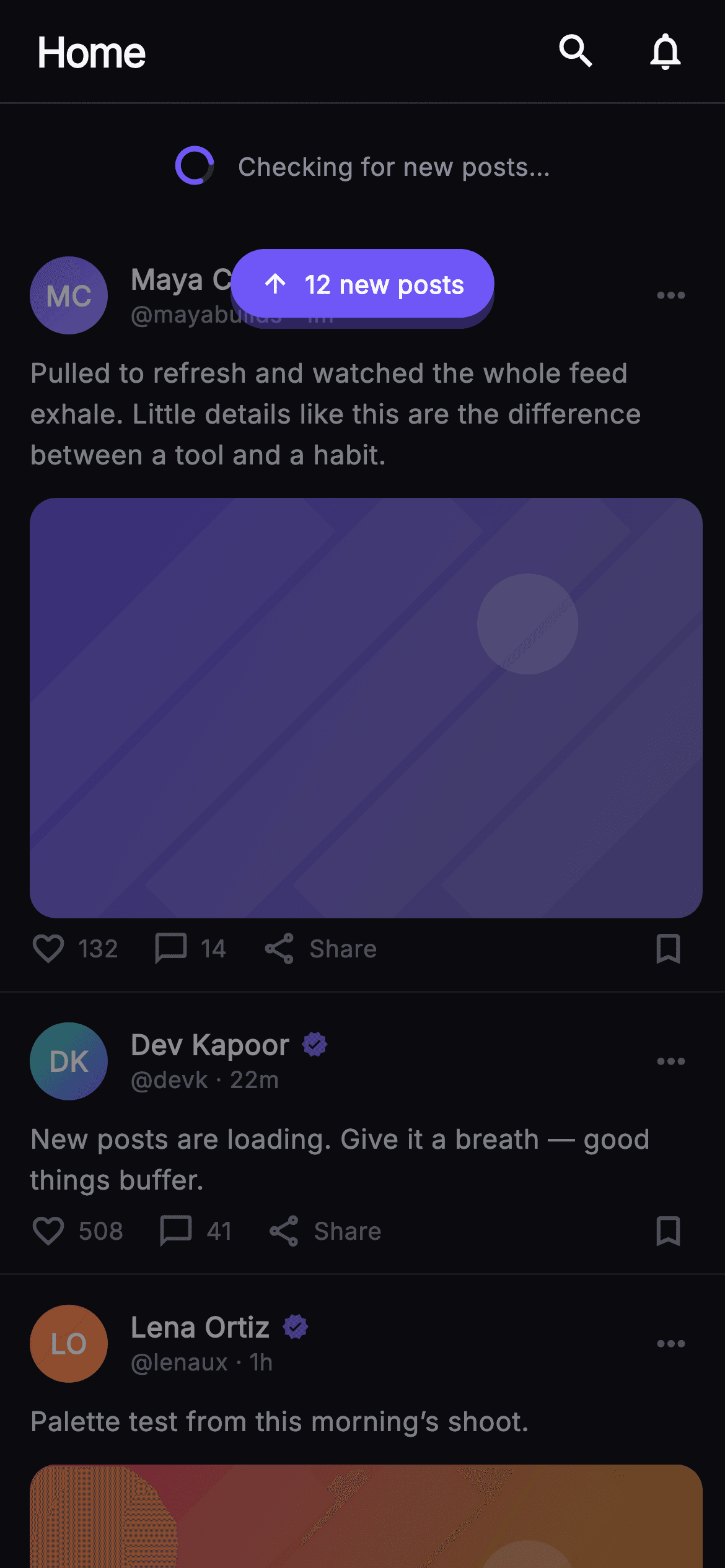
What you'll build
- ✓A `_SpinnerPainter` CustomPainter: a `#26262F` track circle plus a 1.55π indigo arc whose start angle is driven by `_spin.value`
- ✓A 66px refresh reveal row that pairs the 22px animated spinner with a muted 'Checking for new posts…' caption
- ✓A feed `ListView` dimmed to 55% opacity inside a `Stack`, with a `Positioned` `_NewPostsPill` floating above it
- ✓A `_PostCard` with a gradient `_Monogram` avatar, computed initials, a 16:10 `_MediaPainter` image and an `_ActionBar` with a `_fmt` count helper
- ✓Four nullable callbacks — `onShowNew`, `onSearch`, `onNotifications`, `onPost(id)` — so the screen stays backend-agnostic
Step-by-step build
Create the file
Add a new file at lib/social_feed_refresh/social_feed_refresh_screen.dart in your Flutter project.
Register the bundled fonts
No external packages — this is pure Flutter. It does bundle its design font (Inter), so drop the font file into fonts/ and declare it in pubspec.yaml:
flutter:
  fonts:
    - family: Inter
      fonts:
- asset: fonts/Inter-Regular.ttfBuild it, piece by piece
Here's how the screen goes together. Each block below is a real slice of the code with a plain-English explanation — paste them in order, or grab the whole file from the next section.
A stateful screen with a palette and four callbacks
import 'dart:math' as math;

import 'package:flutter/material.dart';

/// Pull-to-Refresh State — the Pulse home mid-refresh: a painted spinner reveal
/// under the top bar, the current feed dimmed beneath it, and a floating
/// "new posts" pill over the feed. The spinner animates but is drawn as a long
/// arc so it still reads as loading in a single static frame. Self-contained per
/// CONVENTIONS.md: pure Flutter, bundled Inter font, own dark theme, SafeArea,
/// overflow-proof.
class SocialFeedRefreshScreen extends StatefulWidget {
  const SocialFeedRefreshScreen({
    super.key,
    this.onShowNew,
    this.onSearch,
    this.onNotifications,
    this.onPost,
  });

  final VoidCallback? onShowNew;
  final VoidCallback? onSearch;
  final VoidCallback? onNotifications;
  final ValueChanged<String>? onPost;

  static const String _font = 'Inter';
  static const Color _bg = Color(0xFF0B0B0F);
  static const Color _brand = Color(0xFF6E56F7);
  static const Color _hairline = Color(0xFF26262F);
  static const Color _textHi = Color(0xFFF4F4F7);
  static const Color _muted = Color(0xFF8A8A99);

  @override
  State<SocialFeedRefreshScreen> createState() =>
      _SocialFeedRefreshScreenState();
}
`SocialFeedRefreshScreen` is a `StatefulWidget` for exactly one reason: the spinner needs an `AnimationController`, and a controller needs a `TickerProvider`. Everything else on the screen is static. The constructor takes four nullable callbacks — `onShowNew` for the floating pill, `onSearch` and `onNotifications` for the top-bar icons, and `onPost` typed as `ValueChanged<String>` so a tap on a card hands back the post id rather than an index. The Pulse palette is declared as `static const` colours on the widget class so the private helper widgets below can reference them as `SocialFeedRefreshScreen._brand` without a theme lookup: `#0B0B0F` near-black background, `#6E56F7` indigo brand, `#26262F` hairline, `#F4F4F7` high text and `#8A8A99` muted. `dart:math` is imported as `math` purely for the arc geometry in the painter.
Three posts as const data, and a repeating 900ms controller
class _SocialFeedRefreshScreenState extends State<SocialFeedRefreshScreen>
    with SingleTickerProviderStateMixin {
  late final AnimationController _spin;

  static const List<_Post> _posts = <_Post>[
    _Post(
      id: 'r1',
      name: 'Maya Chen',
      handle: 'mayabuilds',
      time: '1m',
      colorA: 0xFF6E56F7,
      colorB: 0xFF9B8CFF,
      body:
          'Pulled to refresh and watched the whole feed exhale. Little details '
          'like this are the difference between a tool and a habit.',
      likes: 132,
      comments: 14,
      hasMedia: true,
    ),
    _Post(
      id: 'r2',
      name: 'Dev Kapoor',
      handle: 'devk',
      time: '22m',
      colorA: 0xFF34D399,
      colorB: 0xFF6E56F7,
      body: 'New posts are loading. Give it a breath — good things buffer.',
      likes: 508,
      comments: 41,
      hasMedia: false,
    ),
    _Post(
      id: 'r3',
      name: 'Lena Ortiz',
      handle: 'lenaux',
      time: '1h',
      colorA: 0xFFF4476B,
      colorB: 0xFFFBBF24,
      body: 'Palette test from this morning’s shoot.',
      likes: 274,
      comments: 19,
      hasMedia: true,
    ),
  ];

  @override
  void initState() {
    super.initState();
    _spin = AnimationController(
      vsync: this,
      duration: const Duration(milliseconds: 900),
    )..repeat();
  }

  @override
  void dispose() {
    _spin.dispose();
    super.dispose();
  }
The state class mixes in `SingleTickerProviderStateMixin` because there is only one ticker to own. `_posts` is a `static const List<_Post>` of three entries; each carries two ARGB ints, `colorA` and `colorB`, rather than `Color` objects so the list can be fully const — the ints are wrapped in `Color(...)` later at the point of use. Those pairs drive both the avatar gradient and the painted media, so a post's picture and its author's monogram share a colour family. The `hasMedia` flag on the middle post is `false`, which gives the feed a text-only card between two photo cards. In `initState` the controller is created with a 900ms duration and immediately chained with `..repeat()`, so `_spin.value` cycles 0→1 forever; `dispose` tears it down so the ticker does not outlive the screen.
The refresh reveal row and the dimmed feed
  @override
  Widget build(BuildContext context) {
    return Theme(
      data: ThemeData.dark(useMaterial3: true),
      child: Scaffold(
        backgroundColor: SocialFeedRefreshScreen._bg,
        body: SafeArea(
          child: Column(
            children: <Widget>[
              _TopBar(
                onSearch: widget.onSearch,
                onNotifications: widget.onNotifications,
              ),
              // Refresh reveal.
              Container(
                height: 66,
                alignment: Alignment.center,
                child: Row(
                  mainAxisSize: MainAxisSize.min,
                  children: <Widget>[
                    SizedBox(
                      width: 22,
                      height: 22,
                      child: AnimatedBuilder(
                        animation: _spin,
                        builder: (BuildContext context, Widget? child) {
                          return CustomPaint(
                            painter: _SpinnerPainter(turns: _spin.value),
                          );
                        },
                      ),
                    ),
                    const SizedBox(width: 12),
                    const Text(
                      'Checking for new posts…',
                      style: TextStyle(
                        fontFamily: SocialFeedRefreshScreen._font,
                        fontSize: 13.5,
                        fontWeight: FontWeight.w500,
                        color: SocialFeedRefreshScreen._muted,
                      ),
                    ),
                  ],
                ),
              ),
              Expanded(
                child: Stack(
                  children: <Widget>[
                    Opacity(
                      opacity: 0.55,
                      child: ListView(
                        padding: EdgeInsets.zero,
                        children: <Widget>[
                          for (final _Post p in _posts)
                            _PostCard(
                              post: p,
                              onTap: () => widget.onPost?.call(p.id),
                            ),
                          const SizedBox(height: 24),
                        ],
                      ),
                    ),
                    Positioned(
                      top: 12,
                      left: 0,
                      right: 0,
                      child: Center(
                        child: _NewPostsPill(onTap: widget.onShowNew),
                      ),
                    ),
                  ],
                ),
              ),
            ],
          ),
        ),
      ),
    );
  }
}
`build` forces `ThemeData.dark(useMaterial3: true)` via a `Theme` wrapper so the screen looks identical whatever the host app's theme is. Under the `_TopBar` sits a 66px `Container` centred with `Alignment.center` holding a min-width `Row`: a 22×22 `SizedBox` around an `AnimatedBuilder` that rebuilds only the `CustomPaint` each tick, passing `turns: _spin.value` into `_SpinnerPainter`, then 12px of space and the 13.5px `w500` muted caption 'Checking for new posts…'. The important choice is what happens below: the feed goes inside an `Expanded` `Stack`, and the `ListView` of `_PostCard`s is wrapped in `Opacity(opacity: 0.55)`. The old posts stay readable but visibly recede, telling the user the content is stale without hiding it. A `Positioned` at `top: 12` spanning left-to-right centres the `_NewPostsPill` over the first card. Each card's `onTap` calls `widget.onPost?.call(p.id)` so the parent learns which post was tapped.
The floating 'new posts' pill
class _NewPostsPill extends StatelessWidget {
  const _NewPostsPill({this.onTap});
  final VoidCallback? onTap;

  @override
  Widget build(BuildContext context) {
    return GestureDetector(
      onTap: onTap,
      child: Container(
        padding: const EdgeInsets.symmetric(horizontal: 16, vertical: 9),
        decoration: BoxDecoration(
          color: SocialFeedRefreshScreen._brand,
          borderRadius: BorderRadius.circular(24),
          boxShadow: <BoxShadow>[
            BoxShadow(
              color: SocialFeedRefreshScreen._brand.withValues(alpha: 0.35),
              blurRadius: 18,
              offset: const Offset(0, 6),
            ),
          ],
        ),
        child: const Row(
          mainAxisSize: MainAxisSize.min,
          children: <Widget>[
            Icon(Icons.arrow_upward, size: 16, color: Colors.white),
            SizedBox(width: 8),
            Text(
              '12 new posts',
              style: TextStyle(
                fontFamily: SocialFeedRefreshScreen._font,
                fontSize: 13.5,
                fontWeight: FontWeight.w700,
                color: Colors.white,
              ),
            ),
          ],
        ),
      ),
    );
  }
}
`_NewPostsPill` is a `GestureDetector` around a `Container` filled with the `_brand` indigo, padded 16×9 and rounded to 24px so it becomes a true capsule at its natural height. What makes it float rather than sit flat on the dimmed feed is the single `BoxShadow`: the brand colour itself at `withValues(alpha: 0.35)`, blurred 18px and offset 6px downward, which reads as a coloured glow instead of a grey drop shadow — a grey shadow would disappear against the `#0B0B0F` background. The content is a `const Row` with `mainAxisSize: MainAxisSize.min` — an `arrow_upward` icon at 16px, 8px gap, and '12 new posts' in 13.5px `w700` white. The count is hard-coded here; it is the obvious value to lift into a parameter once you connect a real feed.
A 56px top bar with two icon actions
class _TopBar extends StatelessWidget {
  const _TopBar({this.onSearch, this.onNotifications});
  final VoidCallback? onSearch;
  final VoidCallback? onNotifications;

  @override
  Widget build(BuildContext context) {
    return Container(
      height: 56,
      padding: const EdgeInsets.fromLTRB(20, 0, 8, 0),
      decoration: const BoxDecoration(
        border: Border(
          bottom: BorderSide(color: SocialFeedRefreshScreen._hairline),
        ),
      ),
      child: Row(
        children: <Widget>[
          const Text(
            'Home',
            style: TextStyle(
              fontFamily: SocialFeedRefreshScreen._font,
              fontSize: 22,
              fontWeight: FontWeight.w800,
              letterSpacing: -0.8,
              color: SocialFeedRefreshScreen._textHi,
            ),
          ),
          const Spacer(),
          IconButton(
            onPressed: onSearch,
            icon: const Icon(Icons.search,
                size: 24, color: SocialFeedRefreshScreen._textHi),
            splashRadius: 22,
          ),
          IconButton(
            onPressed: onNotifications,
            icon: const Icon(Icons.notifications_none,
                size: 24, color: SocialFeedRefreshScreen._textHi),
            splashRadius: 22,
          ),
        ],
      ),
    );
  }
}
`_TopBar` is a fixed-height 56px `Container` with asymmetric padding — 20px on the left so 'Home' aligns with the card text below, but only 8px on the right because `IconButton` already carries its own 48px touch target and would otherwise look inset. The bottom edge is a `Border(bottom: BorderSide(color: _hairline))` rather than a `Divider`, so the line belongs to the bar and does not add a widget to the column. The 'Home' title is 22px `w800` with `letterSpacing: -0.8` for the tight display look, a `Spacer` pushes both icons to the trailing edge, and each `IconButton` sets `splashRadius: 22` so the ripple hugs the 24px glyph instead of spreading the full Material default. `onPressed` receives the nullable callbacks directly — passing `null` simply disables the button.
The post model and the card layout
// ── post card ───────────────────────────────────────────────────────────────
class _Post {
  const _Post({
    required this.id,
    required this.name,
    required this.handle,
    required this.time,
    required this.colorA,
    required this.colorB,
    required this.body,
    required this.likes,
    required this.comments,
    required this.hasMedia,
  });
  final String id;
  final String name;
  final String handle;
  final String time;
  final int colorA;
  final int colorB;
  final String body;
  final int likes;
  final int comments;
  final bool hasMedia;
}

class _PostCard extends StatelessWidget {
  const _PostCard({required this.post, this.onTap});
  final _Post post;
  final VoidCallback? onTap;

  String get _initials {
    final List<String> p = post.name.trim().split(RegExp(r'\s+'));
    if (p.length == 1) return p.first.characters.first.toUpperCase();
    return (p.first[0] + p.last[0]).toUpperCase();
  }

  @override
  Widget build(BuildContext context) {
    return GestureDetector(
      onTap: onTap,
      behavior: HitTestBehavior.opaque,
      child: Container(
        padding: const EdgeInsets.fromLTRB(16, 16, 12, 12),
        decoration: const BoxDecoration(
          border: Border(
            bottom: BorderSide(color: SocialFeedRefreshScreen._hairline),
          ),
        ),
        child: Column(
          crossAxisAlignment: CrossAxisAlignment.start,
          children: <Widget>[
            Row(
              children: <Widget>[
                _Monogram(
                  initials: _initials,
                  colorA: Color(post.colorA),
                  colorB: Color(post.colorB),
                ),
                const SizedBox(width: 12),
                Expanded(
                  child: Column(
                    crossAxisAlignment: CrossAxisAlignment.start,
                    children: <Widget>[
                      Row(
                        children: <Widget>[
                          Flexible(
                            child: Text(
                              post.name,
                              overflow: TextOverflow.ellipsis,
                              style: const TextStyle(
                                fontFamily: SocialFeedRefreshScreen._font,
                                fontSize: 15,
                                fontWeight: FontWeight.w700,
                                color: SocialFeedRefreshScreen._textHi,
                              ),
                            ),
                          ),
                          const SizedBox(width: 6),
                          const Icon(Icons.verified,
                              size: 15, color: SocialFeedRefreshScreen._brand),
                        ],
                      ),
                      Text(
                        '@${post.handle} · ${post.time}',
                        style: const TextStyle(
                          fontFamily: SocialFeedRefreshScreen._font,
                          fontSize: 12.5,
                          color: SocialFeedRefreshScreen._muted,
                        ),
                      ),
                    ],
                  ),
                ),
                const Icon(Icons.more_horiz,
                    color: SocialFeedRefreshScreen._muted, size: 22),
                const SizedBox(width: 6),
              ],
            ),
            const SizedBox(height: 10),
            Text(
              post.body,
              style: const TextStyle(
                fontFamily: SocialFeedRefreshScreen._font,
                fontSize: 14.5,
                height: 1.5,
                color: Color(0xFFDDDDE6),
              ),
            ),
            if (post.hasMedia) ...<Widget>[
              const SizedBox(height: 12),
              ClipRRect(
                borderRadius: BorderRadius.circular(14),
                child: AspectRatio(
                  aspectRatio: 16 / 10,
                  child: CustomPaint(
                    painter:
                        _MediaPainter(Color(post.colorA), Color(post.colorB)),
                    child: const SizedBox.expand(),
                  ),
                ),
              ),
            ],
            const SizedBox(height: 6),
            _ActionBar(likes: post.likes, comments: post.comments),
          ],
        ),
      ),
    );
  }
}
`_Post` is a plain const data class — ten required fields, no methods — which keeps the `_posts` list const-constructible. `_PostCard` derives the avatar initials in a getter: it trims and splits the name on `RegExp(r'\s+')`, returns a single uppercased first character for one-word names (using `characters.first` so a multi-code-unit glyph is not split), otherwise first-of-first plus first-of-last. The card is a `GestureDetector` with `HitTestBehavior.opaque` so taps on the padding count, padded 16/16/12/12 and closed with a bottom hairline so cards separate without a card surface. The header `Row` puts the name in `Flexible` with ellipsis so a long name yields space to the 15px indigo `verified` icon, followed by an '@handle · time' line at 12.5px muted. Body text is 14.5px at `height: 1.5` in a slightly dimmer `#DDDDE6`. When `hasMedia` is true, a spread inserts a 12px gap and a `ClipRRect(14)` around a 16:10 `AspectRatio` whose child is a `CustomPaint` running `_MediaPainter` over `SizedBox.expand()`.
Action bar with a count formatter
class _ActionBar extends StatelessWidget {
  const _ActionBar({required this.likes, required this.comments});
  final int likes;
  final int comments;

  String _fmt(int n) => n >= 1000 ? '${(n / 1000).toStringAsFixed(1)}k' : '$n';

  @override
  Widget build(BuildContext context) {
    return Row(
      children: <Widget>[
        _Action(icon: Icons.favorite_border, label: _fmt(likes)),
        const SizedBox(width: 18),
        _Action(icon: Icons.chat_bubble_outline, label: _fmt(comments)),
        const SizedBox(width: 18),
        const _Action(icon: Icons.share_outlined, label: 'Share'),
        const Spacer(),
        const Icon(Icons.bookmark_border,
            size: 21, color: SocialFeedRefreshScreen._muted),
        const SizedBox(width: 8),
      ],
    );
  }
}

class _Action extends StatelessWidget {
  const _Action({required this.icon, required this.label});
  final IconData icon;
  final String label;

  @override
  Widget build(BuildContext context) {
    return Row(
      children: <Widget>[
        Icon(icon, size: 20, color: SocialFeedRefreshScreen._muted),
        const SizedBox(width: 6),
        Text(
          label,
          style: const TextStyle(
            fontFamily: SocialFeedRefreshScreen._font,
            fontSize: 13,
            fontWeight: FontWeight.w500,
            color: SocialFeedRefreshScreen._muted,
          ),
        ),
      ],
    );
  }
}
`_ActionBar` takes raw ints for likes and comments and runs them through `_fmt`, a one-line helper that returns the number as-is under 1000 and otherwise divides by 1000 with `toStringAsFixed(1)` and a 'k' suffix — so 508 stays '508' while 1120 would become '1.1k'. Three `_Action` widgets follow — `favorite_border`, `chat_bubble_outline` and `share_outlined` — each 20px muted icon plus a 13px `w500` label with a 6px gap, separated by 18px `SizedBox`es rather than `MainAxisAlignment.spaceBetween` so the group stays clustered on the left. A `Spacer` then throws the 21px `bookmark_border` to the trailing edge with an 8px inset. `_Action` is deliberately a display-only `Row` with no tap handling; wiring like/comment taps is left to the host, which already receives `onPost` for the card as a whole.
Monogram avatar, spinner geometry and painted media
// ── monogram + painters ─────────────────────────────────────────────────────
class _Monogram extends StatelessWidget {
  const _Monogram({
    required this.initials,
    required this.colorA,
    required this.colorB,
  });
  final String initials;
  final Color colorA;
  final Color colorB;

  @override
  Widget build(BuildContext context) {
    return Container(
      width: 42,
      height: 42,
      decoration: BoxDecoration(
        shape: BoxShape.circle,
        gradient: LinearGradient(
          begin: Alignment.topLeft,
          end: Alignment.bottomRight,
          colors: <Color>[colorA, colorB],
        ),
      ),
      child: Center(
        child: Text(
          initials,
          style: const TextStyle(
            fontFamily: SocialFeedRefreshScreen._font,
            fontSize: 15,
            fontWeight: FontWeight.w700,
            color: Colors.white,
          ),
        ),
      ),
    );
  }
}

class _SpinnerPainter extends CustomPainter {
  _SpinnerPainter({required this.turns});
  final double turns;

  @override
  void paint(Canvas canvas, Size size) {
    final Offset center = size.center(Offset.zero);
    final double radius = size.width / 2 - 2;
    final Rect rect = Rect.fromCircle(center: center, radius: radius);
    canvas.drawCircle(
      center,
      radius,
      Paint()
        ..style = PaintingStyle.stroke
        ..strokeWidth = 3
        ..color = SocialFeedRefreshScreen._hairline,
    );
    final double start = -math.pi / 2 + turns * 2 * math.pi;
    canvas.drawArc(
      rect,
      start,
      math.pi * 1.55,
      false,
      Paint()
        ..style = PaintingStyle.stroke
        ..strokeWidth = 3
        ..strokeCap = StrokeCap.round
        ..color = SocialFeedRefreshScreen._brand,
    );
  }

  @override
  bool shouldRepaint(covariant _SpinnerPainter old) => old.turns != turns;
}

class _MediaPainter extends CustomPainter {
  _MediaPainter(this.colorA, this.colorB);
  final Color colorA;
  final Color colorB;

  @override
  void paint(Canvas canvas, Size size) {
    final Rect rect = Offset.zero & size;
    canvas.drawRect(
      rect,
      Paint()
        ..shader = LinearGradient(
          begin: Alignment.topLeft,
          end: Alignment.bottomRight,
          colors: <Color>[
            colorA.withValues(alpha: 0.85),
            colorB.withValues(alpha: 0.65),
          ],
        ).createShader(rect),
    );
    final Paint streak = Paint()
      ..color = Colors.white.withValues(alpha: 0.06)
      ..style = PaintingStyle.stroke
      ..strokeWidth = size.width * 0.14;
    for (int i = -1; i < 4; i++) {
      final double x = size.width * (0.22 * i);
      canvas.drawLine(Offset(x, size.height), Offset(x + size.height, 0), streak);
    }
    canvas.drawCircle(
      Offset(size.width * 0.74, size.height * 0.30),
      size.height * 0.12,
      Paint()..color = Colors.white.withValues(alpha: 0.18),
    );
  }

  @override
  bool shouldRepaint(covariant _MediaPainter old) =>
      old.colorA != colorA || old.colorB != colorB;
}
`_Monogram` is a 42px circle whose `BoxDecoration` carries a top-left to bottom-right `LinearGradient` of the post's two colours, with initials centred in 15px `w700` white. `_SpinnerPainter` is the heart of the screen. It computes `radius = size.width / 2 - 2` so the 3px stroke never clips the 22px box, draws a full `_hairline` track circle, then an arc on the same `Rect.fromCircle`. The start angle is `-π/2 + turns * 2π` — twelve o'clock, rotated by one full turn per controller cycle — and the sweep is a long `π * 1.55`, roughly 280°, with `StrokeCap.round`. That long arc is why the frozen frame still reads as 'loading': a short arc looks like a static ring gap. `shouldRepaint` compares `turns`, so it repaints only when the value changes. `_MediaPainter` fills a diagonal gradient of the two colours at 0.85 and 0.65 alpha, then draws five diagonal streaks in a loop from `i = -1` to `3` at 6% white with a stroke 14% of the width, and a soft sun disc at 74%/30% with radius 12% of the height — an image with no asset file.
Full code
The complete, ready-to-paste source. Free to use in your projects — one click copies it all.
import 'dart:math' as math;
import 'package:flutter/material.dart';
/// Pull-to-Refresh State — the Pulse home mid-refresh: a painted spinner reveal
/// under the top bar, the current feed dimmed beneath it, and a floating
/// "new posts" pill over the feed. The spinner animates but is drawn as a long
/// arc so it still reads as loading in a single static frame. Self-contained per
/// CONVENTIONS.md: pure Flutter, bundled Inter font, own dark theme, SafeArea,
/// overflow-proof.
class SocialFeedRefreshScreen extends StatefulWidget {
const SocialFeedRefreshScreen({
super.key,
this.onShowNew,
this.onSearch,
this.onNotifications,
this.onPost,
});
final VoidCallback? onShowNew;
final VoidCallback? onSearch;
final VoidCallback? onNotifications;
final ValueChanged<String>? onPost;
static const String _font = 'Inter';
static const Color _bg = Color(0xFF0B0B0F);
static const Color _brand = Color(0xFF6E56F7);
static const Color _hairline = Color(0xFF26262F);
static const Color _textHi = Color(0xFFF4F4F7);
static const Color _muted = Color(0xFF8A8A99);
@override
State<SocialFeedRefreshScreen> createState() =>
_SocialFeedRefreshScreenState();
}
class _SocialFeedRefreshScreenState extends State<SocialFeedRefreshScreen>
with SingleTickerProviderStateMixin {
late final AnimationController _spin;
static const List<_Post> _posts = <_Post>[
_Post(
id: 'r1',
name: 'Maya Chen',
handle: 'mayabuilds',
time: '1m',
colorA: 0xFF6E56F7,
colorB: 0xFF9B8CFF,
body:
'Pulled to refresh and watched the whole feed exhale. Little details '
'like this are the difference between a tool and a habit.',
likes: 132,
comments: 14,
hasMedia: true,
),
_Post(
id: 'r2',
name: 'Dev Kapoor',
handle: 'devk',
time: '22m',
colorA: 0xFF34D399,
colorB: 0xFF6E56F7,
body: 'New posts are loading. Give it a breath — good things buffer.',
likes: 508,
comments: 41,
hasMedia: false,
),
_Post(
id: 'r3',
name: 'Lena Ortiz',
handle: 'lenaux',
time: '1h',
colorA: 0xFFF4476B,
colorB: 0xFFFBBF24,
body: 'Palette test from this morning’s shoot.',
likes: 274,
comments: 19,
hasMedia: true,
),
];
@override
void initState() {
super.initState();
_spin = AnimationController(
vsync: this,
duration: const Duration(milliseconds: 900),
)..repeat();
}
@override
void dispose() {
_spin.dispose();
super.dispose();
}
@override
Widget build(BuildContext context) {
return Theme(
data: ThemeData.dark(useMaterial3: true),
child: Scaffold(
backgroundColor: SocialFeedRefreshScreen._bg,
body: SafeArea(
child: Column(
children: <Widget>[
_TopBar(
onSearch: widget.onSearch,
onNotifications: widget.onNotifications,
),
// Refresh reveal.
Container(
height: 66,
alignment: Alignment.center,
child: Row(
mainAxisSize: MainAxisSize.min,
children: <Widget>[
SizedBox(
width: 22,
height: 22,
child: AnimatedBuilder(
animation: _spin,
builder: (BuildContext context, Widget? child) {
return CustomPaint(
painter: _SpinnerPainter(turns: _spin.value),
);
},
),
),
const SizedBox(width: 12),
const Text(
'Checking for new posts…',
style: TextStyle(
fontFamily: SocialFeedRefreshScreen._font,
fontSize: 13.5,
fontWeight: FontWeight.w500,
color: SocialFeedRefreshScreen._muted,
),
),
],
),
),
Expanded(
child: Stack(
children: <Widget>[
Opacity(
opacity: 0.55,
child: ListView(
padding: EdgeInsets.zero,
children: <Widget>[
for (final _Post p in _posts)
_PostCard(
post: p,
onTap: () => widget.onPost?.call(p.id),
),
const SizedBox(height: 24),
],
),
),
Positioned(
top: 12,
left: 0,
right: 0,
child: Center(
child: _NewPostsPill(onTap: widget.onShowNew),
),
),
],
),
),
],
),
),
),
);
}
}
class _NewPostsPill extends StatelessWidget {
const _NewPostsPill({this.onTap});
final VoidCallback? onTap;
@override
Widget build(BuildContext context) {
return GestureDetector(
onTap: onTap,
child: Container(
padding: const EdgeInsets.symmetric(horizontal: 16, vertical: 9),
decoration: BoxDecoration(
color: SocialFeedRefreshScreen._brand,
borderRadius: BorderRadius.circular(24),
boxShadow: <BoxShadow>[
BoxShadow(
color: SocialFeedRefreshScreen._brand.withValues(alpha: 0.35),
blurRadius: 18,
offset: const Offset(0, 6),
),
],
),
child: const Row(
mainAxisSize: MainAxisSize.min,
children: <Widget>[
Icon(Icons.arrow_upward, size: 16, color: Colors.white),
SizedBox(width: 8),
Text(
'12 new posts',
style: TextStyle(
fontFamily: SocialFeedRefreshScreen._font,
fontSize: 13.5,
fontWeight: FontWeight.w700,
color: Colors.white,
),
),
],
),
),
);
}
}
class _TopBar extends StatelessWidget {
const _TopBar({this.onSearch, this.onNotifications});
final VoidCallback? onSearch;
final VoidCallback? onNotifications;
@override
Widget build(BuildContext context) {
return Container(
height: 56,
padding: const EdgeInsets.fromLTRB(20, 0, 8, 0),
decoration: const BoxDecoration(
border: Border(
bottom: BorderSide(color: SocialFeedRefreshScreen._hairline),
),
),
child: Row(
children: <Widget>[
const Text(
'Home',
style: TextStyle(
fontFamily: SocialFeedRefreshScreen._font,
fontSize: 22,
fontWeight: FontWeight.w800,
letterSpacing: -0.8,
color: SocialFeedRefreshScreen._textHi,
),
),
const Spacer(),
IconButton(
onPressed: onSearch,
icon: const Icon(Icons.search,
size: 24, color: SocialFeedRefreshScreen._textHi),
splashRadius: 22,
),
IconButton(
onPressed: onNotifications,
icon: const Icon(Icons.notifications_none,
size: 24, color: SocialFeedRefreshScreen._textHi),
splashRadius: 22,
),
],
),
);
}
}
// ── post card ───────────────────────────────────────────────────────────────
class _Post {
const _Post({
required this.id,
required this.name,
required this.handle,
required this.time,
required this.colorA,
required this.colorB,
required this.body,
required this.likes,
required this.comments,
required this.hasMedia,
});
final String id;
final String name;
final String handle;
final String time;
final int colorA;
final int colorB;
final String body;
final int likes;
final int comments;
final bool hasMedia;
}
class _PostCard extends StatelessWidget {
const _PostCard({required this.post, this.onTap});
final _Post post;
final VoidCallback? onTap;
String get _initials {
final List<String> p = post.name.trim().split(RegExp(r'\s+'));
if (p.length == 1) return p.first.characters.first.toUpperCase();
return (p.first[0] + p.last[0]).toUpperCase();
}
@override
Widget build(BuildContext context) {
return GestureDetector(
onTap: onTap,
behavior: HitTestBehavior.opaque,
child: Container(
padding: const EdgeInsets.fromLTRB(16, 16, 12, 12),
decoration: const BoxDecoration(
border: Border(
bottom: BorderSide(color: SocialFeedRefreshScreen._hairline),
),
),
child: Column(
crossAxisAlignment: CrossAxisAlignment.start,
children: <Widget>[
Row(
children: <Widget>[
_Monogram(
initials: _initials,
colorA: Color(post.colorA),
colorB: Color(post.colorB),
),
const SizedBox(width: 12),
Expanded(
child: Column(
crossAxisAlignment: CrossAxisAlignment.start,
children: <Widget>[
Row(
children: <Widget>[
Flexible(
child: Text(
post.name,
overflow: TextOverflow.ellipsis,
style: const TextStyle(
fontFamily: SocialFeedRefreshScreen._font,
fontSize: 15,
fontWeight: FontWeight.w700,
color: SocialFeedRefreshScreen._textHi,
),
),
),
const SizedBox(width: 6),
const Icon(Icons.verified,
size: 15, color: SocialFeedRefreshScreen._brand),
],
),
Text(
'@${post.handle} · ${post.time}',
style: const TextStyle(
fontFamily: SocialFeedRefreshScreen._font,
fontSize: 12.5,
color: SocialFeedRefreshScreen._muted,
),
),
],
),
),
const Icon(Icons.more_horiz,
color: SocialFeedRefreshScreen._muted, size: 22),
const SizedBox(width: 6),
],
),
const SizedBox(height: 10),
Text(
post.body,
style: const TextStyle(
fontFamily: SocialFeedRefreshScreen._font,
fontSize: 14.5,
height: 1.5,
color: Color(0xFFDDDDE6),
),
),
if (post.hasMedia) ...<Widget>[
const SizedBox(height: 12),
ClipRRect(
borderRadius: BorderRadius.circular(14),
child: AspectRatio(
aspectRatio: 16 / 10,
child: CustomPaint(
painter:
_MediaPainter(Color(post.colorA), Color(post.colorB)),
child: const SizedBox.expand(),
),
),
),
],
const SizedBox(height: 6),
_ActionBar(likes: post.likes, comments: post.comments),
],
),
),
);
}
}
class _ActionBar extends StatelessWidget {
const _ActionBar({required this.likes, required this.comments});
final int likes;
final int comments;
String _fmt(int n) => n >= 1000 ? '${(n / 1000).toStringAsFixed(1)}k' : '$n';
@override
Widget build(BuildContext context) {
return Row(
children: <Widget>[
_Action(icon: Icons.favorite_border, label: _fmt(likes)),
const SizedBox(width: 18),
_Action(icon: Icons.chat_bubble_outline, label: _fmt(comments)),
const SizedBox(width: 18),
const _Action(icon: Icons.share_outlined, label: 'Share'),
const Spacer(),
const Icon(Icons.bookmark_border,
size: 21, color: SocialFeedRefreshScreen._muted),
const SizedBox(width: 8),
],
);
}
}
class _Action extends StatelessWidget {
const _Action({required this.icon, required this.label});
final IconData icon;
final String label;
@override
Widget build(BuildContext context) {
return Row(
children: <Widget>[
Icon(icon, size: 20, color: SocialFeedRefreshScreen._muted),
const SizedBox(width: 6),
Text(
label,
style: const TextStyle(
fontFamily: SocialFeedRefreshScreen._font,
fontSize: 13,
fontWeight: FontWeight.w500,
color: SocialFeedRefreshScreen._muted,
),
),
],
);
}
}
// ── monogram + painters ─────────────────────────────────────────────────────
class _Monogram extends StatelessWidget {
const _Monogram({
required this.initials,
required this.colorA,
required this.colorB,
});
final String initials;
final Color colorA;
final Color colorB;
@override
Widget build(BuildContext context) {
return Container(
width: 42,
height: 42,
decoration: BoxDecoration(
shape: BoxShape.circle,
gradient: LinearGradient(
begin: Alignment.topLeft,
end: Alignment.bottomRight,
colors: <Color>[colorA, colorB],
),
),
child: Center(
child: Text(
initials,
style: const TextStyle(
fontFamily: SocialFeedRefreshScreen._font,
fontSize: 15,
fontWeight: FontWeight.w700,
color: Colors.white,
),
),
),
);
}
}
class _SpinnerPainter extends CustomPainter {
_SpinnerPainter({required this.turns});
final double turns;
@override
void paint(Canvas canvas, Size size) {
final Offset center = size.center(Offset.zero);
final double radius = size.width / 2 - 2;
final Rect rect = Rect.fromCircle(center: center, radius: radius);
canvas.drawCircle(
center,
radius,
Paint()
..style = PaintingStyle.stroke
..strokeWidth = 3
..color = SocialFeedRefreshScreen._hairline,
);
final double start = -math.pi / 2 + turns * 2 * math.pi;
canvas.drawArc(
rect,
start,
math.pi * 1.55,
false,
Paint()
..style = PaintingStyle.stroke
..strokeWidth = 3
..strokeCap = StrokeCap.round
..color = SocialFeedRefreshScreen._brand,
);
}
@override
bool shouldRepaint(covariant _SpinnerPainter old) => old.turns != turns;
}
class _MediaPainter extends CustomPainter {
_MediaPainter(this.colorA, this.colorB);
final Color colorA;
final Color colorB;
@override
void paint(Canvas canvas, Size size) {
final Rect rect = Offset.zero & size;
canvas.drawRect(
rect,
Paint()
..shader = LinearGradient(
begin: Alignment.topLeft,
end: Alignment.bottomRight,
colors: <Color>[
colorA.withValues(alpha: 0.85),
colorB.withValues(alpha: 0.65),
],
).createShader(rect),
);
final Paint streak = Paint()
..color = Colors.white.withValues(alpha: 0.06)
..style = PaintingStyle.stroke
..strokeWidth = size.width * 0.14;
for (int i = -1; i < 4; i++) {
final double x = size.width * (0.22 * i);
canvas.drawLine(Offset(x, size.height), Offset(x + size.height, 0), streak);
}
canvas.drawCircle(
Offset(size.width * 0.74, size.height * 0.30),
size.height * 0.12,
Paint()..color = Colors.white.withValues(alpha: 0.18),
);
}
@override
bool shouldRepaint(covariant _MediaPainter old) =>
old.colorA != colorA || old.colorB != colorB;
}
Plus bundled 1 binary asset (fonts/images). The CLI and MCP install those for you automatically.
Two faster ways to add it
Copy-paste works, but you can skip it entirely.
1. FlutterKit CLI
One command drops this screen — and its fonts — straight into your project.
$ flutterkit add social-feed-refresh2. AI agent (MCP)
Connect FlutterKit's MCP server in Claude or Cursor and just ask your agent to install social-feed-refresh — it fetches and writes the files for you.
FAQ
Can I use this pull-to-refresh screen in a commercial app?
Yes. FlutterKit screens are free for personal and commercial projects under an MIT-style licence — no key, no sign-up, no attribution. Copy the code from this page or run `flutterkit add social-feed-refresh` and ship it.
Does this screen need any pub packages or fonts?
No packages — it is pure Flutter with `dart:math` for the arc angles. The only asset is the Inter font, which `flutterkit add social-feed-refresh` bundles and registers in your pubspec for you; if you paste the code manually, add Inter yourself or drop the `fontFamily` lines.
Which Flutter version does this require?
Flutter 3.22 or newer, because the pill shadow and `_MediaPainter` use `Color.withValues(alpha: ...)` and the constructor uses `super.key`. On an older SDK replace each `withValues(alpha: x)` with `withOpacity(x)` and expand the constructor to `{Key? key, ...} : super(key: key)`.
How do I turn this static state into a real pull-to-refresh?
Wrap the feed `ListView` in a `RefreshIndicator` and move the reveal row behind a boolean such as `_refreshing`. Start the controller with `..repeat()` only while the refresh future is pending, then set the flag false and raise `Opacity` back to 1.0 when the new posts arrive. Keep `_SpinnerPainter` if you want the custom arc instead of the Material indicator.
Where does the '12 new posts' count come from?
It is a literal inside `_NewPostsPill`. Add an `int count` parameter to the pill and to the screen, then interpolate `'$count new posts'`; hide the pill entirely when the count is zero by returning `SizedBox.shrink()` from the `Positioned` child, and use `onShowNew` to scroll to the top and merge the buffered posts.


