How to Build a Social Poll Post Card in Flutter (Full Code + Preview)
A poll in a feed has to do two things at once: look inviting before anyone taps, and turn into a readable result chart the instant they do. This tutorial builds the Pulse poll post in Flutter: a single `_choice` int drives the whole card, `_OptionRow` swaps from an indigo outline pill to a `FractionallySizedBox` result bar with a percentage and a `check_circle` on your pick, `_votesLabel` abbreviates 1204 to 1.2k, and a second, already-ended poll shows the final-results state with taps disabled.
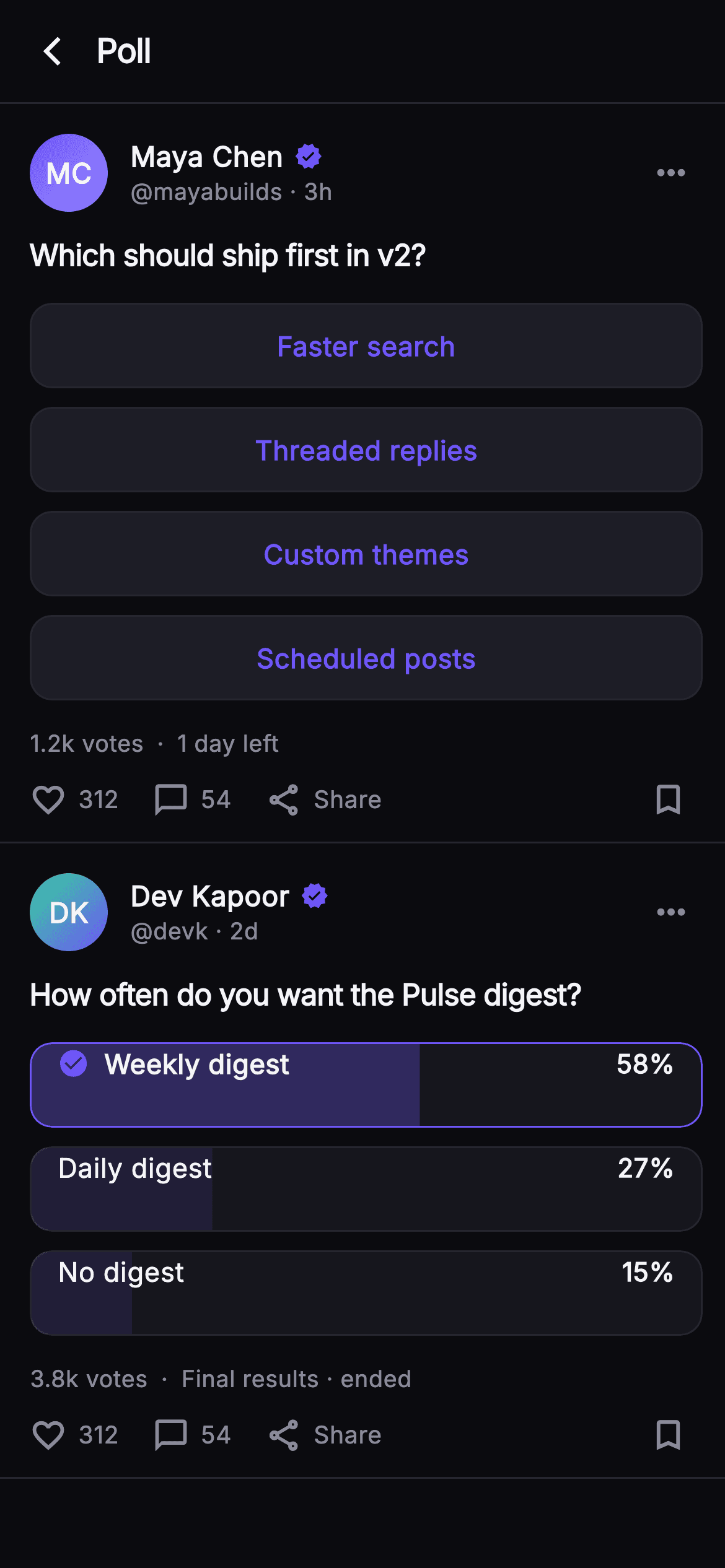
What you'll build
- ✓A `_PollCard` that re-renders every option from one nullable `_choice` int, with `onVote(int)` injected so real submission is a one-line wire-up
- ✓A two-state `_OptionRow`: a `_surfaceAlt` outline pill before voting and a `ClipRRect` + `FractionallySizedBox` result bar tinted to the option's percentage afterwards
- ✓A `_votesLabel` getter that turns 1204 into '1.2k votes', and an `_initials` getter that builds the monogram from the author's name
- ✓An ended-poll variant that loads already resolved, passes `onTap: null` to every row, and reads 'Final results · ended'
- ✓A gradient `_Monogram` avatar, a `_Dot` separator for the meta line, and an `_ActionBar` with like, reply, share and bookmark
Step-by-step build
Create the file
Add a new file at lib/social_feed_poll/social_feed_poll_screen.dart in your Flutter project.
Register the bundled fonts
No external packages — this is pure Flutter. It does bundle its design font (Inter), so drop the font file into fonts/ and declare it in pubspec.yaml:
flutter:
  fonts:
    - family: Inter
      fonts:
- asset: fonts/Inter-Regular.ttfBuild it, piece by piece
Here's how the screen goes together. Each block below is a real slice of the code with a plain-English explanation — paste them in order, or grab the whole file from the next section.
Two callbacks, six colours and a StatefulWidget
import 'package:flutter/material.dart';

/// Poll Post — an inline poll card with painted result bars. The hero poll is
/// interactive: tap an option to cast a vote and the outline rows switch to
/// tinted result bars with percentages and your choice highlighted. A second,
/// already-ended poll shows the final-results state. Self-contained per
/// CONVENTIONS.md: pure Flutter, bundled Inter font, own dark theme, SafeArea,
/// overflow-proof.
class SocialFeedPollScreen extends StatefulWidget {
  const SocialFeedPollScreen({
    super.key,
    this.onBack,
    this.onVote,
  });

  final VoidCallback? onBack;
  final ValueChanged<int>? onVote;

  static const String _font = 'Inter';
  static const Color _bg = Color(0xFF0B0B0F);
  static const Color _surfaceAlt = Color(0xFF1D1D26);
  static const Color _brand = Color(0xFF6E56F7);
  static const Color _hairline = Color(0xFF26262F);
  static const Color _textHi = Color(0xFFF4F4F7);
  static const Color _muted = Color(0xFF8A8A99);

  @override
  State<SocialFeedPollScreen> createState() => _SocialFeedPollScreenState();
}

class _SocialFeedPollScreenState extends State<SocialFeedPollScreen> {
  int? _choice;

  static const List<_Option> _live = <_Option>[
    _Option('Faster search', 46),
    _Option('Threaded replies', 29),
    _Option('Custom themes', 15),
    _Option('Scheduled posts', 10),
  ];

  static const List<_Option> _ended = <_Option>[
    _Option('Weekly digest', 58),
    _Option('Daily digest', 27),
    _Option('No digest', 15),
  ];
`SocialFeedPollScreen` is a `StatefulWidget` because one thing on this page changes: which option the reader picked. It takes `onBack` and `onVote` (a `ValueChanged<int>`) so the host app hears the chosen index without the screen knowing anything about a backend. The palette is a near-mono dark set — `_bg` #0B0B0F, `_surfaceAlt` #1D1D26, `_hairline` #26262F — with a single indigo `_brand` #6E56F7 used for everything that means 'you' or 'act here'. State is just `int? _choice`; null means unvoted. The two option lists are `static const` `_Option(label, pct)` records. `_live` sums to exactly 100 (46+29+15+10) and so does `_ended` (58+27+15), which matters because the percentages are what size the result bars later.
The feed: one live poll, one ended poll
  @override
  Widget build(BuildContext context) {
    return Theme(
      data: ThemeData.dark(useMaterial3: true),
      child: Scaffold(
        backgroundColor: SocialFeedPollScreen._bg,
        body: SafeArea(
          child: Column(
            children: <Widget>[
              _TopBar(onBack: widget.onBack),
              Expanded(
                child: ListView(
                  padding: EdgeInsets.zero,
                  children: <Widget>[
                    _PollCard(
                      name: 'Maya Chen',
                      handle: 'mayabuilds',
                      time: '3h',
                      colorA: 0xFF6E56F7,
                      colorB: 0xFF9B8CFF,
                      question: 'Which should ship first in v2?',
                      options: _live,
                      choice: _choice,
                      voted: _choice != null,
                      totalVotes: 1204,
                      footer: '1 day left',
                      ended: false,
                      onVote: (int i) {
                        setState(() => _choice = i);
                        widget.onVote?.call(i);
                      },
                    ),
                    _PollCard(
                      name: 'Dev Kapoor',
                      handle: 'devk',
                      time: '2d',
                      colorA: 0xFF34D399,
                      colorB: 0xFF6E56F7,
                      question: 'How often do you want the Pulse digest?',
                      options: _ended,
                      choice: 0,
                      voted: true,
                      totalVotes: 3820,
                      footer: 'Final results · ended',
                      ended: true,
                      onVote: (_) {},
                    ),
                    const SizedBox(height: 24),
                  ],
                ),
              ),
            ],
          ),
        ),
      ),
    );
  }
}
`build` wraps everything in `Theme(data: ThemeData.dark(useMaterial3: true))` so Material defaults like the `IconButton` ripple match the dark surface without leaking the host app's light theme. Under `SafeArea`, a `Column` holds the `_TopBar` and an `Expanded` `ListView` with `padding: EdgeInsets.zero` so the first card's hairline sits flush against the bar. The interesting part is how the two `_PollCard`s differ only by props. The live card passes `choice: _choice`, `voted: _choice != null`, `ended: false`, and an `onVote` that calls `setState(() => _choice = i)` then forwards to `widget.onVote?.call(i)`. The ended card hard-codes `choice: 0`, `voted: true`, `ended: true`, and an `onVote: (_) {}` no-op — it renders as final results without any state of its own. The gradient pairs (`0xFF6E56F7`→`0xFF9B8CFF` and `0xFF34D399`→`0xFF6E56F7`) give each author a distinct monogram.
A 56px top bar and the _Option record
class _TopBar extends StatelessWidget {
  const _TopBar({this.onBack});
  final VoidCallback? onBack;

  @override
  Widget build(BuildContext context) {
    return Container(
      height: 56,
      padding: const EdgeInsets.only(left: 4, right: 20),
      decoration: const BoxDecoration(
        border: Border(
          bottom: BorderSide(color: SocialFeedPollScreen._hairline),
        ),
      ),
      child: Row(
        children: <Widget>[
          IconButton(
            onPressed: onBack,
            icon: const Icon(Icons.arrow_back_ios_new,
                size: 18, color: SocialFeedPollScreen._textHi),
          ),
          const Text(
            'Poll',
            style: TextStyle(
              fontFamily: SocialFeedPollScreen._font,
              fontSize: 18,
              fontWeight: FontWeight.w700,
              letterSpacing: -0.4,
              color: SocialFeedPollScreen._textHi,
            ),
          ),
        ],
      ),
    );
  }
}

class _Option {
  const _Option(this.label, this.pct);
  final String label;
  final int pct;
}
`_TopBar` is a fixed 56px `Container` with a bottom `BorderSide` in `_hairline` — the same separator every card uses, so the bar reads as the first row of the feed rather than a distinct chrome layer. Padding is `left: 4, right: 20`: the small left inset is deliberate because the `IconButton` carries its own 48px hit area, and 4px places the `arrow_back_ios_new` glyph optically where a 16px margin would put plain text. The title 'Poll' is 18px `w700` Inter with `letterSpacing: -0.4`, the same tightening used on the questions further down. `_Option` is a two-field `const` class — `label` and an `int pct` — kept private and minimal so both lists can be `static const` and the whole card tree stays const-constructible where possible.
The poll card header and its two getters
class _PollCard extends StatelessWidget {
  const _PollCard({
    required this.name,
    required this.handle,
    required this.time,
    required this.colorA,
    required this.colorB,
    required this.question,
    required this.options,
    required this.choice,
    required this.voted,
    required this.totalVotes,
    required this.footer,
    required this.ended,
    required this.onVote,
  });

  final String name;
  final String handle;
  final String time;
  final int colorA;
  final int colorB;
  final String question;
  final List<_Option> options;
  final int? choice;
  final bool voted;
  final int totalVotes;
  final String footer;
  final bool ended;
  final ValueChanged<int> onVote;

  String get _initials {
    final List<String> p = name.trim().split(RegExp(r'\s+'));
    if (p.length == 1) return p.first.characters.first.toUpperCase();
    return (p.first[0] + p.last[0]).toUpperCase();
  }

  String get _votesLabel {
    final String v = totalVotes >= 1000
        ? '${(totalVotes / 1000).toStringAsFixed(1)}k'
        : '$totalVotes';
    return '$v votes';
  }

  @override
  Widget build(BuildContext context) {
    return Container(
      padding: const EdgeInsets.fromLTRB(16, 16, 12, 12),
      decoration: const BoxDecoration(
        border: Border(
          bottom: BorderSide(color: SocialFeedPollScreen._hairline),
        ),
      ),
      child: Column(
        crossAxisAlignment: CrossAxisAlignment.start,
        children: <Widget>[
          Row(
            children: <Widget>[
              _Monogram(
                initials: _initials,
                colorA: Color(colorA),
                colorB: Color(colorB),
              ),
              const SizedBox(width: 12),
              Expanded(
                child: Column(
                  crossAxisAlignment: CrossAxisAlignment.start,
                  children: <Widget>[
                    Row(
                      children: <Widget>[
                        Flexible(
                          child: Text(
                            name,
                            overflow: TextOverflow.ellipsis,
                            style: const TextStyle(
                              fontFamily: SocialFeedPollScreen._font,
                              fontSize: 15,
                              fontWeight: FontWeight.w700,
                              color: SocialFeedPollScreen._textHi,
                            ),
                          ),
                        ),
                        const SizedBox(width: 6),
                        const Icon(Icons.verified,
                            size: 15, color: SocialFeedPollScreen._brand),
                      ],
                    ),
                    Text(
                      '@$handle · $time',
                      style: const TextStyle(
                        fontFamily: SocialFeedPollScreen._font,
                        fontSize: 12.5,
                        color: SocialFeedPollScreen._muted,
                      ),
                    ),
                  ],
                ),
              ),
              const Icon(Icons.more_horiz,
                  color: SocialFeedPollScreen._muted, size: 22),
              const SizedBox(width: 6),
            ],
          ),
`_PollCard` is a `StatelessWidget` with thirteen required props; it holds no state, so the parent's `_choice` is the single source of truth. Two getters do the string work. `_initials` splits `name` on `RegExp(r'\s+')`, returns the first character upper-cased for a single word, or first-of-first plus first-of-last for 'Maya Chen' → 'MC'. `_votesLabel` divides by 1000 with `toStringAsFixed(1)` only when `totalVotes >= 1000`, so 1204 becomes '1.2k votes' while 820 would stay '820 votes'. The header row puts the `_Monogram` beside an `Expanded` column: the name is in a `Flexible` with `TextOverflow.ellipsis` so a long name truncates instead of pushing the 15px indigo `Icons.verified` off-screen, and the second line concatenates `'@$handle · $time'` in 12.5px `_muted`. `Icons.more_horiz` closes the row with a 6px trailing gap to align with the card's 12px right padding.
Question, option loop, and the vote meta line
          const SizedBox(height: 12),
          Text(
            question,
            style: const TextStyle(
              fontFamily: SocialFeedPollScreen._font,
              fontSize: 16,
              fontWeight: FontWeight.w700,
              letterSpacing: -0.3,
              color: SocialFeedPollScreen._textHi,
            ),
          ),
          const SizedBox(height: 14),
          for (int i = 0; i < options.length; i++) ...<Widget>[
            _OptionRow(
              option: options[i],
              voted: voted,
              chosen: choice == i,
              onTap: ended ? null : () => onVote(i),
            ),
            if (i != options.length - 1) const SizedBox(height: 10),
          ],
          const SizedBox(height: 14),
          Row(
            children: <Widget>[
              Text(
                _votesLabel,
                style: const TextStyle(
                  fontFamily: SocialFeedPollScreen._font,
                  fontSize: 12.5,
                  color: SocialFeedPollScreen._muted,
                ),
              ),
              const _Dot(),
              Flexible(
                child: Text(
                  footer,
                  overflow: TextOverflow.ellipsis,
                  style: const TextStyle(
                    fontFamily: SocialFeedPollScreen._font,
                    fontSize: 12.5,
                    color: SocialFeedPollScreen._muted,
                  ),
                ),
              ),
              if (voted && !ended) ...<Widget>[
                const _Dot(),
                const Text(
                  'You voted',
                  style: TextStyle(
                    fontFamily: SocialFeedPollScreen._font,
                    fontSize: 12.5,
                    fontWeight: FontWeight.w600,
                    color: SocialFeedPollScreen._brand,
                  ),
                ),
              ],
            ],
          ),
          const SizedBox(height: 10),
          const _ActionBar(),
        ],
      ),
    );
  }
}
The question is 16px `w700` with `letterSpacing: -0.3`. The options come from a collection-for that spreads two widgets per iteration — the `_OptionRow` and, guarded by `if (i != options.length - 1)`, a 10px `SizedBox` — so the gap never trails the last row. Each row receives `chosen: choice == i` and `onTap: ended ? null : () => onVote(i)`; passing null rather than an empty closure is what makes the ended poll genuinely inert instead of silently swallowing taps. The meta line is a `Row` of `_votesLabel`, a `_Dot`, the `footer` in a `Flexible` with ellipsis, and then — only when `voted && !ended` — another `_Dot` plus 'You voted' in `w600` indigo. The ended poll skips that tag because 'Final results · ended' already says the poll is closed. A 10px gap then hands over to the `const _ActionBar()`.
_Dot and the two faces of _OptionRow
class _Dot extends StatelessWidget {
  const _Dot();
  @override
  Widget build(BuildContext context) {
    return const Padding(
      padding: EdgeInsets.symmetric(horizontal: 7),
      child: Text(
        '·',
        style: TextStyle(
          fontFamily: SocialFeedPollScreen._font,
          fontSize: 13,
          color: SocialFeedPollScreen._muted,
        ),
      ),
    );
  }
}

class _OptionRow extends StatelessWidget {
  const _OptionRow({
    required this.option,
    required this.voted,
    required this.chosen,
    this.onTap,
  });
  final _Option option;
  final bool voted;
  final bool chosen;
  final VoidCallback? onTap;

  @override
  Widget build(BuildContext context) {
    if (!voted) {
      return GestureDetector(
        onTap: onTap,
        child: Container(
          height: 46,
          alignment: Alignment.center,
          decoration: BoxDecoration(
            color: SocialFeedPollScreen._surfaceAlt,
            borderRadius: BorderRadius.circular(12),
            border: Border.all(color: SocialFeedPollScreen._hairline),
          ),
          child: Text(
            option.label,
            style: const TextStyle(
              fontFamily: SocialFeedPollScreen._font,
              fontSize: 14.5,
              fontWeight: FontWeight.w600,
              color: SocialFeedPollScreen._brand,
            ),
          ),
        ),
      );
    }
    return ClipRRect(
      borderRadius: BorderRadius.circular(12),
      child: Container(
        height: 46,
        decoration: BoxDecoration(
          color: SocialFeedPollScreen._surfaceAlt.withValues(alpha: 0.6),
          borderRadius: BorderRadius.circular(12),
          border: Border.all(
            color: chosen
                ? SocialFeedPollScreen._brand
                : SocialFeedPollScreen._hairline,
          ),
        ),
        child: Stack(
          children: <Widget>[
            FractionallySizedBox(
              alignment: Alignment.centerLeft,
              widthFactor: (option.pct / 100).clamp(0.0, 1.0),
              child: Container(
                decoration: BoxDecoration(
                  color: chosen
                      ? SocialFeedPollScreen._brand.withValues(alpha: 0.30)
                      : SocialFeedPollScreen._brand.withValues(alpha: 0.12),
                ),
              ),
            ),
            Padding(
              padding: const EdgeInsets.symmetric(horizontal: 14),
              child: Row(
                children: <Widget>[
                  if (chosen) ...<Widget>[
                    const Icon(Icons.check_circle,
                        size: 17, color: SocialFeedPollScreen._brand),
                    const SizedBox(width: 8),
                  ],
                  Expanded(
                    child: Text(
                      option.label,
                      overflow: TextOverflow.ellipsis,
                      style: TextStyle(
                        fontFamily: SocialFeedPollScreen._font,
                        fontSize: 14.5,
                        fontWeight: chosen ? FontWeight.w700 : FontWeight.w500,
                        color: SocialFeedPollScreen._textHi,
                      ),
                    ),
                  ),
                  Text(
                    '${option.pct}%',
                    style: const TextStyle(
                      fontFamily: SocialFeedPollScreen._font,
                      fontSize: 14,
                      fontWeight: FontWeight.w700,
                      color: SocialFeedPollScreen._textHi,
                    ),
                  ),
                ],
              ),
            ),
          ],
        ),
      ),
    );
  }
}
`_Dot` is a middle-dot glyph padded 7px each side, so the meta line separators are typographic rather than drawn. `_OptionRow` branches on `voted`. Before a vote it is a `GestureDetector` around a 46px `_surfaceAlt` container with a 12px radius, a `_hairline` border and the label centred in 14.5px `w600` indigo — the brand colour on the text is the affordance. After a vote the row becomes a `ClipRRect` (needed so the fill respects the rounded corners) around a `Stack`. The bottom layer is a `FractionallySizedBox` aligned `centerLeft` with `widthFactor: (option.pct / 100).clamp(0.0, 1.0)` — the bar's width literally is the percentage. Its fill is `_brand` at alpha 0.30 for the chosen row and 0.12 for the rest, over a card background at `_surfaceAlt.withValues(alpha: 0.6)`. The chosen row also gets a `_brand` border, a 17px `check_circle`, and `w700` text; the others keep the `_hairline` border and `w500`. The percentage sits right-aligned in 14px `w700` outside the `Expanded` label so it never truncates.
Action bar, _Action, and the gradient monogram
class _ActionBar extends StatelessWidget {
  const _ActionBar();

  @override
  Widget build(BuildContext context) {
    return const Row(
      children: <Widget>[
        _Action(icon: Icons.favorite_border, label: '312'),
        SizedBox(width: 18),
        _Action(icon: Icons.chat_bubble_outline, label: '54'),
        SizedBox(width: 18),
        _Action(icon: Icons.share_outlined, label: 'Share'),
        Spacer(),
        Icon(Icons.bookmark_border,
            size: 21, color: SocialFeedPollScreen._muted),
        SizedBox(width: 8),
      ],
    );
  }
}

class _Action extends StatelessWidget {
  const _Action({required this.icon, required this.label});
  final IconData icon;
  final String label;

  @override
  Widget build(BuildContext context) {
    return Row(
      children: <Widget>[
        Icon(icon, size: 20, color: SocialFeedPollScreen._muted),
        const SizedBox(width: 6),
        Text(
          label,
          style: const TextStyle(
            fontFamily: SocialFeedPollScreen._font,
            fontSize: 13,
            fontWeight: FontWeight.w500,
            color: SocialFeedPollScreen._muted,
          ),
        ),
      ],
    );
  }
}

class _Monogram extends StatelessWidget {
  const _Monogram({
    required this.initials,
    required this.colorA,
    required this.colorB,
  });
  final String initials;
  final Color colorA;
  final Color colorB;

  @override
  Widget build(BuildContext context) {
    return Container(
      width: 42,
      height: 42,
      decoration: BoxDecoration(
        shape: BoxShape.circle,
        gradient: LinearGradient(
          begin: Alignment.topLeft,
          end: Alignment.bottomRight,
          colors: <Color>[colorA, colorB],
        ),
      ),
      child: Center(
        child: Text(
          initials,
          style: const TextStyle(
            fontFamily: SocialFeedPollScreen._font,
            fontSize: 15,
            fontWeight: FontWeight.w700,
            color: Colors.white,
          ),
        ),
      ),
    );
  }
}
`_ActionBar` is a fully `const` `Row`: three `_Action`s (favorite_border '312', chat_bubble_outline '54', share_outlined 'Share') separated by 18px, a `Spacer`, then a 21px `bookmark_border` with an 8px trailing gap. Being const means the bar is built once and reused by both cards for free. `_Action` pairs a 20px `_muted` icon with a 13px `w500` label 6px apart, and every glyph stays `_muted` so nothing here competes with the indigo of the poll itself. `_Monogram` is a 42px circle whose `BoxDecoration` uses a `LinearGradient` from `topLeft` to `bottomRight` between the two ints the card passed in as `colorA`/`colorB`, with the initials centred in 15px `w700` white. Because the avatar is painted from the name, the screen loads no network image and can never show a broken-image placeholder.
Full code
The complete, ready-to-paste source. Free to use in your projects — one click copies it all.
import 'package:flutter/material.dart';
/// Poll Post — an inline poll card with painted result bars. The hero poll is
/// interactive: tap an option to cast a vote and the outline rows switch to
/// tinted result bars with percentages and your choice highlighted. A second,
/// already-ended poll shows the final-results state. Self-contained per
/// CONVENTIONS.md: pure Flutter, bundled Inter font, own dark theme, SafeArea,
/// overflow-proof.
class SocialFeedPollScreen extends StatefulWidget {
const SocialFeedPollScreen({
super.key,
this.onBack,
this.onVote,
});
final VoidCallback? onBack;
final ValueChanged<int>? onVote;
static const String _font = 'Inter';
static const Color _bg = Color(0xFF0B0B0F);
static const Color _surfaceAlt = Color(0xFF1D1D26);
static const Color _brand = Color(0xFF6E56F7);
static const Color _hairline = Color(0xFF26262F);
static const Color _textHi = Color(0xFFF4F4F7);
static const Color _muted = Color(0xFF8A8A99);
@override
State<SocialFeedPollScreen> createState() => _SocialFeedPollScreenState();
}
class _SocialFeedPollScreenState extends State<SocialFeedPollScreen> {
int? _choice;
static const List<_Option> _live = <_Option>[
_Option('Faster search', 46),
_Option('Threaded replies', 29),
_Option('Custom themes', 15),
_Option('Scheduled posts', 10),
];
static const List<_Option> _ended = <_Option>[
_Option('Weekly digest', 58),
_Option('Daily digest', 27),
_Option('No digest', 15),
];
@override
Widget build(BuildContext context) {
return Theme(
data: ThemeData.dark(useMaterial3: true),
child: Scaffold(
backgroundColor: SocialFeedPollScreen._bg,
body: SafeArea(
child: Column(
children: <Widget>[
_TopBar(onBack: widget.onBack),
Expanded(
child: ListView(
padding: EdgeInsets.zero,
children: <Widget>[
_PollCard(
name: 'Maya Chen',
handle: 'mayabuilds',
time: '3h',
colorA: 0xFF6E56F7,
colorB: 0xFF9B8CFF,
question: 'Which should ship first in v2?',
options: _live,
choice: _choice,
voted: _choice != null,
totalVotes: 1204,
footer: '1 day left',
ended: false,
onVote: (int i) {
setState(() => _choice = i);
widget.onVote?.call(i);
},
),
_PollCard(
name: 'Dev Kapoor',
handle: 'devk',
time: '2d',
colorA: 0xFF34D399,
colorB: 0xFF6E56F7,
question: 'How often do you want the Pulse digest?',
options: _ended,
choice: 0,
voted: true,
totalVotes: 3820,
footer: 'Final results · ended',
ended: true,
onVote: (_) {},
),
const SizedBox(height: 24),
],
),
),
],
),
),
),
);
}
}
class _TopBar extends StatelessWidget {
const _TopBar({this.onBack});
final VoidCallback? onBack;
@override
Widget build(BuildContext context) {
return Container(
height: 56,
padding: const EdgeInsets.only(left: 4, right: 20),
decoration: const BoxDecoration(
border: Border(
bottom: BorderSide(color: SocialFeedPollScreen._hairline),
),
),
child: Row(
children: <Widget>[
IconButton(
onPressed: onBack,
icon: const Icon(Icons.arrow_back_ios_new,
size: 18, color: SocialFeedPollScreen._textHi),
),
const Text(
'Poll',
style: TextStyle(
fontFamily: SocialFeedPollScreen._font,
fontSize: 18,
fontWeight: FontWeight.w700,
letterSpacing: -0.4,
color: SocialFeedPollScreen._textHi,
),
),
],
),
);
}
}
class _Option {
const _Option(this.label, this.pct);
final String label;
final int pct;
}
class _PollCard extends StatelessWidget {
const _PollCard({
required this.name,
required this.handle,
required this.time,
required this.colorA,
required this.colorB,
required this.question,
required this.options,
required this.choice,
required this.voted,
required this.totalVotes,
required this.footer,
required this.ended,
required this.onVote,
});
final String name;
final String handle;
final String time;
final int colorA;
final int colorB;
final String question;
final List<_Option> options;
final int? choice;
final bool voted;
final int totalVotes;
final String footer;
final bool ended;
final ValueChanged<int> onVote;
String get _initials {
final List<String> p = name.trim().split(RegExp(r'\s+'));
if (p.length == 1) return p.first.characters.first.toUpperCase();
return (p.first[0] + p.last[0]).toUpperCase();
}
String get _votesLabel {
final String v = totalVotes >= 1000
? '${(totalVotes / 1000).toStringAsFixed(1)}k'
: '$totalVotes';
return '$v votes';
}
@override
Widget build(BuildContext context) {
return Container(
padding: const EdgeInsets.fromLTRB(16, 16, 12, 12),
decoration: const BoxDecoration(
border: Border(
bottom: BorderSide(color: SocialFeedPollScreen._hairline),
),
),
child: Column(
crossAxisAlignment: CrossAxisAlignment.start,
children: <Widget>[
Row(
children: <Widget>[
_Monogram(
initials: _initials,
colorA: Color(colorA),
colorB: Color(colorB),
),
const SizedBox(width: 12),
Expanded(
child: Column(
crossAxisAlignment: CrossAxisAlignment.start,
children: <Widget>[
Row(
children: <Widget>[
Flexible(
child: Text(
name,
overflow: TextOverflow.ellipsis,
style: const TextStyle(
fontFamily: SocialFeedPollScreen._font,
fontSize: 15,
fontWeight: FontWeight.w700,
color: SocialFeedPollScreen._textHi,
),
),
),
const SizedBox(width: 6),
const Icon(Icons.verified,
size: 15, color: SocialFeedPollScreen._brand),
],
),
Text(
'@$handle · $time',
style: const TextStyle(
fontFamily: SocialFeedPollScreen._font,
fontSize: 12.5,
color: SocialFeedPollScreen._muted,
),
),
],
),
),
const Icon(Icons.more_horiz,
color: SocialFeedPollScreen._muted, size: 22),
const SizedBox(width: 6),
],
),
const SizedBox(height: 12),
Text(
question,
style: const TextStyle(
fontFamily: SocialFeedPollScreen._font,
fontSize: 16,
fontWeight: FontWeight.w700,
letterSpacing: -0.3,
color: SocialFeedPollScreen._textHi,
),
),
const SizedBox(height: 14),
for (int i = 0; i < options.length; i++) ...<Widget>[
_OptionRow(
option: options[i],
voted: voted,
chosen: choice == i,
onTap: ended ? null : () => onVote(i),
),
if (i != options.length - 1) const SizedBox(height: 10),
],
const SizedBox(height: 14),
Row(
children: <Widget>[
Text(
_votesLabel,
style: const TextStyle(
fontFamily: SocialFeedPollScreen._font,
fontSize: 12.5,
color: SocialFeedPollScreen._muted,
),
),
const _Dot(),
Flexible(
child: Text(
footer,
overflow: TextOverflow.ellipsis,
style: const TextStyle(
fontFamily: SocialFeedPollScreen._font,
fontSize: 12.5,
color: SocialFeedPollScreen._muted,
),
),
),
if (voted && !ended) ...<Widget>[
const _Dot(),
const Text(
'You voted',
style: TextStyle(
fontFamily: SocialFeedPollScreen._font,
fontSize: 12.5,
fontWeight: FontWeight.w600,
color: SocialFeedPollScreen._brand,
),
),
],
],
),
const SizedBox(height: 10),
const _ActionBar(),
],
),
);
}
}
class _Dot extends StatelessWidget {
const _Dot();
@override
Widget build(BuildContext context) {
return const Padding(
padding: EdgeInsets.symmetric(horizontal: 7),
child: Text(
'·',
style: TextStyle(
fontFamily: SocialFeedPollScreen._font,
fontSize: 13,
color: SocialFeedPollScreen._muted,
),
),
);
}
}
class _OptionRow extends StatelessWidget {
const _OptionRow({
required this.option,
required this.voted,
required this.chosen,
this.onTap,
});
final _Option option;
final bool voted;
final bool chosen;
final VoidCallback? onTap;
@override
Widget build(BuildContext context) {
if (!voted) {
return GestureDetector(
onTap: onTap,
child: Container(
height: 46,
alignment: Alignment.center,
decoration: BoxDecoration(
color: SocialFeedPollScreen._surfaceAlt,
borderRadius: BorderRadius.circular(12),
border: Border.all(color: SocialFeedPollScreen._hairline),
),
child: Text(
option.label,
style: const TextStyle(
fontFamily: SocialFeedPollScreen._font,
fontSize: 14.5,
fontWeight: FontWeight.w600,
color: SocialFeedPollScreen._brand,
),
),
),
);
}
return ClipRRect(
borderRadius: BorderRadius.circular(12),
child: Container(
height: 46,
decoration: BoxDecoration(
color: SocialFeedPollScreen._surfaceAlt.withValues(alpha: 0.6),
borderRadius: BorderRadius.circular(12),
border: Border.all(
color: chosen
? SocialFeedPollScreen._brand
: SocialFeedPollScreen._hairline,
),
),
child: Stack(
children: <Widget>[
FractionallySizedBox(
alignment: Alignment.centerLeft,
widthFactor: (option.pct / 100).clamp(0.0, 1.0),
child: Container(
decoration: BoxDecoration(
color: chosen
? SocialFeedPollScreen._brand.withValues(alpha: 0.30)
: SocialFeedPollScreen._brand.withValues(alpha: 0.12),
),
),
),
Padding(
padding: const EdgeInsets.symmetric(horizontal: 14),
child: Row(
children: <Widget>[
if (chosen) ...<Widget>[
const Icon(Icons.check_circle,
size: 17, color: SocialFeedPollScreen._brand),
const SizedBox(width: 8),
],
Expanded(
child: Text(
option.label,
overflow: TextOverflow.ellipsis,
style: TextStyle(
fontFamily: SocialFeedPollScreen._font,
fontSize: 14.5,
fontWeight: chosen ? FontWeight.w700 : FontWeight.w500,
color: SocialFeedPollScreen._textHi,
),
),
),
Text(
'${option.pct}%',
style: const TextStyle(
fontFamily: SocialFeedPollScreen._font,
fontSize: 14,
fontWeight: FontWeight.w700,
color: SocialFeedPollScreen._textHi,
),
),
],
),
),
],
),
),
);
}
}
class _ActionBar extends StatelessWidget {
const _ActionBar();
@override
Widget build(BuildContext context) {
return const Row(
children: <Widget>[
_Action(icon: Icons.favorite_border, label: '312'),
SizedBox(width: 18),
_Action(icon: Icons.chat_bubble_outline, label: '54'),
SizedBox(width: 18),
_Action(icon: Icons.share_outlined, label: 'Share'),
Spacer(),
Icon(Icons.bookmark_border,
size: 21, color: SocialFeedPollScreen._muted),
SizedBox(width: 8),
],
);
}
}
class _Action extends StatelessWidget {
const _Action({required this.icon, required this.label});
final IconData icon;
final String label;
@override
Widget build(BuildContext context) {
return Row(
children: <Widget>[
Icon(icon, size: 20, color: SocialFeedPollScreen._muted),
const SizedBox(width: 6),
Text(
label,
style: const TextStyle(
fontFamily: SocialFeedPollScreen._font,
fontSize: 13,
fontWeight: FontWeight.w500,
color: SocialFeedPollScreen._muted,
),
),
],
);
}
}
class _Monogram extends StatelessWidget {
const _Monogram({
required this.initials,
required this.colorA,
required this.colorB,
});
final String initials;
final Color colorA;
final Color colorB;
@override
Widget build(BuildContext context) {
return Container(
width: 42,
height: 42,
decoration: BoxDecoration(
shape: BoxShape.circle,
gradient: LinearGradient(
begin: Alignment.topLeft,
end: Alignment.bottomRight,
colors: <Color>[colorA, colorB],
),
),
child: Center(
child: Text(
initials,
style: const TextStyle(
fontFamily: SocialFeedPollScreen._font,
fontSize: 15,
fontWeight: FontWeight.w700,
color: Colors.white,
),
),
),
);
}
}
Plus bundled 1 binary asset (fonts/images). The CLI and MCP install those for you automatically.
Two faster ways to add it
Copy-paste works, but you can skip it entirely.
1. FlutterKit CLI
One command drops this screen — and its fonts — straight into your project.
$ flutterkit add social-feed-poll2. AI agent (MCP)
Connect FlutterKit's MCP server in Claude or Cursor and just ask your agent to install social-feed-poll — it fetches and writes the files for you.
FAQ
Can I use this poll card in a commercial app?
Yes. FlutterKit screens are free for personal and commercial projects under an MIT-style licence — no key, no attribution line. Copy the code from this page or run `flutterkit add social-feed-poll` and ship it.
Does it need any pub packages or fonts?
No packages — it is pure Flutter with `material.dart` only. The Inter font is referenced by name and is bundled into your project by `flutterkit add social-feed-poll`; if you paste the code by hand, add Inter to `pubspec.yaml` or drop the `fontFamily` lines to fall back to the platform font.
How do I make the percentages come from a server?
Replace the two `static const` lists with data you fetch, keep `_Option(label, pct)` as the shape, and set `totalVotes` from the response. The result bars size themselves from `option.pct / 100`, so as long as the server returns integers that sum to about 100 nothing else changes. Submit the vote inside `onVote` — the screen already forwards the tapped index to `widget.onVote` — and refresh the list when the response arrives.
Why does the ended poll pass `onTap: null` instead of an empty function?
`_PollCard` computes `onTap: ended ? null : () => onVote(i)`. A null callback tells `GestureDetector` there is nothing to listen for, so the row is genuinely inert; an empty closure would still register taps and give feedback that does nothing. In practice the ended card is already in `voted: true` mode, so the outline branch never renders for it anyway.
Which Flutter version is required?
Flutter 3.22 or newer, because the result bars use `Color.withValues(alpha: ...)` and the widgets use `super.key`. On an older SDK swap `withValues(alpha: x)` for `withOpacity(x)` and write the constructor as `{Key? key, ...} : super(key: key)`.


