How to Build a Fintech Category Detail Screen in Flutter (Full Code + Preview)
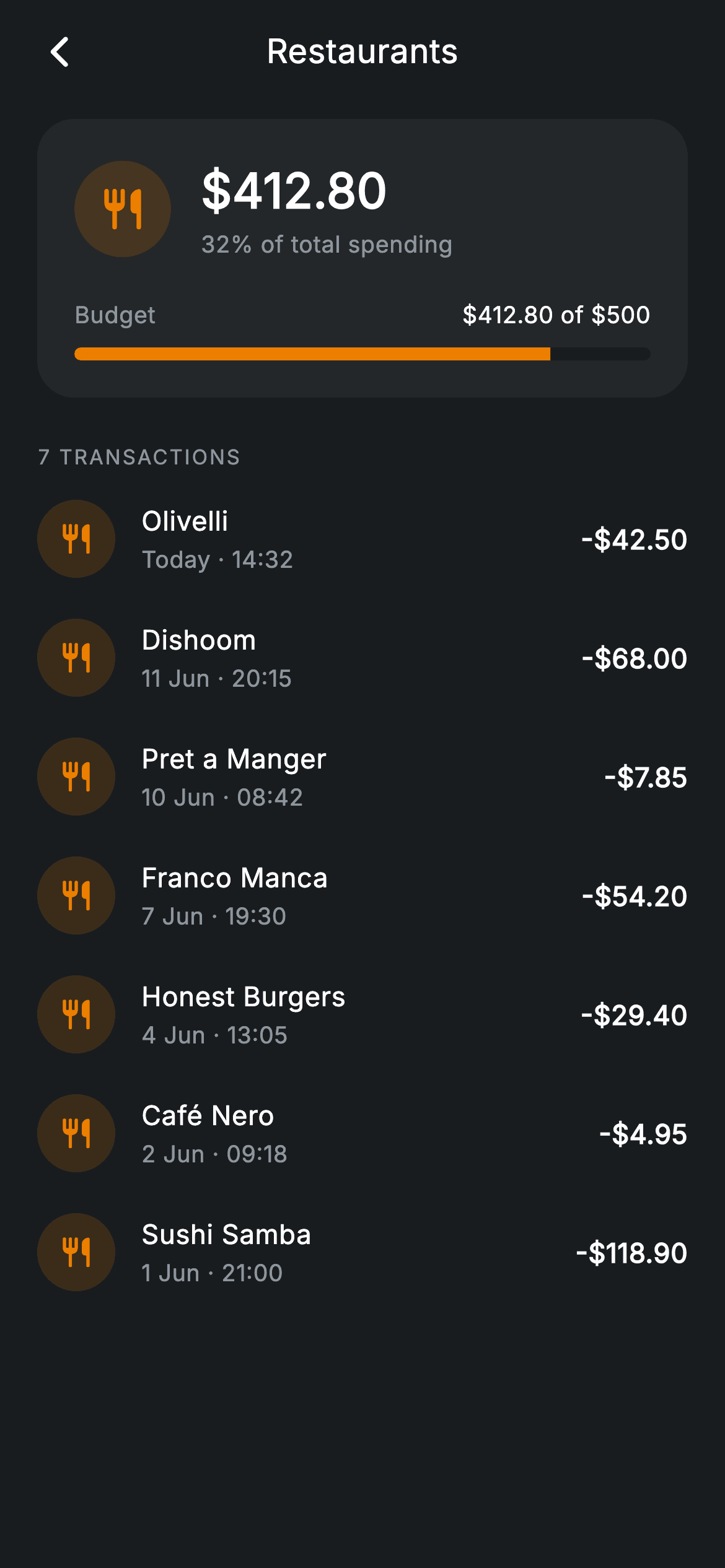
Tapping a category in a spending breakdown should answer two questions at once: how much of the budget is gone, and which purchases got it there. This tutorial builds a Revolut-inspired category detail screen in Flutter — a dark-themed page where a header card shows $412.80 spent against a $500 restaurant budget with an amber progress bar, above a scrollable list of the seven merchant transactions behind that total. It is pure Flutter with the bundled Inter font: one stateless screen, one reusable row component, no charting package, no network images.
What you'll build
- ✓A header card showing the $412.80 category total, its '32% of total spending' share line, and a '$412.80 of $500' budget readout
- ✓A pill-shaped LinearProgressIndicator at 82.6%, clipped with a 9999px ClipRRect and tinted in the category amber
- ✓A reusable _TxnRow with a tinted icon disc, merchant name, date/time line, and a uniformly formatted negative amount
- ✓An uppercase '7 TRANSACTIONS' section label and a collection-for that renders the list straight from const data
- ✓An app bar whose centred title stays optically centred thanks to a 48px trailing spacer mirroring the back button
Step-by-step build
Create the file
Add a new file at lib/fintech_category_detail/fintech_category_detail_screen.dart in your Flutter project.
Register the bundled fonts
No external packages — this is pure Flutter. It does bundle its design font (Inter), so drop the font file into fonts/ and declare it in pubspec.yaml:
flutter:
  fonts:
    - family: Inter
      fonts:
- asset: fonts/Inter-Regular.ttfBuild it, piece by piece
Here's how the screen goes together. Each block below is a real slice of the code with a plain-English explanation — paste them in order, or grab the whole file from the next section.
Palette constants and transactions as const data
import 'package:flutter/material.dart';

/// Category detail — transactions within a category (Revolut-inspired design).
///
/// Self-contained per CONVENTIONS.md: pure Flutter only, the exact design font
/// (Inter) is bundled under `fonts/`, no network images, and the screen forces
/// its own dark theme. A category header with budget progress sits above the
/// list of transactions that make up the total.
class FintechCategoryDetailScreen extends StatelessWidget {
  const FintechCategoryDetailScreen({
    super.key,
    this.onBack,
    this.onTxnTap,
  });

  final VoidCallback? onBack;
  final VoidCallback? onTxnTap;

  static const String _font = 'Inter';
  static const Color _bg = Color(0xFF191C1F);
  static const Color _surface = Color(0xFF242729);
  static const Color _amber = Color(0xFFEC7E00);
  static const Color _muted = Color(0xFF8D969E);

  static const List<_Txn> _txns = <_Txn>[
    _Txn('Olivelli', 'Today · 14:32', -42.50),
    _Txn('Dishoom', '11 Jun · 20:15', -68.00),
    _Txn('Pret a Manger', '10 Jun · 08:42', -7.85),
    _Txn('Franco Manca', '7 Jun · 19:30', -54.20),
    _Txn('Honest Burgers', '4 Jun · 13:05', -29.40),
    _Txn('Café Nero', '2 Jun · 09:18', -4.95),
    _Txn('Sushi Samba', '1 Jun · 21:00', -118.90),
  ];
`FintechCategoryDetailScreen` is a `StatelessWidget` taking only two optional callbacks, `onBack` and `onTxnTap` — the screen displays a snapshot, so there is nothing to mutate. Four static colours define the whole look: `_bg` (#191C1F) near-black, `_surface` (#242729) one step lighter for the header card, `_amber` (#EC7E00) as the restaurant category's identity colour, and `_muted` (#8D969E) for secondary text. The seven transactions live in a `static const List<_Txn>`, each a merchant name, a pre-formatted date string like '11 Jun · 20:15', and a signed double — keeping the demo data in one block you can later swap for a constructor parameter.
Forcing dark mode and composing the page
  @override
  Widget build(BuildContext context) {
    return Theme(
      data: ThemeData.dark(useMaterial3: true),
      child: Scaffold(
        backgroundColor: _bg,
        body: SafeArea(
          child: Column(
            children: <Widget>[
              _buildAppBar(),
              Expanded(
                child: ListView(
                  physics: const BouncingScrollPhysics(),
                  padding: const EdgeInsets.fromLTRB(20, 8, 20, 24),
                  children: <Widget>[
                    _buildHeader(),
                    const SizedBox(height: 24),
                    _sectionLabel('7 transactions'),
                    const SizedBox(height: 4),
                    for (final _Txn t in _txns)
                      _TxnRow(txn: t, onTap: onTxnTap),
                  ],
                ),
              ),
            ],
          ),
        ),
      ),
    );
  }
`build` wraps everything in `Theme(data: ThemeData.dark(useMaterial3: true))`, so the screen keeps its dark banking look even inside a light-themed app. The layout is a `Column` with `_buildAppBar()` above an `Expanded` `ListView` — placing the bar outside the list keeps it pinned while transactions scroll under it with `BouncingScrollPhysics`. The list's `EdgeInsets.fromLTRB(20, 8, 20, 24)` sets the page gutter once, and a collection-for (`for (final _Txn t in _txns)`) spreads a `_TxnRow` per record directly into `children`, so adding a transaction to the const list is the only change needed to grow the page.
An app bar balanced with a phantom spacer
  Widget _buildAppBar() {
    return Padding(
      padding: const EdgeInsets.fromLTRB(8, 4, 8, 4),
      child: Row(
        children: <Widget>[
          IconButton(
            onPressed: onBack,
            icon: const Icon(Icons.arrow_back_ios_new_rounded,
                size: 20, color: Colors.white),
          ),
          const Expanded(
            child: Text(
              'Restaurants',
              textAlign: TextAlign.center,
              style: TextStyle(
                fontFamily: _font,
                fontSize: 18,
                fontWeight: FontWeight.w500,
                letterSpacing: 0.24,
                color: Colors.white,
              ),
            ),
          ),
          const SizedBox(width: 48),
        ],
      ),
    );
  }
The bar is a plain `Row`: an `IconButton` firing `onBack` with a 20px `arrow_back_ios_new_rounded`, then the 'Restaurants' title centred inside an `Expanded`. The trick is the trailing `SizedBox(width: 48)` — it occupies the same footprint as the `IconButton` on the left, so `TextAlign.center` lands the title on the true centre of the screen instead of drifting right. The title's 18px `w500` with `letterSpacing: 0.24` matches the tracking used on every text style in the file, one of the small consistencies that makes the screen read as a system.
Header card: total, share, and icon disc
  Widget _buildHeader() {
    return Container(
      padding: const EdgeInsets.all(20),
      decoration: BoxDecoration(
        color: _surface,
        borderRadius: BorderRadius.circular(20),
      ),
      child: Column(
        children: <Widget>[
          Row(
            children: <Widget>[
              Container(
                width: 52,
                height: 52,
                decoration: BoxDecoration(
                  color: _amber.withValues(alpha: 0.16),
                  shape: BoxShape.circle,
                ),
                child: const Icon(Icons.restaurant_rounded,
                    size: 26, color: _amber),
              ),
              const SizedBox(width: 16),
              Column(
                crossAxisAlignment: CrossAxisAlignment.start,
                children: const <Widget>[
                  Text(
                    r'$412.80',
                    style: TextStyle(
                      fontFamily: _font,
                      fontSize: 26,
                      fontWeight: FontWeight.w600,
                      letterSpacing: 0.24,
                      color: Colors.white,
                    ),
                  ),
                  SizedBox(height: 2),
                  Text(
                    '32% of total spending',
                    style: TextStyle(
                      fontFamily: _font,
                      fontSize: 12.5,
                      letterSpacing: 0.24,
                      color: _muted,
                    ),
                  ),
                ],
              ),
            ],
          ),
The header is a `_surface` container with a 20px radius and 20px padding. Its top row pairs a 52px circle — `_amber.withValues(alpha: 0.16)` behind a full-strength amber `restaurant_rounded` icon, the standard tinted-disc treatment for category glyphs — with the numbers: the `$412.80` total at 26px `w600` and, 2px below, '32% of total spending' at 12.5px in `_muted`. The dollar figures are raw strings (`r'$412.80'`) because `$` would otherwise start string interpolation in Dart. Leading with the share line means the card answers 'is this category a problem?' before the reader ever scans the list.
The budget row and pill progress bar
          const SizedBox(height: 20),
          Row(
            mainAxisAlignment: MainAxisAlignment.spaceBetween,
            children: const <Widget>[
              Text(
                'Budget',
                style: TextStyle(
                  fontFamily: _font,
                  fontSize: 12.5,
                  letterSpacing: 0.24,
                  color: _muted,
                ),
              ),
              Text(
                r'$412.80 of $500',
                style: TextStyle(
                  fontFamily: _font,
                  fontSize: 12.5,
                  fontWeight: FontWeight.w500,
                  letterSpacing: 0.24,
                  color: Colors.white,
                ),
              ),
            ],
          ),
          const SizedBox(height: 8),
          ClipRRect(
            borderRadius: BorderRadius.circular(9999),
            child: const LinearProgressIndicator(
              value: 0.826,
              minHeight: 7,
              backgroundColor: _bg,
              valueColor: AlwaysStoppedAnimation<Color>(_amber),
            ),
          ),
        ],
      ),
    );
  }
A `spaceBetween` row sets 'Budget' in `_muted` against `$412.80 of $500` in white `w500` — the label recedes, the figure carries the weight. Beneath it, a stock `LinearProgressIndicator` becomes a pill by wrapping it in `ClipRRect` with `BorderRadius.circular(9999)`; at `minHeight: 7` the rounded ends are what stop it looking like a default Material bar. `value: 0.826` is simply 412.80 ÷ 500, the fill is `AlwaysStoppedAnimation<Color>(_amber)` so the bar shares the category's colour, and `backgroundColor: _bg` makes the unfilled track match the page behind the card — reading as a slot cut into the surface rather than a grey second bar.
Section label and the transaction model
  Widget _sectionLabel(String text) {
    return Text(
      text.toUpperCase(),
      style: const TextStyle(
        fontFamily: _font,
        fontSize: 11,
        fontWeight: FontWeight.w500,
        letterSpacing: 1.0,
        color: _muted,
      ),
    );
  }
}

class _Txn {
  const _Txn(this.name, this.date, this.amount);
  final String name;
  final String date;
  final double amount;
}
`_sectionLabel` takes '7 transactions' and calls `.toUpperCase()` on it, styling the result at 11px `w500` with `letterSpacing: 1.0` in `_muted` — the wide tracking plus small caps is what separates an eyebrow label from body text without any divider widget. `_Txn` is deliberately minimal: a const value class holding `name`, `date`, and `amount`, with the date kept as a display string. Since the screen never sorts or groups by time, parsing into `DateTime` would add work with no payoff at this layer.
The reusable transaction row
class _TxnRow extends StatelessWidget {
  const _TxnRow({required this.txn, this.onTap});

  final _Txn txn;
  final VoidCallback? onTap;

  @override
  Widget build(BuildContext context) {
    return InkWell(
      onTap: onTap,
      child: Padding(
        padding: const EdgeInsets.symmetric(vertical: 11),
        child: Row(
          children: <Widget>[
            Container(
              width: 42,
              height: 42,
              decoration: BoxDecoration(
                color: FintechCategoryDetailScreen._amber
                    .withValues(alpha: 0.16),
                shape: BoxShape.circle,
              ),
              child: const Icon(Icons.restaurant_rounded,
                  size: 19, color: FintechCategoryDetailScreen._amber),
            ),
            const SizedBox(width: 14),
            Expanded(
              child: Column(
                crossAxisAlignment: CrossAxisAlignment.start,
                children: <Widget>[
                  Text(
                    txn.name,
                    style: const TextStyle(
                      fontFamily: FintechCategoryDetailScreen._font,
                      fontSize: 14.5,
                      fontWeight: FontWeight.w500,
                      letterSpacing: 0.24,
                      color: Colors.white,
                    ),
                  ),
                  const SizedBox(height: 2),
                  Text(
                    txn.date,
                    style: const TextStyle(
                      fontFamily: FintechCategoryDetailScreen._font,
                      fontSize: 12.5,
                      letterSpacing: 0.24,
                      color: FintechCategoryDetailScreen._muted,
                    ),
                  ),
                ],
              ),
            ),
            Text(
              '-\$${txn.amount.abs().toStringAsFixed(2)}',
              style: const TextStyle(
                fontFamily: FintechCategoryDetailScreen._font,
                fontSize: 14.5,
                fontWeight: FontWeight.w600,
                letterSpacing: 0.24,
                color: Colors.white,
              ),
            ),
          ],
        ),
      ),
    );
  }
}
`_TxnRow` wraps each entry in an `InkWell` forwarding the shared `onTxnTap`, with `EdgeInsets.symmetric(vertical: 11)` giving every row a comfortable ~64px tap target with no divider lines. Its 42px icon disc repeats the header's amber-on-16%-alpha treatment at a smaller size, visually chaining every purchase back to the category above; being in the same library, it can reach the parent's private statics like `FintechCategoryDetailScreen._amber` directly. The name/date column sits in an `Expanded` so long merchant names truncate before colliding with the amount, and `'-\$${txn.amount.abs().toStringAsFixed(2)}'` formats the trailing figure — `abs()` plus a hand-written minus means the data can store signed doubles while every row prints a uniform '-$54.20'. Amounts stay white rather than red because on a debits-only screen, colour-coding would add alarm without adding information.
Full code
The complete, ready-to-paste source. Free to use in your projects — one click copies it all.
import 'package:flutter/material.dart';

/// Category detail — transactions within a category (Revolut-inspired design).
///
/// Self-contained per CONVENTIONS.md: pure Flutter only, the exact design font
/// (Inter) is bundled under `fonts/`, no network images, and the screen forces
/// its own dark theme. A category header with budget progress sits above the
/// list of transactions that make up the total.
class FintechCategoryDetailScreen extends StatelessWidget {
  const FintechCategoryDetailScreen({
    super.key,
    this.onBack,
    this.onTxnTap,
  });

  final VoidCallback? onBack;
  final VoidCallback? onTxnTap;

  static const String _font = 'Inter';
  static const Color _bg = Color(0xFF191C1F);
  static const Color _surface = Color(0xFF242729);
  static const Color _amber = Color(0xFFEC7E00);
  static const Color _muted = Color(0xFF8D969E);

  static const List<_Txn> _txns = <_Txn>[
    _Txn('Olivelli', 'Today · 14:32', -42.50),
    _Txn('Dishoom', '11 Jun · 20:15', -68.00),
    _Txn('Pret a Manger', '10 Jun · 08:42', -7.85),
    _Txn('Franco Manca', '7 Jun · 19:30', -54.20),
    _Txn('Honest Burgers', '4 Jun · 13:05', -29.40),
    _Txn('Café Nero', '2 Jun · 09:18', -4.95),
    _Txn('Sushi Samba', '1 Jun · 21:00', -118.90),
  ];

  @override
  Widget build(BuildContext context) {
    return Theme(
      data: ThemeData.dark(useMaterial3: true),
      child: Scaffold(
        backgroundColor: _bg,
        body: SafeArea(
          child: Column(
            children: <Widget>[
              _buildAppBar(),
              Expanded(
                child: ListView(
                  physics: const BouncingScrollPhysics(),
                  padding: const EdgeInsets.fromLTRB(20, 8, 20, 24),
                  children: <Widget>[
                    _buildHeader(),
                    const SizedBox(height: 24),
                    _sectionLabel('7 transactions'),
                    const SizedBox(height: 4),
                    for (final _Txn t in _txns)
                      _TxnRow(txn: t, onTap: onTxnTap),
                  ],
                ),
              ),
            ],
          ),
        ),
      ),
    );
  }

  Widget _buildAppBar() {
    return Padding(
      padding: const EdgeInsets.fromLTRB(8, 4, 8, 4),
      child: Row(
        children: <Widget>[
          IconButton(
            onPressed: onBack,
            icon: const Icon(Icons.arrow_back_ios_new_rounded,
                size: 20, color: Colors.white),
          ),
          const Expanded(
            child: Text(
              'Restaurants',
              textAlign: TextAlign.center,
              style: TextStyle(
                fontFamily: _font,
                fontSize: 18,
                fontWeight: FontWeight.w500,
                letterSpacing: 0.24,
                color: Colors.white,
              ),
            ),
          ),
          const SizedBox(width: 48),
        ],
      ),
    );
  }

  Widget _buildHeader() {
    return Container(
      padding: const EdgeInsets.all(20),
      decoration: BoxDecoration(
        color: _surface,
        borderRadius: BorderRadius.circular(20),
      ),
      child: Column(
        children: <Widget>[
          Row(
            children: <Widget>[
              Container(
                width: 52,
                height: 52,
                decoration: BoxDecoration(
                  color: _amber.withValues(alpha: 0.16),
                  shape: BoxShape.circle,
                ),
                child: const Icon(Icons.restaurant_rounded,
                    size: 26, color: _amber),
              ),
              const SizedBox(width: 16),
              Column(
                crossAxisAlignment: CrossAxisAlignment.start,
                children: const <Widget>[
                  Text(
                    r'$412.80',
                    style: TextStyle(
                      fontFamily: _font,
                      fontSize: 26,
                      fontWeight: FontWeight.w600,
                      letterSpacing: 0.24,
                      color: Colors.white,
                    ),
                  ),
                  SizedBox(height: 2),
                  Text(
                    '32% of total spending',
                    style: TextStyle(
                      fontFamily: _font,
                      fontSize: 12.5,
                      letterSpacing: 0.24,
                      color: _muted,
                    ),
                  ),
                ],
              ),
            ],
          ),
          const SizedBox(height: 20),
          Row(
            mainAxisAlignment: MainAxisAlignment.spaceBetween,
            children: const <Widget>[
              Text(
                'Budget',
                style: TextStyle(
                  fontFamily: _font,
                  fontSize: 12.5,
                  letterSpacing: 0.24,
                  color: _muted,
                ),
              ),
              Text(
                r'$412.80 of $500',
                style: TextStyle(
                  fontFamily: _font,
                  fontSize: 12.5,
                  fontWeight: FontWeight.w500,
                  letterSpacing: 0.24,
                  color: Colors.white,
                ),
              ),
            ],
          ),
          const SizedBox(height: 8),
          ClipRRect(
            borderRadius: BorderRadius.circular(9999),
            child: const LinearProgressIndicator(
              value: 0.826,
              minHeight: 7,
              backgroundColor: _bg,
              valueColor: AlwaysStoppedAnimation<Color>(_amber),
            ),
          ),
        ],
      ),
    );
  }

  Widget _sectionLabel(String text) {
    return Text(
      text.toUpperCase(),
      style: const TextStyle(
        fontFamily: _font,
        fontSize: 11,
        fontWeight: FontWeight.w500,
        letterSpacing: 1.0,
        color: _muted,
      ),
    );
  }
}

class _Txn {
  const _Txn(this.name, this.date, this.amount);
  final String name;
  final String date;
  final double amount;
}

class _TxnRow extends StatelessWidget {
  const _TxnRow({required this.txn, this.onTap});

  final _Txn txn;
  final VoidCallback? onTap;

  @override
  Widget build(BuildContext context) {
    return InkWell(
      onTap: onTap,
      child: Padding(
        padding: const EdgeInsets.symmetric(vertical: 11),
        child: Row(
          children: <Widget>[
            Container(
              width: 42,
              height: 42,
              decoration: BoxDecoration(
                color: FintechCategoryDetailScreen._amber
                    .withValues(alpha: 0.16),
                shape: BoxShape.circle,
              ),
              child: const Icon(Icons.restaurant_rounded,
                  size: 19, color: FintechCategoryDetailScreen._amber),
            ),
            const SizedBox(width: 14),
            Expanded(
              child: Column(
                crossAxisAlignment: CrossAxisAlignment.start,
                children: <Widget>[
                  Text(
                    txn.name,
                    style: const TextStyle(
                      fontFamily: FintechCategoryDetailScreen._font,
                      fontSize: 14.5,
                      fontWeight: FontWeight.w500,
                      letterSpacing: 0.24,
                      color: Colors.white,
                    ),
                  ),
                  const SizedBox(height: 2),
                  Text(
                    txn.date,
                    style: const TextStyle(
                      fontFamily: FintechCategoryDetailScreen._font,
                      fontSize: 12.5,
                      letterSpacing: 0.24,
                      color: FintechCategoryDetailScreen._muted,
                    ),
                  ),
                ],
              ),
            ),
            Text(
              '-\$${txn.amount.abs().toStringAsFixed(2)}',
              style: const TextStyle(
                fontFamily: FintechCategoryDetailScreen._font,
                fontSize: 14.5,
                fontWeight: FontWeight.w600,
                letterSpacing: 0.24,
                color: Colors.white,
              ),
            ),
          ],
        ),
      ),
    );
  }
}
Plus bundled 1 binary asset (fonts/images). The CLI and MCP install those for you automatically.
Two faster ways to add it
Copy-paste works, but you can skip it entirely.
1. FlutterKit CLI
One command drops this screen — and its fonts — straight into your project.
$ flutterkit add fintech-category-detail2. AI agent (MCP)
Connect FlutterKit's MCP server in Claude or Cursor and just ask your agent to install fintech-category-detail — it fetches and writes the files for you.
FAQ
Is this category detail screen free to use in a commercial app?
Yes. FlutterKit screens are free to use, including commercially — copy the code from this page or install it with the CLI command, drop it into your banking or budgeting app, and ship it. No attribution required.
What packages and fonts does this screen depend on?
No packages at all — the single import is `package:flutter/material.dart`, and even the progress bar is the stock `LinearProgressIndicator`. The Inter font it names via `fontFamily: 'Inter'` ships bundled under `fonts/` with the screen, so there is no `google_fonts` dependency and no network fetch.
Which Flutter version does this code need?
Flutter 3.27 or newer, because the icon discs use `Color.withValues(alpha: 0.16)`. On an older SDK, replace both `withValues` calls with `withOpacity(0.16)`; the constructor's `super.key` also assumes Dart 2.17+, which any SDK new enough for the rest of the code already has.
How do I make this work for any category, not just Restaurants?
Promote the hard-coded pieces to constructor parameters: the title string, the `IconData`, the accent colour (replacing `_amber`), the spent and budget amounts, and the transaction list in place of the static `_txns`. Compute the bar as `spent / budget` clamped to 0–1 and build the '$412.80 of $500' line from the same two numbers so the readout can never disagree with the bar.
Why is the progress value hard-coded as 0.826?
It is 412.80 divided by 500, precomputed for the demo data. In a real app derive it — `(spent / budget).clamp(0.0, 1.0)` — so an over-budget category caps the pill at full rather than throwing an assertion, and consider swapping the amber fill for a warning colour once the ratio passes 1.0.


