How to Build a Fintech Insights Screen in Flutter (Full Code + Preview)
Banking apps earn daily opens with insights, not balances — a feed that tells you something about your money you didn't already know. This tutorial builds a Revolut-style monthly Insights screen in Flutter: five colour-coded cards covering a 12% spending drop, subscription costs, a restaurant spike, round-ups swept into a vault, and cashback earned. Each card is driven by one tiny `_Insight` value class, so the whole feed is a const list you can swap for API data. Pure Flutter, forced dark theme, bundled Inter font.
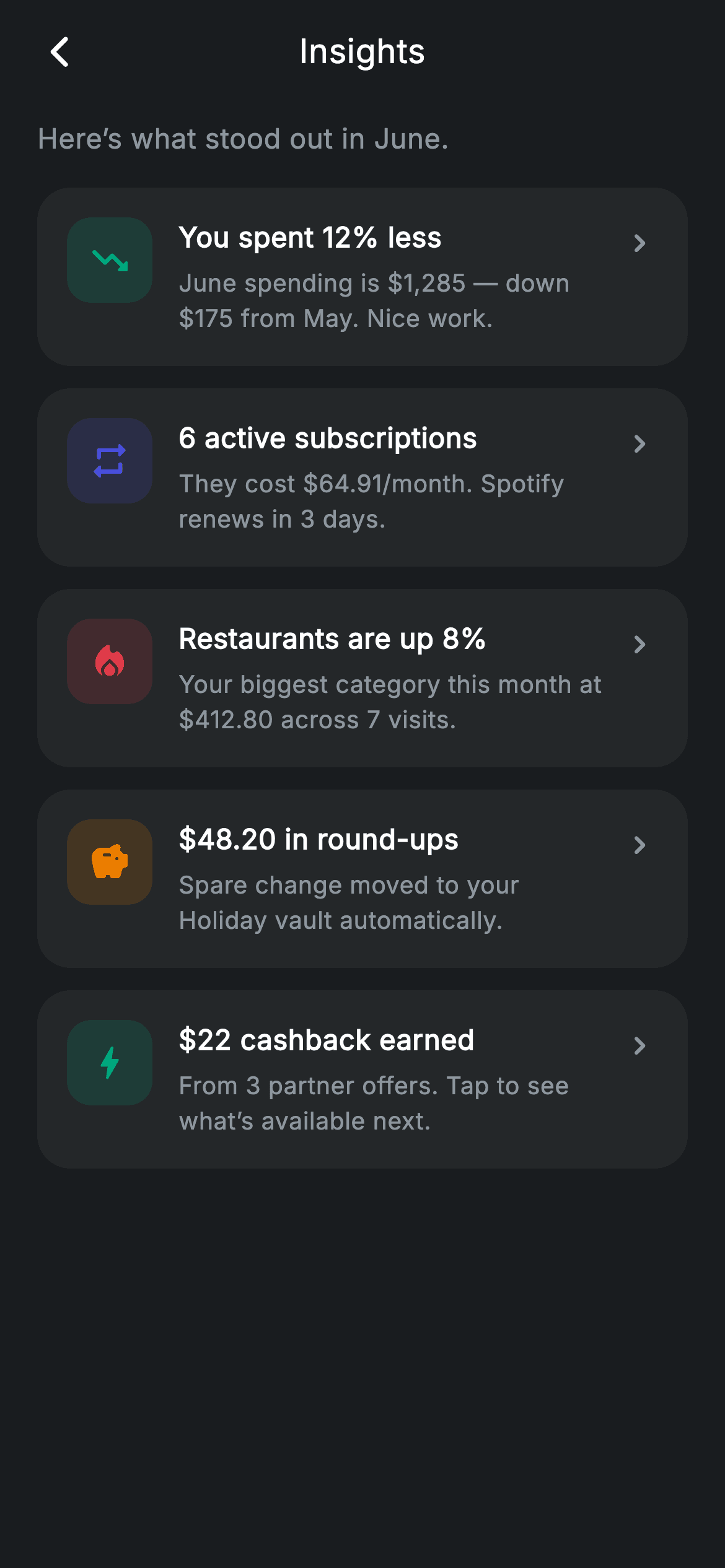
What you'll build
- ✓A scrollable insights feed where five cards are generated from a single const `_Insight` list with a collection-for
- ✓A reusable `_InsightCard` row pairing a 46px tinted icon square with a title, a specific one-line detail, and a chevron
- ✓A semantic tint system — teal for wins, red for overspend, amber for round-ups, brand indigo for neutral facts — applied per card
- ✓A locally forced dark theme via a `Theme` wrapper so the screen renders identically inside any host app
- ✓A minimal centred app bar balanced with a 48px spacer instead of a trailing button
Step-by-step build
Create the file
Add a new file at lib/fintech_insights/fintech_insights_screen.dart in your Flutter project.
Register the bundled fonts
No external packages — this is pure Flutter. It does bundle its design font (Inter), so drop the font file into fonts/ and declare it in pubspec.yaml:
flutter:
  fonts:
    - family: Inter
      fonts:
- asset: fonts/Inter-Regular.ttfBuild it, piece by piece
Here's how the screen goes together. Each block below is a real slice of the code with a plain-English explanation — paste them in order, or grab the whole file from the next section.
One class, one palette, zero state
import 'package:flutter/material.dart';

/// Insights — monthly insight cards (Revolut-inspired design system).
///
/// Self-contained per CONVENTIONS.md: pure Flutter only, the exact design font
/// (Inter) is bundled under `fonts/`, no network images, and the screen forces
/// its own dark theme. A feed of varied, colour-coded insight cards summarises
/// the month with realistic, specific numbers.
class FintechInsightsScreen extends StatelessWidget {
  const FintechInsightsScreen({super.key, this.onBack});

  final VoidCallback? onBack;

  static const String _font = 'Inter';
  static const Color _bg = Color(0xFF191C1F);
  static const Color _surface = Color(0xFF242729);
  static const Color _brand = Color(0xFF494FDF);
  static const Color _teal = Color(0xFF00A87E);
  static const Color _amber = Color(0xFFEC7E00);
  static const Color _red = Color(0xFFE23B4A);
  static const Color _muted = Color(0xFF8D969E);
The screen is a `StatelessWidget` with a single optional `onBack` callback — an insights feed only presents facts, so there is nothing to mutate. All styling lives in static consts on the class: `_bg` (0xFF191C1F) and `_surface` (0xFF242729) are two near-black greys just far enough apart for cards to read as raised, while `_teal`, `_amber`, `_red` and the indigo `_brand` form a semantic accent set that individual insights pick from. `_muted` (0xFF8D969E) is the one grey used for every piece of secondary text, and `_font` pins everything to the bundled Inter face.
The insights as data, with numbers that feel real
  static const List<_Insight> _insights = <_Insight>[
    _Insight(
      Icons.trending_down_rounded,
      _teal,
      'You spent 12% less',
      'June spending is \$1,285 — down \$175 from May. Nice work.',
    ),
    _Insight(
      Icons.repeat_rounded,
      _brand,
      '6 active subscriptions',
      'They cost \$64.91/month. Spotify renews in 3 days.',
    ),
    _Insight(
      Icons.local_fire_department_rounded,
      _red,
      'Restaurants are up 8%',
      'Your biggest category this month at \$412.80 across 7 visits.',
    ),
    _Insight(
      Icons.savings_rounded,
      _amber,
      r'$48.20 in round-ups',
      'Spare change moved to your Holiday vault automatically.',
    ),
    _Insight(
      Icons.bolt_rounded,
      _teal,
      r'$22 cashback earned',
      'From 3 partner offers. Tap to see what’s available next.',
    ),
  ];
The feed's entire content is a `static const List<_Insight>` of five entries, each bundling an icon, a tint and two strings. The copy is the interesting part: every body line carries a specific figure and a consequence — 'June spending is $1,285 — down $175 from May', 'They cost $64.91/month. Spotify renews in 3 days' — because an insight without a number is just a notification. Tints are chosen semantically, not decoratively: `_teal` marks the two wins (spending down, cashback), `_red` flags the restaurants overspend, `_amber` colours the round-ups. Note the raw strings (`r'$48.20 in round-ups'`) so Dart doesn't try to interpolate the dollar sign.
Forcing dark mode and looping the feed
  @override
  Widget build(BuildContext context) {
    return Theme(
      data: ThemeData.dark(useMaterial3: true),
      child: Scaffold(
        backgroundColor: _bg,
        body: SafeArea(
          child: Column(
            children: <Widget>[
              _buildAppBar(),
              Expanded(
                child: ListView(
                  physics: const BouncingScrollPhysics(),
                  padding: const EdgeInsets.fromLTRB(20, 8, 20, 24),
                  children: <Widget>[
                    const Text(
                      'Here’s what stood out in June.',
                      style: TextStyle(
                        fontFamily: _font,
                        fontSize: 15,
                        letterSpacing: 0.24,
                        color: _muted,
                      ),
                    ),
                    const SizedBox(height: 16),
                    for (final _Insight i in _insights)
                      _InsightCard(insight: i),
                  ],
                ),
              ),
            ],
          ),
        ),
      ),
    );
  }
`build` wraps the `Scaffold` in `Theme(data: ThemeData.dark(useMaterial3: true))`, so the screen stays dark even when the host app is light — important for a drop-in screen that hard-codes dark hex colours. Inside `SafeArea`, a `Column` stacks the custom app bar over an `Expanded` `ListView` with `BouncingScrollPhysics` for an iOS-feel scroll. The list opens with a muted 15px lead-in ('Here's what stood out in June.') that frames the feed as a monthly recap, then a collection-for expands `_insights` into `_InsightCard`s — adding a sixth insight is one entry in the list, no widget code.
A hand-rolled app bar with a counterweight
  Widget _buildAppBar() {
    return Padding(
      padding: const EdgeInsets.fromLTRB(8, 4, 8, 4),
      child: Row(
        children: <Widget>[
          IconButton(
            onPressed: onBack,
            icon: const Icon(Icons.arrow_back_ios_new_rounded,
                size: 20, color: Colors.white),
          ),
          const Expanded(
            child: Text(
              'Insights',
              textAlign: TextAlign.center,
              style: TextStyle(
                fontFamily: _font,
                fontSize: 18,
                fontWeight: FontWeight.w500,
                letterSpacing: 0.24,
                color: Colors.white,
              ),
            ),
          ),
          const SizedBox(width: 48),
        ],
      ),
    );
  }
}
Instead of `AppBar`, `_buildAppBar` is a plain padded `Row`: a back `IconButton` wired to `onBack`, an `Expanded` centred 'Insights' title, and a trailing `SizedBox(width: 48)`. That spacer is the trick — it mirrors the footprint of the icon button on the left so `textAlign: TextAlign.center` lands on the true centre of the screen rather than drifting right. The title is deliberately quiet at 18px `w500`; the cards below carry the visual weight.
The `_Insight` value class
class _Insight {
  const _Insight(this.icon, this.tint, this.title, this.body);
  final IconData icon;
  final Color tint;
  final String title;
  final String body;
}
`_Insight` is a four-field const holder — `icon`, `tint`, `title`, `body` — and nothing else. Keeping it this small is what lets the whole feed live in a compile-time const list, and it doubles as the seam for real data: map your API's insight payload into these four fields and the UI needs no changes.
The card: tinted icon square, copy column, chevron
class _InsightCard extends StatelessWidget {
  const _InsightCard({required this.insight});

  final _Insight insight;

  @override
  Widget build(BuildContext context) {
    return Container(
      margin: const EdgeInsets.only(bottom: 12),
      padding: const EdgeInsets.all(16),
      decoration: BoxDecoration(
        color: FintechInsightsScreen._surface,
        borderRadius: BorderRadius.circular(18),
      ),
      child: Row(
        crossAxisAlignment: CrossAxisAlignment.start,
        children: <Widget>[
          Container(
            width: 46,
            height: 46,
            decoration: BoxDecoration(
              color: insight.tint.withValues(alpha: 0.16),
              borderRadius: BorderRadius.circular(13),
            ),
            child: Icon(insight.icon, size: 23, color: insight.tint),
          ),
          const SizedBox(width: 14),
          Expanded(
            child: Column(
              crossAxisAlignment: CrossAxisAlignment.start,
              children: <Widget>[
                Text(
                  insight.title,
                  style: const TextStyle(
                    fontFamily: FintechInsightsScreen._font,
                    fontSize: 15,
                    fontWeight: FontWeight.w600,
                    letterSpacing: 0.24,
                    color: Colors.white,
                  ),
                ),
                const SizedBox(height: 5),
                Text(
                  insight.body,
                  style: const TextStyle(
                    fontFamily: FintechInsightsScreen._font,
                    fontSize: 13,
                    height: 1.45,
                    letterSpacing: 0.24,
                    color: FintechInsightsScreen._muted,
                  ),
                ),
              ],
            ),
          ),
          const Padding(
            padding: EdgeInsets.only(top: 4, left: 6),
            child: Icon(Icons.chevron_right_rounded,
                size: 20, color: FintechInsightsScreen._muted),
          ),
        ],
      ),
    );
  }
}
`_InsightCard` is a `_surface` container with an 18px radius and a `Row` aligned to `CrossAxisAlignment.start` so the icon stays pinned to the top when the body wraps to two lines. The 46px icon square gets its colour from the insight itself: `insight.tint.withValues(alpha: 0.16)` for the soft background with the full-strength tint on the 23px icon — one colour, two intensities, which is why every card looks related despite four different accents. The text column sets the 15px `w600` white title over a 13px `_muted` body with `height: 1.45`, and a chevron nudged down 4px by its `Padding` signals that each card can open a detail view.
Full code
The complete, ready-to-paste source. Free to use in your projects — one click copies it all.
import 'package:flutter/material.dart';

/// Insights — monthly insight cards (Revolut-inspired design system).
///
/// Self-contained per CONVENTIONS.md: pure Flutter only, the exact design font
/// (Inter) is bundled under `fonts/`, no network images, and the screen forces
/// its own dark theme. A feed of varied, colour-coded insight cards summarises
/// the month with realistic, specific numbers.
class FintechInsightsScreen extends StatelessWidget {
  const FintechInsightsScreen({super.key, this.onBack});

  final VoidCallback? onBack;

  static const String _font = 'Inter';
  static const Color _bg = Color(0xFF191C1F);
  static const Color _surface = Color(0xFF242729);
  static const Color _brand = Color(0xFF494FDF);
  static const Color _teal = Color(0xFF00A87E);
  static const Color _amber = Color(0xFFEC7E00);
  static const Color _red = Color(0xFFE23B4A);
  static const Color _muted = Color(0xFF8D969E);

  static const List<_Insight> _insights = <_Insight>[
    _Insight(
      Icons.trending_down_rounded,
      _teal,
      'You spent 12% less',
      'June spending is \$1,285 — down \$175 from May. Nice work.',
    ),
    _Insight(
      Icons.repeat_rounded,
      _brand,
      '6 active subscriptions',
      'They cost \$64.91/month. Spotify renews in 3 days.',
    ),
    _Insight(
      Icons.local_fire_department_rounded,
      _red,
      'Restaurants are up 8%',
      'Your biggest category this month at \$412.80 across 7 visits.',
    ),
    _Insight(
      Icons.savings_rounded,
      _amber,
      r'$48.20 in round-ups',
      'Spare change moved to your Holiday vault automatically.',
    ),
    _Insight(
      Icons.bolt_rounded,
      _teal,
      r'$22 cashback earned',
      'From 3 partner offers. Tap to see what’s available next.',
    ),
  ];

  @override
  Widget build(BuildContext context) {
    return Theme(
      data: ThemeData.dark(useMaterial3: true),
      child: Scaffold(
        backgroundColor: _bg,
        body: SafeArea(
          child: Column(
            children: <Widget>[
              _buildAppBar(),
              Expanded(
                child: ListView(
                  physics: const BouncingScrollPhysics(),
                  padding: const EdgeInsets.fromLTRB(20, 8, 20, 24),
                  children: <Widget>[
                    const Text(
                      'Here’s what stood out in June.',
                      style: TextStyle(
                        fontFamily: _font,
                        fontSize: 15,
                        letterSpacing: 0.24,
                        color: _muted,
                      ),
                    ),
                    const SizedBox(height: 16),
                    for (final _Insight i in _insights)
                      _InsightCard(insight: i),
                  ],
                ),
              ),
            ],
          ),
        ),
      ),
    );
  }

  Widget _buildAppBar() {
    return Padding(
      padding: const EdgeInsets.fromLTRB(8, 4, 8, 4),
      child: Row(
        children: <Widget>[
          IconButton(
            onPressed: onBack,
            icon: const Icon(Icons.arrow_back_ios_new_rounded,
                size: 20, color: Colors.white),
          ),
          const Expanded(
            child: Text(
              'Insights',
              textAlign: TextAlign.center,
              style: TextStyle(
                fontFamily: _font,
                fontSize: 18,
                fontWeight: FontWeight.w500,
                letterSpacing: 0.24,
                color: Colors.white,
              ),
            ),
          ),
          const SizedBox(width: 48),
        ],
      ),
    );
  }
}

class _Insight {
  const _Insight(this.icon, this.tint, this.title, this.body);
  final IconData icon;
  final Color tint;
  final String title;
  final String body;
}

class _InsightCard extends StatelessWidget {
  const _InsightCard({required this.insight});

  final _Insight insight;

  @override
  Widget build(BuildContext context) {
    return Container(
      margin: const EdgeInsets.only(bottom: 12),
      padding: const EdgeInsets.all(16),
      decoration: BoxDecoration(
        color: FintechInsightsScreen._surface,
        borderRadius: BorderRadius.circular(18),
      ),
      child: Row(
        crossAxisAlignment: CrossAxisAlignment.start,
        children: <Widget>[
          Container(
            width: 46,
            height: 46,
            decoration: BoxDecoration(
              color: insight.tint.withValues(alpha: 0.16),
              borderRadius: BorderRadius.circular(13),
            ),
            child: Icon(insight.icon, size: 23, color: insight.tint),
          ),
          const SizedBox(width: 14),
          Expanded(
            child: Column(
              crossAxisAlignment: CrossAxisAlignment.start,
              children: <Widget>[
                Text(
                  insight.title,
                  style: const TextStyle(
                    fontFamily: FintechInsightsScreen._font,
                    fontSize: 15,
                    fontWeight: FontWeight.w600,
                    letterSpacing: 0.24,
                    color: Colors.white,
                  ),
                ),
                const SizedBox(height: 5),
                Text(
                  insight.body,
                  style: const TextStyle(
                    fontFamily: FintechInsightsScreen._font,
                    fontSize: 13,
                    height: 1.45,
                    letterSpacing: 0.24,
                    color: FintechInsightsScreen._muted,
                  ),
                ),
              ],
            ),
          ),
          const Padding(
            padding: EdgeInsets.only(top: 4, left: 6),
            child: Icon(Icons.chevron_right_rounded,
                size: 20, color: FintechInsightsScreen._muted),
          ),
        ],
      ),
    );
  }
}
Plus bundled 1 binary asset (fonts/images). The CLI and MCP install those for you automatically.
Two faster ways to add it
Copy-paste works, but you can skip it entirely.
1. FlutterKit CLI
One command drops this screen — and its fonts — straight into your project.
$ flutterkit add fintech-insights2. AI agent (MCP)
Connect FlutterKit's MCP server in Claude or Cursor and just ask your agent to install fintech-insights — it fetches and writes the files for you.
FAQ
Can I use this insights screen in a commercial app?
Yes — FlutterKit screens are free to use, including commercially. You can ship this feed in a client project or your own fintech app, restyle the palette, and replace the sample June insights with your own data without any attribution requirement.
What packages and fonts does this screen need?
No pub packages at all — the import list is just `package:flutter/material.dart`, and every icon comes from the built-in Material rounded set. The only asset is the Inter font family, which the code references as `fontFamily: 'Inter'` and expects bundled under `fonts/` in your pubspec; swap the `_font` constant if you'd rather use your app's existing typeface.
Which Flutter version does this code require?
Flutter 3.27 or newer, because the icon squares use `insight.tint.withValues(alpha: 0.16)`. On an older SDK, change that one call to `insight.tint.withOpacity(0.16)` and it compiles fine. The `super.key` constructor parameter needs Flutter 3.0+ / Dart 2.17+, which any current project already has.
How do I drive the feed with real data instead of the const list?
Replace the `static const List<_Insight> _insights` with a constructor parameter (`final List<_Insight> insights`) and map your backend's insight objects into the four `_Insight` fields — icon, tint, title, body. Keep the tint semantic when you do: pass `_teal` for positive findings, `_red` for overspend warnings, `_amber` for savings events, so returning users can scan the feed by colour before reading a word.
The cards show a chevron — how do I make them tappable?
The chevron is currently decorative. Add a `VoidCallback onTap` field to `_Insight` (or pass an `onInsightTap(_Insight)` callback into the screen), then wrap the card's `Container` in an `InkWell` with `borderRadius: BorderRadius.circular(18)` so the ripple matches the card's corners. Materialising the tap per insight lets each card deep-link to its own detail — the subscriptions card to a subscriptions manager, the round-ups card to the vault.


